
Kling AI Omni: Complete Guide (2026)
Artificial intelligence is transforming the way creators produce videos, images, and digital content. Instead of switching between multiple AI tools for image generation, video creation, editing, and audio production, creators now expect a single platform capable of handling the entire workflow.
This is exactly where Kling AI Omni stands out.
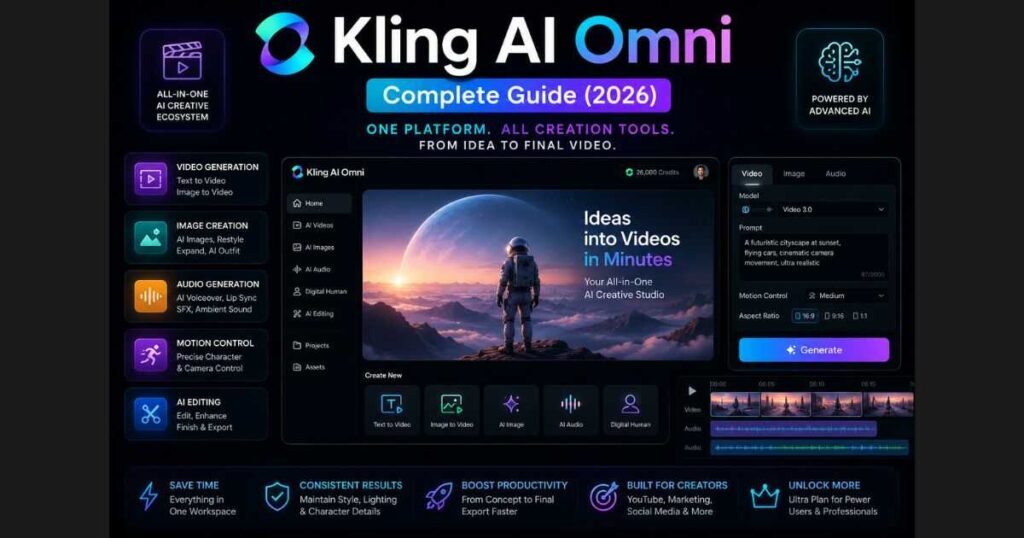
Kling AI Omni is the newest generation of Kling AI’s creative platform, bringing together multiple AI capabilities into one unified workspace. Rather than treating image generation, video generation, and editing as separate tools, Kling AI Omni combines them into a seamless creative experience that helps creators move from idea to finished content much faster.
Whether you’re a YouTuber, digital marketer, filmmaker, designer, or social media creator, Kling AI Omni provides an efficient workflow that reduces complexity while improving creative consistency.
In this complete guide, you’ll learn:
- What Kling AI Omni is.
- How it works.
- Its most important features.
- Who should use it.
- Why the Ultra Plan unlocks the full experience.
- How it compares to traditional AI workflows.
- Practical tips for getting the best results.
By the end of this guide, you’ll know whether Kling AI Omni is the right AI platform for your creative projects in 2026.
Why Creators Are Switching to Kling AI Omni
The biggest challenge with many AI creative platforms is fragmentation.
A typical workflow often looks like this:
- Generate an image using one AI tool.
- Export the image.
- Upload it to another AI video generator.
- Edit the result in a third application.
- Add voiceovers separately.
- Add sound effects manually.
- Export everything again.
Every additional step increases production time and introduces inconsistencies between assets.
Kling AI Omni changes this completely by creating a connected creative ecosystem where multiple AI models work together inside one interface.
Instead of thinking about separate tools, you simply focus on your creative idea while Kling AI handles much of the technical process.
This unified workflow is one of the biggest reasons creators are moving toward the Omni experience.
🚀 Start Creating with Kling AI Omni
Ready to experience Kling AI’s newest AI-powered workflow?
Want access to the newest AI models, faster generation speeds, and premium creative tools? Consider upgrading to the Ultra Plan, which unlocks the complete Omni experience.
What Is Kling AI Omni?
Kling AI Omni is Kling AI’s all-in-one creative environment that combines multiple AI generation models into a single workspace.
Instead of opening different tools for every task, creators can work inside one interface that supports:
- AI video generation.
- AI image generation.
- Image-to-video creation.
- Text-to-video generation.
- Motion Control.
- Video transformations.
- AI avatars.
- Sound generation.
- Voice generation.
- Creative editing.
Everything is designed to work together naturally, reducing the time spent moving files between applications.
The platform is especially useful for creators producing consistent visual content, marketing campaigns, YouTube videos, advertisements, educational material, and cinematic storytelling.
How Kling AI Omni Is Different
Many AI platforms offer several independent tools.
Kling AI Omni offers something more valuable:
One connected creative workflow.
Instead of choosing unrelated AI applications, Omni allows creators to move naturally between creative tasks while keeping projects organized inside a single environment.
For example, you can:
- Generate an image.
- Turn it into a cinematic video.
- Control camera movement.
- Add realistic motion.
- Generate voice.
- Produce sound effects.
- Export everything from one project.
This significantly reduces editing time while maintaining visual consistency across the entire production.
Key Capabilities Inside Kling AI Omni
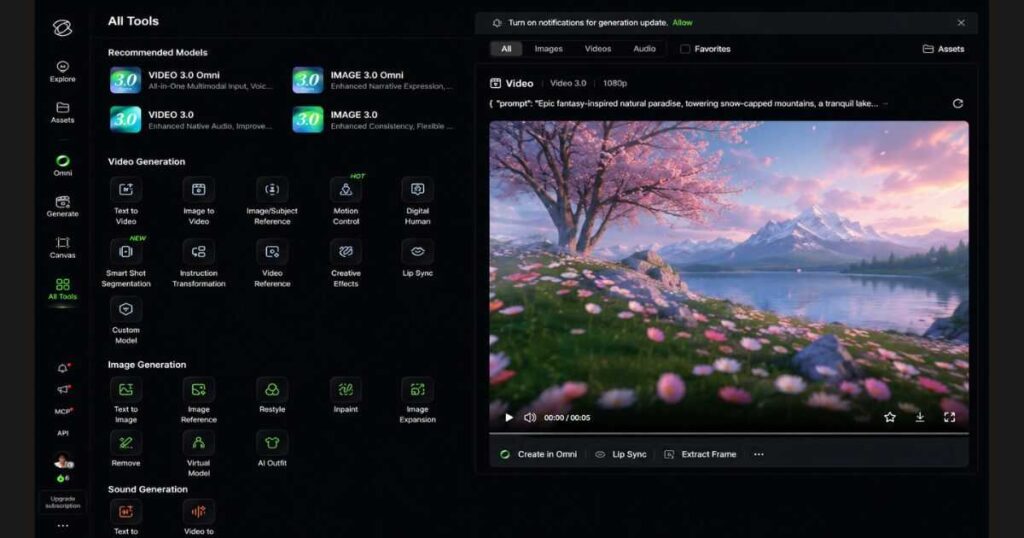
Some of the most powerful tools currently available inside Kling AI Omni include:
- Text to Video.
- Image to Video.
- Image Subject Reference.
- Motion Control.
- Digital Human.
- Smart Shot Segmentation.
- Video Transformation.
- Creative Effects.
- Lip Sync.
- Custom Models.
- Text to Image.
- Image Reference.
- Restyle.
- Inpainting.
- Image Expansion.
- AI Outfit.
- Virtual Models.
- Text to Audio.
- Video to Audio.
These capabilities make Omni one of the most comprehensive AI creative platforms currently available.
Who Should Use Kling AI Omni?
One of the biggest strengths of Kling AI Omni is its versatility.
It’s not designed for just one type of creator—it supports a wide range of creative workflows.
It’s an excellent choice for:
- YouTube creators producing faceless videos.
- Marketing agencies creating advertisements.
- Social media managers publishing short-form content.
- Filmmakers building cinematic AI scenes.
- Small businesses producing promotional videos.
- Freelancers delivering client content.
- Designers creating AI-assisted visuals.
- Educators developing engaging learning materials.
Because everything is centralized, even beginners can create professional-looking projects without juggling multiple software tools.
Why the Ultra Plan Is Worth Considering
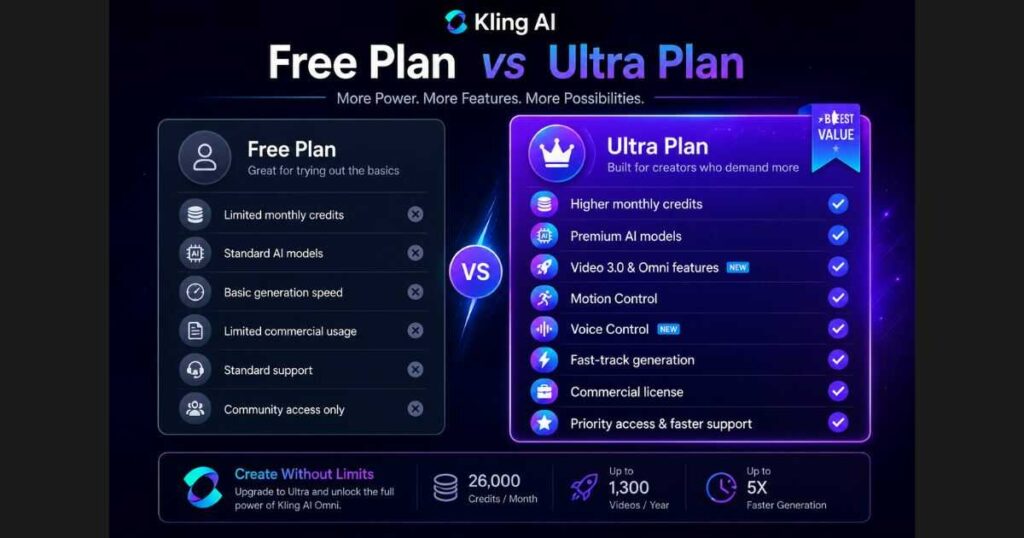
While Kling AI Omni includes a generous free experience, many of its most advanced capabilities are designed to shine with the Ultra Plan.
The Ultra subscription provides access to premium AI models, higher monthly credits, commercial usage rights, priority generation, and advanced features that professional creators rely on for consistent production.
If you plan to publish content regularly or work with clients, upgrading to the Ultra Plan can significantly improve both productivity and creative flexibility.
⭐ Unlock the Full Kling AI Omni Experience
The Ultra Plan is the recommended subscription for creators who want access to the latest AI models, faster rendering, higher credit limits, and premium creative tools.
Core Features of Kling AI Omni
The biggest reason creators are excited about Kling AI Omni is the sheer number of AI-powered tools available inside a single workspace. Instead of forcing users to jump between different platforms, Kling AI Omni centralizes nearly every stage of the creative process—from idea generation to final export.
Let’s explore the features that make Kling AI Omni one of the most complete AI content creation platforms available in 2026.
AI Video Generation in Kling AI Omni
Video generation remains the heart of Kling AI Omni.
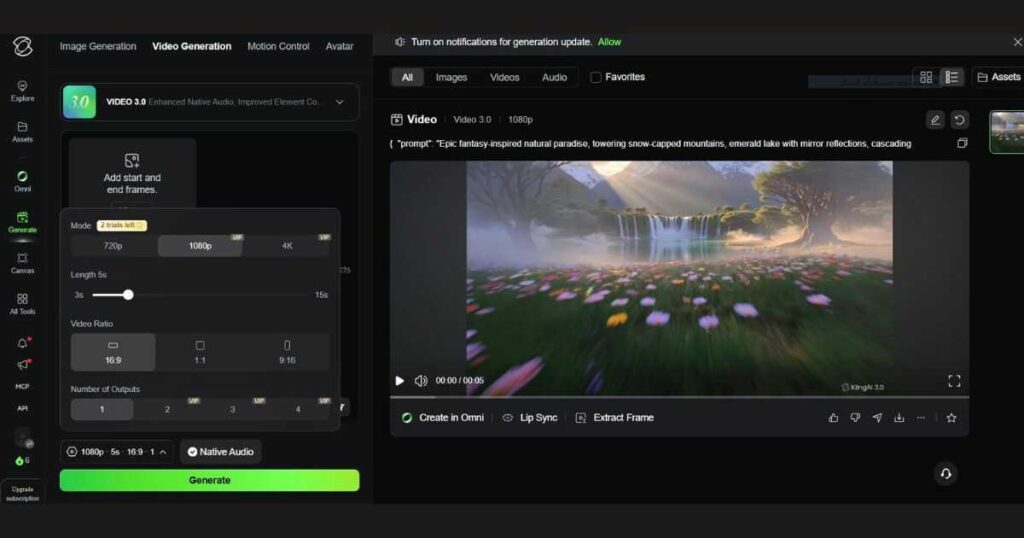
Using advanced AI models like Video 3.0, creators can generate high-quality videos from simple prompts, reference images, or existing footage.
Current video generation options include:
- Text to Video.
- Image to Video.
- Image Subject Reference.
- Motion Control.
- Video Reference.
- Video Transformation.
- Creative Effects.
- Digital Human.
- Lip Sync.
- Smart Shot Segmentation.
Each tool serves a different production workflow, allowing users to create everything from cinematic storytelling to short-form social media content.
Unlike older AI generators, Kling AI Omni keeps these tools connected inside one interface, making production significantly faster.
Text to Video
Text to Video is one of the easiest ways to begin using Kling AI Omni.
Simply describe the scene you want, choose the appropriate model, and let the AI generate a complete video.
Examples include:
- Product advertisements.
- Fantasy landscapes.
- Commercial videos.
- YouTube intros.
- Marketing content.
- Educational animations.
The newer Video 3.0 model produces more natural motion, better prompt understanding, and improved cinematic quality compared to previous versions.
Image to Video
Sometimes a single image tells the perfect story.
With Image to Video, creators can animate still images into dynamic videos with realistic camera movement and fluid animation.
This feature is especially useful for:
- Character animation.
- Product showcases.
- Travel scenes.
- AI art.
- Social media content.
Instead of recreating a scene from scratch, users simply upload an existing image and let Kling AI generate motion naturally.
Motion Control
One of the standout capabilities inside Kling AI Omni is Motion Control.
Rather than relying entirely on AI decisions, Motion Control allows creators to guide character movement, facial expressions, camera direction, and body animation with much greater precision.
This feature is ideal for:
- Character performances.
- Storytelling.
- Commercial advertising.
- Animation.
- Cinematic productions.
If you’d like to learn this feature in detail, don’t miss our complete Kling AI Motion Control guide.
Digital Human
Creating realistic AI presenters has become increasingly important for businesses and content creators.
The Digital Human feature enables creators to generate realistic virtual presenters suitable for:
- Online courses.
- Product demonstrations.
- Company presentations.
- News videos.
- Customer support videos.
Because Digital Human is integrated directly into Kling AI Omni, creators can combine AI presenters with AI-generated environments and videos inside the same workflow.
AI Image Generation
Although Kling AI is best known for video creation, Kling AI Omni also includes powerful AI image generation capabilities.
Instead of using external image generators, users can create images without leaving the platform.
Current image tools include:
- Text to Image.
- Image Reference.
- Restyle.
- Inpainting.
- Image Expansion.
- Remove Objects.
- AI Outfit.
- Virtual Model.
Together, these tools create a complete AI image editing ecosystem.
Restyle
Restyle allows creators to transform existing images into completely different artistic styles while preserving the original composition.
Popular use cases include:
- Anime.
- Realistic photography.
- Oil paintings.
- Cyberpunk.
- Fantasy art.
- Cartoon illustrations.
Instead of generating a new image from scratch, Restyle builds upon your existing artwork.
Image Expansion
Need a wider composition?
Image Expansion intelligently extends images beyond their original borders.
Creators often use this feature for:
- YouTube thumbnails.
- Wallpapers.
- Posters.
- Landscape photography.
- Social media banners.
The AI generates new surrounding content while maintaining visual consistency.
AI Outfit
One of the newest creative tools inside Kling AI Omni is AI Outfit.
Instead of photographing multiple clothing variations, creators can digitally change outfits using AI.
This feature is particularly valuable for:
- Fashion brands.
- E-commerce.
- Marketing agencies.
- Influencer content.
- Virtual clothing previews.
AI Audio Generation
A complete video needs more than visuals.
That’s why Kling AI Omni also includes integrated audio generation.
Current audio tools include:
- Text to Audio.
- Video to Audio.
These tools can automatically generate:
- Voiceovers.
- Ambient sounds.
- Sound effects.
- Background audio.
This reduces the need for third-party editing software.
Creative Workflow Without Switching Platforms
Perhaps the biggest advantage of Kling AI Omni isn’t any single feature.
It’s the workflow.
Instead of opening five or six separate AI tools, creators remain inside one creative environment from beginning to end.
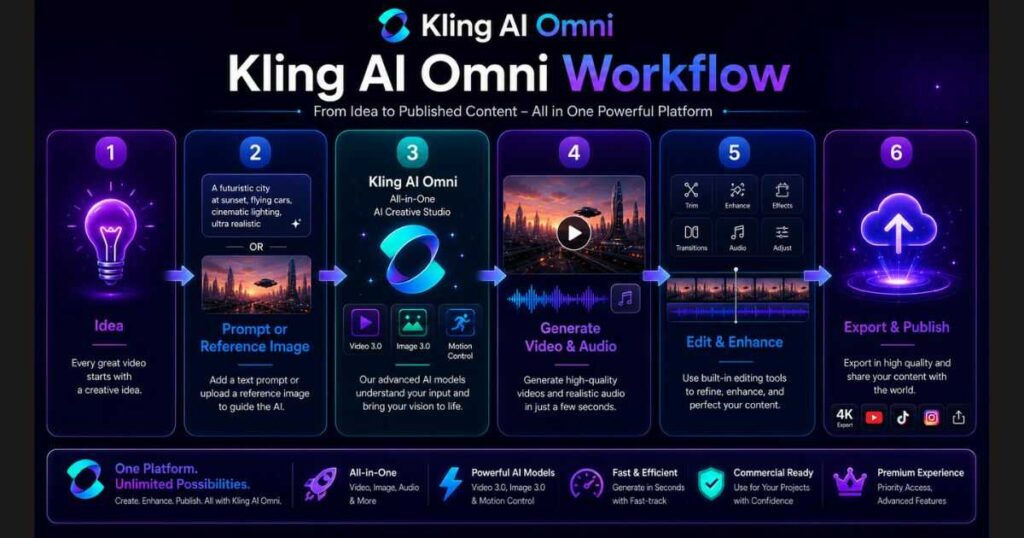
A typical project might look like this:
- Generate concept art.
- Convert the image into video.
- Add Motion Control.
- Apply Creative Effects.
- Generate AI audio.
- Add Lip Sync.
- Export the final video.
Every step happens inside the same project.
That saves time, reduces complexity, and helps maintain visual consistency throughout the production process.
🚀 Create Faster with Kling AI Omni
Want access to all of these tools in one place?
👉 Start Using Kling AI Omni Today
For creators who publish regularly, the Ultra Plan unlocks higher credit limits, premium AI models like Video 3.0 Omni, faster generation speeds, and commercial usage rights—making it the best option for professionals and agencies.
Kling AI Omni vs Traditional AI Workflows
Before platforms like Kling AI Omni, creating a professional AI-generated video usually meant relying on several different tools.
A typical workflow looked like this:
- Generate an image using one AI platform.
- Export the image.
- Upload it to a separate AI video generator.
- Animate the scene.
- Export the video again.
- Use another application for lip sync.
- Add voiceovers in another AI tool.
- Generate sound effects elsewhere.
- Edit everything together in traditional video editing software.
Besides taking more time, this workflow often caused inconsistencies in style, lighting, character appearance, and motion.
Kling AI Omni changes that experience by combining these tasks into one integrated creative ecosystem.
Instead of managing multiple subscriptions and transferring files between platforms, creators can complete nearly the entire production process inside a single interface.
Traditional Workflow vs Kling AI Omni
| Traditional Workflow | Kling AI Omni |
| Multiple AI platforms | One unified workspace |
| Repeated exporting | Seamless workflow |
| Separate image and video tools | Connected AI models |
| Different interfaces | Single dashboard |
| Longer production time | Faster content creation |
| Multiple subscriptions | One platform |
| Higher risk of inconsistent results | Better visual consistency |
For creators producing videos regularly, these improvements translate into significant time savings while maintaining a consistent creative style.
Why Kling AI Omni Is Ideal for Professional Creators
As AI content creation becomes more competitive, speed alone is no longer enough.
Professional creators also need:
- Consistent visual quality.
- Reliable AI models.
- Commercial usage rights.
- Faster rendering.
- Organized project management.
- Access to the newest AI technology.
This is exactly where Kling AI Omni excels.
Instead of functioning as a single AI generator, it has evolved into a complete creative production platform suitable for freelancers, agencies, YouTubers, and businesses.
Whether you’re producing one video per week or dozens of commercial projects every month, Kling AI Omni scales with your workflow.
Why the Ultra Plan Unlocks the Full Power of Kling AI Omni
Although the free version of Kling AI Omni allows users to explore many of its capabilities, the platform is clearly designed to deliver its best experience through the Ultra Plan.
In fact, professional creators and industry experts highly recommend the Ultra Annual Membership as the best investment; because it provides access to the platform’s most advanced features and premium AI models.
With the Ultra Plan, creators gain access to:
- Premium AI models.
- Video 3.0 and advanced generation capabilities.
- Motion Control improvements.
- Voice Control features.
- Faster rendering.
- Higher monthly credit limits.
- Commercial usage rights.
- Priority processing.
- Larger production capacity.
For businesses and professional creators, these benefits can dramatically improve productivity while reducing production time.
Who Should Upgrade to the Ultra Plan?
The Ultra Plan is an excellent choice for creators who:
- Publish YouTube videos regularly.
- Produce commercial content for clients.
- Manage social media campaigns.
- Create AI advertisements.
- Need commercial licensing.
- Generate multiple videos every week.
- Want the newest Kling AI models as soon as they are released.
If you’re only experimenting with AI video creation, the free plan is a great place to start.
However, if content creation is part of your business, upgrading to Ultra provides significantly more creative freedom.
⭐ Unlock Premium AI Creation
Experience the newest AI models, faster rendering, and advanced creative tools with the recommended subscription.
Best Use Cases for Kling AI Omni
One of the reasons Kling AI Omni stands out is its flexibility.
Rather than focusing on a single type of creator, the platform supports a wide range of professional workflows.
YouTube Automation
Creators can generate:
- Documentary videos.
- Educational explainers.
- Faceless YouTube channels.
- Animated storytelling.
- Historical recreations.
Marketing & Advertising
Businesses can quickly produce:
- Product advertisements.
- Promotional videos.
- Brand campaigns.
- Social media ads.
- Landing page videos.
Social Media Content
With its fast generation tools, Kling AI Omni is ideal for:
- TikTok.
- Instagram Reels.
- Facebook Videos.
- YouTube Shorts.
- LinkedIn promotional content.
Film & Storytelling
Creators interested in cinematic productions can use:
- Motion Control.
- Image Subject Reference.
- Video Reference.
- Creative Effects.
- Lip Sync.
to build realistic scenes with consistent characters and professional-looking camera movement.
Learn More About Kling AI
To get the most out of Kling AI Omni, explore these related guides on our website:
- Kling AI Review (2026) — Discover the platform’s latest features, strengths, and weaknesses.
- Kling AI Pricing — Compare subscription plans and choose the right option for your budget.
- Kling AI Motion Control — Learn how to create realistic AI character animation using reference videos.
- Kling AI Tutorial — Follow a complete beginner-friendly guide from account setup to your first AI-generated video.
These resources will help you master the entire Kling AI ecosystem and choose the right workflow for your projects.
Tips for Getting the Best Results with Kling AI Omni
Even though Kling AI Omni is designed to simplify AI content creation, following a few best practices can dramatically improve the quality of your videos and images.
Whether you’re creating marketing content, cinematic videos, or social media posts, these tips will help you maximize the platform’s capabilities.
Write Detailed Prompts
The better your prompt, the better your results.
Instead of writing: A woman walking.
Try something like: A confident businesswoman walking through a futuristic city at sunset, cinematic lighting, realistic reflections, smooth camera movement, shallow depth of field, ultra-detailed, 4K.
Specific prompts provide Kling AI Omni with more context, resulting in richer and more realistic outputs.
Use Reference Images Whenever Possible
Reference images improve consistency.
If you’re creating:
- Brand advertisements.
- Product videos.
- Character animations.
- Storytelling projects.
using a reference image ensures the AI maintains the same appearance throughout the project.
Take Advantage of Motion Control
One of Kling AI’s biggest strengths is Motion Control.
Rather than letting AI decide every movement, guide the animation yourself.
This creates:
- Better facial expressions.
- More natural body language.
- Professional camera movement.
- Cinematic scenes.
If you haven’t explored this feature yet, check out our detailed Kling AI Motion Control guide.
Organize Projects from the Beginning
As your projects grow, organization becomes essential.
Create separate projects for:
- Marketing.
- YouTube.
- Social Media.
- Commercial Clients.
- Personal Experiments.
Keeping everything organized makes future editing much easier.
Upgrade When You Need More Power
The free version is excellent for learning.
However, if you’re creating professional content regularly, upgrading to the Ultra Plan unlocks:
- Premium AI models.
- Higher monthly credits.
- Faster generation.
- Commercial licensing.
- Priority processing.
- Access to the latest Kling AI innovations.
For professionals, the upgrade often pays for itself through increased productivity.
🚀 Experience the Full Power of Kling AI Omni
Ready to create higher-quality AI videos with premium tools?
Frequently Asked Questions
What is Kling AI Omni?
Kling AI Omni is an all-in-one AI creative platform that combines video generation, image generation, editing, animation, and audio tools into a unified workspace, allowing creators to complete entire projects without switching between multiple applications.
Is Kling AI Omni free?
Yes.
Kling AI Omni offers a free plan that allows users to explore many of its core features.
However, advanced capabilities, premium AI models, higher credit limits, and commercial usage rights are available through paid subscriptions such as the Ultra Plan.
What is the difference between Kling AI Omni and regular Kling AI?
Kling AI Omni integrates multiple AI tools into a single workflow.
Instead of using separate interfaces for different tasks, creators can generate images, videos, audio, and animations from one centralized workspace.
Which creators benefit most from Kling AI Omni?
The platform is ideal for:
- YouTubers.
- Marketing agencies.
- Filmmakers.
- Designers.
- Freelancers.
- Small businesses.
- Social media creators.
- AI content studios.
Is the Ultra Plan worth it?
For casual users, the free plan is a great starting point.
For professionals, the Ultra Plan provides access to premium AI models, faster generation speeds, commercial usage rights, and significantly higher monthly credits, making it the best option for serious content creators.
Continue Learning
Expand your knowledge of the Kling AI ecosystem with these in-depth guides:
- Kling AI Review (2026): Is It Worth Using? — Explore Kling AI’s latest features, strengths, pricing, and real-world performance.
- Kling AI Pricing (2026): Plans, Credits & Which Plan Is Best? — Compare every subscription plan and discover whether the Ultra Plan is right for you.
- Kling AI Tutorial: Complete Beginner’s Guide (2026) — Learn how to use Kling AI from creating your account to generating your first AI video.
- Kling AI Motion Control: Complete Guide (2026) — Master realistic character animation, camera movement, and reference-based motion.
- Kling AI Text to Video (2026) — Learn how to transform simple prompts into cinematic AI videos.
- Kling AI Image to Video (2026) — Discover how to animate still images into realistic videos using Kling AI.
- Kling AI Alternatives (2026) — Compare Kling AI with other leading AI video generators and find the best tool for your workflow.
- Kling O1 Review (2026)-Explore the latest Kling O1 features, real-world performance, pricing, and whether it’s the right AI video model for you.
- Kling AI Voice Control (2026): Complete Guide — Master AI voices, Native Audio, and realistic lip sync in Kling AI.
- Kling AI Video 3.0 Review (2026): Is It Worth It? — Discover the latest features, video quality, pricing, and whether Kling AI Video 3.0 is worth using.
- Kling AI Models (2026): Complete Guide & Comparison Compare every Kling AI model, including Video, Image, Turbo, Omni, and O1, to choose the best model for your workflow.
Conclusion
Kling AI Omni represents the next evolution of AI-powered content creation by bringing video generation, image generation, animation, editing, and audio tools together in one intelligent workspace.
Instead of relying on multiple disconnected platforms, creators can complete nearly every stage of production inside a single interface, saving time while maintaining consistent quality across their projects.
Whether you’re creating YouTube videos, cinematic films, marketing campaigns, social media content, or commercial advertisements, Kling AI Omni offers one of the most complete AI creative ecosystems available in 2026.
While the free version is an excellent way to explore the platform, creators who publish regularly or work professionally will benefit the most from the Ultra Plan, which unlocks premium AI models, advanced features like Motion Control and Video 3.0, higher monthly credits, faster generation, and commercial usage rights.
As Kling AI continues introducing new models and capabilities, Kling AI Omni is becoming one of the strongest all-in-one AI creation platforms on the market—and an excellent investment for anyone serious about AI-assisted content production.
🚀 Start Creating with Kling AI Omni Today
Don’t just read about the future of AI creativity—experience it yourself.
Or unlock the complete experience by upgrading to the Ultra Plan and gain access to Kling AI’s most powerful models, faster rendering, commercial rights, and advanced creative tools.

