
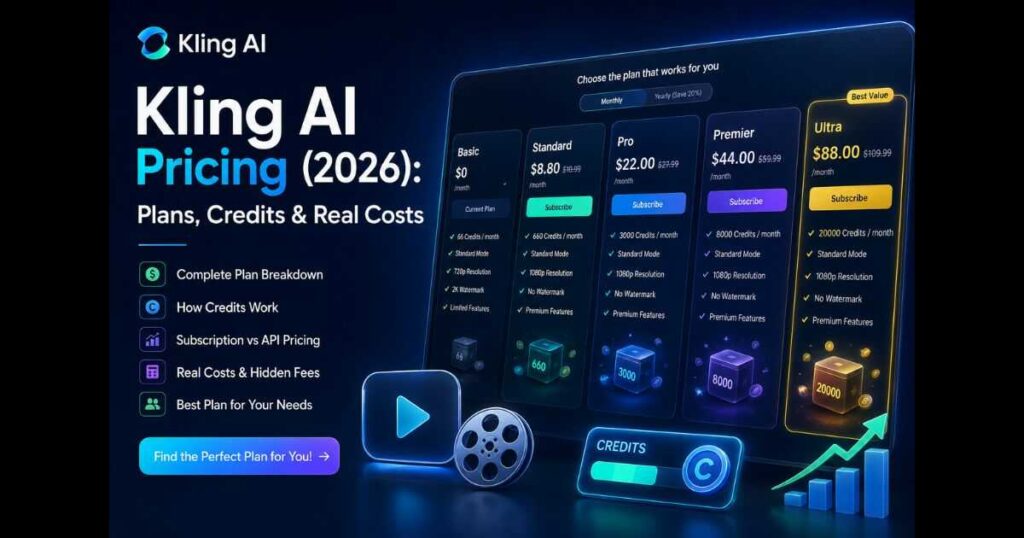
Kling AI Pricing 2026: Plans, Prices & Credits Explained
Understanding Kling AI Pricing has become more important than ever as the platform continues to expand beyond simple AI video generation. With the introduction of new subscription plans, advanced AI models, Canvas, Motion Control, Native Audio, Image Generation, and the Open Platform API, choosing the right plan is no longer just about paying a monthly fee—it’s about selecting the pricing model that matches your workflow.
Whether you’re a content creator producing YouTube videos, a marketer building advertising campaigns, a developer integrating AI into an application, or a business scaling video production, Kling AI Pricing now offers multiple ways to access the platform depending on your needs.
This guide explains everything you need to know about Kling AI Pricing, including subscription plans, credits, API billing, hidden costs, real-world usage, and how to choose the best option without overspending.
By the end of this guide, you’ll understand exactly which Kling AI plan delivers the best value for your projects in 2026.
🚀 Ready to explore Kling AI?
Start with Kling AI and choose the pricing plan that matches your creative workflow.Kling AI Pricing Plans at a Glance (2026)
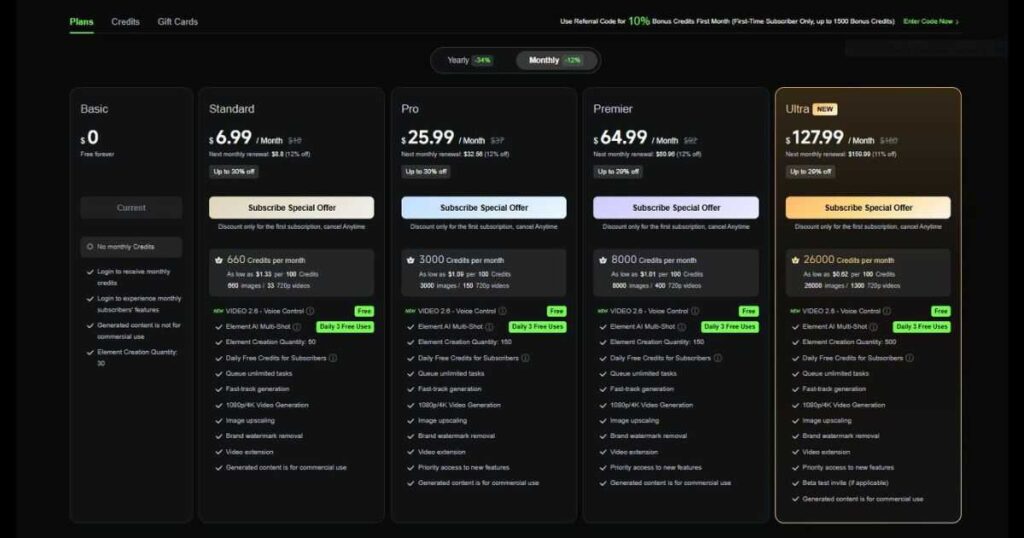
| Plan | Special offer price | Monthly credits |
|---|---|---|
| Basic | Free | No monthly credits |
| Standard | $6.99/month | 660 |
| Pro | $25.99/month | 3,000 |
| Premier | $64.99/month | 8,000 |
| Ultra | $127.99/month | 26,000 |
*Prices shown are special subscription offers. Monthly renewal prices may be higher. Check Kling AI’s official pricing page for the latest prices and terms.
Quick Verdict
If you’re looking for the short answer, Kling AI Pricing has become one of the most flexible pricing systems among AI video generators.
Instead of forcing every user into a single subscription model, Kling AI now offers multiple tiers for creators, professionals, businesses, and developers. Users can generate AI videos through standard subscriptions or integrate the platform into their own software using the Open Platform API.
Overall Rating ⭐ 9.5 / 10
Best For
- YouTube creators.
- AI filmmakers.
- Marketing teams.
- Agencies.
- Developers using AI APIs.
- Businesses producing AI content at scale.
Pros
- Multiple subscription options.
- Flexible credit system.
- Developer API available.
- Supports advanced AI models.
- Suitable for both individuals and businesses.
Cons
- Credit usage varies depending on selected models.
- Advanced features consume more credits.
- Choosing the right plan can be confusing for new users.
Why Trust This Kling AI Pricing Guide?
Unlike many pricing articles that simply list subscription plans, this guide is based on the latest Kling AI platform available in 2026.
It covers the current subscription structure, updated dashboard, the newest AI models, Open Platform API billing, Canvas workflow, Motion Control, Native Audio, and the latest pricing architecture introduced by Kling AI.
Rather than focusing only on monthly plans, this Kling AI Pricing guide explains how the platform actually charges users, helping you understand the real cost of creating AI videos instead of just comparing subscription tiers.
What Is Kling AI Pricing?
One of the biggest misconceptions about Kling AI Pricing is that it’s simply a monthly subscription.
In reality, Kling AI uses two separate pricing systems:
- Subscription Plans for creators using the web platform.
- Usage-Based API Billing for developers integrating Kling AI into their own products.
This gives users far more flexibility than many competing AI video generators.
For example:
- Individual creators typically subscribe to one of the standard platform plans and receive monthly credits.
- Businesses can scale their production through higher-tier subscriptions.
- Developers pay only for the AI generation they actually consume through the Open Platform API.
Understanding this distinction is essential before choosing a plan.
What’s New in Kling AI Pricing (2026)?
Over the past year, Kling AI Pricing has changed significantly as the platform introduced new models, workflows, and subscription options.
Some of the biggest updates include:
| New Feature | Status |
| Ultra Subscription Plan | ✅ New |
| Video 3.0 & Video 3.0 Turbo | ✅ Updated |
| Kling 3.0 Omni Model | ✅ Available |
| Native Audio Generation | ✅ Supported |
| Motion Control Pricing | ✅ Updated |
| Open Platform API Billing | ✅ Expanded |
| Kling Image 3.0 & Image Omni | ✅ Updated |
| Canvas Workflow | ✅ Included |
These additions make Kling AI much more than a text-to-video platform. Today’s subscription plans are designed to support complete AI content production, from image creation and video generation to advanced automation through the API.
Kling AI Pricing Plans Explained
The current Kling AI Pricing structure is designed to support everyone from first-time users to professional creators producing large amounts of AI-generated content.
Instead of overwhelming users with dozens of plans, Kling AI organizes subscriptions into several clear tiers, each unlocking additional generation capacity, premium models, and faster workflows.
Basic
The entry-level plan is ideal for users who want to explore the platform before committing to a paid subscription.
It’s suitable for:
- Learning the interface.
- Testing prompts.
- Exploring AI video generation.
- Experimenting with image creation.
Standard
The Standard plan is designed for creators who publish content consistently.
It provides access to more monthly credits, faster generation, and a smoother production workflow than the entry-level option.
Typical users include:
- TikTok creators.
- Instagram creators.
- Small YouTube channels.
- Freelance marketers.
Pro
The Pro plan unlocks higher production capacity for creators working on commercial projects.
It’s particularly attractive for users who generate AI videos every week and require faster rendering together with access to more advanced features.
Ideal for:
- Professional YouTubers.
- Digital marketers.
- Small agencies.
- Freelance video creators.
Premier
Premier is built for users producing larger amounts of AI content every month.
It offers greater flexibility, increased monthly usage, and access to the platform’s most powerful creative tools.
Recommended for:
- Growing agencies.
- Creative studios.
- Commercial production teams.
- Businesses managing multiple campaigns.
Ultra
Ultra is the newest premium subscription available within the current Kling AI Pricing structure.
Rather than simply increasing monthly credits, Ultra focuses on maximizing productivity for users creating AI videos at scale.
This plan is best suited for:
- Large production teams.
- Professional AI filmmakers.
- Enterprise content departments.
- Heavy commercial users requiring maximum generation capacity.
🚀 Choose the Right Kling AI Plan
Compare Kling AI plans and start creating AI videos with the subscription that fits your workflow.How Kling AI Credits Actually Work
One of the most important parts of Kling AI Pricing is understanding how credits are consumed. While your subscription determines how many credits you receive each month, the number of credits required for each generation depends on several factors.
Unlike traditional software subscriptions that offer unlimited usage, Kling AI uses a flexible credit system designed to match the computing resources required for each AI task.
In simple terms, more demanding generations consume more credits than basic ones.
The amount of credits used depends on factors such as:
- The AI model you choose.
- Video duration.
- Output resolution.
- Whether Native Audio is enabled.
- Motion Control features.
- Image generation versus video generation.
- API usage or standard platform usage.
This approach gives casual users the flexibility to pay only for what they create while allowing professional creators to scale production without fixed generation limits.
What Affects Kling AI Pricing?
Many new users assume every AI video costs the same amount of credits.
In reality, Kling AI Pricing varies depending on the generation settings you choose.
The biggest factors include:
AI Model
The latest models provide higher quality results but usually require more computing power.
For example, newer models such as Kling 3.0 Turbo, Kling 3.0 Omni, or Kling O1 generally consume credits differently than older generations because they deliver improved realism, motion quality, and consistency.
Video Resolution
Higher resolutions require additional processing.
Generating videos in Full HD typically costs less than exporting high-end cinematic resolutions supported by selected models.
If you’re producing content for YouTube Shorts or TikTok, lower resolutions may provide better value while still delivering excellent visual quality.
Native Audio
One of the biggest additions to recent versions of Kling AI is Native Audio generation.
Instead of creating silent clips and adding sound later, supported models can generate synchronized audio directly during video creation.
While this significantly improves workflow efficiency, it also increases resource consumption compared with silent video generation.
Motion Control
Motion Control allows users to guide camera movement and character animation more precisely.
Because these calculations require additional AI processing, Motion Control workflows generally consume more credits than standard text-to-video generations.
For filmmakers and advertisers, however, the extra control often justifies the higher credit usage.
Image Generation
Kling AI Pricing isn’t limited to videos anymore.
The platform now includes multiple image-generation models capable of producing high-quality AI artwork from text prompts or reference images.
Creating AI images uses credits differently from generating videos, allowing creators to build complete visual projects inside a single ecosystem.
API Usage
Developers using the Open Platform API follow a completely different billing model.
Instead of monthly subscription credits, API users pay according to actual AI generation usage.
This makes the API ideal for businesses integrating Kling AI into their own products, websites, or automated workflows.
Subscription Pricing vs API Pricing
A common question is whether creators should subscribe to a standard plan or use the Open Platform API.
Although both provide access to Kling AI technology, they’re designed for different audiences.
| Feature | Subscription Plans | Open Platform API |
| Designed for creators | ✅ | ❌ |
| Monthly credits included | ✅ | ❌ |
| Browser-based workflow | ✅ | ❌ |
| Canvas support | ✅ | ❌ |
| API integration | ❌ | ✅ |
| Usage-based billing | ❌ | ✅ |
| Best for developers | ❌ | ✅ |
| Best for content creators | ✅ | Only when integrating AI generation into a workflow or application |
If you’re creating videos manually inside the Kling AI dashboard, a subscription plan is usually the best choice.
If you’re building software, automating video production, or integrating AI into your own platform, the API offers far greater flexibility.
Kling AI API Pricing Explained
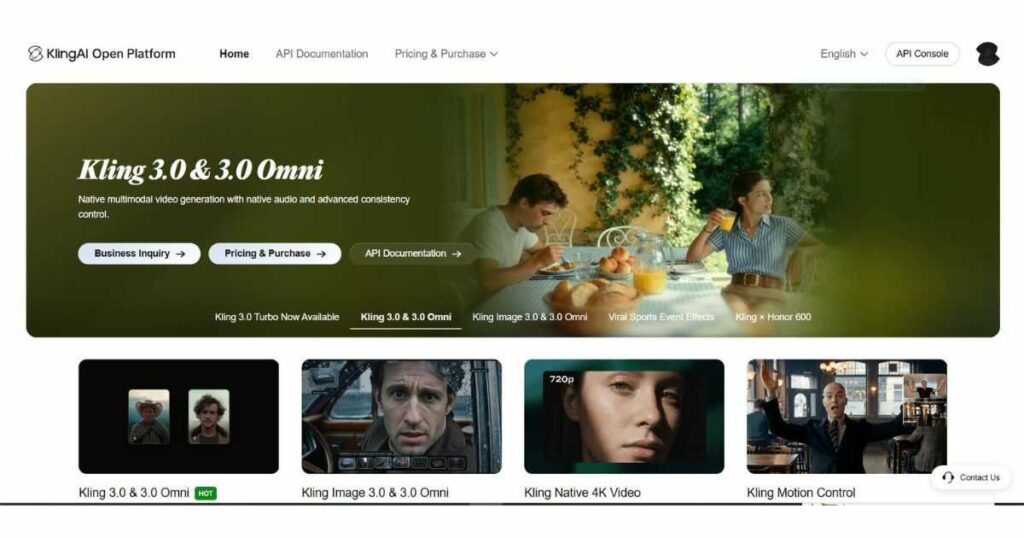
The latest version of Kling AI Pricing also includes a powerful Open Platform for developers.
Instead of paying for a monthly subscription, API users are billed according to the resources consumed by each request.
The Open Platform currently supports:
- AI video generation.
- AI image generation.
- Image-to-video.
- Video input models.
- Native Audio.
- Motion Control.
- Avatar services.
- Lip Sync.
- Audio generation.
- Image recognition.
Different AI models consume different amounts of resources, which means pricing varies depending on the selected model and generation settings.
This flexible structure allows developers to optimise costs while choosing the best model for each project.
Hidden Costs Most Users Don’t Notice
Even after understanding Kling AI Pricing, many creators underestimate how quickly credits can disappear during real production.
Some of the most common reasons include:
Multiple Generations
Few creators generate the perfect video on the first attempt.
It’s common to test several prompts before achieving the desired result, meaning multiple generations consume additional credits.
Prompt Experimentation
Testing different camera movements, lighting styles, or cinematic prompts can significantly increase monthly usage.
While experimentation improves final quality, it’s worth planning prompts carefully to avoid unnecessary credit consumption.
Advanced Features
Premium capabilities such as Motion Control, Native Audio, and the newest AI models provide impressive results but generally require more resources than basic generations.
Choosing these features strategically helps maximise the value of your monthly credits.
🎬 Create More Without Wasting Credits
Choose the Kling AI plan that matches your production needs and start generating smarter.Which Kling AI Pricing Plan Should You Choose?
Choosing the right Kling AI Pricing plan depends less on your budget and more on how often you create AI content. Paying for features you’ll never use wastes money, while selecting a plan that’s too limited can slow down your workflow.
Here’s a practical recommendation based on different types of users.
Choose the Basic Plan If…
The Basic plan is perfect for users who are just getting started with AI video generation.
It’s a good choice if you:
- Want to explore the interface.
- Test prompts before committing.
- Learn how Kling AI works.
- Create only a few videos each month.
If you’re completely new to the platform, starting here allows you to understand the workflow before upgrading.
Choose the Standard Plan If…
The Standard plan is ideal for creators who publish content regularly but don’t generate large volumes every day.
It’s recommended for:
- TikTok creators.
- Instagram Reels creators.
- Small YouTube channels.
- Freelance marketers.
- Personal projects.
This tier offers a good balance between monthly credits and production flexibility.
Choose the Pro Plan If…
For most professional creators, the Pro plan represents the sweet spot of Kling AI Pricing.
It’s designed for users who publish AI-generated content consistently.
Recommended for:
- Faceless YouTube channels.
- Affiliate marketers.
- Online educators.
- Content agencies.
- Professional social media managers.
If AI video creation is part of your business rather than a hobby, this is usually the best long-term choice.
Before choosing Pro, estimate how many clips you need each month and how often you expect to regenerate them. If your workflow involves frequent experiments or credit-intensive features, compare your expected usage with the plan’s monthly credit allowance before subscribing.
Choose Premier If…
Premier targets businesses producing larger amounts of content every month.
Typical users include:
- Marketing agencies.
- Video production studios.
- Corporate content teams.
- Brands managing multiple campaigns.
The increased monthly capacity helps teams maintain a consistent publishing schedule without constantly worrying about available credits.
Choose Ultra If…
The Ultra plan sits at the top of the current Kling AI Pricing structure.
It’s designed for users who need maximum production capacity together with access to Kling AI’s latest technologies.
Ultra is best suited for:
- Professional AI filmmakers.
- Enterprise creative teams.
- Large-scale commercial production.
- Businesses publishing AI content daily.
If your workflow depends heavily on AI-generated videos, Ultra provides the most scalable solution.
Is Kling AI Pricing Worth It?
This is probably the biggest question creators ask before subscribing.
The answer depends on how much value AI video generation brings to your business.
If you only create one or two videos occasionally, the free or entry-level plans may be sufficient.
However, if you’re producing content consistently, Kling AI Pricing becomes much easier to justify.
Instead of spending hours filming, editing, and rendering videos manually, Kling AI can dramatically reduce production time.
For businesses, this often translates into:
- Faster campaign launches.
- Lower production costs.
- Higher publishing frequency.
- More scalable content creation.
When viewed from a productivity perspective rather than just a subscription cost, Kling AI often delivers an excellent return on investment.
Kling AI Pricing for Faceless YouTube Channels
One of the strongest use cases for Kling AI is faceless YouTube automation.
Creators producing educational videos, storytelling channels, motivational content, or AI-generated documentaries can significantly reduce production time using Kling AI.
Instead of hiring editors, animators, or motion designers, creators can generate much of the visual content directly inside the platform.
This makes Kling AI Pricing especially attractive for creators who publish several videos each month.
If you’re building a faceless YouTube business, combining Kling AI with strong prompts and efficient workflows can help maximise every monthly credit.
👉 Related Guide: Kling AI Prompts (2026): 25 Cinematic Prompts That Actually Work
Kling AI Pricing vs Other AI Video Platforms
While every AI video generator uses a different pricing strategy, Kling AI stands out because it supports both creators and developers.
Here’s a simplified comparison.
| Platform | Subscription Plans | Credit System | API Available | Best For |
| Kling AI | ✅ | ✅ | ✅ | Video creators & developers |
| Runway | ✅ | Limited | ✅ | AI filmmaking |
| HeyGen | ✅ | Credit-based | Limited | AI avatars & presenters |
Rather than asking which platform is cheapest, the better question is which platform delivers the best value for your workflow.
If your focus is cinematic AI video generation together with modern developer tools, Kling AI Pricing remains one of the strongest options available in 2026.
👉 Related Reviews:
- Kling AI Review (2026): Features, Pricing & Verdict.
- HeyGen Review (2026): Features, Pricing & Verdict.
- Runway AI Review (2026): Is It Worth Using?
Tips to Get the Most Value from Kling AI Pricing
Regardless of which subscription you choose, using your credits efficiently can significantly increase the value of your plan.
Here are a few practical tips:
- Write detailed prompts before generating videos.
- Avoid unnecessary regenerations by planning scenes carefully.
- Use the latest AI model only when its additional quality is needed.
- Build projects inside Canvas before generating final videos.
- Test ideas with shorter clips before producing longer sequences.
- Keep track of your remaining credits throughout the month.
Following these habits helps reduce wasted generations while improving overall production quality.
🚀 Ready to Create More with Kling AI?
Choose the Kling AI plan that fits your workflow and start producing professional AI videos today.FAQ: Kling AI Pricing (2026)
Is Kling AI free?
Yes. Kling AI offers a free Basic plan, but it does not include monthly subscription credits according to the pricing information shown above. Available free features and any promotional credits may vary, so check your account for the latest access and usage limits.
How does Kling AI Pricing work?
Kling AI Pricing combines subscription plans with a credit-based usage system. Subscribers receive monthly credits, which are used when generating AI videos or images. Developers can also use the Open Platform API, where billing is based on actual API usage rather than a monthly subscription.
What affects Kling AI credit consumption?
Several factors influence how many credits are used for each generation, including:
- The AI model selected.
- Video resolution.
- Video duration.
- Native Audio.
- Motion Control.
- Image generation.
- API usage.
More advanced models and premium features generally consume more credits than standard generations.
Which Kling AI Pricing plan is best for beginners?
The Basic or Standard plan is usually the best starting point. These plans provide enough credits to learn the platform, experiment with prompts, and create AI videos without committing to higher-tier subscriptions.
Is the Ultra plan worth it?
For casual users, probably not.
However, professional creators, agencies, and businesses producing AI videos daily can benefit significantly from the additional generation capacity and premium features included in the Ultra plan.
Can businesses use Kling AI commercially?
Yes. Paid subscriptions are designed for professional and commercial use, making Kling AI suitable for marketing teams, agencies, brands, educators, and businesses creating AI-powered video content.
Does Kling AI offer API pricing?
Yes.
The Kling AI Open Platform provides usage-based API billing for developers who want to integrate AI video generation, image generation, Native Audio, Motion Control, and other services directly into their own applications.
If you’re building software rather than creating videos manually, API billing is often the better choice.
Is Kling AI Pricing better than Runway or HeyGen?
Each platform serves different needs.
- Kling AI focuses on cinematic AI video generation with flexible subscription plans and developer APIs.
- Runway is well known for professional AI filmmaking and editing workflows.
- HeyGen specialises in AI avatars, talking presenters, and multilingual business videos.
The best choice depends on the type of content you create.
Continue Learning
Expand your AI video knowledge with these in-depth guides:
- Kling AI Review (2026): Features, Pricing & Verdict — Discover everything Kling AI offers, including Video 3.0, Canvas, AI models, strengths, weaknesses, and who should use it.
- Kling AI Models (2026): Complete Guide — Compare every Kling AI model, including Video 3.0, Turbo, Omni, O1, and older generations to choose the best model for each project.
- Kling AI API Review (2026) — Learn how developers can integrate Kling AI into their own applications using the Open Platform API and understand usage-based billing.
- Kling AI Canvas Review (2026) — Explore how Canvas simplifies multi-scene AI video production with an intuitive visual workflow.
- Kling AI Tutorial (2026): Complete Beginner’s Guide — Learn how to create professional AI videos step by step while avoiding common beginner mistakes.
- Best Kling AI Prompts (2026) — Discover proven prompts that generate cinematic AI videos with better camera movement, realism, and storytelling.
- HeyGen Review (2026): Features, Pricing & Verdict — Compare Kling AI with one of the leading AI avatar platforms for business presentations and multilingual video creation.
- Runway AI Review (2026): Is It Worth Using? — See how Runway compares with Kling AI in AI filmmaking, editing tools, and professional creative workflows.
- HeyGen Pricing (2026): Plans, Credits & Which Plan Is Best? – Compare every HeyGen plan, credits, pricing, and features to choose the best subscription for your needs.
- Character Swap AI Video: How to Replace Characters in Any Video — Learn how to replace characters in videos using AI while preserving the original scene, actions, and camera movement.
Final Kling AI Pricing Verdict
After analysing the latest subscription plans, credit system, developer platform, and premium features, this Kling AI Pricing guide shows that Kling AI now offers one of the most flexible pricing structures in the AI video industry.
Unlike many competitors that rely on a single subscription model, Kling AI Pricing supports a wide range of users—from beginners experimenting with AI videos to professional creators, agencies, businesses, and developers building AI-powered applications.
The addition of newer subscription tiers, advanced AI models, Canvas, Native Audio, Motion Control, image generation, and the Open Platform API makes Kling AI much more than a traditional AI video generator. It has evolved into a complete creative ecosystem capable of supporting virtually any AI content workflow.
If you’re only experimenting with AI, the entry-level plans provide a low-risk way to get started. However, creators publishing content regularly will benefit far more from one of the paid subscriptions, while businesses and developers can take advantage of scalable production through higher-tier plans and API billing.
Ultimately, Kling AI Pricing delivers excellent value because it allows users to choose the level of investment that matches their production needs instead of forcing everyone into the same pricing model.
🚀 Ready to Start Creating with Kling AI?
Whether you’re producing YouTube videos, marketing campaigns, cinematic AI films, or building AI-powered applications, there’s a Kling AI plan designed for your workflow.
Explore Kling AI Pricing and Choose the Best Plan Today →
