
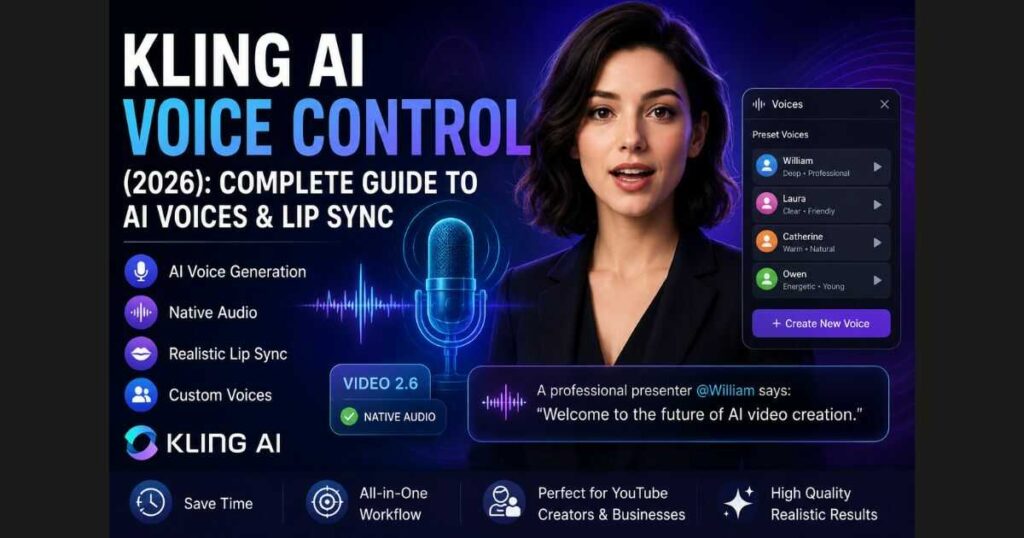
Kling AI Voice Control (2026): Complete Guide
Creating an AI video is only half the challenge. The real work often begins when you need natural dialogue, synchronized speech, and believable lip movements. Traditionally, creators had to combine multiple tools—one for video generation, another for AI voiceovers, a third for lip sync, and finally a video editor to put everything together.
Kling AI Voice Control changes that workflow.
Instead of relying on separate applications, Kling AI Voice Control works alongside Native Audio inside VIDEO 2.6, allowing creators to combine AI-generated speech with video generation and synchronized character performance in a much more streamlined process. Whether you’re producing YouTube automation videos, marketing ads, educational lessons, or cinematic storytelling, this feature can significantly reduce production time while improving consistency.
In this complete guide, you’ll learn:
- What Kling AI Voice Control is.
- How it works with Native Audio.
- How to use preset and custom AI voices.
- Tips for creating realistic AI dialogue.
- Best use cases for creators and businesses.
- Current limitations.
- Whether the Ultra plan is worth considering for professional workflows.
Note: This guide is based on the current Kling AI interface and hands-on testing at the time of writing. Since Kling AI frequently updates its models and features, some options may change over time.
Kling AI Voice Control at a Glance
| Category | Details |
| Feature | Kling AI Voice Control |
| Available In | VIDEO 2.6 (at the time of writing) |
| Works With | Native Audio |
| Preset Voices | Yes |
| Custom Voices | Available |
| Lip Sync | Integrated into the workflow |
| Best For | AI videos, YouTube, marketing, education, storytelling |
| Free Access | Available with limited usage and credits |
| Professional Option | Ultra Plan for higher limits and premium features |
What Is Kling AI Voice Control?
Kling AI Voice Control is an integrated AI speech feature that allows creators to generate spoken dialogue directly while creating AI videos. Rather than exporting a silent video and adding narration later, Voice Control works together with Native Audio to simplify the production process inside a single workspace.
At the time of writing, the feature is available within VIDEO 2.6, where creators can choose from preset AI voices or create reusable custom voices for different projects.
This unified approach offers several advantages over traditional workflows. Instead of moving files between multiple applications, creators can generate video, assign voices, and produce synchronized dialogue without leaving Kling AI.
Typical use cases include:
- Faceless YouTube videos.
- AI presenters.
- Educational tutorials.
- Product demonstrations.
- Marketing campaigns.
- Character conversations.
- Storytelling videos.
For creators publishing content regularly, this streamlined workflow can save a significant amount of editing time while maintaining consistent voice quality across projects.
Why Kling AI Voice Control Matters
AI video generation has become remarkably accessible, but audio production often remains one of the most time-consuming stages of the creative process.
Without an integrated solution, creators typically need to:
- Generate the video.
- Export it.
- Create a separate AI voiceover.
- Synchronize speech manually.
- Adjust lip movements.
- Export the final version.
Kling AI Voice Control simplifies much of this workflow by combining voice generation with video creation inside the same environment. Because it works alongside Native Audio, creators can produce more complete AI videos without constantly switching between different software platforms.
This is especially valuable for:
- YouTube creators producing content at scale.
- Marketing teams creating promotional videos.
- Small businesses with limited production budgets.
- Agencies managing multiple client projects.
- Educators building online courses.
If you’re just getting started with Kling AI, it’s worth reading our Kling AI Tutorial for Beginners before exploring advanced features like Voice Control. Likewise, if you’re interested in Kling’s latest multimodal model, our Kling O1 Review explains how it fits into the platform’s growing AI ecosystem.
Ready to test synchronized AI dialogue yourself? Try Kling AI Voice Control and experience how quickly you can create videos with realistic AI-generated speech—all from a single workflow.
How to Use Kling AI Voice Control
One of the biggest advantages of Kling AI Voice Control is that it doesn’t require a complicated setup. If you’ve already created videos with Kling AI, you’ll find the workflow familiar because Voice Control is integrated directly into the VIDEO 2.6 generation interface.
Instead of exporting your video to another application for narration, you can generate speech during the video creation process, making production faster and much more efficient.
Let’s go through the complete workflow step by step.
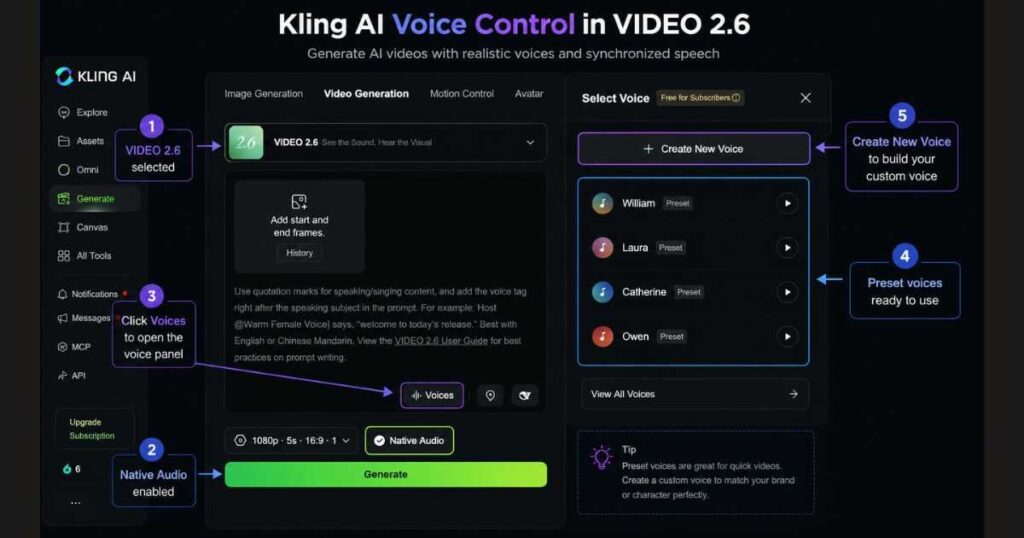
Step 1: Select the VIDEO 2.6 Model
Start by opening the Video Generation page inside Kling AI.
From the available models, choose VIDEO 2.6.
At the time of writing, Voice Control works alongside Native Audio within VIDEO 2.6. If you select another model, the available audio options may differ depending on future Kling AI updates.
VIDEO 2.6 is designed for creators who want to generate both visuals and synchronized speech inside a single workflow.
Step 2: Enable Native Audio
Once VIDEO 2.6 is selected, locate the Native Audio option beneath the generation settings.
Native Audio acts as the foundation for the speech generation workflow.
Rather than thinking of Native Audio and Kling AI Voice Control as the same feature, it’s more accurate to see them as complementary tools:
- Native Audio enables integrated audio generation.
- Voice Control lets you choose or create the voices that will deliver the dialogue.
Together, they allow Kling AI to generate videos with synchronized speech inside the same project.
Step 3: Open the Voices Panel
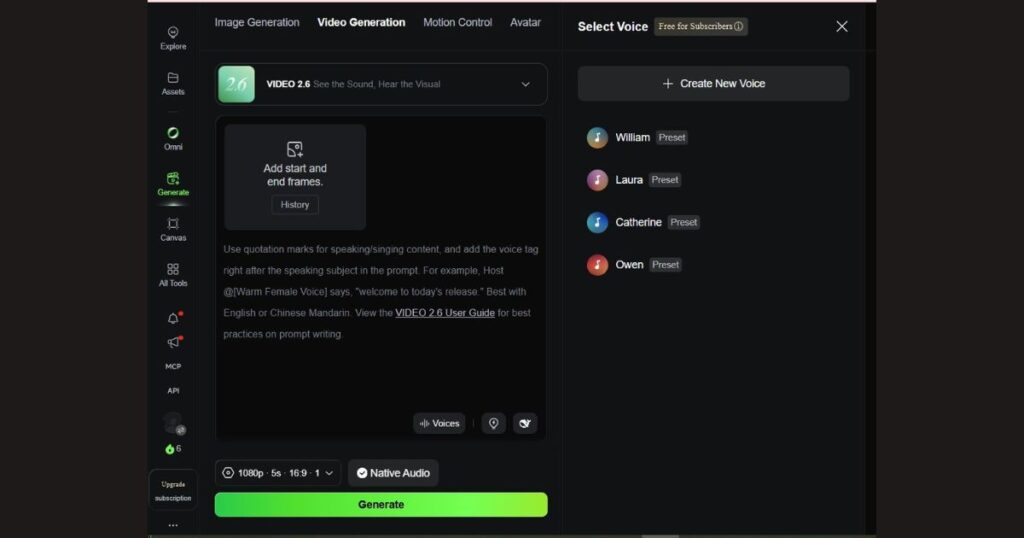
Click the Voices button located inside the prompt editor.
This opens the Voice Control panel, where you can manage every aspect of AI speech generation.
Depending on your account and the current Kling AI version, you’ll typically be able to:
- Select a preset voice.
- Create a new custom voice.
- Manage saved voices.
- Assign voices to dialogue.
Unlike traditional workflows, you don’t need to upload separate audio files or leave Kling AI to manage voice generation.
Step 4: Choose a Preset Voice
At the time of writing, Kling AI includes several built-in voices that can be selected immediately.
Examples visible in the current interface include:
- William.
- Laura.
- Catherine.
- Owen.
Each voice has a slightly different tone and speaking style, making it easier to match the narration to your project.
For example:
| Voice | Best For |
| William | Tutorials, documentaries, business presentations |
| Laura | Educational videos, explainers |
| Catherine | Storytelling, narration |
| Owen | Marketing videos and promotional content |
Choosing an appropriate voice helps the final video sound much more natural.
Step 5: Create a Custom Voice
One of the most useful capabilities of Kling AI Voice Control is custom voice creation.
Inside the Voices panel you’ll find the Create New Voice option.
Custom voices allow creators to build a consistent identity across multiple projects.
This can be particularly valuable for:
- YouTube channels.
- Digital brands.
- Online educators.
- AI influencers.
- Businesses producing recurring video content.
Instead of selecting a different narrator every time, you can reuse the same AI voice across your entire content library.
How to Write Better Voice Prompts
Selecting a voice is only part of the process.
To achieve realistic dialogue, you also need well-written prompts.
The best prompts usually contain three elements:
- The character.
- The selected voice.
- The spoken dialogue.
For example:
A professional presenter @William says: “Welcome to our latest AI video tutorial.”
Or:
A cheerful teacher @Laura says: “Today we’ll learn how AI can simplify video production.”
This structure clearly tells Kling AI:
- who is speaking,
- which voice should be used,
- and what should be said.
The result is generally more natural and consistent than simply typing dialogue without any context.
Tips for More Natural AI Speech
To get the best results from Kling AI Voice Control, keep these recommendations in mind:
Keep dialogue short
Short sentences usually produce smoother speech and better synchronization.
Instead of writing one long paragraph, divide the dialogue into smaller sections.
Describe the emotion
Adding emotional direction often improves the delivery.
Examples include:
- confidently.
- calmly.
- excitedly.
- sadly.
- enthusiastically.
- professionally
Example:
A confident presenter @William says: “Our new product launches today.”
Match the voice to the content
Not every voice fits every project.
Business presentations benefit from professional voices, while storytelling often works better with expressive narration.
Taking a few moments to choose the right voice can noticeably improve the final video.
Keep pronunciation simple
AI voices generally perform better with clear, natural wording.
If a sentence feels difficult to read aloud, consider simplifying it before generating the video.
Ready to hear your own AI-generated dialogue?
Try Kling AI Voice Control and see how quickly you can transform a simple prompt into a fully narrated AI video.
Kling AI Voice Control vs Traditional AI Voice Generators
Many creators already use dedicated AI voice tools like ElevenLabs, PlayHT, or Murf AI to produce narration for their videos. While these platforms offer excellent voice synthesis, they typically require a multi-step workflow:
- Generate the video.
- Create the voiceover in a separate application.
- Export the audio.
- Import everything into a video editor.
- Synchronize the speech.
- Adjust lip movements if necessary.
Kling AI Voice Control simplifies much of this process by integrating voice generation directly into the video creation workflow.
Instead of switching between several applications, creators can generate both visuals and speech inside the same project, saving valuable production time.
| Feature | Kling AI Voice Control | Traditional AI Voice Tools |
| Integrated into video generation | ✅ Yes | ❌ No |
| AI voice generation | ✅ Yes | ✅ Yes |
| Built-in workflow | ✅ Yes | ❌ Multiple tools required |
| Lip sync support | ✅ Integrated workflow | Usually requires additional software |
| Preset voices | ✅ Yes | ✅ Yes |
| Custom voices | ✅ Available | Usually available |
| Beginner-friendly | ⭐ Excellent | ⭐ Good |
| Export/import steps | Minimal | Multiple |
For creators who prioritize speed and simplicity, Kling AI Voice Control offers a much smoother production experience.
Advantages of Kling AI Voice Control
Beyond convenience, Kling AI Voice Control introduces several practical benefits for creators who publish content regularly.
Faster Content Production
One of the biggest advantages is reducing the number of production steps.
Rather than exporting projects between multiple applications, creators can generate video and dialogue inside the same workspace.
For YouTubers producing multiple videos each week, these time savings quickly become significant.
Consistent Character Voices
Creating recurring AI characters becomes much easier when you can reuse the same voice across different videos.
Instead of searching for similar voices every time, custom voices help maintain consistent branding throughout an entire content series.
This is especially valuable for:
- Faceless YouTube channels.
- Educational courses.
- AI presenters.
- Corporate training videos.
- Storytelling channels.
Beginner-Friendly Workflow
Many professional AI production pipelines require experience with several editing programs.
Kling AI Voice Control removes much of that complexity by keeping voice generation inside Kling AI.
Even creators with little video editing experience can begin producing narrated AI videos much faster.
Better Creative Efficiency
Because speech generation is integrated into the project workflow, creators can spend more time improving prompts, scenes, and storytelling rather than moving files between different software.
The result is a workflow that feels cleaner and more focused on creativity.
Limitations of Kling AI Voice Control
While Kling AI Voice Control is an impressive feature, it’s important to understand its current limitations.
Availability Depends on the Current Platform Version
At the time of writing, Voice Control works alongside Native Audio inside VIDEO 2.6.
As Kling AI continues to evolve, supported models and available features may change, so it’s always worth checking the latest documentation or interface before starting a project.
Voice Library May Expand Over Time
The current selection of preset voices works well for many projects, but dedicated AI voice platforms often provide larger libraries with more accents, languages, and emotional variations.
Fortunately, Kling AI continues adding new capabilities through regular updates.
Prompt Quality Still Matters
Even the best AI voice cannot compensate for poor dialogue.
Natural speech depends heavily on:
- Clear writing.
- Appropriate pacing.
- Good scene descriptions.
- Proper voice selection.
Taking time to refine your prompt usually produces noticeably better results.
Who Should Use Kling AI Voice Control?
Although almost anyone can benefit from this feature, some creators will gain more value than others.
YouTube Creators
Ideal for:
- Faceless channels.
- AI tutorials.
- Documentary videos.
- Product reviews.
- Educational content.
If you’re building a YouTube automation workflow, you’ll also find our Kling AI Tutorial for Beginners helpful for mastering the platform before moving into advanced features like Voice Control.
Digital Marketers
Marketing teams can quickly create:
- Product demonstrations.
- Promotional videos.
- Landing page videos.
- Social media advertisements.
without hiring voice actors or purchasing separate narration software.
Businesses
Companies can produce professional internal presentations, customer tutorials, and product explainers while maintaining consistent branding through reusable AI voices.
Storytellers
Voice Control pairs particularly well with cinematic generation.
For creators interested in more advanced scene consistency and multimodal workflows, our Kling O1 Review explains how Kling’s latest generation model complements features like Voice Control.
Should You Upgrade to the Ultra Plan?
Many readers ask whether the free plan is enough.
The answer depends on how often you create videos.
At the time of writing, free users can explore Kling AI with limited credits, making it a good option for learning the platform and testing features like Voice Control.
However, professional creators who publish videos consistently may benefit from upgrading.
The Ultra Plan is particularly attractive for creators who need:
- Higher monthly credit limits.
- Faster generation speeds.
- Access to advanced features.
- Commercial usage options (subject to Kling AI’s current subscription terms).
- Large-scale content production.
If you’re unsure which subscription offers the best value, our detailed Kling AI Pricing Guide compares every available plan and explains which one is right for different types of creators.
Frequently Asked Questions About Kling AI Voice Control
What is Kling AI Voice Control?
Kling AI Voice Control is an AI-powered feature that allows creators to generate spoken dialogue directly within their AI videos. Working alongside Native Audio, it helps produce synchronized speech without relying on separate voiceover or lip-sync software.
Is Kling AI Voice Control free?
At the time of writing, free Kling AI accounts can explore Kling AI Voice Control with limited credits and feature availability.
Creators who produce videos regularly may benefit from a paid subscription, which offers higher usage limits, additional premium features, and more credits for large projects.
Can I create my own AI voice?
Yes.
Kling AI includes a Create New Voice option that allows eligible users to build reusable custom AI voices.
Custom voices are especially useful for:
- YouTube channels.
- Digital brands.
- Online educators.
- Businesses.
- Storytelling series.
Using the same voice across multiple videos helps maintain a consistent identity for your audience.
Does Kling AI Voice Control support lip sync?
Yes.
Kling AI Voice Control works together with Native Audio to generate synchronized speech as part of the AI video workflow.
While the final quality depends on prompt design, scene complexity, and the selected model, the integrated workflow makes it much easier to produce videos where speech and character performance feel naturally connected.
Which Kling AI model supports Voice Control?
At the time of writing, Voice Control is available alongside Native Audio inside VIDEO 2.6.
Since Kling AI regularly updates its models and features, it’s always a good idea to check the latest interface or official documentation for any changes.
Is Kling AI Voice Control good for YouTube creators?
Absolutely.
It is particularly useful for creators producing:
- Faceless YouTube channels.
- AI tutorials.
- Educational videos.
- Product reviews.
- Marketing videos.
- Documentary-style content.
If you’re building a complete AI video workflow, we also recommend reading our Kling AI Image to Video Guide, which explains how to transform still images into dynamic AI videos before adding realistic narration with Voice Control.
Can I use Kling AI Voice Control for commercial projects?
Commercial usage depends on your current Kling AI subscription and licensing terms.
At the time of writing, commercial rights are available on eligible paid plans. Before publishing client work or commercial content, always review the latest licensing information provided by Kling AI.
Final Verdict: Is Kling AI Voice Control Worth Using?
After exploring its features, workflow, and real-world applications, it’s clear that Kling AI Voice Control is one of the most practical additions to the Kling AI ecosystem.
Its biggest strength isn’t simply AI-generated speech—it’s the ability to keep video generation, voice creation, and synchronized character performance inside a single workflow. For many creators, this means spending less time moving between different applications and more time creating better content.
While dedicated AI voice platforms may still offer larger voice libraries or more advanced emotional controls, Kling AI provides something many creators value even more: simplicity.
If you’re producing YouTube videos, educational content, product demonstrations, marketing campaigns, or AI storytelling projects, Kling AI Voice Control can significantly streamline your production process.
For beginners, the free plan offers a great opportunity to explore the feature and understand how it fits into the Kling AI workflow. As your projects grow, a paid plan may become worthwhile if you need additional credits, faster generation, and access to more advanced capabilities.
Ultimately, Kling AI Voice Control isn’t designed to replace every standalone AI voice platform. Instead, it delivers a highly efficient all-in-one experience for creators who want to generate complete AI videos with realistic speech and synchronized performances from a single interface.
Ready to experience it yourself?
Create your first AI-powered video with realistic dialogue and see how much faster your workflow can become.
Continue Learning
Want to master the entire Kling AI platform? Continue with these in-depth guides:
- Kling AI Omni: Complete Guide (2026) — Explore Kling’s unified creative workflow and advanced AI capabilities.
- Kling AI Motion Control Guide — Learn how to create precise and expressive character movements.
- Kling AI Image to Video Guide — Turn static images into realistic AI videos with step-by-step instructions.
- Best Kling AI Prompts (2026) — Copy proven prompts to create cinematic AI videos with better results.
- Kling AI Video 3.0 Review (2026): Is It Worth It? — Discover the latest features, video quality, pricing, and whether Kling AI Video 3.0 is worth using.
By combining these guides with Kling AI Voice Control, you’ll be able to build a complete AI video production workflow—from generating visuals and realistic speech to creating polished, professional content suitable for YouTube, marketing, education, and commercial projects.

