
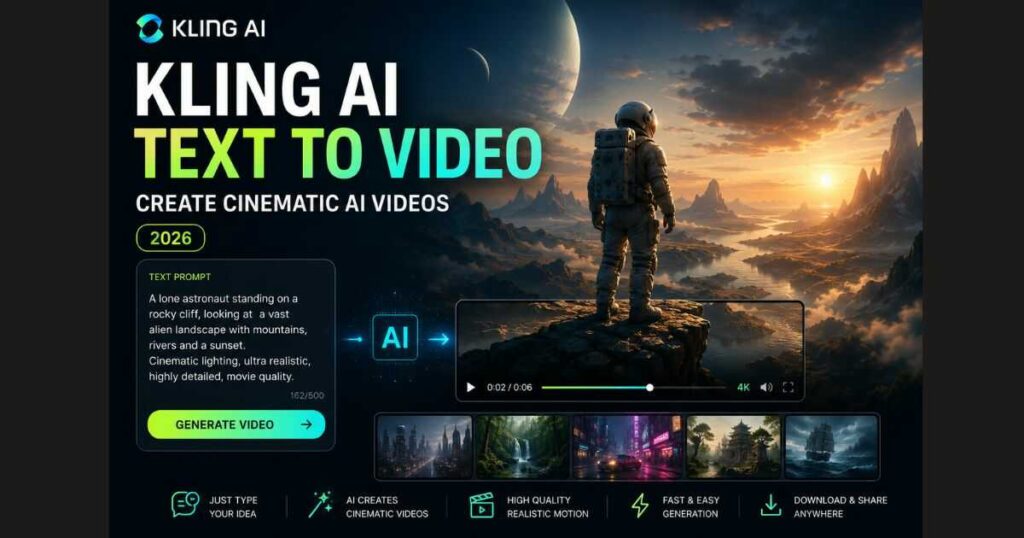
Kling AI Text to Video (2026): Create Cinematic AI Videos
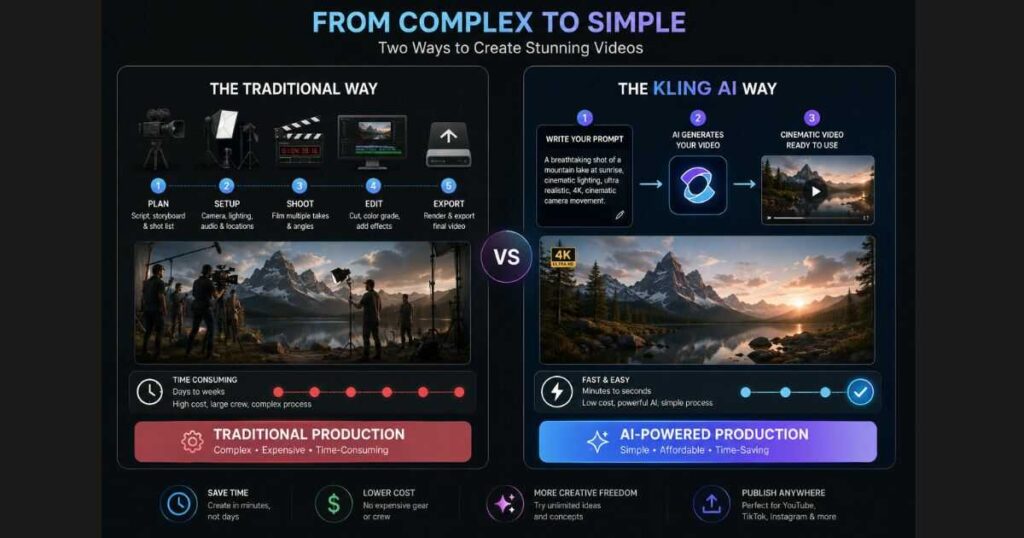
Artificial intelligence has dramatically changed the way videos are created. Just a few years ago, producing a cinematic video required expensive cameras, professional editing software, and countless hours of work. Today, AI video generators can transform a simple text description into a fully animated scene in just a few minutes.
Among the growing number of AI video tools, Kling AI Text to Video has become one of the most talked-about features for creators, marketers, filmmakers, and social media professionals. Instead of uploading images or editing timelines manually, you simply describe the scene you want, and Kling AI generates a realistic video based on your prompt.
Whether you’re creating YouTube content, TikTok videos, marketing ads, cinematic short films, or creative storytelling projects, Kling AI offers an impressive balance of realism, motion quality, and ease of use.
In this guide, you’ll learn exactly how Kling AI Text to Video works, how to write prompts that generate better results, the best settings to use, common mistakes to avoid, and practical tips that can significantly improve your AI-generated videos.
If you’re completely new to Kling AI, consider reading our Kling AI Tutorial (2026) first. It explains the interface, account setup, and the core features before diving deeper into text-to-video generation.
🚀 Ready to Turn Your Ideas Into AI Videos?
Start creating cinematic videos from simple text prompts with Kling AI. Explore realistic motion, cinematic scenes, and powerful AI video generation without complex editing software.
Try Kling AI Text to Video →What Is Kling AI Text to Video?
Kling AI Text to Video is an AI-powered feature that creates videos directly from written descriptions.
Instead of starting with an existing image, you begin with a prompt describing exactly what you want the AI to generate.
For example:
A lone astronaut slowly walking across a frozen alien planet during sunset, cinematic lighting, realistic reflections on the ice, dramatic atmosphere, ultra-detailed, movie quality.
Within a short time, Kling AI analyzes the prompt and generates a video showing that scene with animated camera movement, realistic lighting, environmental effects, and natural object motion.
Unlike traditional animation software, you don’t need experience with:
- Video editing.
- 3D modeling.
- Camera animation.
- Visual effects.
- Motion graphics.
The AI handles these complex tasks automatically, allowing creators to focus on storytelling instead of technical production.
Why Creators Prefer Kling AI Text to Video
Many AI video generators can create videos from prompts, but Kling AI has gained attention because of its ability to produce videos that often feel closer to real cinematic footage than simple AI animations.
Some of its biggest advantages include:
- Highly realistic motion.
- Better understanding of natural language prompts.
- Consistent lighting throughout scenes.
- Smooth camera movement.
- Detailed environments.
- Professional-looking cinematic composition.
- Native audio support on supported models.
- Multiple aspect ratios for different platforms.
These strengths make Kling AI suitable for both casual creators and professionals looking to speed up video production.
What Can You Create With Kling AI Text to Video?
One reason Kling AI Text to Video continues to grow in popularity is its flexibility.
A single prompt can generate many different styles of videos depending on your creative goals.
Popular use cases include:
Cinematic Short Films
Create dramatic movie-style scenes featuring characters, landscapes, weather effects, and emotional storytelling.
Examples include:
- Fantasy worlds.
- Science fiction.
- Historical scenes.
- Adventure stories.
- Horror sequences.
Social Media Content
Content creators frequently use Kling AI to produce engaging short-form videos for:
- TikTok.
- Instagram Reels.
- YouTube Shorts.
- Facebook.
- X (Twitter).
Eye-catching AI videos often perform well because they immediately capture attention during the first few seconds.
Product Marketing
Businesses can quickly visualize products in cinematic environments before investing in expensive commercial production.
Examples include:
- Luxury watches.
- Smartphones.
- Fashion products.
- Cosmetics.
- Cars.
A strong AI-generated concept video can help validate marketing ideas before filming a full commercial.
Educational Videos
Teachers and educators can visualize complex topics that would otherwise be difficult to film.
For example:
- Space exploration.
- Ancient civilizations.
- Scientific experiments.
- Historical recreations.
Storyboarding
Many filmmakers now use Kling AI Text to Video to generate concept scenes before production begins.
Instead of drawing storyboards manually, they create animated previews that communicate camera angles, atmosphere, and pacing much more effectively.
🎬 Start Creating Cinematic AI Videos
Have a video idea in mind? Describe your scene, choose your preferred settings, and let Kling AI transform your imagination into a cinematic video.
Start Creating with Kling AI →How Kling AI Text to Video Works
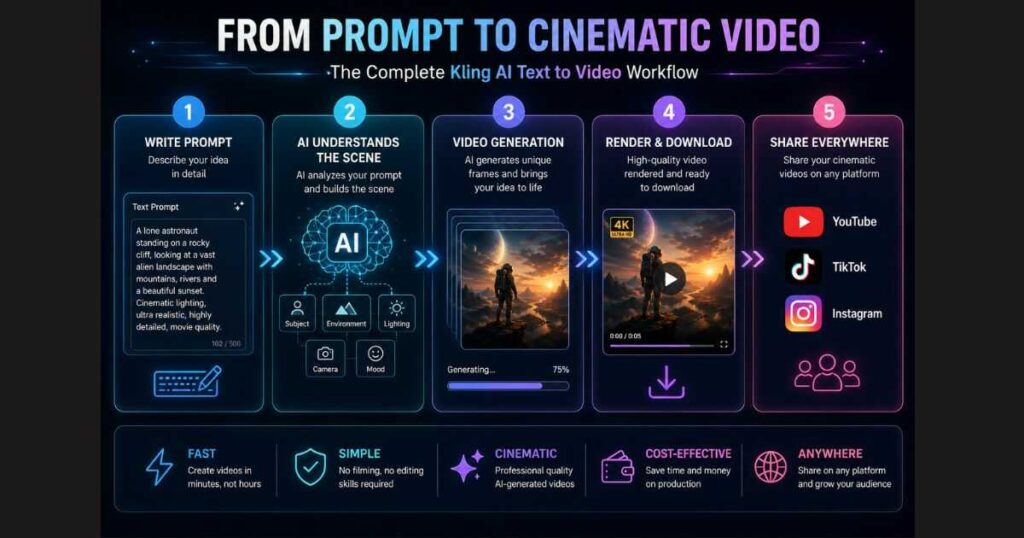
Although the process feels almost magical, the workflow itself is surprisingly straightforward.
The AI follows a sequence of steps every time you generate a video.
Step 1: Write Your Prompt
Everything starts with your description.
Your prompt tells Kling AI:
- What appears in the scene.
- Where the scene takes place.
- Lighting conditions.
- Mood.
- Camera style.
- Artistic style.
- Motion.
The better your prompt, the better your results.
Step 2: AI Understands the Scene
Kling AI analyzes the language inside your prompt.
It identifies:
- Objects.
- Characters.
- Background.
- Relationships.
- Actions.
- Visual style.
This process happens automatically in just a few seconds.
Step 3: Video Generation
After understanding the prompt, Kling AI begins generating every frame.
The AI predicts how objects should move naturally while maintaining consistency throughout the sequence.
Modern versions also improve:
- Character stability.
- Facial consistency.
- Lighting continuity.
- Environmental motion.
Step 4: Final Rendering
Once generation finishes, the system renders the completed video based on your selected settings such as:
- Resolution.
- Video length.
- Aspect ratio.
The finished result is ready to preview, download, or regenerate if you’d like to try a different version.
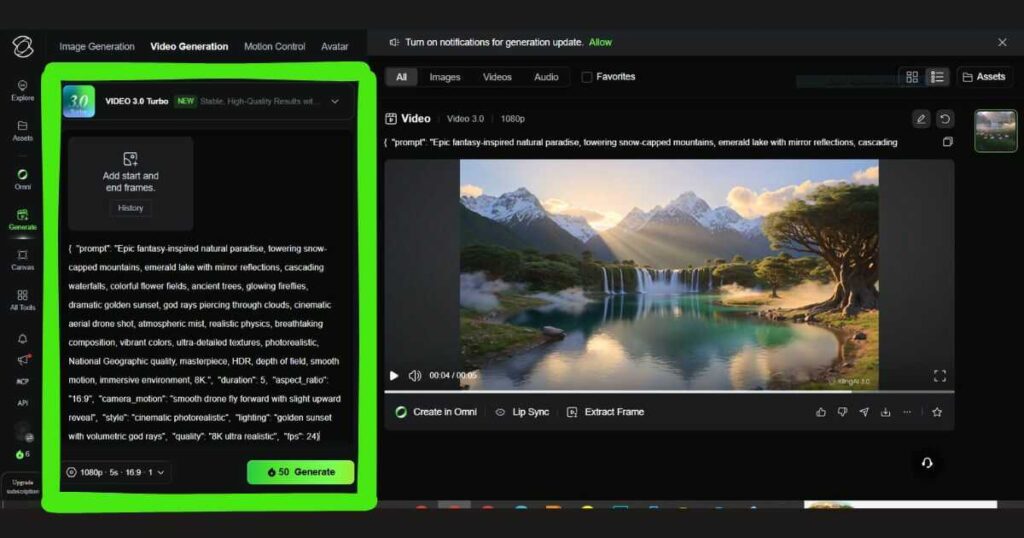
If you’ve been reading along, this is a great moment to open Kling AI and try your first text prompt. Even a simple scene can help you understand how the AI interprets different descriptions, and you’ll learn much faster by experimenting yourself.
Why Prompt Quality Matters
One of the biggest misconceptions is that AI video quality depends entirely on the model.
In reality, the prompt often determines whether your result looks amateur or cinematic.
Consider these two examples.
Basic Prompt
A cat walking.
The AI has very little information to work with.
Now compare it with this version:
A fluffy white cat slowly walking through a peaceful Japanese garden during sunrise, cherry blossoms falling in the wind, cinematic lighting, shallow depth of field, ultra realistic, slow camera push in.
The second prompt provides:
- Subject.
- Environment.
- Lighting.
- Atmosphere.
- Motion.
- Camera direction.
- Visual quality.
As a result, the generated video is usually far more realistic and visually appealing.
If you’re looking for ready-made examples, don’t miss our Best Kling AI Prompts (2026) guide, where we share dozens of prompts designed specifically for cinematic AI videos.
Best Prompt Structure for Kling AI Text to Video
Rather than writing random sentences, follow a structured format.
A simple framework looks like this:
Subject → Action → Environment → Lighting → Camera Movement → Style
For example:
A young explorer walking through an ancient jungle temple, soft morning sunlight, cinematic atmosphere, slow dolly in, highly detailed, realistic movie scene.
This structure helps Kling AI understand your vision much more accurately and usually produces stronger results.
Best Settings for Kling AI Text to Video
While Kling AI Text to Video is designed to generate impressive videos automatically, choosing the right settings can noticeably improve the final result.
Instead of changing every option randomly, focus on the settings that have the biggest impact on quality.
Resolution
If your account supports multiple resolutions, choose the highest one available for your project.
Higher resolutions generally produce:
- Sharper details.
- Cleaner textures.
- Better lighting.
- More professional-looking videos.
For quick testing, a lower resolution is often sufficient, while final projects benefit from higher-quality output whenever available.
Video Length
Longer videos are not always better.
In many cases, a concise cinematic clip looks more polished than a lengthy scene filled with unnecessary movement.
A shorter duration is ideal for:
- Product videos.
- Social media content.
- Dramatic scenes.
- Character introductions.
Longer videos work better for storytelling or landscape reveals, provided your prompt clearly describes the full sequence.
Aspect Ratio
Choose the aspect ratio based on where your video will be published.
Common options include:
16:9
Best for:
- YouTube.
- Websites.
- Presentations.
- Landscape videos.
9:16
Perfect for:
- TikTok.
- Instagram Reels.
- YouTube Shorts.
1:1
Useful for:
- Instagram posts.
- Facebook feeds.
- Square advertisements.
Planning your aspect ratio before generation usually produces better framing than cropping afterward.
How to Write Better Kling AI Text to Video Prompts
The biggest difference between average AI videos and cinematic AI videos is almost always the prompt.
Professional creators rarely write a single sentence.
Instead, they include multiple layers of information.
A high-quality prompt usually contains:
Subject
Clearly describe who or what appears in the scene.
Instead of:
Person
Write:
A young female explorer wearing a leather jacket and carrying an old lantern.
Specific subjects produce much more consistent results.
Action
Explain exactly what is happening.
Examples:
- Walking slowly.
- Flying.
- Running.
- Looking around.
- Smiling.
- Opening a door.
- Floating underwater.
Motion is one of the most important parts of Kling AI Text to Video, so don’t leave it to chance.
Environment
The background influences the overall atmosphere.
Examples include:
- Snow-covered mountains.
- Cyberpunk city.
- Medieval castle.
- Tropical beach.
- Ancient temple.
- Futuristic laboratory.
Rich environments help create more immersive videos.
Lighting
Lighting dramatically changes the mood.
Popular choices include:
- Golden hour.
- Soft morning light.
- Neon lighting.
- Moonlight.
- Volumetric lighting.
- Dramatic sunset.
- Studio lighting.
Professional filmmakers often spend hours perfecting lighting, and AI responds similarly to detailed descriptions.
Camera Movement
Although Kling AI doesn’t currently provide dedicated camera movement controls in its interface, you can still guide the virtual camera naturally through your prompt.
Examples include:
- Slow cinematic dolly in.
- Slow push in.
- Orbit around the subject.
- Smooth pan left.
- Aerial flyover.
- Low-angle tracking shot.
These descriptions often encourage the AI to generate more dynamic and cinematic compositions.
Visual Style
Finish your prompt with style keywords such as:
- Cinematic.
- Ultra realistic.
- Movie quality.
- Photorealistic.
- Highly detailed.
- Professional lighting.
- 8K look.
- Shallow depth of field.
These modifiers help refine the overall aesthetic without making the prompt unnecessarily complicated.
Example of a High-Quality Prompt
Here’s an example that combines all the elements above:
A fearless female astronaut walking across a frozen alien planet at sunrise, glowing ice crystals reflecting golden light, dramatic clouds moving slowly overhead, cinematic atmosphere, slow cinematic dolly in, ultra realistic, highly detailed, movie-quality visuals.
Compared to a simple prompt like:
Astronaut walking.
The richer prompt gives Kling AI far more context, leading to more engaging and visually coherent results.
Ready to test these techniques?
If you already have a free Kling AI account, spend a few minutes trying these prompt ideas with your own scenes. Experimenting with different wording is one of the fastest ways to discover which prompts consistently produce the cinematic style you’re aiming for.
🔥 Test Your First Cinematic Prompt
Now that you know how to structure a powerful AI video prompt, try it yourself. Create cinematic scenes, realistic characters, and dynamic camera movements with Kling AI Text to Video.
Try Kling AI for Free →Common Mistakes Beginners Make
Many users assume AI will automatically understand everything they imagine.
Unfortunately, that’s rarely the case.
Here are the most common mistakes when using Kling AI Text to Video.
Writing Very Short Prompts
A prompt with only three or four words leaves too much room for interpretation.
Instead of: Car driving.
Write: A luxury sports car driving along a coastal highway during sunset, cinematic reflections on the bodywork, soft golden lighting, smooth tracking shot, realistic motion.
The added detail gives the AI a much stronger foundation.
Mixing Too Many Ideas
Avoid asking the AI to generate several unrelated scenes in one prompt.
For example:
- A dragon.
- A spaceship.
- A medieval castle.
- A waterfall.
- A football stadium.
All within the same sentence can confuse the model and reduce consistency.
Focus on one clear scene at a time.
Ignoring the Environment
Many beginners spend all their attention describing the main subject but forget the background.
The environment is just as important for creating cinematic depth and atmosphere.
Expecting Perfect Results on the First Try
Even experienced AI creators rarely keep the first generation.
Instead, they:
- Refine the prompt.
- Adjust wording.
- Replace weak adjectives.
- Regenerate multiple versions.
Small prompt improvements often produce surprisingly better videos.
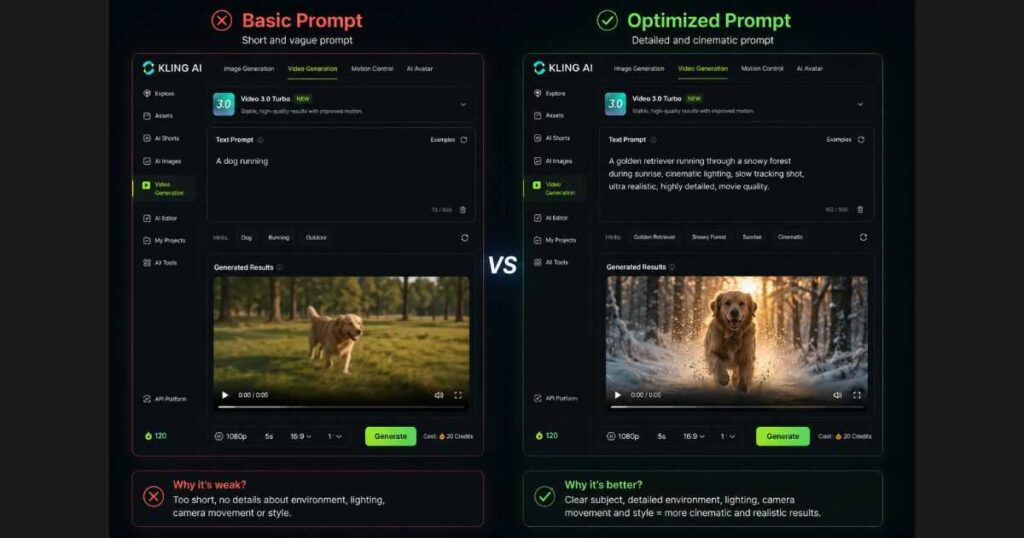
Before creating your next video, try rewriting the same prompt with a few extra cinematic details inside Kling AI. Small changes often produce dramatically better results, and comparing different versions is one of the fastest ways to improve.
Why Many Creators Upgrade After Using the Free Version
One interesting pattern among Kling AI users is that many begin with the free plan simply to learn how the platform works.
Once they become comfortable writing better prompts and generating consistent results, some choose to upgrade—not because the free version is unusable, but because additional credits, faster generation, and access to premium features make larger creative projects much easier.
If you plan to generate videos regularly for YouTube, client work, or social media campaigns, comparing the available plans can help you decide whether an upgrade is worthwhile for your workflow.
Advanced Tips for Creating Cinematic Videos with Kling AI Text to Video
Once you’ve mastered the basics, it’s time to move beyond simple prompts and start creating videos that genuinely look like professional film scenes. The difference between an average AI-generated clip and an impressive cinematic sequence often comes down to small details that many beginners overlook.
Below are some techniques experienced creators regularly use when working with Kling AI Text to Video.
Focus on One Clear Scene
One of the biggest mistakes is trying to tell an entire story in a single prompt.
Instead of writing:
A man wakes up, drives to the city, enters a café, talks with friends, and watches the sunset.
Break your story into multiple short scenes.
For example:
Scene 1
A young man wakes up in a modern apartment as warm morning sunlight enters through the window.
Scene 2
A cinematic drone shot of the man driving through a futuristic city during golden hour.
Generating individual scenes usually produces much higher-quality videos while making editing much easier later.
Use Strong Visual Adjectives
The words you choose have a major impact on the final output.
Instead of writing:
Beautiful city
Try something like:
- Futuristic city.
- Rain-soaked cyberpunk streets.
- Ultra-realistic skyline.
- Vibrant neon reflections.
- Luxury modern architecture.
These descriptive phrases give the AI much richer visual information.
Describe the Mood
Professional filmmakers don’t only think about what appears in the scene—they also think about how viewers should feel.
Examples include:
- Peaceful.
- Emotional.
- Suspenseful.
- Hopeful.
- Dramatic.
- Mysterious.
- Epic.
Adding emotional context often improves the atmosphere of your AI-generated videos.
Keep Character Descriptions Consistent
If you’re generating several clips featuring the same character, try using nearly identical descriptions every time.
Instead of changing details between prompts, consistently mention:
- Hair color.
- Clothing.
- Age.
- Accessories.
- Facial features.
This helps maintain better visual consistency across multiple scenes.
Kling AI Text to Video vs Image to Video
Many beginners wonder whether they should start with text prompts or upload an existing image.
The answer depends entirely on your project.
Choose Kling AI Text to Video if:
- You only have an idea.
- You want complete creative freedom.
- You’re brainstorming concepts.
- You’re experimenting with different scenes.
- You don’t have artwork prepared.
Text-to-video is perfect for transforming imagination into moving visuals.
Choose Image to Video if:
- You already have artwork.
- You need character consistency.
- You’re animating illustrations.
- You’re creating product showcases.
- You want greater visual control.
Image-to-video begins with a fixed reference image, giving the AI a stronger visual foundation.
If you’re interested in this workflow, our Kling AI Image to Video (2026) guide explains how to animate photos into realistic cinematic videos.
Best Use Cases for Kling AI Text to Video
The versatility of Kling AI Text to Video makes it useful across many industries.
YouTube Content
Creators can produce:
- Intro sequences.
- B-roll footage.
- Storytelling animations.
- Documentary visuals.
- AI-assisted scenes.
Instead of relying entirely on stock footage, you can create unique visuals that perfectly match your narration.
Short-Form Social Media
Platforms such as:
- TikTok.
- Instagram Reels.
- YouTube Shorts.
reward videos that immediately capture attention.
Cinematic AI visuals generated from well-written prompts can dramatically improve audience retention during the first few seconds.
Digital Marketing
Businesses increasingly use AI-generated videos for:
- Product teasers.
- Landing pages.
- Advertisements.
- Social campaigns.
- Brand storytelling.
Rather than organizing an expensive production, marketers can quickly test multiple creative ideas before investing in a full commercial shoot.
Education
impossible teachers and online educators use AI videos to explain topics that are difficult—or —to film.
Examples include:
- Space exploration.
- Ancient history.
- Biological processes.
- Scientific concepts.
- Future technologies.
Visual storytelling often helps learners understand complex subjects much faster than text alone.
Creative Storytelling
Independent creators, writers, and filmmakers can visualize scenes before committing to larger productions.
Many now use Kling AI Text to Video as an early storyboarding tool, allowing them to refine ideas before filming with real cameras.
How Long Does It Take to Generate a Video?
Generation time depends on several factors, including:
- Current server demand.
- Selected model.
- Video length.
- Resolution.
- Your account type.
Shorter videos typically finish faster than longer, high-resolution generations.
Users on paid plans may also experience shorter queue times during busy periods.
Is Kling AI Text to Video Good Enough for Professional Work?
For many creators, the answer is yes—but with realistic expectations.
AI-generated videos shouldn’t always replace traditional filmmaking.
Instead, they work exceptionally well for:
- Concept development.
- Marketing previews.
- Social content.
- Creative experimentation.
- Storyboarding.
- Visual inspiration.
Professional studios increasingly combine AI-generated scenes with conventional editing rather than choosing one workflow exclusively.
Should You Upgrade for More Serious Projects?
Many users begin with the free version to learn prompt writing and understand how the platform behaves.
As their projects become larger or more frequent, some decide to upgrade—not simply for higher quality, but for a smoother creative workflow.
A paid plan can be worthwhile if you:
- Generate videos regularly.
- Need more credits.
- Want faster generation during busy periods.
- Produce commercial content for clients.
- Create videos as part of your daily workflow.
If you’re unsure whether a subscription makes sense, our Kling AI Pricing (2026) guide compares available plans, credit systems, and the differences between free and paid access so you can make an informed decision.
Frequently Asked Questions About Kling AI Text to Video
Is Kling AI Text to Video free?
Yes, Kling AI Text to Video offers a free plan that allows new users to experience the platform before purchasing a subscription.
The free plan typically includes limited daily credits and slower generation during busy periods. However, it is more than enough for learning prompt writing, testing different ideas, and understanding how the platform works.
If you start producing videos regularly or need higher limits, exploring the paid plans may provide a smoother workflow.
How do I get better results with Kling AI Text to Video?
The quality of your videos depends far more on your prompt than most beginners realize.
For the best results:
- Describe the subject clearly.
- Specify the environment.
- Include lighting details.
- Describe camera movement naturally.
- Mention the mood or atmosphere.
- Add cinematic style keywords.
- Keep each prompt focused on a single scene.
Small improvements in prompt writing often produce dramatically better videos.
Can Kling AI Text to Video create realistic videos?
Yes.
One reason Kling AI Text to Video has become so popular is its ability to generate highly realistic motion, cinematic lighting, and natural-looking environments.
While results still depend on prompt quality and model capabilities, many creators use Kling AI to produce videos suitable for YouTube, advertisements, social media campaigns, and creative storytelling.
What’s the difference between Text to Video and Image to Video?
Both features generate AI videos, but they start from different inputs.
Text to Video
- Starts with a written prompt.
- Offers maximum creative freedom.
- Perfect for brainstorming new ideas.
Image to Video
- Starts with an uploaded image.
- Provides stronger visual consistency.
- Ideal for animating existing artwork or product photos.
Many experienced creators combine both workflows depending on the project.
Can I use Kling AI Text to Video for commercial projects?
Yes, many businesses and freelancers use AI-generated videos for:
- Marketing campaigns.
- Product demonstrations.
- Social media advertising.
- Website hero videos.
- Brand storytelling.
- Client presentations.
Before using generated content commercially, always review Kling AI’s latest licensing terms to ensure your intended use complies with the platform’s policies.
Common Prompt Formula That Works Consistently
If you’re unsure where to start, this simple formula works well for most cinematic scenes:
Subject + Action + Environment + Lighting + Camera Movement + Style
For example:
A professional chef preparing sushi inside a luxury Japanese restaurant, warm ambient lighting, slow cinematic push in, ultra realistic, highly detailed, movie-quality visuals.
Using this structure consistently will help you create stronger prompts and achieve more predictable results with Kling AI Text to Video.
By now, you have everything you need to start creating AI videos with confidence. Whether you’re experimenting with the free plan or planning larger projects, opening Kling AI and testing your own prompts is the natural next step after reading this guide.
Continue Learning
Now that you’ve learned how Kling AI Text to Video works, these guides will help you improve your results even further:
- Kling AI Tutorial (2026): How to Use Kling AI Step by Step — Learn the complete workflow from account setup to generating your first AI videos.
- Best Kling AI Prompts (2026): 25 Prompts That Actually Work — Copy proven cinematic prompts that consistently produce better AI-generated videos.
- Kling AI Image to Video (2026): How to Turn Images into Cinematic Videos — Discover how to animate photos while maintaining character consistency.
- Kling AI Review (2026): Features, Pricing, Pros & Cons — Explore the platform’s strengths, limitations, and overall performance.
- Kling AI Pricing (2026): Plans, Credits & Hidden Costs — Compare subscriptions, understand the credit system, and choose the right plan for your workflow.
- Kling AI Free (2026): How to Use Kling AI Without Paying — Learn how to maximize the free plan before deciding whether to upgrade.
- Kling AI vs Runway (2026): Which AI Video Generator Is Better? — Compare two of the industry’s leading AI video generators side by side.
- Kling AI Alternatives (2026): 10 Better AI Video Tools — Explore other AI video platforms and discover which one best fits your creative goals.
- Kling AI Motion Control (2026) — Discover how to create realistic AI character animation using Motion Control, reference videos, and advanced motion transfer techniques.
- Kling AI Models (2026): Complete Guide & Comparison Compare every Kling AI model, including Video, Image, Turbo, Omni, and O1, to choose the best model for your workflow.
- Runway AI Review (2026): Discover whether Runway is the best AI video generator for creators in 2026.
🚀 Turn Your Prompts Into Cinematic Videos Today
You now have the prompt structure, settings, and techniques needed to create better AI videos. Open Kling AI and start turning your ideas into realistic cinematic scenes.
Start Creating with Kling AI →Final Thoughts
Kling AI Text to Video has transformed the way creators approach video production. Instead of relying on expensive equipment, complex editing software, or years of technical experience, anyone can now turn a well-written prompt into a cinematic AI-generated video within minutes.
Although creating impressive results still requires practice, learning how to write detailed prompts, describe scenes clearly, and structure your ideas properly will dramatically improve your output over time. In many cases, prompt quality matters even more than the AI model itself.
Whether you’re producing YouTube videos, TikTok content, marketing campaigns, educational animations, or short cinematic films, Kling AI Text to Video offers one of the most accessible and powerful ways to bring your ideas to life.
The best way to improve is simple: experiment with different prompts, compare multiple generations, and continue refining your workflow. Every project teaches you something new, and as AI video technology continues to evolve, creators who keep learning will consistently produce better content.

