Kling AI Review (2026): Is It Worth Using?
Introduction
AI video generation has evolved rapidly, but only a handful of platforms have expanded beyond simple text-to-video creation. Kling AI is one of them. What began as a powerful AI video generator has grown into a complete creative ecosystem that now includes AI video generation, AI image generation, Canvas project management, Motion Control, AI avatars, developer APIs, and multiple next-generation AI models.
In this Kling AI Review, we’ll take an in-depth look at everything the platform currently offers. Rather than focusing on a single feature, this guide covers the latest interface, AI models, pricing plans, creative tools, Open Platform API, real-world performance, strengths, limitations, and whether Kling AI is actually worth using in 2026.
Whether you’re a YouTube creator, filmmaker, marketer, designer, agency, business owner, or developer, this Kling AI Review will help you understand how the platform has evolved, who it’s best suited for, and which features provide the most value.
Unlike many older reviews that only discuss text-to-video generation, this article reflects the latest version of Kling AI, including Video 3.0, Canvas, the new Ultra subscription plan, AI image models, and the Open Platform for developers.
Why Trust This Kling AI Review?
This Kling AI Review is based on extensive exploration of the latest Kling AI platform, including its redesigned interface, Video 3.0 family of models, AI image generation, Canvas workspace, Motion Control, subscription plans, and the official Open Platform API. The review reflects the platform as it exists at the time of writing and is updated whenever major features are introduced.
🚀 Try Kling AI Today
Ready to explore one of the most advanced AI content creation platforms available?
👉 Create Your Free Kling AI AccountGenerate AI videos and images, organize projects with Canvas, and explore the latest creative tools from a single platform.
What’s New in Kling AI (2026)?
Kling AI has introduced several major improvements over the past year, transforming the platform into a comprehensive AI creation ecosystem rather than just another AI video generator.
| New Feature | Status |
| Video 3.0 | ✅ |
| Video 3.0 Turbo | ✅ |
| Video 3.0 Omni | ✅ |
| Kling Canvas | ✅ |
| Open Platform API | ✅ |
| Ultra Subscription Plan | ✅ |
| Kling Image 3.0 Models | ✅ |
| Motion Control | ✅ |
These additions make Kling AI significantly more capable than earlier versions and allow creators to manage everything from AI images to large-scale video production within a single workspace.
What Is Kling AI?
One of the first questions people ask before reading a Kling AI Review is what the platform actually does.
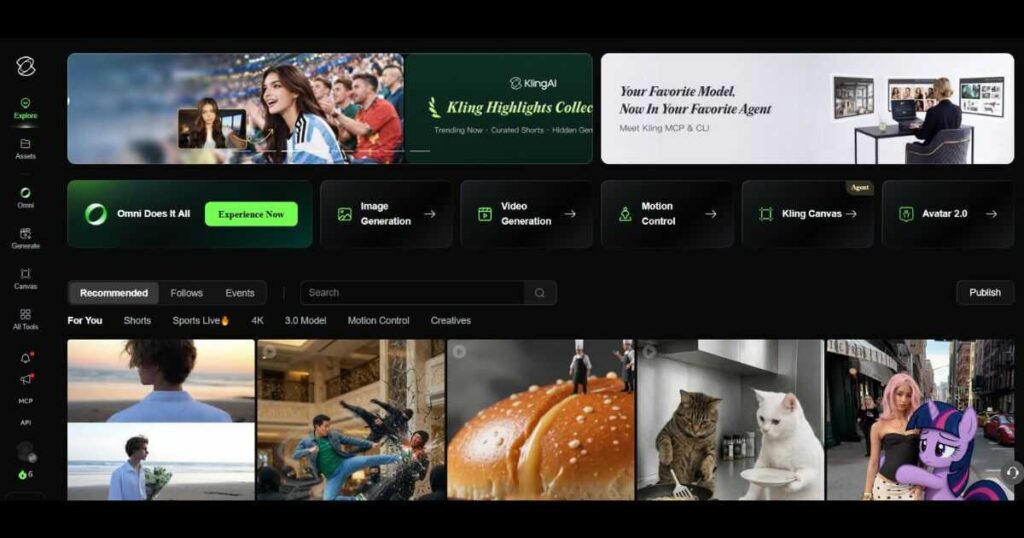
Kling AI is an all-in-one AI content creation platform developed by Kuaishou Technology. Instead of focusing on only one creative task, it combines multiple AI-powered tools into a unified workspace for generating videos, images, avatars, and complete creative projects.
Today, Kling AI supports:
- AI video generation.
- Text-to-video.
- Image-to-video.
- AI image generation.
- Multi-scene project creation with Canvas.
- Motion Control.
- AI avatars.
- Lip Sync.
- Audio generation.
- Image recognition.
- Developer integrations through the official Open Platform API.
Everything is managed from a modern dashboard that allows creators to switch between creative tools without leaving the platform.
This broad ecosystem is one of the main reasons Kling AI has become increasingly popular among YouTubers, marketers, designers, agencies, businesses, and developers looking for a centralized AI content creation solution.
Why Is Kling AI So Popular?
A modern Kling AI Review wouldn’t be complete without explaining why the platform has gained so much attention among creators.
Unlike many competitors that focus on a single AI model or one type of media generation, Kling AI continues expanding its ecosystem with new tools and workflows. This allows users to create, organize, and manage AI content without relying on multiple third-party applications.
Some of the biggest reasons behind Kling AI’s growing popularity include:
- Highly realistic AI video generation.
- Smooth camera movements and cinematic motion.
- Multiple AI video models for different production needs.
- Powerful AI image generation built into the same platform.
- Kling Canvas for organizing complete creative projects.
- Motion Control for more precise camera direction.
- Official Open Platform API for developers.
- Regular platform updates with new features and AI models.
- A growing ecosystem designed for creators, businesses, and enterprise users alike.
Instead of simply adding new AI models, Kling AI continues to expand into a complete creative platform, making it attractive for both individual creators and professional production teams.
Key Features Covered in This Kling AI Review
One of the biggest strengths of Kling AI is that it has evolved into a complete AI content creation ecosystem rather than focusing on a single generation model. Throughout this Kling AI Review, you’ll see that nearly every major creative workflow—from generating images to building multi-scene video projects—can now be completed within one platform.
Let’s explore the features that make Kling AI one of the most comprehensive AI creative platforms available today.
Kling AI Review: AI Video Generation
Video generation remains the core of the platform and the feature that first brought Kling AI to international attention.
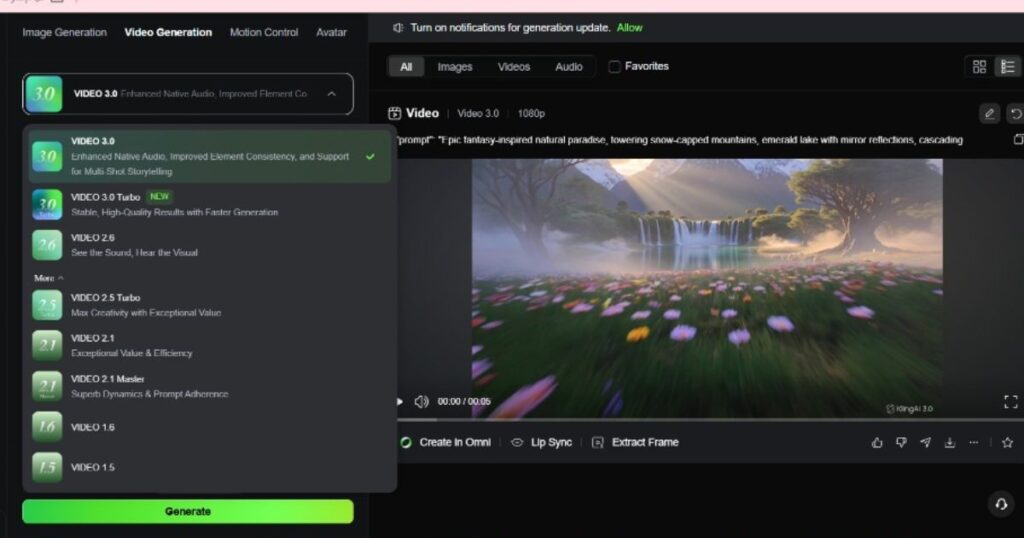
Today, Kling AI offers several video models designed for different production needs instead of forcing creators to rely on a single AI engine.
The current lineup includes:
- Kling Video 3.0.
- Kling Video 3.0 Turbo.
- Kling Video 3.0 Omni.
- Kling O1.
- Kling Video 2.6.
- Previous models for compatibility and specialized workflows.
Each model has its own strengths.
For example:
- Video 3.0 focuses on cinematic quality and improved scene consistency.
- Video 3.0 Turbo prioritizes faster generation while maintaining strong visual quality.
- Video 3.0 Omni introduces more flexible generation workflows with additional input options.
- Video 2.6 remains a strong option for creators who rely on Native Audio and Voice Control workflows.
Rather than replacing older models completely, Kling AI allows creators to choose the best model for each project.
This flexibility is one of the strongest points highlighted throughout this Kling AI Review, especially for professional creators managing different types of content.
Kling AI Review: AI Image Generation
Kling AI is no longer just a video platform.
It now includes a powerful image generation system capable of producing high-quality visuals for marketing, storytelling, concept art, product photography, and social media.
Current image models include:
- Kling Image 3.0.
- Kling Image 3.0 Omni.
- Kling Image O1.
- Kling Image 2.1.
- Previous Image models for compatibility.
The platform currently supports:
- Text-to-Image.
- Image-to-Image.
- Multi-image editing.
- High-resolution image generation.
- 4K image generation on supported models.
For creators producing both images and videos, having these capabilities inside the same ecosystem significantly simplifies production workflows.
Instead of switching between separate AI services, assets can be generated and managed from one dashboard.
Kling AI Review: Kling Canvas
One of the most significant additions covered in this Kling AI Review is Kling Canvas.
Canvas transforms Kling AI from a generation tool into a project management workspace built specifically for AI content creation.
Instead of creating isolated images or videos, Canvas allows creators to organize complete creative projects using specialized templates and structured workflows.
Current Canvas templates include:
- Storyboard.
- Multi-Angle Storyboard.
- Product Visuals.
- Product Advertising Video.
- Poster Design.
These templates are particularly valuable for:
- Marketing campaigns.
- Product launches.
- Brand storytelling.
- Social media campaigns.
- Commercial video production.
By keeping prompts, generated assets, and project planning in one place, Canvas reduces the need to constantly move between different creative applications.
For teams producing content regularly, this is one of the platform’s biggest productivity improvements.
👉 Want a deeper look at Canvas?
Read our complete Kling AI Canvas Review to explore every template, workflow, and practical use case.
🎬 Start Your First Kling Canvas Project
See how Kling Canvas can simplify your creative workflow.
👉 Try Kling AI Canvas FreePlan storyboards, generate AI visuals, and organize complete creative projects from one workspace.
Kling AI Review: Motion Control
Motion Control is another feature that separates Kling AI from many competing AI video platforms.
Instead of relying entirely on text prompts to describe movement, Motion Control allows creators to guide camera behavior more precisely.
This is especially useful for:
- Cinematic camera movements.
- Product demonstrations.
- Action sequences.
- Promotional advertisements.
- Professional marketing videos.
For creators seeking greater creative control, Motion Control makes it easier to produce dynamic scenes with smoother and more intentional camera motion.
Kling AI Review: AI Avatars, Lip Sync & Audio
Beyond images and videos, Kling AI also provides tools for creating talking characters and synchronized dialogue.
The platform currently supports:
- AI Avatars.
- Lip Sync.
- Text-to-Audio.
- Video-to-Audio.
- Custom Voice capabilities.
- Native Audio on supported workflows.
These tools make Kling AI suitable for much more than cinematic content.
Popular use cases include:
- Educational videos.
- Corporate presentations.
- AI presenters.
- Marketing campaigns.
- Faceless YouTube channels.
- Customer communication videos.
Having these features integrated into the same ecosystem allows creators to build richer AI-powered experiences without relying on several third-party services.
Kling AI Review: Open Platform API
Another major strength highlighted in this Kling AI Review is the official Kling AI Open Platform.
The developer platform allows businesses and software developers to integrate Kling AI directly into their own products using official APIs.
The Open Platform currently provides access to services including:
- AI Video Generation.
- AI Image Generation.
- Image-to-Video.
- Multi-Image-to-Video.
- Multi-Element Video Editing.
- Video Extension.
- Avatar Generation.
- Lip Sync.
- Audio Generation.
- Image Recognition.
Unlike the consumer web interface, the API uses a usage-based billing model designed for developers and enterprise applications.
If you’re building SaaS products, creative automation tools, or AI-powered applications, the Open Platform significantly expands what Kling AI can offer beyond its browser interface.
👉 Related guide: Read our detailed Kling AI API Review to learn about authentication, supported endpoints, pricing, and developer workflows.
Kling AI Review: User Interface & Overall Experience
An AI platform can offer powerful models, but if the interface is difficult to navigate, productivity quickly suffers. Fortunately, one of the strongest aspects highlighted in this Kling AI Review is the platform’s modern and well-organized user experience.
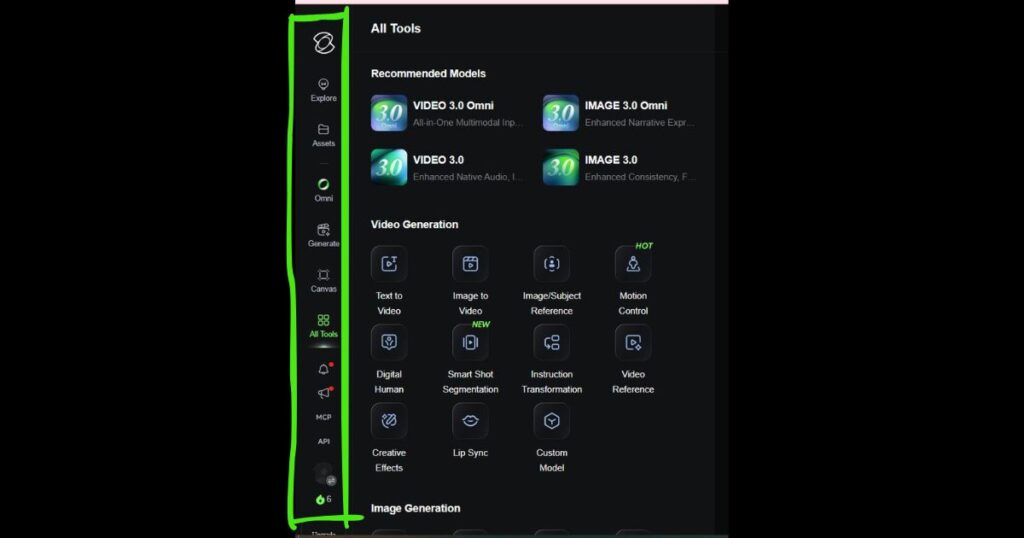
The latest version of Kling AI introduces a cleaner dashboard that groups related tools together, making it easier for both beginners and experienced creators to move through their projects.
The primary navigation currently includes:
- Explore – Browse featured creations and community inspiration.
- Assets – Manage generated images and videos.
- Omni – Access advanced AI generation workflows.
- Generate – Create AI videos using the latest Kling models.
- Canvas – Plan and organize complete creative projects.
- All Tools – Access every AI feature from one location.
- API – Open the developer platform and API documentation.
This logical organization reduces the learning curve and allows creators to focus on producing content rather than searching for features.
Kling AI Review: Supported AI Models
A major advantage discussed throughout this Kling AI Review is the flexibility offered by Kling AI’s expanding collection of AI models.
Rather than replacing previous versions every time a new model is released, Kling AI allows creators to select the most suitable model for each workflow.
Current Video Models
At the time of writing, the platform includes:
- Kling Video 3.0.
- Kling Video 3.0 Turbo.
- Kling Video 3.0 Omni.
- Kling O1.
- Kling Video 2.6.
- Kling Video 2.5 Turbo.
- Kling Video 2.1.
- Kling Video 2.1 Master.
- Kling Video 1.6.
- Kling Video 1.5.
- Kling Video 1.0.
This approach gives creators more flexibility depending on whether they prioritize cinematic quality, generation speed, Native Audio, or specialized production workflows.
Current Image Models
The image generation ecosystem has also expanded considerably.
Current models include:
- Kling Image 3.0.
- Kling Image 3.0 Omni.
- Kling Image O1.
- Kling Image 2.1.
- Kling Image 2.0.
- Kling Image 1.5.
- Kling Image 1.0
Because multiple generations remain available, users can choose the model that best fits their desired balance of quality, speed, and creative flexibility.
This growing model ecosystem is one reason why Kling AI continues attracting both professional creators and enterprise users.
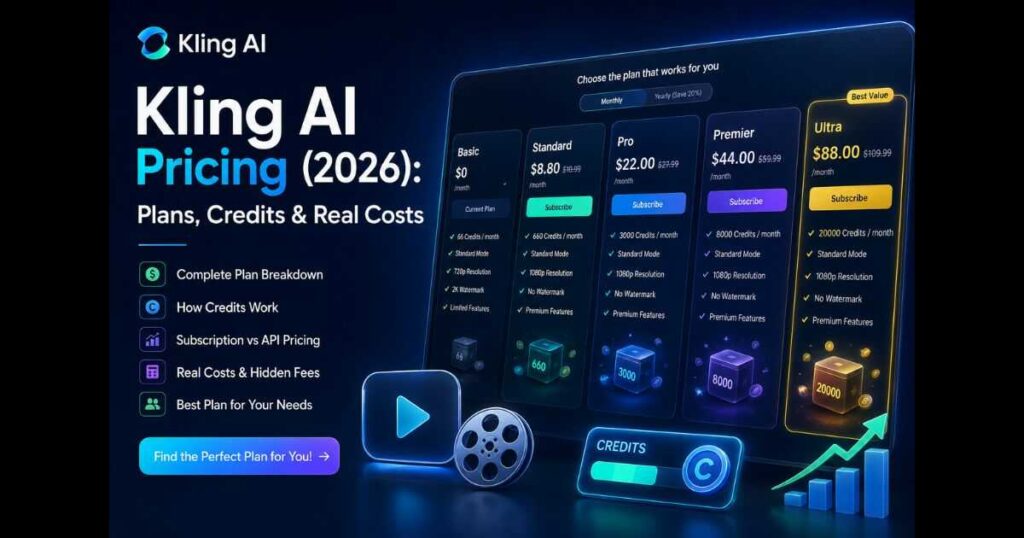
Kling AI Review: Subscription Plans
Another important part of this Kling AI Review is understanding how Kling AI structures its subscription plans.
Instead of offering only one premium option, the platform provides multiple tiers designed for different workloads—from casual creators to agencies producing AI content every day.
Basic
The Basic plan is intended for users who want to explore Kling AI before committing to a subscription. It offers access to the core platform with limited generation capacity and selected creative features.
Standard
Standard is aimed at creators who generate AI content regularly. It unlocks commercial usage, faster generation, watermark removal, higher-resolution exports, and additional premium tools.
Pro
The Pro plan is designed for professionals and businesses that require larger monthly generation capacity, faster workflows, and earlier access to selected platform improvements.
Premier
Premier targets agencies and full-time creators managing higher production volumes. It expands generation capacity while maintaining access to all premium creative features.
Ultra
Ultra is the newest and most powerful Kling AI subscription tier. It’s designed for users with demanding production workflows who require the platform’s highest generation capacity, maximum creative flexibility, and priority access to premium features.
Note: Kling AI updates its subscription plans, included benefits, and platform features periodically. Always check the official pricing page for the latest plan details before subscribing.
⭐ Find the Right Kling AI Plan
Whether you’re creating content occasionally or managing professional AI production every day, Kling AI offers a subscription tier that fits your workflow.
👉 Compare Kling AI Plans & Get StartedChoose the plan that matches your creative needs and unlock the full potential of the Kling AI platform.
Kling AI Review: Who Is Kling AI Best For?
One of the biggest takeaways from this Kling AI Review is that Kling AI serves a much broader audience than many competing AI generators.
The platform is particularly well suited for:
- YouTube creators.
- Faceless YouTube channels.
- Digital marketers.
- Social media managers.
- Graphic designers.
- Advertising agencies.
- E-commerce brands.
- Small businesses.
- Professional filmmakers.
- AI enthusiasts.
- Developers building AI-powered applications.
Because Kling AI combines AI video generation, image creation, Canvas, Motion Control, and developer APIs into a single ecosystem, it can support everything from individual creative projects to enterprise-scale production workflows.
Kling AI vs Runway
Choosing between Kling AI and Runway isn’t always straightforward because both platforms have evolved far beyond simple AI video generators. While they share some overlapping capabilities, they are designed with different priorities in mind.
Runway has traditionally focused on AI-powered video editing and filmmaking workflows, making it a popular choice among professional creators and production teams. Kling AI, on the other hand, has expanded into a much broader ecosystem that combines AI video generation, AI image generation, Canvas project management, developer APIs, avatars, and multiple specialized AI models within a single platform.
For creators looking for an all-in-one solution, Kling AI now offers a wider range of creative tools without requiring multiple services.
| Feature | Kling AI | Runway |
| AI Video Generation | ✅ | ✅ |
| AI Image Generation | ✅ | Limited |
| Canvas Workspace | ✅ | ❌ |
| Motion Control | ✅ | ✅ |
| Open Platform API | ✅ | ✅ |
| AI Avatars | ✅ | Limited |
| Best For | All-in-one AI creation | Video-focused workflows |
Neither platform is objectively better for everyone. If your workflow centers on professional video editing and cinematic production, Runway remains an excellent choice. However, if you want a single platform capable of handling videos, images, project planning, automation, and developer integrations, Kling AI provides a more comprehensive ecosystem.
👉 Read our complete Kling AI vs Runway comparison to explore feature-by-feature differences, pricing, AI models, and real-world performance.
What Makes Kling AI Different?
One of the biggest strengths highlighted throughout this Kling AI Review is that Kling AI is no longer just another AI video generator. Instead, it has evolved into a complete AI creation ecosystem where nearly every stage of the creative workflow can be managed from one platform.
Rather than relying on several third-party tools, creators can generate videos, create images, organize projects, automate production, and even integrate AI capabilities into their own applications using the official Open Platform API.
Some of the features that distinguish Kling AI from many competitors include:
- Multiple AI video models for different creative workflows.
- Advanced AI image generation within the same platform.
- Kling Canvas for planning storyboards and managing multi-scene projects.
- Motion Control for more precise camera movement.
- Native Audio and Voice Control on supported models.
- AI avatars, Lip Sync, and audio generation.
- Official Open Platform API for developers.
- Continuous updates with new models instead of replacing older versions.
This combination makes Kling AI suitable for individual creators, marketing agencies, software companies, enterprise teams, and developers building AI-powered products.
As the platform continues expanding, it is becoming one of the few AI ecosystems capable of supporting everything from a single social media video to large-scale commercial production pipelines.
Pros & Cons
Pros
- Comprehensive AI video and image generation platform.
- Multiple AI models for different creative needs.
- Powerful Canvas workspace for project planning.
- Motion Control for improved camera direction.
- Native Audio support on selected models.
- Official Open Platform API for developers.
- Regular feature updates and new model releases.
- Suitable for creators, businesses, and enterprise users.
- Modern interface with centralized project management.
Cons
- Premium features require a paid subscription.
- Some advanced models consume credits more quickly.
- API pricing is designed primarily for professional developers.
- New users may need time to explore the growing ecosystem.
Is Kling AI Worth It?
After testing the platform and examining its latest features, this Kling AI Review concludes that Kling AI has become much more than an AI video generator.
The addition of Video 3.0, advanced image models, Canvas, Motion Control, developer APIs, and multiple creative workflows has transformed it into one of the most complete AI content creation ecosystems currently available.
For content creators, marketers, agencies, and businesses that need both AI images and videos, Kling AI offers excellent value because nearly every creative task can be completed within the same platform.
Developers also benefit from the official Open Platform, which provides access to AI video generation, image generation, avatars, audio, and automation through production-ready APIs.
If your goal is to build a long-term AI content workflow instead of relying on separate tools for each task, Kling AI is one of the strongest options available in 2026.
Continue Learning
- Kling AI Video 3.0 Review — Discover the newest video model, native audio, and performance improvements.
- Kling AI API Review — Learn how developers can integrate Kling AI into their own applications.
- Kling AI Canvas Review — Explore Canvas templates and project workflows.
- Kling AI Pricing — Compare plans, credits, and choose the right subscription.
- Kling AI Motion Control — Learn how to create more cinematic AI videos with precise camera movement.
- YouTube Automation Tools (2026): 15 Best AI Picks — Discover the best AI tools to automate scripting, video creation, editing, thumbnails, and YouTube SEO in one complete workflow.
- Character Swap AI Video: How to Replace Characters in Any Video — Learn how to replace characters in videos using AI while preserving the original scene, actions, and camera movement.
Final Verdict
Overall Rating: ⭐ 9.6 / 10
Kling AI continues to push beyond traditional AI video generation by combining powerful creative models, project management, developer tools, and automation into one unified ecosystem.
Its expanding collection of AI models, Canvas workspace, Motion Control, Open Platform API, and image generation capabilities make it suitable for beginners, professional creators, businesses, and developers alike.
While premium plans and API usage can become expensive for high-volume production, the overall feature set, continual updates, and broad creative ecosystem make Kling AI one of the best AI platforms available today.
🚀 Try Kling AI Today
Ready to experience everything covered in this Kling AI Review?
👉 Create Your Free Kling AI AccountGenerate AI videos and images, organize projects with Canvas, explore the Open Platform API, and access the latest Kling AI models from one powerful creative ecosystem.