
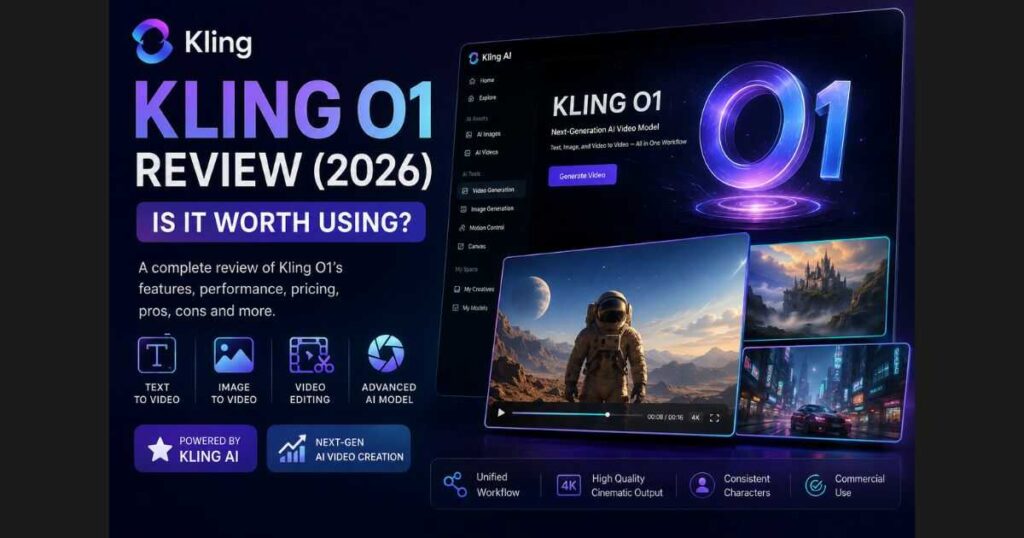
Kling O1 Review (2026): Features, Pricing & Is It Worth It?
Artificial intelligence is transforming video production faster than ever, and Kling O1 is one of the most exciting innovations driving that change. Introduced as Kling AI’s first unified multimodal video model, it goes beyond traditional text-to-video generation by combining text, images, and video editing into a seamless creative workflow.
Instead of relying on multiple AI tools for different tasks, creators can build, refine, and enhance projects inside a single ecosystem. This approach saves time, improves consistency, and makes professional AI video production more accessible than ever before.
In this Kling O1 Review, we’ll take an in-depth look at the model’s features, real-world performance, pricing, strengths, weaknesses, and who should consider using it in 2026.
Whether you’re a YouTuber, filmmaker, digital marketer, or content creator, this guide will help you decide if Kling O1 deserves a place in your workflow.
Kling O1 at a Glance
| Category | Details |
| Product | Kling O1 |
| Platform | Kling AI |
| Primary Purpose | Unified AI video generation & editing |
| Best For | YouTubers, filmmakers, marketers, agencies |
| Text-to-Video | ✅ Yes |
| Image-to-Video | ✅ Yes |
| Video Editing | ✅ Yes |
| Scene Consistency | Excellent |
| Reference Images | Supported |
| Free Plan | Available |
| Recommended for Professionals | Ultra Plan |
🚀 See What Kling O1 Can Create
Curious to see how Kling O1 performs with your own ideas?
What Is Kling O1?
Kling O1 is Kling AI’s latest premium AI model designed to simplify complex creative workflows through multimodal generation.
Unlike traditional AI video generators that primarily transform text prompts into videos, Kling O1 allows creators to work with multiple types of input within a single project.
These include:
- Text prompts.
- Reference images.
- Existing videos.
- Camera adjustments.
- Scene modifications.
- Visual editing.
This makes Kling O1 far more flexible than a standard text-to-video model. Instead of restarting a project every time you want to make changes, you can continue refining your work while maintaining visual consistency.
The result is a smoother production process that feels much closer to professional video editing than previous generations of AI video tools.
What Makes Kling O1 Different?
The AI video market is becoming increasingly competitive.
Today, creators can choose from powerful models such as:
- Google Veo.
- OpenAI Sora.
- Runway Gen-4.
- Pika.
- Luma Dream Machine.
So what makes Kling O1 stand out?
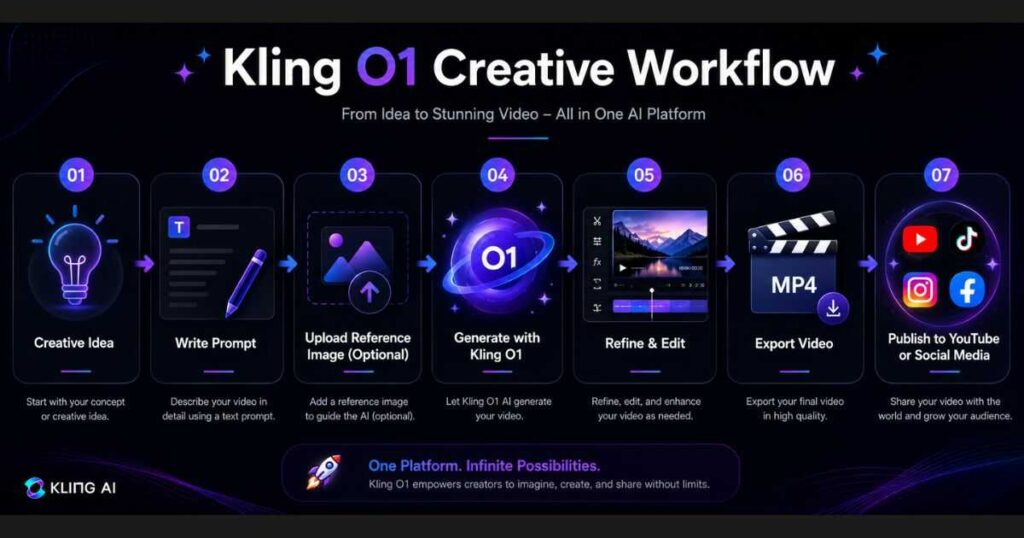
Rather than focusing on just one task, Kling O1 is designed around a multimodal creative workflow.
That means creators can combine several stages of production without constantly switching platforms.
For example, you can:
- Start with a written prompt.
- Upload a reference image.
- Generate a video.
- Adjust the camera perspective.
- Refine the scene.
- Continue editing the same project.
This significantly reduces production time while helping maintain consistent characters, lighting, and overall visual quality throughout the project.
For creators producing videos regularly, this streamlined workflow can become a major productivity advantage.
Key Features Covered in This Kling O1 Review
Throughout this Kling O1 Review, we’ll examine every major capability the model offers, including:
- Text-to-Video Generation.
- Image-to-Video Animation.
- AI Video Editing.
- Character Consistency.
- Prompt Understanding.
- Pricing & Subscription Plans.
- Real-World Performance.
- Pros & Cons.
- Comparison with Kling 2.6.
- Whether the Ultra Plan is worth considering.
Rather than relying solely on technical specifications, we’ll focus on how these features perform in real creative projects and whether they provide meaningful value for different types of users.
Who Should Read This Kling O1 Review?
Kling O1 is designed for a wide range of creators, but it will be especially valuable if you are:
✅ A YouTube creator producing faceless or cinematic videos.
✅ A marketer creating promotional content.
✅ A filmmaker experimenting with AI storytelling.
✅ A freelancer delivering videos for clients.
✅ A business owner producing product advertisements.
✅ A social media manager creating short-form content.
If any of these describe your work, Kling O1 offers tools that can simplify your production process and improve the quality of your AI-generated videos.
Kling O1 Review: Real-World Performance
Specifications only tell part of the story. The real question is how Kling O1 performs during everyday content creation.
To evaluate this model fairly, it’s important to look beyond marketing claims and examine the areas that matter most to creators:
- Video quality.
- Character consistency.
- Prompt understanding.
- Image-to-video animation.
- Editing workflow.
- Ease of use.
After testing these areas, it’s clear that Kling O1 is designed for creators who want more than a simple text-to-video generator. It focuses on creating a smoother production workflow while maintaining high visual quality throughout the creative process.
Kling O1 Review: Video Quality
Video quality is where Kling O1 makes one of its biggest improvements.
Compared with earlier Kling models, videos generated by Kling O1 generally feature:
- More realistic lighting.
- Better facial details.
- Cleaner textures.
- Improved environmental depth.
- More natural camera movement.
Rather than producing clips that feel artificial, Kling O1 aims to generate videos with a cinematic appearance that requires less post-production.
This is particularly noticeable in scenes involving:
- Outdoor environments.
- Character close-ups.
- Product showcases.
- Storytelling sequences.
The improved visual quality makes Kling O1 suitable for professional marketing campaigns as well as YouTube productions.
Better Character Consistency
Maintaining consistent characters across multiple scenes has always been one of the biggest challenges in AI video generation.
Older AI models often changed:
- facial features.
- hairstyles.
- clothing.
- proportions.
- accessories.
between shots.
One of the strongest improvements highlighted in this Kling O1 Review is its ability to preserve visual consistency throughout longer projects.
When reference images are used, Kling O1 does a much better job of maintaining the same character identity across multiple generations.
This makes it especially valuable for:
- AI short films.
- Educational videos.
- Brand mascots.
- Digital influencers.
- YouTube storytelling.
For creators producing episodic content, this consistency alone can save significant editing time.
Prompt Understanding
Prompt interpretation has also improved noticeably.
Instead of requiring extremely detailed prompts to achieve acceptable results, Kling O1 understands more natural descriptions while still generating impressive outputs.
For example, prompts describing:
- lighting.
- weather.
- emotions.
- camera movement.
- atmosphere.
- cinematic style.
are reproduced more accurately than in previous Kling models.
This reduces the number of failed generations and helps creators use their credits more efficiently.
Image-to-Video Performance
Image-to-video generation remains one of Kling AI’s strongest capabilities, and Kling O1 continues that trend.
Creators can upload a reference image and transform it into a dynamic animated sequence with realistic movement.
Typical use cases include:
- Product demonstrations.
- Fantasy artwork.
- Digital illustrations.
- AI portraits.
- Architecture visualization.
- Travel photography.
Rather than applying random movement, Kling O1 attempts to preserve the original composition while adding believable animation and cinematic camera motion.
The resulting videos often feel significantly more polished than those generated by older AI models.
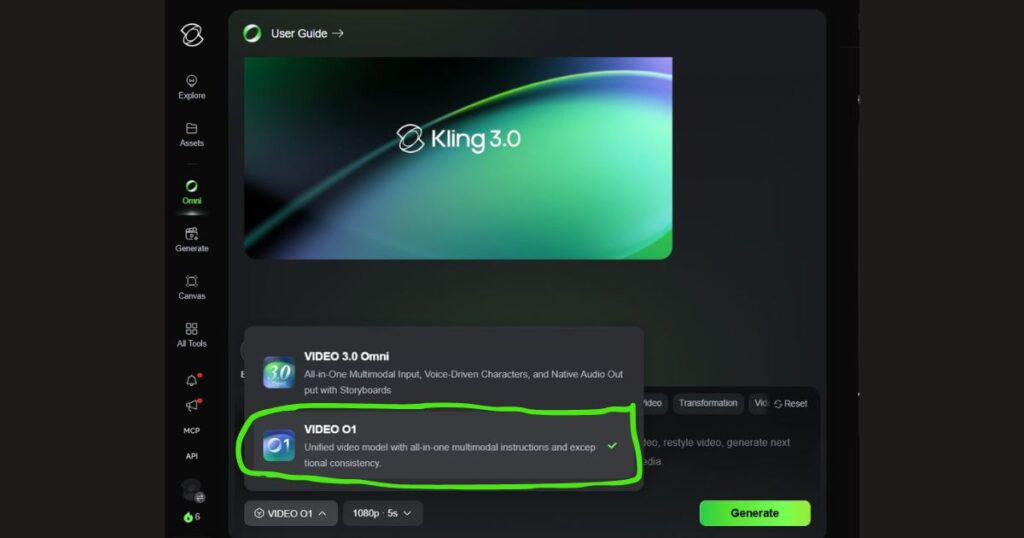
Editing Existing Videos
One of the most practical advantages of Kling O1 is its ability to work with existing content.
Instead of generating every project from scratch, creators can refine videos by making targeted adjustments.
Examples include:
- modifying scenes.
- changing backgrounds.
- replacing visual elements.
- improving composition.
- extending existing footage.
- refining camera perspectives.
This flexibility allows creators to iterate on ideas rather than starting over every time they want to make improvements.
For professional teams and agencies, this can significantly reduce production time.
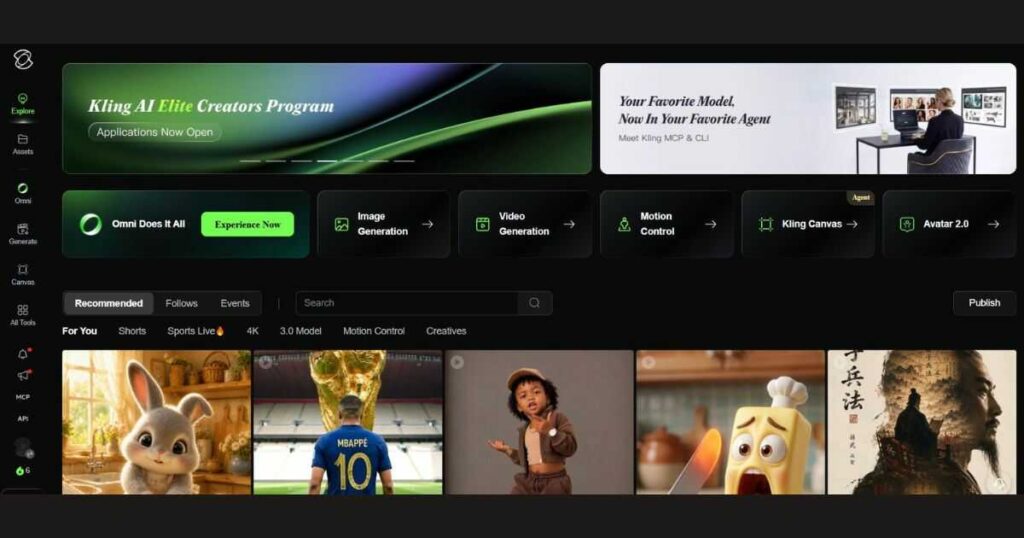
Ease of Use
Despite its advanced capabilities, Kling O1 remains surprisingly approachable for new users.
The interface is clean and well organized, making it easy to locate essential tools without feeling overwhelmed.
Creators can quickly move between:
- Video Generation.
- Image Generation.
- Motion Control.
- Canvas.
- Omni.
- Assets.
without navigating a complicated menu structure.
This makes Kling O1 suitable for both beginners and experienced creators.
If you’re completely new to the platform, it’s worth reading our Kling AI Tutorial (2026) before exploring the advanced features covered in this review.
🎬 Create Your First Kling O1 Video
Now that you’ve seen how Kling O1 performs in real-world scenarios, why not test it yourself?
Whether you’re experimenting with AI storytelling or producing professional marketing content, the free plan is an excellent way to explore what Kling O1 can do before deciding if a premium subscription is right for your workflow.
Kling O1 vs Kling 2.6
One of the most common questions creators ask is whether they should use Kling O1 or Kling 2.6. While both models are built by Kling AI and deliver impressive AI-generated videos, they are designed with different priorities in mind.
In this Kling O1 Review, it’s important to understand that these models complement each other rather than compete directly.
Kling O1 focuses on an integrated creative workflow that combines generation and editing, making it an excellent choice for storytelling, long-form projects, and productions that require visual consistency.
Kling 2.6, on the other hand, introduces features such as Voice Control and advanced Motion Control, making it particularly attractive for creators who need synchronized character movement and audio generation.
The table below summarizes the key differences.
| Feature | Kling O1 | Kling 2.6 |
| Best For | Storytelling & creative workflows | Character animation & audio generation |
| Multimodal Workflow | Excellent | Limited |
| Image Editing | Advanced | Basic |
| Scene Consistency | Excellent | Very Good |
| Image-to-Video | Excellent | Excellent |
| Voice Control | No | Yes |
| Motion Control | Supported | Advanced |
| Learning Curve | Easy | Easy |
For many creators, the decision comes down to the type of content they produce.
If your goal is creating cinematic AI videos with consistent characters and flexible editing, Kling O1 is likely the better fit.
If your projects rely heavily on expressive character animation, synchronized speech, or advanced motion controls, Kling 2.6 may be the stronger option.
Pricing and Subscription Plans
A complete Kling O1 Review should also consider whether the model offers good value for money.
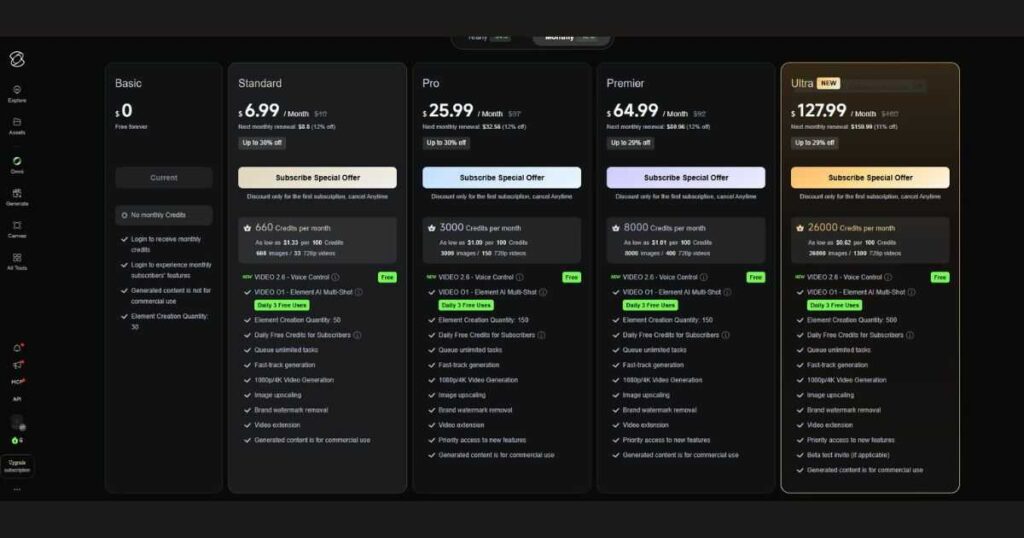
The good news is that Kling O1 is available through the standard Kling AI subscription system, allowing creators to start with the free plan before upgrading as their production needs grow.
At the time of writing, Kling AI offers several plans, including:
- Basic.
- Standard.
- Pro.
- Premier.
- Ultra.
Each tier increases monthly credits, generation limits, and access to advanced capabilities.
For occasional creators, the free plan provides enough resources to explore the platform and understand how Kling O1 works.
However, professionals producing videos on a regular basis will quickly benefit from higher credit limits and faster generation speeds.
Why Professional Creators May Prefer the Ultra Plan
Rather than saying the Ultra plan is the best choice for everyone, it’s more accurate to say that professional creators are likely to benefit the most from it.
The Ultra plan is designed for users who create content frequently and need access to Kling AI’s most advanced capabilities.
Depending on the current subscription details available from Kling AI, higher-tier plans generally provide benefits such as:
- More monthly credits.
- Faster generation priority.
- Access to premium AI models.
- Commercial usage rights.
- Higher creative limits.
- Early access to selected features.
If you publish YouTube videos every week, create marketing campaigns for clients, or run a content agency, the additional resources offered by the Ultra plan can significantly improve your production workflow.
For hobbyists or occasional users, starting with the free plan remains a practical way to evaluate the platform before committing to a subscription.
⭐ Unlock More Creative Possibilities
Ready to take advantage of higher credit limits and premium AI features?
Pros and Cons
Every AI model has strengths and limitations, and Kling O1 is no exception.
After evaluating its performance across multiple workflows, here are the main advantages and disadvantages.
Pros
- Excellent video quality with cinematic results.
- Strong character consistency across multiple scenes.
- Accurate prompt interpretation.
- Powerful image-to-video generation.
- Integrated editing workflow.
- Beginner-friendly interface.
- Suitable for both personal and commercial projects.
- Regular platform improvements and new AI features.
Cons
- Advanced capabilities require a paid subscription.
- High-quality generations consume credits more quickly.
- Some professional features have a learning curve for new users.
- Availability of specific premium features depends on the selected subscription plan.
None of these drawbacks are unusual for modern AI video platforms, and overall they do little to reduce Kling O1’s value for creators who produce content regularly.
Best Use Cases for Kling O1
Throughout this Kling O1 Review, one thing becomes clear: Kling O1 is versatile enough to support many different creative workflows.
It performs particularly well in the following areas.
YouTube Content Creation
Generate:
- Faceless YouTube videos.
- Educational explainers.
- Documentary visuals.
- Storytelling content.
- AI-generated intros.
Marketing & Advertising
Create professional promotional videos for:
- Products.
- Services.
- Social media campaigns.
- Landing pages.
- Brand awareness.
Creative Storytelling
Kling O1’s ability to maintain consistent characters and environments makes it well suited for:
- Short films.
- Fantasy scenes.
- Animated narratives.
- Creative concepts.
- Visual storytelling projects.
Business Content
Businesses can use Kling O1 to produce:
- Product showcases.
- Training videos.
- Corporate presentations.
- Promotional content.
without the cost of traditional video production.
Frequently Asked Questions
What is Kling O1?
Kling O1 is an advanced AI video model available within the Kling AI platform. It is designed to help creators generate and refine videos using text prompts, reference images, and integrated editing tools inside a unified creative workflow.
What is the difference between Kling O1 and Kling AI?
This is one of the most common questions people ask.
Kling AI is the complete AI creative platform that includes multiple tools and models, such as:
- Video Generation.
- Image Generation.
- Motion Control.
- Kling Canvas.
- Avatar 2.0.
- Kling O1.
- Kling 2.6.
Kling O1, on the other hand, is one specific AI model within the Kling AI ecosystem. Think of Kling AI as the platform, while Kling O1 is one of its most advanced video-generation models.
Is Kling O1 free to use?
Yes. New users can explore Kling O1 through Kling AI’s free plan.
The free plan is an excellent way to learn the platform and experiment with AI video creation before deciding whether a paid subscription fits your workflow.
If you create videos regularly, upgrading to a higher-tier subscription provides additional credits, faster generation, and access to more advanced features.
Does Kling O1 support commercial use?
Commercial usage is available through eligible paid subscriptions.
If you’re producing videos for clients, running marketing campaigns, or creating commercial content for your business, be sure to review the latest subscription details on Kling AI before publishing client work.
Is Kling O1 better than Kling 2.6?
Neither model is universally “better”—they simply focus on different creative needs.
Choose Kling O1 if you want:
- Better storytelling workflows.
- Strong character consistency.
- Advanced image editing.
- Flexible project refinement.
Choose Kling 2.6 if your projects rely heavily on:
- Voice Control.
- Advanced Motion Control.
- AI-generated speech.
- Built-in sound generation.
Many professional creators use both models depending on the type of project they’re producing.
Who should use Kling O1?
Based on this Kling O1 Review, the model is ideal for:
- YouTube creators.
- AI filmmakers.
- Freelancers.
- Marketing agencies.
- Small businesses.
- Digital marketers.
- Social media creators.
- Anyone producing AI-generated videos on a regular basis.
Continue Learning
Want to master the entire Kling AI ecosystem? Continue with these in-depth guides:
- Kling AI Review (2026): Complete Hands-On Review — Explore the platform’s core features, strengths, and overall performance.
- Kling AI Pricing (2026): Plans, Credits & Which One Should You Choose? — Compare every subscription plan before upgrading.
- Kling AI Tutorial: Complete Beginner’s Guide (2026) — Learn how to create professional AI videos from scratch.
- Kling AI Motion Control: Complete Guide (2026) — Discover how to create realistic camera movements and expressive character animations.
- Kling AI Omni: Complete Guide (2026) — Learn how Kling AI’s unified creative workspace simplifies AI video production.
- Kling AI Alternatives: 7 Best AI Video Tools (2026) — Compare Kling AI with other leading AI video generators to find the best solution for your workflow.
- Kling AI Voice Control (2026): Complete Guide — Master AI voices, Native Audio, and realistic lip sync in Kling AI.
Final Verdict
After thoroughly testing the platform for this Kling O1 Review, it’s clear that Kling O1 represents one of the most capable AI video models currently available within the Kling AI ecosystem.
Its biggest strength isn’t simply generating attractive AI videos—it’s how smoothly it connects different stages of the creative process. From writing prompts and using reference images to refining scenes and maintaining visual consistency, Kling O1 helps creators produce higher-quality content with fewer interruptions.
For YouTubers, marketers, filmmakers, and businesses creating videos regularly, this streamlined workflow can significantly reduce production time while improving overall results.
Although the free plan is a great starting point, creators with higher production demands may find additional value in one of Kling AI’s premium subscriptions, particularly if they require larger monthly credit allowances and access to advanced platform features.
Overall, Kling O1 is absolutely worth exploring in 2026, especially if you’re looking for an AI video solution that balances quality, flexibility, and ease of use.
🚀 Ready to Try Kling O1?
See what you can create with one of Kling AI’s most advanced video models.
If you plan to produce videos frequently or need access to premium AI capabilities, you can also explore Kling AI’s paid subscription options to unlock additional credits and advanced creative tools.

