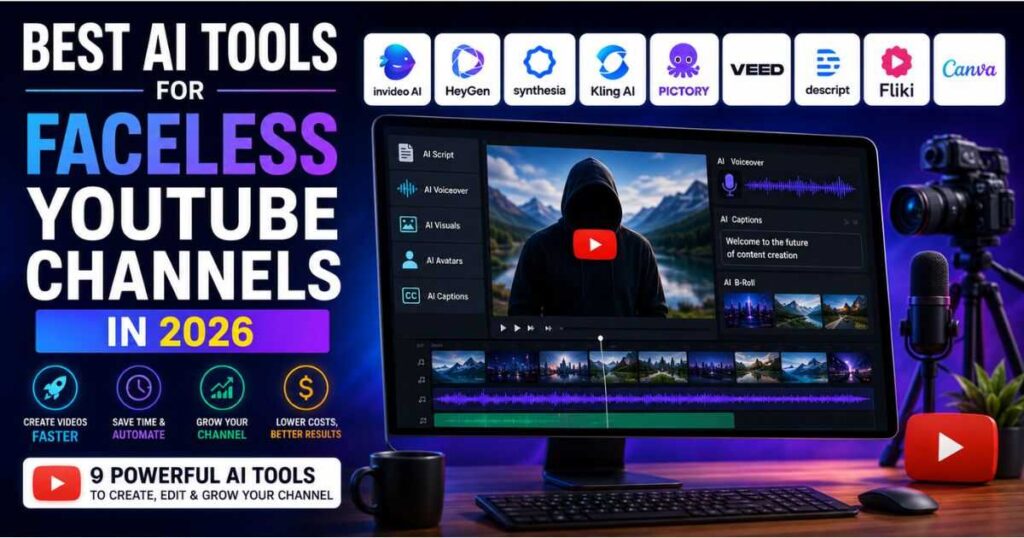
Best AI Tools for Faceless YouTube Channels in 2026
Building a YouTube channel without showing your face is easier than ever, but creating good videos consistently is still a real challenge. You need to research topics, write scripts, create voiceovers, find visuals, edit videos, design thumbnails, and publish content regularly.
That is where the best AI tools for faceless YouTube channels can make a major difference. Instead of handling every part of production manually, creators can use AI to automate repetitive tasks while spending more time on ideas, storytelling, and channel strategy.
However, choosing the right tools is not as simple as picking the platform with the longest feature list. Some tools are excellent for complete video production, while others are better for cinematic visuals, AI presenters, voiceovers, editing, or repurposing content.
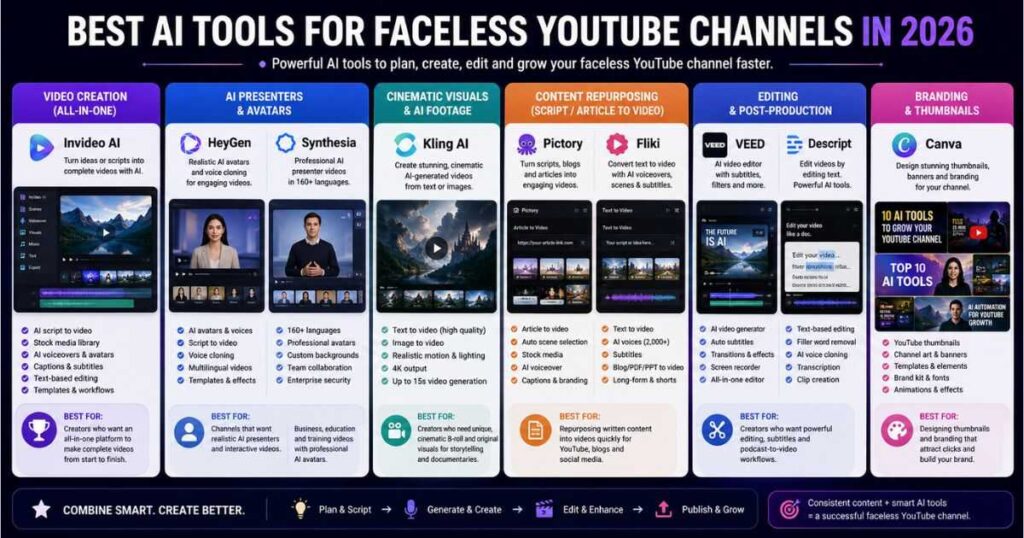
In this guide, we compare the best AI tools for faceless YouTube channels in 2026 and explain exactly where each tool fits into a practical YouTube workflow.
What Are the Best AI Tools for Faceless YouTube Channels?
The best AI tools for faceless YouTube channels are not necessarily the tools that can generate the most impressive-looking AI clips.
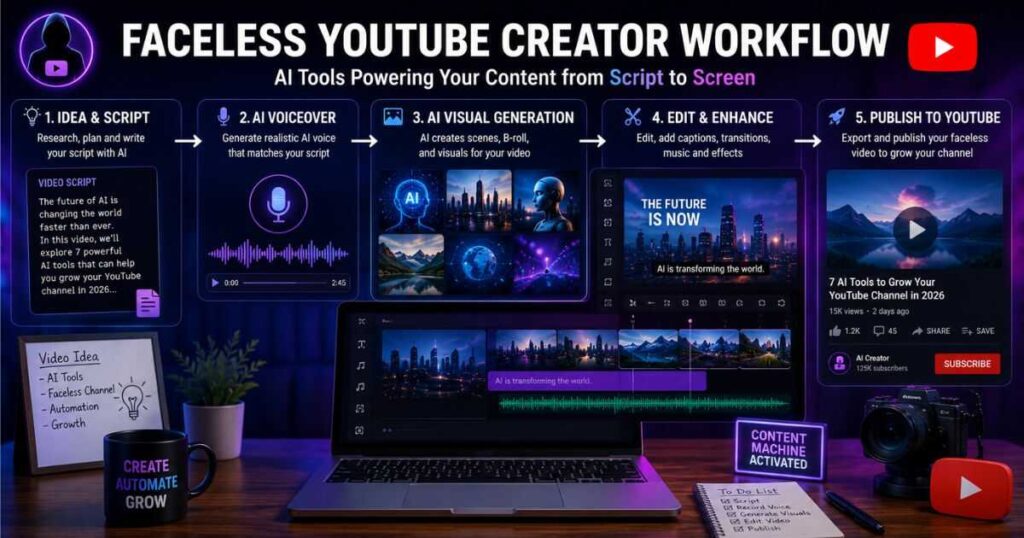
A successful faceless channel usually needs several different capabilities:
- Topic and script development
- AI voiceover
- Video generation
- B-roll and visual creation
- Editing
- Captions
- Avatars when needed
- Content repurposing
- Thumbnail and branding support
The important question is therefore not simply, “Which AI video generator is the best?”
A better question is:
Which combination of AI tools can help me produce useful, original, and engaging YouTube videos consistently?
For most creators, an all-in-one platform can be the easiest place to start. More advanced creators may eventually combine several specialized tools.
Quick comparison
| Tool | Best For | Faceless Videos | AI Voice | AI Visuals | Editing |
| InVideo AI | Complete video production | ✅ | ✅ | ✅ | ✅ |
| HeyGen | AI presenters & video creation | ✅ | ✅ | ✅ | ✅ |
| Synthesia | Professional presenter videos | ✅ | ✅ | ✅ | ✅ |
| Kling AI | Cinematic visuals | ✅ | ✅ | ⭐⭐⭐⭐⭐ | Limited |
| Pictory | Script and article to video | ✅ | ✅ | ✅ | ✅ |
| VEED | AI creation + editing | ✅ | ✅ | ✅ | ⭐⭐⭐⭐⭐ |
| Descript | Text-based editing | ✅ | ✅ | ✅ | ⭐⭐⭐⭐⭐ |
| Fliki | Script-to-video production | ✅ | ✅ | ✅ | ✅ |
| Canva | Thumbnails & channel branding | Partly | ✅ | ✅ | ✅ |
1. InVideo AI — Best Overall for Faceless YouTube
If you want one platform to handle a large part of your production workflow, InVideo AI is one of the strongest options available.
Its current platform combines AI video generation, AI workflows, stock media, AI models, avatars, voice clones, and editing. Its Agent Two system is designed to carry a video project from the initial brief toward a finished cut.
This is particularly useful for faceless YouTube because you can start with an idea or script instead of building an entire project manually.
For creators comparing the best AI tools for faceless YouTube channels, InVideo AI stands out because it can handle multiple production stages from one platform.
For example, imagine you want to create a video titled:
“7 AI Tools That Can Help You Start a YouTube Channel.”
Instead of collecting every clip yourself, you can provide the concept and let InVideo AI build an initial version containing scenes, narration, visuals, captions, and other elements.
Why InVideo AI is useful
- AI video generation
- Automated workflows
- Stock footage and images
- AI voiceovers
- AI avatars
- AI models
- Captions
- Text-based editing
- Long-form content workflows
Its current Plus plan starts at $17/month when billed annually, with higher plans offering substantially more credits and generation capacity.
Best for
Faceless YouTube creators who want an all-in-one production platform.
The downside
Highly automated videos can still look generic if you publish them without editing. Your script, pacing, visual selection, and storytelling still matter.
That is why the best AI tools for faceless YouTube channels should be treated as production assistants rather than complete replacements for human creativity.
Ready to create faceless YouTube videos faster? Try InVideo AI and turn your ideas or scripts into complete videos with AI.
2. HeyGen — Best for AI Presenter Videos
HeyGen is particularly strong when you want a human-like presenter without recording yourself.
Although faceless YouTube traditionally means using narration over B-roll, some channels benefit from an AI presenter. Educational channels, software tutorials, business explainers, news-style videos, and commentary content can all use this format.
HeyGen’s current Script to Video system can take a script and produce a video with narration, captions, transition graphics, matched stock footage, and an AI avatar.
That makes HeyGen one of the most flexible options among the best AI tools for faceless YouTube channels.
What makes HeyGen different?
The biggest advantage is presentation.
Among the best AI tools for faceless YouTube channels, HeyGen is especially useful for creators who want a more human-style presentation without appearing on camera.
Instead of creating a video where the audience only hears a voice, you can use an AI presenter to deliver the script.
HeyGen also offers voice cloning, multilingual video creation, AI Studio, translation, and additional AI video applications. Its current Creator plan is $29/month, with an annual effective price of $24/month, while Pro starts at $49/month.
Best for
- AI presenter channels
- Educational videos
- Tutorials
- Product explainers
- Business content
- Multilingual YouTube channels
The downside
If your channel depends heavily on cinematic storytelling, an AI presenter may actually make the content feel less distinctive.
Want to create YouTube videos with a realistic AI presenter instead of appearing on camera? Try HeyGen and create your first video for free.
For a deeper look, read our HeyGen Review (2026).
3. Synthesia — Best for Professional Faceless Videos
Synthesia is another strong choice, especially if your faceless channel focuses on education, tutorials, professional development, technology, or business.
The platform is built around AI avatars and voiceovers, making it possible to turn scripts into presenter-led videos without cameras or traditional production equipment.
Synthesia currently supports AI video creation in 160+ languages, and its platform combines avatars, voiceovers, dubbing, video creation, and professional collaboration features.
Why use Synthesia for YouTube?
Not every faceless channel needs cinematic footage.
For some niches, viewers mainly want clear information delivered quickly.
This makes Synthesia one of the best AI tools for faceless YouTube channels for creators producing structured educational or professional content.
A technology tutorial, business lesson, software explanation, or educational video can work extremely well with a professional AI presenter.
Synthesia’s Basic plan is free, while its Starter plan is currently $29/month when billed monthly, with annual billing offering a lower effective rate.
Best for
Professional, educational, and business-oriented faceless channels.
The downside
If you want high-volume entertainment content with constantly changing cinematic visuals, other tools may offer a more suitable workflow.
Create professional YouTube videos without filming yourself. Try Synthesia and turn your scripts into polished AI-presenter videos.
You can also explore our guide to Synthesia Text to Video for a more detailed look at its workflow.
4. Kling AI — Best for Cinematic Faceless YouTube Visuals
Kling AI deserves a place among the best AI tools for faceless YouTube channels, but for a different reason.
It is not primarily an automated YouTube production platform.
Instead, Kling is particularly useful when you need original AI-generated footage.
Kling 3.0 currently supports text-to-video and image-to-video generation, native audio, character consistency, lip sync, 4K output, and video generation up to 15 seconds.
That makes it extremely useful for channels where visual storytelling matters.
For creators evaluating the best AI tools for faceless YouTube channels, Kling AI fills an important gap by providing original cinematic visuals instead of relying entirely on stock footage.
Imagine creating a history documentary about ancient civilizations.
Instead of relying entirely on stock footage, you could generate cinematic scenes showing an ancient city, soldiers moving through a battlefield, or a historical environment.
Best uses
- Documentary channels
- History channels
- Storytelling
- Fantasy
- Science content
- Cinematic B-roll
- AI short films
- Creative advertisements
The smart way to use Kling AI
You don’t necessarily need Kling to create your entire YouTube video.
A more efficient workflow can be:
Script → InVideo AI → Identify important scenes → Kling AI → Generate custom B-roll → Final editing
This hybrid approach gives you automation while allowing you to replace generic footage with original visuals.
Need cinematic visuals for your faceless YouTube videos? Try Kling AI and turn your ideas into high-quality AI-generated scenes.
For more information, see our Kling AI Omni Complete Guide.
5. Pictory — Best for Turning Scripts and Articles Into Videos
Pictory is especially useful for creators who already have written content.
Its platform can turn scripts, articles, URLs, presentations, and other written material into videos. It also provides stock media, AI voices, captions, B-roll, and editing tools.
This makes Pictory particularly interesting if you are building a content ecosystem around both a website and YouTube channel.
It can therefore be one of the best AI tools for faceless YouTube channels for bloggers and creators who want to turn existing written content into videos.
For example:
Blog article → YouTube script → Pictory video → YouTube Shorts → Social media clips
Instead of creating completely different content for every platform, you can reuse the same research.
Best for
- Bloggers
- Affiliate marketers
- Educational channels
- News-style content
- List videos
- Content repurposing
- Faceless narration channels
Pictory’s current annual Starter pricing begins at $25/month, while Professional is $35/month when billed annually.
Already have articles or scripts? Try Pictory and turn your written content into professional YouTube videos without starting from scratch.
6. VEED — Best for AI Creation and Editing
VEED is useful because it combines AI generation with a broader online video editor.
For creators comparing the best AI tools for faceless YouTube channels, this combination of AI generation and hands-on editing can be a major advantage.
Its current AI video platform can generate videos from text, scripts, or images and add visuals, AI voiceovers, avatars, and subtitles. It also provides access to multiple AI video models and lets you continue editing the result inside the same workspace.
VEED also has a dedicated faceless video workflow where you can enter a script, generate content, add voiceovers, and refine the result with editing tools.
Why this matters for YouTube
AI generation is only half the job.
You still need to:
- Remove weak scenes
- Adjust pacing
- Add text
- Improve transitions
- Replace unsuitable footage
- Fix captions
- Adjust audio
VEED is useful because these tasks can happen after generation without moving to another application.
Best for
Creators who want AI automation but still want strong editing control.
Generate your faceless video with AI, then customize it inside a full editor. Try VEED and build your next YouTube video from your script.
7. Descript — Best for Script-Based Editing
Descript takes a completely different approach.
Instead of thinking about video editing primarily as moving clips around a timeline, Descript lets you work with video through text and transcripts.
Its current platform includes AI-powered editing, Underlord AI assistance, filler-word removal, captions, voice cloning, background cleanup, and tools for repurposing content into shorter clips.
This can be extremely useful for faceless creators who use:
- Narrated videos
- Tutorials
- Interviews
- Podcasts
- Commentary
- Educational content
A practical workflow
Suppose you record or generate a 15-minute narration.
Instead of manually searching through the timeline, you can work through the transcript, remove unnecessary sentences, improve the structure, and then use the resulting audio/video as the foundation for your YouTube video.
Descript is therefore less about replacing your entire production process and more about making editing dramatically easier.
Best for
YouTubers who already have narration, interviews, podcasts, or recorded content.
Want to edit YouTube videos as easily as editing a document? Try Descript and experience AI-powered text-based video editing.
8. Fliki — Best for Fast Script-to-Video Production
Fliki is another useful option if your priority is converting written content into videos quickly.
Its current text-to-video workflow accepts scripts, ideas, blog URLs, PPT/PDF files, and other written material. It can automatically segment the content into scenes, add AI voiceovers, match visuals, create captions, and add music.
Fliki specifically supports long-form and faceless YouTube videos from scripts, including 5–15 minute videos with B-roll, AI voiceover, and subtitles.
Best for
- Faceless explainers
- List videos
- Educational channels
- Blog-to-video workflows
- Shorts
- Multilingual channels
Why it can be useful
If you don’t want to spend time learning advanced video editing, Fliki provides a relatively straightforward path from text to finished video.
That simplicity makes Fliki worth considering alongside the best AI tools for faceless YouTube channels, particularly for beginners who prioritize speed.
Have a script ready? Try Fliki and turn your written content into a narrated faceless YouTube video in minutes.
9. Canva — Best for Thumbnails and Channel Branding
Canva is different from the other tools on this list.
It is not necessarily the platform you should use to generate every long-form YouTube video.
Its biggest value for a faceless channel is packaging.
YouTube success isn’t determined only by the video itself. Your thumbnail, title, branding, and visual consistency also affect how viewers perceive your content.
Canva can help you create:
- YouTube thumbnails
- Channel banners
- Social media graphics
- Video covers
- Infographics
- Branded templates
This is why Canva belongs among the best AI tools for faceless YouTube channels, even though its most important role may happen before the viewer ever watches your video.
Best for
Thumbnails, branding, and visual consistency.
Want your faceless channel to look professional from the first upload? Use Canva to create consistent thumbnails and channel graphics.
How the Best AI Tools for Faceless YouTube Channels Fit Together
One of the biggest mistakes beginners make is expecting one application to do absolutely everything.
You don’t necessarily need that.
A better approach is to build a simple production system.
The best AI tools for faceless YouTube channels work particularly well when each tool has a clear role within that production system.
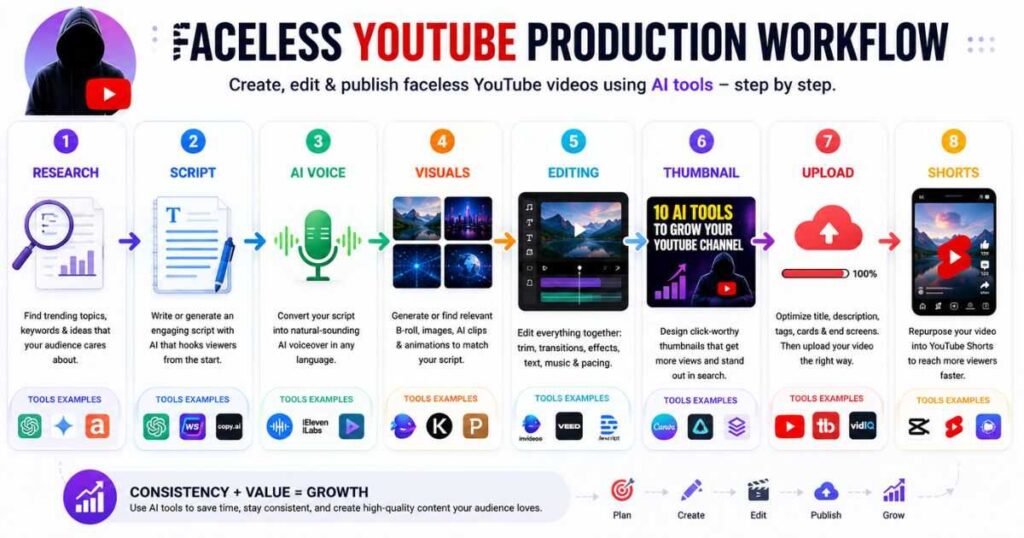
Example faceless YouTube workflow
| Production Stage | Recommended Tool |
| Research & ideas | AI research/writing tool |
| Script | ChatGPT or another writing assistant |
| Main video | InVideo AI |
| Cinematic B-roll | Kling AI |
| AI presenter | HeyGen or Synthesia |
| Article-to-video | Pictory or Fliki |
| Advanced editing | VEED or Descript |
| Thumbnail | Canva |
| Shorts | VEED, Descript, or Fliki |
This approach is more flexible because each platform handles the part it is best at.
For example, you could create your main video with InVideo AI, generate three important cinematic shots with Kling AI, clean the final narration in Descript, and design the thumbnail in Canva.
You don’t need to use every tool in every video.
What Should You Spend Money on First?
If you’re just starting a faceless YouTube channel, subscribing to nine different AI platforms is usually a bad idea.
It creates unnecessary costs and makes your workflow more complicated.
Start with one primary video creation platform.
When choosing among the best AI tools for faceless YouTube channels, your first subscription should solve your biggest production bottleneck rather than simply offer the most features.
For many beginners, InVideo AI is a practical starting point because it covers a large part of the production process.
Then add specialized tools only when you discover a specific limitation.
For example:
Need better cinematic visuals? → Kling AI
Need an AI presenter? → HeyGen
Need professional training-style avatars? → Synthesia
Need article-to-video automation? → Pictory
Need better text-based editing? → Descript
This is a much more sustainable approach than paying for everything immediately.
How to Choose the Best AI Tools for Faceless YouTube Channels
Before subscribing, ask yourself five questions.
1. What type of videos will you create?
A documentary channel has very different requirements from a software tutorial channel.
If your videos depend on cinematic visuals, prioritize generative video.
If your videos depend on explanations, prioritize narration and editing.
If your videos depend on presenters, prioritize AI avatars.
2. How long are your videos?
Some AI tools are excellent for short clips but less suitable for producing complete long-form videos.
If you plan to publish 8–15 minute videos regularly, check video-length limitations and credit consumption before choosing a subscription.
3. How much editing do you want to do?
If you hate editing, an automated platform such as InVideo AI or Fliki may be more attractive.
If you enjoy controlling every scene, VEED or Descript may be a better fit.
4. Do you need original visuals?
Stock footage can work well for some niches.
But if your channel relies on unique visual storytelling, tools such as Kling AI can help you generate scenes that are difficult to find in stock libraries.
5. Does the tool fit your budget?
Don’t judge a plan only by its monthly subscription price.
Look at:
- Credits
- Video minutes
- AI generation limits
- Export resolution
- Watermarks
- Voice usage
- Avatar access
- Commercial rights
- Storage
- Additional credit costs
A cheaper plan isn’t necessarily cheaper if you quickly run out of credits.
How to Avoid Making Your Faceless Videos Look Like AI Content
This may be the most important part of the entire guide.
The best AI tools for faceless YouTube channels can automate production, but they cannot automatically give your channel a unique identity.
Thousands of creators can access similar AI models.
Your advantage therefore comes from how you use them.
Write better scripts
Don’t publish generic AI-generated scripts.
Add:
- Strong hooks
- Specific examples
- Original opinions
- Interesting comparisons
- Real explanations
- Stories
- Unexpected facts
- Clear conclusions
Avoid repetitive visuals
If every sentence gets a random stock video, your video will feel automated.
Use visuals intentionally.
Sometimes one strong visual is better than five unrelated clips.
Edit the AI output
Never assume the first generated version is the final version.
Watch the video from beginning to end.
Remove anything that feels:
- Repetitive
- Unnecessary
- Visually confusing
- Too slow
- Poorly narrated
- Unrelated to the script
Build a recognizable style
Use consistent:
- Thumbnail design
- Fonts
- Intro structure
- Narration style
- Music approach
- Visual style
- Color palette
- Video pacing
The goal is not to hide the fact that AI was used.
The goal is to make the final content feel intentional and useful.
Are AI-Generated Faceless YouTube Videos Worth It in 2026?
Yes—but automation alone is not a business model.
AI has dramatically reduced the technical barrier to producing videos. Current tools can handle tasks that previously required several pieces of software and sometimes an entire production team.
But the easier production becomes, the more important content quality becomes.
When everyone can generate a video, simply generating a video is no longer an advantage.
The channels that stand out are the ones that combine AI production with:
- Better topic selection
- Stronger research
- Better storytelling
- Original perspectives
- Good thumbnails
- Consistent publishing
- Audience understanding
In other words, AI can help you produce more content, but it cannot decide whether that content deserves to be watched.
Best AI Tools for Faceless YouTube Channels: Final Verdict
The best AI tools for faceless YouTube channels depend on the type of content you want to publish.
For an all-in-one workflow, InVideo AI is one of the strongest choices.
For realistic AI presenters, HeyGen is an excellent option.
For professional business and educational videos, Synthesia is particularly useful.
For cinematic AI-generated footage, Kling AI stands out.
For turning written content into videos, Pictory and Fliki are strong options.
For AI generation combined with editing, VEED is worth considering, while Descript is particularly useful for transcript-based workflows.
And for thumbnails and channel branding, Canva can play an important supporting role.
You don’t need all nine.
The smarter strategy is to start with one primary tool, publish consistently, identify the bottleneck in your workflow, and then add another AI tool when it genuinely solves that problem.
For a beginner building a faceless YouTube channel, a simple stack such as InVideo AI + Kling AI + Canva can cover a surprisingly large portion of the production process.
If you later need an AI presenter, add HeyGen or Synthesia. If you need more advanced editing, add VEED or Descript.
The real advantage isn’t having the largest collection of AI subscriptions.
It’s building a workflow that allows you to consistently turn good ideas into videos your audience actually wants to watch.
Frequently Asked Questions
What are the best AI tools for faceless YouTube channels?
The best options depend on the production stage. InVideo AI is a strong all-in-one choice, Kling AI is excellent for cinematic visuals, HeyGen and Synthesia are useful for AI presenters, Pictory and Fliki work well for script-to-video workflows, and Canva is particularly useful for thumbnails and branding.
Can I create a complete faceless YouTube video with AI?
Yes. Modern AI platforms can handle much of the process, including scripting assistance, voiceovers, visuals, captions, and editing. However, human review is still important if you want the video to feel original and engaging.
Is InVideo AI good for faceless YouTube?
Yes. InVideo AI is particularly useful for creators who want to automate much of the video production process from an idea or script while retaining the ability to edit the result.
Is Kling AI good for faceless YouTube?
Kling AI is especially useful for generating original cinematic scenes and B-roll. It is often more effective as part of a broader workflow than as the only tool used to produce an entire long-form YouTube video.
Should I use HeyGen or Synthesia?
Choose HeyGen if you want a flexible creator-focused AI video platform with realistic avatars and broader AI video workflows. Synthesia is particularly strong for professional, educational, and business-oriented presenter videos.
Do I need to pay for several AI tools?
No. Start with one or two tools. Add another subscription only when your current workflow has a specific limitation that the new tool can solve.
Continue Learning
Want to build a stronger AI-powered video workflow? Explore these related Videmint guides:
- How to Make a Faceless YouTube Channel — Learn how to build a YouTube channel without appearing on camera.
- How to Make Faceless YouTube Videos With AI — Follow a practical workflow for producing AI-powered faceless videos.
- Kling AI Review — Explore Kling’s video generation capabilities in detail.
- Kling AI Prompts — Learn how to write better prompts for cinematic AI video.
- HeyGen Review (2026) — Explore avatars, AI Studio, voice cloning, translation, and more.
- Synthesia Text to Video — Learn how to turn scripts and other content into AI videos.
- Best AI Video Editors in 2026 — Compare the leading AI-powered editing platforms.
- Script to Video AI: 9 Best Tools in 2026 Compared — Compare the top AI tools for turning scripts into engaging videos faster and with less effort.
- Best AI Tools for Faceless YouTube Channels in 2026 — A practical comparison of the top AI tools for creating, editing, and growing faceless YouTube channels.
- How to Make AI Videos: Complete Step-by-Step Guide — A practical guide to creating AI videos from idea and script to generation, editing, and publishing.
- How to Write AI Video Prompts That Actually Work — Learn proven techniques, examples, and templates for creating clearer, more effective AI video prompts.
- How to Create Consistent Characters With AI: AI Video Guide — Learn how to keep AI-generated characters consistent across scenes, shots, and videos.
- How to Make Realistic AI Videos: 7 Proven Tips — Learn simple techniques to create lifelike AI videos with natural motion, lighting, and cinematic results.