
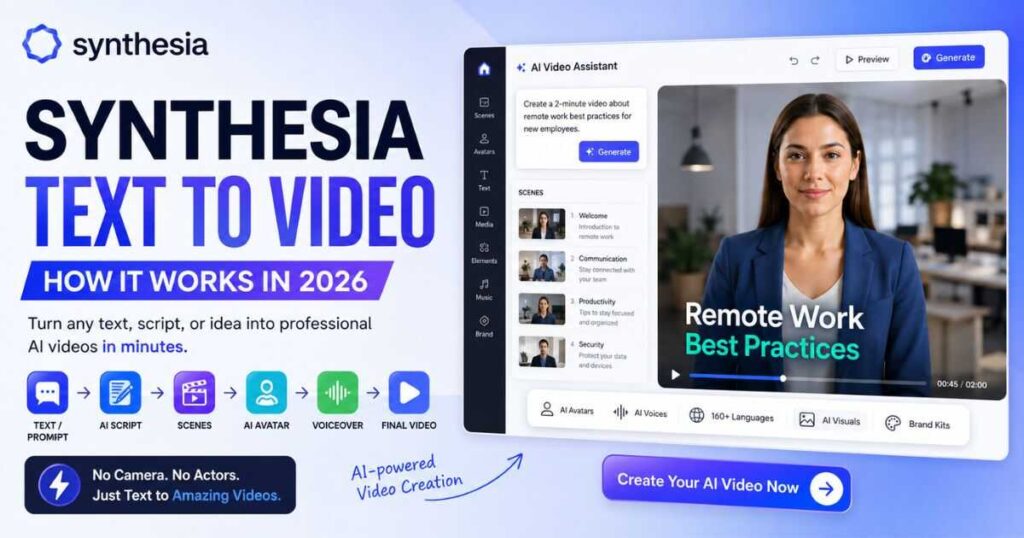
Synthesia Text to Video: How It Works in 2026
Creating a professional video used to mean writing a script, recording a presenter, finding visuals, recording a voiceover, editing scenes, adding captions, and exporting the final file. Synthesia text to video takes a very different approach.
Instead of starting with a camera and a timeline, you can start with a prompt, script, document, or URL and let Synthesia turn your source material into a structured video draft. You can then customize the script, avatar, voice, visuals, layout, and branding before generating the final video.
[Start Creating with Synthesia →]
For businesses, educators, marketers, trainers, and creators who need professional presenter-led videos without traditional production equipment, Synthesia text to video can significantly simplify the workflow.
This guide explains how Synthesia text to video works, what you can create with it, how it compares with Synthesia script to video, and how to get better results from your prompts and scripts.
What Is Synthesia Text to Video?
Synthesia text to video is an AI-powered video creation workflow that converts written instructions or source material into a video draft.
You can start with different types of input, including:
| Starting point | What it can do |
| Text prompt | Describe the video you want to create |
| Script | Use existing spoken content |
| Document | Turn source material into a video |
| URL | Use online content as source material |
| PowerPoint | Transform presentation content into video |
| Template | Start with an existing visual structure |
| Blank canvas | Build the video manually |
The important distinction is that Synthesia is not simply converting text into random video clips.
The platform can build a structured, multi-scene presentation around your content. It can combine an AI avatar, voiceover, visual elements, layouts, and other media into a complete video workflow.
This makes synthesia text to video particularly useful when your goal is a finished explainer, training video, presentation, onboarding video, product video, or educational piece rather than a collection of disconnected AI-generated clips.
Synthesia also supports AI-generated B-roll and motion graphics, allowing users to add visual content alongside presenter-led scenes.
[Try Synthesia Text to Video Free →]
How Synthesia Text to Video Works
The basic workflow is surprisingly simple:
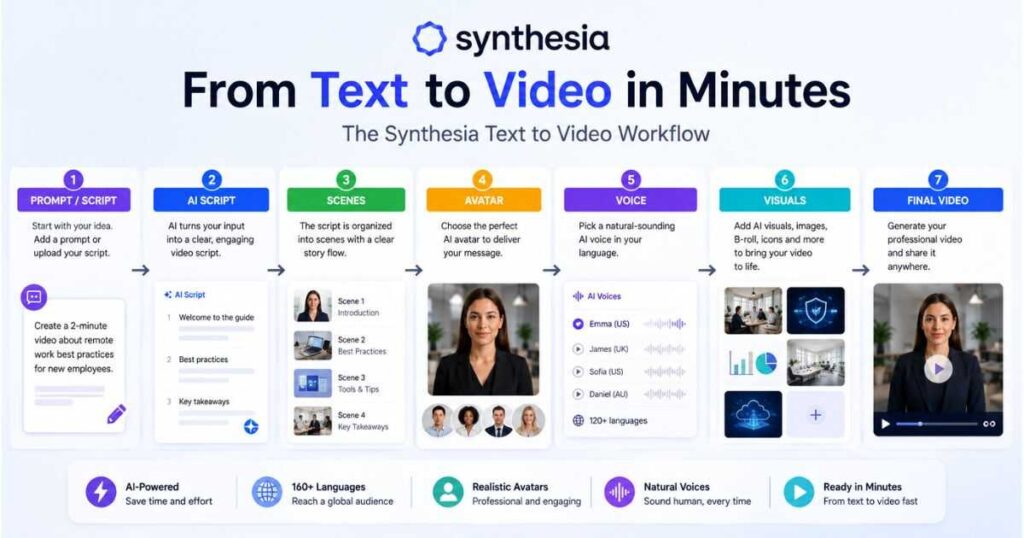
Input → Script → Scenes → Avatar & Voice → Visuals → Generate → Edit
Step 1: Start With Your Content
The first step is providing Synthesia with the information you want your video to communicate.
You could write something like:
Create a three-minute onboarding video explaining our company’s remote-work security rules for new employees.
Or you can provide a more detailed prompt containing the audience, objective, tone, subject, and desired duration.
If you already have a finished script, you can use it instead.
This distinction matters because synthesia text to video is flexible enough for both people who have an idea and people who already have finished content.
Step 2: Let AI Structure the Video
Synthesia can analyze your input and create a structured video draft.
Depending on the workflow, the AI can help organize:
- Scenes
- Spoken script
- Visuals
- Avatar selection
- Voiceover
- Presentation style
- Layouts
- Supporting media
This can save considerable time compared with starting every scene manually.
Step 3: Customize the Draft
The first AI-generated version should be treated as a starting point rather than the final product.
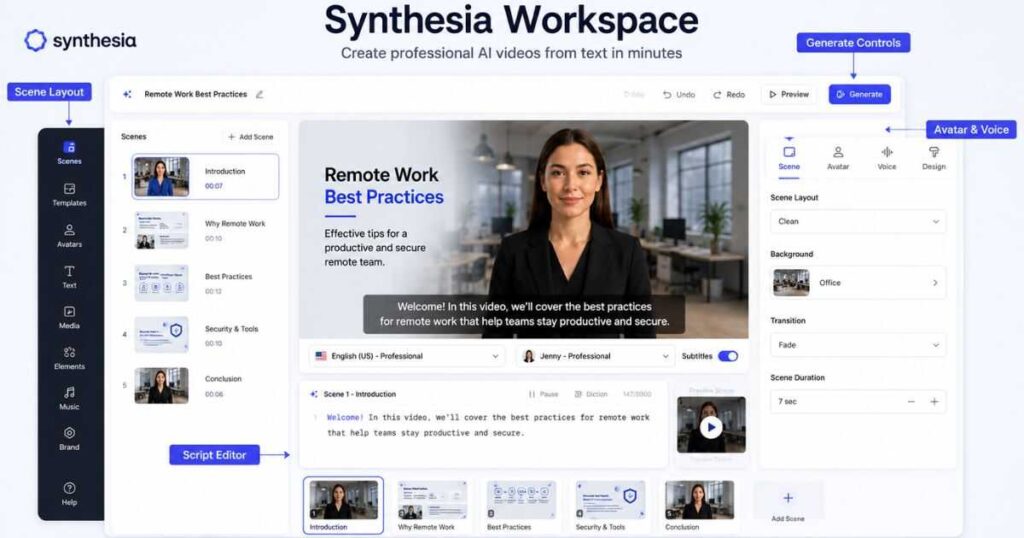
You can review the script, change the avatar, adjust the visuals, modify layouts, and refine the presentation.
This editing stage is important because AI can understand your topic without necessarily understanding exactly how you want the final video to sound.
Step 4: Generate the Video
Once you’re satisfied with the draft, you can generate the finished video.
Synthesia’s current workflow allows you to preview your work before generation, which is useful for checking the script, timing, and visual structure before committing to the final render.
How to Use Synthesia Text to Video
If you’re wondering how to use Synthesia text to video, the best approach is to give the AI enough context to make useful decisions.
A weak prompt might look like:
Make a video about cybersecurity.
That’s technically understandable, but it leaves too many decisions to the AI.
A stronger prompt would be:
Create a 3-minute cybersecurity training video for new employees. Explain phishing emails, password security, suspicious links, and reporting procedures. Use a professional but friendly tone. Divide the video into clear sections and include simple visual examples.
The second prompt gives Synthesia much more information about the intended result.
A Strong Synthesia Prompt Should Include
- Topic
- Target audience
- Video objective
- Approximate duration
- Tone
- Important points
- Desired structure
- Visual preferences
For example:
Create a 5-minute product introduction for small-business owners. Explain the three main benefits of the software, show how the dashboard works, and finish with a clear next step. Use a confident professional tone and clean modern visuals.
This type of prompt gives the Synthesia text to video generator enough information to build a much more useful first draft.
[Create Your First AI Video →]
Synthesia AI Text to Video vs Synthesia Script to Video
These terms sound almost identical, but there is a useful difference.
Synthesia AI text to video is broader. You can begin with an idea, prompt, document, URL, or other source material and allow the AI to help structure the video.
Synthesia script to video is more appropriate when you already know exactly what you want the presenter to say.
| Feature | Text to Video | Script to Video |
| Starting point | Prompt, text, file, URL, script | Existing script |
| AI writing | Can help create/restructure content | Uses your script |
| Scene creation | AI-assisted | AI-assisted |
| Avatar | Yes | Yes |
| Voiceover | Yes | Yes |
| Visuals | AI-assisted | AI-assisted |
| Best for | Ideas and source material | Finished scripts |
| Control | More AI assistance | More direct content control |
If you have only an idea, synthesia text to video is usually the more natural starting point.
If your script has already been approved by your legal, training, marketing, or communications team, Synthesia script to video can make more sense because you can preserve the approved wording.
Synthesia’s documentation also distinguishes between importing a script exactly as written and importing source material that the system uses to create a new script.
What Can You Create With Synthesia Text to Video?
One of the biggest advantages of synthesia text to video is that it is not limited to a single type of video.
You can use the workflow for many professional scenarios.
Training Videos
Create employee training, compliance modules, software tutorials, and educational content.
Training is particularly well suited to presenter-led AI video because the avatar can guide viewers through structured information while visuals support the explanation.
Onboarding Videos
Instead of sending new employees long documents, organizations can transform important information into short video lessons.
You can create separate videos for:
- Company policies
- Workplace procedures
- Software introductions
- Security requirements
- Team introductions
- First-week instructions
Marketing Videos
The Synthesia AI video generator can also be used for product explanations, promotional content, feature announcements, and customer education.
A good marketing video should not simply repeat your website copy. Use the script to explain a problem, introduce the solution, demonstrate the value, and give viewers a logical next step.
Educational Videos
Teachers, trainers, course creators, and organizations can turn written lessons into presenter-led videos.
The ability to translate content into many languages also makes the platform useful when educational material needs to reach international audiences.
Internal Communications
Companies can create recurring updates without arranging filming sessions for every announcement.
For example:
“Create a two-minute weekly company update explaining this week’s three most important announcements.”
That can become a repeatable production workflow.
[Explore Synthesia Video Creation →]
Synthesia AI Video: Avatars, Voices and Visuals
The strength of Synthesia AI video is that text is only the beginning.
After the system creates the initial structure, you can combine different elements to make the video more engaging.
AI Avatars
Synthesia offers a large selection of AI presenters, and users can also create custom avatars depending on their plan and requirements.
The avatar becomes the visual presenter of your content.
AI Voices
Synthesia currently advertises 1,000+ AI voices and support for 160+ languages and accents.
That means you don’t necessarily need to record your own narration for every video.
You can choose a voice that fits the tone of the content and audience.
AI-Generated Visuals
Another important part of the modern Synthesia workflow is AI-generated visual content.
Instead of relying exclusively on stock images, you can generate B-roll and other visual assets from prompts.
This is particularly useful when the subject is difficult to illustrate using conventional stock footage.
For example, instead of searching for a generic image representing “data security,” you could describe a specific visual concept and generate a supporting asset.
Synthesia Text to Video Generator: What Makes It Useful?
A traditional video workflow often involves multiple separate tools.
You might need:
- One tool for writing
- Another for voiceover
- A camera or presenter
- Stock footage
- Video editing software
- Captioning software
- Translation tools
The Synthesia text to video generator attempts to bring many of these steps into one environment.
That doesn’t mean every video can be created perfectly with one click.
The real advantage is reducing the amount of manual production work between the initial idea and a usable video.
This becomes particularly valuable when you’re producing many similar videos.
For example, a company could create dozens of onboarding videos using a consistent visual identity, avatar style, and voice.
How to Get Better Results From Synthesia Text to Video
The quality of your input strongly influences the usefulness of the first draft.
Here are practical improvements that can make synthesia text to video more effective.
1. Define the Audience
Don’t simply say:
Create a product video.
Instead:
Create a product introduction for first-time small-business users who have never used accounting software.
The second version gives the AI a clear communication target.
2. Give the AI a Specific Objective
Tell Synthesia what the viewer should understand after watching.
For example:
By the end of the video, viewers should understand how to create their first project.
That produces a much more focused video than simply describing the topic.
3. Keep One Main Idea Per Scene
Avoid stuffing an entire lesson into one scene.
Breaking information into smaller sections makes the final presentation easier to follow.
Synthesia’s current script system is scene-based, meaning each scene has its own spoken script, and longer content should be divided across scenes.
4. Edit the AI Draft
Never assume the first generated script is perfect.
Check:
- Facts
- Tone
- Repetition
- Scene transitions
- Pronunciation
- Visual relevance
- Timing
- Calls to action
The AI should accelerate production, not remove editorial judgment.
5. Preview Before Generating
Synthesia allows users to preview scenes and the full video before final generation, helping you check timing and content before using generation resources.
Synthesia Text to Video Limitations
No AI video platform is perfect, and synthesia text to video has limitations worth understanding.
AI Does Not Replace Editorial Judgment
A generated script can be grammatically correct while still being boring or too generic.
You should review the message before publishing it.
Visuals May Need Adjustment
AI-generated visuals can be impressive, but they may not always communicate the exact concept you intended.
You may need to replace or modify certain visuals.
Complex Content Requires More Editing
Technical subjects, highly regulated information, medical topics, financial content, and detailed software instructions deserve careful human review.
Generation Is Not the Same as One-Click Perfection
The biggest misconception about AI video tools is that the first generated result should always be publication-ready.
A better workflow is:
Generate → Review → Edit → Preview → Generate Again
That iterative approach is where synthesia text to video becomes much more useful.
Is Synthesia Text to Video Worth Using?
For someone who needs professional-looking videos but doesn’t want to manage cameras, microphones, actors, or a traditional editing workflow, synthesia text to video is worth considering.
It is especially attractive when you need:
- Presenter-led videos
- Consistent branding
- Multiple languages
- Repeatable production
- Training content
- Internal communications
- Product explainers
- Educational videos
It may be less attractive if your only goal is generating short cinematic clips.
That is because Synthesia’s biggest strength is the complete video-production workflow: presenter, script, voice, scenes, visuals, branding, and localization.
For purely cinematic experimentation, dedicated generative video models may be a better fit.
Synthesia Text to Video vs Traditional Video Production
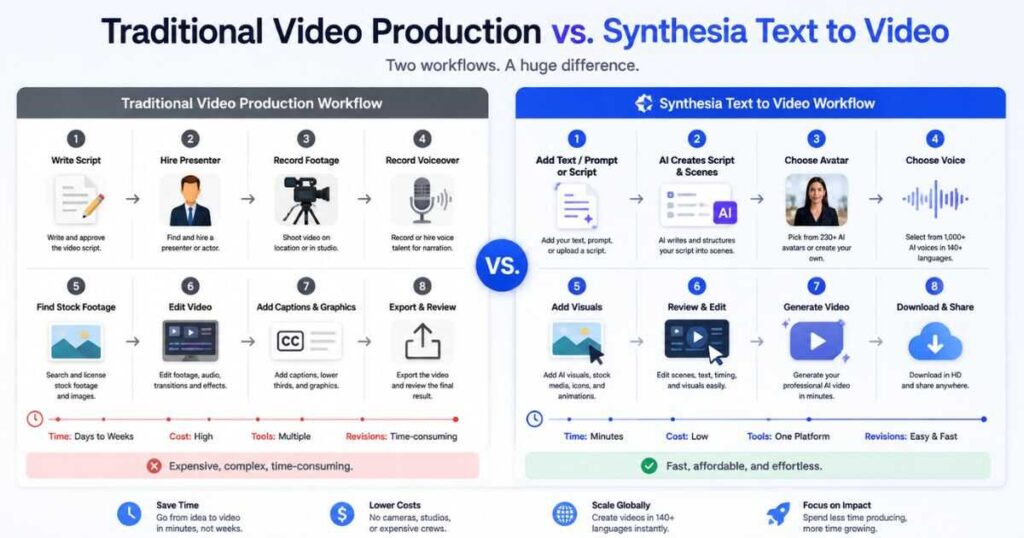
The biggest difference is the production process.
| Traditional workflow | Synthesia workflow |
| Write script | Write or generate script |
| Hire presenter | Select AI avatar |
| Record voice | Select AI voice |
| Film content | Generate video |
| Edit footage | Edit scenes |
| Find supporting footage | Add stock or AI visuals |
| Record translations | Translate digitally |
| Re-shoot revisions | Edit and regenerate |
This doesn’t mean AI completely eliminates production work.
Instead, it moves the work from filming and mechanical editing toward planning, reviewing, and refining.
For organizations producing large amounts of educational or business content, that difference can be significant.
Who Should Use Synthesia Text to Video?
Synthesia text to video is particularly useful for:
Businesses
Companies can create internal training, customer education, onboarding, product explainers, and communications.
Marketing Teams
Marketing teams can turn existing written material into videos without organizing a filming session for every campaign.
Course Creators
Educators can transform lessons and scripts into presenter-led educational content.
HR Teams
HR departments can create consistent onboarding and employee communication videos.
Global Organizations
Teams serving international audiences can take one script and create localized versions in multiple languages.
Content Teams
If your team publishes frequently, the ability to create repeatable videos from written content can make production considerably easier.
Frequently Asked Questions
Is Synthesia text to video free?
Synthesia currently offers a free option that lets users experiment with AI video creation. Its official text-to-video page states that the free plan allows up to 10 minutes of video per month, with access to AI avatars and voices in 160+ languages. Free videos include Synthesia branding, while some features require paid plans.
Can I turn a script into a Synthesia video?
Yes. Synthesia script to video is specifically designed for this workflow. You can use an existing script and build a video around it with avatars, voiceovers, scenes, and visuals.
Can Synthesia create a video from a PDF?
Yes. Synthesia supports source documents and can use them to create a new script and video structure. If you need your exact wording preserved, importing the script itself is more appropriate than asking the AI to rewrite source material.
Can Synthesia create videos in multiple languages?
Yes. Synthesia currently advertises support for 160+ languages and accents, allowing content to be localized without recording a completely new video from scratch.
Does Synthesia use AI avatars?
Yes. AI avatars are one of the platform’s core features. You can select from available avatars and, depending on the plan and workflow, create custom avatars.
Can I edit the generated video?
Yes. You can modify the script, scenes, visuals, avatar, and other elements and generate a new version.
Is Synthesia better than Sora or Veo for text-to-video?
They solve different problems. Sora and Veo are primarily generative video models for creating cinematic clips. Synthesia is a broader AI video platform designed around complete professional videos, including avatars, voiceovers, scenes, branding, and localization.
Final Verdict: Is Synthesia Text to Video Good?
Synthesia text to video is most useful when you want to turn written information into a structured, presenter-led video without going through a traditional filming and editing process.
Its biggest strengths are the combination of AI-assisted scripting, avatars, voices, visuals, editing, and multilingual production in one workflow.
The most effective approach is not to expect one-click perfection.
Start with a strong prompt or script, let Synthesia build the first draft, review the scenes, improve the wording, adjust the visuals, preview the result, and generate the final version.
If you regularly create training, onboarding, marketing, educational, presentation, or communication videos, that workflow can save substantial production effort.
Ultimately, the value of synthesia text to video comes from turning written ideas into repeatable video-production workflows rather than simply generating a video clip from a sentence.
[Start Creating Your Synthesia Video →]
Continue Learning
If you’re exploring Synthesia further, these related guides can help you decide what to do next:
- Synthesia Review — Get a broader look at Synthesia’s features, strengths, weaknesses, and overall performance.
- Synthesia Pricing — Compare the current plans, limits, and features before choosing a subscription.
- Is Synthesia Free? — Learn what you can actually create with the free option and where the limitations begin.
- Synthesia Avatars — Explore avatar types, custom avatars, and how Synthesia presenters work.
- Synthesia Alternatives: 9 Best AI Video Tools in 2026 — Compare the top alternatives for AI avatars, faceless YouTube, cinematic video, training, and more.
- How to Make a Faceless YouTube Channel in 2026: A complete step-by-step guide to building, automating, and monetizing your channel using AI.
- How to Make Faceless YouTube Videos With AI — A step-by-step guide to creating engaging YouTube videos without showing your face.
- Best AI Video Editors in 2026: 7 Tools Compared — A quick comparison of the top AI video editors for creators in 2026.
You can also continue with the Synthesia script to video maker workflow if you already have a finished script and want more control over the exact wording.
For anyone starting with only an idea, however, synthesia text to video remains one of the easiest ways to move from a written concept to a complete AI-assisted video draft.

