How to Make Faceless YouTube Videos With AI
You don’t need a camera, expensive equipment, or even a studio to build a YouTube channel anymore. With the right workflow, you can research a topic, write a script, generate visuals, create a voiceover, edit the video, and publish it without ever appearing on camera.
If you’re wondering How to Make Faceless YouTube Videos, this guide will walk you through the entire process from the first idea to the final YouTube upload.
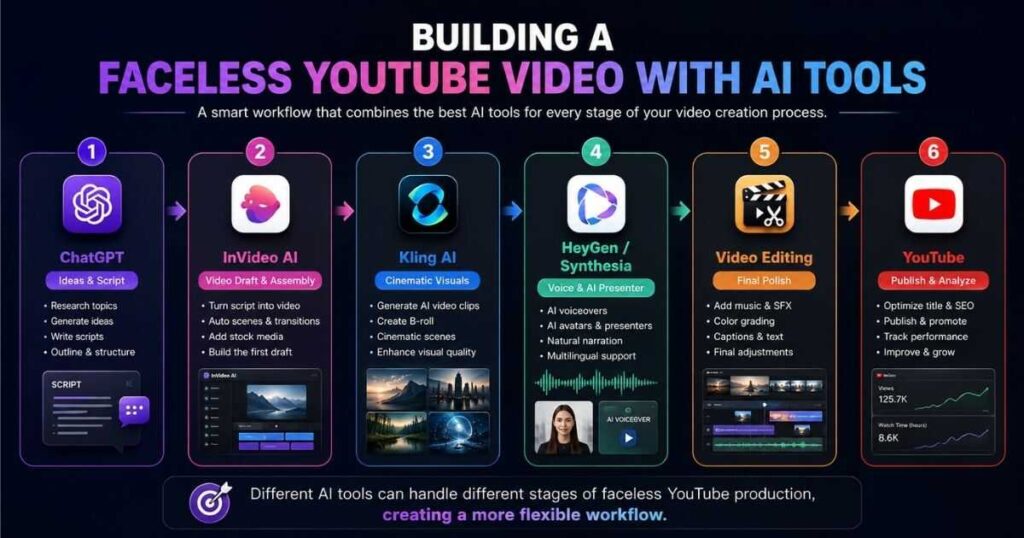
More importantly, you will learn how to combine several AI tools instead of expecting one tool to do everything perfectly. For example, InVideo can help turn a script into a complete video, Kling AI can create cinematic AI footage, and HeyGen or Synthesia can handle presenter-style videos and AI avatars.
The goal is not simply to generate an AI video. The goal is to create a watchable YouTube video that people actually want to finish.
What Are Faceless YouTube Videos?
Faceless YouTube videos are videos where the creator does not need to appear on camera.
Instead of filming yourself, you can build videos using:
- AI-generated or stock footage
- Screen recordings
- AI voiceovers
- Animations
- Images
- Text and motion graphics
- AI avatars
- B-roll
- Background music
- Charts and visual explanations
This makes faceless content particularly attractive for creators who want to build a YouTube channel privately or produce videos without investing in cameras, lighting, microphones, and studio equipment.
However, there is an important distinction.
Faceless does not mean low-effort.
A successful faceless video still needs a strong topic, good storytelling, useful information, visual variety, clear narration, and an engaging structure.
That is why the best approach to How to Make Faceless YouTube Videos is to treat AI as your production assistant—not as a replacement for your creativity.
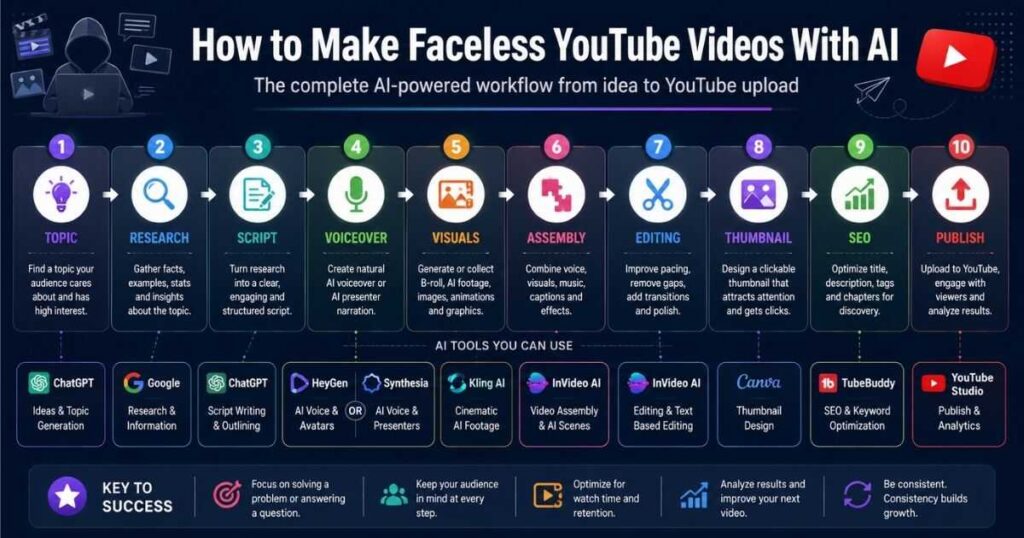
How to Make Faceless YouTube Videos: The Complete Workflow
Before opening any AI tool, understand the complete production pipeline.
| Stage | What You Do | Useful AI Tool |
| 1. Topic | Find an interesting video idea | ChatGPT / research tools |
| 2. Research | Collect useful information | Google / research tools |
| 3. Script | Turn research into a story | ChatGPT / InVideo |
| 4. Voice | Create narration | HeyGen / Synthesia / AI voice |
| 5. Visuals | Create scenes and B-roll | Kling AI / InVideo |
| 6. Assembly | Combine everything | InVideo |
| 7. Editing | Improve pacing and visuals | InVideo / video editor |
| 8. Thumbnail | Create a clickable thumbnail | Canva / AI image tools |
| 9. SEO | Optimize title and description | YouTube SEO tools |
| 10. Publish | Upload and analyze performance | YouTube Studio |
This workflow is the foundation of How to Make Faceless YouTube Videos efficiently.
You do not need to use every tool for every video. The best workflow depends on the type of channel you are building.
Step 1: Choose a Faceless YouTube Niche
The first mistake many beginners make is opening an AI video generator before deciding what their channel is actually about.
Start with the audience.
Good faceless YouTube niches can include:
- Technology
- AI tools
- Personal finance
- History
- Business
- Productivity
- Education
- Documentaries
- Interesting facts
- Science
- Travel
- Software tutorials
- Motivational content
The best niche is not necessarily the one with the largest audience.
You want a niche where you can consistently find topics, create useful videos, and eventually monetize the audience.
A simple niche test
Ask yourself:
- Can I think of at least 50 video ideas?
- Do people search for this information?
- Can I create the videos without appearing on camera?
- Are there products or services I could eventually recommend?
- Can I produce useful content consistently?
If you answer yes to most of these questions, you have a reasonable starting point.
If you are completely new to the concept, read our [How to Make a Faceless YouTube Channel] guide first. It covers the channel-building side, while this article focuses on actually producing the videos.
Step 2: Find a Video Topic People Want to Watch
Learning How to Make Faceless YouTube Videos is useless if nobody wants to watch the topic.
Instead of starting with:
“What video can I make?”
Start with:
“What problem, question, curiosity, or desire does my audience already have?”
For example, if your niche is AI tools, weak topics might be:
- “AI is changing video.”
Stronger topics are:
- “How to Create a YouTube Video With AI”
- “7 AI Video Tools That Save Hours of Editing”
- “I Tested 5 AI Video Generators”
- “How to Make Faceless YouTube Videos With AI”
The second group has a much clearer reason for someone to click.
Use the “one promise” rule
Every video should make one clear promise.
For example:
“By the end of this video, you’ll know how to create a complete faceless YouTube video without recording yourself.”
That promise should influence your title, thumbnail, introduction, script, and conclusion.
Step 3: Research Before Writing the Script
AI can write a script quickly, but you should not blindly publish the first script it generates.
Research your topic first.
Collect:
- Important facts
- Examples
- Statistics
- Common mistakes
- Interesting details
- Real-world examples
- Contrarian opinions
- Questions viewers frequently ask
Then organize your research into a simple structure:
Hook → Problem → Explanation → Examples → Solution → Takeaway → CTA
This creates a much stronger foundation for How to Make Faceless YouTube Videos than simply asking AI to “write a YouTube script.”
Step 4: Write a Script That Sounds Human
Your script is the backbone of the entire video.
A good faceless YouTube script should sound like someone is talking to the viewer—not like a textbook.
For example, avoid:
“Artificial intelligence represents a transformative technological advancement that has significantly influenced the modern video production ecosystem.”
Instead:
“AI has changed video production. You can now create scenes, voices, and even entire videos without owning a camera.”
The second version is easier to listen to.
A simple script structure
For a 6–8 minute video, you could use:
| Section | Approx. Purpose |
| Hook | First 15–30 seconds |
| Introduction | Explain what viewers will learn |
| Main Point 1 | Build the foundation |
| Main Point 2 | Explain the solution |
| Main Point 3 | Give practical examples |
| Mistakes | Show what to avoid |
| Recommendation | Give the best next step |
| Conclusion | Reinforce the main lesson |
| CTA | Tell viewers what to do next |
Don’t make the introduction unnecessarily long.
The viewer clicked because they want the answer.
Give them a reason to stay.
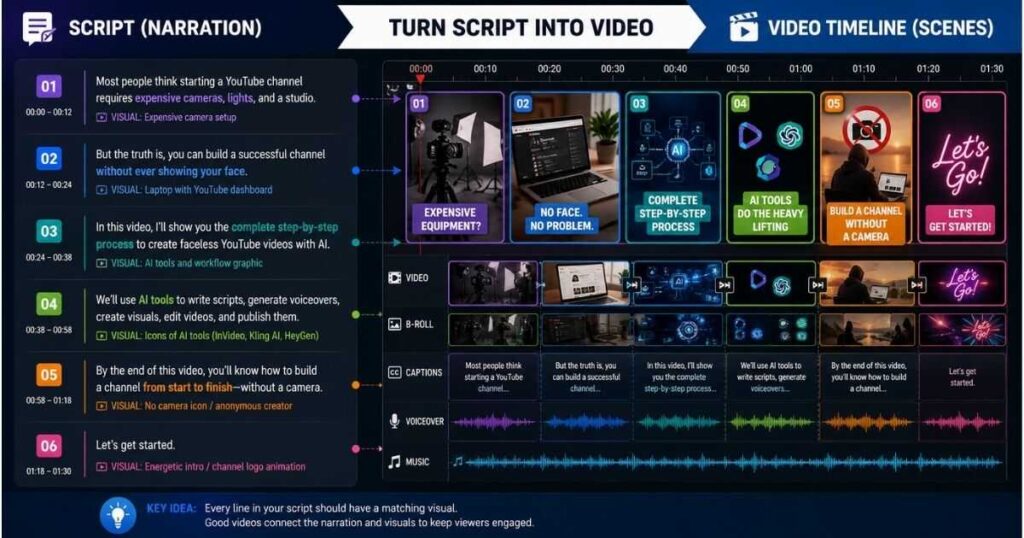
Step 5: Turn the Script Into Scenes
This is where many beginners struggle when learning How to Make Faceless YouTube Videos.
A script is not a video.
You need to translate words into visual moments.
For example:
Narration:
“Most people think starting a YouTube channel requires an expensive camera.”
Visual:
Show an expensive camera setup.
Then transition to:
Narration:
“But a faceless channel can be built without showing your face.”
Visual:
Show a laptop with a YouTube channel dashboard, AI tools, footage, and a timeline.
This constant relationship between narration and visuals keeps the viewer engaged.
Scene rule
Try to avoid showing the same visual for too long.
Change the visual when:
- The topic changes
- The speaker makes an important point
- A new example begins
- A statistic appears
- The narration introduces a new object or concept
Step 6: Use InVideo to Build the First Video Draft
If you want the fastest route from script to finished video, InVideo is one of the most useful tools in this workflow.
You can provide an idea or an existing script, and its AI workflow can help build scenes, select visuals, add voiceover, subtitles, music, and other production elements. InVideo also supports text-based editing of generated videos.
This is especially useful if your goal is How to Make Faceless YouTube Videos without learning a traditional editing application first.
Basic InVideo workflow
- Start with your idea or script.
- Specify the audience and platform.
- Choose the desired visual style.
- Generate the first draft.
- Watch the complete video.
- Identify weak scenes.
- Replace awkward visuals.
- Improve the pacing.
- Check the voiceover.
- Export the finished version.
The important word here is draft.
Don’t assume the first AI-generated version is your final video.
Your job is to review and improve it.
Step 7: Use Kling AI for Cinematic AI Footage
InVideo is excellent for assembling a complete video, but sometimes you need a specific cinematic shot that stock footage cannot provide.
That’s where Kling AI can become extremely useful.
Kling’s current video generation tools support text-to-video and image-to-video workflows, with Kling 3.0 adding stronger character consistency, multi-shot generation, native audio, and outputs up to 15 seconds depending on the generation mode.
Imagine your video is about:
“The future of artificial intelligence.”
Instead of searching endlessly for generic stock footage, you could generate a scene such as:
“A cinematic futuristic city at night, autonomous vehicles moving through neon-lit streets, holographic interfaces floating above buildings, realistic lighting, slow camera movement, documentary style.”
Generate several short clips and use the strongest ones as B-roll.
Don’t generate the entire YouTube video in Kling
This is an important workflow distinction.
Kling is particularly useful for individual visual shots.
Use it to create:
- Establishing shots
- Cinematic B-roll
- Product-style visuals
- Historical recreations
- Futuristic scenes
- Nature footage
- Conceptual visuals
- Character scenes
Then combine those clips inside your main editing workflow.
If you want to learn more about using Kling for YouTube content, see our [Kling AI Review] guide.
Step 8: Add an AI Voiceover
Your voiceover is one of the most important elements in a faceless video.
Viewers may forgive average visuals.
They are much less likely to tolerate a robotic or badly paced voice.
Your narration should have:
- Natural pacing
- Clear pronunciation
- Appropriate pauses
- Emotional variation
- Short sentences
- Good emphasis
You can use AI voice technology through platforms such as HeyGen and Synthesia.
HeyGen currently supports AI avatar videos from text or scripts and offers AI voice capabilities across a large range of languages and dialects.
Synthesia is another option, especially when your content benefits from a professional AI presenter. Its current text-to-video workflow can build videos from prompts, URLs, documents, or scripts and combine scenes, avatars, voiceovers, and AI-generated B-roll.
For a deeper look at the platform, see our [Synthesia Text to Video] article.
Step 9: Decide Whether You Need an AI Avatar
Not every faceless channel needs an avatar.
This is an important distinction.
A faceless documentary channel might work better with:
Narration + B-roll + graphics
A software tutorial might work better with:
Screen recording + voiceover
A business education channel might benefit from:
AI avatar + presentation graphics
A news-style channel could use:
AI voice + stock footage + charts
So don’t add an avatar simply because the technology exists.
Use it when it improves the viewing experience.
Step 10: Edit the Video for Retention
Now we get to the part that separates an average AI video from a good one.
AI can generate the raw material.
You still need to make editorial decisions.
Look for:
- Long pauses
- Repetitive scenes
- Unnecessary sentences
- Boring introductions
- Visuals that don’t match narration
- Music that is too loud
- Captions that are difficult to read
- Scenes that stay on screen too long
A simple retention check
Watch the video once without editing.
Every time you feel:
“This part is boring.”
Stop.
That’s probably where your viewer may feel the same thing.
Remove it, shorten it, or add a stronger visual.
Step 11: Create a Strong Thumbnail
Your thumbnail is not decoration.
It is part of the video.
A good faceless YouTube thumbnail usually has:
- One main idea
- A clear visual subject
- Large readable text
- Strong contrast
- Minimal clutter
- An emotional or curiosity-driven element
For example, instead of:
“How to Make Faceless YouTube Videos With AI”
on the thumbnail, try something shorter:
NO CAMERA NEEDED
or:
AI MADE THIS
The title explains the topic.
The thumbnail creates curiosity.
Step 12: Optimize the YouTube Title and Description
Your title should combine search intent with curiosity.
For example:
How to Make Faceless YouTube Videos With AI
is highly relevant to someone searching for the process.
But you can also test variations such as:
- How to Make Faceless YouTube Videos With AI in 2026
- How to Make Faceless YouTube Videos Without Showing Your Face
- How to Make Faceless YouTube Videos With AI for Beginners
Don’t stuff the title with every keyword variation.
Write for humans first.
How to Make Faceless YouTube Videos With AI for Free
You can start experimenting without buying every AI tool immediately.
A beginner-friendly workflow could look like this:
| Task | Free/Low-Cost Approach |
| Research | Google + free research tools |
| Script | Free AI writing tools |
| Voice | Free AI voice allowance |
| Visuals | Free stock footage + limited AI generation |
| AI clips | Free Kling credits where available |
| Video assembly | InVideo free tier or similar |
| Thumbnail | Canva/free design tools |
| Music | YouTube Audio Library |
| Analytics | YouTube Studio |
However, “free” usually means there are limitations.
You may encounter:
- Watermarks
- Credit limits
- Export restrictions
- Lower resolution
- Limited voices
- Fewer AI generations
That’s why the smartest approach is to test the workflow for free, identify the tools that actually save you time, and then upgrade only when the channel needs them.
How to Make Faceless YouTube Videos and Make Money
Creating videos is only half of the business.
The other half is choosing a monetization model.
A faceless channel can potentially earn through:
- YouTube advertising
- Affiliate marketing
- Sponsorships
- Digital products
- Courses
- Memberships
- Lead generation
- Services
Affiliate marketing can be particularly interesting for AI-focused channels.
For example, imagine a video titled:
“5 AI Tools I Use to Make YouTube Videos”
The viewer is already interested in software.
That creates a natural opportunity to recommend the tools you actually demonstrate.
The key is relevance.
Don’t insert affiliate links simply because a product has a commission.
Recommend a tool because it solves a problem discussed in the video.
A Complete Faceless Video Workflow You Can Copy
If you want a simple system, use this:
1. Find a topic
↓
2. Research the topic
↓
3. Write the script
↓
4. Break the script into scenes
↓
5. Build the first draft in InVideo
↓
6. Generate special cinematic shots with Kling AI
↓
7. Create voiceover or avatar segments with HeyGen/Synthesia
↓
8. Edit the video
↓
9. Add captions and music
↓
10. Create thumbnail
↓
11. Optimize title and description
↓
12. Upload to YouTube
↓
13. Study retention and CTR
↓
14. Improve the next video
This repeatable process is much more valuable than trying to make every video from scratch.
Common Mistakes When Making Faceless YouTube Videos
1. Letting AI do everything
AI-generated does not automatically mean good.
You need human judgment.
2. Using generic visuals
If every video looks like random stock footage, viewers will notice.
Use visuals that actually support the narration.
3. Starting with a weak hook
The first few seconds matter enormously.
Don’t spend 30 seconds introducing yourself.
Give viewers the reason to stay.
4. Making videos too long
Longer does not automatically mean better.
A useful seven-minute video can outperform a boring twenty-minute video.
5. Ignoring the thumbnail
A great video with a weak thumbnail may never get enough clicks to prove itself.
6. Publishing without analyzing results
After publishing, watch:
- CTR
- Audience retention
- Average view duration
- Traffic sources
- Returning viewers
Your analytics should influence what you make next.
How to Make a Successful Faceless YouTube Channel With This System
The biggest advantage of learning How to Make Faceless YouTube Videos is not being able to create one video quickly.
It’s being able to create a repeatable production system.
For example:
Monday: Research 5 topics
Tuesday: Write 5 scripts
Wednesday: Generate videos
Thursday: Edit and create thumbnails
Friday: Publish and schedule
You don’t have to follow this exact schedule.
The principle is what matters:
Separate production into repeatable stages.
Once you have a working system, every new video becomes easier.
And as your skills improve, you can replace slow steps with better AI tools.
The Best AI Tools for Faceless YouTube Videos
| Tool | Best Use | Ideal For |
| InVideo AI | Script-to-video and complete video production | Beginners & creators |
| Kling AI | Cinematic AI-generated footage | Visual storytelling |
| HeyGen | AI avatars and presenter videos | Educational/business content |
| Synthesia | Professional avatar-based videos | Training & presentations |
| ChatGPT | Research, ideas and scripts | Almost every workflow |
| Canva | Thumbnails and graphics | Branding |
The strongest workflow isn’t necessarily about choosing one “best” tool.
It’s about assigning each tool the job it does best.
Final Thoughts: How to Make Faceless YouTube Videos With AI
Learning How to Make Faceless YouTube Videos is much easier when you stop thinking of AI as a magic button and start treating it as a production team.
Use AI to accelerate research and scripting.
Use InVideo to turn scripts and ideas into complete video drafts.
Use Kling AI when you need cinematic or highly specific visuals.
Use HeyGen or Synthesia when an AI presenter makes sense for your content.
Then take control of the final result.
Watch the video.
Fix the boring parts.
Improve the hook.
Replace weak visuals.
Create a better thumbnail.
Study the analytics.
Then make the next video better.
That’s the real secret behind How to Make Faceless YouTube Videos successfully: not generating hundreds of low-quality AI videos, but building a repeatable system that lets you consistently produce useful, original, engaging content.
[Create AI Videos With Kling AI]
Keep Learning
Ready to build the channel itself?
→ [How to Make a Faceless YouTube Channel]
Want to explore AI video production further?
Want cinematic AI footage?
Looking for a complete AI video production platform?
The next step is simple: choose one topic, write one useful script, create one video, publish it, and learn from the results.
A quick comparison of the top AI video editors for creators in 2026.
Compare the top AI video tools for creating, editing, and automating professional videos.