How to Write AI Video Prompts That Actually Work
AI video generators can turn a simple idea into a moving scene in seconds, but getting a result that actually matches your intention is a different challenge. A vague prompt can produce attractive footage that has the wrong camera movement, unrealistic motion, inconsistent characters, or an action that never happens correctly. Learning How to Write AI Video Prompts is therefore less about finding a list of magical keywords and more about learning how to communicate a visual idea clearly.
Modern tools such as Kling AI, Runway, InVideo, HeyGen, and Synthesia approach video creation differently. Some are designed primarily for generative clips, while others can turn a prompt or script into a complete video. Understanding those differences helps you choose the right prompting approach for the job.
This guide explains How to Write AI Video Prompts using practical structures, examples, tables, text-to-video and image-to-video techniques, camera directions, cinematic prompting, character consistency, prompt iteration, and common mistakes. The goal is not simply to write longer prompts, but to write instructions that give an AI video model a clearer idea of what should happen.
What Is an AI Video Prompt?
An AI video prompt is a written description that tells a generative video model what to create and, importantly, what should happen during the clip.
That makes video prompting different from ordinary image prompting.
An image prompt might say:
A cinematic astronaut standing on a rocky alien planet at sunset.
A video prompt needs to communicate movement:
A cinematic astronaut walks slowly across a rocky alien landscape while dust moves across the ground. The camera tracks backward as the sun remains low on the horizon.
The second prompt describes both what is visible and what changes over time.
Current Runway guidance separates text-to-video prompting into visual elements such as subject, environment, lighting, framing, and style, and motion elements such as subject action, environmental motion, camera movement, timing, direction, and speed.
That distinction is one of the foundations of How to Write AI Video Prompts effectively.
How to Write AI Video Prompts: The Core Structure
There is no universal formula that every AI video model requires. In fact, current prompting guidance from Runway emphasizes clarity and reducing ambiguity rather than following a rigid formula.
However, having a repeatable structure makes it much easier to create and refine prompts.
A useful starting structure is:
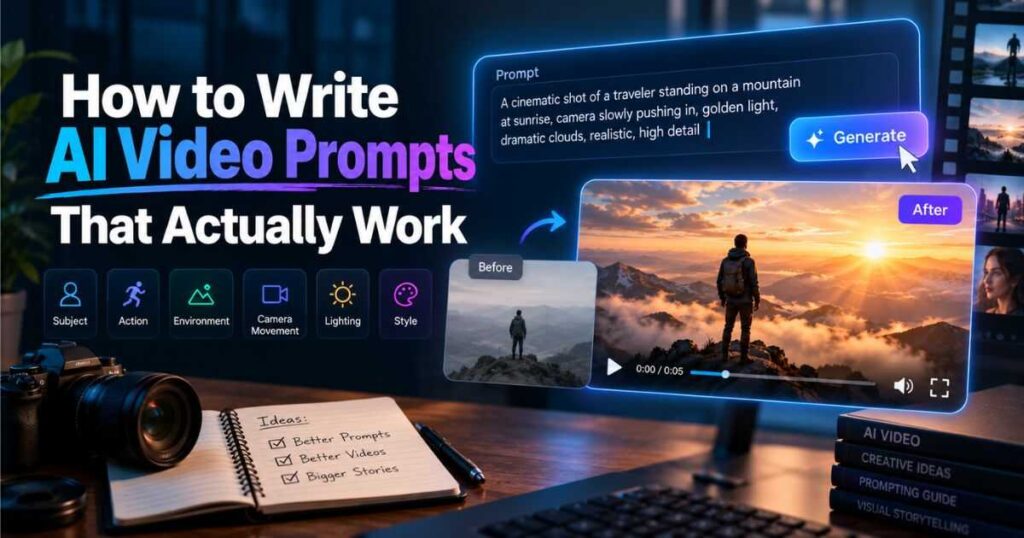
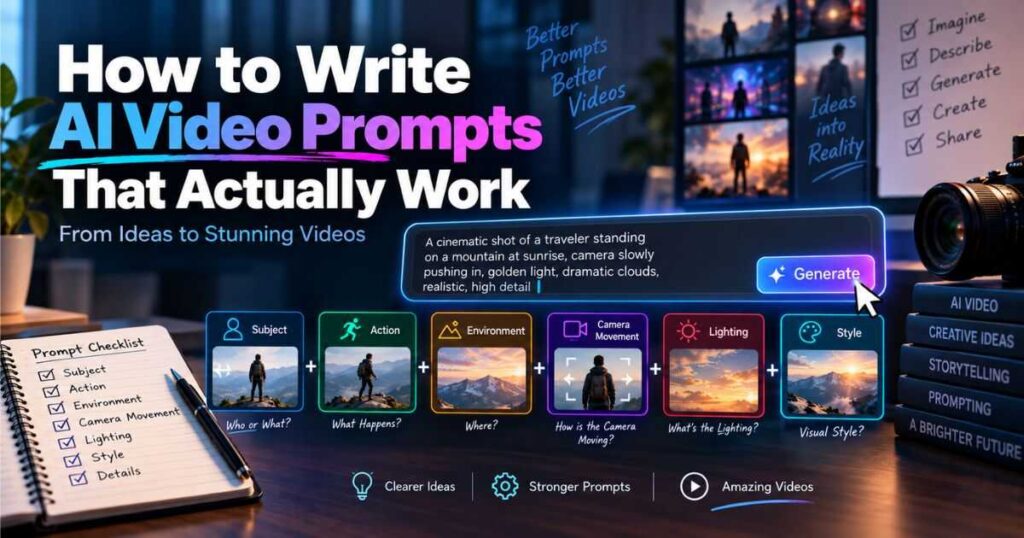
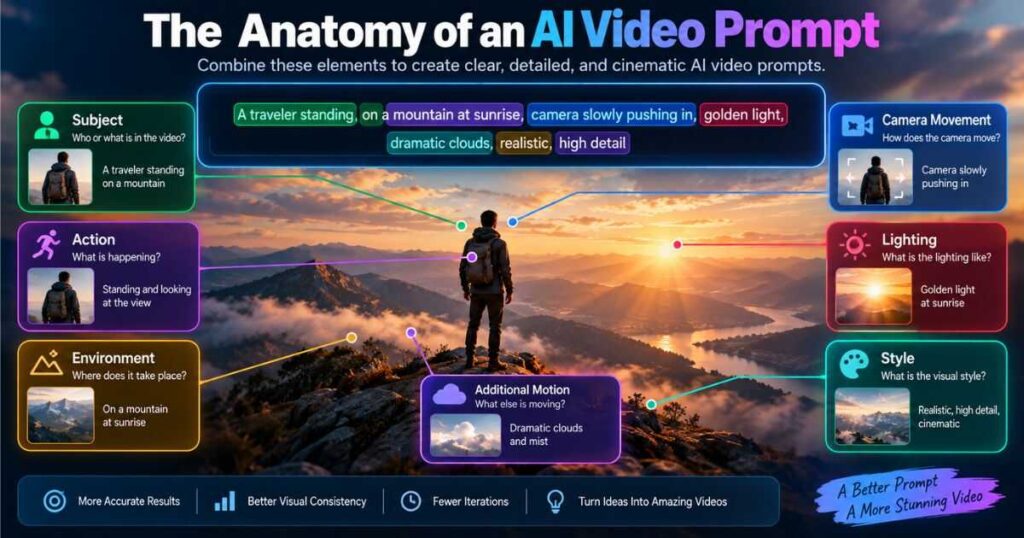
Subject + Action + Environment + Camera + Lighting/Style + Additional Motion
For example:
A golden retriever runs along a wet beach at sunrise. The camera tracks alongside the dog as waves move toward the shore. Warm natural light, realistic cinematic photography, subtle handheld movement.
You do not need every element in every prompt. A simple shot may only need:
A fox walks slowly through a snowy forest while light snow falls around it. The camera remains locked.
The goal is specificity without unnecessary complexity.
When you understand how to write AI video prompts using this structure, you can create clearer instructions without making your prompts unnecessarily long.
The 8 Building Blocks of Effective AI Video Prompts
When learning How to Write AI Video Prompts, think of the prompt as a director’s brief rather than a paragraph filled with impressive adjectives.
1. Subject
Start by identifying the main subject.
Examples:
- A futuristic robot
- A golden retriever
- A red sports car
- A chef preparing pasta
- A product bottle
- A space explorer
Be specific enough to establish the subject without adding unnecessary information.
2. Action
Describe what the subject actually does.
Weak:
A woman in a city.
Better:
A woman walks quickly through a crowded city street.
More specific:
A woman walks quickly through a crowded city street while checking her phone, briefly looking up as pedestrians pass around her.
The action is particularly important because a video model needs to create movement rather than simply reproduce a static image.
3. Environment
Describe where the action takes place.
For example:
A futuristic laboratory filled with transparent screens and metallic equipment.
You do not need to describe every object in the room. Include environmental details that influence the scene.
4. Camera
Camera instructions can significantly change the final shot.
| Camera instruction | Useful for |
| Locked camera | Static compositions |
| Slow push-in | Emphasis and dramatic moments |
| Pull-back | Revealing the environment |
| Pan | Horizontal reveals |
| Tilt | Vertical reveals |
| Tracking shot | Following a subject |
| Orbit | Showing a subject from different angles |
| Handheld | Documentary or realistic footage |
| Crane shot | Large vertical movement |
| Dolly shot | Controlled forward or backward movement |
Runway’s current camera reference includes shot sizes, framing, and numerous camera movement examples that can be translated into prompts.
5. Lighting
Avoid vague phrases such as:
Amazing lighting.
Instead describe the lighting:
Soft morning sunlight enters through the windows.
Or:
Blue and orange neon lights reflect across the wet pavement.
6. Style
Style describes the visual language of the shot.
Examples include:
- Cinematic live action
- Documentary
- Product commercial
- Anime
- Stop motion
- Vintage film
- Photorealistic
- Editorial fashion
7. Environmental motion
The subject does not have to be the only thing moving.
You can describe:
- Rain falling
- Smoke drifting
- Trees moving in the wind
- Dust trailing behind a vehicle
- Waves crashing
- Curtains moving
- Crowds walking
8. Speed and timing
Useful terms include:
- slowly
- rapidly
- gradually
- smoothly
- gently
- suddenly
- aggressively
The more important timing is to the shot, the more explicitly it should be described.
This is one of the most important principles to remember when learning how to write AI video prompts effectively.
How to Write Effective AI Video Prompts for Text-to-Video
Text-to-video generation starts with a blank visual canvas. Your prompt therefore needs to establish both what the viewer sees and what happens inside the scene.
A practical structure is:
[Shot type] of [subject] [action] in [environment]. [Motion]. [Lighting/style].
For example:
Wide cinematic shot of a lone explorer walking across a frozen volcanic landscape. Wind pushes snow across the ground while the explorer slowly approaches a distant mountain. Cold blue daylight, realistic documentary cinematography, subtle camera movement.
Current Runway guidance recommends that text-to-video prompts describe both visual and motion elements, while also emphasizing that there is no ideal prompt length. Overly long prompts can introduce conflicting requests or unnecessarily restrict the model.
Learning how to write AI video prompts for text-to-video starts with understanding what the model needs to see and what it needs to animate.
Don’t describe everything
A common beginner mistake is filling the prompt with adjectives:
Amazing cinematic professional ultra-realistic high-quality detailed…
Those words do not necessarily tell the model what should happen.
Instead:
A handheld camera follows a cyclist riding through a narrow European street after rain. Reflections shimmer on the pavement as pedestrians move past. Natural overcast lighting, documentary style.
This gives the model concrete visual and motion information.
How to Write AI Video Prompts for Image-to-Video
Image-to-video works differently because the starting image already establishes much of the scene.
The image can provide:
- Character appearance
- Composition
- Environment
- Lighting
- Colors
- Style
- Clothing
- Objects
Your prompt can therefore focus primarily on motion.
For example, if the image already shows a woman standing on a beach, you usually do not need to repeat:
A woman standing on a beach wearing a white dress…
Instead:
She slowly turns toward the ocean as her hair moves in the wind. The camera gently pushes in while waves move behind her.
Runway’s current image-to-video guidance explicitly recommends focusing almost exclusively on motion, including subject action, environmental motion, camera motion, timing, direction, and speed.
Kling similarly describes its image-to-video approach around a Subject + Movement structure.
Knowing how to write AI video prompts for image-to-video generation also means knowing what information the reference image has already provided.
That can be much more effective than a huge paragraph describing the entire image.
Text-to-Video Prompts vs Image-to-Video Prompts
Understanding the difference can significantly improve your results.
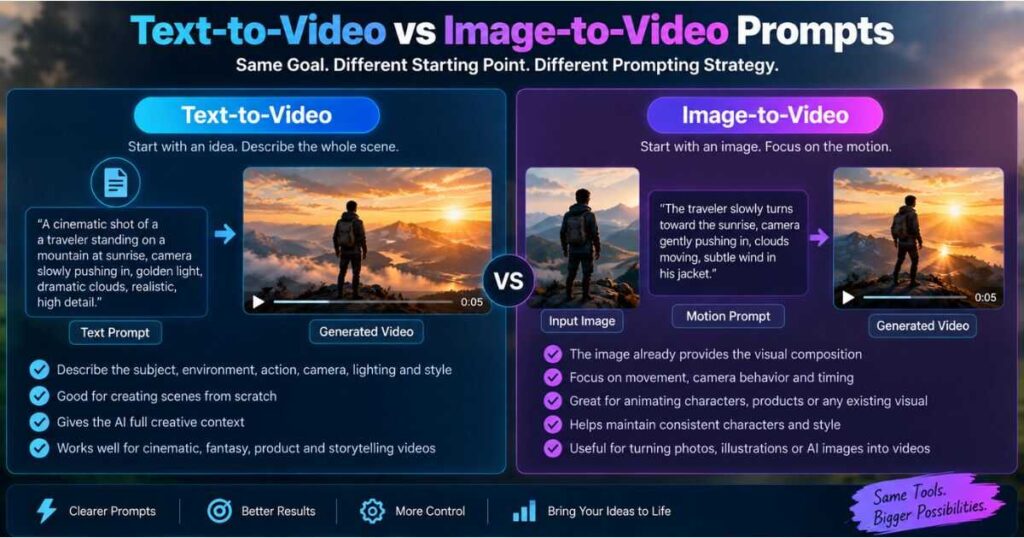
| Feature | Text-to-Video | Image-to-Video |
| Starting point | Text | Image |
| Visual description | Important | Often already established |
| Subject description | Important | Usually minimal |
| Motion description | Essential | Essential |
| Camera movement | Useful | Very useful |
| Style description | Useful | Often inherited |
| Best for | Creating scenes from scratch | Animating existing visuals |
| Main challenge | Establishing the complete scene | Controlling movement |
For example:
Text-to-video prompt:
A cinematic red sports car drives through a rain-soaked city at night. Neon signs reflect across the wet pavement as the camera tracks alongside the vehicle.
Image-to-video prompt:
The car accelerates forward as rain falls across the windshield. The camera smoothly tracks alongside it while neon reflections move across the body.
The second prompt does not need to rebuild the visual composition because the image has already done that work.
How to Write AI Video Prompts for Camera Movement
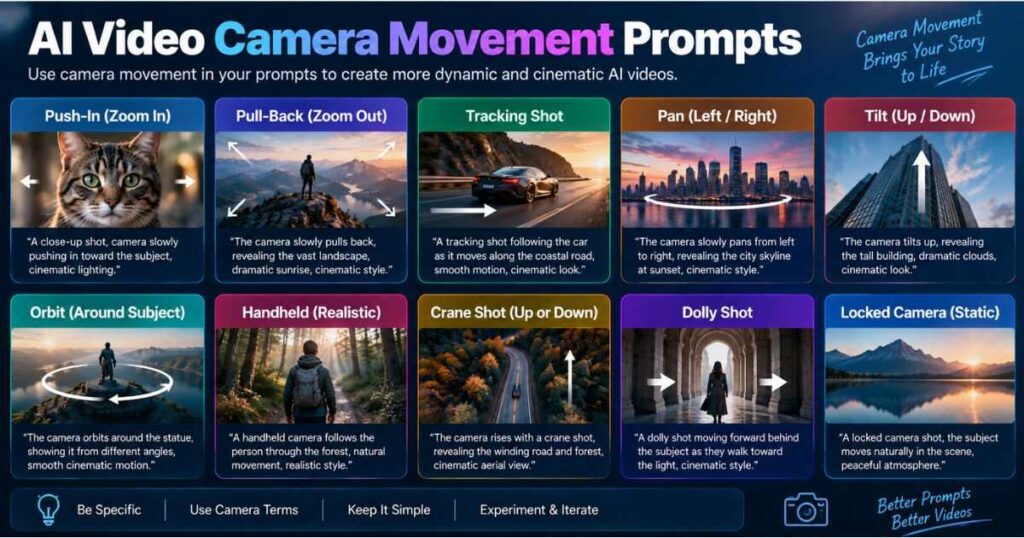
Camera movement is one of the easiest ways to make generated footage feel intentional.
However, beginners often try to combine too many movements in one short clip:
The camera zooms in, pans left, tilts upward, rotates around the character, pulls back, then rapidly zooms forward.
That is a lot of choreography for a short generation.
Instead, isolate the most important movement.
Push-in
The camera slowly pushes toward the character as she looks directly into the lens.
Tracking
The camera tracks alongside the runner as he moves through the city.
Orbit
The camera slowly orbits around the statue while the subject remains still.
Pull-back
The camera gradually pulls backward, revealing the enormous landscape behind the character.
Locked camera
The camera remains locked while the subject moves naturally.
This is an important part of learning how to write AI video prompts because camera instructions should support the action rather than compete with it.
Runway’s current documentation also recommends starting with simple, critical motion and adding detail through iteration rather than trying to control every component at once.
Cinematic AI Video Prompts: How to Make Shots Feel More Professional
Good cinematic AI video prompts are not created simply by adding the word “cinematic.”
Instead, describe the visual decisions that create the cinematic appearance.
Think about:
- Shot size
- Framing
- Camera movement
- Lighting
- Depth of field
- Composition
- Subject movement
- Color atmosphere
- Environmental movement
Compare:
Weak:
Cinematic man walking through a city.
Better:
Medium tracking shot of a man walking through a rain-soaked city street at night. The camera moves smoothly beside him as neon reflections shimmer across the pavement. Shallow depth of field, natural skin tones, soft practical lighting, realistic cinematic photography.
The second prompt provides concrete visual information rather than relying on a single abstract adjective.
The same approach is useful when learning how to write AI video prompts for cinematic scenes: replace vague adjectives with observable visual decisions.
Kling’s current prompting guidance similarly emphasizes subject, action, setting, camera language, lighting, and atmosphere when building cinematic prompts.
How to Write AI Video Prompts That Actually Work
The most reliable workflow is usually iteration, not trying to create a perfect prompt on the first attempt.
Start with a simple prompt.
Generate the clip.
Identify the biggest problem.
Change one important element.
Generate again.
For example:
Version 1
A dog runs through a forest.
The subject and action are clear, but the shot may look generic.
Version 2
A dog runs quickly through a forest while the camera tracks alongside it.
Now the camera has a specific instruction.
Version 3
A golden retriever runs quickly through a misty pine forest while a handheld camera tracks alongside it. Leaves move in the wind and soft morning light filters through the trees.
Now the environment, camera, and atmosphere are more intentional.
If you are learning how to write AI video prompts, controlled iteration is one of the fastest ways to understand which instructions actually affect the output.
Runway describes prompting as an iterative process: generate, review, clarify, and refine rather than expecting the perfect result immediately.
A simple iteration rule
Change one or two things at a time.
If you change the subject, camera, lighting, environment, style, and action simultaneously, you will not know which change caused the improvement—or the failure.
Positive Language Usually Works Better
When learning How to Write AI Video Prompts, beginners often rely heavily on negative instructions:
Don’t move the camera.
Don’t change the character.
No background movement.
Depending on the model, negative language can be unreliable. Runway’s current Gen-4 guidance specifically recommends positive phrasing and gives “Locked camera” as a clearer alternative to “the camera doesn’t move.”
Instead of:
Don’t move the camera.
Write:
The camera remains locked.
Instead of:
Don’t change the character.
Write:
The character maintains the same appearance throughout the shot.
Instead of:
No fast movement.
Write:
Slow, controlled movement.
This approach makes it easier to write AI video prompts that are clear, predictable, and easier for the model to interpret.
The principle is simple:
Describe the result you want rather than listing everything you don’t want.
How to Write AI Video Prompts for Consistent Characters
Character consistency remains one of the more challenging parts of AI video production.
A prompt alone cannot guarantee identical character identity across every generation, but a consistent workflow can make the result much more reliable.
Start with a repeatable character description.
For example:
A young woman with shoulder-length dark brown hair, green eyes, a beige jacket, and a small silver necklace.
Use the same defining characteristics across related scenes.
An even stronger approach is to create a reference image first and animate that image rather than rebuilding the character from text every time.
This is particularly useful for:
- Storytelling
- Faceless YouTube channels
- Animated characters
- Multi-scene videos
- Recurring characters
- Product demonstrations
Kling currently emphasizes reference-based consistency and multi-shot storytelling as part of its newer video-generation workflow.
Related guide: Kling AI Review
AI Video Prompt Examples You Can Copy
The following AI video prompts demonstrate different prompting approaches.
Cinematic character
A young explorer walks slowly across a vast desert at sunset. Wind pushes sand across the ground as the camera tracks backward in front of the subject. Warm golden light, realistic cinematic photography, subtle handheld movement.
Product commercial
A premium black smartwatch rotates slowly on a reflective studio surface. Soft light sweeps across the metal edges while the camera performs a smooth macro push-in. Minimal luxury product advertising style.
YouTube Shorts
A curious orange cat suddenly opens a refrigerator at midnight and freezes when the light turns on. The camera quickly pushes toward the cat’s surprised face. Fast comedic timing, realistic animation, dramatic kitchen lighting.
Image-to-video
The subject slowly turns toward the camera while her hair moves naturally in the wind. The camera remains mostly locked with a subtle push-in.
Action
A motorcycle accelerates through a narrow city street as rain sprays from the tires. The camera tracks rapidly beside the motorcycle with controlled motion blur and dramatic night lighting.
Nature
A bald eagle spreads its wings and takes off from a rocky cliff. Wind moves the feathers naturally as the camera slowly follows upward into the sky.
Notice that each example describes observable actions, rather than abstract intentions.
How to Use an AI Video Prompt Generator
An AI video prompt generator can be useful when you know what you want to create but struggle to express the idea clearly.
For example:
A funny cat stealing pizza.
A prompt generator could expand that idea into:
A mischievous orange cat sneaks into a dimly lit kitchen at midnight and carefully pulls a slice of pizza from an open box. The cat looks around nervously before running away with the slice. Low-angle tracking shot, warm kitchen lighting, comedic cinematic style.
That can save time, but generated prompts should not be copied blindly into every model.
Different models interpret instructions differently, and excessive detail can sometimes make a generation less predictable.
A better workflow is:
Idea → Prompt Generator → Human Editing → Generation → Evaluation → Iteration
The human editing stage remains important.
That is especially important when learning how to write AI video prompts because a generated prompt may contain unnecessary details or instructions that do not fit the selected model.
Which AI Video Generator Should You Use for Prompt-Based Work?
The best tool depends on what you’re trying to create.
Before you learn how to write AI video prompts for a specific generator, it helps to understand what that generator is designed to produce.
Kling AI — Best for Generative Cinematic Clips
Kling is particularly relevant when you want cinematic scenes, character movement, image-to-video generation, and more controlled visual storytelling. Its current documentation includes dedicated text-to-video and image-to-video prompting guidance.
For a deeper evaluation: Read the Kling AI Review
InVideo AI — Best for Complete Prompt-to-Video Workflows
InVideo takes a different approach. It is more focused on turning an idea or prompt into a broader video-production workflow rather than generating only individual cinematic shots.
Related: Read the InVideo AI Review
HeyGen — Best for Presenter and Avatar Videos
HeyGen is particularly useful for presenter-led videos, explainers, and avatar content. Its current Video Agent prompting guide recommends refining the initial idea, generating a polished script, and breaking content into natural scenes before production.
Synthesia — Best for Professional Avatar-Based Content
Synthesia is geared toward professional communication, training, presentations, and avatar-based video creation.
The key is not choosing the tool with the most impressive demo. Choose the tool whose workflow matches the type of video you are actually producing.
Common AI Video Prompt Mistakes
Avoiding mistakes is often as valuable as learning prompting techniques.
1. Being too vague
Make it cinematic.
This gives the model almost no concrete information.
2. Adding too many unrelated instructions
A short clip may struggle with ten actions, several camera movements, multiple transformations, and numerous scene changes.
3. Repeating the image during image-to-video
If the image already establishes the character and environment, use the prompt to control motion.
4. Contradicting yourself
For example:
Fast action with extremely slow movement.
Contradictory instructions create ambiguity.
5. Using abstract language
Make the scene emotionally powerful.
Instead:
The character slowly lowers his head as rain falls around him. The camera moves closer while the background gradually falls out of focus.
6. Trying to create an entire story in one clip
For longer videos, several focused clips are often easier to control than one generation attempting to tell the whole story.
How to Improve a Failed AI Video Prompt
When a generation fails, don’t immediately rewrite the entire prompt.
First identify what failed.
| Problem | What to change |
| Character barely moves | Add a specific physical action |
| Camera is static | Add one explicit camera movement |
| Movement is too fast | Specify slow, controlled motion |
| Background looks frozen | Add environmental movement |
| Character changes | Use a stronger reference image |
| Scene feels chaotic | Simplify the prompt |
| Action happens incorrectly | Describe actions in sequence |
| Image-to-video feels lifeless | Focus more heavily on motion |
| Too many things happen | Remove secondary actions |
For complex sequences, you can also describe events in order:
The character opens the door, then walks into the room. Finally, the camera pushes toward the desk.
Current Runway guidance supports sequential prompting and even timestamp-style instructions for temporal control.
The important point is to match the complexity of the instructions to the available clip duration. If the video is only a few seconds long, asking it to perform six separate actions is unlikely to produce the cleanest result.
A Practical AI Video Prompt Template
Use this as a flexible starting point:
[Shot type] of [subject] [specific action] in [environment]. [Environmental movement]. The camera [camera movement]. [Lighting]. [Visual style]. [Timing or speed].
For example:
Medium tracking shot of a futuristic courier running through a neon city at night. Rain falls around him and reflections move across the wet pavement. The camera tracks backward while maintaining focus on the courier. Blue and orange practical lighting, realistic cinematic photography, fast but controlled movement.
For image-to-video:
The subject [specific action]. [Environmental movement]. The camera [camera movement]. [Speed/style].
Example:
The subject slowly raises her hand as her hair moves in the wind. Dust particles drift through the sunlight. The camera performs a subtle push-in. Natural, realistic movement.
These templates are starting points, not rules.
The more you practice how to write AI video prompts, the easier it becomes to adapt these templates to different scenes, models, and production goals.
How to Write AI Video Prompts for YouTube Shorts
Short-form video requires particularly clear actions because viewers have very little time to understand what is happening.
A strong Shorts prompt should establish:
- The visual hook
- The main action
- The camera behavior
- The emotional or comedic beat
- The ending moment
For example:
A surprised orange cat discovers a giant pizza on a kitchen table and slowly climbs onto a chair to reach it. The camera pushes in as the cat grabs a slice, then suddenly looks toward the camera in shock. Fast comedic timing, expressive realistic animation, vertical social media video.
This approach is especially useful for creators producing AI-generated YouTube Shorts, TikTok videos, or Instagram Reels.
For more complex stories, create several short clips rather than asking one generation to handle an entire narrative.
Related resource: How to Make AI Videos: Complete Step-by-Step Guide
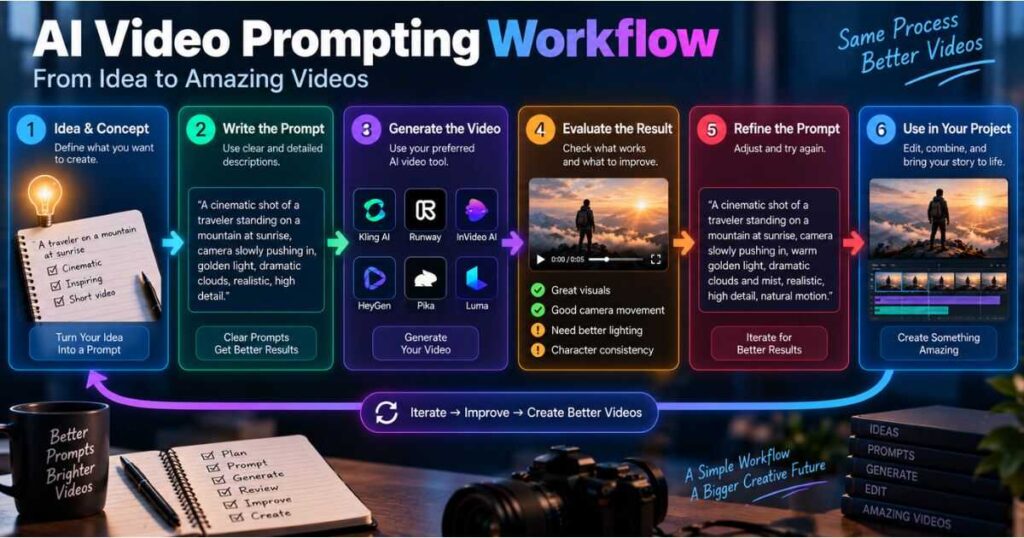
The Best AI Video Prompting Workflow
If you want repeatable results, use this workflow:
Step 1: Define the shot
Decide exactly what the viewer should see.
Step 2: Identify the main action
Ask:
What changes during this clip?
Step 3: Choose one primary camera movement
Keep the camera direction intentional.
Step 4: Add relevant environmental motion
Rain, wind, smoke, crowds, water, dust, or other movement can make the scene feel alive.
Step 5: Add lighting and style
Only include details that actually affect the visual result.
Step 6: Generate
Treat the first generation as a test rather than the final result.
Step 7: Diagnose the biggest problem
Was the action wrong? Was the camera wrong? Was the subject inconsistent?
Step 8: Revise one or two elements
Avoid changing everything simultaneously.
Step 9: Generate again
Compare the new result with the previous version.
Step 10: Assemble the final sequence
Combine successful clips in your editor and remove weak generations.
This process is more reliable than trying to create a perfect prompt from the beginning.
Frequently Asked Questions About How to Write AI Video Prompts
How long should an AI video prompt be?
There is no universal ideal length. The prompt should contain enough information to communicate the intended scene and movement without introducing unnecessary or conflicting instructions. Current Runway guidance explicitly recommends focusing on clarity rather than word count.
Should AI video prompts include camera movement?
Not always. If camera behavior matters, however, an explicit instruction can make the intended shot much clearer. If you want a static composition, “locked camera” is usually clearer than a complicated negative instruction.
Are negative prompts necessary?
Not necessarily. Some current video models work better with positive descriptions of the desired result rather than lists of things that should not happen. Runway’s current Gen-4 guidance specifically recommends positive phrasing.
Should image-to-video prompts describe the entire image?
Usually not. The source image already establishes much of the visual composition, subject, lighting, and style. The prompt can therefore concentrate on motion, camera behavior, timing, and environmental changes.
Can an AI video prompt contain multiple actions?
Yes, but the actions should be realistic for the clip duration. For sequential events, describe the order clearly. More complex sequences may benefit from longer generations or multiple clips.
Is an AI video prompt generator worth using?
It can save time when you have a basic idea but do not know how to structure it. However, always review the generated prompt and remove details that are irrelevant to the selected model.
What is the most important part of an AI video prompt?
For text-to-video, both visual information and motion are important. For image-to-video, motion is usually the primary focus because the input image already provides much of the visual foundation.
Why do my AI videos look good but move incorrectly?
This usually means the visual description is stronger than the motion description. Try describing exactly what the subject does, how fast it moves, what the environment does, and how the camera responds.
Should every prompt use cinematic language?
No. Use cinematic terminology when it communicates a specific visual decision. Words such as “tracking shot,” “macro close-up,” or “locked camera” are more useful than repeatedly adding generic terms such as “professional” or “high quality.”
Final Thoughts: How to Write AI Video Prompts That Actually Work
Learning How to Write AI Video Prompts is not about discovering a secret combination of words. The most reliable prompts communicate a clear visual idea, a specific physical action, and enough information about the environment, camera, and style to reduce ambiguity.
The biggest improvement comes from changing the way you think about prompting.
Don’t ask:
What words make AI generate a better video?
Ask:
If I were directing a camera operator, what exactly would I tell them to capture?
That mindset naturally produces better prompts.
For text-to-video, describe what the viewer sees and what happens. For image-to-video, let the image establish the visual foundation and concentrate on motion. Keep camera directions intentional, avoid contradictory instructions, use positive language, and refine the result through controlled iteration.
Most importantly, remember that prompting is only one part of AI video production. The reference image, selected model, generation settings, clip duration, editing, and continuity between shots all influence the final result.
Once you understand how to write AI video prompts, you can move from vague descriptions to deliberate visual instructions and from random generations to a repeatable production workflow.
That is ultimately what makes prompting useful: not producing more words, but producing clearer results.
Continue Learning
- How to Make AI Videos: Complete Step-by-Step Guide — Learn the complete workflow from idea and script to generation, editing, and publishing.
- Kling AI Review — Explore Kling’s video-generation capabilities and workflows.
- InVideo AI Review — Learn how InVideo fits into a complete AI video workflow.
- Runway AI Review — See how Runway fits into AI video production.
- Best AI Video Editors — Compare tools for editing and finishing AI-generated footage.
- How to Create Consistent Characters With AI: AI Video Guide — Learn how to keep AI-generated characters consistent across scenes, shots, and videos.
- How to Make Realistic AI Videos: 7 Proven Tips — Learn simple techniques to create lifelike AI videos with natural motion, lighting, and cinematic results.
Ready to turn better prompts into better videos?
For cinematic text-to-video and image-to-video generation, try Kling AI.
For complete prompt-to-video workflows, try InVideo AI.
For presenter and avatar-based videos, try HeyGen.
For professional avatar-based training and communication videos, try Synthesia.