How to Make a Faceless YouTube Channel in 2026
You don’t need a camera, studio, or even a microphone to start publishing on YouTube. If you’ve been searching for how to make a faceless YouTube channel, the good news is that the process is much more accessible than it used to be. With the right niche, content strategy, AI tools, and publishing system, you can build videos without appearing on camera.
This guide explains how to make a faceless YouTube channel from the ground up. You’ll learn how to choose a profitable niche, create your channel, find video ideas, write scripts, generate voiceovers, create visuals, edit videos, publish them correctly, and eventually build a monetization strategy.
You’ll also see exactly where AI can help, which tools are worth considering, and how to avoid the mistakes that cause many new faceless channels to fail.
👉 Start Building Your Faceless Channel
What Is a Faceless YouTube Channel?
A faceless YouTube channel is a channel where the creator does not normally appear on camera. Instead of filming yourself, you can use narration, screen recordings, stock footage, animations, AI-generated visuals, presentations, or AI avatars.
The important thing to understand is that “faceless” does not mean “fully automated.”
A successful channel still needs:
- Original ideas
- Useful information
- Strong scripts
- Good storytelling
- Appropriate visuals
- Quality audio
- Consistent publishing
- Audience research
The technology can make production faster, but it cannot replace good content strategy.
This is why learning how to make a faceless YouTube channel should start with the audience and content model—not with an AI tool.
How to Make a Faceless YouTube Channel: The 8-Step Process
If you want a simple overview, the complete process looks like this:
| Step | What You Do | Main Goal |
| 1 | Choose a niche | Find a focused audience |
| 2 | Research competitors | Discover content opportunities |
| 3 | Create your channel | Build your YouTube brand |
| 4 | Find video ideas | Create topics people want |
| 5 | Write scripts | Keep viewers watching |
| 6 | Produce videos | Combine voice and visuals |
| 7 | Optimize uploads | Improve discoverability |
| 8 | Publish consistently | Build momentum |
You do not need to complete everything perfectly before publishing. Your first objective should be creating a repeatable workflow that becomes better with every video.
Step 1: Choose the Right Faceless YouTube Niche
The niche you choose can have a bigger impact on your channel than the editing software you use.
A good faceless niche should have three characteristics:
- There is an audience interested in the subject.
- You can consistently produce content about it.
- There are realistic ways to monetize that audience.
Some popular faceless channel categories include:
| Niche | Faceless Friendly? | Monetization Potential |
| AI tools | Excellent | High |
| Personal finance | Excellent | High |
| Technology | Excellent | High |
| History | Excellent | Medium |
| Documentaries | Excellent | Medium |
| Productivity | Excellent | Medium |
| Educational content | Excellent | Medium-High |
| Business | Excellent | High |
| Gaming | Excellent | Medium |
| Celebrity/news content | Possible | Riskier |
Don’t choose a niche simply because someone claims it is “easy money.”
Instead, ask:
Can I realistically create 50–100 useful videos about this topic?
If the answer is no, keep researching.
For example, an AI tools channel can cover reviews, tutorials, comparisons, pricing guides, use cases, workflows, and new features. That creates much more room for long-term content than a very narrow topic with only a handful of ideas.
Step 2: Research Your Competitors Before Creating Videos
One of the smartest steps in learning how to make a faceless YouTube channel is studying channels that already attract the audience you want.
You are not copying them.
You are looking for patterns.
Study:
- Which topics receive the most views?
- Which titles create curiosity?
- What video lengths perform well?
- How quickly does the video deliver value?
- What thumbnails are repeatedly used?
- What questions appear in the comments?
- Which subjects are underserved?
Create a simple spreadsheet containing:
| Video | Views | Topic | Title Style | Length | Why It Worked |
| Video A | 250K | AI tools | List | 9 min | Strong curiosity |
| Video B | 120K | Tutorial | How-to | 12 min | Solves clear problem |
| Video C | 85K | Comparison | X vs Y | 8 min | High buying intent |
After analyzing 20–30 videos, patterns usually become easier to see.
Step 3: How to Start a Faceless YouTube Channel
Now you can actually create the channel.
If you’re wondering how to start a faceless YouTube channel, the technical part is relatively simple.
You’ll need:
- A Google account
- A YouTube channel
- A channel name
- Profile image
- Banner
- About description
- Basic channel branding
Your name should be easy to remember and relevant to your niche without being unnecessarily complicated.
For example, instead of choosing a random name like “Media Hub 482,” an AI-focused channel could use a name that immediately communicates the subject.
Don’t Overthink Your Branding
Your first logo does not need to be perfect.
Your first banner does not need to look like a major media company.
Your priority should be publishing useful videos.
You can improve your branding later when the channel has an established audience.
Step 4: Find Video Ideas That People Actually Want
This is where many beginners get stuck.
They create a channel and then ask:
“What should I make videos about?”
A better approach is to build an idea bank before publishing.
Use:
- YouTube search suggestions
- Competitor channels
- Reddit discussions
- Google Trends
- Keyword research tools
- Questions in YouTube comments
- Product launches
- Common problems in your niche
You can also create content clusters.
For an AI video channel, for example:
Pillar topic: AI Video Tools
Supporting topics:
- Best AI video generators
- AI video tool comparisons
- AI video tutorials
- AI video pricing
- AI avatars
- Text-to-video tools
- AI video editing
- AI tools for YouTube
This approach makes how to make a faceless YouTube channel much more manageable because you aren’t starting from zero every time you need a video idea.
Step 5: Write a Script That Keeps People Watching
A faceless video lives or dies by its script.
Without a person on camera, your narration and visual storytelling need to carry the video.
A simple structure is:
Hook
Tell viewers immediately why they should keep watching.
Instead of:
“Today we’re going to talk about AI video tools.”
Try:
“You can now create a complete YouTube video without filming yourself—but choosing the wrong AI tool can waste hours.”
The second opening creates a reason to continue.
Problem
Explain the problem your viewer has.
Solution
Show the method, tool, or information that solves it.
Proof
Use examples, demonstrations, screenshots, comparisons, or results.
Conclusion
Give the viewer a clear takeaway and tell them what to do next.
Avoid padding your scripts just to make videos longer.
A useful eight-minute video is better than a boring twenty-minute video.
Step 6: How to Make a Faceless YouTube Channel With AI
AI can dramatically simplify production, especially if you’re working alone.
When learning how to make a faceless YouTube channel with AI, think of AI as a production assistant rather than a replacement for your editorial judgment.
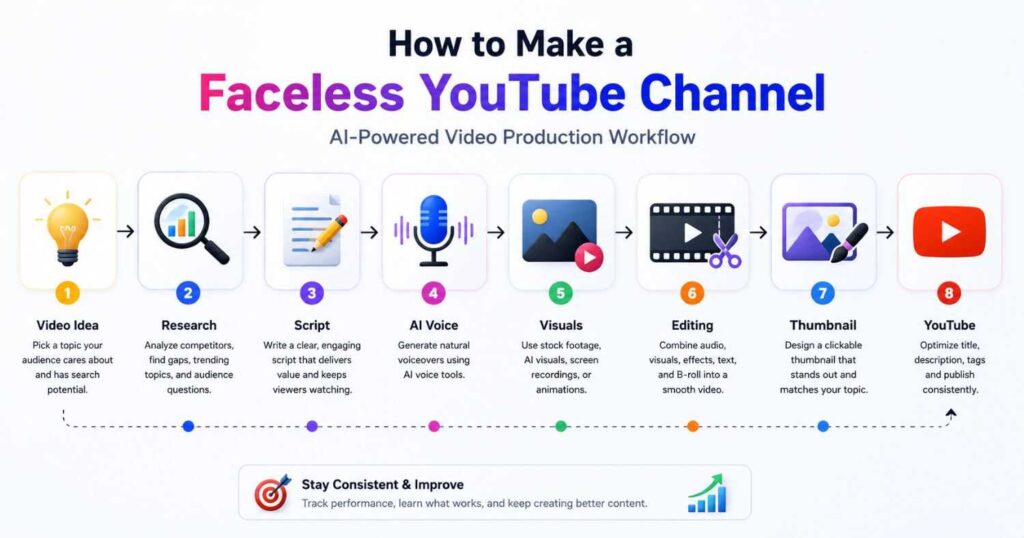
A typical AI-assisted workflow can look like:
Idea → Research → Script → Voice → Visuals → Editing → Thumbnail → Upload
Different tools can handle different parts of the process.
AI Video Creation
If you want to turn scripts into complete videos quickly, platforms such as InVideo can help automate much of the production process.
👉 Try InVideo for Faceless Video Creation
AI Avatars and Presenters
You don’t have to use an avatar for every faceless channel, but avatar-based videos can work particularly well for tutorials, educational videos, product explanations, and business content.
You can explore Synthesia’s AI video workflow here:
Explore the Synthesia text-to-video guide
👉 Try Synthesia for AI Video Creation
For creators who prefer realistic AI presenters and more creator-focused workflows, HeyGen is another strong option. Its current platform combines AI avatars, AI Studio, voice tools, translation, and other video features.
AI-Generated Visuals
If your channel depends heavily on cinematic scenes, product visuals, storytelling, or custom B-roll, a dedicated AI video generator can be useful.
Kling AI is particularly relevant when your faceless videos require generated visual scenes rather than presenter-style content.
For a deeper look at Kling’s creative ecosystem, you can also explore its AI video workflows and model guides.
Step 7: Create the Voiceover
Your voiceover does not necessarily need to be your own voice.
You have several options:
Option 1: Your Own Voice
This can create a stronger connection with viewers and helps establish a recognizable identity.
Option 2: AI Voice
AI voice tools can produce natural narration without requiring you to record every sentence.
Option 3: AI Avatar With Voice
For educational or presenter-style content, you can combine an AI avatar with generated narration.
The key is not whether the voice is human or AI.
The key is whether it sounds natural, matches the subject, and keeps the viewer engaged.
Step 8: Build the Visual Layer
This is one of the most important parts of a faceless video.
Never leave the viewer staring at the same image for several minutes.
Depending on your niche, your visual layer could include:
- Stock footage
- Screen recordings
- AI-generated video
- Animations
- Charts
- Images
- Product demonstrations
- Screenshots
- Text animations
- B-roll
For example, an AI tools channel can show the actual software interface while explaining the feature.
A history channel might use maps, archival images, animations, and narration.
A finance channel might use charts and visual explanations.
The visuals should support the narration—not distract from it.
How to Create a Faceless YouTube Channel That Looks Professional
Learning how to create a faceless YouTube channel is only half the job.
The bigger challenge is making the channel feel professional enough that viewers want to return.
Focus on consistency.
Consistent Thumbnail Style
Use a recognizable visual identity.
You don’t need every thumbnail to look identical, but viewers should gradually recognize your channel.
Consistent Video Structure
If viewers know what to expect, the viewing experience becomes easier.
For example:
Hook → Problem → Explanation → Demonstration → Verdict
Consistent Voice
Use the same narrator or AI voice whenever possible.
Consistent Topic
Don’t upload an AI video today, a cooking video tomorrow, and a football compilation the day after.
The algorithm isn’t the only concern.
Your audience also needs to understand what your channel is about.
How to Create Faceless YouTube Channel Videos Faster
Once you have produced several videos, start documenting your workflow.
Create reusable templates for:
- Scripts
- Introductions
- End screens
- Thumbnails
- Descriptions
- Video editing
- Research
- Upload settings
This allows you to spend more time thinking about content and less time repeating administrative tasks.
You can eventually turn the process into a simple production pipeline:
| Task | Beginner | Optimized Workflow |
| Research | Manual | Research template |
| Script | Start from zero | Reusable structure |
| Voice | Manual recording | Consistent voice |
| Visuals | Search individually | Organized asset library |
| Editing | Manual | Templates |
| Thumbnail | Start from zero | Reusable design |
| Upload | Manual setup | Standard checklist |
The goal is not to remove human involvement.
The goal is to remove unnecessary repetition.
How to Make a Faceless YouTube Channel and Make Money
One of the biggest reasons people search for how to make a faceless YouTube channel and make money is the possibility of building an audience without becoming the public face of a brand.
There are several potential revenue streams.
YouTube Ad Revenue
Once your channel qualifies for the relevant YouTube Partner Program requirements, advertising can become one source of income.
But don’t build your entire business around ads.
Affiliate Marketing
For an AI tools channel, affiliate marketing can be particularly attractive.
You can review a tool, explain how it works, demonstrate it, and then direct viewers toward the product.
For example:
Video: Best AI Video Tools for YouTube
Possible recommendations:
- InVideo
- Kling AI
- HeyGen
- Synthesia
This creates a natural connection between the content and the commercial offer.
Digital Products
You could eventually sell:
- Prompt packs
- Templates
- Guides
- Courses
- Production checklists
- Notion systems
Sponsorships
Once your channel has a targeted audience, companies may pay for sponsored integrations.
The important point is that monetization should be connected to your audience’s needs.
Can You Make a Faceless YouTube Channel for Free?
Yes, you can start how to make a faceless YouTube channel for free, at least at the experimental level.
You can use free versions of:
- YouTube
- Canva
- Free editing software
- Free stock media
- Free AI tools and trials
- Google Docs
- Free research tools
However, completely free production can become time-consuming.
For example, you might save money by manually searching for footage but spend hours producing one video.
Paid AI tools can make sense when they save enough time to justify their cost.
Don’t subscribe to five tools immediately.
Start with one or two tools, understand your workflow, and upgrade only when the free limitations become a genuine bottleneck.
How to Make a Successful Faceless YouTube Channel
There is no guaranteed formula for a successful channel.
But successful faceless channels usually share several characteristics.
1. They Solve a Clear Problem
The viewer should understand why the video matters.
2. They Have Strong Titles
Your title should create curiosity without misleading people.
3. They Use Good Thumbnails
A thumbnail should communicate the idea quickly.
4. They Respect the Viewer
Don’t stretch a two-minute idea into a ten-minute video.
5. They Improve Through Analytics
Watch:
- Click-through rate
- Average view duration
- Audience retention
- Returning viewers
- Traffic sources
Your first videos are data.
If people click but leave quickly, improve the opening.
If retention is strong but CTR is weak, experiment with your title and thumbnail.
Common Mistakes to Avoid
If you’re learning how to make a faceless YouTube channel, avoid these mistakes from the beginning.
Using Completely Generic AI Content
AI can help produce content, but simply generating generic scripts and uploading them is unlikely to create a memorable channel.
Add:
- Your research
- Your opinions
- Examples
- Demonstrations
- Original explanations
- Better storytelling
Choosing a Niche Only Because It Looks Profitable
A profitable niche is useless if you cannot consistently create good content for it.
Publishing Random Topics
Stay focused long enough to build a recognizable audience.
Buying Too Many AI Tools
You don’t need every AI video platform.
Choose tools according to your workflow.
Ignoring Thumbnails
A great video with a weak thumbnail may never get enough clicks to prove itself.
Giving Up Too Early
A new channel may require many experiments before you understand what works.
Don’t judge the entire business model from five videos.
A Practical 30-Day Faceless YouTube Plan
If you want a concrete way to apply how to make a faceless YouTube channel, use this simple first-month plan.
| Period | Main Goal | Action |
| Days 1–3 | Niche | Choose one focused topic |
| Days 4–7 | Research | Analyze 20–30 competitor videos |
| Week 2 | Production | Create 3–5 videos |
| Week 3 | Publishing | Publish consistently |
| Week 4 | Optimization | Study analytics and improve |
| End of Month | Review | Identify your best topics |
Don’t obsess over producing 30 videos immediately.
Your first goal is learning what your audience actually responds to.
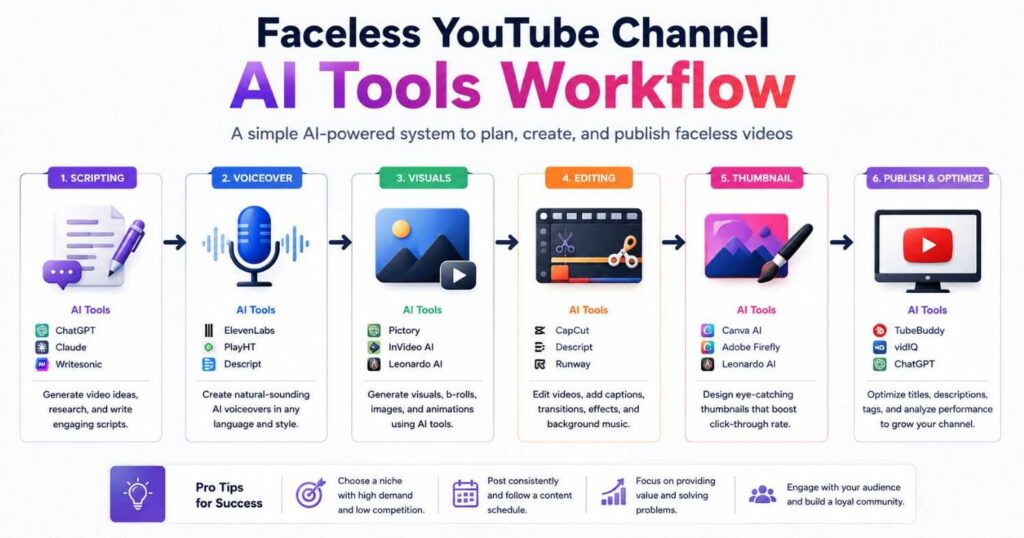
The Best AI Tools for a Faceless YouTube Channel
You don’t necessarily need all of these tools, but each can serve a different role.
| Tool | Best Use | Best For |
| InVideo | AI-assisted video creation | Fast production |
| Kling AI | AI-generated visual scenes | Cinematic/faceless content |
| HeyGen | AI avatars and presenter videos | Tutorials and presenters |
| Synthesia | AI presenter videos | Educational/business content |
| Canva | Thumbnails and graphics | Branding |
| YouTube Studio | Analytics | Channel optimization |
For example, you might use Kling AI to create cinematic B-roll, InVideo to assemble content quickly, and HeyGen or Synthesia when a presenter-style segment makes sense.
The best workflow is not necessarily the one with the most tools.
It is the one that produces high-quality videos consistently without making production unnecessarily complicated.
Is a Faceless YouTube Channel Still Worth Starting in 2026?
Yes—but the strategy has changed.
The opportunity is not simply uploading huge quantities of low-effort AI videos.
The opportunity is using AI to produce better content faster.
A creator who combines:
- Strong niche selection
- Original research
- Useful scripts
- Good storytelling
- Quality visuals
- Smart AI tools
- Consistent publishing
- Audience feedback
has a much stronger foundation than someone who simply presses “Generate.”
This distinction is especially important as AI-generated content becomes easier for everyone to produce.
The barrier to creating a video is falling.
That means quality, originality, and usefulness matter even more.
Continue Learning
Now that you understand how to make a faceless YouTube channel, the next step is building the actual production system.
Explore these related resources:
- Synthesia Text to Video — Learn how to turn scripts into AI presenter videos.
- HeyGen Review — Explore AI avatars, AI Studio, voice cloning, and video creation workflows.
- Kling AI Review— Learn more about AI-generated visuals, models, and creative workflows.
- Runway AI Review — Compare another powerful AI creative platform for video generation and editing.
- How to Make Faceless YouTube Videos With AI — A step-by-step guide to creating engaging YouTube videos without showing your face.
- Best AI Video Editors in 2026: 7 Tools Compared — A quick comparison of the top AI video editors for creators in 2026.
- AI Video Creation Software: 9 Best Tools in 2026 — Compare the top AI video tools for creating, editing, and automating professional videos.
- Script to Video AI: 9 Best Tools in 2026 Compared — Compare the top AI tools for turning scripts into engaging videos faster and with less effort.
- Best AI Tools for Faceless YouTube Channels in 2026 — A practical comparison of the top AI tools for creating, editing, and growing faceless YouTube channels.
- AI Product Video Generator: Make Videos That Sell — Discover how AI can turn product images into engaging, professional videos designed to attract attention, showcase products, and drive more sales.
👉 Explore AI Tools for Your Channel
Final Thoughts: How to Make a Faceless YouTube Channel
Learning how to make a faceless YouTube channel is not about finding one magical AI tool that does everything for you.
It is about building a repeatable content system.
Choose a focused niche. Research what your audience wants. Create useful scripts. Use AI where it genuinely saves time. Build strong visuals. Publish consistently. Study your analytics. Then improve.
If you’re asking how to start a faceless YouTube channel, don’t wait until everything is perfect.
Start with one niche, one workflow, and one video.
If you’re asking how to create a faceless YouTube channel, remember that the channel itself is only the foundation. Your long-term success will come from the quality and consistency of the content you publish.
And if your goal is how to make a faceless YouTube channel and make money, think beyond advertising. Affiliate marketing, digital products, sponsorships, and other revenue streams can eventually turn a focused audience into a real online business.
Most importantly, don’t let AI turn your channel into another collection of generic videos.
Use AI to move faster.
Use your own judgment to make the content worth watching.