
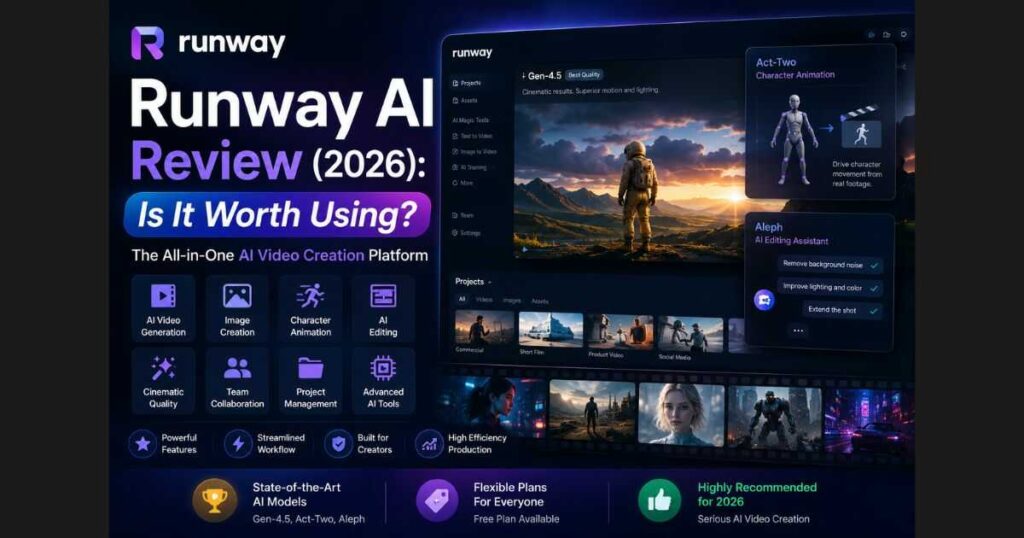
Runway AI Review (2026): Is It Worth It?
Artificial intelligence has transformed video production faster than almost anyone expected. Tasks that once required professional cameras, expensive editing software, and hours of manual work can now be completed with just a few prompts. If you’ve been searching for a powerful AI video generator, this Runway AI Review will help you understand exactly what the platform offers, who it’s designed for, and whether it’s worth your time in 2026.
Unlike many AI tools that focus on just one feature, Runway has evolved into a complete creative platform. It combines AI video generation, image creation, character animation, advanced editing, and collaborative workflows into a single interface. Whether you’re a YouTuber, marketer, filmmaker, or content creator, Runway promises to simplify complex production tasks while maintaining impressive visual quality.
In this Runway AI Review, you’ll discover the platform’s latest features, pricing, strengths, weaknesses, and real-world use cases. By the end of this guide, you’ll know whether Runway deserves a place in your creative workflow.
Quick Verdict
| Category | Rating |
| AI Video Quality | ⭐⭐⭐⭐⭐ |
| Ease of Use | ⭐⭐⭐⭐☆ |
| AI Features | ⭐⭐⭐⭐⭐ |
| Speed | ⭐⭐⭐⭐☆ |
| Value for Money | ⭐⭐⭐⭐☆ |
| Overall Score | 9.4 / 10 |
Who Should Read This Runway AI Review?
This guide is ideal for:
- YouTube creators producing long-form content.
- TikTok and Shorts creators.
- Digital marketers.
- Advertising agencies.
- Filmmakers.
- Freelance video editors.
- Social media managers.
- Anyone looking to create cinematic AI videos without expensive equipment.
If you’re curious about AI-powered video creation, spending a few minutes exploring Runway’s free workspace can help you understand how modern AI production tools work before committing to a larger creative project.
What Is Runway AI?
Runway AI is one of the most advanced AI-powered creative platforms available today. Instead of focusing solely on text-to-video generation, it offers an entire ecosystem of professional AI tools that help creators produce, edit, animate, and enhance visual content.
The platform has become especially popular among filmmakers and professional creators because it continuously releases cutting-edge AI models capable of producing highly realistic results.
Today, Runway includes tools for:
- AI video generation.
- AI image generation.
- Character animation.
- AI-powered video editing.
- Image animation.
- Team collaboration.
- Project management.
- Creative workflows.
- Custom AI models.
Rather than replacing traditional editing software completely, Runway accelerates many of the most time-consuming creative tasks.
Runway AI Review: Main Features
One reason Runway stands out from competing AI platforms is the sheer number of professional tools included in one workspace.
Let’s look at the features that make Runway one of the industry’s leading AI creative platforms.
Runway AI Review: AI Video Generation
Video generation remains Runway’s flagship capability.
Using the latest Gen-4.5 model, creators can generate cinematic-quality videos from prompts or source images while maintaining impressive consistency between scenes.
Common use cases include:
- Product commercials.
- YouTube B-roll.
- AI short films.
- Concept videos.
- Storyboarding.
- Marketing campaigns.
- Social media advertisements.
Compared with older AI models, the newest generation produces significantly smoother motion, better lighting consistency, and more natural camera movement.
Runway AI Review: AI Image Generation
Runway also includes a powerful AI image generator capable of producing:
- Concept art.
- Marketing visuals.
- Product mockups.
- Character designs.
- Background environments.
- Storyboarding assets.
Unlike standalone image generators, these images integrate directly into Runway’s creative workflow, allowing users to animate or edit them without leaving the platform.
Runway AI Review: Character Animation
One of the most impressive additions is Act-Two, Runway’s AI-powered character animation system.
Instead of manually animating characters frame by frame, creators can transfer performances into digital characters using reference footage.
This dramatically reduces production time while producing surprisingly realistic facial expressions and body movement.
For creators making educational videos, animated explainers, or digital storytelling, this feature can save countless hours.
Runway AI Review: Built for Creative Workflows
Unlike many AI tools that feel like isolated generators, Runway is designed as a complete creative environment.
Users can organize work inside dedicated projects, revisit previous generations, collaborate with teammates, and manage assets from one dashboard.
This workflow-focused design makes the platform particularly attractive for agencies and professional production teams rather than just casual users.
Why Creators Choose Runway
Many AI platforms can generate videos.
Far fewer can support an entire production pipeline.
Runway combines:
- AI generation.
- AI editing.
- Character animation.
- Project management.
- Team collaboration.
inside one ecosystem.
This integration is one of the biggest reasons professional creators continue adopting the platform.
How Does Runway AI Work?
One of the reasons Runway has become so popular among creators is that it doesn’t require professional editing experience. The interface is designed to make advanced AI tools accessible to beginners while still providing enough flexibility for professionals.
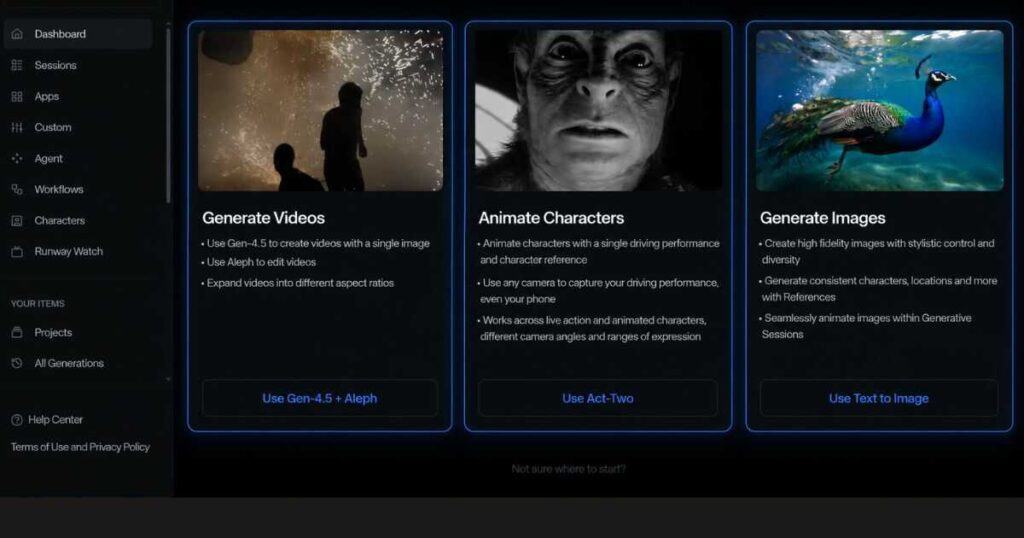
After creating an account, you’ll arrive at the main dashboard where Runway organizes its creative tools into separate workspaces. Instead of overwhelming users with dozens of menus, the platform groups its features into clear categories such as Generate Videos, Animate Characters, and Generate Images.
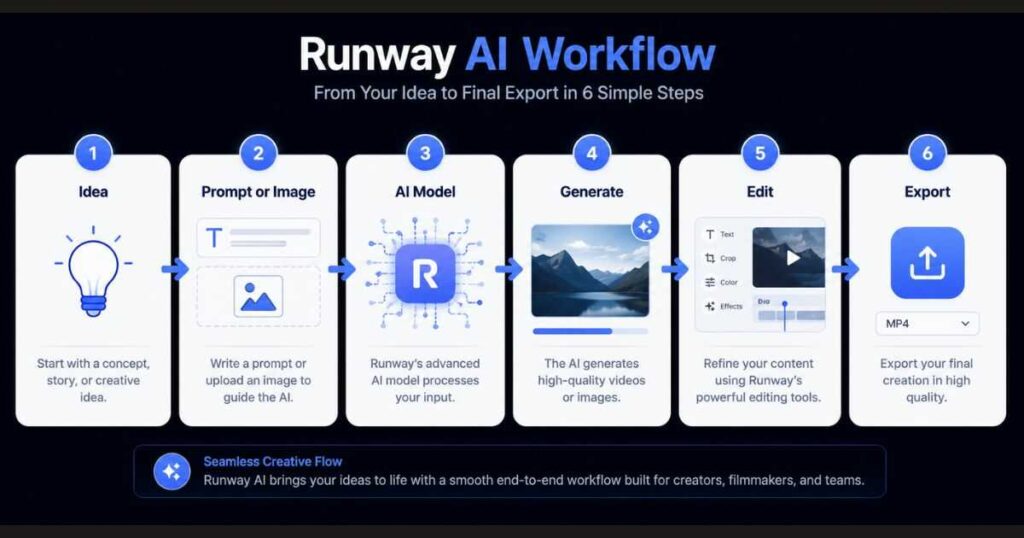
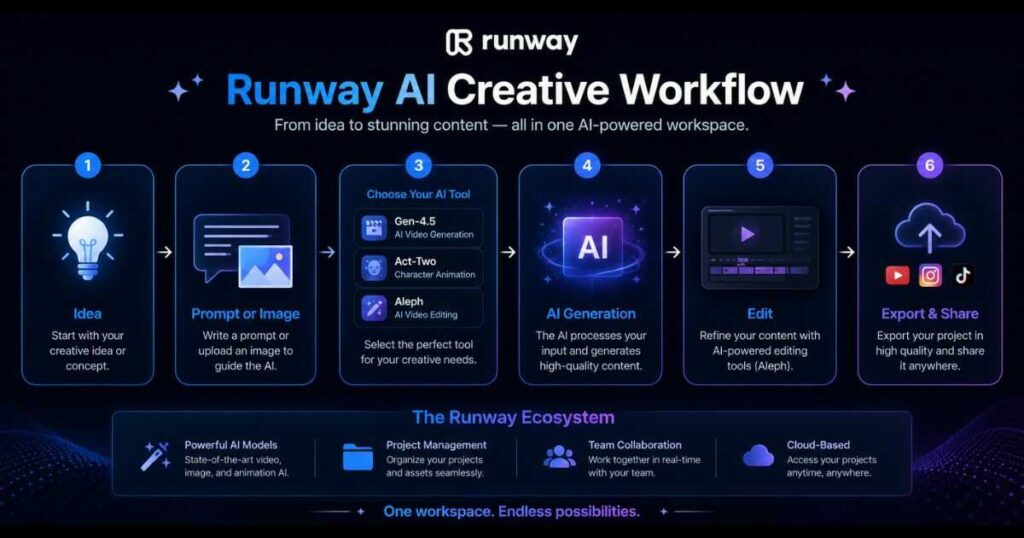
A typical workflow looks like this:
- Choose the AI tool you want to use.
- Upload an image or write a prompt.
- Select the AI model.
- Adjust generation settings if needed.
- Generate the content.
- Review the output.
- Export or continue editing.
This streamlined process allows creators to move from an idea to a polished visual much faster than traditional production methods.
Runway AI Review: Gen-4.5 Video Generation
The biggest attraction for most users is undoubtedly Gen-4.5, Runway’s latest AI video generation model.
Compared with previous generations, Gen-4.5 focuses on improving:
- Motion consistency.
- Camera movement.
- Character realism.
- Lighting.
- Scene transitions.
- Prompt accuracy.
Instead of creating short, disconnected clips, the model is designed to generate more cinematic sequences that feel closer to professionally filmed footage.
Whether you’re creating:
- Commercial advertisements.
- Travel videos.
- Product showcases.
- YouTube intros.
- Short films.
Gen-4.5 produces noticeably smoother results than many earlier AI models.
This improvement is one of the main reasons why this Runway AI Review rates the platform so highly for professional creators.
If you’re experimenting with AI video generation for the first time, try creating several short scenes using different prompts instead of focusing on one long project. You’ll quickly learn how small adjustments can dramatically improve the final video; [Click here to open your free Runway account and start your first trial now] to discover the true power of this tool for yourself.
Runway AI Review: Aleph AI Video Editing
Generating videos is only one part of the creative process.
Editing usually consumes far more time.
That’s where Aleph comes in.
Aleph is Runway’s AI-powered editing assistant designed to simplify many editing tasks that traditionally require advanced software.
Depending on your workflow, Aleph can help with:
- AI-powered video editing.
- Scene refinement.
- Visual enhancement.
- Content adjustments.
- Creative experimentation.
Rather than starting over every time you want to change something, Aleph allows creators to iterate much faster, making experimentation easier and reducing production time.
For content creators publishing videos every week, this workflow can become a significant productivity boost.
Runway AI Review: Act-Two Character Animation
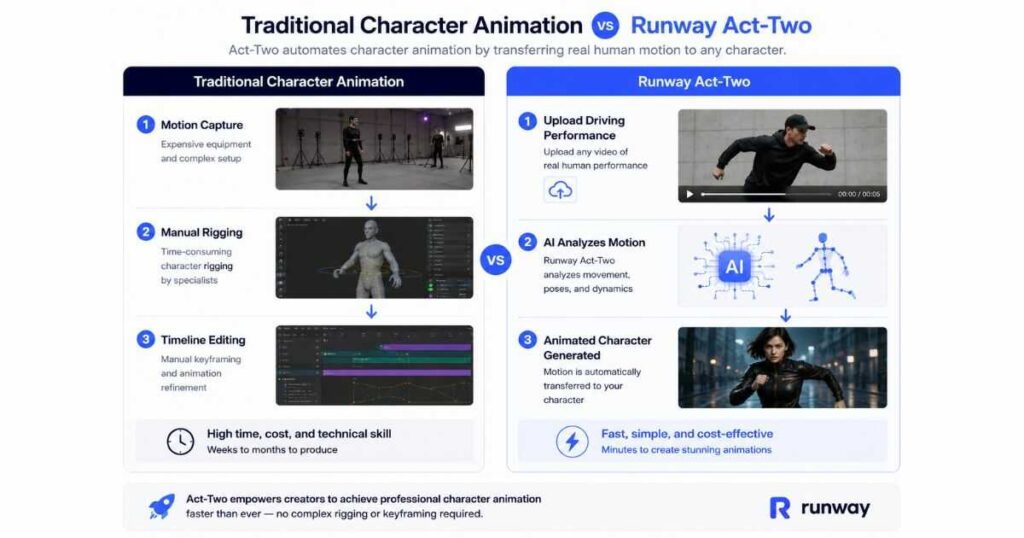
One of Runway’s newest innovations is Act-Two, the platform’s AI character animation system.
Instead of manually keyframing every movement, users can animate digital characters by transferring performances from reference footage.
The process is surprisingly straightforward:
- Upload a driving performance.
- Choose a character.
- Allow the AI to analyze facial expressions and body movements.
- Generate a fully animated result.
This technology opens exciting possibilities for:
- Animated storytelling.
- Virtual presenters.
- Educational videos.
- Marketing campaigns.
- Digital influencers.
Although creators may still need to refine certain scenes, Act-Two dramatically reduces the amount of manual animation work.
Runway AI Review: Project Management
Unlike many AI generators that simply produce files, Runway includes an organized Projects workspace.
Creators can:
- Store multiple projects.
- Organize generations.
- Return to previous work.
- Collaborate with team members.
- Share projects.
For agencies and professional teams, this centralized workflow makes managing creative assets significantly easier than juggling files across different platforms.
The Projects page also helps maintain a cleaner workflow as the number of AI generations grows.
Runway AI Pricing
Runway offers multiple pricing options suitable for different users.
Generally speaking, the plans are designed for:
Free Plan
Ideal for:
- Beginners.
- Students.
- Learning the interface.
- Testing AI models.
Paid Plans
Best suited for:
- Professional creators.
- Agencies.
- Businesses.
- Frequent AI video production.
Paid subscriptions unlock higher usage limits, faster processing, additional credits, and access to more advanced creative capabilities.
Since Runway updates its plans periodically, it’s always worth checking the latest pricing directly before choosing a subscription.
Is the Pricing Worth It?
For casual users who only generate occasional videos, the free tier is often enough to explore the platform.
However, if you’re producing content regularly, the productivity gains from Gen-4.5, Aleph, and Act-Two can justify the subscription cost by saving hours of editing and production time.
Is Runway AI the Best Value for Your Money?
Runway offers a powerful collection of AI video and editing tools, but the best value depends on how you create videos.
If you mainly want cinematic AI video generation, it’s worth comparing Runway with Kling AI before choosing a paid plan.
If your goal is creating complete YouTube videos from scripts, including scenes, voiceovers, and a streamlined production workflow, InVideo AI may be a better fit.
In other words, paying for Runway isn’t automatically the best choice simply because it offers more professional features. The right platform depends on how you plan to use it.
👉 Compare Kling AI and Runway →
👉 See how InVideo AI compares →
Runway AI Review: Pros and Cons
Every AI platform has strengths and limitations, and this Runway AI Review aims to present both sides fairly. While Runway is one of the most advanced AI creative platforms available today, it’s important to understand where it excels and where you may encounter limitations.
Pros
✅ Outstanding AI video quality with Gen-4.5
✅ Modern, beginner-friendly interface
✅ Excellent AI character animation using Act-Two
✅ Powerful AI editing with Aleph
✅ Image generation integrated into the same platform
✅ Organized project management system
✅ Frequent feature updates
✅ Suitable for both individuals and creative teams
✅ Excellent cinematic camera movement
✅ Reliable output consistency compared to many competitors
Cons
❌ Free plan has limited generation credits.
❌ Some advanced features require a paid subscription.
❌ Longer generations may take additional processing time.
❌ Prompt quality still has a significant impact on results.
❌ Learning all available tools can take time because Runway offers many creative features.
Fortunately, most of these drawbacks become less noticeable once users become familiar with the platform.
What If Runway Isn’t the Right Tool for You?
Runway is powerful, but its extensive feature set isn’t ideal for everyone. If you find the platform too focused on professional creative workflows, there are simpler alternatives worth considering.
Choose Kling AI if your main priority is cinematic AI video generation, realistic motion, and image-to-video creation.
Choose InVideo AI if you want to turn scripts or ideas into complete YouTube videos with less manual production work.
Choose HeyGen if your content depends heavily on AI avatars and virtual presenters.
| You want… | Consider |
|---|---|
| Cinematic AI scenes | Kling AI |
| Complete YouTube videos | InVideo AI |
| AI avatars | HeyGen |
| Professional AI editing | Runway |
Best Use Cases for Runway AI
One reason this Runway AI Review receives such a high overall rating is the platform’s flexibility.
Instead of serving only one audience, Runway supports many creative industries.
It works particularly well for:
YouTube Creators
Generate:
- B-roll.
- Cinematic intros.
- Storytelling scenes.
- AI visuals.
- Documentary sequences.
without expensive production equipment.
Is Runway AI Good for Faceless YouTube?
Runway can be extremely useful for faceless YouTube channels, especially when you need cinematic B-roll, atmospheric scenes, product visuals, or short AI-generated sequences.
However, Runway is not necessarily an all-in-one solution for the entire faceless YouTube workflow. You may still need separate tools for script generation, voiceovers, long-form video assembly, and automated editing.
For creators who want a more streamlined script-to-video workflow, InVideo AI is worth considering. It can handle more of the production process from a single platform, while Runway can be used when you need higher-end custom visuals.
A Practical Faceless YouTube Workflow
Script → InVideo AI → Kling AI → Runway
- InVideo AI: build the main video.
- Kling AI: generate cinematic scenes.
- Runway: refine/edit special shots.
Marketing Teams
Create:
- Product advertisements.
- Social media campaigns.
- Brand videos.
- Promotional clips.
in a fraction of the traditional production time.
Filmmakers
Many independent filmmakers now use Runway for:
- Storyboarding.
- Concept visualization.
- Scene planning.
- Experimental filmmaking.
- Visual effects.
before moving into full production.
Agencies
Marketing agencies can accelerate client work by using Runway for:
- Fast concept creation.
- AI-generated commercials.
- Social content.
- Client presentations.
This significantly reduces production costs while increasing creative output.
Educators
Teachers and course creators can build:
- Educational animations.
- Explainer videos.
- Interactive lessons.
- Visual demonstrations.
without hiring an animation studio.
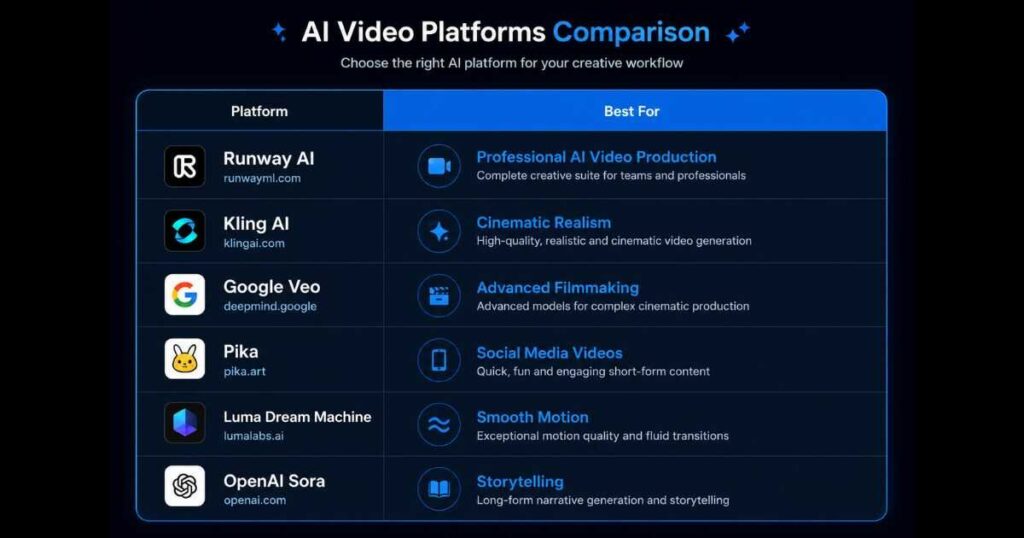
Runway AI Review: How Does It Compare with Competitors?
The AI video industry has become highly competitive.
Some of the biggest alternatives include:
- Kling AI.
- Google Veo.
- Pika.
- Luma Dream Machine.
- OpenAI Sora.
Each platform has its strengths.
Runway
Best for:
- Professional workflows.
- AI editing.
- Character animation.
- Team collaboration.
Kling AI
Best for:
- Cinematic realism.
- Beautiful lighting.
- High-quality text-to-video generation.
- Motion Control.
Pika
Best for:
- Short-form social media content.
- Fast video creation
Google Veo
Best for:
- Large-scale cinematic production.
- Advanced prompt understanding.
OpenAI Sora
Best for:
- Experimental storytelling.
- Long-form AI-generated scenes.
Rather than replacing one another, these platforms often complement different creative workflows.
If you’re comparing platforms before making a decision, these guides may also help:
- Kling AI Review (2026): Features, Pricing & Worth It?
- Kling AI Text to Video (2026): Create Cinematic AI Videos.
- Kling AI Motion Control (2026): Create Realistic AI Character Animation.
- Kling AI Alternatives: Best AI Video Generators Compared.
Reading these articles alongside this Runway AI Review will give you a much broader understanding of today’s AI video landscape.
Runway AI vs Kling AI vs InVideo AI
Runway isn’t necessarily the best AI video tool for every creator. Your best choice depends on what you actually want to produce. Runway is particularly strong for professional AI video generation and editing, while Kling AI focuses heavily on cinematic video generation and InVideo AI is designed around turning ideas and scripts into complete videos.
| If your priority is… | Best choice |
|---|---|
| Professional AI editing | Runway |
| Cinematic AI video generation | Kling AI |
| Turning scripts into complete videos | InVideo AI |
| Character animation | Runway / Kling AI |
| Faceless YouTube production | InVideo AI |
| Cinematic B-roll | Kling AI |
For many creators, the smartest approach isn’t choosing one tool—it’s using each platform for what it does best.
You could use InVideo AI to build the structure of a faceless YouTube video, Kling AI to generate key cinematic scenes, and Runway for advanced editing and visual refinement.
Is Runway AI Worth It for Beginners?
Absolutely.
One pleasant surprise during this Runway AI Review was how approachable the platform feels despite offering professional-grade tools.
The dashboard is clean, navigation is intuitive, and most AI features require only a few clicks to get started.
Beginners don’t need to master every feature immediately. They can begin with simple text prompts or image generation and gradually explore more advanced tools like Aleph and Act-Two as they gain confidence.
“If you’re still deciding whether Runway fits your workflow, consider creating a few small practice projects rather than a full production. Exploring the dashboard, testing different prompts, and experimenting with the available AI models is often the fastest way to discover which features match your creative style. [Click here to sign up for Runway for free] and start your hands-on experiment today!”
Runway AI Review: Who Should Choose Runway?
Runway is an excellent choice if you:
- Produce videos regularly.
- Want professional-looking AI visuals.
- Need AI-powered editing.
- Collaborate with a team.
- Create commercial content.
- Value an organized creative workspace.
If your primary goal is simply generating occasional short AI clips, lighter tools may be sufficient. However, creators looking for a complete AI production environment will likely appreciate everything Runway brings together in one platform.
Frequently Asked Questions About Runway AI
Even after reading this Runway AI Review, you may still have questions about how the platform performs in everyday creative work. Below are answers to the questions most creators ask before deciding to use Runway.
Is Runway AI Free?
Yes.
Runway offers a free plan that allows new users to explore the platform and test many of its core AI features.
The free tier is ideal for:
- Learning the interface.
- Testing AI models.
- Creating small personal projects.
- Understanding the overall workflow.
However, as your projects become more advanced, you’ll likely need additional credits or a paid subscription to access higher generation limits and premium features.
Is Runway AI Good for Beginners?
Absolutely.
One of the biggest surprises during this Runway AI Review was how approachable the interface feels despite offering professional-level capabilities.
The dashboard is clean and logically organized, making it easy to:
- Start a new project.
- Generate videos.
- Animate characters.
- Create images.
- Manage previous work.
Even users with little or no video editing experience can begin producing AI-generated content after only a short learning period.
Can Runway AI Replace Traditional Video Editing?
Not completely.
Professional editing software still provides greater manual control for complex productions.
However, Runway can dramatically reduce the amount of repetitive work by automating tasks that previously required hours of editing.
For many creators, Runway works best alongside traditional editing software rather than replacing it entirely.
What Makes Runway Different From Other AI Video Generators?
Most AI video platforms focus on only one or two features.
Runway combines multiple creative tools inside one ecosystem:
- AI Video Generation.
- AI Image Generation.
- Character Animation.
- AI Editing (Aleph).
- Project Management.
- Team Collaboration.
- Creative Workflows.
This all-in-one approach is one of the biggest reasons why professional creators continue choosing Runway.
Is Runway Worth Paying For?
For occasional users, the free plan may be sufficient.
But if you publish videos regularly for YouTube, TikTok, Instagram, client work, or marketing campaigns, a paid plan can quickly pay for itself through the time saved on production and editing.
The value comes less from generating a single video and more from accelerating your entire creative workflow.
Final Verdict: Is Runway AI Worth Using in 2026?
After thoroughly evaluating the platform for this Runway AI Review, it’s clear that Runway remains one of the strongest AI creative platforms available in 2026.
Rather than offering only an AI video generator, Runway has evolved into a complete production environment where creators can generate videos, animate characters, edit footage, create images, and manage projects from one workspace.
Its newest models—such as Gen-4.5, Act-Two, and Aleph—demonstrate how quickly AI-assisted filmmaking is advancing.
While the platform isn’t perfect, its combination of high-quality output, professional workflows, and continuous innovation makes it one of the most compelling choices for serious content creators.
If your goal is producing cinematic AI videos efficiently while maintaining creative control, Runway is absolutely worth exploring.
If you’re interested in AI video creation, don’t feel pressured to master every feature immediately. Start by experimenting with a few small projects, explore the available AI models, and gradually build your workflow as you become more familiar with the platform. Hands-on experience is often the fastest way to understand what Runway can do. [Click here to join Runway for free] and start your creative journey today!
Before You Subscribe to Runway, Compare These Alternatives
Runway is an excellent choice for creators who need advanced AI video generation and editing. But before paying for a subscription, it’s worth comparing the platform with alternatives that are designed for different workflows.
Kling AI is worth considering if your priority is cinematic AI video generation and realistic motion.
InVideo AI may be a better option if your goal is creating complete faceless YouTube videos from scripts with less manual work.
Instead of choosing based only on the number of features, choose the platform that matches the type of videos you actually want to produce.
🎬 Want cinematic AI videos?
🎥 Want to create complete YouTube videos?
🎞️ Need advanced AI editing?
Try Runway →
Continue Learning AI Video Creation
If you’re building your AI video toolkit, these guides will help you compare platforms and master additional workflows:
- Kling AI Review (2026): Discover the strengths, pricing, and overall capabilities of Kling AI.
- Kling AI Free: Learn how to make the most of Kling AI’s free plan and available credits.
- Kling AI Text to Video: Master prompt-based cinematic AI video generation.
- Kling AI Motion Control: Learn how to animate characters using reference videos and realistic motion transfer.
- Best Kling AI Alternatives: Compare the top AI video generators available today.
- Runway AI Pricing (2026): Plans, Features & Value – A complete breakdown of subscription costs, credit limits, and how to choose the perfect plan for your workflow without overspending.
- Runway AI Tutorial: Complete Beginner’s Guide (2026) — Learn how to use Runway AI from scratch with this step-by-step tutorial covering the dashboard, projects, video generation, workflows, Agent 2.0, and your first AI video.
- Runway AI Alternatives: 7 Best AI Video Tools (2026) Discover the 7 best Runway AI alternatives in 2026 and compare their features, strengths, pricing, and ideal use cases to find the perfect AI video tool.
Conclusion
This Runway AI Review demonstrates why Runway continues to lead the AI video creation industry in 2026. From generating cinematic videos with Gen-4.5 to animating characters with Act-Two and accelerating editing through Aleph, the platform offers an impressive collection of tools that support nearly every stage of the creative process.
While beginners can quickly start with simple AI-generated videos, experienced creators will appreciate the platform’s deeper features, project organization, and collaborative workflows. That balance between accessibility and professional capability is one of Runway’s greatest strengths.
Whether you’re a filmmaker, marketer, educator, YouTube creator, or simply exploring the possibilities of AI-powered content creation, Runway provides a flexible environment that grows with your skills. If you’re looking for a modern platform capable of handling much more than basic video generation, this Runway AI Review suggests it’s well worth your attention in 2026.


I think the distinction between Runway’s comprehensive ecosystem and simpler text-to-video tools is crucial. While Runway offers deep editing features, I wonder if creators seeking rapid prototyping might prefer lighter interfaces for initial concept testing before moving to heavier platforms.
Great point! Runway is definitely more powerful for creators who need advanced editing and creative control. For quick concept testing, lighter text-to-video tools can be a faster starting point before moving into a more comprehensive platform like Runway.