
InVideo AI Review (2026): Is It Worth It?
If you’re looking for an InVideo AI Review that goes beyond a basic list of features, pricing plans, and AI models, you’re in the right place. This detailed InVideo AI Review explores how the platform actually works, what it can do, where it stands out, and whether it’s worth using for your video projects.
InVideo AI has evolved into much more than a simple text-to-video generator. Instead of making you switch between different tools for writing scripts, generating visuals, creating voiceovers, producing AI footage, finding stock media, editing scenes, and exporting videos, InVideo AI brings much of that process together in a single workspace.
And that’s what makes this InVideo AI Review different.
For a beginner creating YouTube videos, a marketer producing promotional content, or a creator building a faceless channel, the most important question isn’t simply:
“Can InVideo AI generate a video?”
The better question is:
“Can InVideo AI make the entire video-production process faster, easier, and more practical?”
That’s exactly what we’ll examine in this InVideo AI Review. We’ll look at its AI video generation, models, editing workflow, credits, pricing, stock media, avatars, voices, strengths, limitations, and real-world use cases—so you can decide whether InVideo AI is the right tool for you before spending your money.
Quick answer: InVideo AI is worth trying if you value speed, convenience, and an all-in-one production workflow. However, creators who want maximum control over individual AI-generated shots may prefer specialized tools such as Kling AI or Runway.
InVideo AI Review: Is It Worth It?
After looking at its workflow, AI generation capabilities, editing tools, models, credits, and use cases, InVideo AI stands out primarily because of its production workflow.
Many AI video tools are excellent at one particular task.
One tool may generate impressive cinematic footage. Another may specialize in talking avatars. Another may provide advanced editing controls.
InVideo AI takes a different approach.
It attempts to connect several stages of production:
Idea → Script → Visuals → Voice → Editing → Final Video
That makes it particularly interesting for people who need to produce content regularly rather than generate a single impressive AI clip.
InVideo AI Review: At a Glance
| Category | Our Take |
| Ease of use | Excellent for beginners |
| AI video generation | Strong |
| AI models | One of its biggest advantages |
| Editing workflow | Very convenient |
| Stock media | Strong |
| AI voices | Good |
| AI avatars | Useful, but not its strongest feature |
| Faceless YouTube | Excellent use case |
| Marketing videos | Excellent use case |
| Creative control | Good, but specialized tools may offer more |
| Best advantage | All-in-one workflow |
| Biggest concern | Credit consumption with premium generation |
The important point is that this table should not be interpreted as saying InVideo AI is the absolute best tool in every category.
It isn’t.
Its strength is bringing multiple capabilities together.
What Is InVideo AI? | InVideo AI Review
In this InVideo AI Review, we’ll explore how InVideo AI works as an AI-powered video creation platform designed to help users create videos without having to perform every production step manually.
Instead of starting with a blank editing timeline, you can begin with an idea, description, script, or content concept and use AI-assisted workflows to turn it into a video.
Depending on the workflow you choose, the platform can help with elements such as:
- Video scripting
- AI-generated visuals
- AI images
- Voiceovers
- AI avatars
- Stock footage
- Music
- Templates
- Editing
- Captions
- Video customization
- Multiple AI generation models
- Exporting and publishing
This makes InVideo AI particularly attractive to creators who don’t want to become experts in several different video-production applications.
For example, someone building a faceless YouTube channel could potentially use one platform for much of the production process instead of creating a script in one application, generating images somewhere else, producing footage in another tool, recording a voiceover separately, and finally editing everything in a traditional video editor.
That is where the real appeal of InVideo AI begins.
Why Is InVideo AI Different?
The most interesting part of this InVideo AI Review is not simply the number of features available.
It is the way those features work together.
Consider a typical AI video workflow.
You might write a script with one AI assistant.
Then you generate images with another tool.
Then you generate video clips with a dedicated video model.
Then you find stock footage.
Then you create a voiceover.
Then you open an editor.
Then you add subtitles.
Then you adjust the timing.
Then you export the final video.
Every individual tool may be excellent.
But the workflow becomes fragmented.
InVideo AI takes a different approach
The platform attempts to reduce the number of separate steps between an idea and a finished video.
That can be especially valuable when your goal is volume.
If you’re creating one cinematic short film, maximum creative control might be more important than speed.
But if you’re creating:
- YouTube videos
- Shorts
- Marketing videos
- Product videos
- Educational content
- Social media content
- Promotional videos
- Faceless channel content
then reducing production time can become a major advantage.
The real advantage isn’t just AI generation
This is one of the most important conclusions from our InVideo AI Review.
The platform’s value isn’t simply that it has access to multiple AI models.
The bigger advantage is the workflow surrounding those models.
You can think of it this way:
Specialized AI tool:
Generate one specific type of content extremely well.
InVideo AI:
Help me move from an idea toward a complete video.
That distinction makes the platform much more interesting for content creators.
Who Is InVideo AI Best For?
InVideo AI isn’t designed for exactly the same type of user as every other AI video platform, which is an important consideration in any InVideo AI Review.
Its strongest audience is people who care about getting videos produced efficiently.
1. Faceless YouTube Creators
This is one of the strongest use cases.
A faceless channel often needs a repeatable production system.
You need:
- A topic
- A script
- Narration
- Visuals
- Editing
- Captions
- Music
- A final export
Doing all of this manually can take hours.
An AI-assisted workflow can potentially reduce the amount of repetitive work involved.
If you’re building a faceless YouTube channel, InVideo AI becomes particularly interesting because the platform is not limited to generating a single visual clip.
It is designed around creating a complete video.
If you are interested in building faceless content with AI, you can also read our guide on [How to Use HeyGen → ], which covers a different approach to AI-assisted video creation.
2. Beginners
InVideo AI can also make sense for people who don’t have advanced video-editing skills.
Traditional editing software can be intimidating.
A beginner may need to understand:
- Timelines
- Tracks
- Transitions
- Keyframes
- Audio mixing
- Color correction
- Aspect ratios
- Export settings
AI-assisted workflows can remove some of that complexity.
Instead of asking:
“How do I build this entire video manually?”
the user can start with:
“What do I want this video to accomplish?”
That’s a significant change in the learning curve.
3. Marketers
Marketing teams often need video content quickly.
A business might need:
- Product demonstrations
- Social media ads
- Promotional videos
- Explainer videos
- Educational content
- Short-form advertisements
- Campaign variations
In these situations, speed can be more valuable than having absolute control over every frame.
InVideo AI’s all-in-one approach can therefore be useful for marketers who need to create and iterate on content quickly.
4. Small Businesses
Small businesses frequently have limited resources.
Hiring a full video-production team for every marketing video isn’t realistic for many companies.
An AI-assisted platform can help reduce some of the technical barriers.
For example, a small business could use InVideo AI to experiment with:
- Product videos
- Social media content
- Promotional campaigns
- Educational videos
- Customer-focused explainers
The goal isn’t necessarily to replace professional production completely.
The goal is to make producing useful video content more accessible.
InVideo AI Features: What Can You Actually Do?
A good InVideo AI Review should explain what InVideo AI can actually do, rather than simply listing its many features.
The more useful question is:
What can you actually use those features for?
Here are some of the major capabilities worth understanding.
| Feature | What It Can Help You Do |
| AI video generation | Turn ideas or instructions into video content |
| AI images | Create visual assets for projects |
| AI video models | Generate different types of AI footage |
| AI voices | Add narration without recording yourself |
| AI avatars | Create presenter-style videos |
| Stock media | Add existing footage and assets |
| Templates | Start from predefined video structures |
| AI workflows | Automate parts of production |
| Editing | Edit uploaded or generated footage, assign first-cut assembly to AI agents, and refine the result on a multitrack timeline |
| Captions | Make videos easier to follow |
| Multiple models | Choose different generation capabilities |
The availability and limits of individual features can depend on the plan and the specific workflow being used, so users should always check the current plan details before subscribing.
Invideo Editor: Working With Your Own Footage
You can also start with footage you’ve already recorded.
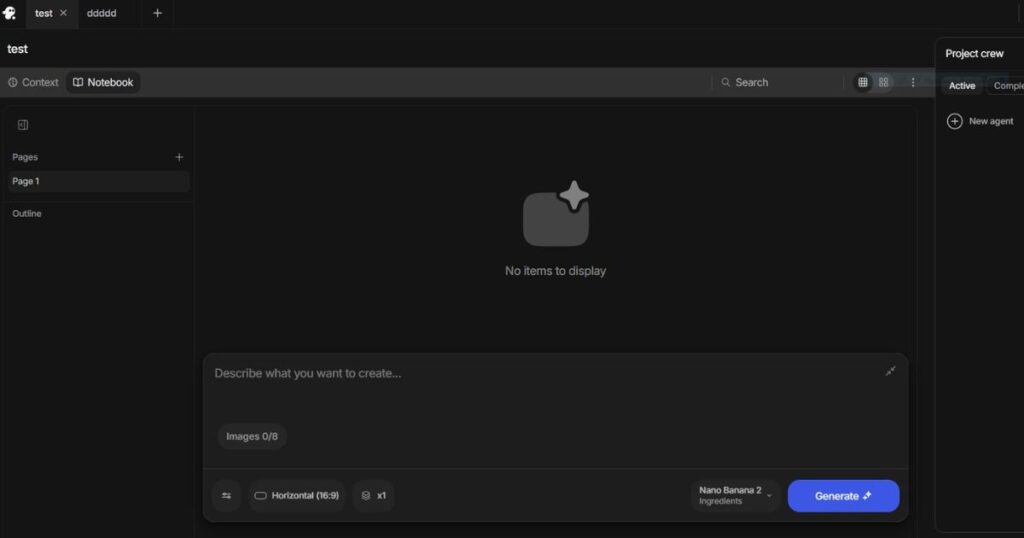
Invideo Editor runs in your browser and combines a multitrack timeline with AI editing agents. Upload your clips, add a script if you have one, and explain the cut you want. The agents can review the footage, select usable takes, remove repetition and assemble a first version.
That first cut is a starting point. You can review the choices, swap takes, move scenes and adjust the pacing yourself.
The editor also includes:
– Frame-by-frame trimming and keyframe controls.
– Colour correction, grading and LUTs.
– Separate audio tracks for dialogue, music and effects.
– Captions, titles and transitions.
– Shared projects and review comments.
This makes it relevant to interviews, tutorials and product demonstrations, as well as videos built from generated footage.
InVideo AI Models: More Choice, More Flexibility
One of the more interesting parts of the current InVideo AI ecosystem is its access to multiple AI models and generation capabilities.
This is an important part of any InVideo AI Review because different models can produce very different results.
One model may be better suited to realistic footage.
Another may produce stronger motion.
Another may work better for certain image-generation tasks.
Rather than forcing users to build their entire workflow around one generation engine, InVideo AI attempts to provide access to multiple capabilities from the same environment.
For creators, that can simplify experimentation.
Instead of opening several websites and learning several interfaces, you can test different approaches within a broader production workflow.
However, more models don’t automatically mean better results.
The quality of the final video still depends on:
- Your prompt
- Your source material
- Your creative direction
- Model selection
- Editing decisions
- Voice selection
- Timing
- Human review
AI can accelerate production, but it doesn’t remove the need for good creative decisions.
InVideo AI vs Specialized AI Video Tools
This is where the InVideo AI Review gets particularly interesting.
Suppose you are comparing InVideo AI with tools such as HeyGen, Kling AI, and Runway.
They aren’t necessarily competing for exactly the same job.
| Tool | Best For | Main Strength |
| InVideo AI | Complete video production | Speed and workflow |
| HeyGen | Presenter and avatar videos | AI presenters |
| Kling AI | Generative video | Visual generation |
| Runway | Advanced creative workflows | Creative control |
For example, if your priority is realistic AI presenters, our HeyGen AI Avatars guide goes deeper into that specific workflow.
If your priority is cinematic AI-generated footage, our Kling AI Review covers the platform from a more generation-focused perspective.
That is why I wouldn’t describe InVideo AI as simply “better” than these platforms.
It solves a somewhat different problem.
InVideo AI focuses heavily on the journey from idea to finished video.
And for many creators, that journey is exactly where most of the time is spent.
Ready to Test the Workflow?
If the all-in-one approach sounds useful for your content workflow, the best way to judge InVideo AI is to test it with a real project rather than relying only on feature lists.
[Try InVideo AI and Create Your First Video →]
Start with a project you would normally create manually and see how much of the production process the platform can handle for you.
How InVideo AI Actually Creates a Video
A good InVideo AI Review should go beyond asking whether the platform can generate a video and explain how the entire process actually works.
The appeal of InVideo AI becomes clearer when you look at the complete workflow.
Instead of treating video creation as a collection of disconnected tasks, the platform brings several stages together inside one environment.
A typical workflow can look like this:
Idea → Prompt → Script → Visuals → Voice → Editing → Refinement → Export
The exact workflow can vary depending on the project and the AI tools you choose, but the concept is straightforward: you start with what you want to create and progressively turn that idea into a finished video.
Step 1: Start With an Idea
You don’t necessarily need a finished script before starting.
For example, you might have an idea such as:
“Create a 60-second YouTube Short explaining five interesting facts about space.”
From there, the AI can help turn the concept into a more structured video.
This is one reason InVideo AI can be particularly useful for beginners: the blank-page problem disappears.
You aren’t staring at an empty editing timeline wondering what to do first.
Instead, you begin with the outcome you want.
Step 2: Develop the Script
InVideo AI Review: The script is one of the most important parts of creating an effective AI-generated video.
A beautiful video with a weak script is still a weak video.
This is why I recommend treating the generated script as a starting point rather than a final product.
Review it.
Remove unnecessary sentences.
Add information.
Change the tone.
Add your own examples.
Make sure the claims are accurate.
For YouTube creators, this step is especially important because retention depends heavily on whether the narration gives viewers a reason to keep watching.
Step 3: Generate or Select Visuals
Once the structure is established, the video needs visuals.
Depending on the workflow, you may combine AI-generated material with stock assets and other visual elements.
This is where the broader workflow examined in this InVideo AI Review becomes particularly useful.
Instead of relying exclusively on one type of footage, you can build a video using different visual sources.
For a faceless YouTube video, for example, a single project might combine:
- AI-generated scenes
- Stock footage
- AI images
- Text overlays
- Background music
- Narration
- Captions
The result can feel considerably more complete than a video consisting of a series of disconnected AI clips.
InVideo AI Workflow: From Generation to Finished Video
The generation itself is only part of the process.
This is an important distinction to consider in an InVideo AI Review.
Some AI video generators are primarily designed around generating individual clips.
InVideo AI is more focused on moving from the initial concept toward something that resembles a finished piece of content.
That makes the workflow particularly interesting for creators who publish frequently.
A Practical Example
Imagine you’re producing a YouTube video titled:
“7 AI Tools That Can Save Creators Hours Every Week.”
Your process could look something like this:
- Define the topic.
- Create the initial script.
- Organize the sections.
- Generate appropriate visuals.
- Add narration.
- Add music.
- Adjust scenes.
- Add captions.
- Review the pacing.
- Export the final video.
The AI can help with many of these steps, but you should still review the final result.
That human review is important.
AI-generated content can contain awkward wording, repetitive visuals, inaccurate information, strange transitions, or scenes that don’t perfectly match the narration.
The best workflow is therefore not:
AI creates everything → Publish immediately
It’s:
AI accelerates production → Human reviews and improves → Publish
That distinction is critical.
InVideo AI Credits: How Much Does Each Video Really Cost?
Credits are one of the most important things to understand before subscribing.
An InVideo AI Review that talks about pricing without explaining credits isn’t giving you the full picture.
The subscription price alone doesn’t tell you the full value of InVideo AI, which is why credits deserve a closer look in this InVideo AI Review.
Your actual value depends on how frequently you generate content and which AI capabilities you use.
According to the plan information used for this review, the individual plans provide different monthly credit allowances.
How Credits Affect Your Workflow
Not every generation necessarily has the same resource cost.
The type of generation, model, and workflow can affect how quickly you consume your available credits.
This means two creators paying for the same plan could get very different amounts of usable output from it.
For example:
Creator A
Uses AI occasionally, experiments with short projects, and doesn’t rely heavily on premium generation.
Creator B
Produces content every day and frequently uses resource-intensive AI generation.
Both may have the same subscription.
But Creator B can reach the credit limit much faster.
This is why a good InVideo AI Review should look beyond the monthly subscription price and examine how credits affect the actual cost of creating videos.
What Should You Consider?
Before choosing a plan, ask yourself:
- How many videos do I want to produce each month?
- How long are those videos?
- How often will I regenerate scenes?
- Which AI models will I use?
- Will I use premium generation frequently?
- Am I producing Shorts or long-form videos?
- How much stock media will I need?
- Am I creating videos for myself or clients?
The answers will help you determine whether a plan provides enough practical capacity for your workflow — an important consideration in any InVideo AI Review.
InVideo AI Pricing and Plans
The following table summarizes the pricing information examined in this InVideo AI Review.
Because software pricing and plan limits can change, always verify the current pricing displayed by InVideo before purchasing.
Individual Plans
| Plan | Price | Monthly Credits | Storage | AI Avatars & Voice Clones |
| Plus | $17/mo* | 75 | 20 GB | 4 |
| Max | $85/mo* | 390 | 100 GB | 16 |
| Generative | $170/mo* | 800 | 2 TB | 40 |
| Elite | $900/mo* | 4,250 | 10 TB | 200 |
*Prices shown are based on the annual-billing information supplied for this article.
Plus Plan — For Exploring
The Plus plan is positioned as an entry-level option for creators who want to explore the platform.
It includes:
- 75 credits per month
- Access to the available AI models
- Access to AI workflows
- AI video trends
- 4 AI avatars and voice clones
- Limited concurrency
- 20 GB storage
- 100 iStock assets
- Unlimited exports without watermark
The biggest attraction here is the relatively low entry price.
For someone who wants to experiment with InVideo AI before committing to a larger production workflow, this is the plan I would investigate first when comparing options in an InVideo AI Review.
Max Plan — For More Frequent Creation
The Max plan increases the monthly capacity significantly.
It includes:
- 390 credits per month
- 16 AI avatars and voice clones
- 2× more concurrency than Plus
- 100 GB storage
- 200 iStock assets
- Unlimited exports without watermark
- The features included in the Plus plan
This is more suitable for someone who has moved beyond experimentation and is producing content regularly.
If you are running a YouTube channel and creating multiple videos rather than simply testing the platform, the additional credits and storage become much more relevant when evaluating the plan in an InVideo AI Review.
Generative Plan — For Daily Use
The Generative plan is aimed at creators with considerably higher usage.
According to the supplied plan information, it includes:
- 800 monthly credits
- Ability to scale up to 1,600 credits
- 40 AI avatars and voice clones
- 10× more concurrency than Plus
- 2 TB storage
- 1,000 iStock assets
- Unlimited exports without watermark
This plan starts to make more sense when video production becomes a regular part of your business or content operation.
For example, a creator producing content every day may value the larger credit allowance and higher concurrency more than a casual user.
Elite Plan — For Power Creators
The Elite plan is designed for very high-volume users.
According to the supplied information, it provides:
- 4,250 monthly credits
- Ability to scale to 8,500 credits
- 200 AI avatars and voice clones
- 20× more concurrency than Plus
- 10 TB storage
- 5,000 iStock assets
- Unlimited exports without watermark
At $900 per month on the supplied annual pricing, this is obviously not a plan intended for the average beginner.
It makes more sense in professional or high-volume production environments, which is worth considering when evaluating InVideo AI’s higher-tier plans in an InVideo AI Review.
InVideo AI Team Plans
The supplied pricing information lists two standard team seat options, which are also worth considering in an InVideo AI Review for businesses and content teams.
The supplied pricing information lists two standard team seat options.
| Seat Type | Annual Price | Monthly Credits per Seat |
| Standard Seat | $40/mo* | 160 |
| Premium Seat | $400/mo* | 1,600 |
*Based on the annual-billing information supplied for this review.
The team setup is designed for organizations with between 2 and 30 users.
The supplied features include:
- Access to AI models
- AI workflows and agents
- 80 GB storage
- 200 iStock assets per seat
- 20 AI avatars and voice clones per seat
- Unlimited exports without watermark
- 24/7 premium customer support
- Mix-and-match seat types
This can be useful when different team members have different workloads.
For example, a company might give most employees standard seats while assigning premium seats to people responsible for heavier video production, a flexibility worth considering in an InVideo AI Review for teams.
Enterprise Plans
For larger organizations, the supplied information lists Enterprise pricing as custom, with a minimum of 10 seats.
The Enterprise offering includes features such as:
- SOC2 and GDPR compliance
- SSO and SCIM
- Role-based access control
- Usage analytics
- Audit logs
- Data privacy agreements
- Model and agent access controls
- Spend controls
- Onboarding and training
- Technical support
- Dedicated success management
- Slack Connect
- Invoice and purchase-order billing
This is clearly a different category from the individual creator plans.
Most YouTubers, freelancers, and small businesses will not need Enterprise, so this plan should be evaluated differently in an InVideo AI Review.
Which InVideo AI Plan Should You Choose?
The most expensive plan isn’t automatically the best plan.
The right plan depends on how you work.
| If You Are… | Consider Starting With |
| Curious beginner | Plus |
| Regular content creator | Max |
| Daily/high-volume creator | Generative |
| Large-scale production operation | Elite |
| Small production team | Team |
| Large organization | Enterprise |
For a beginner, I would not recommend immediately paying for the most expensive option simply because it offers more credits.
Start with your actual workload.
If the platform saves you meaningful time and you consistently hit your credit limit, upgrading becomes much easier to justify when evaluating the value of a plan in an InVideo AI Review.
How to Get More Value From Your InVideo AI Credits
If you’re serious about using InVideo AI for content production, credit management is one of the practical factors worth examining in an InVideo AI Review.
Here are several practical ways to reduce unnecessary consumption.
1. Plan Before Generating
Don’t repeatedly generate content without knowing what you want.
Write down:
- The target audience
- Video length
- Main message
- Visual style
- Narration style
- Required scenes
A few minutes of planning can save unnecessary generations.
2. Improve Your Prompt Before Regenerating
If the first result isn’t right, don’t immediately start generating repeatedly.
Identify the specific problem.
Was the visual wrong?
Was the tone wrong?
Was the scene too long?
Was the narration inaccurate?
Fix the instruction rather than changing everything randomly, especially when you’re evaluating generation efficiency in an InVideo AI Review.
3. Use the Right Model for the Job
Having access to multiple models is useful only when you understand what you need from each one.
Don’t automatically choose the most expensive generation option.
Choose based on the required result, not simply the price, especially when evaluating how efficiently different models fit into your workflow in an InVideo AI Review.
4. Edit Before Regenerating Everything
Before generating another version, check whether the problem can be fixed in the edit. A long pause, a misplaced clip or background music that overpowers the dialogue may only need a timeline adjustment.
Use manual controls for straightforward changes. AI editing agents use credits when assigned work, so factor those tasks into your usage alongside any new footage you generate.
5. Treat AI Generations as Drafts
Your first generation doesn’t have to be perfect.
Think of AI generation as a way to accelerate the creative process.
Then use editing and human judgment to improve the result.
What Does an InVideo AI Video Really Cost?
This is one of the most useful questions you can ask when evaluating the platform.
Instead of asking:
“Is $17 cheap?”
ask:
“How many finished videos can I realistically produce for that subscription?”
That is a much better way to think about value.
Imagine two users.
User A
Creates four videos per month and rarely uses expensive generation.
The subscription may provide plenty of capacity.
User B
Creates videos every day, repeatedly regenerates scenes, and frequently uses premium models.
The same subscription may feel restrictive.
Therefore, the effective cost per finished video depends heavily on your workflow.
A simple way to evaluate it is:
Effective cost per finished video = Monthly subscription cost ÷ Number of usable finished videos
For example, if a creator pays $85 and successfully produces 17 finished videos during the month:
$85 ÷ 17 = $5 per finished video
That doesn’t mean every user will achieve the same cost.
It’s simply a useful framework for measuring whether the tool is economically worthwhile for your particular workflow.
The Biggest Question: Does InVideo AI Save You Time?
This is ultimately where my InVideo AI Review comes back to the central question.
Features are useful.
AI models are useful.
Credits matter.
Pricing matters.
But none of those things matter if the platform doesn’t improve your production process.
For a creator who normally spends several hours moving between different applications, an integrated workflow can potentially provide significant value.
For someone who already has a highly optimized professional production pipeline, the benefit may be smaller.
That’s why I would evaluate InVideo AI based on time saved per finished video, not simply the number of AI features listed on the pricing page.
Test It With a Real Project
Instead of spending hours comparing feature lists, try creating one real project.
Choose a video you genuinely need.
Give InVideo AI a clear brief.
Build the first version.
Then compare the process with the way you normally create videos.
If it saves you time without sacrificing too much quality, you’ll have a much clearer answer about whether InVideo AI is worth it — and that’s ultimately what an InVideo AI Review should help you determine.
[Start Creating With InVideo AI →]
InVideo AI Review: What I Like Most
After looking at the features, workflows, models, credits, and pricing, the most important question is simple:
What actually makes InVideo AI useful?
The answer isn’t necessarily one individual feature.
The strongest part of InVideo AI is the way different capabilities are brought together into one production workflow.
Instead of using one tool to generate a script, another for visuals, another for voiceovers, another for stock footage, and another for editing, InVideo AI attempts to bring much of that process into one workspace.
For creators who value speed, this can be a major advantage.
1. The All-in-One Workflow
The biggest strength in this InVideo AI Review is the complete workflow.
You can move from an idea toward a finished video without constantly switching between different applications.
That can be particularly valuable for:
- Faceless YouTube channels
- Social media creators
- Small businesses
- Marketing teams
- Freelancers
- Educators
- Content agencies
If your main goal is to publish consistently, reducing the number of separate tools in your workflow can be just as valuable as improving the quality of individual AI generations.
2. Access to Multiple AI Models
Another major advantage is the ability to work with multiple AI models from one platform.
This matters because different models can be better suited to different tasks.
One model may produce more impressive visual generations, while another may be more appropriate for a particular workflow.
Instead of building your entire production system around one model, InVideo AI gives creators a broader collection of options.
However, having many models doesn’t automatically mean that every generated result will be perfect.
You still need to understand what you’re trying to create and select the appropriate workflow, which is an important consideration in any InVideo AI Review.
3. Stock Media and AI Generation Together
Another useful aspect is combining generated content with stock assets.
This can be particularly helpful when creating informational or YouTube videos.
For example, imagine a video about artificial intelligence.
You may want:
- AI-generated futuristic scenes
- Real-world technology footage
- Screen recordings
- Background images
- Text animations
- Narration
A platform that can combine different types of media can make this workflow considerably easier.
InVideo AI Review: What I Don’t Like
No AI video platform is perfect, and an honest InVideo AI Review should explain the limitations as clearly as the advantages.
1. Credits Can Become a Limitation
The credit system is probably one of the most important things to understand.
If you use the platform occasionally, the available credits may be more than enough.
But heavy users can consume credits quickly, particularly when experimenting with expensive generation options or repeatedly regenerating content.
This means the advertised monthly price doesn’t tell the entire story.
You need to consider how much content you actually plan to create.
2. AI Still Needs Human Direction
InVideo AI can automate a significant portion of production, but that doesn’t mean you should publish everything exactly as generated.
You may still need to correct:
- Scripts
- Facts
- Scene selection
- Timing
- Narration
- Visual consistency
- Transitions
- Captions
The more professional your content needs to be, the more important human review becomes.
3. Generation Control and Editing Control Are Different
The control you have over an AI-generated shot depends on the model and workflow you choose. Specific camera movements, performances or visual details may still require several attempts.
Timeline editing is a separate question. Invideo Editor lets you trim individual frames, rearrange clips, work with keyframes, adjust colour and mix audio. Edits made by its AI agents remain editable by hand.
If you already use a specialist application, test the controls and project handoff against your own workflow before deciding whether to switch.
InVideo AI Pros and Cons
Here’s a quick summary.
| Pros | Cons |
| All-in-one video workflow | Credits can be consumed quickly |
| Multiple AI models | AI output still requires review |
| AI video generation | Not every generation is perfect |
| AI images and voices | Heavy users may need expensive plans |
| Stock media integration | Advanced users may want more granular control |
| Useful for faceless content | Results depend heavily on prompting |
| Multiple workflows | Pricing can be difficult to evaluate without considering credits |
| Useful for beginners | Not every feature is equally valuable to every creator |
The important takeaway is that most of the disadvantages aren’t deal-breakers.
They simply mean you should understand how you intend to use the platform before paying for a subscription.
InVideo AI vs HeyGen vs Kling AI vs Runway
This is one of the most important comparisons for creators deciding which AI video platform to use.
The four platforms have different strengths.
| Tool | Best For | Main Strength |
| InVideo AI | Complete video production | All-in-one workflow |
| HeyGen | Presenter videos | AI avatars and voice |
| Kling AI | Generative video | Cinematic AI visuals |
| Runway | Creative AI video | Advanced creative control |
InVideo AI vs HeyGen
HeyGen is particularly strong when the main focus is an AI presenter or avatar.
If you want a virtual person to explain a product, deliver a presentation, or act as the face of a video, HeyGen is a strong option.
We cover this topic in more detail in our guide to HeyGen AI Avatars.
But if your goal is to build a complete video containing scripts, visuals, narration, stock media, and editing, InVideo AI may be more appealing.
Choose InVideo AI if: you want a broader production workflow.
Choose HeyGen if: your priority is AI presenters and avatar-based videos.
InVideo AI vs Kling AI
Kling AI is particularly interesting for creators who care about AI-generated visual scenes and cinematic-looking footage.
If your priority is generating individual creative shots, Kling can be extremely useful.
We also have a detailed Kling AI Review covering its capabilities and use cases.
But InVideo AI approaches video production from a broader perspective.
Choose InVideo AI if: you want to create complete videos efficiently.
Choose Kling AI if: generating impressive AI scenes is your primary objective.
InVideo AI vs Runway
Runway is another powerful option for creators who want advanced AI video creation and creative control.
It can be particularly interesting for filmmakers, visual artists, and creators who want to experiment with AI-generated footage.
InVideo AI is different because its appeal is less about giving you one specialized creative environment and more about bringing multiple stages of video production together.
Choose InVideo AI if: workflow speed and convenience are your priorities.
Choose Runway if: creative experimentation and detailed AI video control are more important.
Which Tool Should You Choose?
The answer depends on your objective.
| If You Need… | Best Starting Point |
| Complete AI video production | InVideo AI |
| AI avatar presenters | HeyGen |
| Cinematic AI-generated scenes | Kling AI |
| Advanced AI creative control | Runway |
| Faceless YouTube production | InVideo AI |
| Presenter-led marketing videos | HeyGen |
| AI cinematic experiments | Kling AI |
| Advanced creative video work | Runway |
This is why there isn’t one universally “best” AI video tool.
The best platform is the one that matches your workflow.
Is InVideo AI Good for Faceless YouTube Channels?
Yes, this is one of the use cases where InVideo AI can make a lot of sense.
A faceless YouTube channel often requires several production stages:
Research → Script → Voice → Visuals → Editing → Captions → Thumbnail → Upload
The more of these stages you can accelerate, the easier it becomes to publish consistently.
InVideo AI can be particularly useful for channels producing:
- Educational videos
- List videos
- Explainer videos
- News-style content
- Technology videos
- Business content
- Motivational videos
- Tutorials
- Social media videos
However, automation shouldn’t become an excuse to publish generic content.
The channels most likely to stand out are those that add something original:
- Better research
- Stronger hooks
- Original commentary
- Better storytelling
- Unique visuals
- Human editing
- Useful information
AI can accelerate production.
It doesn’t automatically create a successful channel.
Is InVideo AI Good for Beginners?
This is another area where InVideo AI has an advantage.
A beginner doesn’t necessarily need to understand professional video-editing software before creating their first project.
The AI-driven workflow can reduce the technical barrier.
Instead of learning every editing function first, you can start by describing what you want to create and then refine the result.
That doesn’t mean there is no learning curve.
You still need to learn how to:
- Write effective prompts
- Structure scripts
- Choose appropriate visuals
- Edit generated scenes
- Control pacing
- Review AI output
- Manage credits
But the learning process can be much less intimidating than starting with a completely empty editing timeline.
Who Should NOT Use InVideo AI?
Despite the advantages, InVideo AI isn’t necessarily the right choice for everyone.
You may want another solution if:
You Need Extremely Precise Cinematic Control
If you are creating highly controlled cinematic productions where every frame matters, a specialized creative workflow may be more appropriate.
You Already Have a Professional Editing Workflow
If you already use professional editing software and have an efficient production pipeline, moving everything to another platform may not provide enough benefit.
You Only Want AI Avatars
If your entire project revolves around realistic AI presenters, a specialized platform such as HeyGen may make more sense.
You Only Want Individual AI Video Clips
If you don’t need complete video production and simply want to generate cinematic AI footage, Kling AI or another specialized generator may be a better fit.
How to Get the Most From InVideo AI
If you decide to use the platform, don’t treat it as a magic “make my video” button.
Use it as a production assistant.
Start With a Clear Brief
Before generating anything, define:
Audience: Who will watch?
Goal: What should the viewer learn or do?
Format: Short, long-form, advertisement, tutorial, etc.
Tone: Professional, entertaining, educational, emotional, or conversational.
Length: How long should the finished video be?
The clearer your brief, the easier it becomes for the AI to produce something useful.
Edit the First Generation
Your first generation is rarely your final version.
Watch it carefully.
Ask:
- Does the opening hook work?
- Are the visuals relevant?
- Does the narration sound natural?
- Are scenes too long?
- Are there repetitive shots?
- Is the information accurate?
- Does the ending give viewers a reason to act?
Then improve it.
Create a Repeatable Workflow
If you’re building a YouTube channel, don’t reinvent your process every time.
Create a repeatable system.
For example:
Research
↓
Script
↓
InVideo AI generation
↓
Human review
↓
Editing
↓
Thumbnail
↓
SEO
↓
Publish
This is where the platform can become genuinely valuable.
The goal isn’t simply to create one video.
The goal is to create a system that allows you to create many good videos consistently.
Is InVideo AI Worth It?
After looking at the platform from the perspective of features, workflow, credits, pricing, and competing tools, the answer depends on what you’re trying to accomplish.
If you’re looking for an AI platform that does one specific task extremely well, there are specialized alternatives.
But if you want to bring multiple parts of video production together, InVideo AI becomes much more interesting.
Its strongest argument isn’t simply:
“We have lots of AI models.”
The stronger argument is:
“You can use those capabilities inside a broader video production workflow.”
That distinction matters.
For a creator producing content regularly, reducing the number of separate tools can save time.
And time is one of the most valuable resources in content creation, which is ultimately what this InVideo AI Review is trying to evaluate.
InVideo AI Review: Final Verdict
This InVideo AI Review comes down to one central question:
Does InVideo AI make video production easier and faster?
For many creators, the answer can be yes.
The platform combines AI generation, media assets, voices, avatars, editing capabilities, workflows, and multiple models into a broader production environment.
That makes it particularly attractive for creators who don’t want to build a complicated stack of different AI tools.
Its biggest weakness is that the economics become more complicated as usage increases.
Credits matter.
Generation choices matter.
Your production volume matters.
And you shouldn’t judge a subscription only by its headline price.
My Overall Take
Best feature: All-in-one workflow
Best for: Faceless YouTube creators, marketers, beginners, businesses, and frequent content producers
Biggest advantage: Speed and convenience
Biggest limitation: Credit consumption for heavier workflows
Best alternative for AI avatars: HeyGen
Best alternative for cinematic AI scenes: Kling AI
Best alternative for advanced creative AI video: Runway
Overall Rating
InVideo AI: 9.2/10
The score reflects its overall usefulness as a video production platform rather than claiming that it is the best tool for every individual video-generation task.
If your priority is creating complete videos efficiently, InVideo AI is absolutely worth testing.
[Try InVideo AI for Yourself → ]
Frequently Asked Questions About InVideo AI Review
Is InVideo AI free?
InVideo AI offers a way to explore the platform before committing to a paid plan, but the exact limitations and available features can change.
If you’re considering a subscription, check the current plan details before purchasing.
How much does InVideo AI cost?
The pricing depends on the plan and billing option.
The individual plans covered in this InVideo AI Review include Plus, Max, Generative, and Elite, with substantially different credit allowances and resources.
Because pricing can change, verify the current pricing before subscribing.
Does InVideo AI use credits?
Yes.
Credits are an important part of the platform’s economics, particularly when using resource-intensive AI generation.
Your actual monthly usage will depend on the type of content you create and how frequently you regenerate content.
Do InVideo AI credits expire or roll over?
Credit policies can change, so this should be verified against the current official plan terms before making a purchasing decision.
Don’t assume that unused credits will automatically carry over.
Is InVideo AI good for YouTube?
It can be a strong option for YouTube creators, particularly those producing faceless, educational, explainer, business, or list-based content.
However, AI-generated videos should still be reviewed and edited before publication.
Is InVideo AI good for YouTube automation?
It can be useful as part of a YouTube automation workflow, particularly for accelerating script-to-video production.
However, successful YouTube automation still requires research, content strategy, quality control, thumbnails, SEO, and audience understanding.
Is InVideo AI better than HeyGen?
Neither is universally better.
HeyGen is particularly strong for AI avatars and presenter-based videos, while InVideo AI is more focused on a broader video production workflow.
Is InVideo AI better than Kling AI?
That depends on the goal.
Kling AI is particularly useful when your priority is AI-generated visual footage.
InVideo AI is more useful when you want to move from an idea toward a complete video using a broader production workflow.
Is InVideo AI better than Runway?
Again, it depends on your workflow.
Runway can be more attractive for advanced creative AI video work, while InVideo AI is appealing for creators who prioritize speed and an integrated production process.
Is InVideo AI worth it in 2026?
For creators who can make practical use of its workflows and AI capabilities, it can be worth considering.
The most important factor is whether the time saved and production capacity justify the subscription and credit consumption for your specific workflow.
Final InVideo AI Review Recommendation
If you’re still unsure whether InVideo AI is right for you, don’t start by buying the most expensive plan.
Start with a real project.
Choose something you genuinely want to publish.
Create it.
Measure how much time the platform saves you.
Then look at how many credits you used and compare the final quality with your normal workflow.
That’s a much better test than simply reading a feature list.
If InVideo AI helps you turn ideas into finished videos faster while maintaining the quality your audience expects, then the conclusion of this InVideo AI Review is simple: the subscription can become a useful part of your content-production system.
[Ready to Test InVideo AI? Start Creating Here →]
Continue Learning
- InVideo AI Pricing (2026): Plans, Credits & Best Value — Read our complete guide to choose the right plan for your workflow.
- InVideo AI Review (2026): Is It Worth It? — Discover InVideo AI’s features, pricing, AI models, and whether it’s worth using for your video workflow.
- How to Use InVideo AI: Step-by-Step Beginner Guide – A practical beginner-friendly guide showing how to use InVideo AI step by step to create, edit, and customize videos with AI.
- Invideo alternatives (2026): 7 Best AI Video Tools — Compare the best AI video tools and find the right InVideo alternative for your workflow.
- Is InVideo AI Free? Plans, Limits & Free Trial — Discover the free plan, usage limits, credits, and whether it’s worth using.
- InVideo AI for YouTube: Create Better Videos Faster – Learn how to use InVideo AI to create high-quality YouTube videos faster, from scripting and visuals to editing and publishing.
- Faceless YouTube Channel Ideas: 15 Niches to Try — Discover profitable niches and practical formats for building a successful faceless YouTube channel.

