
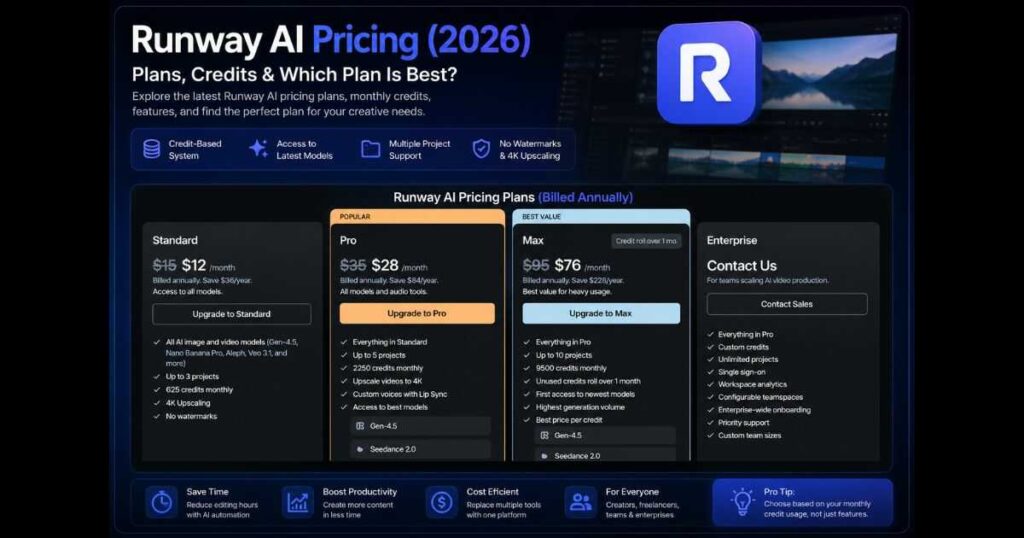
Runway AI Pricing (2026): Plans, Features & Value
Artificial intelligence has transformed video creation, making professional-quality production accessible to everyone—from solo creators to large production teams. Among today’s leading AI video platforms, Runway stands out with powerful models like Gen-4.5, Act-Two, Aleph, and advanced creative workflows that go far beyond simple text-to-video generation.
Before investing your time or budget, however, one question naturally comes first:
Is Runway AI Pricing actually worth it?
Choosing the wrong subscription can leave you paying for features you’ll never use—or running out of AI credits long before the end of the month. That’s why understanding the differences between the available plans is just as important as understanding the technology itself.
In this complete Runway AI Pricing guide, you’ll learn exactly what each subscription includes, how the credit system works, who each plan is designed for, and whether upgrading makes sense based on your creative workflow. By the end, you’ll know which Runway plan offers the best value for your specific needs, whether you’re a beginner experimenting with AI or a professional producing content every day.
What Is Runway AI?
Runway is one of the world’s most advanced AI-powered creative platforms, built for creators who want to generate, edit, and enhance videos using artificial intelligence.
Instead of relying on multiple applications for different production tasks, Runway brings everything together in one workspace.
Today, creators use Runway to:
- Generate videos from text prompts.
- Transform images into animated videos.
- Edit existing footage with AI.
- Animate characters using performance capture.
- Generate high-quality AI images.
- Expand or modify video scenes.
- Produce marketing content and social media videos.
- Prototype cinematic concepts before full production.
Unlike many AI tools that focus on a single feature, Runway continues expanding into a complete AI production ecosystem.
Understanding Runway AI Pricing
One of the biggest misconceptions about Runway AI Pricing is that you’re simply paying for video generation.
In reality, a Runway subscription gives you access to an entire collection of AI-powered creative tools, with the main difference between plans being the number of monthly AI credits, project limits, access to premium models, and collaboration features.
The current pricing structure is designed to serve different types of users, from beginners testing AI video generation to professional studios producing content at scale.
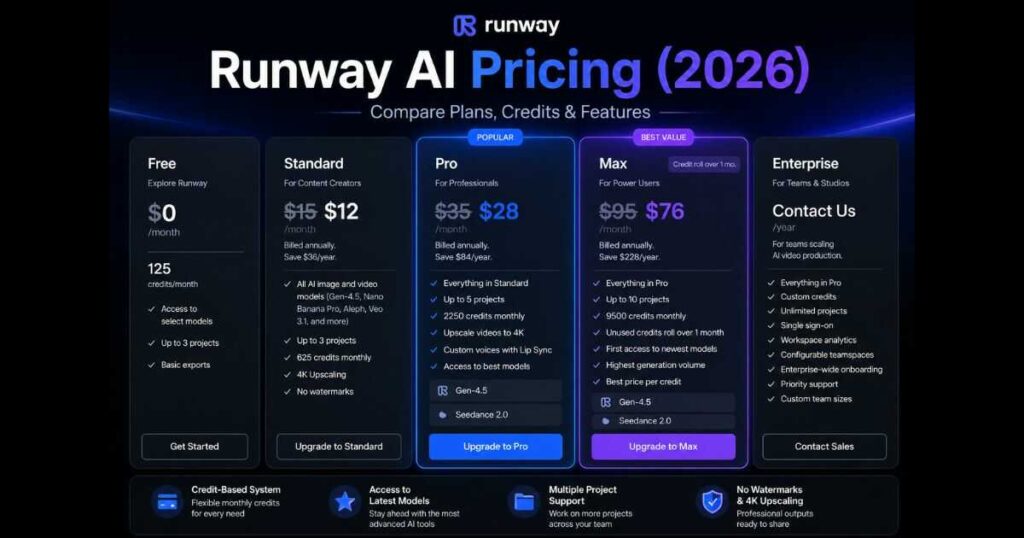
At the time of writing, Runway offers five subscription tiers:
- Free.
- Standard.
- Pro.
- Max.
- Enterprise.
Each plan targets a different level of usage rather than simply offering “more features.”
How Does the Credit System Work?
Instead of offering unlimited AI generations, Runway uses a monthly credit system.
Every AI action—such as generating a video, creating an image, or using premium models—consumes credits. The more advanced the task, the more credits it may require.
This approach gives creators flexibility while allowing them to choose a subscription that matches their actual production volume.
For casual users, the Free plan may provide enough credits to learn the platform.
Professional creators producing videos every day will naturally benefit from subscriptions that include significantly larger monthly credit allowances.
Understanding how these credits are consumed is one of the most important aspects of evaluating Runway AI Pricing.
Overview of Every Runway AI Pricing Plan
Let’s look at each subscription level before comparing which one offers the best value.
Free Plan
The Free plan is designed for anyone who wants to explore Runway without making a financial commitment.
It’s perfect for:
- Beginners learning AI video creation.
- Students.
- Hobbyists.
- Anyone comparing different AI tools before subscribing.
Although the available AI credits are limited, the Free plan provides enough access to understand how the platform works and whether it fits your creative workflow.
Standard Plan
The Standard plan is the first paid subscription and is aimed at creators who publish content regularly.
It includes:
- Access to all AI image and video models.
- Up to 3 projects.
- 625 monthly credits.
- 4K upscaling.
- Watermark-free exports.
This plan is well suited for:
- YouTubers.
- TikTok creators.
- Instagram content creators.
- Small business owners.
- Freelancers starting to use AI in their workflow.
For many independent creators, Standard provides an excellent balance between cost and monthly production capacity.
Pro Plan
The Pro subscription is where Runway begins targeting professional creators.
Compared to Standard, it offers:
- Everything included in Standard.
- Up to 5 projects.
- 2,250 monthly credits.
- Access to premium AI models like Gen-4.5.
- Upscaling videos to 4K.
- Custom voices with Lip Sync.
- Access to the platform’s best AI models.
For creators publishing videos every week—or working with clients—the Pro plan often represents the best balance between flexibility and value.
If you’re still exploring what Runway can do, starting with the Free plan for a few projects is often the easiest way to estimate how many AI credits your workflow actually requires before choosing a paid subscription.
Max Plan: The Best Choice for Heavy AI Creators
The Max plan is currently positioned as Runway’s Best Value subscription, and it’s easy to see why.
Instead of simply increasing your monthly AI credits, Runway designed this plan for creators who rely on AI as part of their daily production pipeline.
The Max plan includes:
- Everything included in Pro.
- Up to 10 projects.
- 9,500 monthly credits.
- Unused credits roll over for one month.
- First access to the newest AI models.
- Highest monthly generation volume.
- Better value per credit.
The addition of Credit Rollover is particularly valuable.
Unlike lower plans where unused credits disappear at the end of the billing cycle, Max subscribers can carry unused credits into the following month. This gives creators much more flexibility, especially when project workloads fluctuate.
If you produce YouTube videos, client work, advertisements, or AI-generated content every day, the Max plan usually delivers the strongest return on investment.
Enterprise Plan
The Enterprise plan targets organizations rather than individual creators.
Instead of fixed pricing, businesses contact the Runway sales team to receive a customized solution.
Enterprise includes:
- Everything included in Max.
- Custom AI credits.
- Unlimited projects.
- Single Sign-On (SSO).
- Workspace analytics.
- Configurable team spaces.
- Enterprise onboarding.
- Priority support.
- Custom team sizes.
For agencies, production studios, media companies, and enterprise marketing teams, these collaboration features become much more important than simply increasing monthly AI credits.
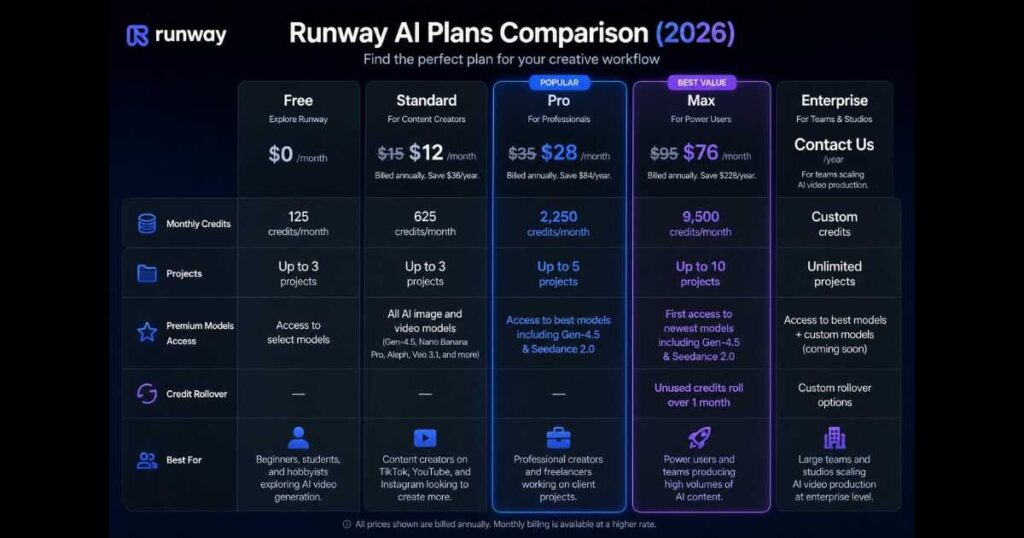
Comparing Every Runway AI Pricing Plan
| Plan | Best For | Monthly Credits | Projects |
| Free | Learning & testing | Limited | Limited |
| Standard | Individual creators | 625 | Up to 3 |
| Pro | Freelancers & professionals | 2,250 | Up to 5 |
| Max | Heavy AI production | 9,500 | Up to 10 |
| Enterprise | Teams & companies | Custom | Unlimited |
This comparison highlights an important fact:
Runway AI Pricing isn’t simply about paying more—it’s about matching your subscription to your production volume.
A beginner doesn’t need 9,500 monthly credits.
Likewise, a production company creating dozens of videos every week will quickly outgrow the Standard plan.
How Monthly Credits Are Actually Used
One of the most misunderstood parts of Runway AI Pricing is the monthly credit system.
Many new users assume they’ll only spend credits when generating videos.
In reality, credits can be consumed by several AI-powered features, including:
- Text-to-video generation.
- Image-to-video generation.
- AI image creation.
- Video editing.
- Upscaling.
- Character animation.
- Premium AI models.
- Experimental features.
The exact credit cost depends on the feature you’re using, the selected model, output quality, and the complexity of the generation.
That’s why creators should think less about the subscription price itself and more about how many AI tasks they perform every month.
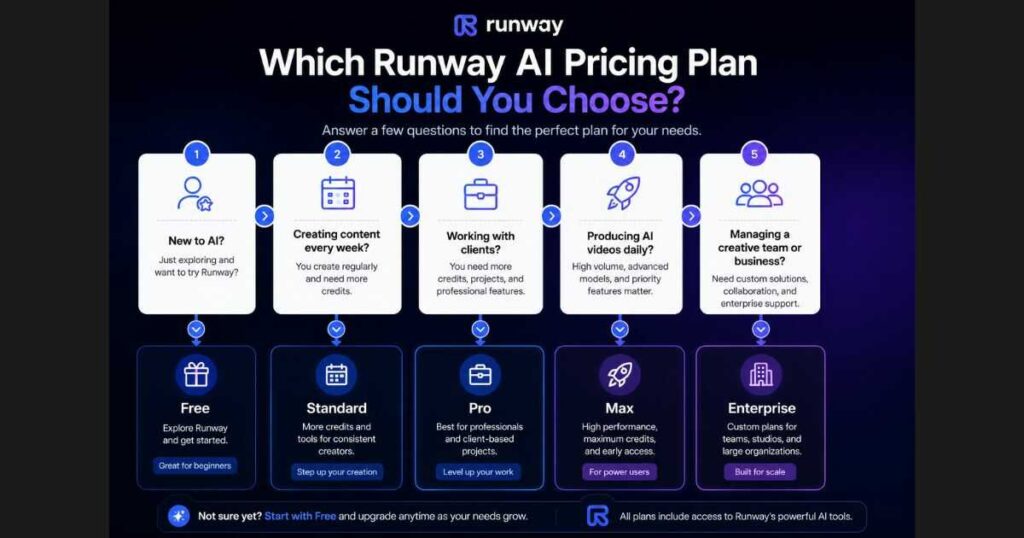
Which Runway AI Pricing Plan Should You Choose?
Every creator works differently.
Instead of asking which subscription is “best,” ask which subscription best matches your workflow.
Choose Free if…
- You’re completely new to AI.
- You want to learn the interface.
- You’re comparing Runway with other AI platforms.
- You only generate content occasionally.
Choose Standard if…
- You upload videos every week.
- You create social media content.
- You’re building a YouTube channel.
- You need watermark-free exports.
For many creators, Standard offers the best entry point into professional AI video production.
Choose Pro if…
You’re probably ready for Pro if you:
- Work with clients.
- Publish content consistently.
- Produce commercial videos.
- Need access to the latest AI models.
- Want significantly more monthly credits.
Professional freelancers often recover the subscription cost simply by saving editing time.
Choose Max if…
Max is ideal for creators who:
- Produce AI videos every day.
- Run multiple commercial projects simultaneously.
- Need access to the newest AI models as soon as they’re released.
- Want the security of unused credit rollover.
- Generate large volumes of AI content each month.
Rather than constantly worrying about available credits, Max allows creators to focus on producing content.
Choose Enterprise if…
Enterprise is designed for organizations that require:
- Multiple team members.
- Shared workspaces.
- Custom onboarding.
- Priority support.
- Enterprise-level collaboration.
Most individual creators won’t need this plan, but growing agencies and large creative teams often benefit from its advanced management features.
If you’ve been using the Free plan for a while, take a look at how often you reach your credit limit. That simple observation usually tells you whether Standard, Pro, or Max is the right next step—without guessing. Ready to unlock more credits and advanced AI models? [Click here to upgrade your Runway plan today and scale your production!]
Is Runway AI Pricing Expensive?
That depends on what you’re comparing it to.
If you compare Runway to a simple AI video generator, it may appear more expensive.
However, Runway combines multiple creative tools inside a single platform.
Instead of paying separately for:
- AI image generation.
- Video generation.
- AI editing.
- Character animation.
- Upscaling.
- Collaboration tools.
you access everything through one subscription.
For creators who regularly produce AI content, this often makes Runway AI Pricing far more economical than maintaining several separate subscriptions.
Does Paying More Always Make Sense?
Not necessarily.
A common mistake is subscribing to the highest plan immediately.
Instead, choose the plan that matches your current workload.
As your content production grows, upgrading becomes much easier—and far more cost-effective—than paying for thousands of unused credits every month.
Runway AI Pricing vs Other AI Video Platforms
Understanding Runway AI Pricing becomes much easier when you compare it with other leading AI video generators. While subscription cost is important, it shouldn’t be the only factor in your decision.
A platform that saves hours of editing time every week can provide much greater value than a cheaper tool with fewer capabilities.
Here’s how Runway compares with some of today’s biggest competitors.
| Platform | Best For | Pricing Model |
| Runway AI | Professional AI video production | Monthly subscription with AI credits |
| Kling AI | Cinematic AI videos | Credit-based subscriptions |
| Google Veo | Advanced filmmaking | Limited public availability |
| Pika | Short-form social content | Monthly subscription |
| Luma Dream Machine | Smooth AI camera movement | Credit-based generation |
| OpenAI Sora | Storytelling and realistic scenes | Limited availability |
Unlike most competitors, Runway combines multiple creative workflows inside one platform instead of focusing on a single AI generation feature.
For many creators, this reduces the need to subscribe to several different AI tools.

Who Should Pay for Runway AI?
Not everyone needs a paid subscription.
The right Runway AI Pricing plan depends entirely on your production workflow.
Let’s look at the most common creator types.
YouTubers
YouTube creators often spend hours editing every single video.
Runway helps speed up production by generating:
- Cinematic B-roll.
- AI-enhanced scenes.
- Background replacements.
- Motion graphics.
- Visual effects.
- Thumbnail assets.
If you upload consistently every week, a paid Runway subscription can save dozens of editing hours every month.
Freelancers
Freelancers usually manage multiple client projects simultaneously.
Because time directly affects income, reducing editing time can significantly increase profitability.
Many freelance creators choose the Pro plan because it offers:
- Access to premium AI models.
- Larger monthly credit allowance.
- Higher project limits.
- Better production flexibility.
Marketing Agencies
Marketing teams frequently create:
- Product advertisements.
- Promotional videos.
- Brand campaigns.
- Social media content.
- Explainer videos.
Instead of outsourcing every creative task, agencies can generate high-quality content internally using Runway’s AI models.
The Max plan often provides the best balance between credit volume and production flexibility for agencies producing AI content regularly.
Small Businesses
Small businesses rarely have large video production budgets.
Runway allows them to create professional marketing assets without investing in expensive cameras or editing teams.
Common business use cases include:
- Website videos.
- Product demonstrations.
- Landing page content.
- Social advertisements.
- Company presentations.
Creative Studios
Creative studios benefit from the larger project limits and premium collaboration features included in the higher-tier plans.
For organizations managing several creators simultaneously, Enterprise becomes the logical choice because of its workspace management and administrative controls.
How to Choose the Right Runway AI Pricing Plan
Choosing the correct subscription becomes much easier if you answer a few simple questions.
How often do you generate AI videos?
If you only experiment occasionally, the Free plan is likely sufficient.
If AI becomes part of your weekly workflow, upgrading usually makes sense.
How many AI credits do you actually need?
Many beginners overestimate their monthly AI usage.
Rather than buying the largest subscription immediately, monitor your credit consumption for a few weeks.
That data provides a much better basis for upgrading than guessing.
Do you work professionally?
If AI directly contributes to your income, investing in a subscription often becomes a business expense rather than simply another software cost.
Professional creators usually recover the subscription fee through improved efficiency.
Do you need the newest AI models?
Runway regularly introduces new generation models and creative features.
Higher subscription tiers typically receive access to these improvements earlier, making them especially valuable for professionals who always want to use the latest AI technology.
“If you’ve already completed several projects with the Free plan, try recreating one of your recent videos using a paid workflow. Comparing the production time and overall quality is often the easiest way to determine whether upgrading is worthwhile for your specific needs. Ready to see the difference? [Click here to unlock Runway’s premium features and elevate your video quality now!]”
Common Mistakes When Choosing a Runway AI Pricing Plan
Many new creators choose a subscription based only on price.
That approach often leads to unnecessary spending—or frequent credit shortages.
Here are the mistakes worth avoiding.
Upgrading Too Early
Some users purchase the highest plan before understanding how many AI credits they actually use.
Starting smaller and upgrading later is usually the smarter approach.
Choosing the Cheapest Plan Forever
The opposite mistake is staying on a plan that no longer supports your growing workload.
Constantly running out of credits can interrupt projects and reduce productivity.
Ignoring Credit Rollover
If your workload changes from month to month, the Max plan’s Credit Rollover feature can provide substantial long-term value.
Unused credits don’t immediately disappear, giving you greater flexibility for larger future projects.
Paying for Features You Never Use
Before upgrading, ask yourself whether you genuinely need:
- More projects.
- Premium AI models.
- Team collaboration.
- Enterprise management tools.
Only pay for features that improve your workflow.
Looking Only at Monthly Cost
The subscription price is only one part of the equation.
A better question is:
How much time does Runway save you every month?
For creators producing content consistently, the answer often makes the subscription surprisingly affordable.
Is Runway AI Pricing Worth It in 2026?
For casual experimentation, the Free plan remains one of the best ways to experience professional AI video generation.
However, for creators publishing content regularly, Runway AI Pricing becomes much easier to justify.
Instead of paying solely for AI generations, you’re investing in:
- Faster production.
- Professional AI models.
- Advanced editing tools.
- High-quality exports.
- Continuous platform improvements.
- A complete AI-powered creative workflow.
For many professionals, the productivity gains alone can outweigh the monthly subscription cost.
Frequently Asked Questions About Runway AI Pricing
Even after understanding the different subscription plans, many creators still have questions about credits, upgrades, and which plan delivers the best long-term value. Below are answers to the most common questions people ask before subscribing.
Is Runway AI Free?
Yes.
Runway offers a Free plan that allows anyone to explore the platform before purchasing a subscription.
The Free plan is ideal for:
- Learning the interface.
- Testing AI video generation.
- Creating AI images.
- Exploring Gen-4.5 capabilities.
- Understanding how the credit system works.
Although monthly credits are limited, it’s an excellent way to determine whether Runway fits your workflow before upgrading.
Can I Upgrade My Runway Subscription Later?
Absolutely.
One of the biggest advantages of Runway AI Pricing is its flexibility.
You can begin with the Free or Standard plan and upgrade whenever your projects require additional AI credits or more advanced features.
Many creators naturally move through the plans as their production volume increases.
Which Runway AI Pricing Plan Offers the Best Value?
For most creators, the answer is different depending on their workflow.
Free
Best for:
- Beginners.
- Students.
- Casual experimentation
Standard
Best for:
- YouTubers.
- Bloggers.
- Social media creators.
- Individual freelancers.
Pro
Best for:
- Professional creators.
- Client work.
- Commercial projects.
- Frequent AI video production.
Max
Best for:
- Daily AI production.
- Heavy credit usage.
- Agencies.
- Professional studios.
Its combination of high monthly credits and Credit Rollover makes it the strongest value for creators producing AI content consistently.
Enterprise
Best for:
- Companies.
- Creative teams.
- Enterprise organizations.
This plan focuses on collaboration, management, and scalability rather than individual creators.
What Happens If I Run Out of Credits?
If you use all of your monthly credits before your billing cycle resets, you’ll generally need to wait until the next billing period or upgrade to a higher plan that better matches your production needs.
This is why monitoring your monthly credit usage is one of the smartest ways to evaluate Runway AI Pricing.
Is Runway AI Pricing Worth It for Beginners?
Yes.
Many beginners assume they need a paid subscription immediately.
In reality, the Free plan provides more than enough opportunity to:
- Learn prompting.
- Explore the interface.
- Generate your first AI videos.
- Test different creative workflows.
Once you understand how frequently you create AI content, upgrading becomes a much easier decision.
Does Runway Offer Better Value Than Paying for Multiple AI Tools?
For many creators, yes.
Instead of subscribing separately to:
- AI image generators.
- AI video generators.
- AI editors.
- Animation tools.
- Background removal software.
Runway combines these capabilities inside one platform.
This consolidated workflow is one of the reasons many professionals consider the platform a worthwhile investment.
“If you’ve already been creating content with Runway for a few weeks, review your recent projects before upgrading. Looking at how many credits you actually used—and which features you relied on most—will help you choose a subscription that fits your workflow instead of paying for capabilities you don’t need yet. Found the perfect tier for your needs? [Click here to choose your Runway plan and unlock full production power today!]”
Final Verdict: Is Runway AI Pricing Worth It in 2026?
After examining every available subscription, it’s clear that Runway AI Pricing has been designed to support creators at every stage—from beginners experimenting with AI to professional studios producing content at scale.
The Free plan lowers the barrier to entry, making it easy to explore the platform without financial risk. As your creative needs grow, the Standard and Pro plans provide a balanced mix of AI credits, premium features, and access to powerful models like Gen-4.5. For creators who rely on AI every day, the Max plan stands out thanks to its generous monthly credit allowance and Credit Rollover feature, while Enterprise delivers the collaboration and management tools required by larger organizations.
Ultimately, the best Runway AI Pricing plan isn’t necessarily the most expensive one—it’s the one that matches your workflow, production volume, and creative goals. By choosing the right subscription, you can spend less time worrying about credits and more time creating high-quality AI-powered videos.
Continue Learning
Continue expanding your AI video creation skills with these in-depth guides:
- Runway AI Review (2026): Discover Runway’s latest features, Gen-4.5, Act-Two, Aleph, and real-world performance.
- Kling AI Review (2026): Compare Runway with one of the leading AI video generation platforms.
- Kling AI Pricing (2026): Explore Kling AI subscription plans and compare pricing.
- Kling AI Text to Video (2026): Learn how to create cinematic AI videos using advanced prompts.
- Kling AI Motion Control (2026): Master realistic AI character animation with reference videos.
- Best Kling AI Alternatives: Compare today’s top AI video generators and find the right platform for your projects.
- Runway AI Tutorial: Complete Beginner’s Guide (2026) — Learn how to use Runway AI from scratch with this step-by-step tutorial covering the dashboard, projects, video generation, workflows, Agent 2.0, and your first AI video.
- Runway AI Alternatives: 7 Best AI Video Tools (2026) Discover the 7 best Runway AI alternatives in 2026 and compare their features, strengths, pricing, and ideal use cases to find the perfect AI video tool.

