
Best AI Video Editors in 2026: 7 Tools Compared
Choosing between the Best AI Video Editors is no longer as simple as picking the tool with the most features. In 2026, AI video software has split into very different categories: some platforms create complete videos from a prompt, others specialize in realistic AI avatars, while others focus on cinematic generation or editing footage you already have.
That matters because the Best AI Video Editors for a faceless YouTube channel may be completely different from the best choice for corporate training, social media ads, or cinematic filmmaking.
In this guide, you’ll find seven of the strongest AI video tools worth considering in 2026, including InVideo AI, HeyGen, Kling AI, Runway, Synthesia, Descript, and Pictory. Instead of simply listing features, we’ll explain what each tool is actually good for, who should use it, where it falls short, and which option makes the most sense for your workflow.
Quick answer: If you want complete faceless videos from scripts and prompts, start with InVideo AI. For realistic AI presenters, HeyGen is one of the strongest choices. For cinematic AI-generated footage, Kling AI is a standout. Runway is better suited to creative professionals, while Synthesia is particularly strong for structured business and training videos.
Best AI Video Editors at a Glance
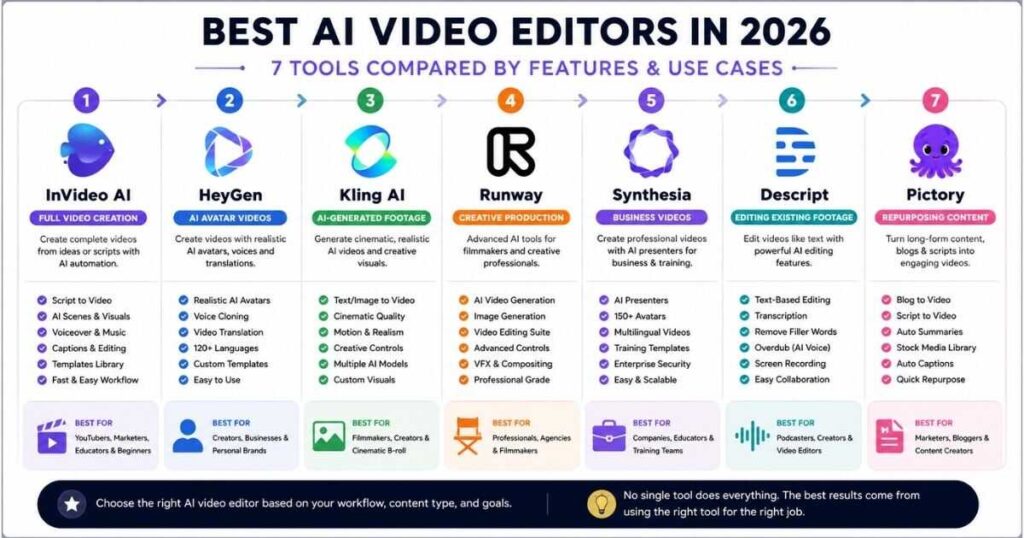
Before looking at every platform individually, here’s a quick comparison to help you narrow down the list.
| AI Video Editor | Best For | Main Strength | Ideal User |
|---|---|---|---|
| InVideo AI | Full video creation | Prompt-to-video automation | YouTubers & marketers |
| HeyGen | AI avatar videos | Realistic presenters & translation | Creators & businesses |
| Kling AI | AI-generated footage | Motion, realism & creative generation | Creators & filmmakers |
| Runway | Creative production | Generative video + advanced tools | Professionals |
| Synthesia | Business videos | AI presenters & training | Companies & educators |
| Descript | Editing existing footage | Text-based editing | Podcasters & creators |
| Pictory | Repurposing content | Turning text/content into videos | Marketers & bloggers |
The important point is that these aren’t identical products. Current 2026 comparisons similarly show the market separating into avatar platforms, complete script-to-video systems, generative video tools, and AI-assisted editors.
How We Chose the Best AI Video Editors
A good AI video editor should do more than generate something that looks impressive in a demo.
For this comparison, the most important factors are:
- Ease of use
- Video generation quality
- AI automation
- Editing flexibility
- Avatar and voice capabilities
- Script-to-video workflow
- Creative control
- Speed of production
- Use-case flexibility
- Value for creators and businesses
We also considered an important distinction: video generation is not the same as video editing.
For example, Kling AI and Runway are particularly relevant when you need AI-generated footage, while Descript is designed around editing content that already exists. HeyGen and Synthesia approach video from the presenter/avatar side. InVideo AI focuses more heavily on taking an idea or script and turning it into a finished video.
That difference is more useful than simply giving every tool a generic score.
1. InVideo AI — Best for Full Video Creation
If your goal is to type an idea and receive something close to a finished video, InVideo AI is one of the most interesting options on this list.
Instead of treating video creation as a series of separate tasks, InVideo AI focuses on automating much of the workflow: script development, scenes, visuals, voiceover, music, captions, and editing.
That makes it especially attractive if you’re searching for the Best AI Video Editors for YouTube, social media, marketing, or faceless content.
Why InVideo AI Stands Out
Imagine you want to create a five-minute YouTube video about the best AI tools.
A traditional workflow might require you to:
- Research the topic.
- Write the script.
- Record or generate narration.
- Find visual footage.
- Build scenes.
- Add music.
- Add captions.
- Edit the timeline.
- Export the final video.
An AI-first workflow can automate a large portion of those steps.
That is why InVideo AI is particularly interesting for creators who want speed rather than frame-by-frame editing.
Best for
- Faceless YouTube channels
- YouTube listicles
- Educational videos
- Marketing videos
- Social media content
- Explainer videos
- Beginners
Where it falls short
If you want to manually control every frame, camera movement, transition, and visual effect, a traditional editor or a more professional creative platform may give you greater control.
Verdict: For creators who want to go from idea → script → video quickly, InVideo AI is one of the strongest choices among the Best AI Video Editors.
If you’re building a faceless channel, also read our guide on How to Make Faceless YouTube Videos With AI to understand how AI can fit into the complete production workflow.
2. HeyGen — Best for AI Avatar Videos
HeyGen takes a different approach.
Instead of primarily generating a collection of cinematic scenes, HeyGen is particularly strong when you want a person—or an AI representation of one—to deliver your message.
The platform combines realistic AI avatars, voice generation, multilingual video creation, translation, and AI-powered video tools.
Our detailed HeyGen Review covers its current features and workflow in greater depth.
Why HeyGen Is One of the Best AI Video Editors
HeyGen is especially useful when your video needs a presenter.
For example:
Script → AI Avatar → Voice → Presentation → Finished Video
This makes it a strong choice for:
- Product demonstrations
- Marketing videos
- Educational content
- Training
- Social media
- Multilingual content
- Personal-brand-style videos without recording yourself
Recent 2026 comparisons continue to rank HeyGen highly for avatar realism and multilingual production.
HeyGen vs InVideo AI
These tools shouldn’t be treated as interchangeable.
| Need | Better Choice |
|---|---|
| Full faceless video | InVideo AI |
| AI presenter | HeyGen |
| Realistic avatar | HeyGen |
| Automated B-roll workflow | InVideo AI |
| Marketing presenter | HeyGen |
| Listicle YouTube video | InVideo AI |
Verdict: If you want an AI presenter rather than a completely faceless montage, HeyGen is one of the Best AI Video Editors to consider.
3. Kling AI — Best for Cinematic AI Video
Kling AI belongs to a somewhat different category.
Rather than focusing primarily on traditional timeline editing, Kling AI is built around AI generation and creative control.
It’s particularly useful when you need cinematic shots, realistic motion, image-to-video generation, text-to-video, character consistency, and other AI-native workflows.
Videmint’s existing Kling AI Review and Kling guides cover the platform in much greater detail, while the newer Kling Omni ecosystem brings multiple creative capabilities into a connected workspace.
Why Kling AI Matters
Suppose you’re creating a faceless YouTube documentary.
Instead of relying entirely on stock footage, you could generate custom scenes such as:
- A futuristic city
- A historical reconstruction
- A cinematic landscape
- A product concept
- A fictional character
- An atmospheric establishing shot
Kling becomes particularly useful when the exact footage you need doesn’t exist in a stock library.
Kling AI Is Best For
- Cinematic AI scenes
- YouTube B-roll
- Image-to-video
- Text-to-video
- Creative storytelling
- Short-form content
- AI filmmaking
Its current ecosystem also includes tools such as Motion Control, Digital Human, Lip Sync, Image-to-Video, Text-to-Video, and creative editing capabilities.
One Important Distinction
Kling AI isn’t necessarily the best choice if your objective is:
“Give me a script and automatically produce an entire five-minute YouTube video.”
For that workflow, InVideo AI is more appropriate.
Kling is more valuable when you want control over individual AI-generated shots and visual creativity.
Verdict: For creators who care about cinematic AI footage and realistic motion, Kling AI deserves a place among the Best AI Video Editors in 2026.
4. Runway — Best for Creative Professionals
Runway is one of the most established names in AI-powered video creation.
Its strength is creative control rather than simply producing an entire finished YouTube video from one prompt.
Runway combines AI video generation with image creation, editing, character animation, and other creative workflows. Videmint’s Runway AI Review covers the platform in more detail.
Who Should Use Runway?
Runway makes more sense if you’re comfortable thinking like a video creator rather than simply pressing a “make video” button.
It can be useful for:
- Filmmakers
- Creative agencies
- Designers
- VFX experimentation
- Cinematic B-roll
- AI filmmaking
- Creative advertising
Recent 2026 comparisons continue to place Runway among the leading choices for creative control and cinematic generation.
The downside
Runway can be more complicated than an all-in-one beginner platform.
If your goal is simply:
“I have a script. Make me a YouTube video.”
you may find InVideo AI easier.
Verdict: Runway is one of the Best AI Video Editors for people who want more creative control and are willing to learn the platform.
5. Synthesia — Best for Business and Training Videos
Synthesia is particularly strong in professional video communication.
Its main advantage is the ability to create structured videos with AI presenters without requiring cameras, actors, studios, or traditional production.
That makes it especially useful for:
- Employee training
- Corporate communication
- Onboarding
- Educational content
- Product explainers
- Internal presentations
If you want to understand the platform before subscribing, see our Synthesia Text to Video guide.
Synthesia vs HeyGen
This is one of the most common comparisons in this category.
HeyGen tends to appeal strongly to creators and marketers who want realistic avatars, voice cloning, and multilingual social or marketing content.
Synthesia is particularly attractive when the video needs to feel structured, professional, and suitable for organizational training.
Verdict: Synthesia is one of the Best AI Video Editors for companies and educators, but it isn’t necessarily the first choice for a creator producing cinematic YouTube content.
6. Descript — Best for Editing Existing Videos
Descript is different from most of the other tools here.
Its major strength is text-based video editing.
Instead of thinking primarily in terms of a timeline, you can work with a transcript and edit the video by changing the text.
This is extremely useful for:
- Podcasts
- Interviews
- YouTube videos
- Tutorials
- Screen recordings
- Talking-head videos
- Repurposing long-form content
Why Descript Is Different
Imagine you recorded a 30-minute interview and said something incorrectly.
In a traditional workflow, you would locate the mistake on the timeline, cut the clip, and edit around it.
With transcript-based editing, you can locate the sentence directly in the text and remove it.
That makes Descript one of the Best AI Video Editors for people who already have footage and need to clean, restructure, and repurpose it.
Best For
Existing footage → transcript → edits → clips → finished content
It is not primarily a replacement for Kling AI’s generative workflow or InVideo AI’s prompt-to-video approach.
7. Pictory — Best for Content Repurposing
Pictory is particularly useful for creators and marketers who already have written content and want to turn it into video.
For example, you might have:
- A blog post
- A webinar
- A long video
- A script
- A podcast
and want to turn it into shorter video content.
That makes Pictory especially relevant for content marketing teams.
Pictory vs InVideo AI
Both can help automate video creation, but their workflows can differ.
| Use Case | Better Fit |
|---|---|
| New video from a prompt | InVideo AI |
| Blog-to-video | Pictory |
| Faceless YouTube production | InVideo AI |
| Repurposing existing content | Pictory |
| Full automated production | InVideo AI |
If your main objective is publishing a large volume of repurposed marketing content, Pictory deserves consideration.
Which of the Best AI Video Editors Is Right for You?
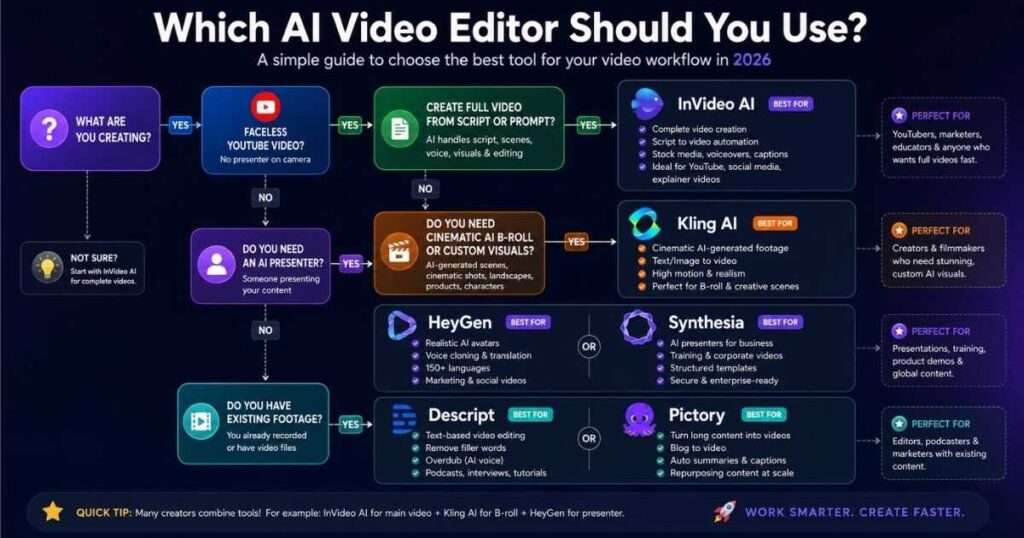
The easiest way to choose is to start with the video you actually want to produce.
If you want faceless YouTube videos
You can use it to accelerate the process from idea and script to scenes, voiceover, visuals, and editing.
If you want to create your own AI-generated cinematic B-roll, combine the workflow with Kling AI.
If you want an AI presenter
It is particularly suited to videos where the audience needs to see a presenter delivering the message.
If you want cinematic AI scenes
Choose Kling AI or Runway.
Kling is especially attractive for realistic AI-generated scenes and motion, while Runway is aimed more toward creative professionals who want broader production control.
If you make corporate training
Its structured avatar-video workflow makes it a natural fit for professional organizations.
If you already have footage
Choose Descript.
Its transcript-driven editing workflow can dramatically simplify editing spoken content.
If you want content repurposing
Choose Pictory.
It is worth considering when the source material already exists and your objective is turning it into additional video content.
Best AI Video Editors by Use Case
Here’s the simplest decision table:
| Your Goal | Best Choice |
|---|---|
| Faceless YouTube | InVideo AI |
| Cinematic AI footage | Kling AI |
| AI avatar videos | HeyGen |
| Corporate training | Synthesia |
| Professional creative control | Runway |
| Podcast/video editing | Descript |
| Content repurposing | Pictory |
There isn’t one universal winner because these tools solve different problems. That pattern is consistent across current 2026 comparisons: the strongest platforms are increasingly differentiated by workflow rather than simply competing feature-for-feature.
Are AI Video Editors Worth Paying For?
For many creators, the answer is yes—but only if the tool saves enough time or produces something that would otherwise cost more to create.
Consider a simple example.
If a traditional video takes you four hours to research, script, record, edit, caption, and publish, an AI-assisted workflow that cuts that workload substantially may justify a monthly subscription even if the software isn’t free.
But don’t subscribe to every tool.
That’s one of the biggest mistakes beginners make.
Instead, choose the platform based on your primary workflow.
A practical approach
Faceless YouTube creator:
InVideo AI → complete video
Kling AI → custom cinematic scenes
Presenter-based creator:
HeyGen → avatar video
Business:
Synthesia → training/explainer videos
Creative professional:
Runway → generative production
Existing video library:
Descript/Pictory → editing and repurposing
This approach can be much more cost-effective than paying for seven different subscriptions.
How to Choose the Best AI Video Editor
Before purchasing anything, ask yourself these five questions:
1. Do I need generation or editing?
If you don’t have footage yet, prioritize an AI video generator.
If you already have footage, prioritize an AI editor.
2. Do I need an AI avatar?
If yes, focus on HeyGen or Synthesia.
3. Am I building faceless content?
If yes, InVideo AI is one of the first platforms worth testing.
4. Do I need cinematic AI footage?
If yes, explore Kling AI and Runway.
5. How often will I publish?
A creator publishing one video per month may not need an expensive production stack.
Someone publishing several videos every week can benefit much more from automation.
The Best AI Video Editors for Faceless YouTube
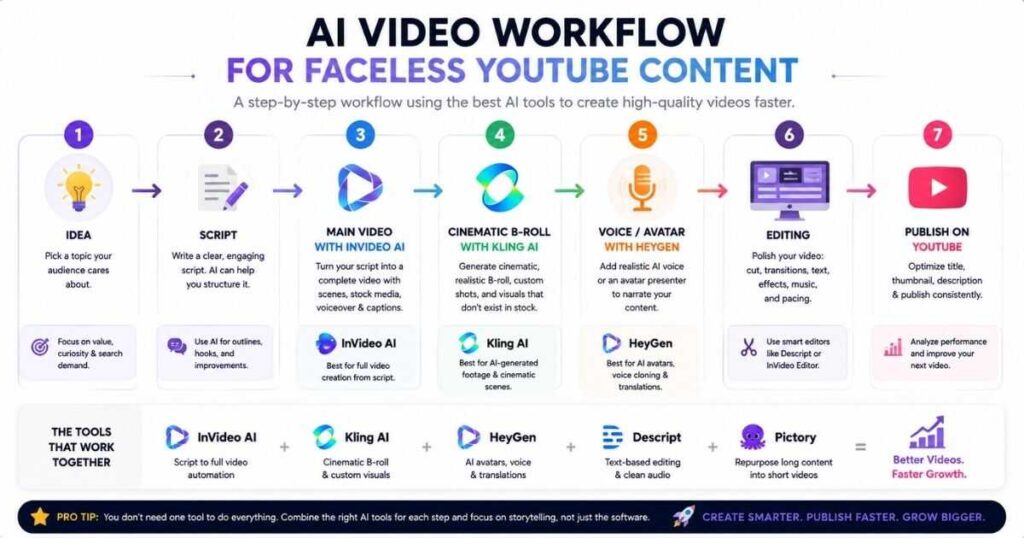
For Videmint readers specifically interested in faceless YouTube, my recommended workflow is straightforward.
Step 1 — Write the idea and script
Start with a strong topic and a useful script.
Don’t let AI create generic content without reviewing it. Your advantage comes from better topics, stronger hooks, original examples, and useful information.
Step 2 — Build the main video
Use InVideo AI when you want to turn your script into a complete video quickly.
Step 3 — Create custom B-roll
Use Kling AI when stock footage isn’t enough and you need custom cinematic visuals.
Step 4 — Add an AI presenter when necessary
If your content benefits from a presenter, use HeyGen or Synthesia rather than forcing every video into a faceless format.
Step 5 — Edit and polish
Review the final video manually.
Fix:
- Incorrect visuals
- Awkward narration
- Repetitive scenes
- Poor pacing
- Captions
- Music levels
- Transitions
- Factual errors
Step 6 — Publish
Finally, create a strong title, thumbnail, description, and opening hook.
AI can accelerate production, but you still control the quality.
Final Verdict: Which Is the Best AI Video Editor?
The Best AI Video Editors aren’t necessarily the tools with the longest feature lists.
The best tool is the one that matches the job you’re trying to accomplish.
InVideo AI is my strongest recommendation for creators who want to turn ideas and scripts into complete videos quickly, especially for faceless YouTube.
HeyGen is the better choice when realistic AI presenters and multilingual avatar content are the priority.
Kling AI is the standout option when you need cinematic AI-generated footage, realistic motion, or creative visual scenes.
Runway is better suited to creative professionals who want more control over generative production.
Synthesia is particularly compelling for business training and structured professional communication.
Descript shines when you already have footage and want a smarter way to edit it.
And Pictory is useful when your priority is turning existing written or video content into additional content efficiently.
So, rather than asking which of the Best AI Video Editors is universally number one, ask a better question:
Which one fits the videos I actually want to make?
For a faceless YouTube workflow, start with InVideo AI, add Kling AI when you need custom visuals, and use HeyGen when an AI presenter makes sense.
Continue Learning
Want to build a stronger AI video workflow? Continue with these Videmint guides:
- HeyGen Review (2026): Features, Pricing & Verdict — Explore HeyGen’s avatars, voice tools, translation, and overall value.
- Kling AI Review & Guides — Explore Kling AI’s generation capabilities and the growing Omni ecosystem.
- Kling AI Alternatives — Compare Kling with other AI video generation platforms.
- Runway AI Review — Learn more about Runway’s creative production workflow.
- Synthesia Text to Video — See how Synthesia approaches script-to-video creation.
- How to Make a Faceless YouTube Channel — Continue your journey from choosing tools to building the actual channel.
- How to Make Faceless YouTube Videos With AI — Learn how to combine AI tools into a complete production workflow.
- AI Video Creation Software: 9 Best Tools in 2026 — Compare the top AI video tools for creating, editing, and automating professional videos.
- Script to Video AI: 9 Best Tools in 2026 Compared — Compare the top AI tools for turning scripts into engaging videos faster and with less effort.
- Best AI Tools for Faceless YouTube Channels in 2026 — A practical comparison of the top AI tools for creating, editing, and growing faceless YouTube channels.
- How to Make AI Videos: Complete Step-by-Step Guide — A practical guide to creating AI videos from idea and script to generation, editing, and publishing.
The AI video market will continue changing quickly, so always check the current plan limits, credits, commercial-use terms, and available features before subscribing.

