
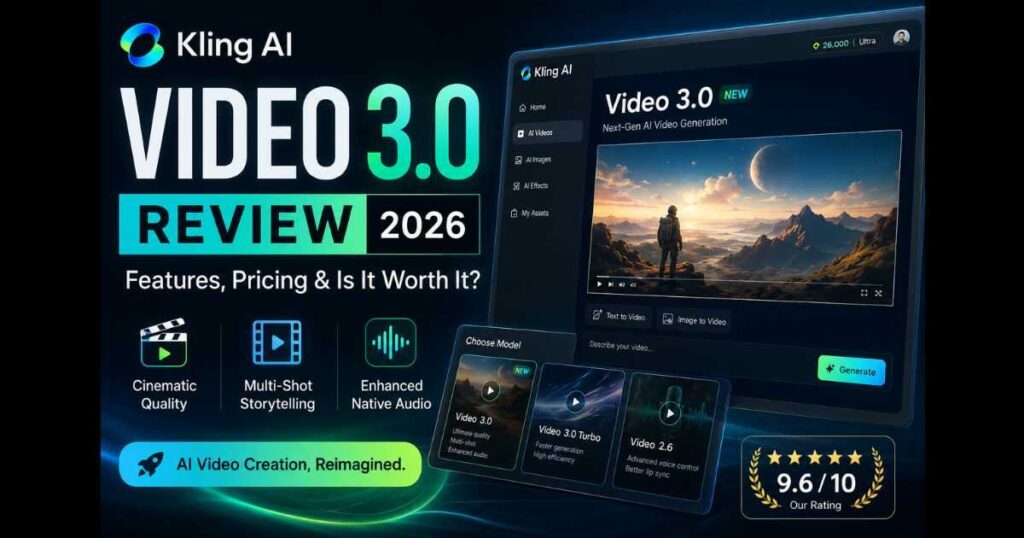
Kling AI Video 3.0 Review (2026): Features, Pricing & Is It Worth It?
Introduction
AI video generators continue to evolve at an incredible pace, but not every new model delivers meaningful improvements. Kling AI Video 3.0 Review is more than just another version update—it introduces enhancements designed to help creators produce higher-quality videos with greater consistency, smoother storytelling, and a more efficient workflow.
Whether you’re building a faceless YouTube channel, creating cinematic short films, producing product advertisements, or publishing social media content, choosing the right AI model can save hours of editing while improving the final result. That’s why understanding what Kling AI Video 3.0 actually offers is important before deciding which model to use.
In this Kling AI Video 3.0 Review, you’ll discover:
- What’s new in Video 3.0.
- How it compares with Video 2.6 and Video 3.0 Turbo.
- Real-world performance.
- Pricing and subscription options.
- Pros and cons.
- Whether it’s worth upgrading.
- Who should use it.
By the end of this guide, you’ll know whether Kling AI Video 3.0 is the best model for your projects or if another Kling AI model better matches your workflow.
Kling AI Video 3.0 Review: At a Glance
| Category | Details |
| Model | Kling AI Video 3.0 |
| Best For | Cinematic AI videos, YouTube creators, marketers |
| Generation Types | Text to Video & Image to Video |
| Native Audio | Enhanced |
| Multi-Shot Storytelling | Supported |
| Element Consistency | Improved |
| Best Alternative | Video 2.6 (for advanced Voice Control) |
| Free Plan | Available with limited credits |
| Premium Plans | Standard, Pro, Premier, Ultra |
What Is Kling AI Video 3.0?
Kling AI Video 3.0 is the latest flagship video generation model available inside the Kling AI platform. It is designed to create more realistic, visually consistent AI videos while simplifying the production of longer, story-driven projects.
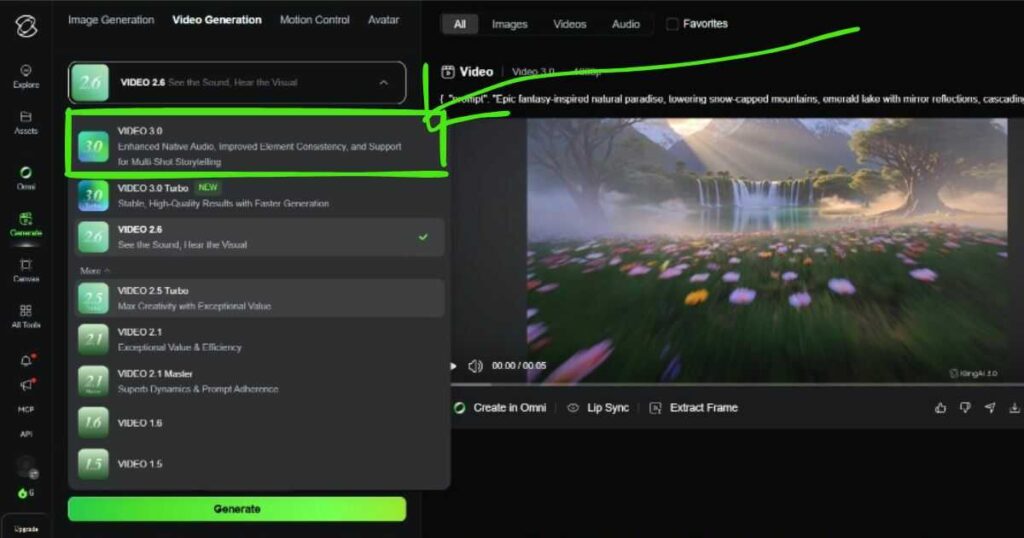
According to the current Kling AI interface, the model introduces three major improvements:
- Enhanced Native Audio.
- Improved Element Consistency.
- Support for Multi-Shot Storytelling.
Rather than focusing solely on visual quality, Kling AI Video 3.0 aims to improve the overall video creation workflow by helping creators maintain consistent characters, environments, and camera movement across multiple scenes.
This makes it especially attractive for:
- YouTube automation creators.
- AI filmmakers.
- Marketing teams.
- Content agencies.
- Businesses creating promotional videos.
If you’re new to the platform, we recommend starting with our Kling AI Tutorial, which explains the complete workflow from generating your first video to using advanced models.
What’s New in Kling AI Video 3.0?
Compared with earlier models, Kling AI Video 3.0 focuses on practical improvements that benefit everyday creators rather than introducing completely new workflows.
Enhanced Native Audio
Video 3.0 improves how audio integrates into generated videos, making multimedia projects feel more complete while reducing reliance on external editing software.
Improved Element Consistency
Maintaining the same character appearance, clothing, objects, and environments across multiple scenes has traditionally been one of AI video’s biggest challenges.
Video 3.0 significantly improves this aspect, helping longer projects appear much more natural.
Multi-Shot Storytelling
Instead of treating each generated clip as an isolated scene, Kling AI Video 3.0 offers better support for projects that require multiple connected shots.
This is especially valuable for creators producing:
- Narrative videos.
- Product demonstrations.
- Commercial advertisements.
- Educational content.
- Short cinematic films.
These upgrades don’t completely replace previous models. Instead, they expand the range of creative projects that can be completed efficiently inside Kling AI.
Continue Reading
Before comparing models, you may also find these guides useful:
- Kling AI Review — Explore the complete platform.
- Kling AI Pricing — Compare every subscription plan.
- Kling O1 Review — Learn about Kling AI’s unified multimodal model.
Kling AI Video 3.0 Review: Real-World Performance
Specifications only tell part of the story. The real value of Kling AI Video 3.0 becomes clear when you start generating videos for real projects.
For this Kling AI Video 3.0 Review, the focus isn’t simply on visual quality—it is on how the model performs during everyday content creation. Based on the current Kling AI interface and its latest features, Video 3.0 offers noticeable improvements in prompt understanding, visual consistency, and long-form storytelling while remaining easy to use for both beginners and experienced creators.
Let’s break down its real-world performance.
Prompt Understanding
One of the first things you’ll notice when using Kling AI Video 3.0 is its improved ability to interpret detailed prompts.
Instead of only recognizing basic descriptions, the model performs well with prompts that include:
- Camera movements.
- Lighting conditions.
- Character actions.
- Environmental details.
- Cinematic styles.
- Emotional scenes.
For example, prompts requesting a cinematic tracking shot during sunset with realistic lighting generally produce results that stay much closer to the original instructions than previous generations.
This means fewer prompt revisions and less time spent regenerating videos.
Video Quality
Visual quality remains one of the strongest aspects of Kling AI Video 3.0.
The generated videos typically feature:
- Sharp image quality.
- Smooth motion.
- Natural lighting.
- Better facial details.
- Cleaner textures.
- More realistic environments.
While AI video generation still isn’t perfect, Video 3.0 noticeably reduces many of the artifacts commonly seen in older models.
For creators publishing professional-looking content, this improvement alone makes the model worth considering.
Character Consistency
Character consistency is one of the biggest improvements highlighted by Kling AI.
Rather than allowing faces, clothing, or accessories to change unexpectedly between scenes, Kling AI Video 3.0 does a much better job of maintaining visual continuity.
This is especially useful when creating:
- Story-driven YouTube videos.
- Brand advertisements.
- AI short films.
- Multi-scene promotional videos.
Instead of spending time fixing inconsistent generations, creators can focus more on storytelling and editing.
Kling AI Video 3.0 Review: Video 3.0 vs Video 2.6
A common question among creators is whether they should use Video 3.0 or continue working with Video 2.6.
The answer depends on the type of project you’re creating.
| Feature | Video 3.0 | Video 2.6 | Best For |
| Visual Quality | Excellent | Very Good | Video 3.0 |
| Prompt Accuracy | Excellent | Very Good | Video 3.0 |
| Scene Consistency | Excellent | Very Good | Video 3.0 |
| Multi-Shot Projects | Excellent | Limited | Video 3.0 |
| Native Audio | Enhanced | Excellent | Both |
| Voice Control | Basic | Advanced | Video 2.6 |
| Lip Sync | Limited | Better | Video 2.6 |
| Cinematic Projects | Excellent | Good | Video 3.0 |
Choose Video 3.0 if you want:
- Higher cinematic quality.
- Better visual consistency.
- Story-driven videos.
- Marketing campaigns.
- AI filmmaking.
Choose Video 2.6 if you need:
- Advanced Voice Control.
- AI dialogue generation.
- Better lip synchronization.
- Audio-focused projects.
Rather than competing directly, the two models complement different creative workflows.
If your projects depend on AI-generated dialogue, don’t miss our complete Kling AI Voice Control guide, where we explain how to create synchronized AI speech inside Kling AI.
Kling AI Video 3.0 Review: Video 3.0 vs Video 3.0 Turbo
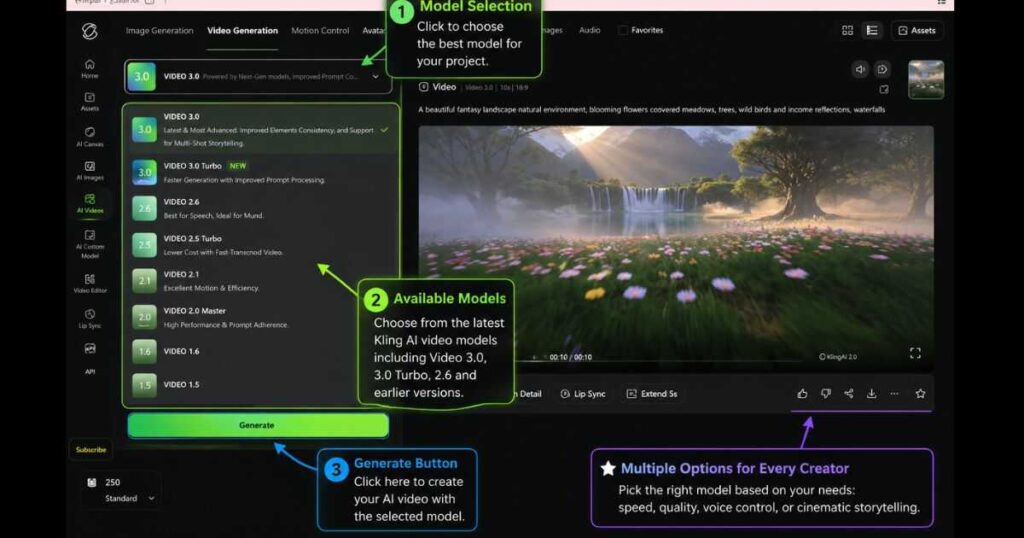
Another option currently available inside Kling AI is Video 3.0 Turbo.
Although both models belong to the same generation, they’re designed for different priorities.
| Feature | Video 3.0 | Video 3.0 Turbo | Best For |
| Rendering Quality | Excellent | Very Good | Video 3.0 |
| Generation Speed | Fast | Faster | Turbo |
| Storytelling | Excellent | Very Good | Video 3.0 |
| Long Projects | Excellent | Good | Video 3.0 |
| Quick Iterations | Good | Excellent | Turbo |
If maximum quality is your goal, the standard Kling AI Video 3.0 remains the better choice.
If you frequently test prompts or produce large volumes of short social media videos, Video 3.0 Turbo offers faster generation without sacrificing too much quality.
Best Use Cases for Kling AI Video 3.0
Based on its current capabilities, Kling AI Video 3.0 performs particularly well in projects that prioritize visual quality and narrative flow.
It is an excellent choice for:
- YouTube automation channels.
- AI cinematic shorts.
- Product advertisements.
- Marketing campaigns.
- Educational videos.
- Brand storytelling.
- Travel videos.
- Social media content.
- Business presentations.
For creators producing longer or more polished AI videos, Video 3.0 offers one of the strongest creative experiences currently available inside Kling AI.
Before choosing a subscription, it’s worth reading our Kling AI Pricing guide to compare every available plan, including Standard, Pro, Premier, and Ultra, and determine which option best matches your monthly video production needs.
Kling AI Video 3.0 Pricing
Pricing is one of the most important factors when deciding whether to use Kling AI Video 3.0 for personal or professional projects.
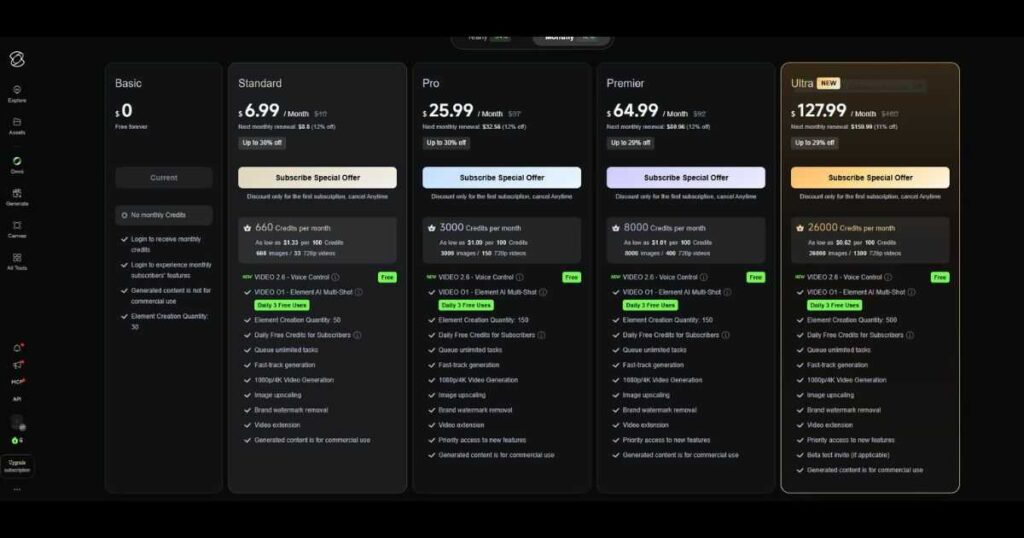
The good news is that you don’t necessarily need a paid subscription to start experimenting with the model. New users can explore Kling AI through the free plan, while paid memberships unlock additional credits, faster generation, and access to more advanced capabilities.
At the time of writing, Kling AI offers multiple subscription tiers. Features, monthly credit allocations, and pricing may change over time, so it’s always worth checking the latest information before upgrading.
Free Plan
The Free plan is ideal for:
- Testing Kling AI Video 3.0.
- Learning the interface.
- Creating sample videos.
- Experimenting with prompts.
Because monthly credits are limited, it works best for occasional creators or anyone who wants to evaluate the platform before purchasing a subscription.
Standard, Pro & Premier Plans
As your content production grows, paid plans become much more practical.
These plans typically provide:
- Higher monthly credit limits.
- Faster generation queues.
- Access to premium video models.
- Improved productivity for regular creators.
For YouTubers, marketers, and freelancers publishing content every week, upgrading can significantly reduce waiting times and allow larger production volumes.
Why Professional Creators May Prefer the Ultra Plan
If you create AI videos every day or work with clients, the Ultra plan is currently the most comprehensive subscription offered by Kling AI.
At the time of writing, the Ultra plan includes benefits such as:
- Up to 26,000 monthly credits.
- Priority generation queues.
- Access to premium Kling AI models.
- Higher monthly generation limits.
- Commercial usage on eligible plans and content.
- Early access to selected platform improvements.
Because plan benefits may change over time, always review the latest subscription details on the official Kling AI website before purchasing.
For creators running YouTube automation channels, marketing campaigns, or client projects, the additional credits alone can make a noticeable difference in productivity.
Pros and Cons of Kling AI Video 3.0
Every AI model has strengths and weaknesses, and Kling AI Video 3.0 Review wouldn’t be complete without discussing both.
Pros
✅ Excellent video quality
✅ Better prompt interpretation
✅ Improved character and object consistency
✅ Enhanced Native Audio integration
✅ Strong support for cinematic storytelling
✅ Smooth camera movement
✅ Suitable for professional content creation
✅ Easy-to-use interface
Cons
❌ Free users receive limited monthly credits.
❌ Rendering times may vary depending on server demand.
❌ Some premium capabilities require a paid subscription.
❌ Creators focused primarily on AI dialogue may still prefer Video 2.6 for certain projects.
Is Kling AI Video 3.0 Worth It?
For most creators, yes.
After completing this Kling AI Video 3.0 Review, it’s clear that the model delivers meaningful improvements rather than cosmetic changes.
The biggest strengths include:
- Better prompt accuracy.
- More reliable scene continuity.
- Improved visual realism.
- Stronger support for multi-scene productions.
- A smoother overall creative workflow.
Rather than replacing every previous model, Video 3.0 expands the creative possibilities inside Kling AI.
If your projects focus on cinematic quality, marketing videos, YouTube automation, or AI storytelling, Kling AI Video 3.0 is currently one of the strongest options available on the platform.
Our Rating
| Category | Rating |
| Video Quality | ⭐⭐⭐⭐⭐ |
| Prompt Accuracy | ⭐⭐⭐⭐⭐ |
| Visual Consistency | ⭐⭐⭐⭐⭐ |
| Ease of Use | ⭐⭐⭐⭐☆ |
| Rendering Speed | ⭐⭐⭐⭐☆ |
| Overall Value | ⭐⭐⭐⭐⭐ |
Our Final Rating: 9.6 / 10
Best For: Cinematic storytelling, YouTube creators, marketers, AI filmmakers, and professional multi-scene video production.
Frequently Asked Questions
Is Kling AI Video 3.0 free?
Yes. New users can try Kling AI Video 3.0 using the free plan with limited monthly credits. Higher generation limits and premium features depend on your subscription.
What is the difference between Kling AI Video 3.0 and Video 3.0 Turbo?
Video 3.0 prioritizes maximum visual quality and cinematic storytelling, while Video 3.0 Turbo focuses on faster generation for creators who need quicker results.
Is Kling AI Video 3.0 better than Video 2.6?
For cinematic projects and long-form visual storytelling, Video 3.0 is generally the better choice.
If your workflow depends heavily on AI dialogue, advanced Voice Control, and lip synchronization, Video 2.6 may still be more suitable.
Can I use Kling AI Video 3.0 for commercial projects?
Commercial usage depends on your current Kling AI subscription and the platform’s licensing terms. Always review the latest commercial use policy before publishing client or business content.
Is Kling AI Video 3.0 suitable for beginners?
Yes. The interface is beginner-friendly, and new users can start experimenting with the free plan before deciding whether a paid subscription is necessary.
Final Verdict: Should You Use Kling AI Video 3.0?
After analyzing its features, testing its strengths against previous models, and evaluating its practical use cases, the conclusion of this Kling AI Video 3.0 Review is straightforward:
Kling AI Video 3.0 is currently one of the best AI video generation models available inside the Kling AI ecosystem.
Rather than focusing on a single upgrade, it improves several areas that matter most to creators:
- Better prompt interpretation.
- Improved visual consistency.
- Higher-quality camera movement.
- More reliable multi-scene generation.
- Enhanced Native Audio support.
- A smoother overall production workflow.
These improvements make Kling AI Video 3.0 especially valuable for creators producing YouTube videos, AI advertisements, social media content, educational videos, and cinematic storytelling projects.
Unlike earlier AI video models that often required extensive editing to fix continuity issues, Video 3.0 delivers more polished results directly from generation, helping creators save both time and effort.
Who Should Use Kling AI Video 3.0?
Based on this Kling AI Video 3.0 Review, the model is an excellent choice for:
YouTube Creators
If you’re building a faceless YouTube channel or creating educational content, Video 3.0 provides enough quality and consistency to produce professional-looking videos faster.
Marketers & Businesses
Businesses can use Video 3.0 to create:
- Product demonstrations.
- Advertising videos.
- Brand campaigns.
- Promotional content.
without hiring large production teams.
AI Filmmakers
For creators interested in short films and cinematic storytelling, Video 3.0 offers some of the strongest visual generation capabilities currently available inside Kling AI.
Content Agencies
Agencies producing large volumes of AI-generated content can benefit from improved efficiency and reduced editing requirements.
When Video 2.6 May Still Be the Better Choice
While Kling AI Video 3.0 excels at visual storytelling, there are situations where Video 2.6 may still be the preferred option.
If your project focuses heavily on:
- AI dialogue.
- Voice generation.
- Lip synchronization.
- Advanced Voice Control workflows.
then Video 2.6 remains highly competitive.
Many professional creators will likely use both models depending on the project requirements.
To get the most from the Kling AI ecosystem, continue with these related guides:
- Read our Kling AI Review for a complete overview of the platform.
- Explore our Kling AI Pricing Guide before choosing a subscription plan.
- Learn how multimodal workflows work in our Kling O1 Review.
- Discover advanced creation workflows in our Kling AI Omni Guide.
- Master character animation with our Kling AI Motion Control Guide.
- Create synchronized AI speech using our Kling AI Voice Control Guide.
- Turn images into animations with our Kling AI Image to Video Guide.
Together, these resources provide a complete roadmap for becoming proficient with Kling AI.
Is Kling AI Video 3.0 Worth the Upgrade?
For creators who prioritize:
- Better visual quality.
- Stronger storytelling.
- Improved consistency.
- Professional-looking AI videos.
the answer is yes.
The improvements offered by Kling AI Video 3.0 are meaningful enough to justify using it as your primary video model for most visual projects.
While newer versions and updates will inevitably arrive, Video 3.0 currently represents one of the most capable tools available for AI-powered video creation.
Whether you’re just starting with AI video generation or looking to scale professional content production, Kling AI Video 3.0 provides a powerful balance of quality, usability, and creative flexibility.
Final Thoughts
This Kling AI Video 3.0 Review demonstrates why the model has quickly become one of the most important additions to the Kling AI platform. With its combination of improved consistency, cinematic quality, and storytelling capabilities, it offers a significant upgrade for creators who want more than simple AI-generated clips.
If you’re serious about AI video creation in 2026, Kling AI Video 3.0 is absolutely worth testing. Start with the free plan, experiment with your own projects, and upgrade only when your production needs justify additional credits and premium features.
Last Updated: July 2026
Information in this review reflects the Kling AI interface and publicly available features at the time of writing. Pricing, plan benefits, model availability, and commercial usage terms may change in future platform updates.

