
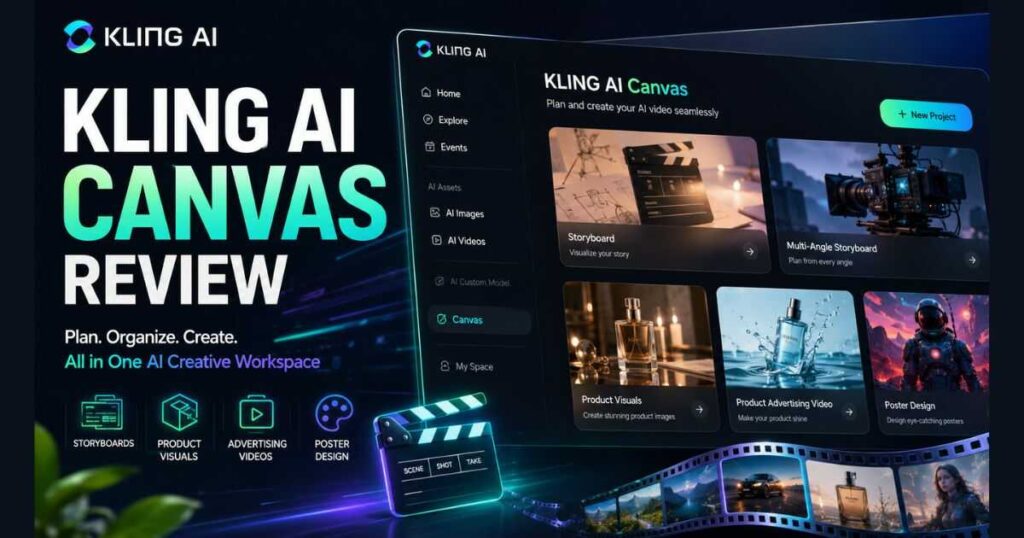
Kling AI Canvas Review (2026): Worth It?
Creating a single AI-generated image or video is relatively easy today. Managing an entire creative project with multiple scenes, consistent visuals, and organized assets is a much bigger challenge.
That’s exactly the problem Kling Canvas is designed to solve.
In this Kling AI Canvas Review, we’ll explore how Kling Canvas helps creators organize complete AI projects inside one workspace. Rather than functioning as another standalone generator, Canvas brings together planning, prompting, templates, and asset creation in a single interface.
Whether you’re producing YouTube videos, product advertisements, marketing campaigns, storyboards, or cinematic AI projects, this Kling AI Canvas Review explains what Canvas offers, how it fits into the current Kling AI ecosystem, and whether it’s worth using in 2026.
Kling AI Canvas at a Glance
| Feature | Details |
| Product | Kling Canvas |
| Platform | Kling AI |
| Best For | Storyboards, AI marketing, creative planning |
| Workspace | Project-based |
| Built-in Templates | Yes |
| Supports Images | ✅ Yes |
| Supports Video | ✅ Yes |
| Prompt Workspace | ✅ Yes |
| AI Project Organization | ✅ Yes |
| Free Version | Available |
| Paid Plans | Available |
What Is Kling Canvas?
One of the first questions answered in this Kling AI Canvas Review is what Canvas actually is.
Kling Canvas is a dedicated creative workspace inside Kling AI that helps users organize complete AI projects instead of generating one image or video at a time.
Unlike the standard Generate page—which focuses on producing individual assets—Canvas provides an environment where creators can structure an entire project before generation begins.
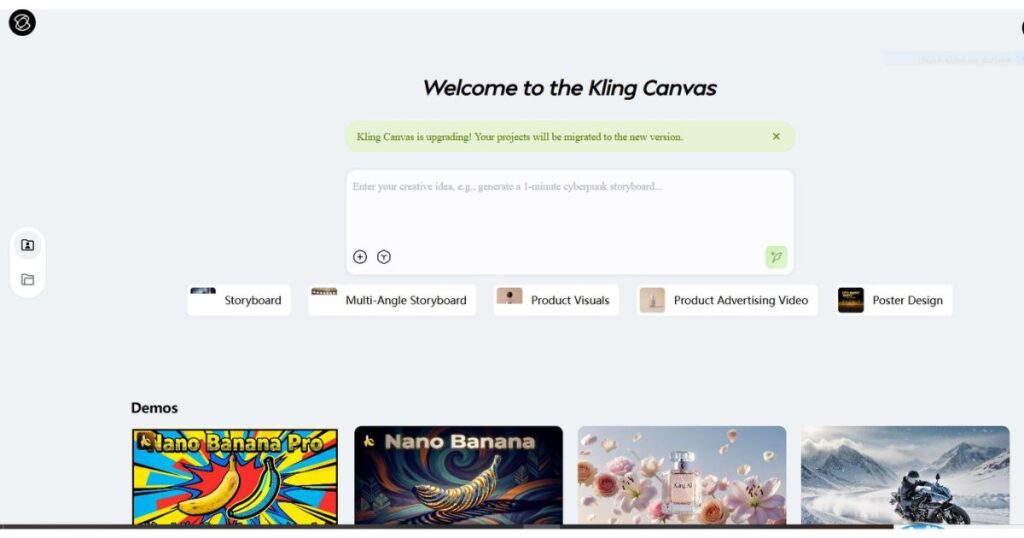
At the time of writing, the Canvas workspace includes several built-in creative templates, including:
- Storyboard.
- Multi-Angle Storyboard.
- Product Visuals.
- Product Advertising Video.
- Poster Design.
Each template is designed around a specific production workflow, allowing creators to start with an organized project instead of an empty prompt box.
Why Kling Canvas Is Different
A common misconception is that Canvas is simply another AI generator.
It isn’t.
The standard Kling AI generator is designed for quickly creating individual images or videos.
Canvas focuses on creative organization.
Instead of repeatedly writing isolated prompts, you can build an entire project inside one workspace.
For example, rather than creating multiple unrelated generations for a commercial campaign, you can organize every visual asset as part of a structured project.
This workflow is particularly valuable for:
- YouTube creators.
- Marketing agencies.
- Product designers.
- E-commerce businesses.
- Creative studios.
- AI filmmakers.
The result is a more organized production process, especially for projects involving multiple scenes or creative assets.
Key Features Covered in This Kling AI Canvas Review
Organized Project Workspace
The most noticeable strength highlighted throughout this Kling AI Canvas Review is organization.
Canvas keeps prompts, project ideas, generated assets, and creative templates together instead of spreading them across multiple browser tabs or external documents.
For larger productions, this makes project management significantly easier.
Ready-to-Use Creative Templates
Starting from a blank page often slows down creative work.
Canvas solves this by offering predefined templates that match common production scenarios.
Whether you’re planning a storyboard or preparing a product advertisement, the workspace already provides a structured starting point.
This reduces setup time while making projects easier to organize.
Prompt-Centered Workflow
Instead of encouraging creators to think only about individual generations, Canvas promotes planning first.
You begin with the creative concept, select the appropriate template, organize the project structure, and then generate the necessary assets.
This workflow often produces more consistent projects than generating each image or video independently.
If you’re already familiar with Kling AI’s newest generation models, our Kling AI Video 3.0 Review explains how Canvas complements Video 3.0 by organizing projects before and after AI generation rather than replacing the generation models themselves.
How to Use Kling Canvas
One of the biggest strengths highlighted throughout this Kling AI Canvas Review is how simple the workspace is to navigate. If you’ve already used Kling AI for generating images or videos, you’ll find the Canvas interface familiar while offering a much more organized way to build complete creative projects.
At the time of writing, the typical workflow looks like this:
- Open Canvas from the left navigation panel.
- Create a new project.
- Choose the template that matches your goal.
- Describe your creative idea.
- Generate visual assets.
- Continue refining everything inside the same workspace.
Instead of managing prompts across multiple tabs or documents, Canvas keeps the entire creative process together.
Storyboard Template
The Storyboard template is one of the most practical tools available inside Canvas.
Rather than generating disconnected scenes, you can begin by planning the entire visual sequence.
This makes it easier to create:
- Short films.
- YouTube explainers.
- Educational videos.
- AI commercials.
- Brand storytelling.
- Social media campaigns.
Planning first often leads to better visual consistency across the finished project.
Multi-Angle Storyboard
Another feature worth highlighting in this Kling AI Canvas Review is the Multi-Angle Storyboard template.
Instead of thinking about a single camera shot, this template allows you to organize multiple perspectives for the same scene.
For example, a product showcase might include:
- Wide establishing shot.
- Medium shot.
- Close-up.
- Side profile.
- Detail shot.
Keeping these shots within one structured project helps maintain a coherent visual style while reducing repetitive prompt writing.
Product Visuals
The Product Visuals template is designed for businesses, marketers, and e-commerce creators who need professional promotional images.
Instead of manually creating dozens of separate prompts, you can organize product concepts inside one project and generate multiple visual variations more efficiently.
Typical use cases include:
- Shopify stores.
- Amazon listings.
- Fashion products.
- Electronics.
- Cosmetics.
- Luxury goods.
- Brand campaigns.
For creators producing large catalogs, this organized workflow can save considerable time.
Product Advertising Video
One of the most useful templates covered in this Kling AI Canvas Review is Product Advertising Video.
Instead of creating every scene independently, Canvas helps structure an entire promotional video before generation begins.
This is particularly useful for:
- Product launches.
- Promotional campaigns.
- Social media ads.
- Landing page videos.
- Brand commercials.
Having the entire campaign organized in one workspace makes revisions much easier later in the production process.
Poster Design
Canvas isn’t limited to video production.
The Poster Design template focuses on creating promotional graphics for marketing and branding projects.
Possible applications include:
- Event posters.
- Product launches.
- Movie-style artwork.
- Promotional banners.
- Campaign visuals.
- Social media marketing.
This makes Canvas a broader creative workspace rather than simply another AI video generator.
Kling Canvas in Practical Workflows
Rather than focusing on generating isolated images or videos, Canvas is designed to support structured creative workflows.
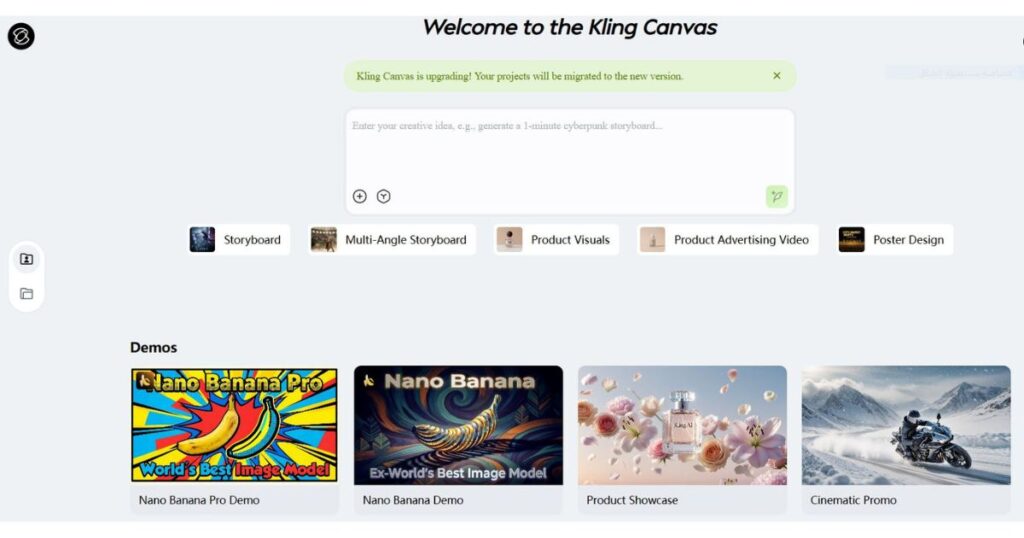
Based on the current Canvas interface, a typical project may look like this:
- Create a new Canvas project.
- Select the most suitable template.
- Write your primary creative brief.
- Generate the required visual assets.
- Continue refining the project without leaving the workspace.
This approach reduces the need to manage separate prompts, notes, and generated files across multiple tools.
For creators producing multi-scene projects, marketing campaigns, or storyboard-based content, the organized workflow is one of the most valuable aspects highlighted in this Kling AI Canvas Review.
If you’re planning to generate your final scenes using Kling AI’s latest models, be sure to read our Kling AI Video 3.0 Review, where we explain when to use Video 3.0, Video 3.0 Turbo, and how they complement the Canvas workflow for larger creative projects.
Kling AI Canvas Review: Real-World Performance
An important part of any Kling AI Canvas Review is understanding what the workspace actually improves.
Canvas doesn’t generate higher-quality videos by itself. Instead, it improves how creative projects are organized before and during AI generation.
Based on the current Canvas workflow, its biggest advantage is keeping prompts, project assets, templates, and creative ideas together in one place instead of spreading them across multiple applications.
For creators working on larger productions, that organization can make the entire workflow noticeably smoother.
Where Kling Canvas Performs Best
Canvas delivers the greatest value when projects involve multiple assets or scenes.
For a single AI image or a short standalone video, opening the standard Kling AI generator is usually the faster option.
However, Canvas becomes much more useful for projects such as:
- YouTube productions.
- Storyboards.
- Product launches.
- Commercial campaigns.
- Brand presentations.
- Multi-scene advertisements.
- Creative client work.
As project complexity increases, the advantages of an organized workspace become much more apparent.
Advantages of Kling Canvas
Throughout this Kling AI Canvas Review, several strengths consistently stand out.
Excellent Project Organization
Canvas keeps creative work centralized.
Instead of storing prompts in one document, images in another folder, and ideas somewhere else, everything stays connected inside one project.
For long-term projects, this organization saves time and makes revisions much easier.
Faster Creative Planning
The built-in templates eliminate much of the repetitive setup work.
Rather than beginning every project from scratch, creators can immediately start with a structured workflow tailored to a specific goal.
This allows more time to focus on creativity instead of project preparation.
Better Collaboration
Although Canvas is designed primarily as a personal creative workspace, its organized project structure also makes it easier to present concepts to clients or team members.
Instead of sharing dozens of separate generations, creators can present an organized project with a clear creative direction.
Flexible for Different Industries
Canvas isn’t limited to filmmakers.
Its templates support many different creative fields, including:
- Digital marketing.
- E-commerce.
- Graphic design.
- Education.
- Product visualization.
- Advertising.
- Social media content.
This versatility makes Canvas useful for a much wider audience than traditional AI video generators.
Current Limitations
No Kling AI Canvas Review would be complete without discussing where the workspace could improve.
Less Useful for Quick Generations
If your goal is simply creating one image or one short AI video, Canvas may introduce an unnecessary extra step.
The standard Kling AI generator remains the better option for quick, standalone generations.
Growing Feature Set
Canvas continues to evolve.
At the time of writing, Kling AI regularly updates the platform with new tools, templates, and workflow improvements.
Because of this, available templates and interface elements may change over time.
Learning a Project-Based Workflow
Creators accustomed to generating individual AI videos may need a short adjustment period.
Fortunately, the interface is intuitive, and the template-based workflow becomes natural after completing a few projects.
Kling Canvas vs Standard Kling AI Generator
One of the questions users ask most frequently is whether Canvas replaces the standard Kling AI generator.
The answer is no.
Instead, both tools serve different purposes.
| Feature | Kling Canvas | Standard Generator |
| Single Image Generation | ✅ Yes | ✅ Yes |
| Single Video Generation | ✅ Yes | ✅ Yes |
| Project Organization | Excellent | Limited |
| Storyboard Planning | ✅ Built-in | ❌ No |
| Creative Templates | Multiple Templates | Limited |
| Product Campaign Workflow | Excellent | Basic |
| Best for Quick Generation | Good | Excellent |
| Best for Complex Projects | Excellent | Limited |
If your objective is producing one image or one short video, the standard generator is typically the faster choice.
If you’re planning an entire campaign, storyboard, commercial, or multi-scene production, Canvas provides a much more organized workflow.
Pricing and Availability
Kling Canvas is available directly inside the Kling AI platform through the Canvas section of the interface.
At the time of writing, access to the workspace is available for both free and paid users, although generation limits, available credits, premium capabilities, and commercial usage depend on the active subscription plan.
Professional creators who publish content regularly may benefit from upgrading to a paid plan for higher usage limits and additional creative resources.
Before selecting a subscription, we recommend reading our Kling AI Pricing guide, where we compare every available plan and explain which option offers the best value for different types of creators.
Our Rating
| Category | Rating |
| Ease of Use | ⭐⭐⭐⭐⭐ |
| Project Organization | ⭐⭐⭐⭐⭐ |
| Templates | ⭐⭐⭐⭐⭐ |
| Workflow Efficiency | ⭐⭐⭐⭐☆ |
| Value for Professional Creators | ⭐⭐⭐⭐☆ |
Overall Rating: 9.2/10
Best For: YouTube creators, marketers, agencies, product designers, filmmakers, and anyone managing multi-scene AI creative projects who wants a more organized workflow.
Who Should Use Kling Canvas?
After completing this Kling AI Canvas Review, it’s clear that Canvas is designed for creators who manage complete creative projects rather than simple one-off generations.
If your workflow regularly involves planning, organizing, and producing multiple AI assets, Canvas can become one of the most valuable tools inside the Kling AI ecosystem.
YouTube Creators
Creators producing faceless YouTube videos, educational content, documentaries, or cinematic stories can use Canvas to organize scenes before generating the final visuals.
Instead of managing separate prompts for every sequence, the entire project stays inside one structured workspace.
Marketing Teams
Marketing campaigns often require multiple visual assets that share a consistent style.
Canvas simplifies planning for:
- Product launches.
- Social media campaigns.
- Brand storytelling.
- Promotional videos.
- Advertising concepts.
Keeping everything organized reduces repetitive work and makes future revisions much easier.
Agencies & Freelancers
Creative agencies and freelancers usually manage several projects simultaneously.
Canvas helps separate client work into individual projects, making creative assets easier to organize and review throughout production.
E-commerce Businesses
Businesses creating promotional content for online stores can benefit from templates like Product Visuals and Product Advertising Video, allowing marketing materials to be planned inside one organized workspace.
Frequently Asked Questions
Is Kling Canvas free?
Yes.
At the time of writing, Kling Canvas is available through the Kling AI platform. Free users can access the workspace with limited generation credits, while higher usage limits and premium capabilities depend on the current subscription plan.
Is Kling Canvas different from the standard Kling AI generator?
Yes.
The standard generator focuses on creating individual AI images or videos.
Canvas focuses on organizing complete creative projects using templates, project workspaces, and structured planning.
Both tools complement each other rather than replacing one another.
What templates are available in Kling Canvas?
At the time of writing, available templates include:
- Storyboard.
- Multi-Angle Storyboard.
- Product Visuals.
- Product Advertising Video.
- Poster Design.
Kling AI may introduce additional templates as Canvas continues to evolve.
Can I use Kling Canvas for commercial projects?
Yes.
Many creators use Canvas to organize commercial workflows. However, commercial usage rights depend on your current Kling AI subscription and the latest licensing terms published by Kling AI.
Is Kling Canvas suitable for beginners?
Absolutely.
Although Canvas introduces a project-based workflow, the interface is clean, intuitive, and easy to learn. Most users can become comfortable after completing their first project.
Final Verdict
This Kling AI Canvas Review shows that Canvas isn’t trying to replace Kling AI’s generation models. Instead, it improves how creators organize complex projects before and during content generation.
Its biggest strengths are:
- Excellent project organization.
- Practical creative templates.
- Better workflow for multi-scene productions.
- Easier management of marketing and commercial projects.
- Seamless integration with the Kling AI ecosystem.
For quick, standalone generations, the standard Kling AI generator remains the faster choice.
However, if you’re producing YouTube videos, product campaigns, storyboards, or commercial AI content, Canvas offers a much more structured and efficient creative workflow.
Continue Learning
Want to explore more Kling AI features? Continue with these in-depth guides:
- Kling AI Review — Discover everything the platform offers for AI image and video creation.
- Kling AI Video 3.0 Review — Learn how the newest video model compares with previous versions.
- Kling O1 Review — Explore Kling AI’s unified multimodal model and its creative capabilities.
- Kling AI Voice Control — Create AI videos with realistic voices and synchronized lip sync.
- Kling AI Image to Video — Turn static images into cinematic AI videos.
- Kling AI Pricing — Compare plans, credits, and premium features before subscribing.
- Kling AI Prompts — Improve your AI-generated content with better prompt engineering techniques.
- Kling AI API Review — Learn how to integrate Kling AI into your applications using the official API, explore supported models, pricing, authentication, and developer tools.
- Kling AI Models (2026): Complete Guide & Comparison Compare every Kling AI model, including Video, Image, Turbo, Omni, and O1, to choose the best model for your workflow.
- HeyGen Review (2026): Features, Pricing & Verdict – Explore HeyGen’s features, pricing, AI avatars, and overall value in our complete review.
Last Updated: July 2026
This Kling AI Canvas Review reflects the current Canvas interface and publicly available features at the time of writing. Templates, subscription benefits, generation limits, and available capabilities may change as Kling AI continues to update the platform.

