HeyGen Pricing (2026): Plans, Credits & Which Plan Is Best?
If you’re researching HeyGen Pricing before purchasing a subscription, you’re already making the right decision. AI video platforms vary significantly in pricing, credits, export quality, and available features, so understanding exactly what you receive for your money can save both time and budget.
In this comprehensive HeyGen Pricing guide, we’ll break down every available subscription plan, explain how the credit system works, compare the Free, Creator, Pro, Business, and Enterprise plans, and help you determine which option delivers the best value based on your workflow.
Whether you’re a YouTube creator, marketer, freelancer, educator, or business owner, this guide will help you choose the right HeyGen Pricing plan without paying for features you don’t actually need.
What Is the HeyGen Pricing Model?
Unlike traditional video editors that charge only a flat monthly subscription, HeyGen Pricing combines subscription tiers with a flexible credit system.
Each plan includes a monthly credit allowance that you spend whenever you generate AI videos. The number of credits consumed depends on several factors, including:
- Video duration.
- Selected AI model.
- Avatar generation mode.
- Export quality.
- Certain premium AI features.
This approach gives casual creators affordable entry points while allowing professional users to scale production without purchasing unnecessary resources.
HeyGen Pricing Plans (2026 Overview)
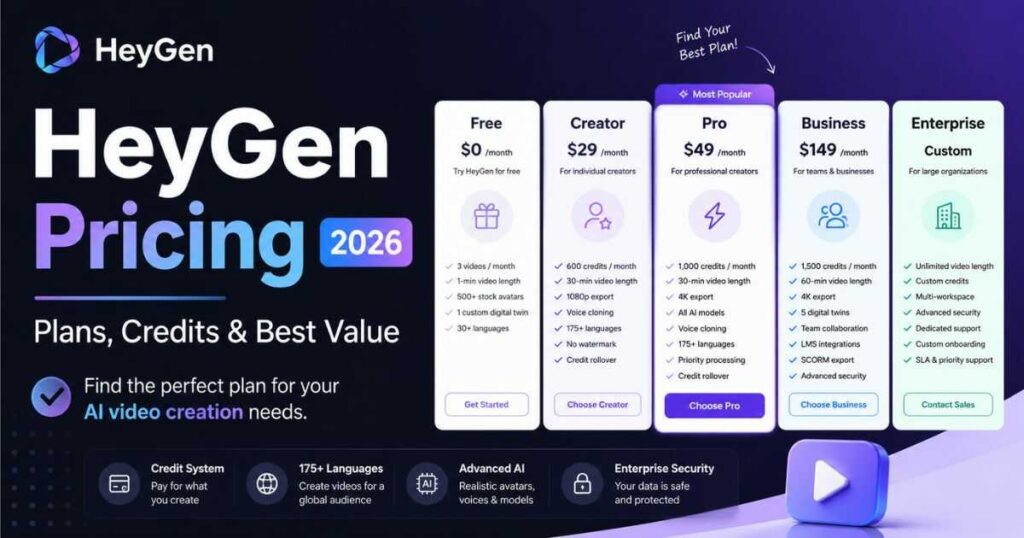
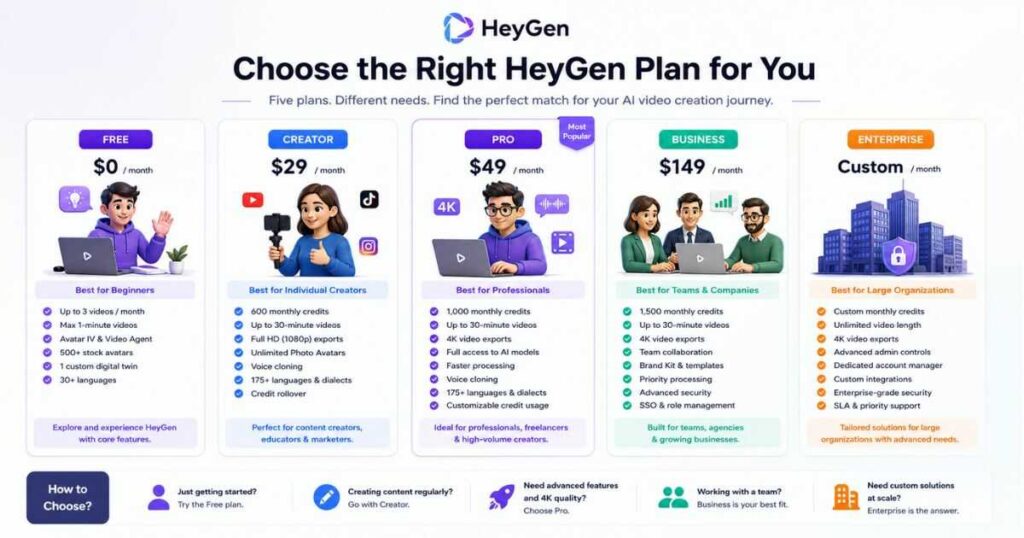
As of 2026, HeyGen Pricing includes five primary subscription tiers:
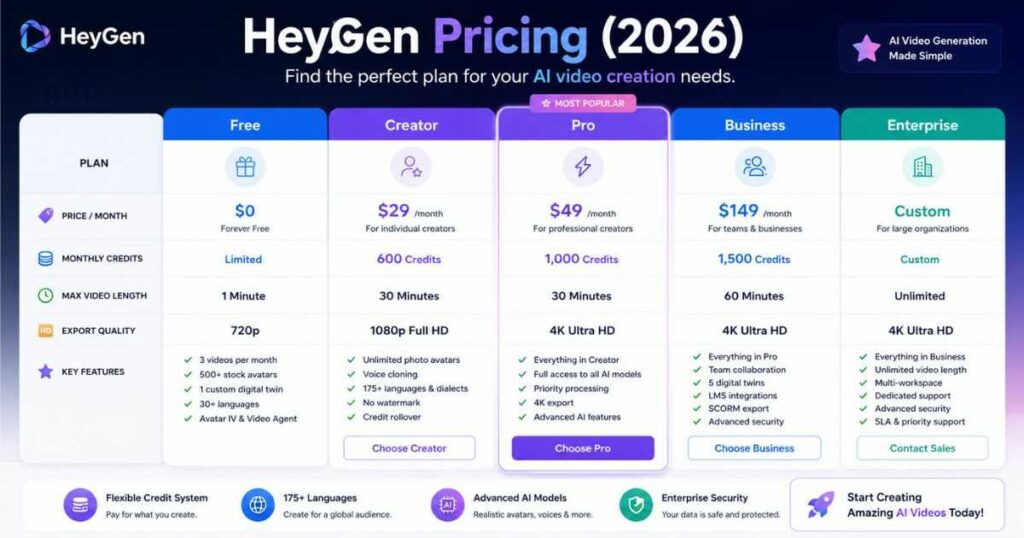
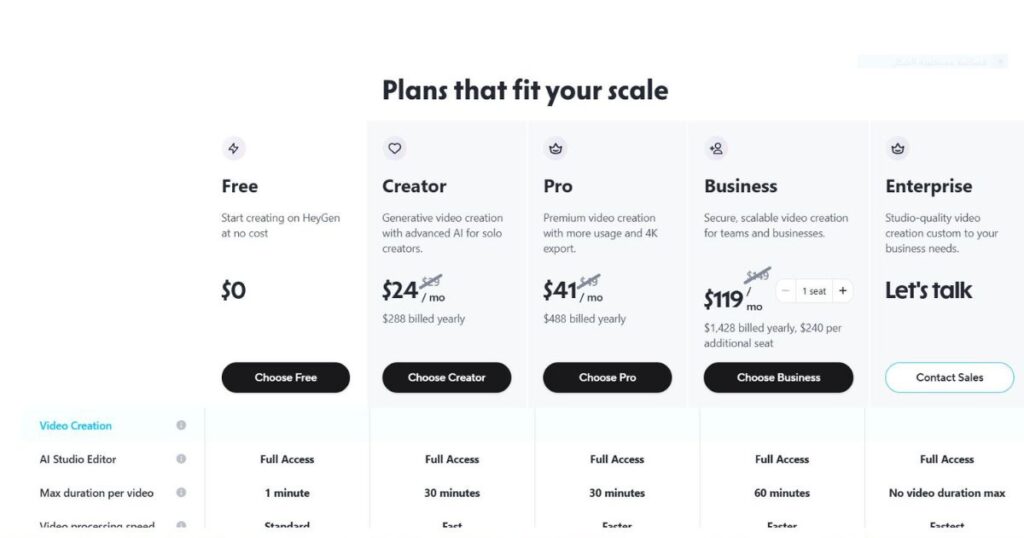
| Plan | Monthly Price | Credits | Best For |
| Free | $0 | Limited | Beginners & testing |
| Creator | $29/month | 600 Credits | Individual creators |
| Pro | $49/month | 1,000 Credits | Professional creators |
| Business | $149/month | 1,500 Credits | Teams & companies |
| Enterprise | Custom | Custom | Large organizations |
Every paid plan expands both production capabilities and collaboration tools while unlocking additional AI features.
HeyGen Free Plan
The Free plan is designed for users who want to experience the platform before upgrading.
It includes:
- Up to 3 videos per month.
- Maximum 1-minute videos.
- Access to Avatar IV.
- Access to Video Agent.
- Standard rendering speed.
- More than 500 stock avatars.
- One custom digital twin.
- Support for over 30 languages.
Although the Free plan is surprisingly generous, its limitations become noticeable once you begin creating content regularly.
Best for:
- First-time users.
- Testing avatars.
- Learning the interface.
- Exploring AI video generation.
HeyGen Creator Plan ($29/month)
For most individual creators, the Creator plan represents the biggest upgrade in the entire HeyGen Pricing lineup.
It includes:
- 600 monthly credits.
- Videos up to 30 minutes.
- Full HD (1080p) exports.
- Extended Avatar IV generation.
- Faster processing.
- Unlimited Photo Avatars.
- Watermark removal.
- Voice cloning.
- Support for 175+ languages and dialects.
- Monthly credit rollover.
This plan is ideal for YouTubers, affiliate marketers, educators, and social media creators publishing content consistently.
Ready to create professional AI videos without watermark limitations?
Upgrade to the HeyGen Creator Plan and unlock faster rendering, voice cloning, and high-quality exports.
If you’re still evaluating the platform, don’t miss our complete HeyGen Review (2026), where we test its avatars, AI Studio, video quality, and overall performance in real-world content creation.
You may also find these guides helpful:
- Kling AI Pricing (2026): Plans, Credits & Real Costs.
- Kling AI Review (2026): Features, Pros & Cons.
- Best Kling AI Prompts (2026): 25 Cinematic Prompts That Actually Work.
These articles provide additional comparisons if you’re deciding between multiple AI video generators.
Creator vs Pro: Which HeyGen Pricing Plan Should You Choose?
One of the most common questions users ask is whether the Creator plan is enough or if upgrading to Pro is worth the extra cost. While both tiers unlock professional AI video creation, they are designed for different types of users.
Here’s a quick comparison of the two most popular HeyGen Pricing plans.
| Feature | Creator | Pro |
| Monthly Price | $29 | $49 |
| Monthly Credits | 600 | 1,000 |
| Maximum Video Length | 30 min | 30 min |
| Export Quality | 1080p | 4K |
| Processing Speed | Fast | Faster |
| Photo Avatars | Unlimited | Unlimited |
| Voice Cloning | ✅ | ✅ |
| Advanced AI Models | Limited | Full Access |
| Credit Flexibility | Standard | Customizable |
Choose Creator If…
The Creator plan offers the best balance between affordability and features. It’s an excellent choice if you:
- Publish YouTube videos weekly.
- Create TikTok or Instagram Reels.
- Produce training or educational videos.
- Run a personal brand.
- Need professional avatars without enterprise tools.
For many individual creators, the Creator subscription provides everything needed to build a consistent AI-powered content workflow.
Choose Pro If…
The Pro plan becomes worthwhile when video production is part of your business rather than just your content strategy.
You should consider upgrading if you:
- Publish videos every day.
- Need stunning 4K exports.
- Use HeyGen for commercial client projects.
- Want access to every advanced AI model.
- Produce high volumes of multilingual videos.
For agencies and professional creators, the additional credits and premium export options often justify the higher monthly investment.
Business and Enterprise HeyGen Pricing
While the Creator and Pro plans are designed for individuals, the higher HeyGen Pricing tiers focus on collaboration, scalability, and enterprise security.
Business Plan — $149/month
The Business plan includes 1,500 monthly credits and introduces features built specifically for teams.
Highlights include:
- Videos up to 60 minutes.
- 4K exports.
- Faster rendering.
- Five Custom Digital Twins.
- Workspace collaboration.
- Team management.
- Centralized billing.
- Interactive videos.
- SCORM export.
- LMS integrations.
- Integrations with HubSpot, Zapier, Make, and n8n.
- Additional team seats for $20 per user/month.
This plan is ideal for marketing teams, online education companies, agencies, and growing businesses.
Enterprise Plan
The Enterprise plan uses custom pricing because every organisation has different production requirements.
It includes everything in Business plus:
- Unlimited video duration.
- Flexible video generation.
- Highest processing priority.
- Multi-workspace management.
- Enterprise-grade security.
- SCIM provisioning.
- Team member MFA.
- Dedicated customer success manager.
- Tailored onboarding.
- Invoice billing.
- Commercial agreements.
- Priority technical support.
Large companies that create hundreds of AI videos each month typically benefit most from Enterprise.
How Do HeyGen Credits Work?
Understanding credits is one of the most important parts of understanding HeyGen Pricing.
Instead of charging per video, HeyGen gives you a monthly pool of credits. Every AI generation consumes part of that allowance.
Credits are generally affected by:
- Video length.
- Selected avatar technology.
- AI model used.
- Resolution.
- Premium generation features.
For example:
- A short talking-avatar video may consume only a small number of credits.
- A long 4K presentation with advanced avatars and multiple scenes will consume significantly more.
Because of this, two creators on the same HeyGen Pricing plan can use very different amounts of credits depending on their workflow.
Tip: If you regularly recreate videos or experiment with multiple versions before publishing, choose a plan with a larger monthly credit allowance to avoid running out before the end of the month.
Related Guides
To better understand whether HeyGen offers the best value compared to other AI video tools, continue with:
- HeyGen Review (2026): Features, Pros & Cons.
- Kling AI Pricing (2026): Plans, Credits & Real Costs.
- Kling AI Review (2026): Complete Hands-on Review.
These guides will help you compare pricing, features, and overall value before making a subscription decision.
Is HeyGen Pricing Worth It?
The biggest question isn’t simply how much HeyGen costs—it’s whether the platform delivers enough value to justify the subscription.
After comparing every HeyGen Pricing plan, the answer depends on how often you create videos and how much time AI automation can save you.
For occasional users, the Free plan is an excellent way to explore the platform. However, creators publishing content consistently will usually recover the cost of a paid subscription through increased productivity alone.
When the Free Plan Is Enough
The Free plan is suitable if you:
- Want to test AI avatars before committing.
- Only create a few videos each month.
- Are learning how AI video generation works.
- Need short presentations or simple social media content.
For beginners, it’s one of the best free AI video tools currently available.
When You Should Upgrade
A paid HeyGen Pricing plan becomes worthwhile if you:
- Publish YouTube videos regularly.
- Create content for multiple clients.
- Produce multilingual videos.
- Need watermark-free exports.
- Want higher-quality avatars and voices.
- Create educational or corporate training videos.
The more videos you create, the more valuable the paid plans become because they dramatically reduce production time.
Hidden Costs You Should Know About
Many creators only compare subscription prices and forget to consider how their workflow affects monthly credit usage.
Before choosing a HeyGen Pricing plan, keep these factors in mind.
Credits Can Disappear Faster Than Expected
Longer videos naturally consume more credits than short clips.
If you frequently create 15–30 minute videos, you’ll use your monthly allowance much faster than someone producing one-minute social videos.
Multiple Generations Increase Usage
Most creators don’t publish the first AI-generated result.
Instead, they often regenerate scenes, test different voices, or tweak scripts until everything looks perfect.
Those additional generations can significantly increase monthly credit consumption.
Premium Features Increase Value
Higher plans include features that can easily replace several separate subscriptions, including:
- AI Voice Cloning.
- AI Translation.
- Premium Avatars.
- 4K exports.
- Advanced AI models.
- Team collaboration.
Although these plans cost more, they may actually reduce your overall software expenses.
Which HeyGen Pricing Plan Is Best for Different Users?
Choosing the right HeyGen Pricing plan depends more on your workflow than your budget.
Content Creators
Recommended Plan: Creator
Perfect for:
- YouTube creators.
- TikTok creators.
- Instagram Reels.
- Affiliate marketers.
- Bloggers creating video content.
Freelancers
Recommended Plan: Pro
Ideal if you create videos for clients and need:
- Faster rendering.
- Professional quality.
- 4K exports.
- Premium AI models.
Marketing Teams
Recommended Plan: Business
Best for:
- Marketing departments.
- Agencies.
- Corporate communications.
- Sales teams.
- Product demonstrations.
Large Organisations
Recommended Plan: Enterprise
Recommended for companies requiring:
- Large-scale AI video production.
- Team management.
- Enterprise security.
- Multiple workspaces.
- Dedicated customer support.
HeyGen Pricing vs Competitors
Many users compare HeyGen Pricing with other AI video platforms before subscribing.
Here’s a simplified comparison.
| Platform | Starting Price | Best For |
| HeyGen | $29/month | AI avatars & multilingual videos |
| Kling AI | Credit-based | Cinematic AI video generation |
| Runway | Subscription + credits | AI filmmaking & video editing |
Each platform serves a different purpose.
- HeyGen excels at talking avatars, presentations, training videos, and business communication.
- Kling AI focuses on cinematic AI-generated scenes.
- Runway is stronger for AI video editing and creative filmmaking.
If your primary goal is creating professional presenter-style videos, HeyGen Pricing offers one of the strongest value propositions in today’s AI video market.
💰 Is HeyGen Pricing a Good Investment?
Rather than asking whether HeyGen Pricing is cheap or expensive, it’s better to ask:
How much time can HeyGen save every month?
If AI avatars replace hours of filming, editing, subtitle creation, translation, and voice recording, the subscription can quickly pay for itself.
Many creators recover their monthly subscription after just one client project, one successful affiliate campaign, or a few monetized YouTube videos.
🚀 Ready to Start Creating Professional AI Videos?
Whether you’re a solo creator, marketer, educator, or business owner, there’s a HeyGen Pricing plan designed for your needs. Start with the Free plan or unlock premium features with Creator or Pro to produce high-quality AI videos faster than ever.
👉 Start Using HeyGen Today and Choose the Plan That Fits Your Workflow
Frequently Asked Questions About HeyGen Pricing
Is HeyGen free?
Yes. HeyGen offers a Free plan that lets you create up to three AI videos per month, each up to one minute long. The Free plan also includes access to Avatar IV, Video Agent, over 500 stock avatars, and one custom digital twin, making it an excellent way to explore the platform before upgrading.
How much does HeyGen cost?
The current HeyGen Pricing starts at:
- Free — $0/month.
- Creator — $29/month.
- Pro — $49/month.
- Business — $149/month.
- Enterprise — Custom pricing.
Each plan includes a different monthly credit allowance and unlocks additional features such as higher export quality, faster rendering, collaboration tools, and advanced AI models.
Which HeyGen Pricing plan is best?
The best HeyGen Pricing plan depends on your workflow.
- Free — Perfect for testing the platform.
- Creator — Best value for YouTubers, affiliate marketers, bloggers, educators, and solo creators.
- Pro — Ideal for professionals producing large volumes of premium content.
- Business — Designed for teams, agencies, and companies.
- Enterprise — Built for organisations requiring advanced security and large-scale video production.
For most individual creators, the Creator plan delivers the best balance between price and features.
Does HeyGen use credits?
Yes. Every paid HeyGen Pricing plan includes a monthly credit allowance that is used when generating AI videos.
Credit usage varies depending on factors such as:
- Video duration.
- AI model.
- Avatar technology.
- Export quality.
- Premium generation features.
Higher subscription tiers include more monthly credits and greater flexibility.
Can I upgrade or downgrade my HeyGen Pricing plan?
Absolutely. HeyGen allows users to change their subscription whenever their production needs change.
Many creators start with the Free or Creator plan and upgrade to Pro or Business once they begin producing content more frequently.
Is HeyGen Pricing worth it?
For creators who regularly produce AI videos, HeyGen Pricing offers excellent value.
Instead of spending hours filming, editing, recording voiceovers, and translating content manually, HeyGen automates much of the production process. Even one successful client project, affiliate campaign, or monetized YouTube video can often cover the monthly subscription cost.
Final Verdict: Is HeyGen Pricing Worth It?
After analysing every HeyGen Pricing plan, it’s clear that HeyGen offers one of the most flexible and creator-friendly pricing structures available in the AI video industry. Whether you’re experimenting with the Free plan or scaling your business with Pro or Business, each subscription is designed for a specific type of user and production workflow.
The Creator plan provides outstanding value for most individuals, while Pro and Business unlock premium features for professionals and teams that need faster rendering, higher-quality exports, and advanced collaboration tools. Combined with realistic AI avatars, multilingual video translation, voice cloning, AI Studio, and continuous platform improvements, HeyGen Pricing delivers a strong return on investment for anyone creating video content regularly.
If your goal is to produce professional AI videos faster, eliminate expensive production costs, and scale your content efficiently, HeyGen Pricing is absolutely worth considering in 2026.
🚀 Ready to Create Professional AI Videos?
Choose the HeyGen Pricing plan that matches your goals and start creating studio-quality AI videos with realistic avatars, multilingual voiceovers, and powerful automation tools.
👉 Start with HeyGen Today and Scale Your Content Faster
Continue Reading
If you’re still researching AI video tools, these guides can help you make a smarter decision:
- HeyGen Review (2026): Features, Pros & Cons.
- Kling AI Pricing (2026): Plans, Credits & Real Costs.
- Kling AI Review (2026): Honest Hands-on Review.
- Best Kling AI Prompts (2026): 25 Cinematic Prompts That Actually Work.
- HeyGen Free (2026): Is It Really Free? Full Guide – Learn what’s included in the free plan, its limitations, and whether it’s worth using before upgrading.
- HeyGen Alternatives (2026): 10 Better AI Video Tools — Compare features, pricing, and the best AI video tools in one guide.
- YouTube Automation Tools (2026): 15 Best AI Picks — Discover the best AI tools to automate scripting, video creation, editing, thumbnails, and YouTube SEO in one complete workflow.
These articles compare pricing, features, workflows, and real-world performance to help you choose the best AI video platform for your content strategy.