
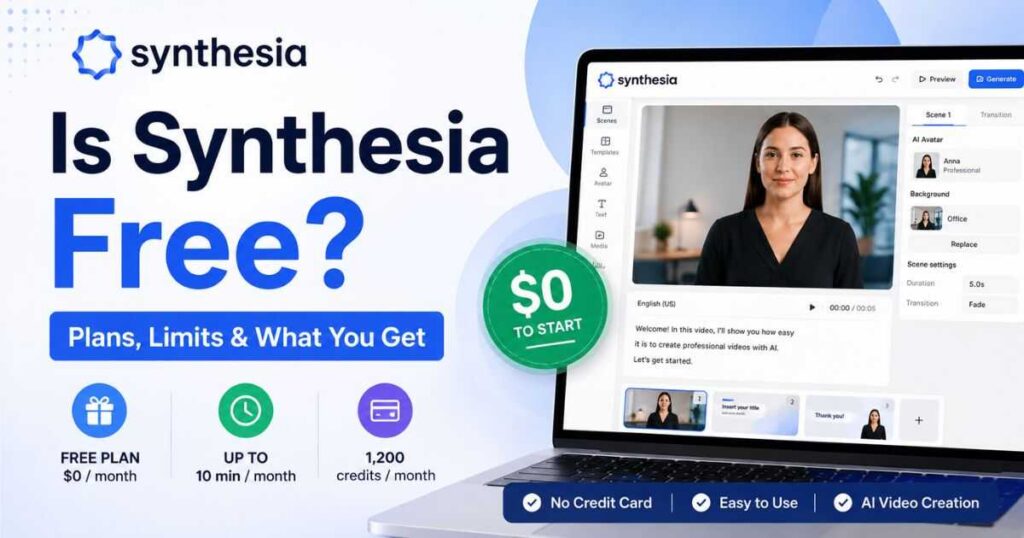
Is Synthesia Free? Plans, Limits & What You Get
If you’re wondering is Synthesia free, the short answer is yes — Synthesia currently offers a free Basic plan that lets you create AI videos without paying for a subscription or entering a credit card. But there are limits, and understanding those limits is important before you decide whether the free version is enough for your needs.
The free plan includes 1,200 credits per month, which can be used for up to 10 minutes of generated video per month, along with access to a limited selection of AI avatars and other features. Paid plans unlock higher usage limits, more avatars, downloads, collaboration features, and additional AI video capabilities.
So, is Synthesia free enough to actually use, or is the free plan mainly designed as a trial? What can you create without paying? Can you download free videos? Do free videos have limitations? And when does upgrading make sense?
This guide answers all of those questions so you can decide whether Synthesia’s free plan is right for you.
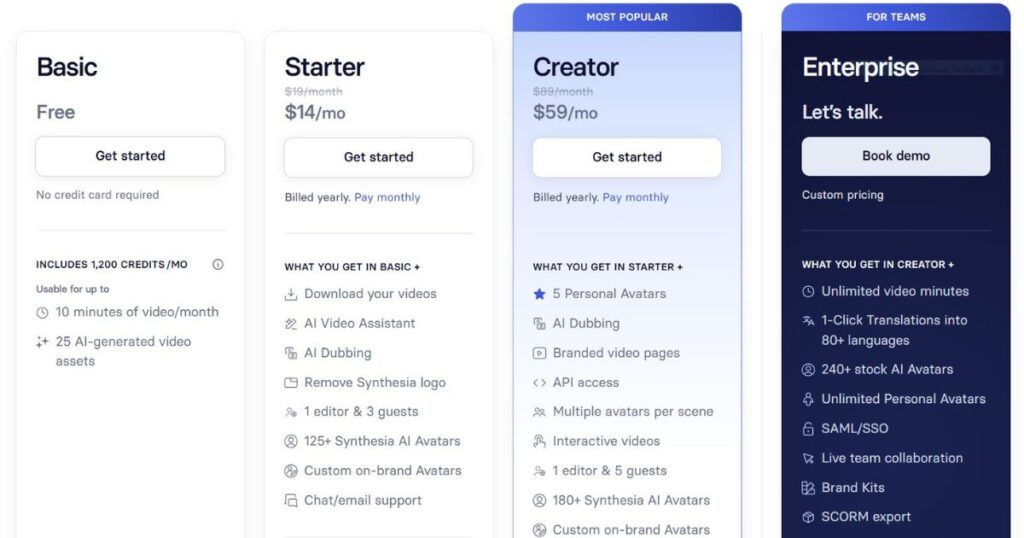
Is Synthesia Free in 2026?
Yes. Synthesia is free if you use its Basic plan.
The current Basic plan costs $0 per month, requires no credit card to get started, and includes 1,200 credits every month. Synthesia states that those credits are enough for up to 10 minutes of video per month.
That makes the free plan useful for people who want to test the platform before committing to a paid subscription.
However, “free” does not mean unlimited.
The important distinction is that Synthesia gives free users a limited monthly allowance. Once you use your available credits, you cannot continue generating videos using those credits until the allowance renews or you upgrade.
Synthesia’s current credit system is also important because credits are used across several AI-powered features rather than simply representing a fixed number of videos.
What Does the Synthesia Free Plan Include?
The Basic plan currently includes:
| Feature | Basic Free Plan |
| Monthly price | $0 |
| Monthly credits | 1,200 |
| Maximum video generation | Up to 10 minutes/month |
| AI-generated video assets | Up to 25/month |
| AI avatars | Limited selection |
| Languages & voices | 160+ languages & voices |
| Credit card required | No |
| Desktop access | Yes |
| Video downloads | Limited compared with paid plans |
| Paid subscription required | No |
The exact feature availability can change as Synthesia updates its product, so the official pricing page should always be checked before making a purchase decision.
[Explore Synthesia’s Free Plan →]
Is Synthesia Free Without a Credit Card?
Yes.
One of the biggest advantages of the current Basic plan is that you can get started without entering a credit card. Synthesia explicitly lists “No credit card required” for the free plan.
This is useful if your goal is simply to test:
- AI avatars
- AI voices
- Video templates
- Script-based video creation
- Different presentation styles
- Multilingual video creation
- The overall Synthesia editor
You can therefore experiment with the platform without immediately committing to a recurring subscription.
That makes the free version particularly useful for first-time users who aren’t sure whether Synthesia fits their workflow.
How Many Videos Can You Make With Synthesia Free?
This is where the answer becomes more interesting.
The free plan does not really limit you to a specific number of videos. Instead, your usage is primarily controlled by the available credits.
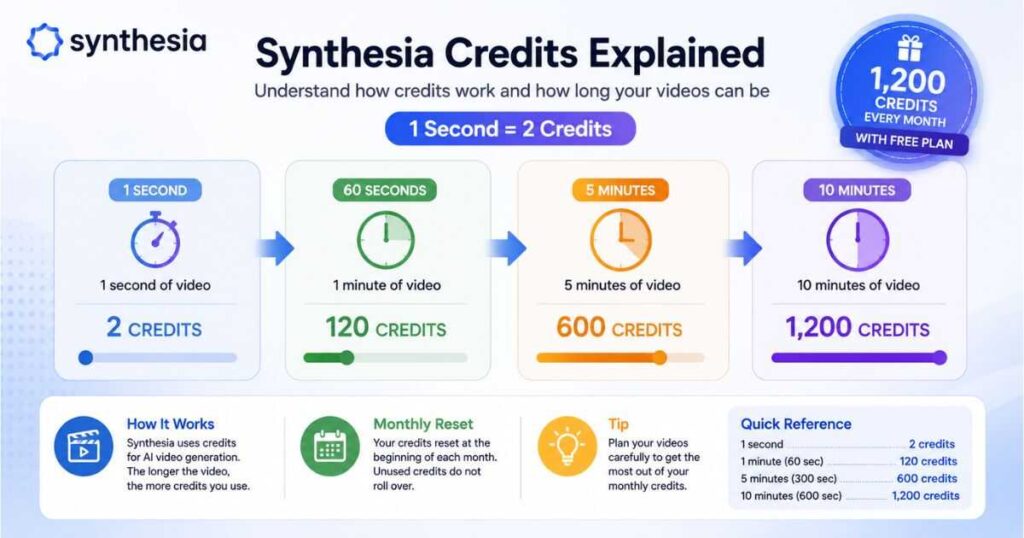
Synthesia currently gives Basic users 1,200 credits per month, and each second of generated video consumes 2 credits. That means a one-minute video uses approximately 120 credits.
In practical terms:
| Video Length | Credits Used |
| 30 seconds | 60 |
| 1 minute | 120 |
| 2 minutes | 240 |
| 5 minutes | 600 |
| 10 minutes | 1,200 |
So, theoretically, you could create:
- 10 videos of 1 minute each
- 5 videos of 2 minutes each
- 2 videos of 5 minutes each
- 1 video of 10 minutes
The actual number of videos you can create depends on their length and on whether you use other credit-consuming features.
This is an important distinction because someone making short 30-second videos will be able to create more individual videos than someone producing five-minute training presentations.
Is Synthesia Free for AI Video Generation?
Yes, within the limits of the Basic plan.
Synthesia’s free plan is designed to let you explore AI video creation rather than simply view a demonstration. You can create videos using Synthesia’s AI-powered workflow and test the platform’s avatar-based presentation system.
This makes the free plan useful for several types of experiments.
For example, you could create a short:
- Product introduction
- Training explanation
- Educational presentation
- Internal announcement
- Social media concept
- Tutorial
- Presentation
- Business explainer
The biggest restriction is not whether you can create a video at all. It’s how much video you can generate within your monthly credit allowance.
[Create a Free Synthesia Video →]
Is Synthesia Free for YouTube Videos?
Yes, you can use the free plan to experiment with YouTube-style videos, but whether it is practical for an entire YouTube channel depends on how much content you need to produce.
For example, if you create short 60-second videos, the Basic allowance could theoretically cover around 10 minutes of generated video in a month.
But a creator publishing:
- 5-minute videos twice a week
- 10-minute educational videos
- Multiple videos every day
- Long-form training content
will quickly run into the free plan’s usage ceiling.
This is why the answer to is Synthesia free for YouTube depends heavily on your publishing strategy.
For testing a channel concept, short-form content, or a few experimental videos, the free plan can be useful.
For serious, consistent production, a paid plan is much more practical.
If you’re building a faceless YouTube workflow, you may also want to read our previous guide on [Kling AI Prompts] and our [Kling AI Review] to compare different approaches to AI video production.
Is Synthesia Free to Use Without Paying Every Month?
Yes.
You do not need to subscribe to a paid plan simply to use the Basic version.
Synthesia’s current pricing structure includes:
| Plan | Monthly Price | Video Usage |
| Basic | $0 | Up to 10 min/month |
| Starter | $29/month | Up to 10 min/month |
| Creator | $89/month | Up to 30 min/month |
| Enterprise | Custom | Unlimited video minutes |
Synthesia also offers lower effective monthly pricing when Starter and Creator are billed annually. The current pricing page lists Starter at $18/month when billed yearly and Creator at $64/month when billed yearly.
The important point is that you don’t have to pay just to maintain access to the free Basic plan.
What Is the Difference Between Synthesia Free and Paid Plans?
The main difference isn’t simply video generation.
Paid plans are designed for people who need more control, more production capacity, and more professional features.
The Starter plan adds features such as video downloads, AI Video Assistant, AI Dubbing, removal of the Synthesia logo, more avatars, additional workspace functionality, and customer support.
Creator goes further by adding features such as more video minutes, more avatars, personal avatars, API access, branded video pages, multiple avatars per scene, interactive videos, and additional collaboration capabilities.
Synthesia Free vs Starter vs Creator
| Feature | Basic | Starter | Creator |
| Monthly price | $0 | $29 | $89 |
| Credits/month | 1,200 | 1,200 | 3,600 |
| Video minutes/month | Up to 10 | Up to 10 | Up to 30 |
| AI avatars | Limited | 125+ | 180+ |
| Video downloads | Limited | Yes | Yes |
| AI Dubbing | Limited | Yes | Yes |
| Remove Synthesia logo | No | Yes | Yes |
| Personal avatars | Limited | Available on annual plan | Up to 5 |
| API access | No | No | Yes |
| Interactive videos | No | No | Yes |
| Branded video pages | No | No | Yes |
Feature availability and plan limits can change, so consider this table a current 2026 snapshot rather than a permanent specification.
Is Synthesia Free Good Enough for Beginners?
For many beginners, yes.
If you’ve never used an AI avatar platform before, paying immediately may not be necessary.
The free version gives you enough room to answer the most important questions:
Do I like the avatars?
Do the voices sound natural enough for my content?
Can I create videos faster than I could manually?
Does the editor fit my workflow?
Are the available languages useful for my audience?
Can I produce the style of video I actually want?
Those questions are more important than simply asking whether the software is free.
A free plan is valuable when it lets you test the product before spending money. Synthesia’s current Basic plan does exactly that by providing a recurring monthly credit allowance rather than requiring an immediate subscription.
Is Synthesia Free Enough for Business Use?
For testing and small experiments, potentially.
For a business that needs regular production, the free plan is unlikely to be enough for long.
Businesses often need more than an AI avatar. They may require:
- Consistent branding
- Downloadable videos
- Collaboration
- More avatar choices
- Higher video limits
- Dubbing
- Personal avatars
- API access
- Interactive video features
- Multiple editors or guests
These are areas where paid plans become significantly more useful.
For larger organizations, Synthesia’s Enterprise plan adds features such as unlimited video minutes, extensive avatar access, SAML/SSO, live collaboration, Brand Kits, SCORM export, tailored onboarding, and dedicated customer success support.
So if your question is is Synthesia free for business, the better answer is:
Yes, you can start for free, but serious business production usually requires a paid plan.
[Explore Synthesia for Business →]
How Do Synthesia Credits Work?
Credits are one of the most important things to understand before using the free plan.
Synthesia currently uses credits as a shared measurement system for AI-powered usage.
For standard video generation, one second of video costs two credits. Therefore:
1 minute = 120 credits
5 minutes = 600 credits
10 minutes = 1,200 credits
Synthesia also uses credits for other AI-powered features, and the cost can vary depending on the feature. For example, its documentation currently lists AI dubbing, bulk personalization, API usage, and custom AI video assets as credit-consuming activities.
This means you shouldn’t assume that all 1,200 credits on the free plan will necessarily behave like a simple “10-minute video coupon.”
If you’re experimenting with multiple AI features, monitor your credit usage.
[Start Creating With 1,200 Free Credits →]
Do Synthesia Free Credits Roll Over?
No.
Unused credits do not accumulate indefinitely.
According to Synthesia’s current documentation, usage credits reset at the beginning of the next billing period, and unused credits do not roll over.
For a free user, that means there’s little reason to intentionally save all your credits for months.
If you have 1,200 credits available and want to experiment, using them during the current period is generally more useful than waiting for a future month.
This also means that your monthly allowance should be viewed as a recurring testing and production budget rather than a bank of credits that grows over time.
What Happens When You Run Out of Free Synthesia Credits?
Once you’ve used your available credits, you can’t simply continue generating videos for free with the same allowance.
Synthesia states that when users exceed their plan limit, usage is capped until renewal. Users can upgrade if they need additional video minutes immediately.
This is one of the biggest practical limitations of the free plan.
Imagine that you have used all 1,200 credits during the first week of the month because you created several longer videos.
You may then need to wait for the next renewal or upgrade to continue producing additional content.
For occasional users, that may not matter.
For frequent creators, it can become frustrating.
Can You Download Videos From Synthesia Free?
This is one of the areas where the free and paid experience differs.
Synthesia currently lists video downloads among the features added with the Starter plan, while the Basic plan is positioned primarily as a way to explore the editor and test avatars and voices.
That distinction matters.
If you simply want to experiment with Synthesia and see how its AI avatar workflow works, the free plan can be enough.
If your goal is to produce finished videos that you can routinely download and distribute as part of a professional workflow, you should look carefully at the paid plans.
This is one of the clearest reasons why someone may decide that “free” is not enough for their particular use case.
Is Synthesia Free Worth Trying?
Yes — especially if you’re still evaluating AI avatar platforms.
The free plan removes much of the initial risk because you can test the platform without paying for a subscription.
You can evaluate:
- Avatar quality
- Voice quality
- Video templates
- Languages
- Script-to-video workflow
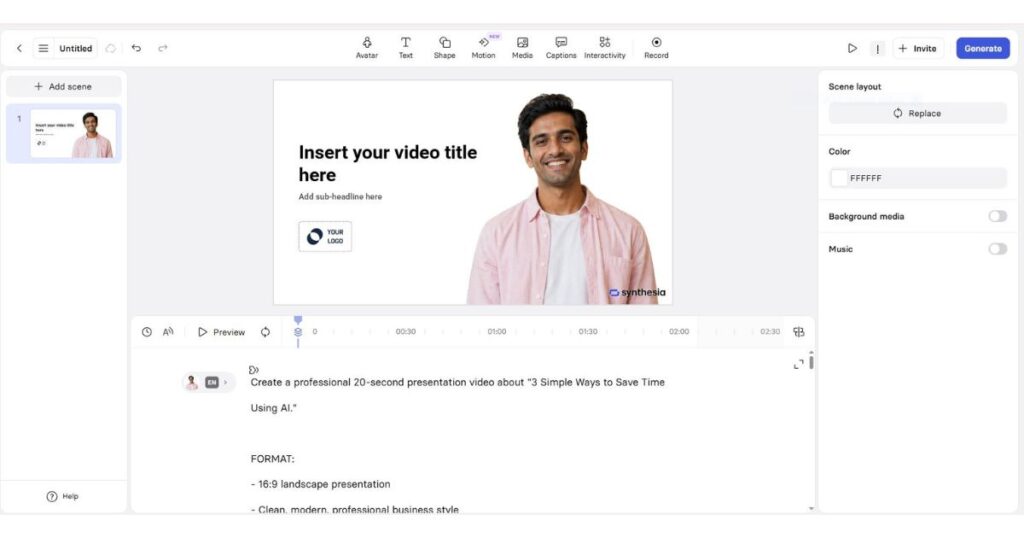
- Editing experience
- Production speed
- Whether the platform fits your content style
The free allowance is also large enough to create meaningful test videos rather than merely showing you a restricted demo.
However, don’t judge the entire platform solely by what is available for free.
If your workflow depends on downloading finished videos, removing platform branding, producing larger volumes, using more avatars, or accessing advanced features, you’ll need to compare the paid plans carefully.
Who Should Use Synthesia Free?
The Basic plan makes the most sense for:
Beginners
If you’re completely new to AI video generators, the free plan gives you an opportunity to learn the workflow before spending money.
Students and educators
If you only need occasional short educational presentations, the monthly allowance may be enough for experimentation.
Small content experiments
You can test a new video format or content idea without committing to a paid subscription.
Businesses evaluating AI video
Teams can explore whether AI avatars fit their training, onboarding, or communication workflow before considering a larger deployment.
Creators testing alternatives
If you’re comparing Synthesia with other AI video platforms, starting with the free option lets you evaluate the actual experience rather than relying entirely on reviews.
Who Should Upgrade From Synthesia Free?
The free plan becomes less attractive when you need production rather than experimentation.
Consider a paid plan if you:
- Create videos frequently
- Need downloadable videos
- Want to remove Synthesia branding
- Need more avatar choices
- Require more collaboration
- Need personal avatars
- Want AI dubbing at higher usage
- Need API access
- Want interactive video functionality
- Produce content for clients
- Need a more professional production workflow
The Starter plan is currently positioned for individuals who need regular video creation, while Creator targets individuals and smaller teams needing more minutes, avatars, guests, and advanced features.
Is Synthesia Free Better Than Paying for It?
That depends entirely on how you use it.
If you’re creating a few short videos each month, the free plan can offer excellent value because your cost is literally zero.
If you’re producing videos professionally, however, the real question isn’t:
“Can I use Synthesia for free?”
It’s:
“Will the free plan give me everything I need to finish and distribute my videos?”
For some users, the answer will be yes.
For others, features such as downloads, higher limits, branding controls, collaboration, advanced avatars, and additional production capabilities will make a paid plan worthwhile.
That is why it’s better to test the free plan first and then upgrade based on an actual limitation rather than paying for features you may never use.
Frequently Asked Questions About Is Synthesia Free
Is Synthesia completely free?
Synthesia offers a free Basic plan, but it has usage limits. The current Basic plan includes 1,200 credits per month and up to 10 minutes of video generation per month.
Is Synthesia free to use?
Yes. You can use the Basic plan without paying for a subscription, and Synthesia says no credit card is required to get started.
Is Synthesia AI free?
Yes, Synthesia offers free access through its Basic plan, although advanced features and higher production limits are available through paid plans.
How long can a free Synthesia video be?
The Basic plan provides up to 10 minutes of generated video per month in total. The limit is based on usage rather than giving you an unlimited number of 10-minute videos.
How many credits does Synthesia Free give you?
The current Basic plan provides 1,200 credits per month.
How many credits does one minute of Synthesia video use?
Standard video generation currently uses 2 credits per second, meaning one minute uses 120 credits.
Do unused Synthesia credits roll over?
No. Unused usage credits do not roll over into the next billing period.
Does Synthesia Free require a credit card?
No. Synthesia currently states that no credit card is required for the Basic free plan.
Can I use Synthesia Free for YouTube?
You can use the free plan to create and test videos, but the 10-minute monthly allowance may be too restrictive for a channel that publishes frequent long-form content.
Is Synthesia Free good for business?
It’s useful for testing and small experiments. Businesses producing content at scale will generally need the additional capacity and features offered by paid or Enterprise plans.
Final Verdict: Is Synthesia Free Worth It?
So, is Synthesia free?
Yes — and the current free plan is more useful than a simple demo.
The Basic plan gives you 1,200 credits per month, equivalent to up to 10 minutes of generated video, and you can start without a credit card. That makes it a practical way to test Synthesia’s AI avatar and video creation workflow before spending money.
But the free plan is not designed for unlimited production.
If you only need occasional videos, want to experiment with AI avatars, or are comparing video creation platforms, the free plan is a sensible place to start.
If you need regular professional production, downloadable videos, more avatars, branding controls, collaboration, or advanced features, you’ll eventually want to compare Starter, Creator, or Enterprise.
The smartest approach is simple: start free, test the workflow with real content, and only upgrade when the free plan becomes a genuine limitation.
Continue Learning
Want to explore more AI video tools before choosing your workflow? Continue with these guides:
- [Synthesia AI Review] — Explore Synthesia’s features, strengths, weaknesses, and ideal use cases.
- [Synthesia Pricing] — Compare Synthesia’s current plans, pricing, credits, and features.
- [Kling AI Review] — See how Kling AI approaches AI video generation and creative video production.
- [Best Kling AI Prompts] — Explore practical prompts for creating more cinematic AI-generated videos.
- [Kling AI Pricing] — Compare Kling AI plans and understand how its pricing works.
- Synthesia Avatars: Types, Custom Avatars & How They Work — Explore Synthesia’s avatar types, customization options, features, and how AI avatars work.
- Synthesia Text to Video: How It Works in 2026 — A simple guide to creating videos from text with Synthesia.
- Synthesia Alternatives: 9 Best AI Video Tools in 2026 — Compare the top alternatives for AI avatars, faceless YouTube, cinematic video, training, and more.
- How to Make a Faceless YouTube Channel in 2026: A complete step-by-step guide to building, automating, and monetizing your channel using AI.
Comparing tools side by side is often more useful than choosing based on price alone. The best AI video generator is the one that matches your production volume, video style, editing needs, and audience.

