
Synthesia Pricing (2026): Plans, Costs & Features
If you’re researching Synthesia pricing, you’re probably trying to answer a simple question: How much will Synthesia actually cost me, and which plan gives me the features I need?
Synthesia offers a free Basic plan, a Starter plan for individual creators, a Creator plan with more video capacity and advanced features, and an Enterprise option with custom pricing. The biggest difference between the paid plans isn’t simply the monthly price. Video minutes, AI avatars, personal avatars, credits, dubbing, collaboration, API access, and other features can significantly affect which plan makes sense for you.
In this guide, we’ll break down Synthesia pricing, compare every plan, explain monthly versus yearly billing, look at credits and video limits, and help you decide whether Synthesia is worth paying for.
Synthesia Pricing at a Glance
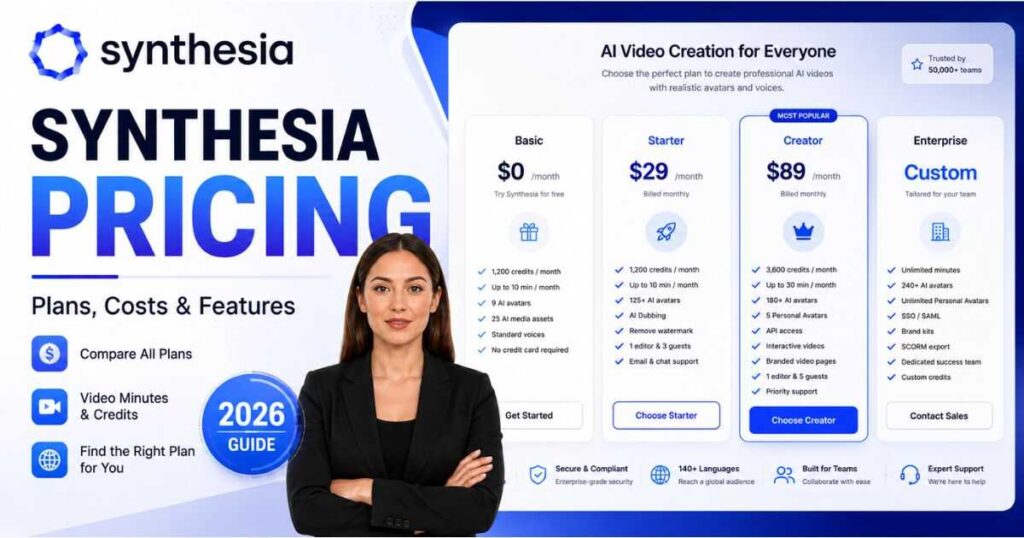
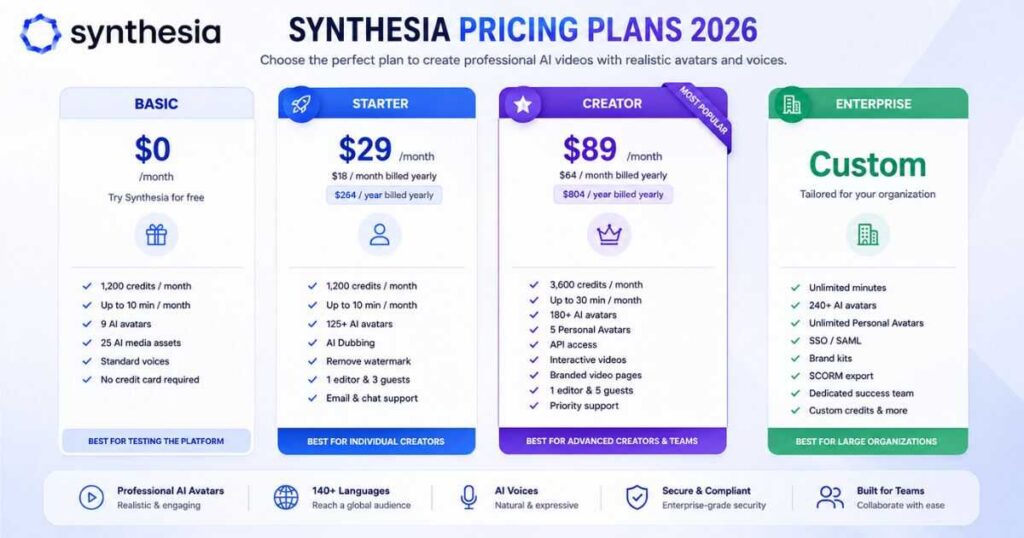
Synthesia currently has four main plans: Basic, Starter, Creator, and Enterprise.
The Basic plan costs nothing. Starter and Creator are self-serve subscriptions, while Enterprise uses custom pricing based on the organization’s requirements.
| Plan | Monthly Price | Yearly Price | Video Allowance | Best For |
| Basic | $0 | — | 10 min/month | Testing Synthesia |
| Starter | $29/mo | $18/mo | 120 min/year | Individual creators |
| Creator | $89/mo | $64/mo | 360 min/year | Advanced creators & small teams |
| Enterprise | Custom | Custom | Unlimited | Large organizations |
The yearly prices shown above are the effective monthly rates when billed annually. Synthesia’s official FAQ lists the annual totals as $264/year for Starter and $804/year for Creator.
That means the difference between monthly and annual billing can be significant if you already know you’ll use Synthesia throughout the year.
What Is Included in the Synthesia Basic Plan?
The Basic plan is Synthesia’s free option, making it the easiest way to test the platform before spending money.
You don’t need a credit card to get started, and the current Basic plan includes 1,200 credits per month, enough for up to 10 minutes of video per month, along with access to 25 AI-generated video assets.
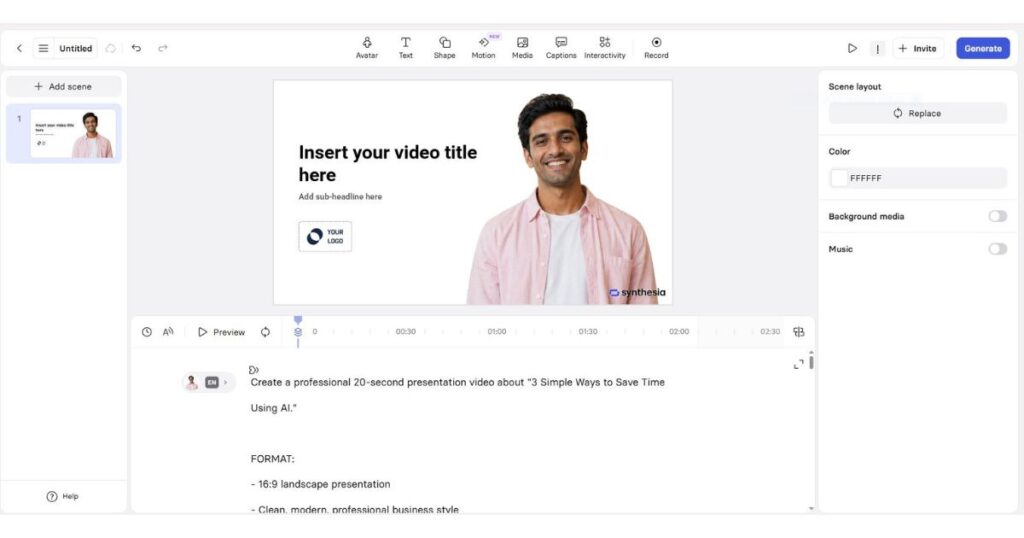
The Basic plan also gives you access to a limited selection of AI avatars and allows you to explore Synthesia’s editor, voices, and video creation workflow.
However, the free plan isn’t designed to replace a paid production workflow.
For example, the current pricing comparison shows that downloading videos is a paid-plan feature. Starter adds video downloads, AI Video Assistant, AI Dubbing, removal of the Synthesia logo, more avatars, and additional collaboration options.
Is Synthesia Free?
Yes. Synthesia can be used for free, but the free plan is primarily useful for testing the platform and learning how its editor and AI avatars work.
If you’re simply curious about the quality of Synthesia’s avatars and voices, Basic is a good starting point.
If you need to regularly publish downloadable videos, you’ll probably need one of the paid plans.
[Start Creating with Synthesia for Free →]
Synthesia Pricing for the Starter Plan
The Starter plan is the first paid Synthesia tier and is designed for individuals who need more functionality than the free plan provides.
The current price is:
- $29/month when billed monthly
- $18/month when billed annually
- $264/year when paid annually
Synthesia’s pricing page currently lists Starter with 1,200 credits per month on monthly billing or 14,500 credits per year on annual billing. It supports up to 10 minutes of video or AI Dubbing per month on monthly billing, or up to 120 minutes per year under the annual allowance.
Starter also includes:
- Video downloads
- AI Video Assistant
- AI Dubbing
- Synthesia logo removal
- 1 editor and 3 guests
- 125+ AI avatars
- Custom on-brand avatars
- Chat and email support
- 25 AI-generated video assets on the monthly version
- 300 AI-generated video assets on the annual version
Who Should Choose Starter?
Starter makes the most sense if you are an individual creator, educator, freelancer, marketer, or small business that doesn’t need the more advanced Creator features.
It can also be a practical option if your videos are relatively short and you don’t need to produce dozens of minutes of content every month.
One important consideration is the video allowance. Starter is limited to 10 minutes of video per month on monthly billing, so heavy users can reach the limit quickly.
Synthesia Pricing for the Creator Plan
The Creator plan is currently the most popular self-serve option according to Synthesia’s pricing page.
The current price is:
- $89/month when billed monthly
- $64/month when billed annually
- $804/year when paid annually
Creator increases the usage allowance to 3,600 credits per month or 44,000 credits per year and supports up to 30 minutes of video or AI Dubbing per month, or 360 minutes per year with annual billing.
You also get features that aren’t available in the same way on Starter, including:
- 5 personal avatars
- 180+ AI avatars
- Branded video pages
- API access
- Multiple avatars per scene
- Interactive videos
- 1 editor and 5 guests
- Priority chat and email support
- AI Dubbing
- Custom on-brand avatars
Who Should Choose Creator?
Creator is better suited to users who are producing videos regularly and need more than the Starter allowance.
It’s particularly useful for:
- Marketing teams
- Content creators
- Training professionals
- Small businesses
- Agencies
- Creators producing multilingual content
- Users who need API access
- Teams that want interactive videos
The biggest reason to move from Starter to Creator isn’t simply the additional avatars. It’s the combination of higher usage, personal avatars, API access, interactive video capabilities, branded video pages, and additional collaboration capacity.
Synthesia Pricing for Enterprise
Enterprise pricing is different from the self-serve plans.
Instead of displaying a fixed monthly price, Synthesia uses custom pricing for larger organizations. You need to contact the sales team to discuss your requirements.
Enterprise adds capabilities designed for organizations producing video at scale, including:
- Unlimited video minutes
- 240+ stock AI avatars
- Unlimited personal avatars subject to reasonable consumption and compute
- 1-click translations into 80+ languages
- SAML/SSO
- Live team collaboration
- Brand Kits
- SCORM export
- AI Dubbing
- Tailored onboarding
- Implementation services
- Dedicated customer success
- Enterprise community
- Academy and certifications
- Custom credits
Who Needs Synthesia Enterprise?
Enterprise makes the most sense when video creation is part of a larger organizational workflow rather than an occasional individual task.
Think about companies producing:
- Employee training
- Customer education
- Internal communications
- Compliance training
- Product training
- Multilingual corporate content
- Large-scale onboarding materials
For these organizations, the value of Synthesia isn’t just the AI avatar. Collaboration, governance, branding, security, scalability, and integrations become much more important.
Synthesia Pricing: Monthly vs. Yearly
One of the most important things to understand about Synthesia pricing is the difference between monthly and annual billing.
| Plan | Monthly Billing | Annual Billing |
| Basic | $0 | — |
| Starter | $29/month | $18/month |
| Creator | $89/month | $64/month |
| Enterprise | Custom | Custom |
At first glance, annual billing looks considerably cheaper.
Starter drops from $29 to an effective $18 per month, while Creator drops from $89 to an effective $64 per month.
However, don’t choose annual billing solely because the monthly equivalent is lower.
Ask yourself how frequently you’ll use Synthesia.
If you’re experimenting with AI avatars and aren’t sure whether you’ll continue using the platform, the monthly option gives you more flexibility.
If Synthesia is already part of your regular video workflow, annual billing can provide considerably better value.
How Synthesia Credits Work
Credits are one of the most important changes to understand when evaluating Synthesia pricing.
Synthesia now uses credits as a shared currency for usage-based AI features on its self-serve plans. Basic provides 1,200 credits per month, Starter provides 1,200 monthly credits or 14,500 annual credits, and Creator provides 3,600 monthly credits or 44,000 annual credits.
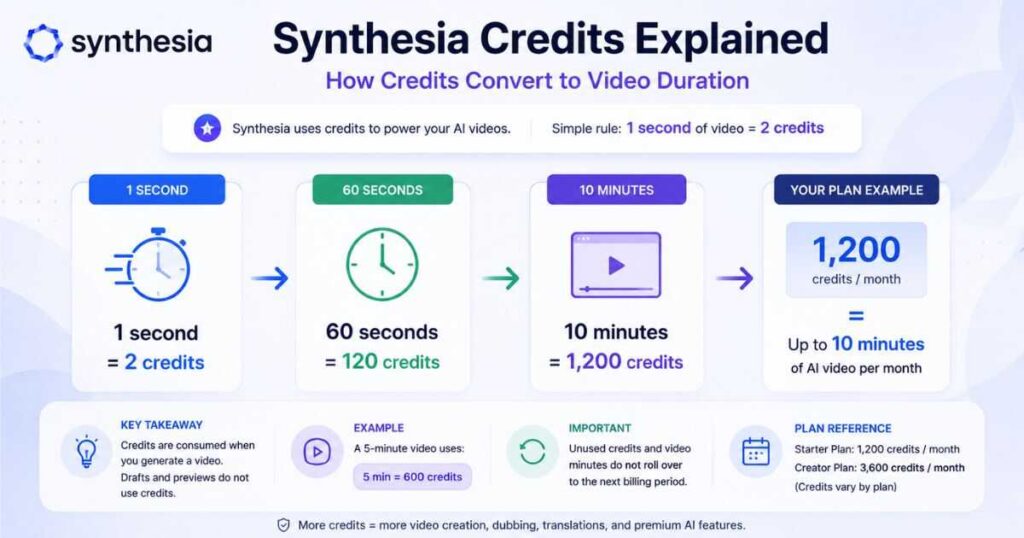
For video generation specifically, Synthesia states that each second of video uses 2 credits.
That means a one-minute video consumes approximately:
60 seconds × 2 credits = 120 credits
So 1,200 credits correspond to approximately 10 minutes of video.
This also explains why the platform’s video limits are calculated in seconds rather than simply counting the number of videos you create.
For example, Synthesia explains that if a Starter user generates a 59-second video, approximately 9 minutes and 1 second remain from a 10-minute allowance.
Do Synthesia Credits Roll Over?
No.
Unused video minutes do not roll over into the next billing period.
This is important when deciding whether a higher plan is worthwhile.
If you regularly use most of your allowance, upgrading may make sense.
If you consistently use only a small portion of your allowance, paying for a higher tier could be unnecessary.
How Many Videos Can You Make With Synthesia?
There’s no single answer because Synthesia measures usage based on video duration rather than simply counting finished videos.
For example, a 10-minute monthly allowance could theoretically be used for:
- 10 videos × 1 minute
- 5 videos × 2 minutes
- 2 videos × 5 minutes
- 1 video × 10 minutes
The important factor is total generated video time.
Synthesia also explains that credits are consumed when a video is generated. Drafting and using the play functionality don’t consume the same generated-video allowance. If you regenerate an edited video, Synthesia calculates usage based on the newly generated duration.
This is useful for people who frequently edit scripts because changing a small section doesn’t necessarily mean paying for an entirely new full-length video.
What Do You Get for the Money?
Looking only at the headline price can make Synthesia pricing seem straightforward.
The more useful comparison is what you actually get at each level.
| Feature | Basic | Starter | Creator | Enterprise |
| Price | Free | $29/mo | $89/mo | Custom |
| Annual effective price | — | $18/mo | $64/mo | Custom |
| Video limit | 10 min/mo | 10 min/mo | 30 min/mo | Unlimited |
| AI avatars | 9 | 125+ | 180+ | 240+ |
| Personal avatars | — | 3 | 5 | Unlimited* |
| AI Dubbing | Limited | Yes | Yes | Yes |
| API access | — | — | Yes | Yes |
| Interactive videos | — | — | Yes | Yes |
| Guests | — | 3 | 5 | Custom |
| SSO | — | — | — | Yes |
| Brand Kits | — | — | — | Yes |
*Enterprise personal avatars are subject to reasonable consumption and compute.
This table makes one thing clear: Creator isn’t simply a larger Starter plan. It introduces capabilities that can matter significantly to professional users.
Is Synthesia Worth the Price?
Whether Synthesia is worth the price depends heavily on what you’re trying to accomplish.
If you only need to create a few experimental AI videos, the free Basic plan may be enough.
If you’re an individual creator who needs downloadable videos and a professional selection of avatars, Starter is the more logical entry point.
If you’re producing content regularly and need personal avatars, interactive videos, branded pages, or API access, Creator becomes much more attractive.
Enterprise is aimed at organizations where video production is a serious operational requirement.
For a deeper look at the platform itself—including its strengths, weaknesses, avatars, video creation capabilities, and overall experience—see our [Synthesia AI Review].
The important thing is to match the plan to your actual usage rather than automatically choosing the most expensive option.
[Explore Synthesia and Compare Your Options →]
Is Synthesia Good for YouTube Creators?
Synthesia can be useful for YouTube, but it isn’t designed exclusively around traditional YouTube production.
Its biggest strengths are professional presenters, AI avatars, multilingual communication, training, presentations, and business-focused video production.
That makes it particularly interesting for creators who want:
- AI presenters
- Educational videos
- Tutorial content
- Business explainers
- Multilingual videos
- Training-style content
- Faceless presentation videos
However, if your primary goal is cinematic text-to-video generation, you may want to compare Synthesia with other AI video platforms.
For example, you can explore our [Kling AI Review] if you’re more interested in generative video and cinematic content.
You can also compare Synthesia with [HeyGen] if you’re specifically interested in AI avatars and presenter-style videos.
Synthesia Pricing FAQ
How much does Synthesia cost?
Synthesia currently has a free Basic plan. Starter costs $29/month when billed monthly or an effective $18/month when billed annually. Creator costs $89/month monthly or an effective $64/month when billed annually. Enterprise has custom pricing.
Is Synthesia free?
Yes. The Basic plan is free and includes 1,200 credits per month and up to 10 minutes of video per month.
Is Synthesia a one-time payment?
No. Synthesia uses recurring subscriptions for its self-serve plans. Monthly and annual billing options are available for Starter and Creator.
Does Synthesia have a monthly plan?
Yes. Starter is currently $29/month and Creator is $89/month when paid monthly.
Is Synthesia cheaper if I pay yearly?
Yes. The current effective annual rates are $18/month for Starter and $64/month for Creator, with annual totals of $264 and $804 respectively.
Do unused Synthesia minutes roll over?
No. Unused video minutes don’t roll over into the next billing period.
Can I cancel Synthesia?
Yes. Synthesia states that you can cancel your plan through your account settings.
Does Synthesia charge per video?
No. Synthesia uses subscription plans rather than a simple pay-per-video model. Usage is measured through video duration and credits.
Which Synthesia plan is best?
For testing, Basic is the obvious starting point. Starter is suitable for individuals who need paid features and downloads, while Creator is better for users who need more video capacity, personal avatars, API access, interactive videos, and other advanced features. Enterprise is intended for larger organizations.
Continue Learning
If you’re exploring AI video tools and want to find the right platform for your workflow, don’t stop with Synthesia pricing.
Continue exploring:
- [Synthesia AI Review] — See how Synthesia performs beyond its pricing plans, including its avatars, video creation tools, strengths, and weaknesses.
- [Kling AI Review] — Explore Kling AI if your focus is more on generative and cinematic AI video.
- [HeyGen Review] — Compare another popular AI avatar platform for presenter-style and multilingual videos.
- [Kling AI Pricing] — See how another major AI video platform structures its pricing and usage limits.
- Is Synthesia Free? Plans, Limits & What You Get — Discover Synthesia’s free plan, monthly credits, video limits, key features, and when upgrading makes sense.
- Synthesia Avatars: Types, Custom Avatars & How They Work — Explore Synthesia’s avatar types, customization options, features, and how AI avatars work.
- Synthesia Text to Video: How It Works in 2026 — A simple guide to creating videos from text with Synthesia.
- Synthesia Alternatives: 9 Best AI Video Tools in 2026 — Compare the top alternatives for AI avatars, faceless YouTube, cinematic video, training, and more.
- AI Storyboard Generator: Turn Ideas Into Stunning Videos — Discover how AI storyboard tools transform ideas and scripts into organized, consistent video scenes.
Comparing platforms based on your actual video requirements—not just the cheapest monthly price—can help you avoid paying for features you don’t need while making sure you have enough capacity for the content you actually want to produce.
[Try Synthesia Free and Explore the Platform →]
Final Verdict on Synthesia Pricing
Synthesia pricing is structured around four main levels: Basic, Starter, Creator, and Enterprise.
The free Basic plan is useful for testing the platform. Starter is the entry-level paid option and currently costs $29/month or an effective $18/month with annual billing. Creator costs $89/month or an effective $64/month annually and adds substantially more capacity and professional features. Enterprise provides custom pricing for organizations requiring unlimited video production and advanced collaboration, security, branding, and support.
The most important thing to remember is that the cheapest plan isn’t necessarily the best value.
If you rarely create videos, Basic may be enough. If you need downloads and a professional avatar library, Starter can be a sensible choice. If you produce videos frequently or need personal avatars, interactive content, API access, and more capacity, Creator is the stronger option.
Before committing to an annual subscription, use the free plan to test the editor, avatars, voices, and workflow yourself. That gives you a much better idea of whether Synthesia’s features justify the cost for your specific needs.

