Invideo alternatives (2026): 7 Best AI Video Tools
If you’re searching for the best invideo alternatives, you probably don’t want another generic list of AI video generators. You want to know which tool is actually better for your specific workflow, what you gain by switching, what you give up, and which platform is worth paying for.
That’s exactly what this guide is designed to answer.
There are now more AI video platforms than ever, but they are not interchangeable. Some are built around complete text-to-video workflows. Others focus on AI avatars, cinematic generation, professional editing, short-form content, or turning existing content into videos.
That means the best invideo alternatives depend heavily on what you are trying to create.
If your goal is to turn an idea into a complete video with minimal editing, one platform may be the obvious choice. If you want realistic AI presenters, another tool may be better. If cinematic AI-generated footage is your priority, you may want a completely different approach.
In this guide, we’ll compare the strongest invideo alternatives and help you choose the right one instead of simply recommending the tool with the longest feature list.
Quick Answer: What Are the Best InVideo Alternatives?
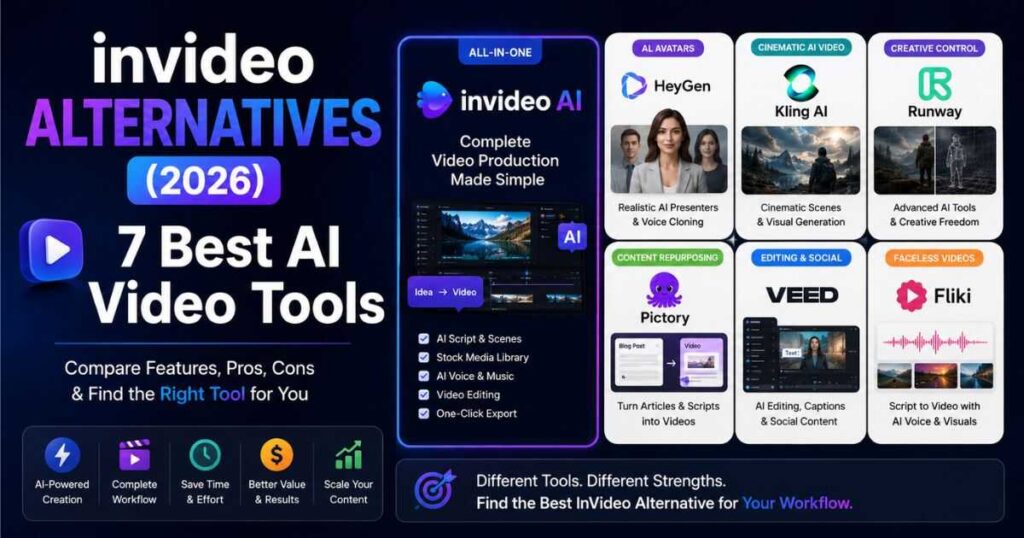
If you want the short version, these are the platforms I would look at first:
| Platform | Best For | Main Strength |
| InVideo AI | Complete video production | All-in-one workflow |
| HeyGen | AI presenters | Avatars and voice |
| Kling AI | Cinematic AI video | Visual generation |
| Runway | Creative professionals | AI video + creative control |
| VEED | Editing + AI creation | Browser-based workflow |
| Pictory | Content repurposing | Text and long-form content |
| Fliki | Faceless content | Voice, visuals and social videos |
The important point is that invideo alternatives are not necessarily “better” than InVideo AI overall.
They may simply be better at one particular job.
For example, someone building a faceless YouTube channel may prefer an all-in-one workflow, while someone creating an AI spokesperson video for a company may care much more about avatar quality.
So before switching, ask yourself one question:
What is the biggest weakness in my current video workflow?
That answer should determine which of these invideo alternatives you test first.
Why Look for InVideo Alternatives?
InVideo AI is designed to simplify video production by bringing multiple parts of the process into one environment.
That can be extremely useful.
Instead of creating a script in one application, generating visuals somewhere else, finding stock footage on another website, creating voiceovers with another service, and then editing everything in a separate video editor, an all-in-one platform can reduce the amount of tool switching involved.
But an all-in-one approach is not perfect for everyone.
You may be looking for invideo alternatives because:
- You want more realistic AI avatars.
- You want more control over cinematic AI-generated scenes.
- You want a more traditional video editing experience.
- You want better tools for repurposing existing content.
- You want a different pricing structure.
- You need a specific AI video model.
- You want stronger voice generation.
- You want more control over individual shots.
- You want a platform designed specifically for social media.
- You simply prefer another workflow.
This distinction is important.
A platform can be excellent and still not be the right platform for you.
That’s why I don’t recommend choosing between invideo alternatives based only on the number of AI models, templates, or features a platform advertises.
The better question is:
Which tool gets you from your idea to your finished video with the least friction?
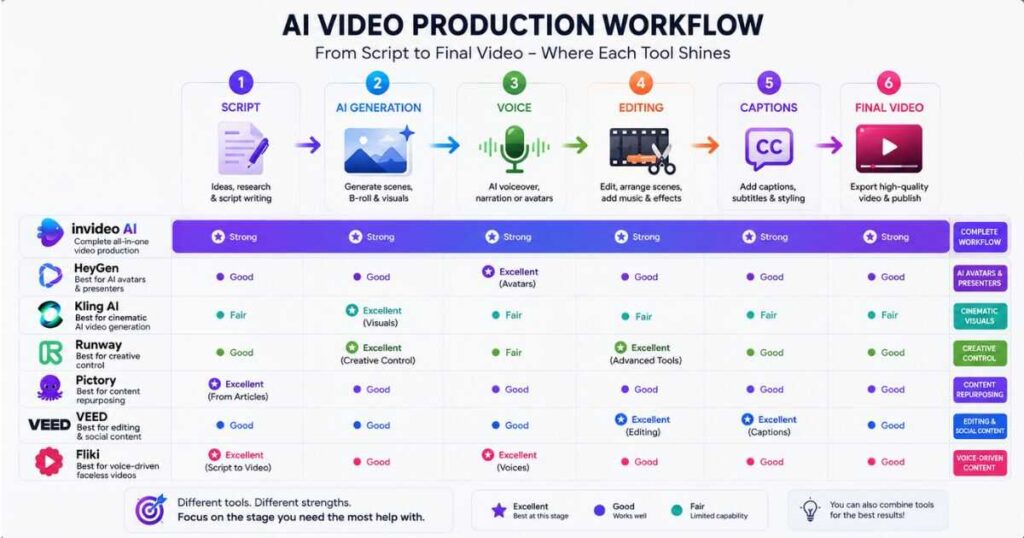
The Best InVideo Alternatives at a Glance
Before going deep into each platform, here’s a more practical comparison.
| Tool | Ideal User | Workflow | AI Generation | Avatars | Editing | Best Overall Use |
| InVideo AI | Beginners & creators | ⭐⭐⭐⭐⭐ | ⭐⭐⭐⭐ | ⭐⭐⭐⭐ | ⭐⭐⭐⭐ | Complete production |
| HeyGen | Marketers & businesses | ⭐⭐⭐⭐ | ⭐⭐⭐ | ⭐⭐⭐⭐⭐ | ⭐⭐⭐ | Presenter videos |
| Kling AI | Visual creators | ⭐⭐⭐ | ⭐⭐⭐⭐⭐ | ⭐⭐ | ⭐⭐ | Cinematic scenes |
| Runway | Advanced creators | ⭐⭐⭐⭐ | ⭐⭐⭐⭐⭐ | ⭐⭐ | ⭐⭐⭐⭐ | Creative production |
| VEED | Social creators | ⭐⭐⭐⭐ | ⭐⭐⭐⭐ | ⭐⭐⭐⭐ | ⭐⭐⭐⭐⭐ | Create + edit |
| Pictory | Content marketers | ⭐⭐⭐⭐⭐ | ⭐⭐⭐ | ⭐⭐ | ⭐⭐⭐⭐ | Repurposing |
| Fliki | Faceless creators | ⭐⭐⭐⭐⭐ | ⭐⭐⭐⭐ | ⭐⭐⭐⭐ | ⭐⭐⭐⭐ | Voice-driven content |
These ratings are not intended to suggest that one platform wins every category.
Instead, they show why different invideo alternatives appeal to different users.
For example, Kling AI may be a better choice if you care primarily about generating individual cinematic shots. That doesn’t necessarily make it a better replacement for someone who wants to create an entire YouTube video from a simple idea.
Likewise, HeyGen can be a much stronger choice for an AI presenter, while InVideo AI may remain more convenient for a creator who wants scripts, scenes, narration, media and editing in one workflow.
🚀 Ready to See What InVideo AI Can Do?
Don’t switch tools blindly. Test the original workflow first and compare it with the alternatives below.
1. InVideo AI — Best All-in-One Option
Before discussing invideo alternatives, we need to establish what you’re actually replacing.
InVideo AI makes the most sense for people who don’t want to assemble a complicated production stack.
You can start with an idea or script and work toward a finished video without necessarily moving between several specialized applications.
That’s why I would not automatically recommend replacing InVideo AI just because another tool produces a better-looking individual AI clip.
The entire workflow matters.
Imagine you’re creating a faceless YouTube video.
Your process might look like this:
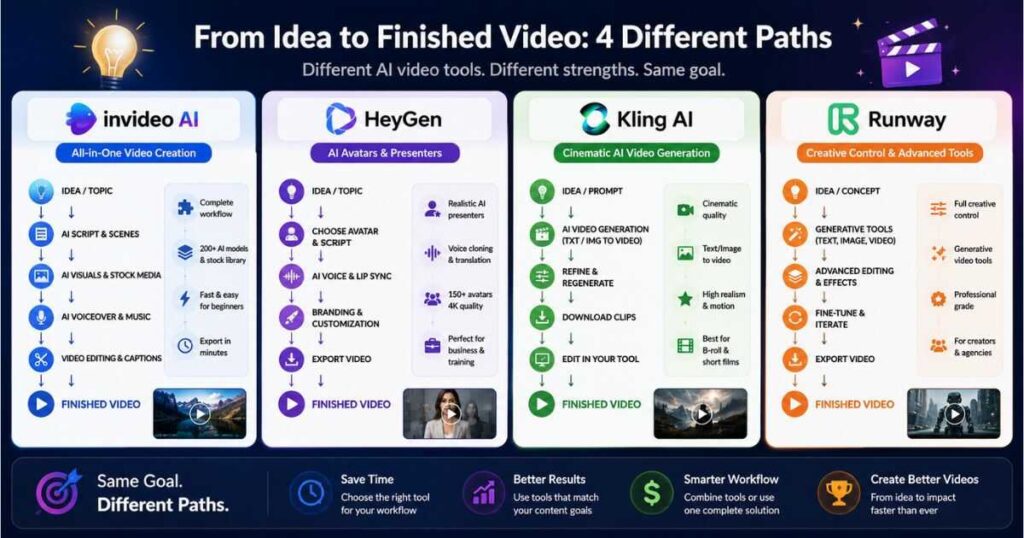
Topic → Script → Scenes → Visuals → Voiceover → Music → Captions → Editing → Export
A specialized AI video generator may produce a beautiful eight-second shot.
But then you still have to figure out:
- How to write the rest of the video.
- How to create the narration.
- How to find supporting footage.
- How to arrange scenes.
- How to add captions.
- How to create transitions.
- How to export the finished video.
This is where InVideo AI’s all-in-one approach becomes important.
When Should You Choose InVideo AI?
Choose InVideo AI if you value:
- Speed over maximum manual control.
- A complete production workflow.
- Faceless YouTube content.
- Marketing videos.
- Explainer videos.
- Social media content.
- Rapid experimentation.
- A beginner-friendly workflow.
If these priorities describe you, you may discover that you don’t actually need an InVideo replacement.
You may simply need to learn how to use the platform more effectively.
Our previous [InVideo AI Review] goes deeper into the platform’s workflow, strengths, weaknesses and overall value, while our [How to Use InVideo AI] guide walks through the platform step by step.
Those two guides are worth reading before you decide to leave the platform completely.
2. HeyGen — Best InVideo Alternative for AI Avatars
If your main reason for looking at invideo alternatives is AI presenters, HeyGen should be near the top of your list.
HeyGen is particularly focused on creating videos featuring AI avatars and digital presenters.
That makes it fundamentally different from a tool whose main purpose is to take an idea and assemble a broader video project.
For example, imagine you’re creating:
- A software tutorial.
- A company announcement.
- A training video.
- A product presentation.
- A sales video.
- An educational lesson.
- A multilingual marketing video.
If you want a person-like presenter delivering the script, an avatar-focused platform can make more sense than a general-purpose video generator.
HeyGen currently positions its AI avatar tools around lifelike presenters, voice cloning and multilingual video creation, making it one of the most obvious invideo alternatives for presenter-led content.
Why Choose HeyGen Instead of InVideo AI?
The answer is simple:
You care more about the presenter than the entire production workflow.
If the central element of your video is an AI person speaking directly to the viewer, HeyGen deserves serious consideration.
But there’s a trade-off.
If you want to create a complex faceless YouTube video containing dozens of scenes, B-roll, generated visuals, narration and multiple editing decisions, you may prefer an all-in-one workflow rather than an avatar-first platform.
HeyGen vs InVideo AI
| If your priority is… | Better starting point |
| AI presenter | HeyGen |
| Digital spokesperson | HeyGen |
| Voice-cloned presenter | HeyGen |
| Faceless YouTube workflow | InVideo AI |
| Complete video production | InVideo AI |
| Rapid scene-based content | InVideo AI |
So is HeyGen one of the best invideo alternatives?
Yes — but mainly if avatars are central to your content.
🎤 Want AI Videos With a Realistic Presenter?
Try HeyGen and create your first AI avatar video.
If you’re interested specifically in avatars, our previous [HeyGen AI Avatars] guide is a useful next step before choosing a plan.
3. Kling AI — Best for Cinematic AI-Generated Scenes
Kling AI is a completely different type of contender.
If your biggest complaint about InVideo AI is not the workflow but the quality or control of individual generated scenes, Kling deserves attention.
This is where the distinction between an AI video production platform and an AI video generation model becomes important.
You might use InVideo AI when you want to build an entire video.
You might use Kling when you want to create a particular shot.
For example:
A lone astronaut walking across a frozen alien planet at sunrise, cinematic lighting, slow camera movement, realistic atmospheric particles.
The objective here isn’t necessarily to produce a ten-minute YouTube video from one prompt.
The objective is to generate a visually compelling scene that you can then use inside a larger project.
That’s why Kling is one of the most interesting invideo alternatives for creators who prioritize visual generation.
When Does Kling Make More Sense?
Kling is worth considering if your priorities include:
- Cinematic scenes.
- AI-generated characters.
- Image-to-video generation.
- Creative visual experimentation.
- Short AI-generated clips.
- High-impact B-roll.
- Visual storytelling.
It becomes particularly interesting when you already know how to edit videos and simply need better generated footage.
Kling AI vs InVideo AI
| Need | Better starting point |
| Complete video from an idea | InVideo AI |
| Cinematic individual scenes | Kling AI |
| AI-generated B-roll | Kling AI |
| Full production workflow | InVideo AI |
| Maximum visual experimentation | Kling AI |
This is also why I wouldn’t describe Kling as a universal InVideo replacement.
The two tools can actually complement each other.
You could use an all-in-one platform for the structure of your video while using a specialized generator for shots that need a more cinematic look.
If you want to understand Kling before deciding, check out our previous [Kling AI Review] and [Best Kling AI Prompts] guides.
🎬 Want More Cinematic AI Video?
Try Kling AI and see how its generated footage compares with your current workflow.
4. Runway — Best InVideo Alternative for Creative Control
Runway belongs in this comparison for a different reason.
While some platforms focus on simplifying the entire process, Runway is attractive to creators who want more creative control over AI-generated video and visual production.
This makes it one of the more compelling invideo alternatives for experienced creators.
If you’re comfortable thinking in terms of:
- Shots.
- Camera movement.
- Composition.
- Visual style.
- Motion.
- Image-to-video workflows.
- Generative editing.
- Creative experimentation.
then a more creator-oriented platform may be a better fit.
Runway vs InVideo AI
The difference can be summarized like this:
InVideo AI:
“I want to turn this idea into a complete video quickly.”
Runway:
“I want more control over how this visual is created.”
Neither philosophy is automatically better.
It depends on how you work.
A beginner making daily YouTube videos may value speed and simplicity.
A filmmaker, designer, creative agency or advanced content creator may be willing to spend more time controlling individual visual elements if the final result is better suited to their vision.
That’s why Runway deserves a place among the best invideo alternatives, even though it serves a somewhat different audience.
Our previous [Runway review] can be linked here to give readers a deeper look at its capabilities.
The First Big Decision: Do You Need a Replacement?
At this point, there’s an important conclusion that many “best invideo alternatives” articles miss:
You don’t necessarily need to replace InVideo AI.
You need to identify the part of your workflow that isn’t working.
If you’re struggling because:
“I need better AI presenters.”
If you’re thinking:
“I need more cinematic AI footage.”
If you’re thinking:
“I need more creative control over generated scenes.”
→ Test Runway.
If you’re thinking:
“I want to create complete videos faster with fewer tools.”
This is a much better way to evaluate invideo alternatives than simply choosing the platform with the highest number of features.
What I Would Choose Based on Your Goal
If I were starting from scratch today, I would not choose an AI video tool based on hype.
I’d choose based on the type of videos I planned to publish every week.
For Faceless YouTube Channels
Start with InVideo AI.
You generally need a repeatable production workflow rather than one impressive AI-generated clip.
The ability to move from topic to script, scenes, narration and editing is more important than having the most advanced individual generation model.
For AI Presenter Videos
Start with HeyGen.
If the presenter is the central character of your video, an avatar-focused platform makes more sense.
For Cinematic Shorts
Start with Kling AI.
If the goal is visual impact and cinematic AI-generated footage, Kling is one of the first platforms I’d test.
For Advanced Creative Work
Start with Runway.
If you want more creative control and are comfortable spending additional time refining your visual output, Runway becomes more attractive.
🚀 Still Not Sure Which Tool to Choose?
Start with InVideo AI if you want the simplest all-in-one workflow, then compare it against the specialized tools in this guide.
What’s Coming Next?
The biggest mistake when comparing invideo alternatives is stopping at four names.
The next tools in this comparison solve different problems.
We’ll look at platforms that are particularly interesting for:
- Browser-based AI video editing.
- Faceless YouTube production.
- Turning articles and scripts into videos.
- Repurposing long-form content.
- Social media video creation.
- AI voiceovers.
- Automated video production.
Most importantly, we’ll answer the question that actually matters:
Which InVideo alternative should you choose based on the videos you want to create — and which ones are simply unnecessary for your workflow?
That comparison is where the decision becomes much clearer.
5. Pictory — Best InVideo Alternative for Repurposing Content
If you’re searching for invideo alternatives because your main goal is turning existing content into videos, Pictory is worth considering.
The key difference is the starting point.
With an all-in-one platform like InVideo AI, you can begin with an idea and build a video around it.
With Pictory, the workflow becomes particularly interesting when you already have something to work with:
- A blog post
- A written script
- A webinar
- A podcast
- A long-form video
- An article
- Existing marketing content
That makes Pictory one of the more practical invideo alternatives for content marketers and creators who already produce written or long-form content.
Pictory vs InVideo AI
| Your starting point | Better option |
| Blank idea | InVideo AI |
| Blog article | Pictory |
| Existing script | Both |
| Long-form content | Pictory |
| Complete AI video workflow | InVideo AI |
| Content repurposing | Pictory |
This difference may sound small, but it can completely change your workflow.
Imagine that you have a 2,000-word article already published on your website.
Instead of starting a video from zero, a content-repurposing platform can help transform that existing material into video content.
For a website owner, this can be extremely useful because one piece of content can potentially become:
Article → YouTube video → Short → Social clip → Email content
That’s a very different value proposition from simply generating an AI video from a prompt.
Who Should Choose Pictory?
Pictory may be a better choice among the invideo alternatives if you are:
- A blogger
- An SEO publisher
- A content marketer
- A YouTube creator with existing scripts
- A podcaster
- A business producing educational content
- Someone trying to repurpose existing videos
If you are creating everything from scratch every day, however, InVideo AI may still provide the more convenient starting point.
6. VEED — Best InVideo Alternative for Editing and Social Content
VEED is another interesting option when comparing invideo alternatives, especially if editing is just as important to you as AI generation.
This is an important distinction.
There are AI tools that are primarily generation platforms.
There are editing platforms that have added AI features.
And there are all-in-one platforms trying to combine both.
VEED sits closer to the second category.
That can make it attractive if you don’t want AI to completely control your workflow.
You may want AI to help with:
- Subtitles
- Video generation
- Voiceovers
- Background removal
- Social content
- Text-based editing
- Video enhancement
while still keeping a traditional editing environment available.
Why VEED Can Be a Strong InVideo Alternative
One of the biggest advantages of an editor-first workflow is control.
You can generate something quickly, then manually adjust it.
That matters because AI-generated videos are rarely perfect on the first attempt.
You may need to:
- Change a scene.
- Replace footage.
- Fix timing.
- Modify captions.
- Adjust text.
- Change music.
- Cut unnecessary sections.
- Reorder scenes.
- Improve the opening hook.
If your workflow involves a lot of these changes, an editing-focused platform can be more appealing than a purely automated approach.
VEED vs InVideo AI
| Need | Better starting point |
| Fast AI video creation | InVideo AI |
| Manual editing control | VEED |
| Social media editing | VEED |
| Complete AI workflow | InVideo AI |
| Captions and editing | VEED |
| Beginner automation | InVideo AI |
Current third-party testing also highlights VEED’s combination of AI generation and editing tools, particularly for social content and subtitles.
So if your reason for researching invideo alternatives is:
“I want AI to help me, but I still want to control the final video.”
VEED deserves a place on your shortlist.
🎥 Want More Control Over Your Videos?
Try VEED if you want AI-assisted creation combined with a hands-on editing workflow.
[ TRY VEED → ]
7. Fliki — A Strong Option for Faceless Content
Fliki is another platform worth considering when comparing invideo alternatives, particularly for creators who rely heavily on scripts, voiceovers and faceless content.
The concept is straightforward:
Script → Voice → Visuals → Video
That workflow can be appealing for creators who don’t want to appear on camera.
For example, you could create:
- Educational videos
- List videos
- Motivational content
- News-style videos
- Explainer videos
- Social media videos
- Faceless YouTube content
Fliki also combines AI voice capabilities with video creation features, making it different from a purely cinematic generation tool. Current reviews describe it as a broad AI video platform with voice cloning, avatars, scriptwriting and subtitle capabilities.
Fliki vs InVideo AI
The choice comes down largely to workflow.
If you want:
“Give me an idea and help me build a complete video.”
→ InVideo AI is a natural fit.
If you think:
“I already have my script. I need a voice and visuals around it.”
→ Fliki becomes more interesting.
| Feature | InVideo AI | Fliki |
| Faceless content | ⭐⭐⭐⭐⭐ | ⭐⭐⭐⭐⭐ |
| Script-based workflow | ⭐⭐⭐⭐⭐ | ⭐⭐⭐⭐⭐ |
| AI voices | ⭐⭐⭐⭐ | ⭐⭐⭐⭐⭐ |
| Complete production workflow | ⭐⭐⭐⭐⭐ | ⭐⭐⭐⭐ |
| Social content | ⭐⭐⭐⭐ | ⭐⭐⭐⭐⭐ |
| Cinematic generation | ⭐⭐⭐⭐ | ⭐⭐⭐ |
The important thing is not which platform has the bigger feature list.
It’s which one matches how you actually create videos.
8. Which InVideo Alternatives Are Best for Faceless YouTube?
This is where the comparison becomes particularly useful for creators building faceless channels.
A faceless YouTube workflow has different requirements from an AI filmmaking workflow.
You need:
- A strong script.
- A compelling hook.
- Narration.
- Visuals.
- B-roll.
- Music.
- Captions.
- Editing.
- Consistent production.
- A workflow you can repeat every week.
That’s why some of the most impressive AI video generators aren’t necessarily the best invideo alternatives for YouTube automation.
A tool might generate spectacular eight-second footage but still require you to assemble an entire 10-minute video manually.
That can actually make your workflow slower.
Best Choices for Faceless YouTube
| Creator Goal | Recommended Tool |
| Complete faceless workflow | InVideo AI |
| Script + voice + visuals | Fliki |
| Repurpose articles | Pictory |
| Social-first editing | VEED |
| Cinematic B-roll | Kling AI |
| Creative AI scenes | Runway |
| AI presenter | HeyGen |
This is one of the most important conclusions in this entire invideo alternatives guide:
The best AI video generator is not necessarily the best AI video production tool.
A generator creates footage.
A production platform helps you create a finished video.
Those are not always the same thing.
9. InVideo Alternatives for YouTube Shorts
Short-form video changes the equation again.
For Shorts, Reels and TikTok, speed is extremely important.
You may need to produce several videos per week—or even several videos per day.
That means the ideal tool should make it easy to:
- Start quickly.
- Generate short scenes.
- Add captions.
- Create a strong hook.
- Change aspect ratios.
- Add music.
- Edit quickly.
- Export without unnecessary steps.
For this workflow, I would shortlist:
InVideo AI
Best when you want an automated production workflow.
VEED
Best when editing, captions and social formatting are major priorities.
Fliki
Best when your content begins with scripts and voiceovers.
Kling AI
Best when the visual itself is the main attraction.
Runway
Best when you’re willing to spend more time refining creative visuals.
10. InVideo Alternatives for Cinematic AI Video
This category deserves special attention.
If what you really want is:
“I want AI-generated footage that looks cinematic.”
then your shortlist should look very different.
Instead of focusing primarily on all-in-one video makers, look at specialized generative video platforms.
Kling AI
Kling is particularly interesting for creators who want AI-generated scenes and visual storytelling.
This makes it one of the most relevant invideo alternatives when visual quality is the primary concern.
Our previous [Kling AI Review] goes deeper into the platform, while our [Best Kling AI Prompts] article can help you improve the quality of your generations.
Runway
Runway is another strong choice for creators who want more creative control over AI-generated footage.
It’s particularly relevant when you’re not simply looking for:
“Generate a video for me.”
but rather:
“Help me create this specific visual.”
That difference is crucial.
The Catch
Neither Kling nor Runway should automatically be treated as a complete replacement for InVideo AI.
You may still need:
- Voice generation
- Editing
- Captions
- Music
- Story structure
- Scene sequencing
In other words, you might use Kling or Runway alongside InVideo AI rather than instead of it.
11. The Most Important Question: What Are You Actually Replacing?
Before paying for one of these invideo alternatives, stop and identify the problem you’re trying to solve.
This sounds obvious, but it’s where many creators waste money.
Suppose you currently use InVideo AI and complain:
“The generated visuals aren’t cinematic enough.”
Buying Pictory won’t solve that.
Buying another stock-footage-based platform probably won’t solve it either.
You need a better visual-generation tool.
That’s where Kling or Runway may make more sense.
Now imagine your complaint is:
“I need realistic people presenting my videos.”
Kling isn’t the answer.
You need an avatar platform, such as HeyGen.
Or perhaps your problem is:
“I already publish articles and want to turn them into videos.”
Now a content-repurposing platform becomes more relevant.
The lesson is simple:
Don’t replace the whole platform when you only need to replace one capability.
This can save you a significant amount of money.
12. A Simple Decision Tree for Choosing InVideo Alternatives
Use this decision tree before signing up for anything.
Do you want complete videos with minimal manual work?
Yes → Start with InVideo AI.
Do you mainly need an AI person to present your script?
Yes → Try HeyGen.
Do you mainly need cinematic AI-generated footage?
Yes → Try Kling AI.
Do you want more creative control over AI-generated visuals?
Yes → Try Runway.
Do you already have articles, scripts or long-form content?
Yes → Try Pictory.
Do you want a strong browser-based editing workflow?
Yes → Try VEED.
Do you primarily need scripts, voices and faceless videos?
Yes → Try Fliki.
This approach is much more useful than searching for the single “best” tool.
Because there isn’t one.
There is only the best tool for your workflow.
13. Should You Leave InVideo AI?
This is the question behind almost every search for invideo alternatives.
And my answer is:
Not necessarily.
If InVideo AI already solves most of your production process, switching simply because another platform has a better individual feature may create more problems than it solves.
You may end up paying for two or three different subscriptions.
Then your workflow becomes:
InVideo → Kling → ElevenLabs → CapCut → Canva → YouTube
At that point, you’ve replaced one subscription with a complicated production stack.
Sometimes that’s absolutely worth doing.
For advanced creators, combining specialized tools can produce better results.
But for beginners and high-volume creators, simplicity has value.
A workflow that produces eight good videos consistently may be more valuable than a complicated workflow capable of producing one exceptional video every two weeks.
🚀 Before You Switch, Test Your Current Workflow
If you’re already using InVideo AI, create one complete project and compare the result against your favorite alternative.
14. The Hybrid Strategy: You Don’t Have to Choose One
One of the smartest approaches to invideo alternatives is not choosing a single winner at all.
Instead, use each tool for what it does best.
For example:
Workflow A — Simple Creator
InVideo AI → YouTube
Best for beginners who want simplicity.
Workflow B — Cinematic Creator
Kling → InVideo/VEED → YouTube
Use Kling for hero shots and another platform for editing and assembly.
Workflow C — Avatar Creator
HeyGen → VEED → YouTube
Use HeyGen for the presenter and VEED for editing.
Workflow D — Content Publisher
Blog → Pictory → YouTube
Repurpose existing written content.
Workflow E — Advanced Creator
Runway/Kling → Editing Platform → YouTube
Generate specialized visuals, then assemble everything manually.
The hybrid approach is particularly powerful because it avoids forcing one platform to do everything.
15. InVideo Alternatives: Which One Should You Start With?
If you’re overwhelmed by all the choices, simplify it.
Don’t subscribe to seven tools.
Choose one based on your main objective.
If you are a beginner:
Start with InVideo AI.
If you’re building a faceless channel:
Start with InVideo AI or Fliki.
If you’re turning articles into videos:
Start with Pictory.
If you’re creating AI presenter videos:
Start with HeyGen.
If you’re creating cinematic AI footage:
Start with Kling AI.
If you’re an advanced visual creator:
Start with Runway.
If editing is your biggest concern:
Start with VEED.
Then test your chosen platform on an actual project.
Don’t judge it from a homepage.
Don’t judge it from a viral demo.
And don’t judge it from a feature list.
Create the type of video you actually plan to publish.
That is the only comparison that really matters.
Final Recommendation Before You Choose
After looking at these invideo alternatives, the biggest takeaway should be clear:
InVideo AI remains one of the strongest choices when your priority is an all-in-one production workflow.
But it isn’t automatically the best choice for every creator.
If you need avatars, look at HeyGen.
If you need cinematic generation, look at Kling.
If you need creative control, look at Runway.
If you need content repurposing, look at Pictory.
If you need editing and social content, look at VEED.
If you need voice-driven faceless content, look at Fliki.
The smartest decision isn’t:
“Which AI video tool is the best?”
It’s:
“Which tool removes the biggest bottleneck in my current workflow?”
Once you answer that question, the right InVideo alternative becomes much easier to identify.
And if you’re still unsure, don’t buy multiple subscriptions at once.
Start with one real project, measure the time required to go from idea to finished video, and compare the output against what you’re currently getting from InVideo AI.
That’s a much more reliable way to decide where your money should go.
16. InVideo Alternatives: The Final Comparison
After looking at all of these invideo alternatives, it is clear that there is no single platform that wins every category.
That is actually good news.
Instead of choosing a tool simply because someone called it the “best AI video generator,” you can choose based on the type of content you create, the amount of control you want, and how much of the production process you want AI to handle.
Here is the simplest way to look at the market.
| Tool | Best For | Main Advantage | Best Starting Point |
| InVideo AI | Complete video production | All-in-one workflow | Beginners & creators |
| HeyGen | AI presenters | Avatars & presenter videos | Business & education |
| Kling AI | AI-generated scenes | Visual generation | Cinematic creators |
| Runway | Creative AI video | Creative control | Advanced creators |
| Pictory | Content repurposing | Articles & scripts to video | Bloggers & marketers |
| VEED | Editing & social content | AI + browser editing | Social creators |
| Fliki | Faceless videos | Script-to-video workflow | YouTube creators |
The important point is that these platforms are not identical competitors.
Some are designed around generation.
Others focus on editing.
Others specialize in avatars or content repurposing.
And InVideo AI tries to bring many of those capabilities into a single workspace. InVideo currently advertises access to more than 200 image, video, audio and music models in one platform.
That is why your personal workflow matters more than a generic ranking.
17. Best InVideo Alternatives by Use Case
If you don’t want to read another huge comparison, use this section.
Best InVideo Alternative for AI Avatars: HeyGen
If your videos depend on a person speaking directly to the audience, an avatar-focused platform makes more sense than a general video generator.
Choose HeyGen when your priority is:
- AI presenters
- Training videos
- Business communication
- Marketing presenters
- Educational content
- Talking-head style videos
If you want to understand how avatar-based video creation works, our previous HeyGen AI Avatars guide is a useful next step.
Best InVideo Alternative for Cinematic Scenes: Kling AI
If your priority is visual generation rather than complete video production, Kling AI deserves serious consideration.
Kling is particularly relevant when you want:
- Cinematic scenes
- AI-generated characters
- Visual storytelling
- Image-to-video generation
- Short creative clips
- High-impact B-roll
If this is your main goal, check out our Kling AI Review and Best Kling AI Prompts guide before making a decision.
Best InVideo Alternative for Creative Control: Runway
Runway is worth considering when you want to be more involved in the creative process.
Instead of simply asking an AI system to produce an entire video, you may want greater control over the individual visual elements.
That makes Runway more interesting for:
- Filmmakers
- Designers
- Visual artists
- Creative agencies
- Advanced AI video creators
Best InVideo Alternative for Repurposing Content: Pictory
If your business already has articles, webinars, podcasts or scripts, Pictory can make more sense.
The objective isn’t necessarily to generate something completely new.
It’s to turn existing content into additional content formats.
For publishers, that can be a powerful workflow.
Best InVideo Alternative for Editing: VEED
If your biggest frustration is editing rather than generation, VEED may be the better choice.
It is especially useful when you need:
- Captions
- Social videos
- Transcript-based editing
- Quick browser editing
- AI-assisted production
Current 2026 reviews also highlight VEED’s combination of AI generation, editing and subtitle tools.
Best InVideo Alternative for Faceless Videos: Fliki
Fliki is particularly interesting for creators who begin with a script and want to turn it into narrated video content.
That makes it a natural option for:
- Faceless YouTube
- Educational videos
- Explainer content
- List videos
- Social content
18. What Is the Best InVideo Alternative for YouTube?
For YouTube creators, the answer depends heavily on the type of channel.
If you’re building a faceless YouTube channel, don’t automatically choose the tool with the most impressive individual AI model.
You need a repeatable production system.
A typical workflow looks like:
Topic → Research → Script → Voice → Visuals → Editing → Thumbnail → Upload
The tool that removes the most steps from that process can be more valuable than a tool that produces the most impressive individual five-second clip.
For Faceless YouTube
Best overall workflow: InVideo AI
Best script-driven alternative: Fliki
Best cinematic visual supplement: Kling AI
Best creative visual control: Runway
Best avatar-based channel: HeyGen
This is why many creators may actually benefit from combining tools.
For example:
InVideo AI + Kling AI
can make sense if you want InVideo’s broader production workflow but need specialized cinematic shots.
Likewise:
HeyGen + VEED
can make sense if you want an AI presenter and then want more control over editing and social formatting.
19. What Is the Best Free InVideo Alternative?
This question is harder than it sounds.
There is a major difference between:
Free to try
and
Free enough to run a serious content operation.
Most AI video platforms limit at least one important resource on their free tiers, such as:
- Credits
- Resolution
- Export options
- Watermarks
- AI generations
- Storage
- Premium models
InVideo itself currently offers a free plan without requiring a credit card, but the free tier has limited credits.
That means you should not evaluate a free plan simply by asking:
“Can I make a video?”
Instead ask:
“Can I make enough videos at the quality I need without paying?”
That’s a much more useful question.
My recommendation
Use free plans for testing, not necessarily as the foundation of a serious production business.
Create one complete project.
Export it.
Check the quality.
Calculate how much time you actually saved.
Then decide whether upgrading makes financial sense.
20. Are InVideo Alternatives Cheaper?
Some are.
But “cheaper” doesn’t automatically mean “better value.”
This is one of the biggest mistakes people make when comparing AI video platforms.
Suppose Tool A costs less than InVideo AI.
But Tool A requires you to:
- Generate the script elsewhere.
- Generate the voice elsewhere.
- Create visuals separately.
- Edit everything manually.
- Add captions manually.
- Export and resize the video.
You might save money on the subscription but lose several hours every week.
Now consider another platform that costs more but removes most of those steps.
The second tool could actually be cheaper for your business.
Think in terms of production cost
Instead of asking:
“Which subscription is cheaper?”
ask:
“How much does it cost me to produce one finished video?”
That includes:
- Subscription
- Credits
- Additional tools
- Editing time
- Voice costs
- Stock footage
- Human labor
- Failed generations
- Regeneration costs
This is a much more accurate way to compare invideo alternatives.
21. What About Credit-Based AI Video Tools?
Credits are becoming an increasingly important part of AI video pricing.
InVideo currently uses credits across video creation, generative models and other AI features, while different models can have significantly different costs. Its official documentation notes that generative models can be priced according to the provider’s original pricing, and that video costs can vary according to model, duration, resolution and audio.
That means you shouldn’t compare platforms only by the number of credits included.
One credit on one platform does not necessarily represent the same amount of generation on another platform.
What should you compare instead?
Look at:
Cost per finished video
rather than:
Credits per month
For example, if a platform gives you a large number of credits but the model you actually want consumes them quickly, the headline number can be misleading.
This is particularly important for creators who use premium generation models frequently.
22. How to Choose Between InVideo AI and Its Alternatives
Here’s the decision I would make based on different creator profiles.
Choose InVideo AI if…
You want:
- An all-in-one workflow
- Fast video production
- AI-assisted scripting
- Multiple AI models
- Stock media
- Voice and video generation
- Editing in one environment
- A beginner-friendly workflow
InVideo’s current platform is built around access to multiple models and agents rather than forcing users to work with a single generation model.
Choose HeyGen if…
Your videos depend heavily on:
- AI presenters
- Talking avatars
- Business communication
- Training
- Educational content
- Presenter-led marketing
Choose Kling AI if…
Your priority is:
- Cinematic visuals
- AI-generated scenes
- Creative storytelling
- Short visual clips
- Image-to-video generation
Read our Kling AI Review before deciding.
Choose Runway if…
You want:
- More creative control
- Advanced visual workflows
- Experimental AI video
- Professional creative tools
- More involvement in the generation process
Read our previous Runway Review to see how it compares.
Choose Pictory if…
Your business already produces:
- Blog posts
- Articles
- Podcasts
- Webinars
- Scripts
- Long-form content
and you want to repurpose them into video.
Choose VEED if…
You primarily need:
- Editing
- Captions
- Social content
- Browser-based production
- AI-assisted editing
Choose Fliki if…
Your workflow begins with:
Script → Voice → Visuals → Video
and you primarily create faceless or narrated content.
23. InVideo Alternatives: What I Would Choose
If I were starting a new faceless YouTube channel today, I wouldn’t immediately subscribe to five different platforms.
I’d start with one.
My first choice would be InVideo AI if the objective were to produce complete videos quickly without building a complicated production stack.
Then I’d add a specialized tool only when I discovered a genuine limitation.
For example:
↓
“I need better cinematic scenes.”
↓
Add Kling AI
Or:
↓
“I need a realistic AI presenter.”
↓
Add HeyGen
Or:
↓
“I need more advanced creative control.”
↓
Test Runway
This approach is much more efficient than buying every AI tool you see on social media.
24. The Biggest Mistake When Testing InVideo Alternatives
Don’t compare them using their marketing demos.
This is extremely important.
Every AI video platform can show impressive examples.
But the question is whether you can produce the type of content you need.
So create the same test project on two or three platforms.
Use the same:
- Script
- Prompt
- Video duration
- Aspect ratio
- Topic
- Voice style
- Visual requirements
Then measure:
| Test | What to Measure |
| Generation | How long it takes |
| Accuracy | Did it follow your instructions? |
| Visual quality | Are the scenes usable? |
| Voice | Does it sound natural? |
| Editing | How much manual work is required? |
| Regeneration | How easy is it to fix mistakes? |
| Export | Quality and limitations |
| Total time | Minutes from idea to finished video |
| Total cost | Actual cost per finished video |
That final metric is often the most important.
Time saved is part of the value.
If one platform saves you 90 minutes per video and another saves you only 30 minutes, the difference becomes enormous after 20 or 30 videos.
25. FAQ: InVideo Alternatives
What is the best InVideo alternative?
There isn’t one universal winner.
InVideo AI is strong for complete video production, while HeyGen is better suited to avatar-led content, Kling AI to cinematic generation, Runway to creative control, Pictory to content repurposing, VEED to editing and Fliki to script-driven faceless videos.
Is there a free InVideo alternative?
Yes. Several AI video platforms offer free or limited free tiers, but the limitations vary considerably.
Always check:
- Watermarks
- Export resolution
- Credit limits
- Commercial usage
- AI generation limits
- Storage
A free plan can be excellent for testing without necessarily being suitable for daily production.
Which InVideo alternative is best for faceless YouTube?
For an all-in-one workflow, InVideo AI remains a strong option.
Fliki is also worth considering for script-driven faceless content, while Kling AI and Runway can complement a workflow when you need more sophisticated AI-generated visuals.
Which InVideo alternative is best for cinematic videos?
Kling AI and Runway are stronger candidates if cinematic AI-generated visuals are your primary requirement.
The important distinction is that specialized visual-generation tools may require additional editing and production steps.
Is HeyGen an InVideo alternative?
Yes, but they solve somewhat different problems.
HeyGen is particularly strong when an AI avatar or presenter is central to the video.
If you want an automated end-to-end workflow rather than presenter-led content, InVideo AI may be the more natural choice.
Is Kling AI better than InVideo AI?
Not universally.
Kling AI can be more appropriate when your priority is AI-generated visual footage.
InVideo AI can be more appropriate when you want a broader production workflow.
The better tool depends on what you are trying to create.
Is Runway better than InVideo AI?
Again, it depends on the workflow.
Runway is attractive for creators who want more creative control over AI-generated visuals.
InVideo AI is attractive when speed and a broader production workflow matter more.
Is VEED better than InVideo AI?
VEED can be a better fit if editing, captions and social-media content are your priorities.
InVideo AI can be a better fit if you want AI to handle more of the production process.
Should I use more than one AI video tool?
You can, but don’t build a complicated stack before you actually need one.
Start with one platform.
Identify your biggest limitation.
Then add a specialized tool to solve that specific problem.
26. Final Verdict: Which InVideo Alternative Should You Choose?
After comparing these invideo alternatives, my biggest recommendation is simple:
Don’t choose based on the biggest feature list. Choose based on the biggest problem you need to solve.
If your problem is:
“I need to create complete videos faster.”
If your problem is:
“I need realistic AI presenters.”
If your problem is:
“I need cinematic AI-generated scenes.”
If your problem is:
“I need more creative control.”
→ Runway
If your problem is:
“I already have content and want to turn it into videos.”
→ Pictory
If your problem is:
“I need better editing and social content.”
→ VEED
If your problem is:
“I need script-driven faceless videos.”
→ Fliki
That is the real answer to the invideo alternatives question.
There is no magic platform that is automatically best for everyone.
The right tool is the one that gets you from idea to finished video with the least friction, at a quality and cost that make sense for your workflow.
And if you’re still undecided, don’t purchase several subscriptions today.
Run the same project through two or three platforms.
Compare the output.
Compare the time.
Compare the actual cost.
Then choose the winner.
Ready to Start Creating?
If your biggest priority is having AI handle as much of the video-production workflow as possible, InVideo AI is still one of the first platforms I would test.
You can start with the free option, create a real project, and decide whether the workflow fits your needs before committing to a paid plan. InVideo currently allows free use without entering card details, with limited credits for testing the platform.
[ 🚀 TRY INVIDEO AI FOR FREE → ]
And if you already know exactly what your bottleneck is, choose the specialized alternative instead.
Need avatars? → [ TRY HEYGEN ]
Need cinematic visuals? → [ EXPLORE KLING AI ]
Need creative control? → [ EXPLORE RUNWAY ]
The best AI video tool isn’t necessarily the one with the most features.
It’s the one you’ll actually use consistently.