
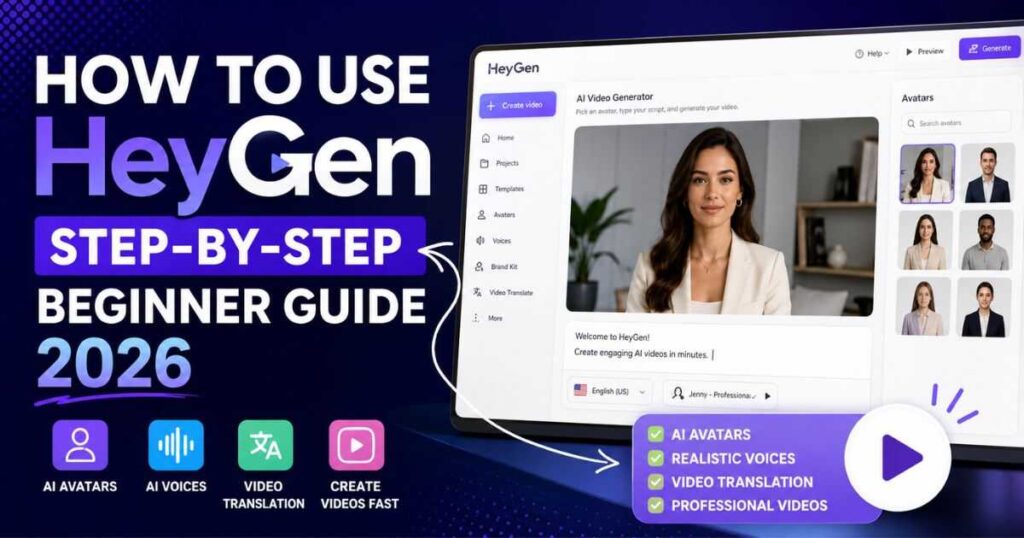
How to Use HeyGen: Step-by-Step Beginner Guide (2026)
Creating professional videos no longer requires expensive cameras, actors, or editing skills. Thanks to AI-powered platforms like HeyGen, anyone can produce realistic spokesperson videos, multilingual presentations, social media content, and marketing videos in just a few minutes.
If you’re wondering how to use HeyGen, this complete step-by-step guide will show you everything you need to know—from creating your account and choosing an AI avatar to generating your first video and exporting it like a professional.
Whether you’re a content creator, YouTuber, marketer, educator, freelancer, or business owner, this tutorial will help you learn how to use HeyGen AI efficiently while avoiding common beginner mistakes.
By the end of this guide, you’ll know exactly how to use HeyGen to create high-quality AI videos that save time, reduce production costs, and look surprisingly professional.
New to HeyGen? Read our complete HeyGen Review (2026) to discover its features, pricing, pros, and cons before getting started.
Why Learn How to Use HeyGen?
Before jumping into the tutorial, it’s worth understanding why millions of creators have started using HeyGen.
Traditional video production often involves:
- Recording with a camera
- Hiring presenters
- Setting up lighting
- Editing footage
- Recording voiceovers
- Creating subtitles
- Translating videos manually
HeyGen replaces most of that workflow with AI.
Instead of spending hours—or even days—you can create polished videos in minutes using realistic AI avatars and natural-sounding voices.
Learning how to use HeyGen can help you:
- Create YouTube videos faster
- Produce marketing videos at scale
- Build training materials
- Generate product demos
- Translate videos into dozens of languages
- Create professional presentations without appearing on camera
For creators who don’t enjoy being on camera, HeyGen is one of the easiest ways to produce engaging video content consistently.
What Can You Create with HeyGen?
One reason HeyGen has become so popular is its versatility.
Once you understand how to use HeyGen AI, you’ll be able to create many different types of videos, including:
- Marketing videos
- Product demonstrations
- Sales presentations
- YouTube videos
- Online course lessons
- Social media videos
- Business announcements
- Internal company training
- Customer support videos
- Multilingual content
Many businesses now use HeyGen instead of hiring actors because AI avatars can deliver professional presentations around the clock without additional production costs.
How to Use HeyGen Step by Step
Now let’s walk through the complete process.
This HeyGen step-by-step tutorial is designed for beginners, so don’t worry if you’ve never used AI video software before.
By following each step, you’ll quickly understand how to use HeyGen to create your first professional AI video.
Step 1: Create Your HeyGen Account
The first step is creating your account.
Visit the official HeyGen website and sign up using:
- Microsoft
Registration only takes a minute.
After confirming your email, you’ll arrive at the main dashboard.
If you’re using the free plan, you’ll immediately be able to explore the interface and test many of the platform’s core features before upgrading.
Not sure which plan to choose? Check out our HeyGen Pricing (2026) guide before upgrading.
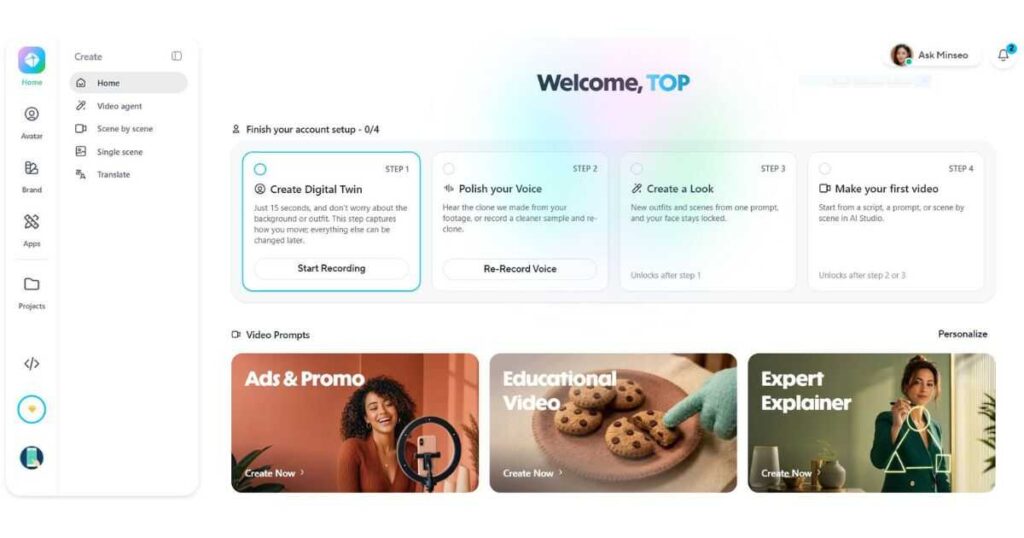
👉 Create your free HeyGen account and follow this tutorial step by step.
Step 2: Explore the Dashboard
Once inside your workspace, take a few minutes to familiarize yourself with the dashboard.
Depending on your subscription, you’ll typically find sections such as:
- Create Video
- Templates
- Avatars
- Voices
- Brand Assets
- Instant Avatars
- Video Translation
- Workspace
At first glance, the number of tools may seem overwhelming.
Don’t worry.
You don’t need every feature to create your first project.
For beginners learning how to use HeyGen, the main focus should be the video creation workspace.
Understanding where everything is located will make the rest of the process much easier.
Step 3: Start a New Video Project
Click the Create Video button.
HeyGen usually gives you several starting options.
You can begin with:
- A blank project
- A ready-made template
- A marketing template
- A presentation template
- A social media template
For beginners, templates are often the easiest choice because many design elements are already prepared.
If you prefer complete creative control, start with a blank canvas instead.
Either approach works well when learning how to use HeyGen for beginners.
Step 4: Choose an AI Avatar
One of HeyGen’s biggest strengths is its collection of realistic AI avatars.
You’ll find presenters in many styles, including:
- Business professionals
- Casual creators
- Corporate presenters
- Teachers
- Healthcare specialists
- Customer support representatives
Choose an avatar that best matches your audience.
For example:
- Business tutorials → professional presenter
- YouTube content → friendly creator
- Educational videos → instructor avatar
- Marketing ads → energetic spokesperson
Selecting the right avatar significantly improves viewer engagement.
Want to explore more AI avatar platforms? Read our Best AI Avatar Generator comparison.
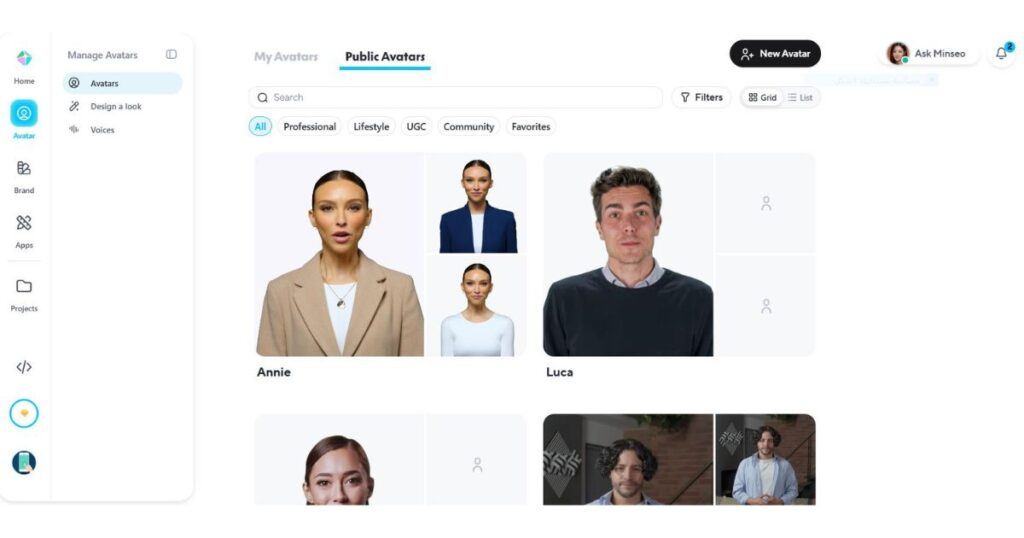
👉 Explore hundreds of realistic AI avatars with HeyGen and create your first AI video today.
Step 5: Write or Paste Your Script
After selecting an avatar, it’s time to add your script.
Simply paste your text into the script editor.
The AI will automatically generate speech from your content.
When writing scripts, keep these best practices in mind:
- Use short sentences.
- Avoid overly complex wording.
- Break long paragraphs into smaller sections.
- Write conversationally.
- Include natural pauses.
The better your script, the more realistic the final video will sound.
This is one of the most important steps when learning how to use HeyGen because even the best AI avatar can’t compensate for a poorly written script.
Step 6: Select the Perfect AI Voice
Now it’s time to give your avatar a voice.
HeyGen offers hundreds of AI voices across multiple languages and accents, making it easy to create videos for a global audience.
You can filter voices by:
- Language
- Accent
- Gender
- Age
- Speaking style
Take your time testing different options before making a final choice.
A business presentation usually sounds better with a calm, confident voice, while social media videos often perform better with a more energetic tone.
If your subscription includes Voice Cloning, you can even create videos using your own voice for a more personal and consistent brand experience.
One of the biggest advantages of learning how to use HeyGen AI is understanding how much the voice affects the final quality of your videos.
👉 Unlock premium AI voices, voice cloning, and multilingual features with a HeyGen plan.
Learn what you can do with the free version in our HeyGen Free (2026) guide.
Step 7: Customize Your Video
Before generating the video, customize the overall appearance.
HeyGen allows you to modify many visual elements, including:
- Backgrounds
- Brand colors
- Logos
- Text overlays
- Images
- Videos
- Animations
- Layouts
For businesses, this is an excellent opportunity to maintain consistent branding across every video.
If you’re creating YouTube content, keep the design clean and avoid cluttering the screen with too much text.
Professional-looking videos usually have:
- Clear hierarchy
- Simple layouts
- Large readable text
- Consistent branding
These small improvements make a significant difference in viewer retention.
Step 8: Preview Before Rendering
Never generate the final video without previewing it first.
HeyGen allows you to preview your project so you can check for:
- Pronunciation mistakes
- Awkward pauses
- Incorrect emphasis
- Text formatting
- Timing
- Avatar movements
- Scene transitions
Many beginners skip this step and end up wasting credits on videos with simple mistakes.
This is one of the most important steps when learning how to use HeyGen, especially if you’re working with limited monthly credits.
Step 9: Generate Your Video
Once everything looks correct, click Generate.
HeyGen will begin rendering your project.
Rendering time depends on factors such as:
- Video length
- Avatar complexity
- Resolution
- Current server load
Most videos are completed within a few minutes.
After rendering finishes, you’ll be able to:
- Watch the final version
- Download it
- Share it
- Duplicate it
- Continue editing if necessary
Congratulations—you’ve now learned the core workflow of how to use HeyGen to create AI-powered videos.
How to Use HeyGen Like a Professional
Creating your first video is only the beginning.
Professional creators use HeyGen much more efficiently by taking advantage of features that save hours of work every week.
Here are some of the best practices.
Use Templates
Instead of starting from scratch every time, create reusable templates for:
- YouTube videos
- Product demos
- Sales presentations
- Training videos
- Client projects
Templates ensure consistency while dramatically reducing production time.
Save Your Brand Kit
If you’re producing videos regularly, upload your:
- Logo
- Brand colors
- Fonts
- Intro graphics
- Outro graphics
This allows every future project to stay visually consistent.
Organize Projects into Workspaces
As your video library grows, organization becomes essential.
Create folders for:
- Marketing
- YouTube
- Tutorials
- Clients
- Internal training
Keeping projects organized saves time and makes collaboration much easier.
Reuse Custom Avatars
If you’ve created an Instant Avatar or uploaded a custom avatar, use it consistently across your content.
Viewers begin recognizing familiar presenters, which helps strengthen your personal or business brand.
Batch Create Videos
Instead of producing one video at a time, write multiple scripts and generate them together.
Many experienced creators dedicate one day to writing scripts and another day to generating videos.
Batch production is one of the easiest ways to scale your workflow.
👉 Upgrade to HeyGen and access advanced AI avatars, faster rendering, and professional video tools.
How to Use HeyGen for Different Purposes
One of the reasons HeyGen has become one of the leading AI video platforms is its flexibility.
Depending on your goals, the workflow changes slightly.
For YouTube Creators
Use HeyGen to create:
- Faceless videos
- Tutorials
- Explainer videos
- Product reviews
- AI tool demonstrations
Pair it with good editing and custom thumbnails to build a consistent publishing schedule.
Creating YouTube videos? Explore the Best AI Video Generator for YouTube to compare the top tools for creators.
For Marketing
Marketing teams commonly use HeyGen for:
- Product launches
- Landing page videos
- Facebook ads
- Instagram Reels
- TikTok advertisements
- Promotional campaigns
AI avatars make it possible to produce multiple variations of the same advertisement without filming again.
For Businesses
Businesses often use HeyGen for:
- Employee onboarding
- Internal communications
- Company announcements
- Customer onboarding
- Sales presentations
Instead of scheduling video shoots, companies can update information in minutes using AI.
For Education
Teachers and course creators can quickly produce:
- Course lessons
- Learning modules
- Educational explainers
- Training videos
- Language lessons
Students often engage more with visual presentations than text-only materials.
Common Mistakes When Using HeyGen
Even after learning how to use HeyGen, beginners often make avoidable mistakes that reduce video quality.
Here are the most common ones.
Using Low-Quality Scripts
The AI reads exactly what you write.
Poorly written scripts produce robotic-sounding videos.
Write naturally, just as you would speak.
Choosing the Wrong Avatar
An avatar should match your audience.
For example:
- Corporate audience → professional presenter
- Social media audience → casual presenter
- Educational audience → instructor-style avatar
Choosing the wrong style can reduce viewer trust.
Ignoring Voice Selection
Not every voice fits every project.
Always test multiple voices before rendering the final video.
A better voice often improves viewer engagement more than changing the avatar.
Overloading the Screen
Too much text, too many graphics, or excessive animations distract viewers.
Keep designs simple and focused.
Exporting Without Previewing
This is probably the most expensive mistake.
Always preview your project before spending rendering credits.
Checking pronunciation and timing only takes a few seconds but can save valuable credits.
Pro Tips for Using HeyGen Faster
Once you’ve learned the basics of how to use HeyGen, it’s time to improve your workflow.
Professional creators don’t necessarily work harder—they work smarter.
Here are some practical tips that can save hours every month.
Create Reusable Templates
If you regularly produce similar videos, don’t start from scratch every time.
Instead, create reusable templates for:
- YouTube intros
- Product reviews
- Marketing videos
- Tutorials
- Customer onboarding
- Social media videos
Templates allow you to maintain consistent branding while dramatically reducing production time.
Build Your Brand Assets
Upload your:
- Logo
- Brand colors
- Fonts
- Intro animation
- Outro animation
This ensures every video matches your brand identity without repeating the same setup.
Organize Your Workspace
As your content library grows, organization becomes increasingly important.
Create folders for different projects such as:
- YouTube
- Marketing
- Client Work
- Internal Training
- Product Videos
A clean workspace makes it much easier to locate and update older projects.
Reuse Your Best Scripts
Some video formats perform well repeatedly.
Instead of rewriting everything, duplicate successful projects and update only the necessary information.
This strategy is widely used by agencies and marketing teams to scale production efficiently.
Experiment with Different Voices
Even small changes in voice style can affect audience engagement.
Try testing:
- Professional voices for business presentations
- Friendly voices for YouTube
- Energetic voices for social media
- Calm voices for educational content
Over time, you’ll discover which voice resonates best with your audience.
Need another AI video platform? Compare HeyGen vs Synthesia to see which tool fits your workflow best.
Frequently Asked Questions
How do beginners use HeyGen?
Beginners simply need to create an account, start a new project, choose an AI avatar, paste their script, select a voice, preview the video, and click Generate.
Once you’ve completed your first project, the rest of the workflow becomes much easier.
Is HeyGen easy to use?
Yes.
One reason HeyGen has become so popular is its beginner-friendly interface.
Most users can create their first AI video in less than 15 minutes without prior video editing experience.
Can I use HeyGen for YouTube?
Absolutely.
Many creators use HeyGen to produce:
- Faceless YouTube videos
- Tutorials
- Product reviews
- Educational content
- AI tool demonstrations
Combined with good editing and compelling thumbnails, it can significantly speed up your YouTube workflow.
Can I use HeyGen for business?
Yes.
Businesses frequently use HeyGen for:
- Sales presentations
- Customer support
- Employee training
- Internal communication
- Product demonstrations
It’s especially useful for companies that need to produce multilingual content quickly.
Is HeyGen free?
HeyGen offers a free plan that allows you to explore the platform and test many of its features.
However, paid plans unlock additional avatars, higher video limits, premium voices, advanced AI capabilities, and commercial usage options.
If you’re planning to create videos regularly, upgrading to a paid plan is usually worthwhile.
👉 Ready to create professional AI videos? Try HeyGen today and start building videos in minutes.
Final Thoughts
Learning how to use HeyGen is one of the easiest ways to start creating professional AI videos without expensive equipment or advanced editing skills.
From generating realistic AI avatars to producing multilingual business presentations, HeyGen dramatically simplifies video creation for creators, marketers, educators, and businesses alike.
Whether you’re building a YouTube channel, promoting products, creating online courses, or improving your company’s communication, HeyGen provides a fast and beginner-friendly workflow that can save countless hours.
Now that you know how to use HeyGen, the next step is simple:
Start creating your first project, experiment with different avatars and voices, and discover how AI can transform your video production process.
If you’re ready to unlock premium avatars, faster rendering, advanced AI features, and commercial tools, consider upgrading to a paid plan and take your content creation to the next level.
Continue Learning
If you found this guide helpful, you may also enjoy these detailed resources on Videmint:
- HeyGen Review (2026): Discover whether HeyGen is worth the investment and explore its biggest strengths and weaknesses.
- HeyGen Pricing (2026): Compare every plan to choose the best option for your needs and budget.
- Best AI Avatar Generator Platforms: Explore the top alternatives to HeyGen for creating realistic AI avatars.
- Kling AI vs HeyGen: Compare two of today’s most popular AI video platforms to find the right one for your workflow.
- HeyGen AI Avatars: How to Create Realistic AI Avatars (2026)– Learn how to create realistic AI avatars, choose the right avatar type, and produce professional AI videos with HeyGen.
- InVideo AI Review (2026): Is It Worth It? — Discover InVideo AI’s features, pricing, AI models, and whether it’s worth using for your video workflow.
These guides will help you build a deeper understanding of AI video creation and choose the best tools for your projects. - How to Use InVideo AI: Step-by-Step Beginner Guide – A practical beginner-friendly guide showing how to use InVideo AI step by step to create, edit, and customize videos with AI.
- [InVideo AI Pricing (2026): Plans, Credits & Best Value] — Read our complete guide to choose the right plan for your workflow.
- Invideo alternatives (2026): 7 Best AI Video Tools — Compare the best AI video tools and find the right InVideo alternative for your workflow.
- Is InVideo AI Free? Plans, Limits & Free Trial — Discover the free plan, usage limits, credits, and whether it’s worth using.
- Faceless YouTube Channel Ideas: 15 Niches to Try — Discover profitable niches and practical formats for building a successful faceless YouTube channel.

