
How to Create Consistent Characters With AI: AI Video Guide
Creating an AI video is easy when you only need one short clip. The challenge begins when the same character needs to appear in five, ten, or twenty different scenes without suddenly looking like a different person.
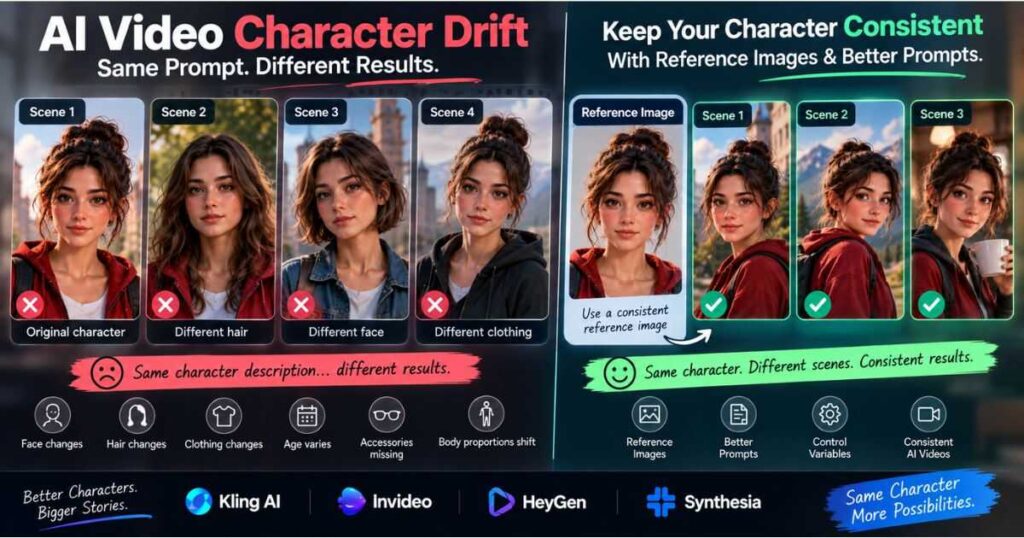
The face may change. Hair can become shorter. Clothing can disappear. Body proportions can shift. Even a distinctive feature such as glasses, freckles, or a scar may be replaced in the next generation.
That is why learning How to Create Consistent Characters With AI has become an important part of AI video production. Instead of generating every scene from scratch, creators can use reference images, reusable character descriptions, structured prompts, and reference-based video workflows to give the AI a stable visual identity.
Modern tools are making this process much easier. Runway, for example, supports character references for maintaining the same character across image and video generations, while Kling provides Elements and subject-binding workflows designed to keep characters consistent across shots.
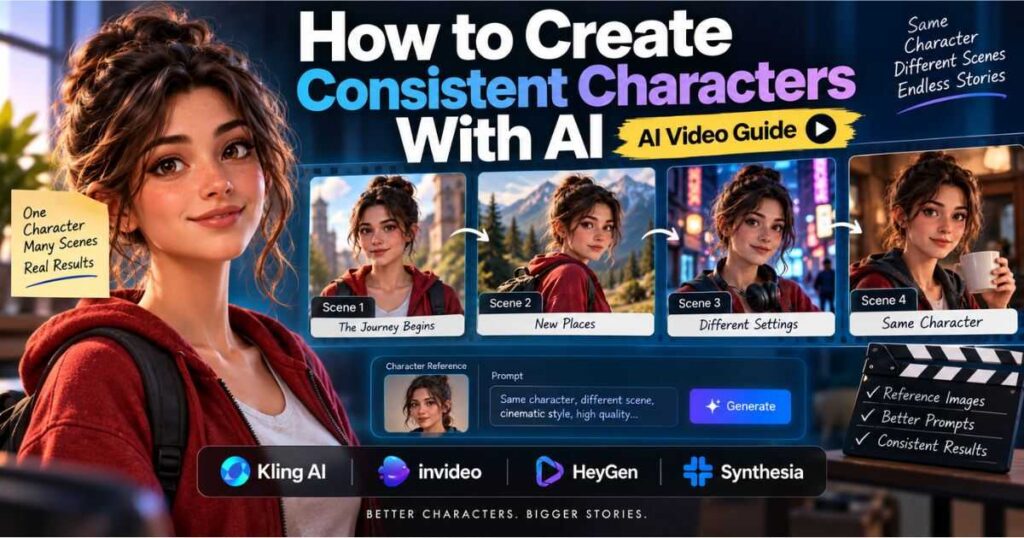
This guide explains How to Create Consistent Characters With AI from the initial character design to reference images, prompting, multi-scene production, troubleshooting, and choosing the right AI video tool.
Why Do AI Characters Change Between Scenes?
Before learning How to Create Consistent Characters With AI, it helps to understand why character drift happens.
A text-to-video model does not necessarily treat a written character description as a permanent identity. When you generate a new clip, the model interprets the instructions again and creates a new visual result based on the information available.
Consider this simple prompt:
A young woman with long brown hair wearing a red jacket walks through a futuristic city.
It may produce a convincing character in one generation. But if you use the same description for another scene, the result could have:
- A different face
- Different hair length
- Different facial proportions
- A different jacket
- Different body proportions
- Different accessories
- A noticeably different age
The problem becomes more obvious as the number of scenes increases.
Character Drift Example
| Character Detail | Scene 1 | Scene 2 | Scene 3 |
| Face | Correct | Slightly different | Very different |
| Hair | Long brown | Brown, shorter | Darker and curly |
| Clothing | Red jacket | Red coat | Black jacket |
| Age | 25 | 27 | 31 |
| Body shape | Consistent | Slight variation | Noticeable variation |
| Accessories | Necklace | Missing | Different necklace |
This is commonly called character drift or identity drift.
The solution is to give the AI something more stable than a sentence. A strong reference image can act as a visual anchor, while consistent prompts tell the model what should change around that character.
How to Create Consistent Characters With AI: The Core Workflow
The most reliable approach is to treat your character like a reusable production asset rather than recreating it for every scene.
A practical workflow is:
Character idea → Master reference → Character identity → Reference-based generation → Test clip → Evaluation → Refinement → Final scenes
Runway’s character-reference guidance similarly emphasizes using a reference image as the visual anchor while changing the setting, action, and other scene elements around the character.
Step 1: Define the Character
Start by deciding which visual characteristics must remain stable.
For example:
- Age range
- Face shape
- Hair color and style
- Eye color
- Skin tone
- Body type
- Signature clothing
- Distinctive facial features
- Accessories
- Overall visual style
You do not need a paragraph describing every detail. Focus on the features that make the character recognizable.
This focused approach makes How to Create Consistent Characters With AI more manageable because you are defining the details that actually anchor the character’s identity.
Step 2: Create a Master Reference
Your master reference image becomes the visual source of truth.
A strong reference should normally have:
- A clear face
- Sharp details
- Simple lighting
- Minimal distractions
- One character
- A neutral or simple background
- A recognizable appearance
Runway recommends clear, high-quality reference images with visible facial details, relatively simple backgrounds, and front or three-quarter views.
A strong master reference is therefore one of the most important foundations for How to Create Consistent Characters With AI across different scenes and camera angles.
Step 3: Separate Identity From the Scene
This is one of the most useful concepts when learning How to Create Consistent Characters With AI.
Your character identity should stay stable.
The scene can change.
For example:
Identity:
Maya, a 28-year-old woman with shoulder-length dark brown hair, hazel eyes, a small beauty mark below her left eye, wearing a dark green jacket.
Scene:
Maya walks through a rainy Tokyo street at night.
For another scene:
Maya enters a small coffee shop and looks toward the rain-covered window.
The identity remains stable while the environment and action change.
That separation is at the heart of How to Create Consistent Characters With AI because the character stays fixed while the story around them can evolve.
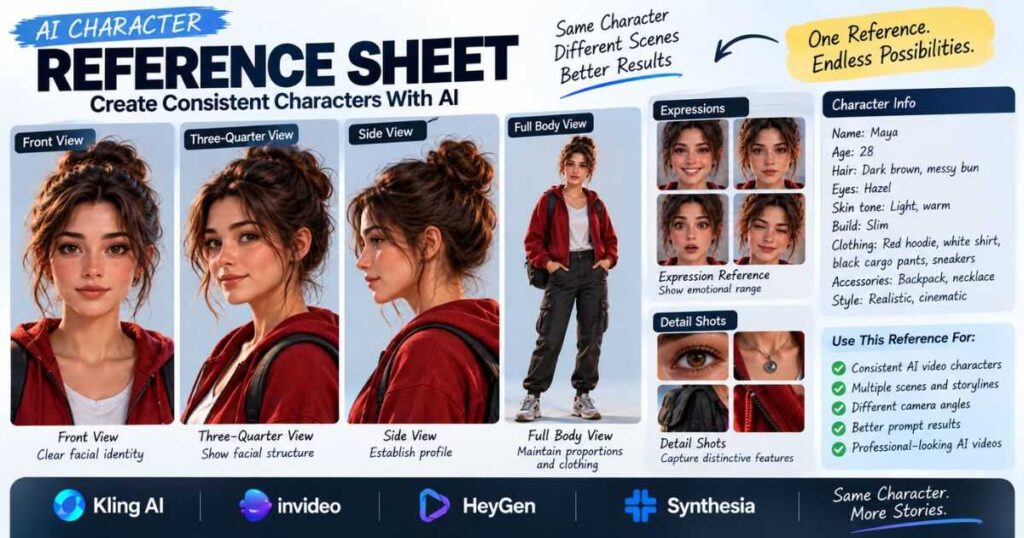
Create a Character Reference Sheet
A character reference sheet gives you more information to work with when a project requires different angles, poses, or full-body shots.
A useful sheet can include:
| Reference | Main Purpose |
| Front view | Establish facial identity |
| Three-quarter view | Show facial structure |
| Side view | Establish profile |
| Full-body view | Maintain proportions and clothing |
| Expression reference | Preserve emotional appearance |
| Detail reference | Capture distinctive features |
You do not necessarily need to upload every reference to every generation. Start with one strong image and add additional references only when the workflow benefits from them.
Runway recommends multiple references when different camera angles or full-body shots create consistency problems. Kling’s current reference workflows similarly support multiple images for subjects and elements.
How to Write AI Prompts for Consistent Characters
Reference images solve part of the problem, but prompting still matters.
A useful structure is:
Character identity + action + environment + camera + lighting + visual style
For example:
Maya, a 28-year-old woman with shoulder-length dark brown hair, hazel eyes, a small beauty mark below her left eye, wearing a dark green jacket, walks slowly through a rainy Tokyo street at night. Neon reflections appear on the wet pavement. Medium tracking shot, cinematic lighting, realistic film look.
The important part is that Maya’s identity remains consistent.
The scene changes.
The camera changes.
The action changes.
But the visual identity stays anchored.
This is the practical goal of How to Create Consistent Characters With AI: keep identity details stable while allowing the action, camera, and environment to change.
Avoid Rebuilding the Character in Every Prompt
A common mistake is using a completely different description in every scene.
For example:
Scene 1:
A young brunette woman wearing a green jacket…
Scene 2:
A beautiful woman with dark hair wearing an olive coat…
Scene 3:
A young female traveler with brown hair…
These descriptions may sound similar to a human reader, but they introduce unnecessary variation.
A better approach is to create one identity block and reuse it.
The Identity Block + Scene Block Method
This is one of the simplest ways to improve consistency.
Identity Block
Luna is a small orange cat with green eyes, a white patch on her chest, and a blue collar with a silver tag.
Scene Block
Luna runs across a wooden bridge during a rainy evening while the camera tracks from the side.
Then create the next scene by changing only the scene block:
Luna sits beside a campfire in a quiet forest while the camera slowly pushes in.
Or:
Luna walks through a snowy village while warm lights glow from the surrounding houses.
The identity remains recognizable while the story develops.
This method is especially useful when producing several short clips that will later be edited into one sequence.
How to Create Consistent Characters With AI Using Reference Images
Reference images are often more reliable than asking the model to recreate a character entirely from text.
The basic workflow is:
Reference image → Image-to-video → Action prompt → Generate → Review
The reference provides the visual information, while the prompt tells the model what should happen.
For example:
Use the provided character reference. The character slowly turns toward the camera while her hair moves naturally in the wind. The camera performs a slow push-in. Maintain facial identity, hairstyle, clothing, and body proportions.
The reference does not eliminate variation, but it gives the model a much stronger visual starting point.
For anyone learning How to Create Consistent Characters With AI, this visual starting point is often more useful than trying to describe every identity detail with text alone.
Runway describes character references as a way to preserve the character while allowing the creator to change settings, actions, and scenes.
Text-to-Video vs Image-to-Video for Character Consistency
| Workflow | Best For | Character Consistency |
| Text-to-video | New concepts and standalone shots | Moderate |
| Image-to-video | Animating an established character | High potential |
| Character references | Recurring characters | High potential |
| Multiple references | Different angles and complex scenes | Better control |
| Video references | Motion and performance continuity | Useful when supported |
For a recurring character, image-to-video or reference-based workflows are usually more practical than regenerating the character entirely from text every time.
The exact results depend on the model and generation method, so testing the chosen workflow before producing a complete sequence is still important.
Testing before production is an important part of How to Create Consistent Characters With AI because different models handle references, motion, and camera changes differently.
How to Create Consistent Characters With AI Using Kling AI
Kling AI is particularly relevant to character-consistency workflows because its Elements system allows creators to use reference images for subjects such as people, animals, objects, and scenes.
Kling’s official documentation says Elements can use one or multiple images as references and then combine those elements with prompts describing actions and interactions.
Kling’s newer VIDEO 3.0 workflows also include subject binding and Element references intended to keep a character stable across shots. Kling describes support for multiple reference images and, in some workflows, video references.
A Practical Kling Workflow
- Create a clean character reference.
- Add the reference to the supported Elements workflow.
- Define the character’s identity.
- Keep the reference consistent throughout the project.
- Change the scene and action rather than rebuilding the character.
- Generate a short test.
- Check the face, hair, clothing, and proportions.
- Adjust the prompt if necessary.
- Save successful outputs for later scenes.
Kling also provides Motion Control workflows that combine a character image with a motion reference. Its current documentation describes facial-element binding for maintaining facial identity in supported Motion Control workflows.
Try Kling AI for Character-Based Video
If recurring characters are central to your project, Kling is worth testing because its reference and subject-binding features are designed around keeping visual elements stable across generated shots.
Try Kling AI and experiment with reference-based character generation for your next AI video
If you want a broader look at the platform before deciding whether it fits your workflow, see our Kling AI Review.
How to Create Consistent Characters With AI Across Multiple Scenes
The real challenge appears when your character needs to survive an entire story.
Imagine a ten-scene video:
- Character wakes up.
- Character leaves home.
- Character walks through a city.
- Character enters a store.
- Character meets another character.
- Character travels by train.
- Character reaches a new location.
- Character runs through the streets.
- Character returns home.
- Character closes the story.
If you generate each scene independently, small differences can accumulate quickly.
Instead, create a character consistency document.
Character Identity
- Name
- Age
- Face shape
- Hair
- Eyes
- Skin tone
- Body type
- Distinctive features
Clothing
- Main outfit
- Shoes
- Accessories
- Colors
- Signature details
Visual Style
- Photorealistic
- Cinematic
- 3D animation
- Anime
- Stylized illustration
Prompt Rules
- Keep identity description unchanged.
- Use the same reference whenever possible.
- Change one major variable at a time.
- Test important shots before moving on.
If a character is going to appear throughout a long project, treating these details as production specifications can save a surprising amount of regeneration time.
How to Create Consistent Characters With AI for Camera Changes
Character consistency becomes harder when the camera moves from a close-up to a side profile or full-body shot.
A front-facing reference may work perfectly for a close-up but reveal weaknesses when the character turns around.
This is where multiple reference angles can help.
For example:
Reference 1: front-facing portrait
Reference 2: three-quarter view
Reference 3: side profile
Reference 4: full-body reference
Kling’s current Elements workflows can use multiple reference images, while Runway also recommends additional references when different angles create problems.
Do not add references simply because you can. Start with the strongest single reference and increase complexity only when the project requires it.
Common AI Character Consistency Mistakes
Even with modern reference tools, certain mistakes can make consistency worse.
| Mistake | Why It Causes Problems | Better Approach |
| Rewriting the character every time | Identity gets reinterpreted | Reuse the identity block |
| Poor reference image | Important features are unclear | Use a clean, sharp reference |
| Changing clothing randomly | Clothing becomes another variable | Keep wardrobe stable |
| Changing art style | Overall appearance shifts | Lock the visual style |
| Huge prompts | Important details compete | Keep instructions focused |
| Complex scenes too early | More variables create more failure points | Start with simple tests |
| Ignoring camera angle | Unseen features must be guessed | Add useful angle references |
| Generating everything before reviewing | Problems become expensive to fix | Test scenes progressively |
One particularly useful rule is to change one major variable at a time.
If you change the character, lighting, camera angle, environment, clothing, and action simultaneously, it becomes difficult to know what caused the inconsistency.
How to Fix AI Character Drift
If the character changes, do not immediately throw away the entire workflow.
First identify what actually changed.
The face changed
Use a stronger reference and simplify the prompt.
The hair changed
Make the hairstyle part of the stable identity description.
The clothing changed
Specify the outfit consistently or use a clothing reference where supported.
The body proportions changed
Use a full-body reference for scenes where proportions matter.
The character changes during a camera move
Try a simpler movement first, then increase complexity.
The style changes
Lock the visual style and avoid introducing contradictory style terms.
Runway’s troubleshooting guidance similarly recommends strong references, focused prompts, controlled variables, and iterative testing rather than overloading the generation with instructions.
How to Create Consistent Characters With AI for YouTube Videos
Character consistency is especially valuable for YouTube storytelling.
It can work well for:
- Mystery channels
- Horror stories
- Fantasy stories
- Children’s stories
- Animated adventures
- Historical storytelling
- AI-generated documentaries
- Recurring animal characters
- Short narrative series
A recurring character can become part of the visual identity of a channel.
For example, instead of creating unrelated clips for every video, a channel could have one recognizable fictional character who appears repeatedly.
If you’re building the broader production pipeline, our How to Make AI Videos guide covers the process from ideas and scripts to AI visuals, voiceovers, editing, and publishing.
How to Create Consistent Characters With AI for Shorts
Short-form video adds another challenge because viewers notice visual changes immediately when scenes change every few seconds.
A practical workflow is:
Reference → Short test → Approve character → Generate next scene → Edit
Do not generate an entire 60-second Short and only then check whether the character remained consistent.
Instead, create the first important scene, verify it, and use the approved result to guide the next generation.
This step-by-step approach makes How to Create Consistent Characters With AI much more reliable when a Short contains many rapid scene changes.
This approach is particularly useful for TikTok, YouTube Shorts, and Instagram Reels where rapid scene changes make visual continuity especially noticeable.
Which AI Tools Are Best for Character-Based Video Creation?
No single tool is ideal for every character workflow.
The right choice depends on whether you are making cinematic characters, complete scripted videos, talking presenters, or business content.
| Tool | Best Use | Character Workflow |
| Kling AI | Cinematic characters and recurring subjects | Strong reference/Element workflows |
| Runway | Creative generation and visual production | Character references and video workflows |
| InVideo AI | Complete AI-assisted videos | Better for broader script-to-video production |
| HeyGen | AI presenters and avatars | Strong recurring presenter use case |
| Synthesia | Business and training videos | Consistent avatar-led production |
Runway currently markets reference-based generation specifically for maintaining the same character across multiple shots and scenes.
InVideo AI: Best When Character Generation Is Part of a Larger Workflow
Not every creator wants to spend the entire production process generating individual clips.
If the goal is to turn a script into a broader YouTube video with scenes, voiceover, and editing, InVideo AI can be useful as part of the production workflow.
This makes it particularly relevant after the character-generation stage, when the project needs to become a finished video rather than a collection of isolated clips.
For a deeper look at the platform, see our InVideo AI Review.
Try InVideo AI if you want to turn scripts and ideas into complete AI-assisted videos with less manual production work.
HeyGen: Best for Consistent AI Presenters
If the goal is a recurring presenter rather than a cinematic fictional character, HeyGen solves a different problem.
It is useful for:
- Educational content
- Product explainers
- Marketing videos
- Training
- Social media presenters
- Business communication
In these cases, you may not need to build a character through multiple reference images. A consistent AI avatar can become the visual identity of the video series.
Try HeyGen if you want a recurring AI presenter for educational, marketing, or business videos.
Synthesia: Best for Professional Avatar Videos
Synthesia is another option when the project is centered around professional AI presenters rather than cinematic storytelling.
It can be a good fit for:
- Corporate training
- Internal communications
- Educational videos
- Product demonstrations
- Professional presentations
The distinction matters: a cinematic character workflow and an AI avatar workflow solve different production problems.
Try Synthesia if you need professional avatar-based videos with a structured production workflow.
How to Create Consistent Characters With AI: Practical Prompt Template
Use this template as a starting point:
[Character identity] + [appearance] + [clothing] + [action] + [environment] + [camera movement] + [lighting] + [visual style]
Example
Maya, a 28-year-old woman with shoulder-length dark brown hair, hazel eyes, and a small beauty mark below her left eye, wearing a dark green jacket and black jeans, walks slowly through a rainy Tokyo street at night. Neon signs reflect across the wet pavement. The camera tracks beside her at a medium distance. Soft cinematic lighting, realistic skin texture, natural movement, cinematic film style.
For the next scene, keep the identity stable:
Maya, the same character with the same facial features, hairstyle, clothing, and proportions, enters a small Tokyo coffee shop and looks toward the rain-covered window. Slow push-in camera movement, warm interior lighting, cinematic realism.
The goal is not to make every prompt longer. The goal is to make the important information consistent.
A Simple Character Consistency Checklist
Before generating a new scene, check the following.
Character
- Is the face correct?
- Is the hairstyle unchanged?
- Are distinctive features still visible?
- Are body proportions reasonable?
Clothing
- Is the outfit correct?
- Are colors consistent?
- Are important accessories present?
Reference
- Am I using the same master reference?
- Does the reference match the required camera angle?
- Would an additional reference help?
Scene
- Is the environment correct?
- Does the lighting fit previous scenes?
- Is the visual style consistent?
Motion
- Is the action simple enough?
- Is the camera movement necessary?
- Could the movement make the identity harder to preserve?
A quick checklist can prevent you from spending credits fixing problems that could have been caught before generation.
The Best AI Character Consistency Workflow
Once the process is familiar, How to Create Consistent Characters With AI becomes much less complicated.
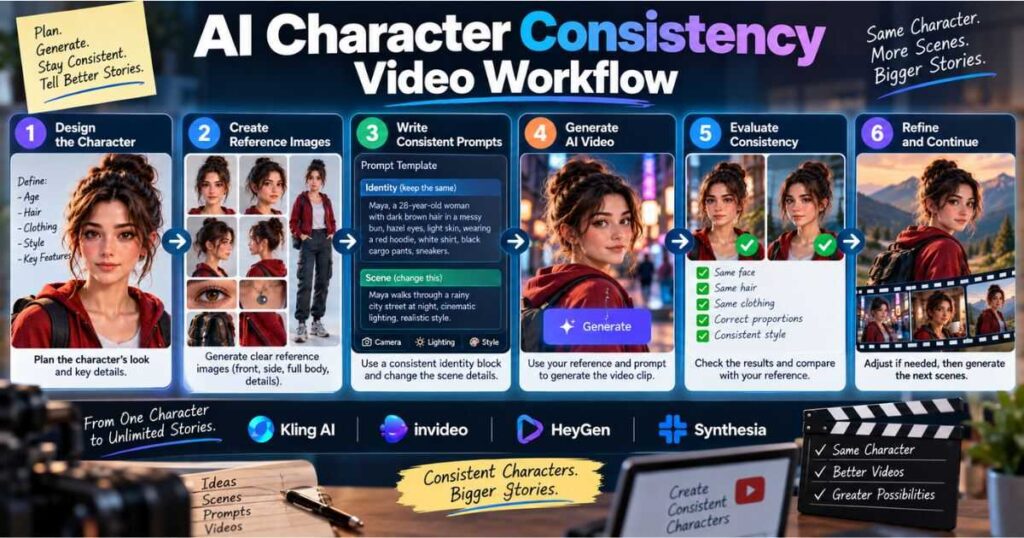
The workflow can be reduced to six stages:
1. Design
Define the character’s visual identity.
2. Reference
Create a strong master reference and additional views only when needed.
3. Prompt
Separate the fixed character identity from the changing scene instructions.
4. Generate
Use image-to-video, character references, or element-based workflows when available.
5. Evaluate
Compare each important output against the original character.
6. Refine
Change one variable at a time until the result is stable enough for the final edit.
For the prompting stage, our How to Write AI Video Prompts guide explains how to structure prompts around subject, action, environment, camera movement, lighting, and style.
How to Make the Workflow More Efficient
The biggest mistake is treating every failed generation as a completely new project.
Instead, save what works.
Create folders for:
- Master character references
- Successful prompts
- Approved scenes
- Alternative camera angles
- Clothing references
- Full-body references
- Final clips
If a particular reference produces consistently good results, keep it.
If a prompt structure works well, turn it into a reusable template.
Over time, you are no longer starting from zero. You are building a small production library that makes future videos faster.
Frequently Asked Questions
How to Create Consistent Characters With AI without reference images?
It is possible to improve consistency using a fixed character description, stable visual style, and carefully controlled prompts. However, reference images usually provide a stronger visual anchor when the same character needs to appear across multiple scenes.
What is the best way to keep an AI character consistent?
Start with a high-quality reference image, create a fixed identity description, reuse the same reference, and change only the scene-specific instructions. For complex projects, additional reference angles can provide more control.
Can AI video generators keep the same character across scenes?
Many modern AI video systems now provide character-reference or subject-binding features intended to improve consistency. Kling’s Elements workflows and Runway’s character references are examples of tools built around this use case.
Why does my AI character keep changing?
The model may reinterpret the character every time it generates a new clip. Changing descriptions, weak reference images, complicated prompts, different visual styles, and difficult camera angles can all contribute to inconsistency.
Is image-to-video better for character consistency?
It can be. Image-to-video starts from an established visual reference, which can provide more identity information than text alone. It is particularly useful when you already have a character image that looks exactly the way you want.
How many reference images should I use?
Start with one strong reference. Add front, side, three-quarter, or full-body references when the project requires different views or when a single image produces inconsistent results. The best number depends on the specific tool and workflow.
Final Thoughts
Learning How to Create Consistent Characters With AI is not about finding one perfect prompt that magically solves every generation.
It is about building a repeatable system.
Start with a strong character design. Create a clean reference image. Separate the character’s fixed identity from the changing scene. Use reference-based generation when available, test important shots early, and refine one variable at a time.
For simple projects, one good reference image may be enough. For longer stories, a character sheet, multiple reference angles, reusable prompts, and organized assets can make a significant difference.
The most useful rule is simple:
Lock the character. Change the scene.
Once you understand How to Create Consistent Characters With AI, you can create recurring characters that feel much more believable across YouTube videos, Shorts, stories, advertisements, and other AI-generated productions.
And character consistency is only one part of a complete AI video workflow. Combine it with strong prompting, voice generation, editing, and the right AI video tool, and you can move from isolated AI clips to a repeatable production system.
Continue Learning
- How to Make AI Videos — Learn the complete AI video production workflow from idea to finished video.
- How to Write AI Video Prompts — Learn how to create clearer prompts for text-to-video and image-to-video generation.
- Kling AI Review — Explore Kling’s AI video generation features and workflows.
- Runway AI Review — Learn how Runway fits into an AI video creation workflow.
- Best AI Video Editors — Compare tools for editing and finishing AI-generated videos.
- How to Make Realistic AI Videos: 7 Proven Tips — Learn simple techniques to create lifelike AI videos with natural motion, lighting, and cinematic results.
- AI Image to Video: How to Turn Images Into Videos — Learn how to transform still images into engaging AI-generated videos with the right tools, prompts, and techniques.
- AI Movie Generator: How to Create Cinematic AI Videos — Learn how to create stunning cinematic movies with AI tools, prompts, and a practical step-by-step workflow.