How to Start a Faceless YouTube Channel in 2026
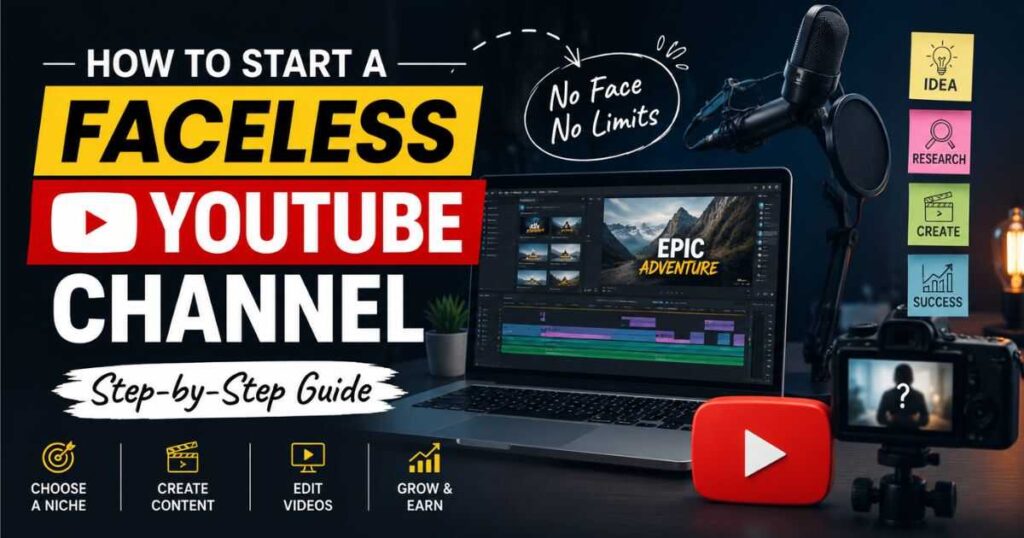
Learning How to Start a Faceless YouTube Channel no longer requires a camera, studio, or a large production team. Today, one person can research a topic, write a script, create narration, generate visuals, edit a video, design a thumbnail, and publish the finished result without ever appearing on camera.
But there is an important distinction between making videos without showing your face and building a successful faceless YouTube channel.
The first is easy.
The second requires a strategy.
A successful faceless channel needs a clear audience, a focused niche, useful or entertaining video ideas, strong storytelling, consistent production, and a reason for viewers to come back. AI tools can make production faster, but they cannot replace good judgment.
If you want to learn How to Start a Faceless YouTube Channel properly, this guide will walk you through the process from choosing your niche to creating your first videos, selecting the right AI tools, avoiding copyright and monetization problems, and building a practical 30-day launch plan.
Quick answer: Choose one specific audience, create a repeatable video format, use AI to accelerate production rather than replace your creativity, and publish consistently while learning from viewer behavior.
Start Creating Faceless YouTube Videos With InVideo AI →
What Is a Faceless YouTube Channel?
A faceless YouTube channel is a channel where the creator does not need to appear on camera as the main presenter.
Instead, the video communicates through a combination of:
- Voiceover
- Screen recordings
- Stock footage
- AI-generated visuals
- Animation
- Graphics
- Text
- Gameplay
- Product demonstrations
- AI avatars
A faceless channel can therefore look completely different depending on its niche.
A software tutorial channel might use screen recordings and narration.
A history channel might use maps, archival images, narration, and animations.
A cinematic storytelling channel might use AI-generated scenes and voiceover.
An AI tools channel might combine screen recordings with demonstrations and generated visuals.
The key idea is simple:
Faceless does not mean personality-free.
Your research, opinions, explanations, examples, editing decisions, and storytelling can still give the channel a recognizable identity.
That is one of the most important concepts to understand when learning How to Start a Faceless YouTube Channel.
How to Start a Faceless YouTube Channel Step by Step
The easiest way to make the process manageable is to break it into a series of decisions rather than trying to solve everything at once.
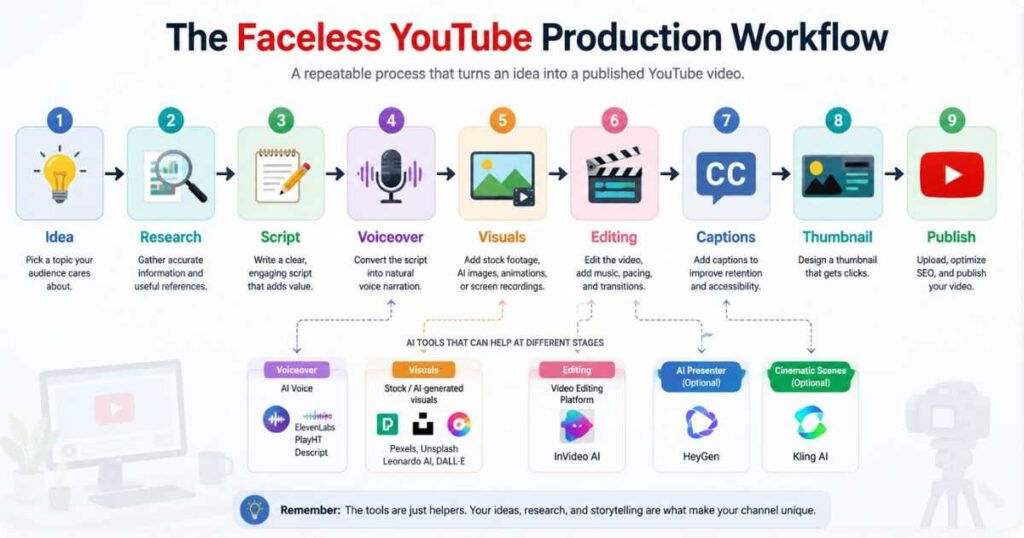
A practical system looks like this:
Niche → Audience → Format → Topic → Research → Script → Voice → Visuals → Editing → Thumbnail → Publishing → Analysis
Each stage has a different purpose.
The mistake many beginners make is jumping directly into video generation before deciding what the channel is actually trying to accomplish.
Step 1: Choose a Niche With Room to Grow
The first decision in How to Start a Faceless YouTube Channel is not which AI tool to buy.
It is what the channel will be about.
A good niche should give you enough ideas to create dozens of videos while still being specific enough for viewers to understand what they will get from the channel.
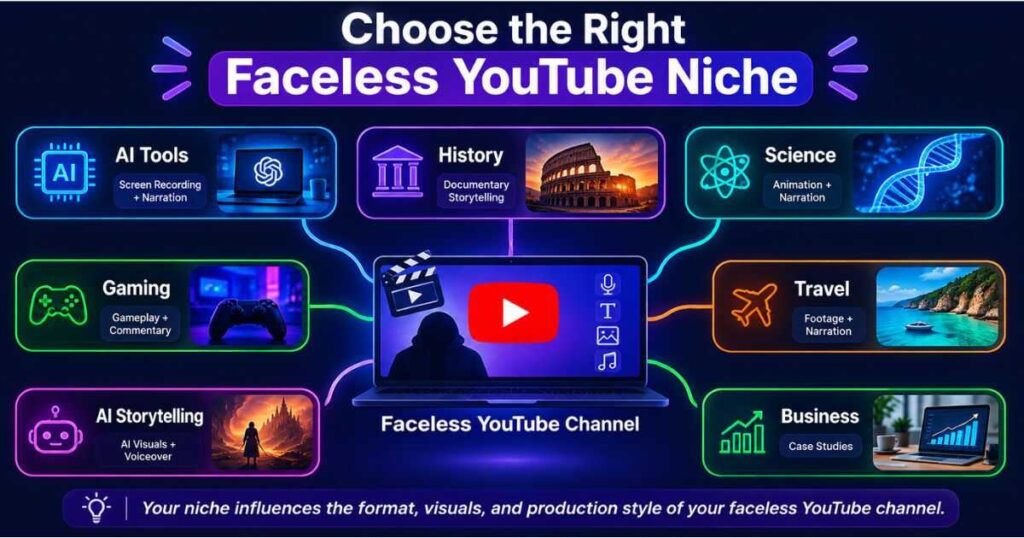
Here are several possibilities:
| Niche | Faceless format | Potential production style |
| AI tools | Tutorials and reviews | Screen recordings + narration |
| Personal finance | Educational explainers | Graphics + narration |
| History | Storytelling | Images + maps + narration |
| Technology | Tutorials and comparisons | Screen recordings |
| Business | Case studies | Graphics + narration |
| Productivity | Tutorials and workflows | Screen recordings |
| Science | Explainers | Animation + narration |
| Gaming | Guides and analysis | Gameplay + commentary |
| Travel | Destination guides | Footage + narration |
| Storytelling | Narrated stories | Generated visuals + voiceover |
A Better Niche Test
Before committing to an idea, ask:
- Can you identify a specific audience?
- Can you generate at least 30–50 video ideas?
- Does the audience have recurring questions?
- Can the content work without showing your face?
- Can you create useful original material?
- Are there products, services, or topics that can eventually support monetization?
Do not choose a niche only because another channel appears to be making money from it.
Choose something you can actually produce consistently.
If you need more ideas before making this decision, see our guide to Faceless YouTube Channel Ideas.
Step 2: Define Your Audience Before Your Video
A channel becomes much easier to build when you know exactly who you are talking to.
Compare these two descriptions:
“I make AI videos.”
and:
“I help beginners use AI tools to create YouTube videos without appearing on camera.”
The second immediately tells you:
- Who the audience is
- What they want
- What problems to solve
- What videos to create
- Which tools might be relevant
This also makes titles and thumbnails easier to create.
When learning How to Start a Faceless YouTube Channel, think about the viewer before thinking about the software.
The software is only part of the production process.
Step 3: Choose a Repeatable Video Format
Your next decision is how your videos will actually look.
This is important because “faceless” is not a video format by itself.
For example:
Tutorial Format
Screen recording + narration + captions
Ideal for software, AI tools, apps, and productivity.
Documentary Format
Narration + images + footage + maps + graphics
Ideal for history, science, business, and educational content.
Cinematic Storytelling
Narration + AI-generated scenes + music + sound effects
Useful for fictional stories, concepts, and visually driven topics.
AI Presenter
AI avatar + script + supporting visuals
Useful for educational and professional content.
Commentary
Voiceover + screenshots + clips + graphics
Useful for technology, news, analysis, and reviews.
Choose one primary format first.
You can expand later.
Step 4: Find Video Ideas Based on Problems
A faceless channel does not need hundreds of random ideas.
It needs a reliable way to find topics people care about.
Instead of asking:
“What should I make a video about?”
Ask:
“What does my target viewer want to know, solve, compare, or accomplish?”
For an AI tools channel, for example:
- How do I create a video with AI?
- Which AI video generator should I use?
- Can I create YouTube videos without showing my face?
- How much does an AI video tool cost?
- Which tool is best for cinematic scenes?
- How can I create an AI presenter?
- How can I automate repetitive editing tasks?
These questions can become entire content clusters.
This is also where your website can support your YouTube strategy. A detailed article can become the research foundation for a video, while the video can introduce viewers to the deeper guide.
Step 5: Research Before Writing the Script
Research is one of the areas where faceless channels can differentiate themselves.
If five channels are using the same AI tool, but all five repeat the same basic information, viewers have little reason to prefer one over another.
Research should help you discover:
- What people are asking
- What competitors explain poorly
- What information is outdated
- What examples are missing
- Which features matter in practice
- Which mistakes beginners make
Then add your own structure and explanation.
The objective is not to produce the longest video.
It is to produce the video that answers the viewer’s question most effectively.
Step 6: Write a Script That Sounds Human
AI can help create an outline or first draft, but a faceless video still needs a strong script.
A simple structure works well:
1. Hook
Give the viewer a reason to continue.
2. Promise
Explain what the video will help them accomplish.
3. Main Content
Deliver the information in a logical sequence.
4. Demonstration
Show the idea in practice whenever possible.
5. Takeaway
Give the viewer a clear conclusion.
6. Next Step
Direct them toward another useful video, guide, or resource.
Avoid long introductions that delay the answer.
Instead of:
“Welcome back to the channel, and today we’re going to talk about…”
Try:
“You can build a YouTube video without recording yourself, but the workflow matters. Here’s the exact process from idea to finished upload.”
That creates an immediate reason to keep watching.
Step 7: Create the First Video With AI
This is where tools such as InVideo AI can simplify production.
If you are learning How to Start a Faceless YouTube Channel, one of the biggest advantages of AI-assisted video software is reducing repetitive production work.
Instead of manually searching for every visual, arranging every scene, adding text, and building the first draft from an empty timeline, you can use an AI-assisted workflow to accelerate the initial production stage.
InVideo AI can be particularly useful for:
- Script-based video creation
- Scene generation
- Stock media selection
- Voiceovers
- Captions
- Video editing
- Social and YouTube content workflows
The important word is workflow.
AI should create a strong starting point that you review and improve.
It should not become an excuse to publish the first automated result without checking it.
Learn more in our guide:
InVideo AI for YouTube: Create Better Videos Faster
Create Your First Faceless Video With InVideo AI →
Step 8: Use Custom AI Visuals When Stock Footage Is Not Enough
Stock footage is useful, but it can also make videos look generic when every channel uses similar clips.
Custom AI-generated visuals can help when the subject requires something you cannot easily find in a stock library.
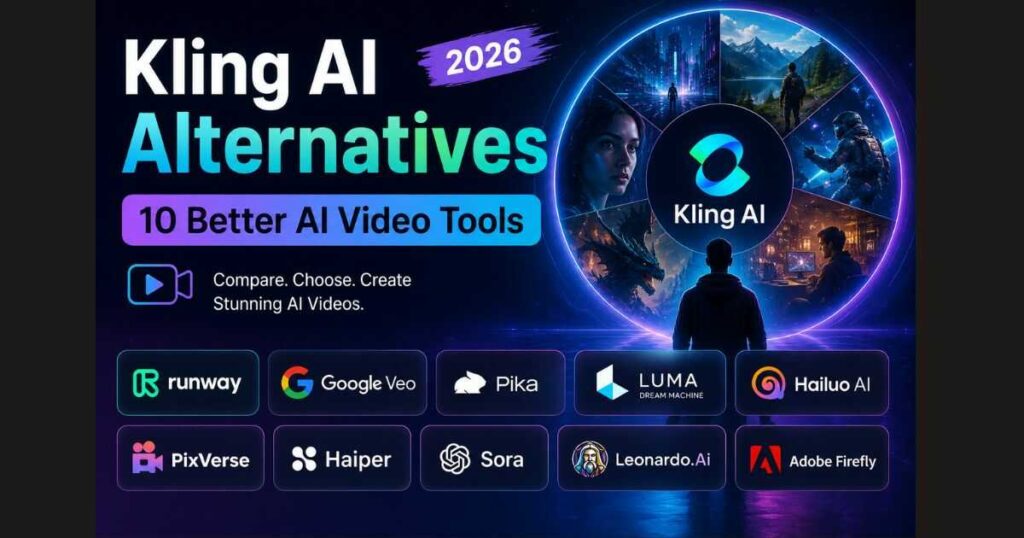
This is where Kling AI can fit into a faceless production workflow.
For example, imagine a channel about future technology.
Instead of searching for generic footage of a computer, you could create a futuristic AI-generated environment that visually represents the concept being discussed.
Kling AI can be useful for:
- Cinematic scenes
- Creative concepts
- Fictional environments
- Atmospheric footage
- Visual storytelling
- Product concepts
- AI-generated sequences
For a practical introduction, see our Kling AI Tutorial.
You can also explore our Kling AI Review if you want a broader look at the platform.
Create Cinematic AI Scenes With Kling AI →
Step 9: Decide Whether an AI Avatar Fits Your Channel
Not every faceless channel needs an avatar.
In fact, forcing an avatar into a channel that does not need one can make the content feel less natural.
But presenter-led formats can benefit from an AI avatar.
Consider:
- Software tutorials
- Educational content
- Business explainers
- Training videos
- Professional presentations
HeyGen is one option for creators who want an AI presenter without recording themselves.
This creates a different version of How to Start a Faceless YouTube Channel:
Script → AI presenter → supporting visuals → finished video
rather than:
Narration → footage → editing
The right option depends on your audience.
Try HeyGen for Your Faceless YouTube Channel →
Step 10: Use Synthesia for Professional Presenter Content
Synthesia can also make sense when the channel relies heavily on presenter-led educational or professional videos.
For example, a channel teaching:
- Business skills
- Software concepts
- Workplace training
- Professional workflows
- Educational subjects
may benefit from a consistent digital presenter.
However, you do not need both HeyGen and Synthesia simply because both are available.
Choose the platform that matches your content format and production requirements.
The goal of How to Start a Faceless YouTube Channel is not to accumulate subscriptions.
It is to build an efficient production system.
Explore Synthesia for Presenter-Led Videos →
The Best Tool Depends on Your Channel
There is no single “best AI tool” for every faceless YouTube channel.
Use this framework instead:
| If your channel focuses on… | A useful starting point |
| General YouTube videos | InVideo AI |
| AI tool tutorials | InVideo AI + screen recording |
| Cinematic storytelling | Kling AI |
| AI presenter content | HeyGen |
| Professional presenter videos | Synthesia |
| Mixed formats | InVideo AI as the core workflow |
This approach is better than subscribing to everything immediately.
Start with one primary tool.
Add another only when it solves a specific production problem.
For example, InVideo AI can handle much of the general video workflow while Kling AI can be added when you need custom cinematic scenes.
That is a much more practical way to think about How to Start a Faceless YouTube Channel.
Four Examples of Faceless YouTube Workflows
Understanding real workflows is often more useful than reading a list of tools.
Example 1: AI Tools Channel
Topic: “Best AI Video Tools for Beginners”
Workflow:
Research → Script → Screen recordings → InVideo AI → Voiceover → Editing → Thumbnail
The screen recordings provide original evidence while the AI-assisted editor helps assemble the supporting material.
Example 2: Cinematic Storytelling Channel
Topic: “What Cities Might Look Like in 2050”
Workflow:
Research → Story → Narration → Kling AI scenes → Editing → Sound design → Thumbnail
The value comes from the storytelling and visual interpretation, not simply generating random AI clips.
Example 3: Educational Channel
Topic: “How Compound Interest Works”
Workflow:
Research → Script → AI presenter → Supporting graphics → Editing → Thumbnail
A presenter-based platform such as HeyGen or Synthesia may fit this format.
Example 4: Software Tutorial Channel
Topic: “How to Create a Video With an AI Tool”
Workflow:
Screen recording → Voiceover → Zooms → Captions → Editing → Thumbnail
This format can be produced without an avatar at all.
These examples show why there is no single formula for How to Start a Faceless YouTube Channel.
Your niche determines your format.
Your format determines your workflow.
Can AI Faceless Videos Be Monetized?
Yes, but using AI should not be confused with creating low-effort content.
This is one of the most important parts of How to Start a Faceless YouTube Channel in 2026.
The important question is not:
“Did AI help create this video?”
A better question is:
“Does this video provide genuine value and meaningful original contribution?”
A strong AI-assisted video can contain:
- Original research
- Your own explanations
- Unique examples
- Commentary
- Demonstrations
- Meaningful editing
- Original storytelling
- Useful comparisons
A weak video might simply:
- Generate a generic script
- Generate a generic voice
- Add unrelated stock clips
- Publish automatically
- Repeat the same process hundreds of times
The second approach is much harder to defend as valuable content.
YouTube’s current guidance also distinguishes between AI assistance such as helping with scripts or production and AI-generated or meaningfully altered realistic content that may require disclosure. Disclosure itself does not automatically make a video ineligible for monetization.
So the safest strategy is simple:
Use AI to improve production, but make the finished content genuinely useful.
What About AI Disclosure on YouTube?
AI disclosure is another issue creators should understand before launching a faceless channel.
YouTube currently requires disclosure when AI is used to meaningfully alter or generate realistic content in situations such as making a real person appear to say or do something they did not, altering footage of a real event or place, or creating a realistic scene that did not actually happen.
By contrast, YouTube lists several forms of production assistance that do not require disclosure, including AI assistance with outlines, scripts, thumbnails, titles, captions, and some editing tasks.
This does not mean you should ignore disclosure settings.
When uploading a video, review YouTube Studio’s AI disclosure options and answer them honestly based on what the video contains.
The rules can evolve, so always check YouTube’s current guidance when publishing content that uses realistic synthetic media.
What About Copyright?
Copyright is another area that should be considered before you start.
A faceless channel does not automatically have permission to use whatever footage, music, images, or clips you find online.
Pay attention to:
Stock Footage
Use media according to the license provided by the source.
Music
Do not assume that music available online is free to use commercially.
Images
Check whether you have the right to use images in your videos and thumbnails.
Clips From Other Videos
Adding a voiceover to someone else’s footage does not automatically give you permission to use it.
AI-Generated Assets
Check the terms of the AI platform you use and understand what rights and restrictions apply to the generated material.
Fair Use
Fair use is not a universal permission slip. Its application depends on the circumstances and jurisdiction.
If your channel is commercial, build a workflow around properly licensed assets rather than assuming you can use anything because you added narration.
How Much Does It Cost to Start a Faceless YouTube Channel?
You can start relatively cheaply.
You do not need a studio or expensive camera.
A basic setup might include:
| Requirement | Basic option |
| Computer | Existing computer |
| Script | Free or low-cost AI assistance |
| Voice | Basic voiceover solution |
| Video creation | Free/entry-level AI tools |
| Visuals | Free media + selected AI generation |
| Thumbnail | Free design software |
| Music | Properly licensed sources |
| Storage | Existing drive or cloud storage |
As production increases, premium subscriptions may become worthwhile.
But do not buy five tools before creating your first few videos.
Start small.
Identify your bottleneck.
Then pay to solve it.
That approach keeps How to Start a Faceless YouTube Channel financially realistic for beginners.
How Long Does It Take to Make a Faceless Video?
The answer depends heavily on the format.
A simple software tutorial may take a few hours.
A documentary with extensive research can take much longer.
A cinematic video may spend significant time generating and selecting visuals.
AI can reduce repetitive work, but it does not eliminate review.
A practical workflow is:
Research → Script → Generate → Review → Edit → Thumbnail → Publish
The review stage matters.
AI-generated footage can contain:
- Incorrect details
- Visual inconsistencies
- Strange movements
- Wrong text
- Unnatural narration
- Repetitive scenes
Never assume that the first generated version is the final version.
How to Start a Faceless YouTube Channel Without Creating AI Slop
The easiest way to avoid low-quality content is to make the creator’s judgment visible in the final result.
Add Original Examples
Show the tool, demonstrate the process, or test the idea.
Improve the Script
Remove generic filler and make every section useful.
Replace Weak Visuals
If a clip does not support the narration, replace it.
Add Your Own Perspective
Explain what works, what does not, and who should use the method.
Build Consistency
Develop recognizable thumbnails, pacing, narration, and visual style.
AI should make your workflow faster.
It should not make every video look identical.
Common Mistakes Beginners Make
When learning How to Start a Faceless YouTube Channel, avoid these mistakes.
Choosing a Niche Only Because It Looks Profitable
A profitable niche still requires useful content.
Using Too Many Tools
More subscriptions do not equal better videos.
Automating Before Understanding the Workflow
First learn how to make one good video.
Then automate repetitive parts.
Publishing Generic Content
If viewers can find the same information everywhere, give them a better explanation or a more useful demonstration.
Ignoring Packaging
A good video needs a strong title and thumbnail.
Copying Competitors
Study successful channels, but build your own angle.
Expecting Immediate Results
Your first videos are also experiments.
Use them to learn.
How Many Videos Should You Upload?
There is no magic number.
A sustainable schedule is usually more useful than forcing yourself to publish every day.
For example:
1–2 strong videos per week
can provide enough data to learn while leaving time for research and improvement.
As your workflow becomes more efficient, you can increase your publishing frequency if quality remains high.
Do not make volume the primary objective.
Make useful videos consistently the objective.
A Practical 30-Day Faceless YouTube Launch Plan
If you want to turn How to Start a Faceless YouTube Channel into an actual project, use the following roadmap.
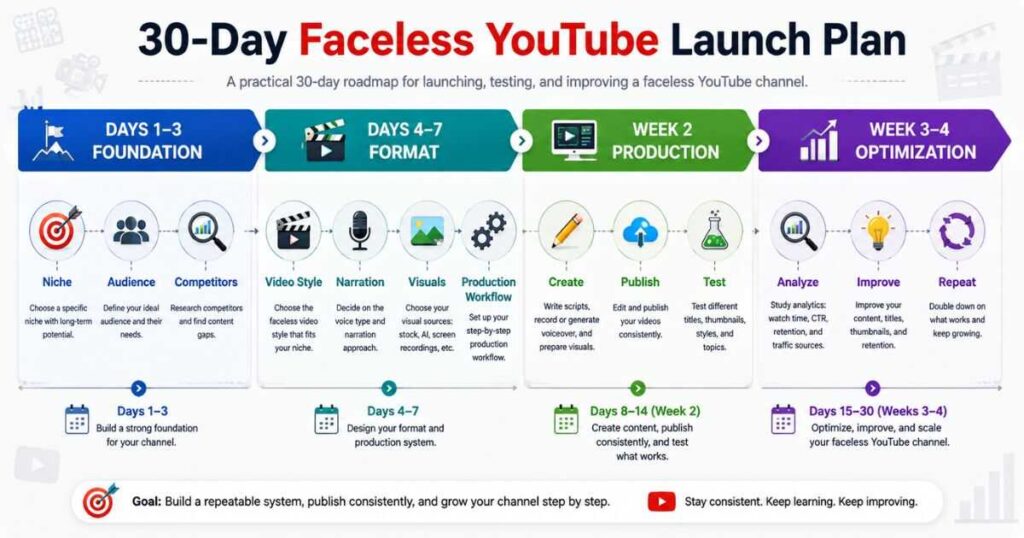
Days 1–3: Choose the Foundation
- Choose one niche
- Define the target audience
- Study competing channels
- Identify recurring viewer questions
- Write down 20–30 possible topics
Days 4–7: Design the Format
Choose:
- Video length
- Narration style
- Visual style
- Thumbnail format
- Editing approach
- Primary production tool
Create one sample video before committing to the complete system.
Week 2: Produce Your First Videos
Create several videos using the same basic workflow.
Do not change the entire format after every upload.
You need enough examples to see what works.
Week 3: Publish and Analyze
Track:
- Impressions
- Click-through rate
- Watch time
- Audience retention
- Traffic sources
- Viewer comments
Do not judge the channel based on one upload.
Look for patterns.
Week 4: Improve the System
Identify:
- Which topics attracted attention?
- Which videos retained viewers?
- Which thumbnails earned clicks?
- Which production steps took too long?
- Which parts can AI simplify?
Then create the next batch based on what you learned.
Build Your Next Faceless Video With InVideo AI →
How to Start a Faceless YouTube Channel and Make It a Real Brand
Once you have published several videos, stop thinking only about individual uploads.
Start thinking about the channel as a brand.
That means creating consistency in:
- Channel name
- Profile image
- Banner
- Thumbnail style
- Video introductions
- Narration
- Colors
- Typography
- Content categories
A viewer should gradually recognize your content before reading the channel name.
This is especially important because faceless channels cannot rely on a recognizable on-camera personality.
The brand itself becomes part of the personality.
Continue Learning
Building a faceless channel becomes much easier when you learn the individual parts of the workflow.
Continue with these guides:
- Faceless YouTube Channel Ideas — Explore niches and content directions before committing to one.
- InVideo AI for YouTube: Create Better Videos Faster — Learn how InVideo AI can fit into a YouTube production workflow.
- InVideo AI Pricing — Compare plans and understand the cost before choosing a subscription.
- Is InVideo AI Free? — Understand the free option, limits, and trial considerations.
- Kling AI Tutorial — Learn how to create AI-generated video scenes.
- Kling AI Review — Explore Kling AI in more detail.
- Best Kling AI Prompts — Improve the quality and consistency of generated scenes.
- Synthesia AI Review: Is It Worth It in 2026? — Explore its features, pricing, AI avatars, and video creation capabilities.
- Synthesia Pricing (2026): Plans, Costs & Features – A complete breakdown of Synthesia AI plans, pricing, features, and video limits.
- Is Synthesia Free? Plans, Limits & What You Get — Discover Synthesia’s free plan, monthly credits, video limits, key features, and when upgrading makes sense.
- Synthesia Avatars: Types, Custom Avatars & How They Work — Explore Synthesia’s avatar types, customization options, features, and how AI avatars work.
The goal is not to master every platform.
It is to build a production system that matches the type of channel you want to create.
Final Thoughts: How to Start a Faceless YouTube Channel
If you are serious about How to Start a Faceless YouTube Channel, do not begin by trying to automate everything.
Begin with one audience.
Choose one niche.
Create one repeatable format.
Build one reliable production workflow.
Then publish enough videos to learn what your audience actually responds to.
AI can help with scripts, visuals, narration, editing, avatars, and many other production tasks. But the strongest faceless channels still depend on human decisions: choosing useful topics, checking information, improving scripts, selecting better visuals, and understanding what viewers want.
The best strategy for How to Start a Faceless YouTube Channel is therefore not maximum automation.
It is efficient creation combined with genuine value.
Start with the simplest workflow that can produce a good video. Use InVideo AI when you want to accelerate general video production, Kling AI when your content needs custom cinematic visuals, and HeyGen or Synthesia when an AI presenter makes sense for your format.
Then improve one part of the system at a time.
Your first goal is not to build a huge channel.
Your first goal is to create a video that a real person would genuinely choose to watch.
Do that repeatedly, learn from the results, and your faceless YouTube channel has a much stronger foundation for long-term growth.
Start Creating Your Faceless YouTube Channel With InVideo AI →