
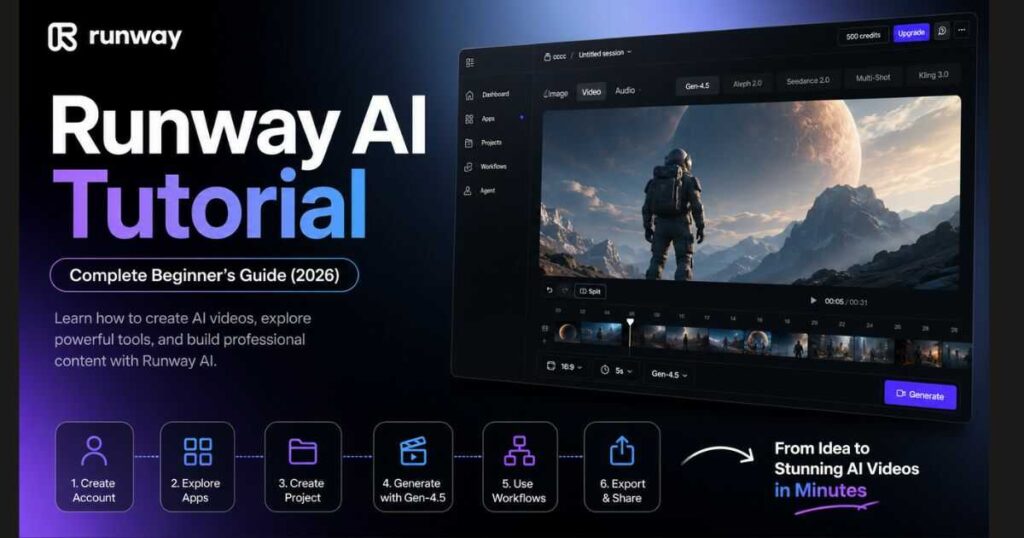
Runway AI Tutorial: Complete Beginner’s Guide (2026)
Artificial intelligence has transformed video production, making it possible for anyone to create professional-looking videos without expensive equipment or advanced editing skills. If you’re looking for the most complete Runway AI Tutorial, you’ve come to the right place.
Whether you’re a content creator, YouTuber, marketer, filmmaker, or business owner, this Runway AI Tutorial will teach you everything you need to know—from creating your account to generating your first AI-powered video using Runway’s latest models like Gen-4.5, Aleph, and Seedance 2.0.
Unlike many beginner guides that only explain basic features, this tutorial focuses on the actual workflow you’ll use inside the newest Runway interface. By the end of this guide, you’ll understand how to navigate the dashboard, create projects, generate videos, organize workflows, and use Runway more efficiently.
If you’re still deciding whether the platform is right for you, we recommend reading our Runway AI Review (2026): Is It Worth Using? before continuing. It explains the platform’s strengths, weaknesses, and who should use it.
Ready to learn by doing?
👉 Start your first AI video today with Runway.
[Start Creating with Runway AI →]
What Is Runway AI?
Before diving into this Runway AI Tutorial, it’s important to understand what Runway actually is.
Runway AI is a creative platform that combines multiple AI models into one workspace, allowing users to generate, edit, and enhance videos, images, and creative content.
Instead of relying on separate software for editing, animation, motion graphics, and AI generation, Runway brings everything together inside a modern cloud-based interface.
Today, Runway includes powerful tools such as:
- Gen-4.5 for AI video generation.
- Aleph 2.0 for intelligent editing.
- Seedance 2.0.
- Multi-Shot Video.
- AI Image Generation.
- Character Animation.
- Workflow Automation.
- Project Management.
- Team Collaboration.
Because everything is integrated into a single platform, creators can move from an idea to a finished video much faster than with traditional editing software.
Who Should Use This Runway AI Tutorial?
This Runway AI Tutorial is designed for beginners, but it also includes tips that experienced creators will appreciate.
It’s especially useful for:
- YouTube creators.
- Faceless YouTube channels.
- TikTok creators.
- Instagram Reels creators.
- Digital marketers.
- Advertising agencies.
- Small businesses.
- AI content creators.
- Designers.
- Filmmakers.
- Freelancers.
Even if you’ve never used AI video tools before, you can follow this guide step by step.
Create Your Runway Account
The first step in this Runway AI Tutorial is creating your account.
Getting started takes only a few minutes.
Simply visit the official Runway website and create a free account using:
- Google.
- Apple.
- Email.
After verifying your account, you’ll immediately gain access to the dashboard.
The free plan allows you to explore the interface, create projects, and test many AI features before upgrading.
If you’re wondering whether the paid plans are worth it, check our detailed Runway AI Pricing (2026) guide where we compare every subscription option.
First Login Experience
One thing you’ll immediately notice is that Runway’s interface has changed significantly compared to previous versions.
Instead of showing only video generation tools, the new homepage organizes everything into creative workspaces.
You’ll see access to:
- Agent.
- Apps.
- Projects.
- Workflows.
- Image Generation.
- Video Generation.
- Audio tools.
This new organization makes it much easier for beginners to find the feature they need without feeling overwhelmed.
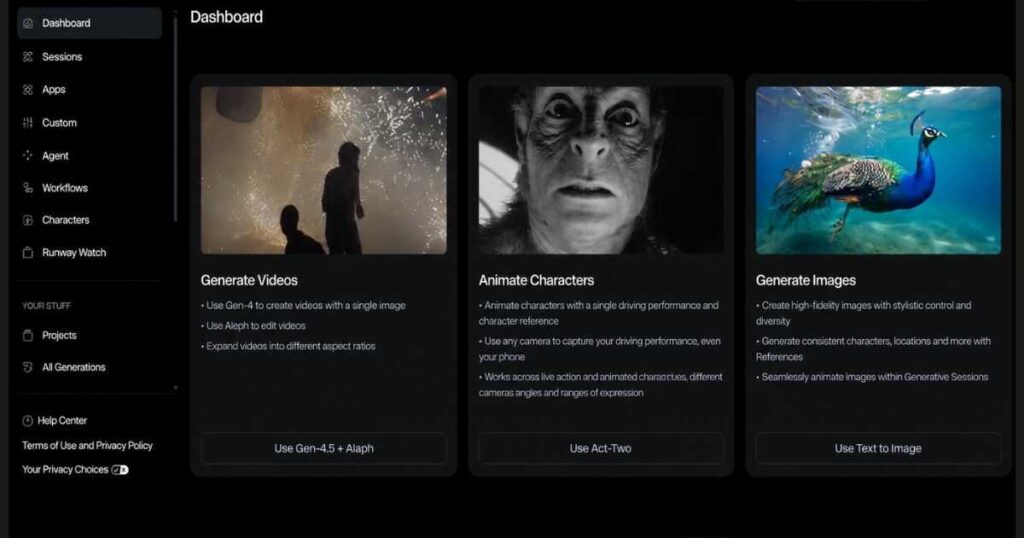
Understanding the New Runway Interface
One of the biggest improvements covered in this Runway AI Tutorial is the redesigned interface.
Instead of opening directly into a single editor, Runway now acts like a creative operating system.
Everything starts from one central workspace where you can access every AI capability.
The main navigation panel includes several important sections:
Dashboard
Your starting point for creating videos and images.
Apps
A collection of AI-powered creative applications organized by category.
Projects
A workspace where all your creations are stored.
Workflows
Automation tools that simplify repetitive creative tasks.
Agent
An AI assistant that helps you brainstorm ideas, create campaigns, and generate creative assets.
The new layout feels much cleaner and significantly improves productivity compared to older versions.
Why Runway’s Interface Is Different
Unlike traditional editing software that expects users to understand timelines, layers, and technical settings immediately, Runway focuses on creativity first.
Most tasks begin with a simple prompt or image.
From there, AI handles much of the complex work.
This approach allows beginners to start creating within minutes while still giving professionals access to advanced tools.
That’s one reason why Runway has become one of the leading AI video platforms in 2026.
Your First Goal
Don’t try to learn every feature on your first day.
Instead, your first objective should be very simple:
- Learn the dashboard.
- Create your first project.
- Generate one short AI video.
- Export it successfully.
Once you’ve completed those steps, the rest of the platform becomes much easier to understand.
Exploring the Apps Library
The next step in this Runway AI Tutorial is understanding the Apps section, which has become one of the most useful additions to the platform.
Instead of forcing users to start from a blank canvas, Runway now provides ready-made creative experiences called Starter Kits and Apps. These are designed for specific use cases, making it much easier to begin a project—even if you’re completely new to AI video creation.
Think of the Apps Library as a collection of creative shortcuts. Rather than figuring out which AI model to use first, you simply choose the type of content you want to create.
Some of the most popular categories include:
- Film & Shorts.
- Marketing.
- Social Media Content.
- Educational Content.
- Image Creation.
- Video Creation.
- Audio Generation.
Each category launches the tools and settings that best match your creative goal.
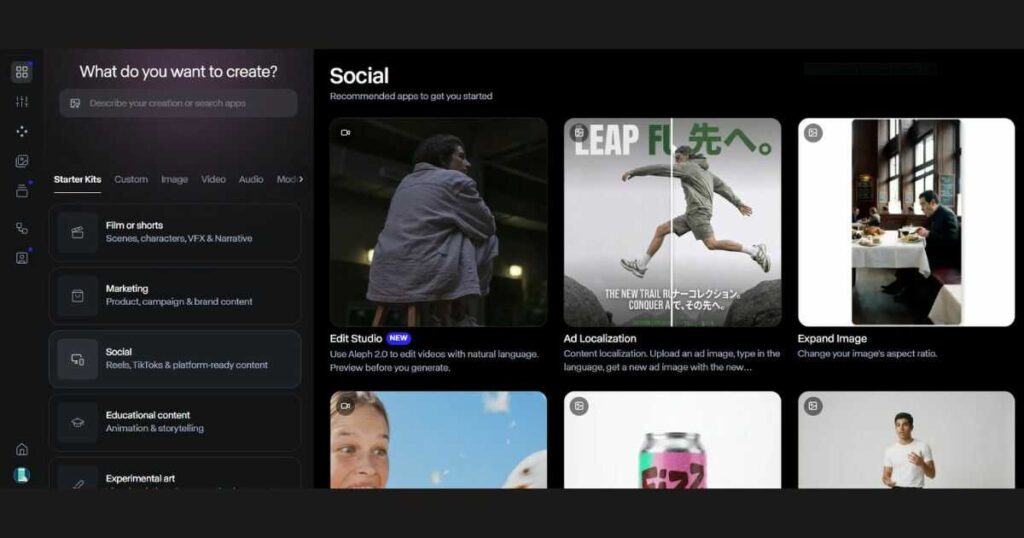
Choosing the Right Starter Kit
One reason many beginners struggle with AI tools is that they don’t know where to start.
Runway solves this problem with Starter Kits.
Here are a few examples:
Film or Shorts
Perfect for:
- Short films.
- Storytelling.
- Cinematic scenes.
- Narrative content.
- Character-driven videos.
Marketing
Ideal for:
- Product advertisements.
- Promotional campaigns.
- Brand videos.
- Commercial content.
Social
Designed for creators making:
- TikTok videos.
- Instagram Reels.
- YouTube Shorts.
- Vertical videos.
Educational Content
Great for:
- Online courses.
- Tutorials.
- Explainer videos.
- Presentations.
Instead of building every project from scratch, these templates help you focus on creativity rather than technical setup.
Creating Your First Project
Now that you’ve explored the Apps Library, it’s time to create your first project.
Projects keep all of your generated videos, images, edits, and assets organized in one place.
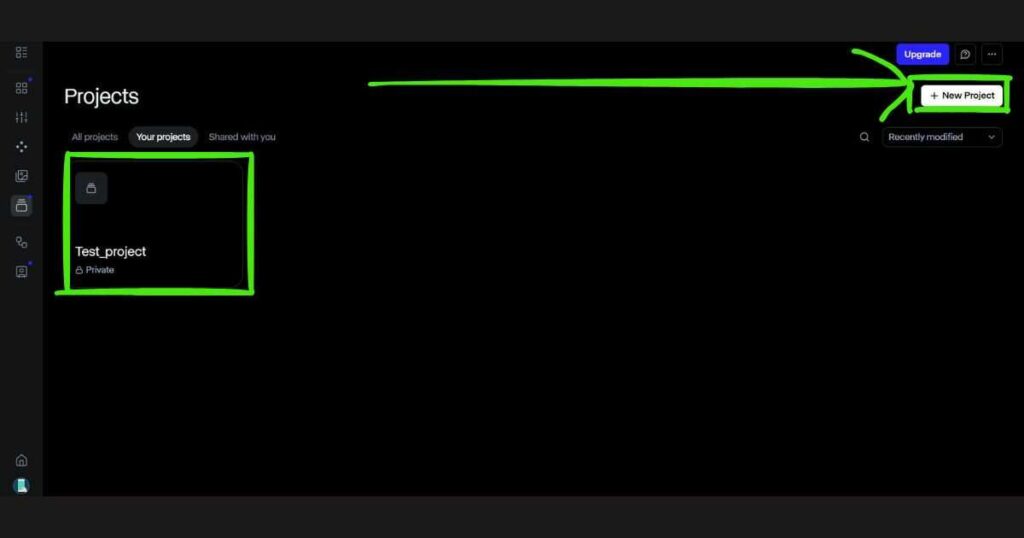
To create a new project:
- Open Projects from the left navigation menu.
- Click New Project.
- Enter a project name.
- Start adding videos, images, prompts, or workflows.
Projects are especially useful if you’re working on larger productions because they prevent your assets from becoming scattered across different sessions.
Many professional creators organize projects by:
- Client name.
- YouTube channel.
- Marketing campaign.
- Product launch.
- Course content.
This makes collaboration and future editing much easier.
Generate Your First AI Video
No Runway AI Tutorial would be complete without creating your first video.
Fortunately, the latest interface makes this process surprisingly simple.
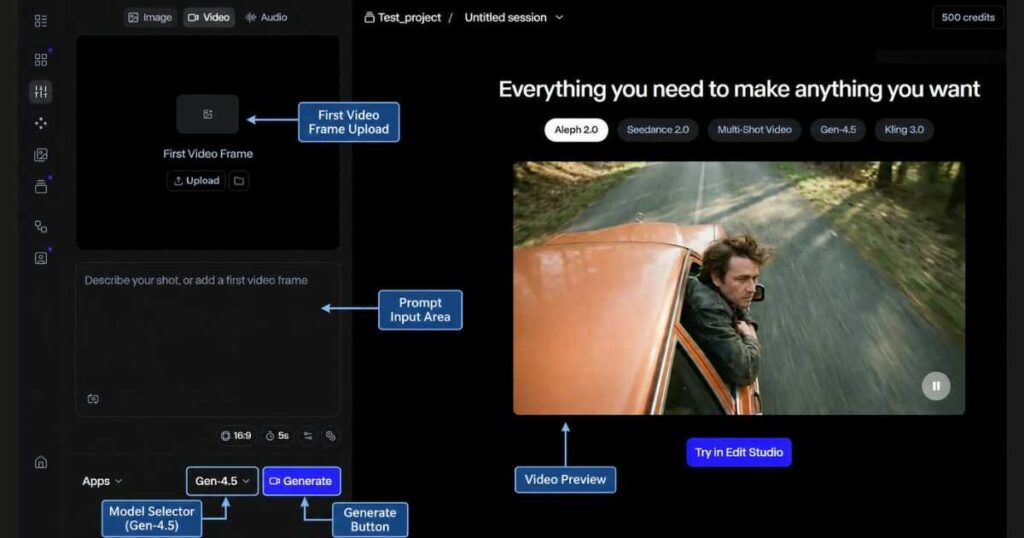
Open the Video workspace, and you’ll see an editor designed around AI generation rather than traditional video editing.
Depending on the model you choose, you can generate videos from:
- Text prompts.
- Images.
- Existing footage.
- First video frames.
At the bottom of the interface, you’ll also find options for:
- Aspect ratio.
- Video duration.
- AI model selection.
- Generation settings.
For most beginners, Gen-4.5 is the best place to start because it offers an excellent balance between quality, speed, and ease of use.
Selecting Gen-4.5
One of the newest improvements in Runway is the ability to switch between multiple AI models directly inside the generation interface.
When creating your first video, you’ll notice a model selector near the bottom of the screen.
Popular options include:
- Gen-4.5.
- Aleph 2.0.
- Seedance 2.0.
Each model has its own strengths, but if you’re following this Runway AI Tutorial, Gen-4.5 is the recommended choice for learning the basics.
Simply write a descriptive prompt, choose your desired aspect ratio, and click Generate.
Within a short time, Runway produces a fully AI-generated video that you can continue refining.
The best way to master Runway is by practicing.
Create a simple project, write your first prompt, and experiment with different AI models to see how each one performs.
👉 Ready to create your first AI-generated video?
[Start Creating with Runway AI →]
Writing Better Prompts
Your results depend heavily on the quality of your prompts.
Instead of writing: “A dog”
Try something like: “A cinematic golden retriever running through a misty forest at sunrise, soft golden lighting, shallow depth of field, ultra-realistic, smooth camera movement.”
Specific prompts generally produce:
- Better lighting.
- More consistent motion.
- Stronger composition.
- Higher realism.
- Fewer generation errors.
As you continue through this Runway AI Tutorial, you’ll discover additional techniques that dramatically improve video quality.
Using Workflows to Automate Your Creative Process
As you become more comfortable with the platform, one of the most valuable features covered in this Runway AI Tutorial is Workflows.
Instead of repeating the same creative process every time you start a new project, Workflows allow you to build reusable production pipelines.
Think of them as automation templates that connect different AI tools together, helping you create content faster while maintaining consistent quality.
For creators who publish videos regularly, Workflows can save hours every week.
What Are Runway Workflows?
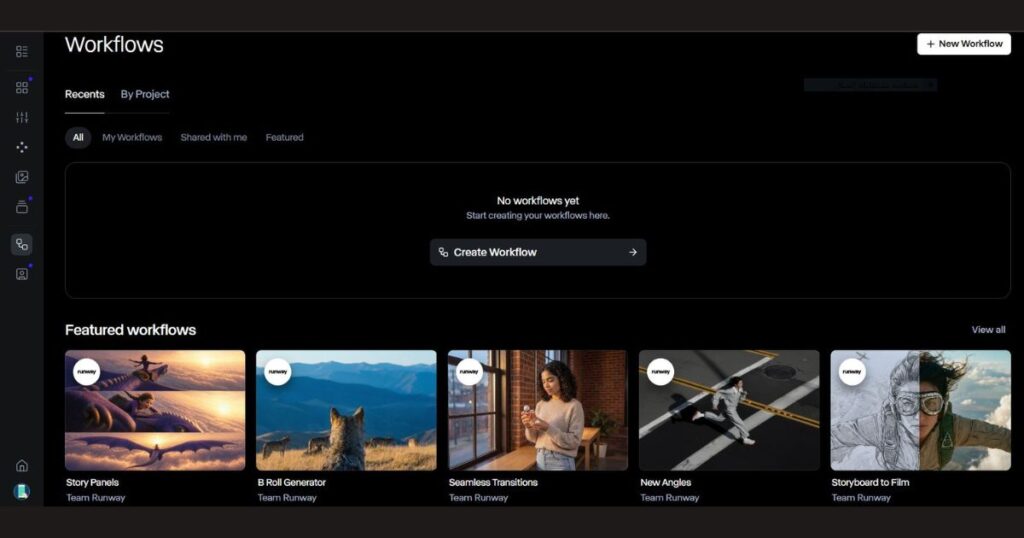
Workflows are visual production pipelines that combine multiple AI actions into one organized process.
Rather than manually switching between different tools, you can build a workflow that follows your preferred creative sequence.
For example:
Idea → Script → AI Video → Editing → Export
Or
Image → Animate → Upscale → Export
Everything stays organized inside one workspace.
This is especially useful if you produce content for:
- YouTube.
- TikTok.
- Instagram Reels.
- Client projects.
- Marketing campaigns.
Managing Projects Like a Professional
As your content library grows, keeping everything organized becomes increasingly important.
Fortunately, Runway’s Projects system makes this simple.
A good habit is to create a separate project for every major objective.
Examples include:
- YouTube Videos.
- Client Work.
- Product Advertisements.
- Social Media Campaigns.
- Course Videos.
- Experimental Ideas.
This organization makes it much easier to locate assets later without searching through dozens of unrelated generations.
Professional creators often maintain separate projects for each client or campaign, making collaboration far more efficient.
Meet Agent 2.0
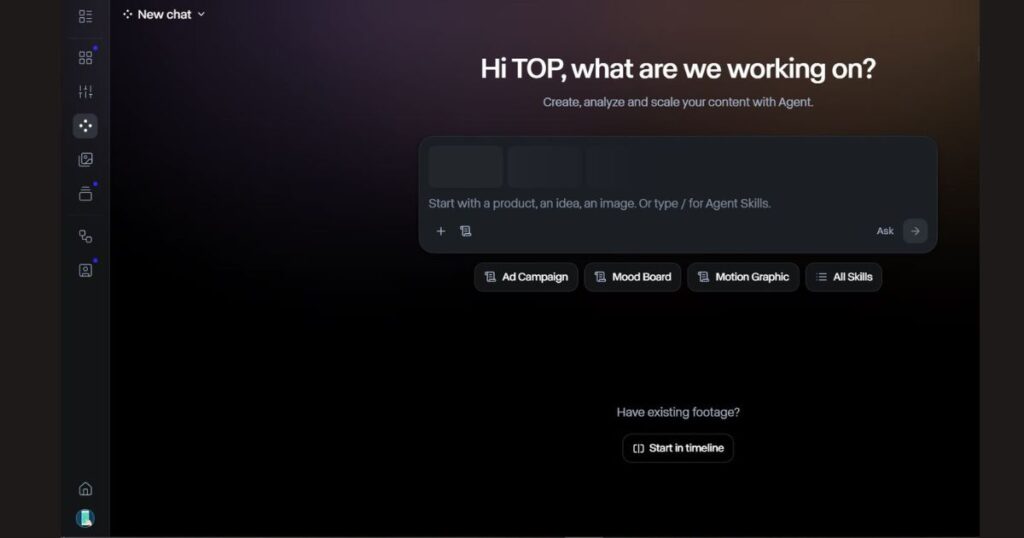
One of the biggest additions to Runway in 2026 is Agent 2.0.
Instead of being just another chatbot, Agent acts as a creative assistant that helps generate ideas, organize projects, and speed up content production.
When you open the Agent page, you’ll notice several suggested creative tasks, including:
- Ad Campaign.
- Mood Board.
- Motion Graphic.
- Creative Planning.
- AI Skills.
Rather than starting with a blank page, Agent helps you brainstorm and develop ideas before moving into production.
This makes it especially useful for creators who struggle with creative blocks.
If you’re serious about creating AI-powered videos consistently, don’t just experiment—build a repeatable workflow.
👉 Create your first project and experience Runway’s newest AI tools today.
[Start Using Runway AI →]
Best Practices for Better Results
Following this Runway AI Tutorial will help you avoid many beginner mistakes, but these additional practices can improve your results even further.
Write Detailed Prompts
The AI performs much better when given detailed descriptions instead of short phrases.
Include information about:
- Subject.
- Camera movement.
- Lighting.
- Environment.
- Mood.
- Style.
- Colors.
The more context you provide, the better the generated video usually becomes.
Keep Videos Short
Beginners often try generating long scenes immediately.
Instead, generate shorter clips first.
This allows you to:
- Review quality.
- Make corrections.
- Save credits.
- Improve consistency.
Later, you can combine multiple clips into one finished video.
Stay Organized
Rename projects clearly.
Use folders when possible.
Delete unnecessary test generations.
These habits become increasingly valuable as your library grows.
Experiment with Different Models
Although Gen-4.5 is excellent for most users, don’t ignore the other available models.
Each AI model has unique strengths depending on your project.
Testing multiple models can often produce significantly better results.
Common Beginner Mistakes
Every beginner makes mistakes during their first few projects.
The good news is that they’re easy to avoid once you recognize them.
Writing Extremely Short Prompts
Poor example: “A city.”
Better example: “A futuristic cyberpunk city at night with neon reflections, cinematic drone shot, rainy streets, ultra-realistic lighting.”
Specific prompts almost always generate better videos.
Ignoring Aspect Ratio
Always choose the correct aspect ratio before generating.
For example:
- 16:9 for YouTube.
- 9:16 for TikTok and Reels.
- 1:1 for many social media posts.
Choosing the correct format early prevents unnecessary cropping later.
Generating Without a Goal
Many new users generate random videos simply to test the platform.
Instead, create every project with a specific objective.
Examples include:
- Product advertisement.
- YouTube intro.
- Story scene.
- Social media clip.
- Educational animation.
Purpose-driven projects produce better outcomes and help you learn faster.
Not Exploring the Entire Platform
One common mistake is staying inside the Video Generator and never exploring:
- Apps.
- Projects.
- Workflows.
- Agent.
- Image Generation.
These features work together to create a much more efficient creative ecosystem.
The more familiar you become with each section, the more value you’ll get from Runway.
Advanced Tips to Master Runway AI
Now that you’ve completed this Runway AI Tutorial, you’re already familiar with the platform’s core workflow. However, experienced creators often use a few additional techniques to produce higher-quality results while saving both time and AI credits.
Here are some practical tips that can immediately improve your workflow.
Plan Before You Generate
One of the biggest mistakes beginners make is opening Runway and immediately clicking Generate.
Instead, spend a few minutes defining:
- Your objective.
- Target audience.
- Video style.
- Camera movement.
- Lighting.
- Color palette.
A clear creative direction usually produces much better AI generations with fewer attempts.
Generate Multiple Variations
AI generation is a creative process.
Instead of expecting the perfect result on the first attempt, generate several variations of the same prompt.
Often, one small wording change can dramatically improve:
- Camera motion.
- Character consistency.
- Lighting.
- Composition.
- Cinematic quality.
Professional creators rarely rely on a single generation.
Combine Multiple Short Clips
Rather than asking AI to generate one long video, create several short scenes.
For example:
Scene 1 → Establishing shot
Scene 2 → Character close-up
Scene 3 → Action sequence
Scene 4 → Ending shot
Afterward, combine them during editing.
This approach usually produces more consistent results than generating one long sequence.
Keep Learning New Models
Runway evolves rapidly.
New AI models continue to appear, each improving:
- Motion realism.
- Character consistency.
- Scene understanding.
- Prompt accuracy.
- Generation speed.
Checking new releases regularly helps you take advantage of the latest improvements without changing platforms.
Frequently Asked Questions
Is Runway AI beginner-friendly?
Yes.
One reason this Runway AI Tutorial exists is because Runway has become much easier to use than previous versions.
The redesigned interface, Starter Kits, Apps, and Agent 2.0 allow complete beginners to start creating AI videos within minutes.
Can I create videos without editing experience?
Absolutely.
Most creators begin with simple prompts.
Runway’s AI handles much of the technical work automatically.
As your experience grows, you can gradually explore more advanced tools like Workflows, custom editing, and professional AI models.
Which AI model should beginners use?
For most users, Gen-4.5 is the best starting point.
It provides excellent quality while remaining simple enough for first-time users.
As you become more comfortable, you can experiment with Aleph 2.0, Seedance 2.0, and future AI models released by Runway.
Is the Free plan enough?
For learning, yes.
The Free plan allows you to:
- Explore the dashboard.
- Create projects.
- Test AI generation.
- Understand the workflow.
Once AI becomes part of your regular content creation process, upgrading to a paid plan becomes much easier to justify.
Final Thoughts
This Runway AI Tutorial demonstrates that modern AI video creation is no longer limited to professional studios or experienced editors. With the latest Runway interface, beginners can generate videos, organize projects, automate workflows, and experiment with powerful AI models from a single platform.
The key to success isn’t learning every feature on the first day. Instead, focus on building a simple workflow:
- Learn the dashboard.
- Create organized projects.
- Practice writing better prompts.
- Explore Apps and Starter Kits.
- Use Workflows to save time.
- Continue experimenting with new AI models.
By following this approach, you’ll improve much faster than trying to master everything at once.
The best way to improve isn’t reading another tutorial—it’s creating your next project.
Start with a simple prompt, experiment with different models, and let every generation teach you something new.
👉 Ready to build your first professional AI video?
➡️ Start Creating with Runway AI
Continue Learning
Now that you’ve completed this Runway AI Tutorial, continue exploring Runway with these in-depth guides:
- Runway AI Review (2026): Is It Worth Using? — Learn about Runway’s latest features, strengths, and real-world performance.
- Runway AI Pricing (2026): Plans, Credits & Which Plan Is Best? — Compare every subscription and choose the right plan for your workflow.
- Kling AI Review (2026): Features, Pricing & Pros and Cons — Compare Runway with one of its strongest competitors.
- Kling AI Pricing (2026): Plans, Features & Value — Explore Kling AI’s pricing structure.
- Kling AI Text to Video (2026): Create Cinematic AI Videos — Learn advanced prompt-based AI video generation.
- Kling AI Motion Control (2026): Create Realistic AI Character Animation — Discover how AI motion transfer works for professional animations.
- Runway AI Alternatives: 7 Best AI Video Tools (2026) Discover the 7 best Runway AI alternatives in 2026 and compare their features, strengths, pricing, and ideal use cases to find the perfect AI video tool.
Conclusion
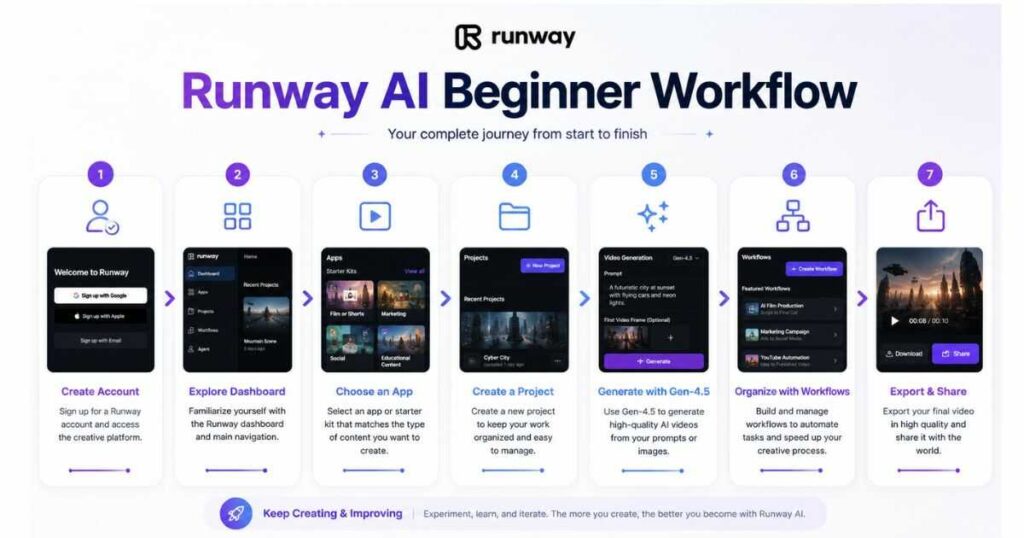
Learning a new AI platform can feel overwhelming at first, but this Runway AI Tutorial shows that Runway has made the process far more accessible than ever. From creating your account and navigating the dashboard to generating your first AI video with Gen-4.5, organizing projects, and building automated workflows, every step is designed to help creators move from idea to finished content with less friction.
The most important takeaway is that mastering Runway doesn’t happen overnight. Start with the basics, practice writing better prompts, explore the Apps library, and gradually incorporate features like Agent 2.0 and Workflows into your creative process. As your confidence grows, you’ll be able to produce higher-quality videos more efficiently.
Whether you’re creating content for YouTube, social media, marketing campaigns, or professional filmmaking, following this Runway AI Tutorial gives you a solid foundation for making the most of one of today’s leading AI video creation platforms.

