Pictory Pricing: Hidden Costs, Credits & Plans Explained
Pictory Pricing may look simple at first: choose a plan, pay a monthly or annual fee, and start creating videos. But the subscription price is only part of the decision. You also need to understand video-minute limits, AI credits, voiceover allowances, annual billing, and the additional costs that may arise when you generate AI images or video clips.
In this guide, we explain Pictory Pricing in practical terms so you can compare the available plans, estimate your actual costs, and avoid paying for features you do not need. Whether you are creating your first YouTube videos or producing content for several channels, the right plan depends on your workflow, publishing schedule, and use of generative AI.
We will also explain the difference between video minutes and AI credits, compare monthly and annual billing, and calculate how additional credit purchases can affect your budget.
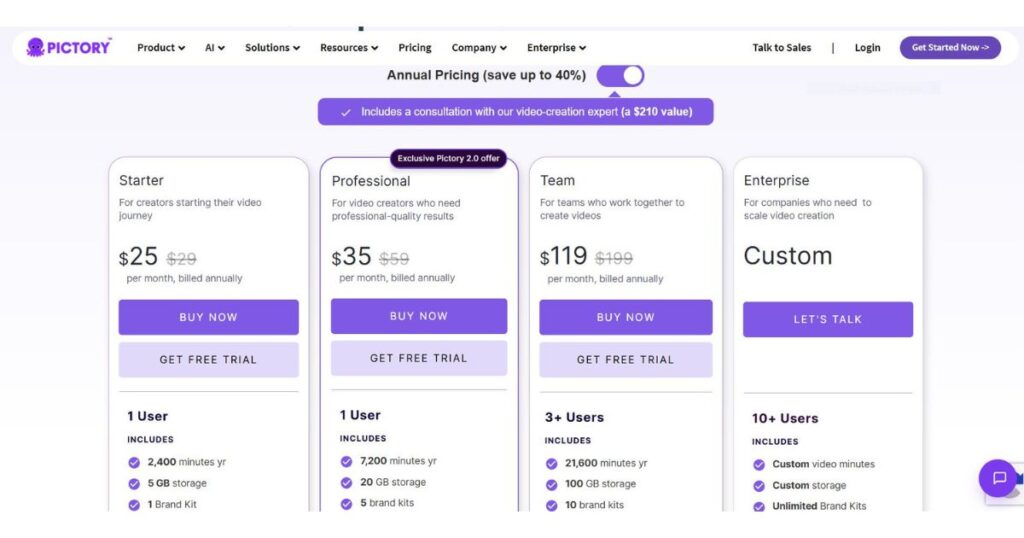
Quick answer: Pictory offers Starter, Professional, Team, and Enterprise plans. The standard monthly prices displayed on its official pricing page are $29, $59, and $199 for the first three plans. The annual-billing equivalents are $25, $35, and $119 per month, respectively. Enterprise pricing is customized. These prices and plan allowances may change, so verify the current offer before subscribing.
Check Pictory Pricing and Available Plans →
Pricing note: This guide uses Pictory’s official pricing page and Help Center as primary references. Monthly and annual allowances are presented separately because they are not always identical. Last reviewed: October 2026.
Pictory Pricing at a Glance
The quickest way to understand Pictory Pricing is to compare the plans before examining the details. The following table summarizes the standard prices and major allowances shown on Pictory’s official pricing page.
| Feature | Starter | Professional | Team | Enterprise |
|---|---|---|---|---|
| Monthly billing | $29/month | $59/month | $199/month | Custom |
| Annual-billing equivalent | $25/month | $35/month | $119/month | Custom |
| Video minutes | 200/month | 600/month | 1,800/month | Custom |
| Storage | 5 GB | 20 GB | 100 GB | Custom |
| Brand Kits | 1 | 5 | 10 | Unlimited |
| Users | 1 | 1 | 3+ | 10+ |
| AI credits with monthly billing | 100/month | 500/month | 2,400/month | Custom |
| Custom avatars and voice cloning | Not listed in the core Starter features | Included | Included | Custom |
| Team collaboration | No | No | Yes | Yes |
Source: Official Pictory Pricing. Check the live page for current feature availability and exact billing terms.
Important: Annual subscriptions have different AI-credit allocations. The current pricing page lists 1,200 credits per year for Starter, 12,000 for Professional, and 28,800 for Team. These annual allowances should not be assumed to equal twelve times the monthly-billing allowance for every plan. Pictory’s Help Center explains that annual subscribers receive their year’s credit allocation at purchase or renewal.
The main difference between plans is not simply the number of video minutes. Higher tiers also offer more storage, additional Brand Kits, advanced features, and greater AI-generation capacity.
Before choosing a subscription, learn how to use the platform effectively. Our Pictory AI Tutorial: Create Videos in Minutes walks you through the video creation process, scene editing, AI visuals, and voiceovers so you can better understand which features fit your needs.
Still deciding whether Pictory is worth the cost? Read our Pictory Review: Is It Worth It? Features & Pricing for a closer look at its features, pros and cons, and overall value for video creators.
Pictory Pricing: Monthly vs. Annual Billing
One of the most important decisions is whether to pay monthly or annually. Annual billing reduces the displayed monthly equivalent, but it requires a larger upfront payment.
| Plan | Monthly billing | Annual-billing equivalent | Approximate annual payment | Approximate saving |
|---|---|---|---|---|
| Starter | $29/month | $25/month | $300 | $48 |
| Professional | $59/month | $35/month | $420 | $288 |
| Team | $199/month | $119/month | $1,428 | $960 |
Calculations use the published standard rates and exclude taxes, currency-conversion fees, and promotional changes. Confirm the total shown at checkout.
For example, Professional costs $59 per month on monthly billing. If that rate remains unchanged for twelve months, the total would be $708. At the published annual rate of $35 per month, the annual payment would be approximately $420.
That is a meaningful difference, but you must be comfortable committing to a full year.
When monthly billing makes sense
Monthly billing may be better if you are still testing Pictory, experimenting with your publishing schedule, or unsure whether its workflow fits your needs.
It gives you more flexibility to evaluate the platform before committing to a longer subscription. This is particularly useful for new YouTube creators whose production requirements are still changing.
When annual billing makes sense
Annual billing may be worthwhile if you already use Pictory consistently and expect to continue throughout the year.
Before choosing annual Pictory Pricing, consider three questions:
- Have you tested the platform enough to know that it fits your workflow?
- Can you comfortably pay the annual amount upfront?
- Will you use the included minutes and features regularly?
Do not choose an annual plan only because the displayed monthly equivalent looks cheaper. A lower rate does not save money if you stop using the platform after a few weeks.
Compare Pictory’s Current Monthly and Annual Plans →
What Does Each Pictory Pricing Plan Include?
The best plan depends on the videos you create, how frequently you publish, and whether you need generative AI features.
1. Starter — $29 per month
Starter is designed for individual creators who are beginning their video-production journey.
The standard monthly plan includes:
- 200 video minutes per month.
- 5 GB of storage.
- One Brand Kit.
- 60 minutes of ElevenLabs AI voices in 29 languages.
- Access to a library of Getty Images and Storyblocks videos.
- 100 AI credits per month.
- No Pictory watermark on videos exported under the paid subscription.
- Basic AI tools and automatic synchronization of uploaded voiceovers.
The annual-billing equivalent is $25 per month, billed annually. The annual plan includes 2,400 video minutes and 1,200 AI credits for the subscription year.
Starter can suit creators who want to transform scripts, articles, or URLs into videos without generating every scene from scratch.
However, the AI-credit allowance deserves attention. Pictory’s pricing page provides indicative examples of what the annual Starter allocation can generate: up to 2,000 images, 12.5 minutes of generated video, or 40 minutes of avatar video. These are alternative usage estimates, not separate allowances that you receive simultaneously.
Who should choose Starter?
Choose Starter if your workflow relies mainly on converting text into videos, using stock footage, adding captions, and arranging scenes. If you depend heavily on generated video clips, the included credits may become a limitation.
Check Pictory Starter Pricing →
2. Professional — $59 per month
Professional is intended for creators who need more capacity and advanced production tools.
The standard monthly plan includes:
- 600 video minutes per month.
- 20 GB of storage.
- Five Brand Kits.
- 500 AI credits per month.
- Unlimited standard voices in seven languages.
- 120 minutes of ElevenLabs AI voices in 29 languages.
- Access to a larger Getty Images and Storyblocks video library.
- Custom avatars, voice cloning, and advanced AI tools.
- Summarization of long videos.
The annual-billing equivalent is $35 per month. The annual plan includes 7,200 video minutes and 12,000 AI credits for the subscription year.
Professional is worth considering if you produce multiple videos regularly, manage different brands, or want custom avatars and cloned voices. It may also suit creators who repurpose longer videos into shorter content.
The key distinction is that Professional increases both the video-minute allowance and the AI-credit allowance. Those resources serve different purposes, so estimate both types of usage before upgrading.
Who should choose Professional?
Professional may be a good fit for an established faceless YouTube channel, a content marketer, or a solo creator with a consistent publishing schedule who needs more than basic text-to-video features.
However, do not assume that Professional makes every generative AI feature unlimited. The credit allowance remains finite, and some models can consume credits quickly.
Explore Pictory Professional →
3. Team — $199 per month
Team is designed for organizations and creators who need shared production workflows.
The standard monthly plan includes:
- 1,800 video minutes per month.
- 100 GB of storage.
- Ten Brand Kits.
- 2,400 AI credits per month.
- Unlimited standard voices in seven languages.
- 240 minutes of ElevenLabs AI voices in 29 languages.
- Access to Getty Images and Storyblocks footage.
- A shared team workspace.
- Collaboration features and professional onboarding or training.
The annual-billing equivalent is $119 per month, billed annually. The annual plan includes 21,600 video minutes and 28,800 AI credits for the subscription year.
Team is not automatically the best choice for an individual YouTuber. Its main advantage is the combination of higher capacity and collaboration tools. If you work alone and rarely approach your Starter or Professional limits, paying for Team may not provide enough additional value.
Who should choose Team?
Team is worth considering for agencies, small production teams, and businesses managing several content projects. Estimate the team’s combined demand rather than calculating the allowance as if every member had a separate pool.
Compare Pictory Team Pricing →
4. Enterprise — Custom pricing
Enterprise is intended for larger organizations that need customized capacity, administration, and video-distribution features.
Depending on the agreement, Enterprise can include:
- Custom video-minute and storage allocations.
- Unlimited Brand Kits.
- Custom AI-credit allowances.
- Customized ElevenLabs voice allowances.
- Pictory Central interactive video hosting.
- AI-generated chapters, quizzes, and knowledge checks.
- Clickable calls to action and links.
- SCORM export for learning-management systems.
- Single sign-on (SSO).
- A dedicated success manager and expert video consulting.
- Custom templates, uploaded-asset indexing, and done-for-you video creation.
Enterprise pricing is customized, so there is no single standard monthly amount to quote.
This plan is generally relevant to organizations producing videos at scale, particularly for training, education, or interactive business content. Individual creators should usually compare the lower plans first.
Pictory Pricing Explained: Video Minutes vs. AI Credits
This is one of the most important parts of understanding Pictory Pricing. Video minutes and AI credits measure different types of usage, and confusing them can lead to an incorrect estimate of your costs.
What are video minutes?
Video minutes represent the duration of video you can export under your plan. Pictory’s Help Center explains that its quota is based on video minutes rather than a fixed number of videos.
For example, the monthly Professional plan includes 600 video minutes. If your projects average ten minutes per export, that allowance could cover sixty ten-minute exports, assuming each export counts against the allowance as expected.
Annual plans provide the year’s video-minute allocation. Professional, for example, includes 7,200 minutes for the subscription year. That gives you flexibility to use your allowance during busier periods, subject to the plan’s terms.
If you need more video minutes than your plan includes, check the options available in your account before assuming that an upgrade is the only solution.
What are AI credits?
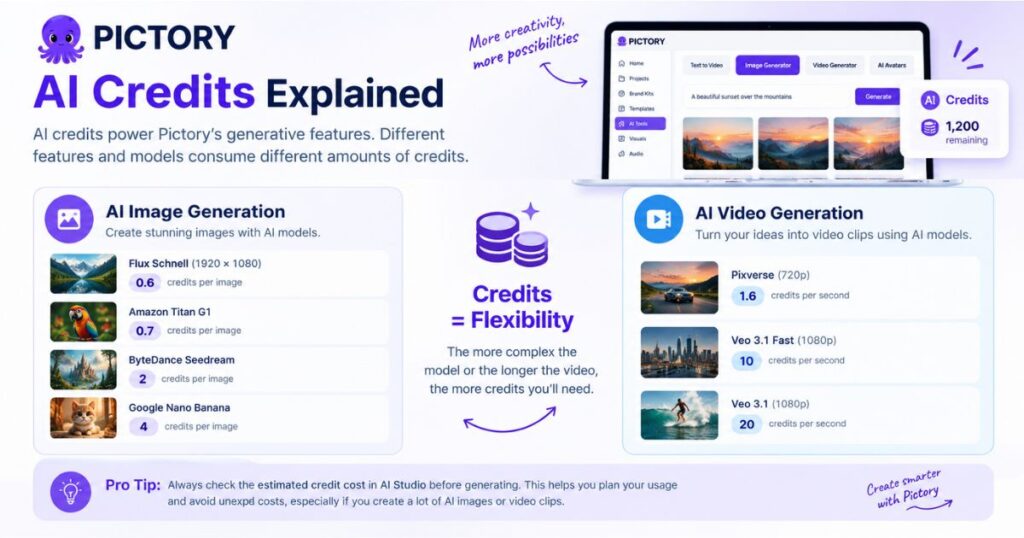
AI credits are used for generative features such as AI image generation, AI video generation, and AI avatars. Different features and models consume different amounts of credits.
Pictory’s official credit guide lists the following examples:
| Generative feature | Published credit consumption |
|---|---|
| Flux Schnell image generation, 1920 × 1080 | 0.6 credits per image |
| Amazon Titan G1 image generation | 0.7 credits per image |
| ByteDance Seedream image generation | 2 credits per image |
| Google Nano Banana image generation | 4 credits per image |
| Pixverse video generation at 720p | 1.6 credits per second |
| Veo 3.1 Fast at 1080p | 10 credits per second |
| Veo 3.1 at 1080p | 20 credits per second |
Source: Pictory’s official AI Credits guide. Rates and available models may change, so check the estimate displayed in AI Studio before generating content.
Notice the difference: generating one minute of video with a model charging 20 credits per second would require 1,200 credits if the entire 60 seconds were generated at that rate. That is why a plan’s video-minute allowance should never be treated as a promise of unlimited generative footage.
What happens to unused AI credits?
Pictory’s published documentation says unused credits roll over into the next cycle and remain available while the subscription is active. Annual subscribers receive their year’s credit allocation at purchase or renewal, rather than receiving one-twelfth of it every month.
For Team plans, credits are pooled at the workspace level. Members draw from the shared allowance rather than each receiving an independent copy of the entire pool.
This is useful if your generation needs fluctuate. However, read the current credit terms carefully, especially before cancelling a subscription.
How Much Does Pictory Really Cost for a Faceless YouTube Channel?
The most useful way to evaluate Pictory Pricing is to estimate the cost of your actual workflow. Two creators on the same plan may have very different expenses because one relies on stock footage while the other generates most of the scenes using AI models.
Consider three hypothetical workflows.
| Workflow | Main usage | What to evaluate |
|---|---|---|
| Beginner channel | Scripts, stock footage, captions, AI voiceovers | Starter’s minutes and voiceover allowance |
| Regular publishing | Multiple videos each week, long-video summaries, occasional AI visuals | Professional’s minutes, credits, and advanced features |
| AI-heavy production | Frequent generated scenes, avatars, and multiple projects | Credit consumption, add-ons, and Team capacity if collaboration is needed |

Scenario 1: A beginner publishing four videos a month
Suppose you publish four eight-minute videos monthly. That is 32 minutes of finished content, well below Starter’s 200-minute monthly allowance.
If you mainly use stock footage and standard editing tools, video minutes may not be your limiting factor. Instead, check your voiceover allowance and whether you need generative AI images or video clips.
In this situation, Starter may be sufficient. Paying for Professional simply to obtain more video minutes may not make sense if you never use them.
Scenario 2: A channel publishing twenty videos a month
Suppose you publish twenty ten-minute videos each month. That is 200 minutes of finished content, matching Starter’s published monthly video-minute allowance.
But that does not automatically mean Starter is the best plan. You must also account for the voiceovers, AI generation, editing workflow, and any need for longer individual projects. If your production grows, Professional may provide a more comfortable buffer and advanced features.
Scenario 3: A channel generating most scenes with AI
Now imagine that your videos depend on AI-generated footage rather than mostly stock clips. Your video exports might remain within the minute allowance while your AI credits run out much sooner.
For example, generating 60 seconds of footage with a model charging 10 credits per second would consume 600 credits. At 20 credits per second, the same duration would consume 1,200 credits.
This is why the cost of a generative-AI-heavy workflow cannot be estimated from the monthly subscription price alone.
These examples are planning scenarios, not guaranteed output limits. Actual usage depends on the model, duration, resolution, number of generations, and current credit rates.
Pictory Pricing: The Hidden Costs You Should Check
The phrase “hidden costs” does not necessarily mean that Pictory charges undisclosed fees. The practical concern is that the headline subscription price may not represent the full cost of your particular workflow.
Here are the main areas to check before paying.
1. Additional AI credits
If you rely on generative images, video, or avatars, your included credits may not be enough.
Pictory’s published credit guide lists these additional credit options:
| Additional credits | Published price |
|---|---|
| 500 recurring monthly credits | $25/month |
| 1,000 recurring monthly credits | $49/month |
| 1,500 recurring monthly credits | $70/month |
| 3,000 recurring monthly credits | $135/month |
| 5,000 recurring monthly credits | $199/month |
| 500 one-time prepaid credits | $25 |
| 1,500 one-time prepaid credits | $70 |
| 3,000 one-time prepaid credits | $135 |
These prices come from Pictory’s published credit documentation and may change. Check the current options in your account before budgeting for an add-on.
For example, if Professional’s included credits are insufficient for your monthly workload, a recurring add-on could materially increase your total cost. Compare the add-on price with the cost of upgrading before deciding.
2. Annual billing requires upfront payment
The lower annual rate comes with a larger initial payment. A plan displayed at $35 per month may require a $420 annual payment rather than a $35 monthly payment.
This is not an extra fee; it is a billing commitment. It matters if you are testing a new workflow or have an uncertain budget.
3. Voiceover allowances differ
The plans do not all provide the same voiceover allowance. ElevenLabs AI voice minutes are separate from the general video-minute allocation, and standard voice availability also differs between plans.
If realistic narration is essential to your channel, check the languages and voice options you need. Do not assume that a large video-minute allowance includes unlimited premium voice generation.
4. Team resources are shared
Team plans use a shared workspace and pooled AI credits. If multiple people generate content frequently, estimate the team’s combined demand rather than treating the allowance as an independent pool for each person.
5. Taxes and payment-related charges
Pictory displays prices in US dollars. Your final payment may be affected by applicable taxes, your bank’s currency-conversion rate, or fees charged by your payment provider. These depend on your circumstances and may not be included in the headline price.
6. Free-trial downloads are restricted
Pictory offers a 14-day free trial. Its Help Center explains that downloads after the trial require a paid subscription. Videos downloaded during the free trial carry Pictory branding or a watermark.
If you create a video during the trial and later subscribe, you may need to download it again to obtain a version without the trial watermark.
The trial is useful for testing the editor, voices, and workflow, but it should not be treated as a permanent free publishing plan.
Review Pictory’s Current Plans Before You Subscribe →
Is Pictory Free?
Pictory offers a 14-day free trial, but trial access should not be confused with unlimited free use of the platform.
Pictory’s official materials describe trial limitations, including restricted downloads and watermarking. The exact trial allowance and registration requirements can change, so review the offer displayed when you sign up.
During the trial, focus on testing the parts of the workflow that matter most:
- Can Pictory turn your script or article into a useful first draft?
- Are the selected visuals relevant to the narration?
- Is the voiceover quality acceptable for your audience?
- How much editing do you need before the video is publishable?
- How quickly do you consume AI credits when generating images or footage?
These questions will tell you more about the value of a paid plan than simply creating one short demo.
Check Pictory’s Free Trial Offer →
Which Pictory Pricing Plan Is Best for Faceless YouTube Creators?
The right plan depends on your production method. A faceless channel that turns scripts into videos using stock footage may have very different needs from one that generates most scenes with AI video models.
| Your situation | Plan to evaluate first | Why |
|---|---|---|
| You are testing your first workflow | Free trial | Test the editor before committing |
| You publish occasionally and use stock footage | Starter | Lower entry price and basic features |
| You publish consistently and need advanced tools | Professional | More minutes, credits, and production features |
| You work with editors or manage several channels | Team | Shared workspace and collaboration |
| You produce business training at scale | Enterprise | Custom capacity and interactive features |
For many individual faceless YouTube creators, Starter is a sensible place to begin evaluating Pictory Pricing. However, creators who depend heavily on generated scenes may find that AI-credit consumption, rather than video minutes, determines which plan is practical.
Before upgrading, estimate how many finished videos you publish each month, their average duration, and the proportion of scenes you generate rather than select from existing footage. Then compare those estimates with the current plan allowances.
Remember that a video tool is only one part of a successful channel. Topic selection, scripting, audience retention, editing decisions, and thumbnails still matter. A more expensive plan does not automatically produce better-performing videos.
Is Pictory Worth the Price?
Pictory may offer good value if it saves you meaningful time converting scripts, articles, presentations, or existing videos into finished content. Its combination of stock footage, narration, captions, and AI-assisted workflows can reduce the amount of manual editing required for some projects.
However, it is not ideal for every production style. If you need highly customized cinematic scenes, extensive manual control, or large volumes of generative footage, examine the credit costs and editing flexibility before subscribing.
A useful way to assess Pictory Pricing is to compare the subscription cost with the time it saves you.
Suppose a plan costs $35 per month on annual billing. If it saves you five hours of work each month, that is an effective subscription cost of $7 per hour saved, before accounting for additional credits or other expenses. Whether that represents good value depends on how you value your time and whether the exported videos meet your quality standards.
The best approach is to test a real project, not just a promotional demo. Use a script you would actually publish, inspect the generated scenes, check the narration, and estimate your likely credit consumption.
For a broader look at another AI video workflow, read our InVideo AI Review. Comparing both tools using the same script can help you decide which workflow offers better value for your channel.
Frequently Asked Questions About Pictory Pricing
How much does Pictory cost per month?
The published standard monthly prices are $29 for Starter, $59 for Professional, and $199 for Team. Enterprise pricing is customized. Annual billing reduces the displayed monthly equivalents to $25, $35, and $119, respectively. Confirm the live prices before purchasing.
Is Pictory cheaper with annual billing?
Yes, the published annual-billing equivalents are lower than the standard monthly rates. However, annual subscriptions are billed upfront, so compare the total payment and your expected usage before choosing.
Do Pictory video minutes and AI credits mean the same thing?
No. Video minutes measure the duration of video you can export under your plan. AI credits are used for certain generative features, including AI images, AI video, and avatars. Each allowance has its own limits.
What happens when I run out of AI credits?
You may need to wait for your allowance to renew, reduce your use of credit-consuming features, or purchase an eligible additional credit pack. Check the current credit options and terms in your account.
Do unused Pictory AI credits roll over?
Pictory’s published credit guide says unused credits roll over into the next cycle and remain available while your subscription is active. Review the current terms before cancelling or changing your subscription.
Can I cancel Pictory at any time?
Pictory’s subscription documentation says you can cancel through your account. Cancellation takes effect at the end of the current billing term. Check your renewal date and the current cancellation terms before proceeding.
Does Pictory put a watermark on exported videos?
Videos downloaded during the free trial carry Pictory branding. Paid plans remove the Pictory watermark from videos exported under the paid subscription. You may need to download a trial-created project again after upgrading.
Which Pictory plan is best for beginners?
Starter is the lowest-priced standard paid plan and may be sufficient for beginners who mainly turn scripts or URLs into videos using existing visuals. Test your workflow first, especially if you expect to use generative AI features extensively.
Does Pictory charge extra for AI-generated videos?
AI video generation consumes credits according to the selected model and settings. If your included allowance is insufficient, additional credit packs may be available at extra cost. Check the displayed estimate before generating.
Continue Learning
Choosing a video tool is easier when you understand how different platforms fit different creative workflows. Continue exploring these Videmint guides:
- InVideo AI Review: Features, Pricing, and What to Expect — explore another platform for creating videos with AI.
- Kling AI Omni: Complete Guide — learn about Kling AI’s creative workflow and capabilities.
- Kling AI Motion Control — explore motion-driven AI video creation.
- Kling AI Pricing Guide — compare another AI video tool’s subscription structure.
- Pictory Review: Is It Worth It? Features & Pricing — An in-depth look at Pictory’s features, pricing, pros, and cons to help you decide if it’s worth it.
- Pictory AI Tutorial: Create Videos in Minutes — A step-by-step guide to creating AI videos quickly and easily.
- Pictory Free Plan: 14-Day Trial & Watermark Limits — Discover the free trial’s features, credit limits, and watermark restrictions before subscribing.
- Pictory vs InVideo AI: Best for Faceless YouTube? — Compare features, pricing, and workflows to find the best AI video tool for your channel.
Final Verdict: Is Pictory Pricing Worth It?
Pictory Pricing is easiest to evaluate when you look beyond the headline subscription fee. Starter provides a lower-cost entry point, Professional adds capacity and advanced features, and Team is designed for collaboration. Enterprise serves organizations with customized requirements.
The main costs to understand are annual billing commitments, AI-credit consumption, voiceover allowances, and any additional credits you may need. Video minutes alone do not tell you how much generative content you can produce.
For faceless YouTube creators, the most sensible plan is the one that supports a realistic publishing schedule without making you pay for unused features. Start by testing a representative project, estimating your actual credit consumption, and comparing your needs with the current allowances.
Ultimately, Pictory Pricing should be judged by the time it saves and the quality of the videos you can publish—not just the number displayed on the pricing page.
If the workflow suits your channel, review the current plans and trial terms before deciding which subscription to choose.