Pictory vs InVideo AI: Best for Faceless YouTube?
Choosing between Pictory and InVideo AI can make a real difference to your faceless YouTube workflow. Both platforms use artificial intelligence to simplify video production, but they approach the process differently. One focuses heavily on turning existing content into videos, while the other provides a broader environment for creating videos from prompts and customizing the result.
This Pictory vs InVideo comparison explores the differences that matter most to creators: video quality, script-to-video workflows, AI-generated visuals, voiceovers, editing flexibility, pricing, and overall value. Rather than simply listing features, we will examine how each platform fits different production needs.
Whether you want to build a faceless YouTube channel, repurpose blog posts, create educational videos, or produce promotional content, understanding these differences will help you spend your money more wisely.
Ready to explore your options? Try Pictory AI for content-driven video production or InVideo AI for a broader AI video creation workflow.
Pictory vs InVideo: Quick Comparison
Before examining each platform in detail, here is an overview of the main differences relevant to faceless YouTube creators.
| Feature | Pictory | InVideo AI |
|---|---|---|
| Primary focus | Turning existing content into videos | Creating and editing videos from prompts and source material |
| Script-to-video | Yes | Yes |
| Blog-to-video | A central workflow | Available workflows depend on the project tools |
| AI-generated visuals | Available through AI Studio and supported tools | Available through supported AI generation models |
| Stock media | Getty Images and Storyblocks integrations | Stock media and other assets, depending on plan |
| AI voiceovers | Yes | Yes |
| Scene editing | Yes | Yes, with additional timeline-editing capabilities |
| Faceless YouTube videos | Suitable for explainers and educational content | Suitable for varied content formats and creative projects |
| Free access | Time-limited free trial | Free plan with limited usage and watermarked exports |
| Usage limits | Video-minute allowances, credits, and plan-specific restrictions | Credits, generation limits, models, and plan-specific restrictions |
| Best starting point | Creators who already have scripts or articles | Creators who want more ways to generate and customize video content |
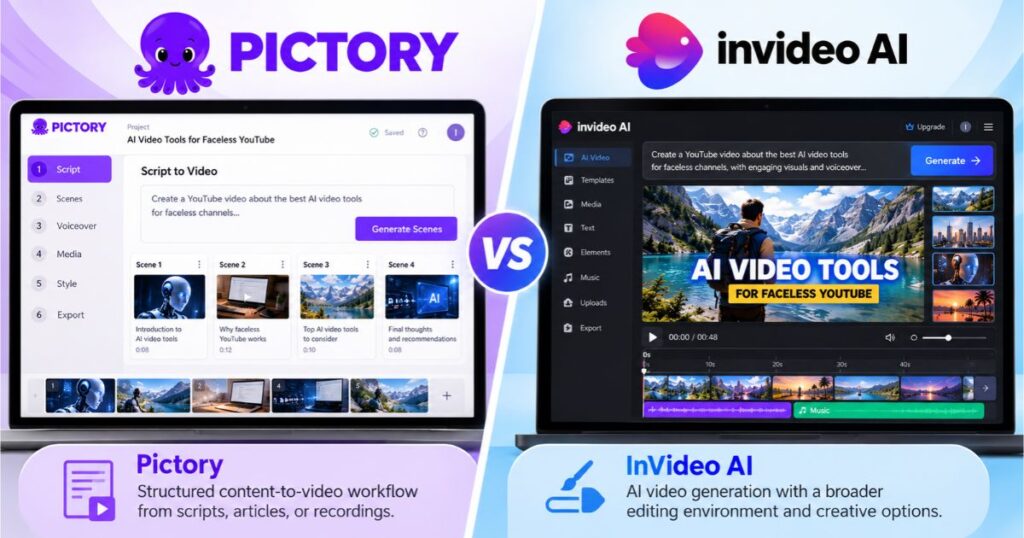
The central distinction in the Pictory vs InVideo comparison is how you prefer to create videos. Pictory is especially useful when you already have a script, article, or recording that needs to become a video. InVideo AI is worth considering when you want to explore a wider range of prompt-based creation and editing options.
Neither workflow is automatically better for every creator. The right choice depends on your content format, editing preferences, and production budget. For many creators, the Pictory vs InVideo choice becomes clearer when judged against their actual video production workflow.
What Is Pictory AI?
Pictory is an AI-powered video creation platform designed to help creators turn written and recorded material into videos. It can help organize a script into scenes, select relevant visuals, add narration, and prepare a video that you can review and edit.
One of its strongest use cases is content repurposing. Suppose you publish a 1,500-word article explaining how to use an AI tool. Instead of manually assembling a video from scratch, you can use Pictory to transform the article or its key points into a visual explanation.
Pictory supports several starting points, including scripts, URLs, documents, presentations, audio, and ideas. The exact workflow and available options depend on the project and account experience.
For faceless YouTube creators, the main advantage is a structured production process. You can develop a script, review the automatically assembled scenes, improve the narration, and replace visuals that do not fit the explanation.
Pictory’s Main Advantages
Content repurposing: Pictory is useful for turning existing articles, scripts, and recordings into additional video content.
Structured scene editing: You can review the relationship between the narration and visuals and adjust the result before exporting.
Voiceovers and captions: These tools help you produce narrated videos without recording yourself on camera.
Brand consistency: Brand Kit and related features can help creators maintain a consistent appearance across recurring content, subject to their plan.
Where Pictory May Fall Short
Automatic visual selection does not guarantee that every scene will accurately represent the script. You may need to replace generic or irrelevant clips, improve pacing, and correct captions.
The platform also uses different allowances for exported video minutes and AI generation credits. If you frequently generate custom visuals, you should review the relevant credit costs before choosing a plan.
For a detailed examination of its features, limitations, and value, read our Pictory Review: Is It Worth It? Features & Pricing.
Want to test a content-driven workflow? Try Pictory AI and see how it handles a short script or article from your own niche.
What Is InVideo AI?
InVideo AI is a video creation platform that combines AI-assisted generation with editing tools. Depending on the selected plan and workflow, users can start from prompts or scripts, create visuals with supported models, add narration, and refine their projects using the available editing environment.
Its broader creative approach can be useful when you want to develop different kinds of content rather than follow one repeatable article-to-video process.
For instance, you might want to create a product advertisement, a short social media video, a cinematic concept, or a narrated YouTube explainer. InVideo AI provides tools for a range of these tasks, although the available generation models and usage allowances vary by plan.
InVideo AI’s Main Advantages
Flexible creative workflows: You can work from a prompt or script and explore different ways to produce a video.
AI generation options: Available models can help create visual content beyond conventional stock-footage selection, depending on your plan and chosen workflow.
Timeline editing: The InVideo editor includes tools for trimming, splitting, rearranging, and refining clips. Manual timeline editing does not consume AI credits according to its Help Center.
Broader content formats: The platform can support social media content, marketing videos, and different kinds of faceless YouTube projects.
Where InVideo AI May Fall Short
InVideo AI uses credits for AI-assisted creation and generation. Costs vary depending on the model, duration, resolution, and features used. More ambitious projects may consume credits quickly, particularly when you generate several versions.
The broader set of creative options may also require more decisions during production. If you want a simple, repeatable way to turn existing blog posts into narrated videos, you should compare how much time each workflow actually saves you.
To evaluate the platform more thoroughly, read our InVideo AI Review.
Want to explore more creative options? Try InVideo AI and experiment with a short prompt-based project before committing to a subscription.
Pictory vs InVideo: Which Is Better for Faceless YouTube?
For faceless YouTube creators, the choice is not simply about which platform has more features. It is about how you produce videos and how much work remains after the initial generation.
The Pictory vs InVideo decision becomes clearer when you separate common faceless channel formats.
| Faceless YouTube format | Pictory | InVideo AI |
|---|---|---|
| Educational explainers based on scripts | Strong fit | Suitable |
| Videos repurposed from blog posts | Particularly useful | Depends on the workflow |
| Product tutorials | Suitable | Suitable |
| Storytelling videos from detailed prompts | Possible, depending on the workflow | Worth exploring for broader creative generation |
| Promotional videos | Suitable | Suitable |
| Content requiring custom AI-generated visuals | Available through supported tools | Available through supported generation models |
| Repeatable content production | Useful for structured workflows | Useful when you need broader editing and generation options |
If You Already Have a Script
Pictory is a natural starting point when the script is already written and the goal is to turn it into a narrated video with relevant scenes.
This workflow is useful for channels covering educational topics, software tutorials, list videos, industry explainers, and informational content. You can focus on the message first and then improve the visual sequence.
InVideo AI can also work from scripts, so the distinction is not that one platform supports scripts and the other does not. The practical question is which interface produces a better first draft for your topic and requires less correction. This practical difference is central to Pictory vs InVideo for script-led channels.
If You Want More Creative Freedom
InVideo AI is worth evaluating when your ideas require different visual approaches, prompt-based generation, or more extensive timeline editing.
This may be useful for short promotional videos, creative storytelling, and social media content where visual experimentation is an important part of the production process.
However, AI-generated visuals can still contain mistakes or inconsistent details. You must review the result rather than assuming that a prompt will always produce a finished, publishable video.
If Your Goal Is Publishing Consistently
The best platform is the one that helps you maintain a sustainable workflow.
If you publish several educational videos each week from existing scripts, a predictable process may be more valuable than having access to many generation options. If every video requires different scenes and a distinctive creative treatment, broader generation and editing features may matter more.
For more tools to consider, explore our guide to the best AI tools for faceless YouTube channels.
Pictory vs InVideo: Features and Editing Compared
Feature lists can be misleading unless you connect them to actual production tasks. A useful comparison asks not only whether a tool provides a feature, but also how that feature affects the process of making a finished video.
Script-to-Video Workflow
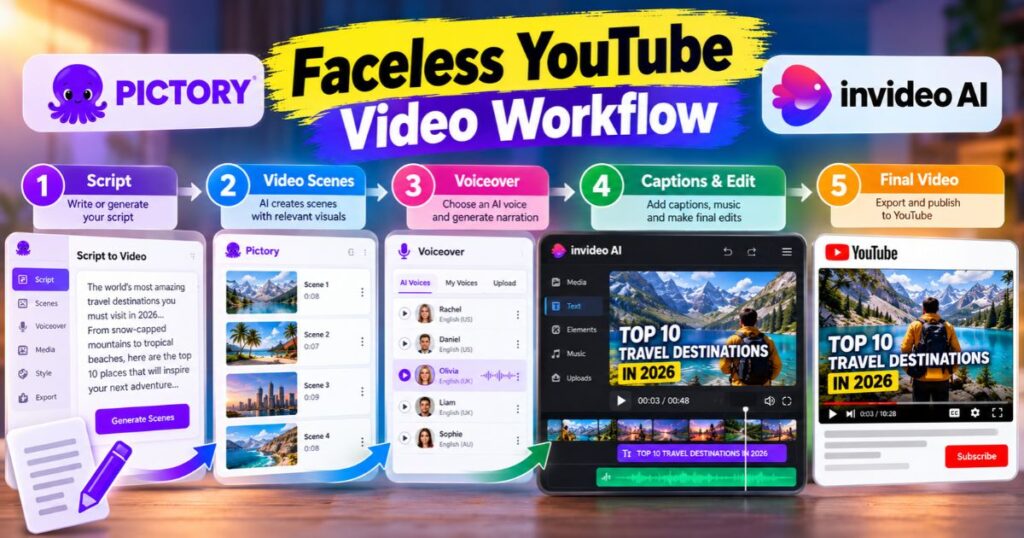
Both platforms can help transform written material into a video. The important questions are how well the generated scenes match your content, how easily you can correct mistakes, and how much editing is required before the output is ready.
If you already publish articles, try converting the same short script in both tools. Compare scene relevance, narration, and the time required to fix the first draft. This test is especially useful in a Pictory vs InVideo evaluation.
Visual Selection and AI Generation
Pictory can assemble scenes using available visual assets and offers AI Studio tools for custom visuals through supported workflows. InVideo AI also offers access to generation models and visual assets, with availability depending on the subscription.
For a channel covering broadly familiar subjects, stock footage may be sufficient. For a project that requires a specific visual concept, custom generation may be more useful.
Neither approach guarantees perfectly accurate visuals. Check that the selected footage represents the narration rather than simply matching a keyword.
Voiceovers and Captions
Both platforms offer tools for narration and text-based video workflows. Their specific options vary by project and plan, so compare the voices and caption controls available to your account.
Listen to the finished narration rather than judging it from a settings menu. Pronunciation, sentence rhythm, and audio levels can affect how professional a video feels. Listening to both outputs is a practical part of any Pictory vs InVideo comparison.
Editing and Control
Pictory offers scene-based editing that suits structured content. InVideo AI includes timeline editing tools that allow users to refine clips and the overall sequence.
More editing control is not always an advantage if you never need it. Conversely, a highly automated workflow can become frustrating when the video requires extensive visual changes.
Pictory vs InVideo: Pricing, Credits, and Value
Pricing is important, but a subscription’s value depends on what you can actually produce with the included allowances. Both platforms offer different tiers, and the numbers used to measure usage are not identical.
Pictory provides video-minute allowances and AI credits depending on the plan. InVideo AI uses credits for AI creation, generation models, and other AI-assisted features. Manual editing and AI generation therefore have different cost implications.
Pictory Pricing
Pictory’s official pricing page currently displays the following monthly equivalents for annual billing, alongside higher monthly-billing rates:
| Plan | Annual-billing equivalent | Monthly billing |
|---|---|---|
| Starter | $25/month | $29/month |
| Professional | $35/month | $59/month |
| Teams | $119/month | $199/month |
| Enterprise | Custom | Custom |
The plans differ in video-minute allowances, storage, brand kits, AI credits, and collaboration features. Annual plans may allocate the yearly allowance upfront rather than refreshing it monthly, so check the terms before subscribing.
See the official Pictory pricing page and our Pictory Pricing Guide for the current details.
InVideo AI Pricing
InVideo AI’s current pricing page offers a free plan with limited weekly usage, along with paid tiers. The official page currently displays annual-billing equivalents of $10 per seat/month for Starter, $30 for Plus, and $75 for Max; pricing and promotions can change.
| Plan | Annual-billing equivalent shown | General use |
|---|---|---|
| Free | $0 | Limited testing with watermarked exports |
| Starter | $10/seat/month | Entry-level AI creation |
| Plus | $30/seat/month | More frequent creation and model access |
| Max | $75/seat/month | Higher credit allowance for demanding projects |
| Enterprise | Custom | Organization-specific requirements |
The exact models and generation capabilities depend on the plan. InVideo’s credit system also means that the number of finished videos can vary substantially depending on which models and settings you choose.
Review the official InVideo AI pricing page before subscribing.
Which Offers Better Value?
The Pictory vs InVideo cost comparison cannot be decided by looking only at the lowest monthly price. One platform measures exported video minutes and provides AI credits for certain tools, while the other relies more extensively on credit-based generation.
A fair comparison should estimate the cost of producing your typical finished video, including the number of revisions, generation attempts, and final exports.
Ask yourself:
- How many finished videos will you publish each month?
- Will you mostly assemble stock footage or generate custom visuals?
- How much editing will you do after generation?
- Do you need multiple brand kits or team collaboration?
- Which credit allowances are included in your preferred plan?
Ready to compare the plans directly? Explore Pictory’s pricing options and InVideo AI’s available plans before deciding how much production capacity you need.
Pictory vs InVideo: A Practical Test You Can Run
You do not need to subscribe to both platforms for months to learn which workflow suits you. A small, structured comparison can reveal meaningful differences before you spend more money.
Step 1: Choose One Script
Write a short script of approximately 300–500 words on a topic you understand well. Use exactly the same text in both tools.
Choose a topic with enough concrete details to evaluate the visuals, but avoid a subject that requires complex animation or extensive original footage.
Step 2: Use Comparable Settings
Choose the same aspect ratio, approximate length, language, and narration style wherever the tools allow it. Record any differences that you cannot match.
This keeps the comparison focused on the platform’s workflow rather than on unrelated choices.
Step 3: Review the First Draft
Evaluate the following areas:
| Criterion | What to check |
|---|---|
| Script accuracy | Does the video preserve the intended meaning? |
| Visual relevance | Do the scenes match the narration? |
| Voice quality | Is the narration clear and natural? |
| Pacing | Are scenes too short, too long, or repetitive? |
| Editing effort | How many changes were required? |
| Generation usage | How many minutes or credits were consumed? |
| Export restrictions | Are there watermarks, resolution limits, or other restrictions? |
Step 4: Track the Time Spent Editing
Record how long it takes to correct the video and prepare the final export. An automatically generated draft may appear fast, but the time spent fixing irrelevant clips or adjusting the sequence matters just as much.
Step 5: Compare the Final Result
Watch both videos from beginning to end, preferably on the device your audience is likely to use.
Choose the platform that provides the best combination of acceptable output quality, manageable editing effort, and affordable production for your specific content. Use these results to make your Pictory vs InVideo decision based on evidence from your own workflow.
This practical method makes the Pictory vs InVideo decision more meaningful than relying on feature lists alone.
Which Tool Should You Choose?
The right choice depends on how you work, not on the number of features listed on a pricing page.
| Your situation | Platform to evaluate first | Reason |
|---|---|---|
| You regularly turn articles into videos | Pictory | Its workflows are designed for content repurposing |
| You already write scripts for educational videos | Pictory | It offers a structured script-to-video process |
| You want to experiment with different creative prompts | InVideo AI | Its generation workflows offer broader creative options |
| You need more timeline-editing flexibility | InVideo AI | Its editor provides detailed manual editing controls |
| You produce several types of promotional content | InVideo AI | Its range of generation and editing workflows may suit varied projects |
| You want a simple recurring workflow | Compare both using the same script | Your actual editing effort will determine which is more efficient |
Remember that either platform may fit several of these situations. This table indicates where to begin evaluating, not a guarantee that one tool will produce better results for every project. Treat the recommendations above as starting points for your Pictory vs InVideo test, not universal rules.
Frequently Asked Questions
Is Pictory better than InVideo AI for faceless YouTube?
Pictory is worth evaluating first if you primarily turn existing scripts, blog posts, or recordings into narrated videos. InVideo AI is worth testing if you want broader prompt-based creation and timeline-editing options. Your results will depend on your topic and editing needs.
Can I create faceless YouTube videos with both tools?
Yes. Both platforms can help assemble videos without requiring you to appear on camera. You still need to review the script, visuals, narration, and copyright permissions before publishing.
Which platform is cheaper?
The answer depends on your plan, billing period, usage, and chosen features. Pictory’s video-minute allowances and AI credits are not directly equivalent to InVideo’s credit-based generation. Compare the cost of producing your actual videos rather than just the entry price.
Does InVideo AI have a free plan?
Its official pricing page lists a free plan with limited weekly usage and watermarked exports. It does not provide the same generation access as the paid tiers, so check the current allowances before relying on it for production.
Does Pictory offer a permanent free plan?
Pictory offers a time-limited free trial rather than a permanent, unrestricted free subscription to its full platform. Trial access and restrictions are explained in our Pictory Free Plan guide.
Can I use either tool for commercial videos?
Commercial use depends on the platform’s current terms, the plan you purchase, and the rights associated with the media and other assets in your project. Review those terms before using the output in advertising or paid client work.
Where can I learn more about Pictory?
Read our Pictory AI Tutorial for a practical walkthrough of the video creation process.
Final Verdict: Pictory vs InVideo AI
The Pictory vs InVideo decision comes down to the workflow you need most. Pictory is a strong option to evaluate when your content starts as an article, script, or recording and you want to turn it into a structured video. InVideo AI is a useful alternative when your work involves varied creative prompts, AI generation, and more detailed timeline editing.
Neither tool guarantees a perfect first draft. Both require review and refinement, and their costs depend on the production capacity and features you use.
Before subscribing, compare the output from the same short script, measure the editing time, review generation usage, and check the export restrictions. That will give you a clearer answer than choosing solely on feature counts or advertised prices.
Ready to start creating? Try Pictory AI if you want to repurpose content into video, or explore InVideo AI if you want more flexibility across different creation workflows.
Continue Learning
Explore these related Videmint guides to make a more informed decision:
- Pictory Review: Is It Worth It? Features & Pricing — Understand Pictory’s features, limitations, and overall value.
- Pictory Pricing Guide — Compare plan prices, allowances, and subscription terms.
- Pictory AI Tutorial: Create Videos in Minutes — Learn how to create and refine videos using Pictory.
- Pictory Free Plan: 14-Day Trial & Watermark Limits — Understand the trial restrictions before subscribing.
- InVideo AI Review — Explore InVideo AI’s features and limitations.
- Best AI Tools for Faceless YouTube Channels — Explore other tools for creating videos without appearing on camera.
- Pictory Alternatives: 7 Best Tools in 2026 (Free & Paid) — Compare seven AI video tools, including InVideo AI, Kling AI, HeyGen, and Synthesia, to find the best free or paid alternative for your video creation needs.
Affiliate disclosure: Some links in this article are affiliate links. Videmint may earn a commission if you subscribe through them, at no additional cost to you.