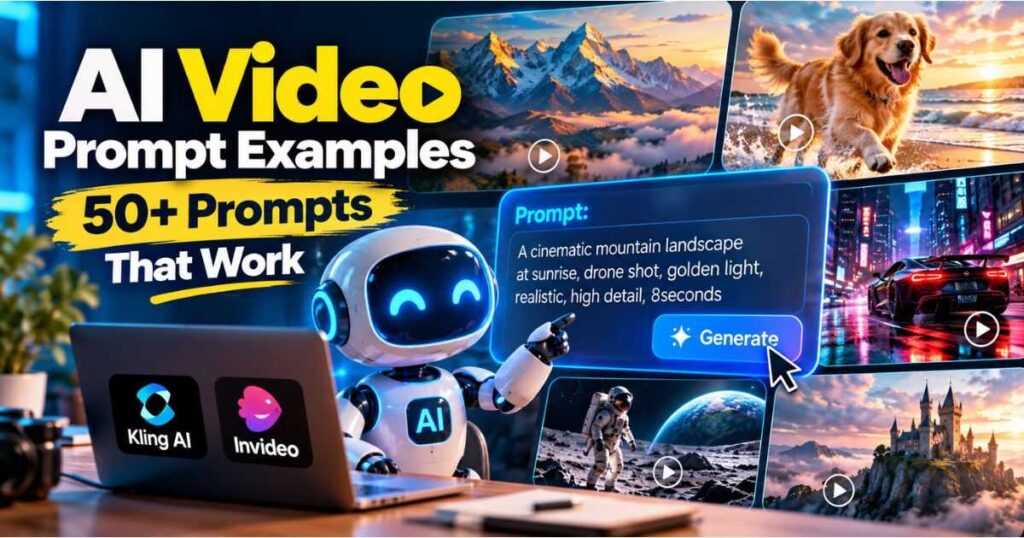
AI Video Prompt Examples: 50+ Prompts That Work
Creating an impressive AI-generated video is not always about choosing the most advanced video model. In many cases, the quality of the result depends on how clearly you describe the scene, the action, the camera, and the visual style.
That is why having practical AI Video Prompt Examples can save you hours of trial and error. Instead of staring at an empty prompt box wondering what to write, you can start with a proven structure, adapt it to your idea, and generate a much more intentional result.
In this guide, you’ll find 50+ AI Video Prompt Examples covering cinematic scenes, products, nature, characters, action, horror, storytelling, YouTube Shorts, advertising, and image-to-video generation. You’ll also learn how to structure your own prompts, avoid common mistakes, and adapt prompts for tools such as Kling AI and InVideo.
Quick tip: Don’t treat these prompts as fixed scripts. Use them as starting points and change the subject, action, environment, camera movement, lighting, and style to match your project.
What Makes a Good AI Video Prompt?
Before jumping into the AI Video Prompt Examples, it helps to understand what separates a useful prompt from a vague one.
A weak prompt might be:
A beautiful cinematic city.
There is nothing technically wrong with it, but the AI has to make almost every creative decision itself.
A stronger prompt gives the model a clearer production brief:
A futuristic city street at night after heavy rain, neon signs reflecting across wet pavement, pedestrians moving through the scene, slow tracking camera, shallow depth of field, realistic cinematic lighting.
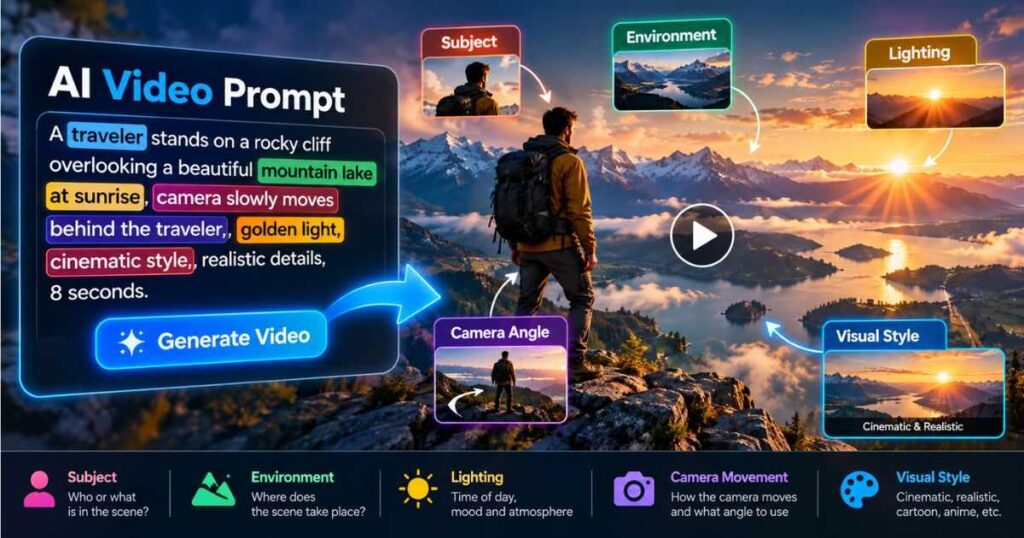
Now the model has information about:
- The subject
- The environment
- Movement
- Camera behavior
- Lighting
- Visual style
- Atmosphere
For a deeper explanation, see our guide on How to Write AI Video Prompts That Actually Work, which covers prompt structure, text-to-video, image-to-video, camera movement, character consistency, and prompt iteration.
The Basic AI Video Prompt Formula
A useful starting structure for most AI Video Prompt Examples is:
Subject + Action + Environment + Camera + Lighting + Style + Additional Motion
You don’t have to include every element in every prompt.
For example:
A golden retriever runs along a wet beach at sunrise. The camera tracks alongside the dog while waves move toward the shore. Warm natural lighting, realistic cinematic photography.
For image-to-video, you can simplify the structure because the reference image already establishes much of the appearance:
The character slowly turns toward the camera while her hair moves in the wind. Subtle push-in, natural movement, soft evening light.
The goal isn’t to write the longest possible prompt. The goal is to give the AI enough useful information to understand what should happen.
50+ AI Video Prompt Examples You Can Copy
The following AI Video Prompt Examples are designed as practical starting points. You can copy them, replace the subject, and adapt the camera or style to your preferred AI video generator.
1. Cinematic City
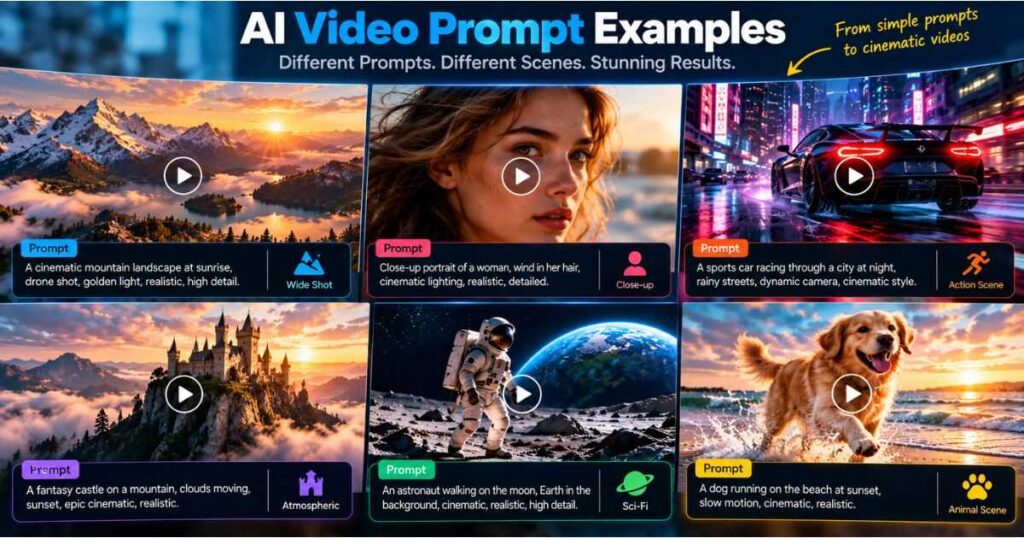
A futuristic city at night after heavy rain, neon signs reflecting across wet streets, pedestrians moving naturally, slow cinematic tracking shot, shallow depth of field, realistic lighting.
2. Mountain Landscape
Massive snow-covered mountains at sunrise, golden light illuminating the peaks, clouds moving through the valleys, slow aerial drone movement, cinematic landscape photography.
3. Ocean Scene
A powerful ocean wave approaches a rocky coastline during sunset, sea spray drifting through the air, slow camera push-in, warm golden light, realistic cinematic style.
4. Forest Scene
A dense pine forest covered in morning mist, sunlight filtering between the trees as leaves move gently in the wind, slow forward tracking camera, atmospheric cinematic realism.
5. Desert Scene
A lone traveler walks across a vast desert at sunset, wind blowing sand across the ground, the camera slowly tracks backward, warm orange light, epic cinematic photography.
6. Futuristic Laboratory
A futuristic AI laboratory filled with holographic displays and advanced equipment, researchers moving between workstations, slow camera movement, cool blue lighting, realistic science-fiction style.
7. Medieval Castle
An ancient stone castle stands on a mountain during sunrise, clouds drifting behind the towers, birds flying across the sky, slow aerial camera movement, epic fantasy cinematography.
8. Space Station
A massive space station orbits Earth while sunlight reflects from its metallic surface, the camera slowly moves around the station, realistic space photography, cinematic lighting.
9. Rainy Street
A person walks through a narrow city street during heavy rain, reflections shimmer across the pavement, pedestrians carry umbrellas, handheld documentary camera, realistic nighttime lighting.
10. Sunrise Village
A peaceful mountain village wakes at sunrise, smoke rises from rooftops while birds fly between houses, slow aerial reveal, warm natural lighting, realistic cinematic atmosphere.
AI Video Prompt Examples for Characters
Character-based generation becomes more interesting when you clearly describe both the character and what the character is doing.
11. Character Walking
A young explorer wearing a weathered brown jacket walks through a misty forest, carefully looking around, camera tracking backward, soft morning light, realistic cinematic style.
12. Character Running
A determined athlete runs through an empty city street before sunrise, visible breath in the cold air, dynamic tracking camera, natural motion blur, dramatic blue-hour lighting.
13. Character Portrait
Close-up portrait of a mysterious detective standing beneath a streetlight in the rain, subtle facial movement, shallow depth of field, slow push-in, moody cinematic lighting.
14. Character Looking at a City
A traveler stands on a rooftop overlooking a futuristic city at night, coat moving gently in the wind, camera slowly pushes toward the character, neon reflections, cinematic atmosphere.
15. Character Entering a Room
A detective slowly opens an old wooden door and enters a dark abandoned room, dust floating through a beam of light, handheld camera follows from behind, suspenseful cinematic style.
AI Video Prompt Examples for Products
Product videos require a different approach. The product should remain visually important while the camera movement supports the presentation.
16. Smartphone Commercial
Premium black smartphone rotating slowly on a reflective surface, soft studio lights moving across the glass edges, macro camera push-in, luxury technology commercial style.
17. Watch Advertisement
Luxury mechanical watch resting on black stone, subtle reflections across the metal surface, camera slowly orbits the watch, dramatic studio lighting, premium advertising style.
18. Perfume Commercial
Elegant perfume bottle standing on a marble surface surrounded by soft flowers, golden light passing across the glass, slow macro camera movement, luxury fragrance advertisement.
19. Car Commercial
Black sports car driving through a rain-soaked city at night, neon reflections moving across the body, low tracking camera beside the vehicle, dramatic cinematic lighting.
20. Laptop Product Video
Modern laptop opens slowly on a minimalist desk, screen illuminates the surrounding workspace, camera performs a smooth push-in, soft natural daylight, premium technology commercial.
AI Video Prompt Examples for YouTube and Shorts
Short-form content needs a strong visual hook and a clear action. Avoid trying to describe an entire story in one generation.
21. Funny Cat Short
An orange cat secretly opens a refrigerator at midnight and freezes when the light turns on, camera quickly pushes toward its surprised face, comedic timing, realistic animation.
22. Viral Transformation
A messy bedroom instantly transforms into a futuristic creator studio, objects moving rapidly into position, dynamic camera pull-back, energetic lighting, satisfying social media style.
23. AI Workspace
A futuristic content creator sits at a desk surrounded by holographic screens showing video analytics, camera slowly circles the workspace, blue ambient lighting, cinematic technology aesthetic.
24. Money Visualization
Digital financial charts rapidly rise above a modern city skyline, glowing numbers move upward through the scene, camera flies forward between the graphics, polished business presentation style.
25. Mystery Hook
A locked door slowly opens by itself inside an abandoned house, darkness visible behind it, camera slowly pushes forward, dust floating in the air, suspenseful horror atmosphere.
AI Video Prompt Examples for Action Scenes
Action prompts benefit from a clear physical action and controlled camera movement.
26. Motorcycle Chase
A black motorcycle races through a narrow city street at night, water spraying from the tires, camera tracks rapidly alongside the bike, controlled motion blur, dramatic cinematic lighting.
27. Car Chase
Two sports cars race through a mountain road at sunset, tires gripping the sharp turns, low tracking camera following the lead vehicle, realistic motion and dramatic lighting.
28. Running Through a Forest
A runner sprints through a dense forest while branches move in the wind, camera tracks alongside at high speed, natural motion blur, dramatic sunlight breaking through the trees.
29. Superhero Landing
A futuristic armored hero lands heavily in the center of a damaged city street, dust and debris rise around the character, low-angle camera pushes forward, dramatic cinematic lighting.
30. Explosion Reveal
A massive explosion erupts behind an abandoned warehouse as the camera pulls backward to reveal the full environment, smoke and debris moving naturally, dramatic action-film cinematography.
AI Video Prompt Examples for Horror and Suspense
Horror doesn’t always need fast movement. Slow, controlled camera work can make a scene more unsettling.
31. Abandoned Hospital
A deserted hospital corridor at night, flickering fluorescent lights and drifting dust, the camera slowly moves forward toward an open doorway, dark cinematic horror atmosphere.
32. Haunted Forest
A fog-covered forest at midnight, trees moving gently in the wind while a distant shadow crosses between them, slow handheld camera movement, eerie blue lighting.
33. Empty House
An abandoned house interior with old furniture covered in dust, curtains moving from an unseen breeze, camera slowly pans toward a dark hallway, unsettling cinematic lighting.
34. Mysterious Figure
A mysterious figure stands motionless at the end of an empty street during heavy fog, camera slowly pushes forward while streetlights flicker, atmospheric psychological horror style.
35. Doorway
An old wooden door slowly opens inside a completely dark room, faint light spills across the floor, camera remains locked as dust floats through the air, suspenseful horror cinematography.
AI Video Prompt Examples for Nature and Animals
Nature scenes are excellent for testing environmental movement.
36. Eagle Taking Flight
A bald eagle spreads its wings and launches from a rocky mountain cliff, wind moves through its feathers, camera follows upward, golden sunset lighting, realistic wildlife cinematography.
37. Horse Running
A powerful black horse runs across a green meadow at sunrise, grass moves beneath its hooves, camera tracks alongside, warm natural lighting, realistic cinematic photography.
38. Whale
A massive humpback whale breaches the ocean surface at sunset, water droplets sparkle in the sunlight, camera slowly follows the movement, epic wildlife documentary style.
39. Wolf in Snow
A gray wolf walks slowly through a snowy forest while snow falls around it, visible breath in the cold air, camera tracks backward, realistic winter documentary style.
40. Tropical Island
A tropical island surrounded by turquoise water under bright sunlight, palm trees moving in the breeze, waves reaching the shore, slow aerial drone movement, cinematic travel photography.
AI Video Prompt Examples for Storytelling
Storytelling works best when each generation represents a focused shot rather than an entire movie.
41. Emotional Discovery
A young explorer discovers an old photograph inside an abandoned house, slowly wipes dust from the image, camera pushes toward the photograph, warm sunlight through the window, emotional cinematic style.
42. Train Station
A traveler waits alone at an old train station during heavy rain, checking the empty platform, camera slowly tracks toward the character, muted colors, emotional drama cinematography.
43. Lost Child’s Toy
An old teddy bear lies in the middle of an empty playground as autumn leaves move across the ground, camera slowly pulls backward to reveal the abandoned surroundings, melancholic cinematic style.
44. Treasure Discovery
An explorer opens an ancient stone chest inside a hidden underground chamber, warm golden light spills across the room, camera slowly pushes forward, mysterious adventure-film style.
45. Final Scene
A lone character walks toward the horizon as the sun sets behind distant mountains, wind moves their clothing, camera slowly pulls backward, warm cinematic lighting, emotional ending.
AI Video Prompt Examples for Image-to-Video
With image-to-video generation, don’t unnecessarily rewrite everything already visible in the reference image.
Instead, concentrate on movement.
46. Portrait Animation
The character slowly turns toward the camera while their hair moves naturally in the wind. Subtle push-in, realistic facial movement, soft natural lighting.
47. Product Animation
The product rotates slowly while reflections move naturally across its surface. Smooth macro camera movement, controlled studio lighting, premium commercial style.
48. Landscape Animation
Clouds move slowly across the sky while trees sway gently in the wind. The camera performs a subtle forward push, maintaining the original composition.
49. Character Walking
The character begins walking forward naturally while the camera tracks backward at the same speed. Clothing moves gently in the wind, realistic cinematic motion.
50. Vehicle Animation
The vehicle accelerates forward while dust rises naturally from the road. The camera tracks alongside it with controlled motion blur and smooth cinematic movement.
51. Ocean Image Animation
Waves move naturally toward the shore while sunlight reflects across the water. The camera slowly pulls backward, revealing more of the surrounding coastline.
How to Adapt These AI Video Prompt Examples
Copying a prompt is useful, but learning how to modify one is much more valuable.
Take this example:
A sports car drives through a futuristic city at night. Slow tracking shot, neon lighting, cinematic style.
You can turn it into a completely different video by changing individual components:
| Element | Original | New Version |
|---|---|---|
| Subject | Sports car | Motorcycle |
| Environment | Futuristic city | Desert highway |
| Action | Drives | Accelerates |
| Camera | Tracking shot | Low-angle follow |
| Lighting | Neon | Golden sunset |
| Style | Cinematic | Documentary |
The result becomes:
A black motorcycle accelerates along a desert highway at sunset. Low-angle camera follows behind the motorcycle, dust trailing from the tires, warm natural light, realistic documentary style.
This is one of the most effective ways to build your own AI Video Prompt Examples library.
How to Write Better AI Video Prompts
If you want consistent results instead of relying entirely on copy-and-paste prompts, follow these principles.
1. Describe Physical Actions
AI video generation needs motion.
Instead of:
A beautiful woman in a city.
Try:
A woman walks through a crowded city street while checking her phone.
The second version tells the model what needs to change over time.
2. Use One Primary Camera Movement
Don’t overload a five-second clip with:
Zoom in, orbit, pan left, tilt upward, track backward and rotate around the subject.
Choose the most important movement.
For example:
The camera slowly tracks alongside the character as she walks through the city.
If you need another movement, consider making it a separate shot.
For a much larger collection of camera-specific instructions, see AI Camera Prompts: 30 Camera Movements for Better AI Videos.
3. Replace Vague Adjectives With Visual Information
Words such as:
- Amazing
- Awesome
- Beautiful
- Professional
- Epic
- High quality
- Cinematic
can help, but they shouldn’t be the entire prompt.
Instead of:
Amazing cinematic forest.
Try:
Dense pine forest covered in morning mist, soft sunlight passing between the trees, leaves moving in the wind, slow forward tracking camera.
Now the AI has actual visual instructions.
4. Don’t Overload the Prompt
More words don’t automatically mean better results.
A short, structured prompt can outperform a huge paragraph containing contradictory instructions.
Think like a director writing a shot description rather than a novelist writing a scene.
5. Iterate Instead of Rewriting Everything
If the first generation is almost right, identify the biggest problem.
Was the:
- Camera too fast?
- Character barely moving?
- Background frozen?
- Lighting wrong?
- Action unclear?
- Character inconsistent?
Change that one element and generate again.
This makes it easier to understand which instruction actually improved the result.
AI Video Prompt Examples for Kling AI
Kling AI is particularly useful when your goal is to create cinematic generative clips, realistic motion, image-to-video sequences, or visually detailed scenes.
A useful Kling-style structure is:
Subject + Environment + Action + Lighting + Camera Movement + Style
For example:
A faceless entrepreneur walks through a futuristic neon city, glowing reflections across wet pavement, volumetric fog, slow tracking camera movement, ultra-realistic cinematic style.
If you want more Kling-specific examples, our Best Kling AI Prompts (2026): 25 Cinematic Prompts That Actually Work includes cinematic, nature, fantasy, camera movement, text-to-video, and YouTube prompt examples.
🚀 Ready to Test Your Prompts in Kling AI?
Instead of simply collecting prompts, put them into practice and compare the results. Try Kling AI Free and experiment with the examples above.
Using AI Video Prompt Examples With InVideo
Not every creator wants to generate individual cinematic clips one at a time.
InVideo takes a broader approach by turning an idea or prompt into a more complete video-production workflow. This can be useful when your objective is creating YouTube videos, marketing content, explainers, or other projects where scripting, visuals, narration, and editing all matter.
For example, instead of prompting only:
A futuristic city at night.
You can start with a broader instruction:
Create a short YouTube video explaining how artificial intelligence is changing video production. Use futuristic AI-generated visuals, clear narration, engaging scene changes, and a modern technology aesthetic.
The difference is that the prompt describes the purpose of the video, not just one shot.
You can learn more in our InVideo AI Review (2026).
🚀 Create Videos Faster With InVideo
If you prefer having AI handle more of the production workflow instead of generating every scene manually, try InVideo AI and test your own ideas.
AI Video Prompt Examples: Text-to-Video vs Image-to-Video
One of the most important distinctions is whether you’re starting with text or an existing image.
| Feature | Text-to-Video | Image-to-Video |
|---|---|---|
| Starting point | Text | Reference image |
| Scene description | Important | Often already established |
| Character description | Important | Usually minimal |
| Motion | Essential | Essential |
| Camera movement | Useful | Very useful |
| Style | Important | Often inherited |
| Best use | Creating scenes from scratch | Animating existing visuals |
For text-to-video:
A red sports car drives through a rain-soaked city at night, neon reflections across the pavement, camera tracking alongside the vehicle.
For image-to-video:
The car accelerates forward as rain falls across the windshield. The camera tracks alongside it while reflections move across the body.
The second prompt doesn’t need to describe the car again because the reference image has already established its appearance.
Common Mistakes to Avoid
Even the best AI Video Prompt Examples won’t guarantee perfect generations if the underlying instructions are problematic.
Being Too Vague
Make a cool cinematic video.
This leaves almost everything to the model.
Too Many Actions
The character runs, jumps, fights, opens a door, gets into a car, drives away and watches an explosion.
A short clip may struggle to represent all of that correctly.
Break it into separate shots.
Conflicting Camera Instructions
Static camera that rapidly orbits around the character.
Those instructions fight each other.
Choose one clear camera behavior.
Repeating the Entire Image
For image-to-video, describing every object again can be unnecessary. Focus on what should move.
Changing Too Many Variables
If every generation changes the character, camera, environment, lighting, and action, it becomes difficult to identify what actually improved the result.
Change one or two variables at a time.
How to Build Your Own AI Video Prompt Library
Once you create several successful videos, don’t let the prompts disappear into old projects.
Create a personal library with categories such as:
| Category | Save These Prompt Elements |
|---|---|
| Cinematic | Shot size, lens, lighting, camera |
| Characters | Appearance, clothing, movement |
| Nature | Weather, environmental motion |
| Products | Product position, reflections, camera |
| Action | Movement, speed, tracking |
| Horror | Lighting, atmosphere, slow movement |
| Shorts | Hook, action, pacing |
| Advertising | Product, camera, brand style |
| Image-to-video | Subject movement, camera movement |
| Storytelling | Character, action, environment, mood |
Over time, you won’t need to start from a blank prompt.
You’ll have reusable structures that you can adapt to new projects.
Best Workflow for Using AI Video Prompts
A reliable workflow looks like this:
Idea → Shot → Prompt → Generate → Evaluate → Improve → Generate Again → Edit
Step 1: Define the shot
Ask what the viewer should see.
Step 2: Define the action
Ask what changes during the clip.
Step 3: Choose the camera
Pick one primary camera movement.
Step 4: Add environmental movement
Think about rain, wind, smoke, water, crowds, dust, or moving objects.
Step 5: Add lighting and style
Use details that actually affect the appearance.
Step 6: Generate
Treat the first generation as a test.
Step 7: Diagnose
Find the biggest problem.
Step 8: Change one or two elements
Don’t rewrite the entire prompt unnecessarily.
Step 9: Generate again
Compare the new result with the previous version.
Step 10: Assemble your successful clips
Once you have several usable generations, bring them together in your editor.
This process is much more predictable than endlessly adding adjectives to a prompt and hoping the AI eventually understands what you mean.
Frequently Asked Questions About AI Video Prompt Examples
What are AI video prompts?
AI video prompts are written instructions that tell a generative video model what scene to create and what should happen during the clip. Effective prompts usually describe the subject, action, environment, camera, lighting, and style.
How long should an AI video prompt be?
There is no universal ideal length. A prompt should be long enough to communicate the important visual and motion information but short enough to avoid unnecessary or conflicting instructions.
What makes an AI video prompt effective?
Specificity is more important than length. Clearly describe what the subject does, where the scene takes place, how the camera moves, and what visual style you want.
Should I include camera movements?
When camera behavior matters, yes. Instructions such as tracking shot, slow push-in, orbit, pan, dolly, or locked camera can make the intended shot much clearer.
Are these AI Video Prompt Examples compatible with every AI video generator?
They can be adapted to most prompt-based AI video tools, but different models interpret instructions differently. A prompt that works extremely well in one platform may need adjustments in another.
Should I use the same prompt repeatedly?
You can reuse a successful structure, but adapt the subject, action, environment, and camera to each scene. For recurring characters, keeping important appearance details consistent can also help.
Are AI video prompt generators useful?
Yes. A prompt generator can be useful when you have an idea but don’t know how to structure it. However, you should review the generated prompt and remove unnecessary details before using it.
How can I make AI-generated videos more cinematic?
Don’t simply add the word “cinematic.” Describe specific visual decisions such as shot size, camera movement, depth of field, lighting, composition, environmental motion, and color atmosphere.
Continue Learning
If you want to go beyond these AI Video Prompt Examples, continue building your prompting skills with these related Videmint guides:
- How to Write AI Video Prompts That Actually Work — Learn the complete prompt structure and how to improve text-to-video and image-to-video results.
- AI Camera Prompts: 30 Camera Movements for Better AI Videos — Explore camera movements you can directly incorporate into your prompts.
- Best Kling AI Prompts (2026): 25 Cinematic Prompts That Actually Work — Get Kling-specific cinematic, camera, fantasy, nature, and YouTube prompts.
- AI Storyboard Generator: Turn Ideas Into Stunning Videos — Learn how to turn ideas into organized visual sequences before generation.
- Kling AI Canvas Review (2026) — Explore a project-based workflow for organizing storyboards, prompts, and AI-generated assets.
- Runway AI Review (2026): Is It Worth Using? — Compare another major AI video platform and its creative workflow.
- InVideo AI Review (2026): Is It Worth It? — Learn how InVideo approaches prompt-based video creation and editing.
- Runway AI Free: Is It Really Free? Here’s What You Get — Discover the free plan, 125 credits, key features, and its limitations.
Final Thoughts on AI Video Prompt Examples
The biggest lesson from these AI Video Prompt Examples is simple: don’t prompt for a vague idea when you can prompt for a specific shot.
Instead of asking an AI model to make something “cool,” tell it what the viewer should see, what the subject should do, how the camera should behave, and what kind of lighting and visual style you want.
You don’t need to write enormous prompts either. A concise, structured description can be more useful than a long paragraph filled with generic words.
Start with the examples in this guide, change the subjects and actions, test them in your preferred AI video generator, and save the versions that produce good results. Over time, you’ll build your own library of AI Video Prompt Examples that can dramatically speed up your workflow.
If you want cinematic individual clips, experiment with Kling AI. If you want a broader prompt-to-video production workflow, try InVideo. The important thing is to stop treating prompting as guesswork and start treating each prompt as a small production brief.
That shift alone can make your AI-generated videos more consistent, more intentional, and much easier to create.