AI Camera Prompts: 30 Camera Movements for Better AI Videos
AI video generation has become much more capable, but getting a visually impressive result is not only about choosing the right model. AI Camera Prompts can make a major difference in how a generated shot feels, especially when the goal is to create cinematic movement instead of a static image with random animation.
A prompt such as “make it cinematic” gives an AI video model very little information about how the camera should behave. A more specific instruction such as “slowly dolly toward the subject while maintaining focus on the face” gives the model a much clearer physical action to interpret.
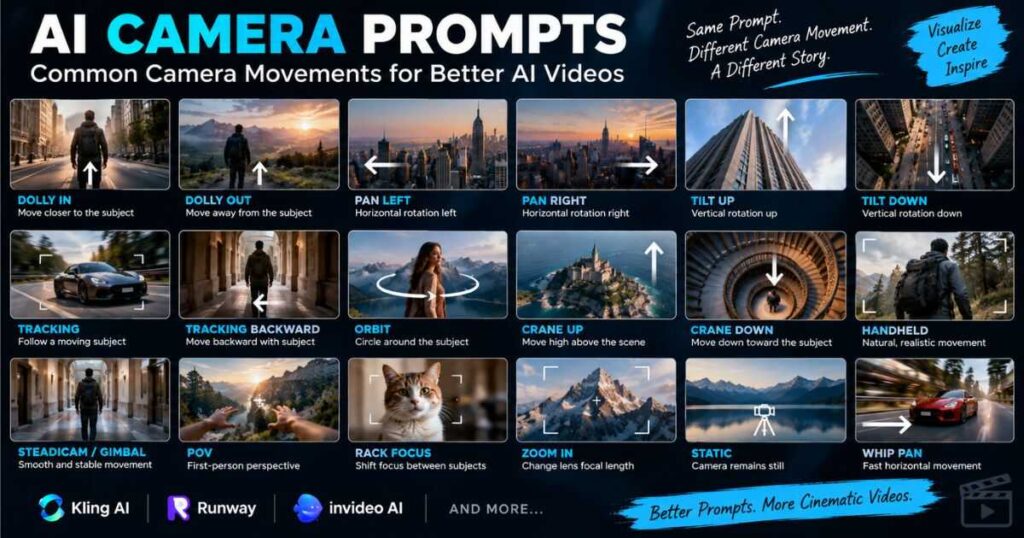
Modern AI video tools can understand camera movements such as pans, tilts, dollies, tracking shots, orbits, crane movements, handheld shots, and more. Runway’s current camera reference, for example, separates camera movement from framing and composition and provides examples for many different movements.
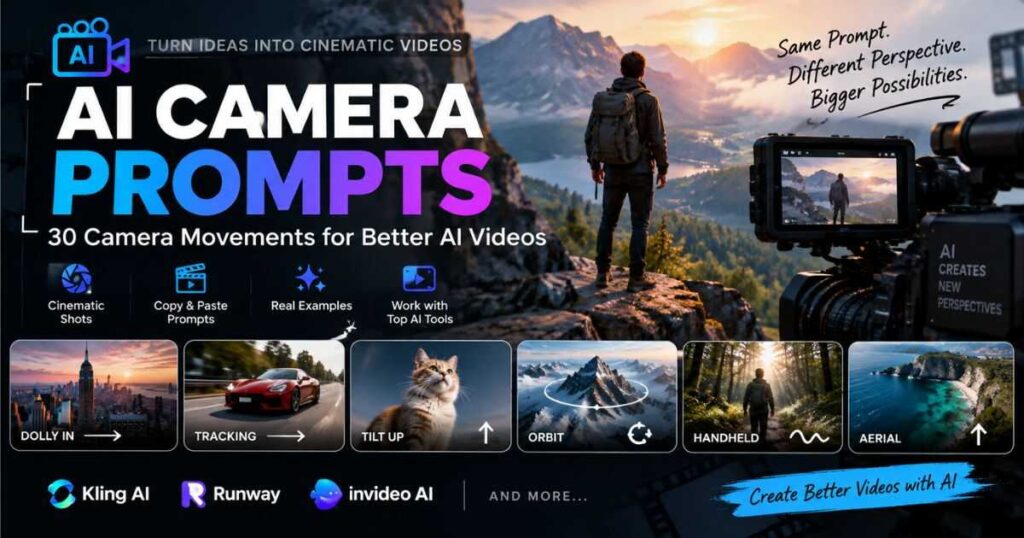
This guide explains how AI Camera Prompts work, how to describe camera movement clearly, and provides 30 copy-and-paste prompts that can be adapted for cinematic scenes, YouTube videos, product videos, social media content, and AI-generated movies.
What Are AI Camera Prompts?
AI Camera Prompts are instructions that tell an AI video generator how the virtual camera should behave during a shot.
Instead of describing only the subject, the prompt describes the relationship between the camera and the subject.
For example:
A woman stands beside a window.
This describes the scene, but not the camera.
A stronger version is:
Slow dolly in toward the woman as she looks through the window, keeping her face in sharp focus.
Now the AI has information about:
- The subject
- The camera movement
- The direction of movement
- The subject’s action
- The focus
- The pacing
This distinction is important because AI video generation involves both subject motion and camera motion. Runway’s prompting guidance specifically recommends treating camera motion as its own prompt element rather than relying on vague cinematic language.
How AI Camera Prompts Control Camera Movement
The simplest way to write effective AI Camera Prompts is to think like a film director.
Instead of writing:
Make this scene cinematic.
Describe what the camera physically does:
The camera slowly tracks backward as the character walks toward it.
A useful structure is:
Camera movement + direction + subject + action + speed + framing
For example:
Slow tracking shot moving backward as the man walks toward the camera, keeping him centered in a medium shot.
You do not always need every element. In fact, overly complicated prompts can make it harder to determine which instruction caused a bad result. Runway recommends starting with essential motion and adding details gradually through iteration.
InVideo’s current guidance similarly emphasizes describing camera movement using filmmaking vocabulary and combining shot size, movement, and framing in a clear structure.
For more ready-to-use AI video prompts beyond camera movements, check out our AI Video Prompt Examples guide for practical prompts covering cinematic scenes, characters, action, products, and more.
30 AI Camera Prompts for Better AI Videos
The following AI Camera Prompts are designed as practical starting points. They can be adapted to different subjects, environments, styles, and AI video generators.
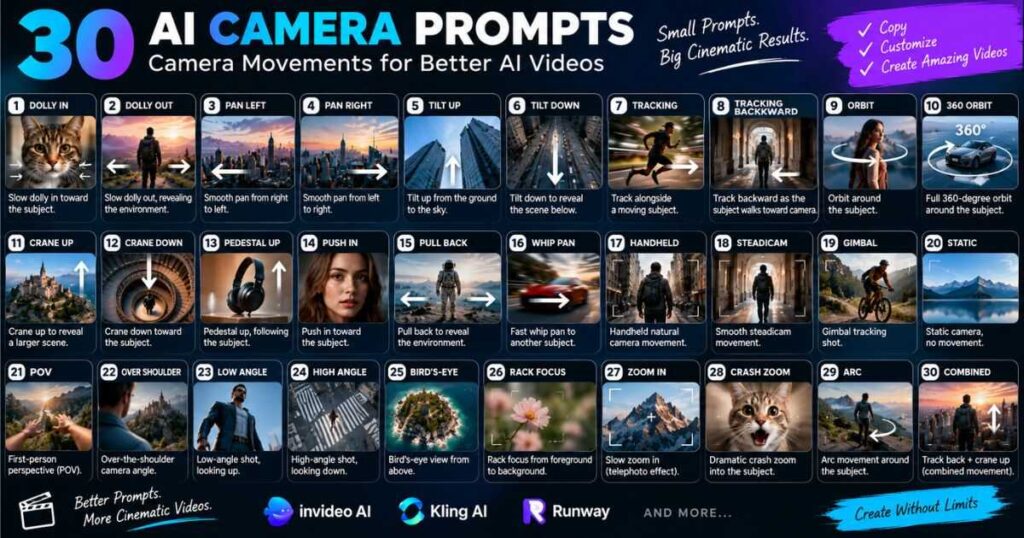
1. Slow Dolly In
A dolly moves the camera physically forward or backward.
Prompt:
Slow dolly in toward the character as they look directly into the camera, gradually bringing their face into greater focus, smooth cinematic movement.
Best for: Emotional scenes, introductions, dramatic moments.
2. Slow Dolly Out
A dolly out gradually reveals more of the environment.
Prompt:
Slow dolly backward from the character, gradually revealing the surrounding landscape while maintaining the subject in the center of the frame.
Best for: Reveals, establishing shots, dramatic endings.
3. Pan Left
A pan rotates the camera horizontally from a fixed position.
Prompt:
Smooth camera pan from right to left across the room, gradually revealing the character standing beside the window.
Runway describes a pan as horizontal camera rotation from a fixed point.
4. Pan Right
Prompt:
Slow cinematic pan from left to right following the moving car as it travels along the road, maintaining a consistent composition.
Best for: Vehicles, landscapes, character entrances, environmental reveals.
5. Tilt Up
A tilt changes the vertical direction of the camera without moving its position forward.
Prompt:
Slow tilt upward beginning at the character’s feet and gradually revealing their face before continuing toward the sky.
Best for: Tall buildings, characters, dramatic reveals.
6. Tilt Down
Prompt:
Slow camera tilt downward from the top of the skyscraper to the busy street below, revealing the environment gradually.
This works particularly well when the subject or environment has significant vertical scale.
7. Tracking Shot
A tracking shot follows a moving subject.
Prompt:
Smooth tracking camera follows the runner from the side as they move through the city street, keeping the subject centered throughout the shot.
Tracking is especially useful when the subject itself is moving through the environment. Runway’s camera reference distinguishes tracking from other movements and provides examples of cameras following moving subjects.
8. Tracking Backward
Prompt:
The camera smoothly tracks backward while the character walks toward it, maintaining a medium shot and keeping the character centered.
This is one of the most useful AI Camera Prompts for character introductions.
9. Orbit Around the Subject
An orbit circles around the subject.
Prompt:
Slow 180-degree camera orbit around the character as they remain still, maintaining focus on the face while the background moves naturally.
Best for: Character reveals, products, fantasy scenes, dramatic portraits.
Runway’s current camera terminology describes orbit as the camera circling around a subject.
10. Full 360-Degree Orbit
Prompt:
Smooth 360-degree camera orbit around the character, maintaining consistent framing and natural background parallax throughout the movement.
Use this carefully. A full orbit requires the model to maintain the subject consistently from multiple angles.
11. Crane Up
A crane movement moves the camera vertically using a larger sweeping movement.
Prompt:
The camera smoothly cranes upward from behind the character, gradually revealing the massive city surrounding them.
Best for: Epic environments and cinematic reveals.
12. Crane Down
Prompt:
Smooth crane-down movement begins above the scene and gradually descends toward the character standing in the center of the courtyard.
This can create a dramatic transition from an environment-wide view to a character-focused shot.
13. Pedestal Up
A pedestal movement raises or lowers the camera vertically.
Prompt:
The camera performs a slow pedestal up, following the product as it rises from the table into the center of the frame.
Pedestal movement is particularly useful for product videos and controlled studio scenes.
14. Push-In
A push-in brings the camera closer to the subject.
Prompt:
Gentle cinematic push-in toward the character as their expression changes from calm to surprised, maintaining sharp focus on the eyes.
This is similar to a dolly-in conceptually, but the wording can be useful when describing an intentional cinematic emphasis.
15. Pull-Back Reveal
Prompt:
The camera slowly pulls back from a close-up of the character’s face, revealing that they are standing alone in a vast desert landscape.
This is excellent for storytelling because the movement itself reveals new information.
16. Whip Pan
A whip pan is an extremely fast horizontal camera movement.
Prompt:
Rapid whip pan from the detective to the mysterious figure across the room, creating strong natural motion blur between the two subjects.
Runway includes whip pan among its current camera movement terminology.
Best for: Action, transitions, comedy, fast-paced edits.
17. Handheld Camera
Handheld movement introduces controlled natural camera shake.
Prompt:
Handheld documentary-style camera follows the character through the crowded market, with subtle natural camera shake and realistic movement.
Do not automatically add extreme shake. Subtle handheld movement is often more believable for documentary-style footage.
18. Steadicam Movement
Prompt:
Smooth steadicam follows the character from behind as they walk through the hotel corridor, maintaining stable cinematic framing.
Steadicam-style movement can create the impression of a camera operator moving naturally without excessive shake.
19. Gimbal Tracking
Prompt:
Smooth gimbal camera tracks alongside the cyclist as they move through the forest, maintaining stable framing and natural parallax.
This is useful when you want movement but still want the shot to feel polished.
20. Static Camera
Not every cinematic shot needs camera movement.
Prompt:
Locked-off static camera remains completely still while the character slowly walks into the frame and sits beside the table.
This is especially useful for dialogue, establishing shots, product scenes, and controlled compositions.
Runway specifically recommends explicitly stating that the camera remains motionless when a truly static shot is required.
21. POV Camera
POV means the camera represents the character’s point of view.
Prompt:
POV camera walks slowly through the abandoned hallway, looking toward the flickering light at the end of the corridor, subtle handheld movement.
Best for: Horror, gaming-style content, immersive storytelling, first-person scenes.
22. Over-the-Shoulder Movement
Prompt:
Over-the-shoulder camera slowly moves closer to the character as they watch the storm outside the window, keeping the shoulder softly in the foreground.
This creates a strong sense that the viewer is physically present in the scene.
23. Low-Angle Camera
Prompt:
Low-angle camera slowly pushes toward the character as they stand confidently in the center of the street, making the subject appear powerful and imposing.
Low-angle framing is different from camera movement, but combining an angle with movement can create a stronger result.
24. High-Angle Camera
Prompt:
High-angle camera slowly pulls backward from the character, revealing the entire landscape surrounding them.
High angles can work particularly well for environmental storytelling.
25. Bird’s-Eye Movement
Prompt:
Bird’s-eye-view camera slowly rises above the city, revealing streets, buildings, and moving vehicles in a wide cinematic composition.
This is useful for large-scale environments and establishing sequences.
26. Rack Focus
Rack focus changes the focus from one subject to another.
Prompt:
Start focused on the glass of water in the foreground, then smoothly rack focus to the character sitting across the table while the foreground becomes softly blurred.
Rack focus is not a physical camera movement, but it is an important camera-control technique that can make AI-generated footage feel much more cinematic. Runway includes rack focus in its current camera terminology.
27. Slow Zoom In
A zoom changes the lens perspective rather than physically moving the camera.
Prompt:
Slow cinematic zoom toward the character’s face as they realize something is wrong, maintaining sharp focus and subtle natural movement.
It is useful to distinguish zoom from a dolly because they produce different visual effects.
28. Crash Zoom
Prompt:
Sudden dramatic crash zoom into the character’s eyes as they notice something off-screen, creating an intense moment of surprise.
Runway currently lists crash zoom as a very fast dramatic zoom movement.
Use it sparingly because excessive dramatic movement can quickly make a generated video feel artificial.
29. Arc Movement
An arc moves the camera along a curved path around the subject without necessarily completing a full orbit.
Prompt:
Smooth cinematic arc movement around the character from left to right as they stand beside the ocean, keeping the horizon stable and the subject centered.
This works particularly well for cinematic character introductions.
30. Combined Cinematic Camera Movement
Sometimes a sequence benefits from more than one movement, but combining movements should be done carefully.
Prompt:
The camera slowly tracks backward as the character walks forward, then gently cranes upward to reveal the city skyline, maintaining smooth continuous motion throughout the shot.
This type of AI Camera Prompt should be used when the model can handle sequential actions. For complex movements, describing what appears or is revealed during each phase can help make the intended choreography clearer.
AI Camera Prompts: How to Combine Movement With the Subject
One of the biggest mistakes in AI video prompting is describing the camera without explaining what the subject is doing.
Compare these two prompts:
Weak:
Cinematic tracking shot.
Better:
The camera tracks alongside the woman as she walks through the forest, maintaining a medium shot while sunlight moves naturally across the trees.
The second prompt gives the AI a relationship between:
subject movement → camera movement → framing → environment.
This approach is especially useful when creating multiple shots for a YouTube video or AI-generated movie.
For a broader explanation of prompt structure, see How to Write AI Video Prompts That Actually Work.
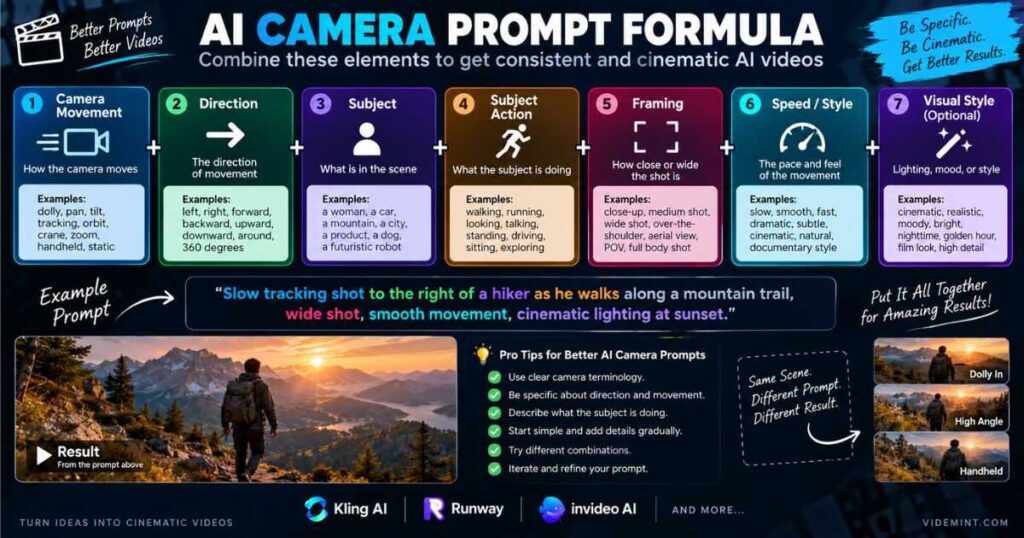
The Best Formula for AI Camera Prompts
A practical formula is:
[Camera movement] + [direction] + [subject] + [subject action] + [framing] + [speed/style]
For example:
Slow dolly forward toward the woman as she opens the old wooden door, medium shot, smooth natural movement, cinematic lighting.
Or:
Handheld camera tracks the dog running through the park from the side, realistic camera shake, natural daylight, documentary style.
You can also add a specific camera angle:
Low-angle tracking shot follows the athlete as he runs through the city, smooth stabilized movement, cinematic natural lighting.
The key is specific physical language. Current Runway guidance recommends direct descriptions rather than abstract instructions such as simply asking for something to “feel cinematic.”
Common AI Camera Prompt Mistakes
1. Using vague words
Avoid relying entirely on:
Make it cinematic.
Instead:
Slow dolly in toward the subject with subtle natural movement.
2. Asking for too many movements
This can create unpredictable results:
Zoom in, orbit, pan left, crane up, whip pan, then track backward.
Instead, start with one primary movement.
For complex sequences, build the movement progressively.
3. Confusing zoom with dolly
A zoom changes the lens perspective.
A dolly physically moves the camera.
If you want the camera to move toward the subject, say:
Slow dolly in.
If you want a lens-based change in perspective, say:
Slow zoom in.
4. Forgetting the direction
Instead of:
Pan.
Write:
Pan slowly from left to right.
Instead of:
Track.
Write:
Track alongside the character from left to right.
The more physically precise the instruction, the less room the model has to guess.
5. Fighting the source image
Image-to-video generation can be particularly sensitive to the starting image. If the image already contains strong motion cues such as motion blur or directional movement, requesting contradictory motion can produce unexpected results. Runway’s current image-to-video guide specifically discusses this issue.
AI Camera Prompts for Different Types of Videos
Different content requires different camera strategies.
| Video Type | Useful Camera Movements |
|---|---|
| YouTube storytelling | Dolly, tracking, slow pan |
| Faceless YouTube | Slow push-in, pan, aerial, static |
| Product videos | Orbit, dolly, rack focus |
| Social media | Push-in, whip pan, crash zoom |
| Cinematic movies | Dolly, crane, orbit, arc |
| Horror | Handheld, POV, slow push-in |
| Travel videos | Pan, drone, tracking |
| Educational videos | Static, slow zoom, controlled pan |
| Action scenes | Tracking, handheld, whip pan |
| Character introductions | Dolly, orbit, crane |
For a complete workflow covering idea development, scripting, visuals, voiceover, editing, and publishing, see How to Make AI Videos.
Using AI Camera Prompts With Kling AI
Kling AI is particularly relevant when the goal is to create generative video shots where movement and cinematic presentation are important.
A useful workflow is to first establish the composition and subject, then use an AI Camera Prompt to describe the desired movement.
For example:
Slow 180-degree orbit around the character while the character remains still, realistic environmental movement and cinematic depth.
Another option:
Smooth tracking shot follows the character as they walk through the city, maintaining consistent framing and natural motion.
The important principle is not to overload the prompt with unnecessary instructions. Start with the camera movement you care about most, generate the shot, and then refine it.
For a deeper look at Kling AI’s capabilities and workflow, see Kling AI Review.
Try Kling AI
If the priority is experimenting with cinematic AI-generated shots and different camera movements, Kling AI is worth testing directly rather than relying only on examples.
Using AI Camera Prompts With Runway
Runway is particularly useful for creators who want direct control over camera terminology and motion.
Its current documentation includes dedicated examples for pans, tilts, dollies, tracking, pedestal movements, crane shots, orbits, arcs, zooms, whip pans, handheld movement, gimbals, static shots, and rack focus.
For image-to-video, Runway recommends focusing the prompt on the desired motion because the input image already establishes much of the composition and visual information.
For example:
The camera slowly pushes in as the character looks toward the horizon.
This is more useful than repeating everything already visible in the reference image.
Using AI Camera Prompts With InVideo AI
InVideo AI takes a broader approach because it is designed around complete video-production workflows rather than only individual generative shots.
Its current guidance recommends using filmmaking vocabulary such as shot size, camera movement, framing, lens behavior, lighting, and atmosphere when describing a shot.
For example:
Medium shot of a man walking through a modern office, slow tracking camera moving backward, shallow depth of field, natural office lighting.
This style of instruction can be useful when building complete YouTube videos, marketing videos, social content, or other projects where camera direction is only one part of the production process.
Create a Video With InVideo AI
If the goal is to move beyond individual clips and create a complete video with scripting, visuals, voiceover, editing, captions, and other production elements in one workflow, InVideo AI is worth testing.
How to Get More Consistent Camera Movement
Getting the first generation right is not always realistic. AI video generation is inherently iterative.
A useful process is:
1. Start with one movement
Slow dolly in.
2. Add the subject action
Slow dolly in as the woman walks toward the door.
3. Add framing
Slow dolly in, medium shot, keeping the woman centered.
4. Add pacing
Slow, smooth dolly in with controlled cinematic movement.
5. Refine the result
If the camera moves too quickly, adjust the speed.
If the subject leaves the frame, specify the framing.
If the camera creates unexpected movement, simplify the prompt.
This iterative approach is consistent with current Runway guidance, which recommends starting with essential motion and adding prompt elements gradually rather than trying to solve everything in one extremely complicated instruction.
AI Camera Prompts for Faceless YouTube Videos
Camera movement is especially useful for faceless YouTube channels because AI-generated scenes can otherwise look repetitive.
For example, instead of showing a static AI-generated image of a city:
Slow aerial camera movement over a futuristic city at night, gradually descending toward the central skyscraper, glowing lights and subtle traffic movement.
For a technology video:
Slow push-in toward a futuristic computer interface as animated data flows across the screen, subtle reflections and controlled camera movement.
For storytelling:
Slow tracking shot follows a lone traveler walking through a foggy forest, camera positioned behind the character, subtle handheld movement.
The goal is not to add movement to every shot. Camera variation is more important than constant movement.
A strong sequence might use:
Static → Pan → Dolly → Tracking → Close-up → Wide reveal
That creates visual rhythm without making every shot feel artificially dramatic.
Quick AI Camera Prompts Cheat Sheet
| Movement | Copy-and-Paste Prompt |
|---|---|
| Dolly In | Slow dolly in toward the subject, maintaining focus on the face. |
| Dolly Out | Slow dolly backward, gradually revealing the surrounding environment. |
| Pan Left | Smooth pan from right to left across the scene. |
| Pan Right | Slow pan from left to right following the subject. |
| Tilt Up | Slow tilt upward from the subject toward the sky. |
| Tilt Down | Slow tilt downward revealing the environment below. |
| Tracking | Smooth tracking camera follows the moving subject. |
| Orbit | Slow camera orbit around the subject while maintaining focus. |
| Crane Up | Smooth crane movement rises above the subject to reveal the environment. |
| Crane Down | Slow crane movement descends toward the subject. |
| Handheld | Subtle handheld camera movement with natural documentary-style shake. |
| Steadicam | Smooth steadicam follows the subject through the environment. |
| Gimbal | Stable gimbal camera tracks alongside the subject. |
| Static | Locked-off camera remains completely still throughout the shot. |
| POV | POV camera shows exactly what the character sees. |
| Over Shoulder | Over-the-shoulder camera slowly moves toward the subject. |
| Push-In | Gentle cinematic push-in toward the subject. |
| Pull-Back | Slow pull-back reveals the larger environment. |
| Whip Pan | Rapid whip pan creates natural motion blur between subjects. |
| Rack Focus | Smooth rack focus shifts attention from foreground to background. |
Final Thoughts: AI Camera Prompts Can Transform AI Video Shots
The difference between a basic AI-generated video and a convincing cinematic shot often comes down to how clearly the intended movement is communicated.
AI Camera Prompts give creators a practical way to control that movement instead of leaving the camera behavior entirely to the model.
You do not need complicated technical instructions. Start with a simple physical action:
Slow dolly toward the subject.
Then add useful information:
Slow dolly toward the subject as they walk through the hallway, maintaining a medium shot.
From there, refine the speed, direction, framing, focus, and environment.
The most important lesson is that AI Camera Prompts should describe what the camera actually does, not simply how the final video should feel. Phrases such as “cinematic” or “professional” can help establish an aesthetic, but they cannot replace a clear physical camera instruction. Current AI video prompting guidance from Runway and InVideo similarly emphasizes direct camera terminology and clear descriptions of movement.
Once the basic movement works, experiment with combinations such as tracking plus a low angle, a dolly combined with rack focus, or an orbit followed by a reveal.
And remember: not every shot needs movement. A perfectly static camera can sometimes create more impact than another complicated camera move.
The best results come from choosing the movement that supports the story rather than adding movement simply because the technology allows it.
For more techniques covering the complete AI video creation process, continue with How to Make Realistic AI Videos and AI Image to Video: How to Turn Images Into Videos.
With the right AI Camera Prompts, a static concept can become a dynamic shot that feels intentionally filmed rather than randomly generated.