
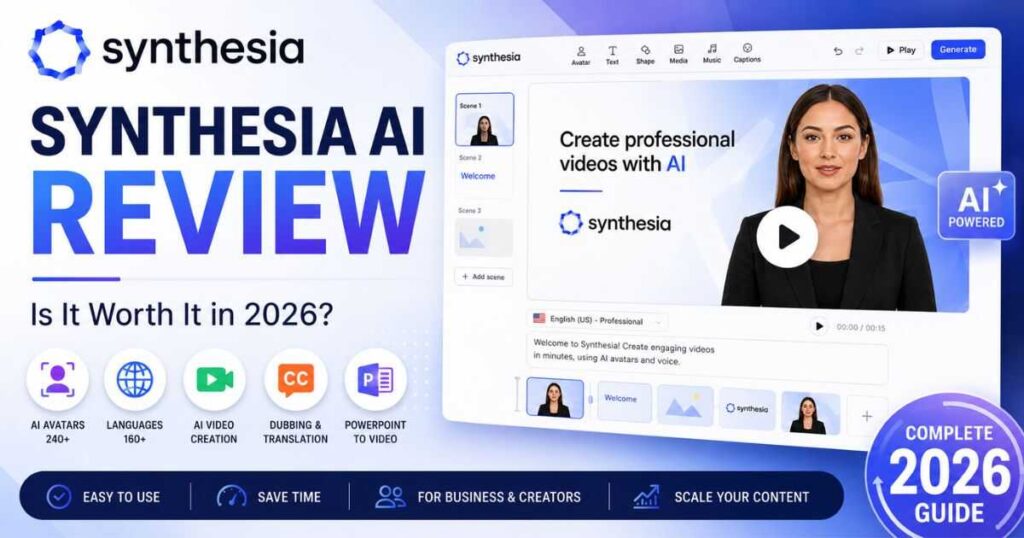
Synthesia AI Review: Is It Worth It in 2026?
If you are looking for a serious AI video platform that can create presenter-led videos without cameras, microphones, actors, or a traditional editing workflow, this Synthesia AI review is worth reading before you spend money.
Synthesia has evolved far beyond the basic “AI avatar reads your script” concept. Today, the platform combines AI avatars, AI video creation, PowerPoint-to-video conversion, dubbing, multilingual production, personal avatars, AI-generated media, templates, screen recording, and a browser-based video editor.
I spent time looking at the current Synthesia interface and its latest feature set, including the dashboard, video creation workflow, Dubbing area, PowerPoint import, AI Playground, and editor. I also compared the current plans and usage limits to answer the question that matters most:
Is Synthesia actually worth paying for in 2026?
Synthesia AI Review: What Is Synthesia?
Synthesia is an AI video creation platform designed primarily for businesses, educators, marketers, trainers, and creators who want to produce professional-looking videos without traditional filming.
Instead of standing in front of a camera and recording every video yourself, you can choose an AI avatar, enter a script, select a voice and language, customize the scene, and generate the video.
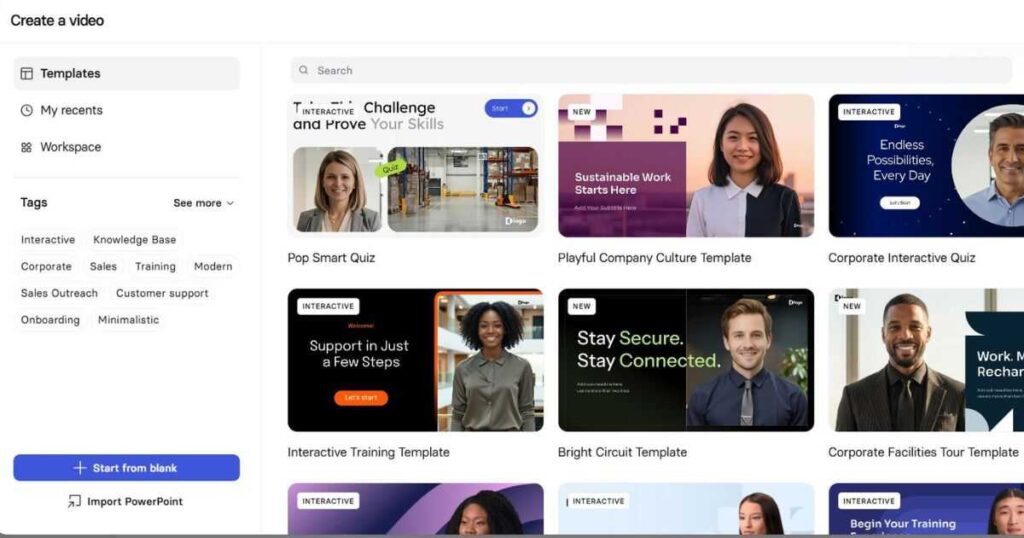
The platform also supports more advanced workflows. You can start with a blank project, use a template, import a PowerPoint presentation, use the AI Assistant, or generate content from prompts and documents.
That flexibility is one of the biggest reasons this Synthesia AI review gives the platform more credit than older reviews often do.
Synthesia currently supports more than 160 languages and offers a large collection of AI voices and avatars. Its avatar system has also become more expressive, allowing presenters to gesture and perform actions rather than simply standing still and talking.
The result is a platform that feels closer to an AI-powered video production environment than a simple talking-avatar generator.
Synthesia AI Review: What Can You Create?
One of the easiest ways to understand Synthesia is to look at the types of content you can actually create.
Training and educational videos
This is probably one of Synthesia’s strongest use cases.
You can create:
- Employee training
- Onboarding videos
- Course lessons
- Software tutorials
- Safety training
- Internal announcements
- Product education
- Customer support videos
Instead of recording a presenter every time information changes, you can update the script and regenerate the video.
Marketing videos
Synthesia can also be used for:
- Product explainers
- Promotional videos
- Social media content
- Sales presentations
- Product demonstrations
- Customer education
- Internal marketing content
The ability to create videos in multiple languages makes the platform particularly interesting for companies targeting international markets.
Presentation videos
If you already create PowerPoint presentations, Synthesia becomes even more useful.
You can import a .pptx presentation and turn it into a narrated video. Synthesia can import editable elements such as text, images, videos, and shapes, while speaker notes can also be converted into the video script.
Create Your First Synthesia Video →
Synthesia AI Review: AI Avatars
Avatars remain one of Synthesia’s biggest selling points.
The current platform offers a large selection of stock avatars, and Synthesia has also expanded into customizable and personal avatars.
The important difference is that avatars are no longer limited to simply reading text.
Synthesia’s newer expressive avatar technology can synchronize gestures, facial expressions, and presentation style with the script.
You can also create a Personal Avatar representing yourself. Depending on the plan and workflow, you can record yourself and use your digital likeness repeatedly instead of appearing on camera every time.
This can be extremely useful for:
- CEOs
- Coaches
- Teachers
- YouTubers
- Course creators
- Sales teams
- Marketing teams
- Corporate trainers
The real advantage is consistency.
Once your avatar is ready, you can create another video without setting up lighting, a camera, a microphone, or a studio.
Synthesia also supports customizable avatars that can be used in different environments and outfits, giving creators more control over how the presenter appears.
According to Synthesia’s current feature information, the platform supports 240+ stock avatars and more than 160 languages, while its voice library contains a very large selection of AI voices.
Are Synthesia avatars realistic?
Yes, generally.
But there is an important distinction.
Synthesia’s strength is not necessarily making the most cinematic AI-generated human imaginable. Its strength is creating a professional digital presenter that can consistently deliver structured information.
For training, business presentations, explainers, tutorials, and educational videos, that distinction matters.
If your goal is an ultra-realistic cinematic character walking through a fantasy environment, Synthesia would not be my first choice.
If your goal is a professional presenter delivering a polished explanation, Synthesia becomes much more compelling.
Synthesia AI Review: Creating a Video
The current interface makes the starting point relatively straightforward.
From the dashboard, you can see options such as:
- Create video
- Dub video
- Import PowerPoint
- Start with Assistant
You can also start from templates or create a project from scratch.
This is one area where the current interface feels significantly more mature than the older Synthesia experience.
Option 1: Start with a blank video
You can create a video from scratch and control the scenes, avatar, text, media, captions, animations, and other elements.
This is the best option when you already have a clear idea of what the video should look like.
Option 2: Use a template
Templates can save time if you don’t want to design every scene manually.
You can choose a suitable layout, replace the content, select an avatar, adjust the script, and generate your video.
Option 3: Start with Assistant
This is one of the more interesting developments in the current version of Synthesia.
The AI Assistant can help create and refine a video from a prompt, script, document, or URL. Synthesia’s documentation says Assistant is available on Starter, Creator, and Enterprise plans.
That means you can start with an idea instead of building the entire video structure yourself.
Option 4: Import PowerPoint
This is particularly useful for professionals and educators.
You can upload a PowerPoint file and turn it into a narrated video while retaining many editable elements.
There are limitations, however.
PowerPoint animations and transitions are not imported, tables can become static backgrounds, and presentations are limited to 150 slides.
So Synthesia does not magically reproduce every PowerPoint feature. It converts the presentation into a video-friendly workflow.
Synthesia AI Review: AI Playground
The AI Playground is one of the features that makes the current Synthesia considerably more interesting.
The Playground allows users to generate AI media and then use that media directly inside Synthesia’s video editor.
You can generate:
- Short AI videos
- Images
- Motion graphics
The current AI Playground supports models including Veo 3.1, Veo 3.1 Fast, and Gemini Omni for video generation, while image generation uses models such as Flux.2 and Nano Banana Pro.
Video generations in the Playground are short clips, generally 8 seconds long. You can generate multiple clips and place them into separate scenes to build a longer sequence.
This is important because it changes the role of Synthesia.
It is no longer only:
Script → Avatar → Video
It can now become:
Idea → Script → Avatar → AI visuals → Motion graphics → Captions → Final video
The generated media is also integrated with the editor, so you don’t have to download an asset and manually upload it again.
Explore Synthesia’s AI Video Tools →
Synthesia AI Review: Dubbing and Translation
Another major strength is localization.
Synthesia supports multilingual video creation and AI Dubbing, allowing you to adapt existing content for different audiences.
The current Dubbing system can translate and dub videos while preserving aspects of the original speaker’s voice and synchronizing lip movement.
Synthesia’s documentation currently lists AI Dubbing across 139 languages, with different credit consumption depending on whether lip sync is enabled.
This can be valuable for businesses that don’t want to create separate videos manually for every market.
Imagine creating one product tutorial in English and then adapting it for:
- Spanish
- French
- German
- Arabic
- Japanese
- Portuguese
- Korean
Instead of hiring separate presenters and recording each version, the localization process can be handled within the platform.
For international businesses, this may be one of Synthesia’s most practical features.
Synthesia AI Review: Pricing
Pricing is one of the areas you should examine carefully before subscribing.
Synthesia currently offers four main plans:
| Plan | Monthly Price | Annual Equivalent | Video Usage |
| Basic | $0 | $0 | Up to 10 min/month |
| Starter | $29/mo | About $18/mo | Up to 10 min/month |
| Creator | $89/mo | About $64/mo | Up to 30 min/month |
| Enterprise | Custom | Custom | Unlimited |
The annual figures are based on Synthesia’s current annual billing prices. Starter is listed at $264/year and Creator at $804/year.
Basic — Free
The free plan is surprisingly useful for testing.
It currently includes:
- 1,200 credits per month
- Up to 10 minutes of video per month
- 25 AI-generated video assets
- A limited avatar selection
- Access to the platform without requiring a credit card
This is enough to understand the interface and decide whether Synthesia fits your workflow.
Starter
Starter is aimed at individuals who need regular video creation.
It includes:
- 1,200 monthly credits
- 14,500 credits annually when billed yearly
- Up to 10 minutes of video per month
- 125+ avatars
- AI Video Assistant
- AI Dubbing
- Downloadable videos
- Custom on-brand avatars
- 1 editor and 3 guests
Creator
Creator increases the allowance to:
- 3,600 credits per month
- 44,000 credits annually
- Up to 30 minutes of video per month
- 180+ avatars
- 5 Personal Avatars
- API access
- Multiple avatars per scene
- Interactive videos
- Branded video pages
- 1 editor and 5 guests
The current credit system is important to understand: Synthesia uses credits across AI usage-based features, and one second of generated video consumes two credits.
That means you shouldn’t judge a plan only by its dollar price. You also need to consider how much content you actually plan to generate.
Synthesia AI Review: Is the Free Plan Worth Trying?
Absolutely.
If you’re unsure whether Synthesia is right for you, I would not recommend immediately paying for a subscription.
Start with Basic.
Create a short video.
Test several avatars.
Try different voices.
Experiment with the AI Playground.
See how the editor feels.
Then ask yourself whether the result is good enough for your intended audience.
This is especially important because AI video platforms can look impressive in promotional demonstrations but feel very different when you actually build a complete project.
The free plan gives you an opportunity to judge the workflow before committing.
Synthesia AI Review: How Good Is the Video Editor?
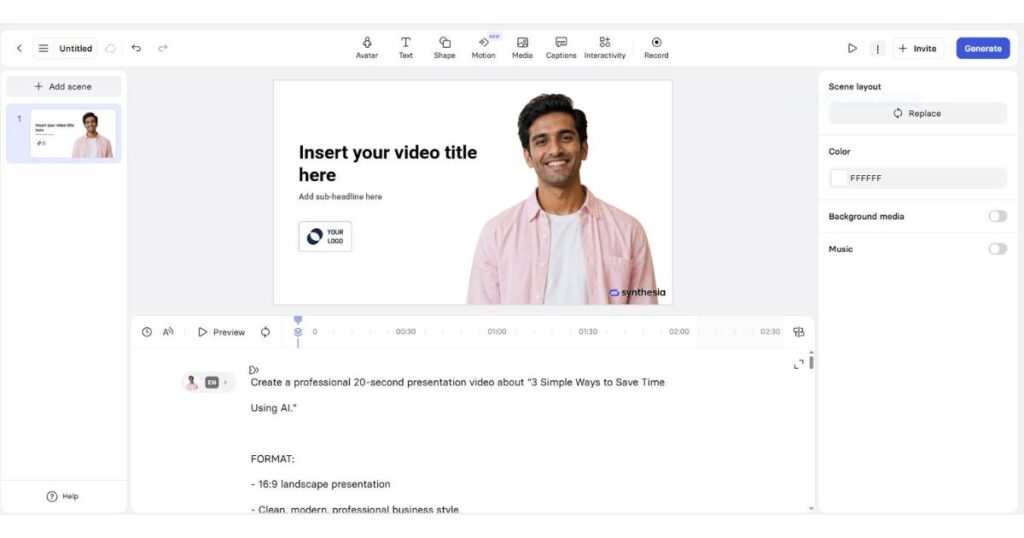
The editor is designed around scenes.
Each scene can contain elements such as:
- Avatars
- Text
- Images
- Video
- Shapes
- Captions
- Music
- Background media
- Animations
- Interactive elements
The interface resembles a simplified presentation/video editor rather than a traditional professional editor such as Premiere Pro.
That’s actually a strength for the target audience.
You don’t need to spend hours learning a complicated timeline.
You can create a scene, place your avatar, adjust the script, add visuals, move to the next scene, and generate the final video.
However, professional video editors will notice the difference.
Synthesia is optimized for speed and structured content, not unlimited creative control.
If you want extremely detailed color grading, complex compositing, advanced sound design, or frame-by-frame editing, you’ll probably want another editor after generating your Synthesia video.
Synthesia AI Review: Pros and Cons
Pros
1. Very easy to use
The interface is designed for people who aren’t professional video editors.
2. Strong AI avatar system
The avatars are one of Synthesia’s biggest advantages, particularly for business and educational videos.
3. Excellent multilingual capabilities
Creating localized versions of content is much easier than traditional production.
4. PowerPoint integration
Turning existing presentations into narrated videos can save significant time.
5. AI Playground
The addition of AI-generated video, images, and motion graphics makes the platform more versatile.
6. Personal Avatars
Creators can build a digital version of themselves and reuse it across multiple videos.
7. Strong business workflow
Synthesia is particularly well suited to training, onboarding, sales, communication, and internal content.
Cons
1. It can become expensive
The paid plans aren’t the cheapest option for casual creators.
2. Video limits matter
The monthly generation allowance needs to be considered carefully if you produce lots of videos.
3. Not a replacement for a professional editor
The editor is powerful for Synthesia’s intended use but doesn’t provide the same creative freedom as advanced desktop editing software.
4. AI-generated visuals consume credits
If you frequently generate additional AI assets, your credit consumption can increase quickly.
5. Avatars still look AI-generated
Even though the quality has improved significantly, some viewers may still notice that they’re watching an AI presenter.
Synthesia AI Review: Synthesia vs HeyGen
Synthesia and HeyGen are two of the most obvious platforms to compare.
The biggest difference is positioning.
Synthesia has historically focused heavily on business communication, training, education, and professional video production.
HeyGen has become particularly popular among creators and marketers looking for avatar videos and broader creator-oriented workflows.
That doesn’t mean one is universally better.
Choose Synthesia if your priority is:
- Professional training
- Business presentations
- Corporate communication
- PowerPoint conversion
- Structured educational content
- Multilingual business videos
- Team workflows
HeyGen may be more attractive if your priority is more creator-oriented avatar content and social-media-style production.
For a deeper comparison, you can also read our upcoming HeyGen vs Synthesia guide.
Synthesia AI Review: Who Should Use It?
Synthesia makes the most sense for people who need to produce repeatable, professional videos at scale.
Best for businesses
Companies can use it for training, onboarding, internal announcements, customer education, and sales content.
Best for educators
Teachers and course creators can turn scripts and presentations into narrated lessons without recording themselves repeatedly.
Best for marketers
Marketing teams can produce product explainers, localized campaigns, and presentation-style videos faster.
Best for faceless creators
If you are building a faceless YouTube channel, Synthesia can help with presenter-led content, although I wouldn’t recommend using it for every type of faceless channel.
For cinematic storytelling, AI-generated scenes and stock footage may be better.
For tutorials, explainers, educational videos, and business content, Synthesia can be a much stronger fit.
You can also combine Synthesia with other AI video tools. For example, if you’re already researching Kling AI, Kling can be useful for cinematic AI-generated footage while Synthesia handles the presenter and narration.
That combination can be more powerful than trying to force one platform to do everything.
Synthesia AI Review: Is It Good for YouTube?
This depends heavily on the type of YouTube channel you’re building.
Synthesia is particularly suitable for:
- Educational channels
- Software tutorials
- Business channels
- Explainer videos
- News-style presentations
- Corporate content
- How-to videos
- Product demonstrations
It is less suitable if your content depends heavily on:
- Cinematic storytelling
- Highly emotional human performances
- Complex character acting
- Fast-paced entertainment
- Realistic cinematic environments
For a faceless YouTube strategy, I would treat Synthesia as a presenter and production tool, not necessarily the entire production stack.
For example:
Script → Synthesia Avatar → AI-generated B-roll → Screen recordings → Captions → Final edit
This workflow can produce much more interesting videos than simply placing an avatar on screen for the entire duration.
Synthesia AI Review: My Verdict
After looking at the current platform, features, interface, and pricing, my conclusion is straightforward:
Synthesia is one of the strongest AI video platforms for professional, presenter-led, multilingual, and business-focused video production.
Its biggest advantage isn’t simply that it can create an AI avatar.
There are many tools that can do that.
Its real advantage is the complete workflow surrounding the avatar.
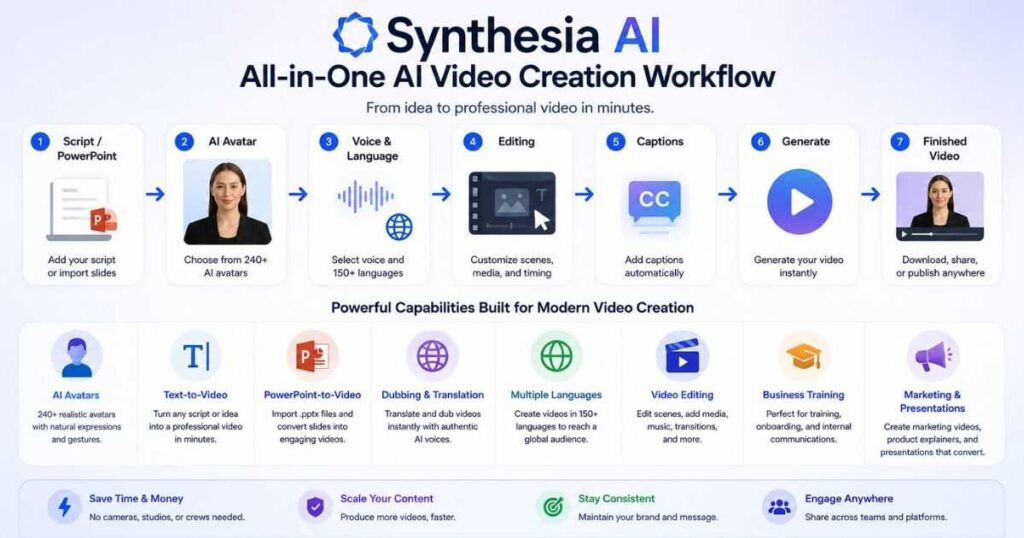
You can start from a script, prompt, document, URL, or PowerPoint. You can build scenes, add media, generate AI assets, create a personal avatar, translate content, dub existing videos, add captions, and distribute the finished content.
The AI Playground is also a meaningful addition because it gives users access to AI-generated video and image assets without leaving the Synthesia ecosystem.
The biggest question is price.
For someone making one or two casual videos, the paid plans may be difficult to justify.
For a business, educator, marketer, or serious creator producing videos regularly, the time saved can make the subscription much easier to justify.
My overall rating
| Category | Rating |
| Ease of use | 9/10 |
| AI Avatars | 9/10 |
| Video creation | 9/10 |
| Multilingual support | 9.5/10 |
| AI Playground | 8.5/10 |
| PowerPoint workflow | 9/10 |
| Editing flexibility | 8/10 |
| Value for casual users | 7/10 |
| Value for businesses | 9/10 |
| Overall | 9/10 |
So, is Synthesia worth it?
For professional video production, training, education, marketing, and multilingual content, yes.
For someone who simply wants to experiment with AI video occasionally, start with the free plan before paying.
Try Synthesia Free and See for Yourself →
Frequently Asked Questions About Synthesia AI
Is Synthesia AI free?
Yes. Synthesia has a free Basic plan that allows users to test the platform and create a limited amount of video without paying.
How much does Synthesia cost?
The current paid plans include Starter at $29 per month and Creator at $89 per month when billed monthly. Annual billing lowers the effective monthly cost to about $18 and $64 respectively.
Is Synthesia good for YouTube?
Yes, especially for educational, tutorial, explainer, business, and presenter-led channels. It is less suitable for highly cinematic entertainment content.
Can Synthesia create videos from PowerPoint?
Yes. You can import PowerPoint presentations and convert them into AI-narrated videos. Speaker notes can also be used as scripts.
Does Synthesia have AI avatars?
Yes. Synthesia offers stock avatars, customizable avatars, and Personal Avatars.
Does Synthesia support multiple languages?
Yes. Synthesia supports 160+ languages and accents, making it particularly useful for multilingual video production.
Can Synthesia translate videos?
Yes. Synthesia offers video translation and AI Dubbing capabilities for creating localized versions of existing content.
Does Synthesia generate AI video clips?
Yes. Its AI Playground can generate short video clips using supported generative models, and those assets can be brought directly into the Synthesia editor.
Is Synthesia better than HeyGen?
Neither is automatically better for everyone. Synthesia is particularly strong for professional, business, training, presentation, and multilingual workflows, while HeyGen can be attractive for creator-focused avatar production.
Continue Learning
If you’re exploring AI video tools for content creation, don’t stop with one platform.
Continue with these guides:
- Kling AI Review — See how Kling compares when you need cinematic AI-generated video.
- Best Kling AI Prompts — Learn how to write better prompts for AI-generated video scenes.
- Kling AI Pricing — Compare Kling’s plans, credits, and usage limits.
- HeyGen vs Synthesia — Compare two of the biggest AI avatar video platforms.
- Synthesia Pricing (2026): Plans, Costs & Features – A complete breakdown of Synthesia AI plans, pricing, features, and video limits.
- Is Synthesia Free? Plans, Limits & What You Get — Discover Synthesia’s free plan, monthly credits, video limits, key features, and when upgrading makes sense.
- Synthesia Avatars: Types, Custom Avatars & How They Work — Explore Synthesia’s avatar types, customization options, features, and how AI avatars work.
- Synthesia Text to Video: How It Works in 2026 — A simple guide to creating videos from text with Synthesia.

