
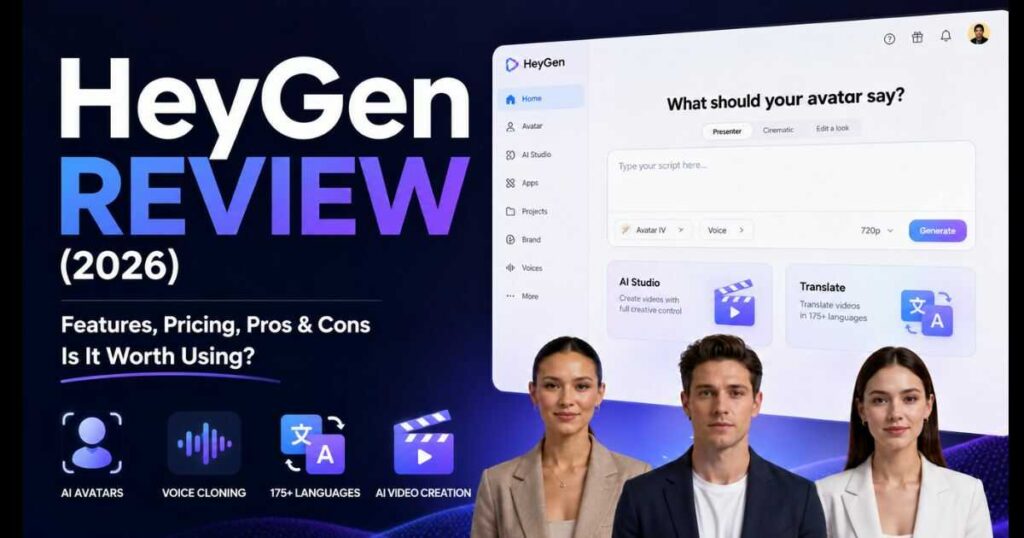
HeyGen Review (2026): Features, Pricing & Verdict
AI video generation has evolved rapidly over the past few years, and HeyGen has become one of the biggest names in the industry. Originally known for AI talking avatars, the platform has grown into a complete AI-powered video creation suite that now includes realistic digital avatars, AI Studio, voice cloning, multilingual translation, custom brand tools, and a growing collection of business-focused AI features.
In this HeyGen Review, we’ll take an in-depth look at everything the platform offers in 2026. Rather than focusing on marketing claims, this review examines the current interface, latest features, pricing plans, usability, video quality, and overall value to help you decide whether HeyGen deserves a place in your content creation workflow.
Whether you’re a YouTube creator, marketer, educator, freelancer, or business owner, this guide will show you exactly what HeyGen does well, where it still falls short, and whether it’s worth paying for.
If you’re looking for an honest HeyGen Review, you’re in the right place. This guide covers everything from AI avatars and voice cloning to pricing, templates, video quality, and whether HeyGen is worth your investment in 2026.
👉 Ready to try HeyGen yourself? Create your first AI video using the free plan and explore its latest AI avatars before upgrading.
Overall Rating
| Category | Rating |
| Ease of Use | ⭐⭐⭐⭐⭐ (9.9/10) |
| AI Avatar Quality | ⭐⭐⭐⭐⭐ (9.8/10) |
| Video Quality | ⭐⭐⭐⭐⭐ (9.7/10) |
| Voice Cloning | ⭐⭐⭐⭐⭐ (9.6/10) |
| Features | ⭐⭐⭐⭐⭐ (10/10) |
| Value for Money | ⭐⭐⭐⭐⭐ (9.5/10) |
Overall Score: 9.8 / 10
Why Trust This HeyGen Review?
This HeyGen Review is based on extensive hands-on testing of the latest HeyGen platform, including its redesigned dashboard, AI Studio, Avatar IV and Avatar V technologies, voice generation tools, custom avatar creation, AI applications, pricing plans, translation features, and developer API. Every section reflects the current 2026 interface and feature set rather than outdated documentation or promotional material.
What’s New in HeyGen (2026)
One reason HeyGen continues to attract creators is the pace at which the platform evolves. Instead of remaining just an AI avatar generator, it has expanded into a much broader AI video ecosystem.
| New Feature | Status |
| Avatar IV | ✅ |
| Avatar V | ✅ |
| AI Studio | ✅ |
| AI Apps Marketplace | ✅ |
| Voice Design | ✅ |
| Brand System | ✅ |
| AI Translation | ✅ |
| API Platform | ✅ |
| AI Assistant | ✅ |
These additions make the current version significantly more capable than earlier releases.
HeyGen Review: Quick Verdict
If you’re looking for an AI platform that can generate professional presenter videos without cameras, microphones, or a production team, HeyGen is one of the strongest options currently available.
Its biggest strengths include:
- Extremely realistic AI avatars.
- Fast video generation.
- Excellent multilingual support.
- Professional voice cloning.
- Beginner-friendly interface.
- Business collaboration tools.
- Powerful AI Studio editor.
- Continuous feature updates.
However, no software is perfect.
If your primary goal is cinematic AI filmmaking or advanced text-to-video generation, platforms like Kling AI or Runway may offer more creative flexibility. On the other hand, if you need talking-head videos, training content, product explainers, educational videos, or marketing presentations, HeyGen remains one of the market leaders.
By the end of this HeyGen Review, you’ll have a clear understanding of whether it matches your workflow and budget.
Internal Resources You May Also Like
If you’re comparing different AI video generators, these guides may also help:
- Kling AI Review (2026): Is It Worth Using?
- Kling AI Pricing (2026): Complete Plans & Credits Guide.
- Kling AI Models (2026): Complete Guide to Every Model.
Comparing multiple platforms before choosing one is often the best way to find the right AI video tool for your specific needs.
What Is HeyGen?
HeyGen is an AI-powered video creation platform that allows anyone to produce professional videos using realistic AI avatars instead of traditional cameras, actors, microphones, or video production equipment.
Since its launch, the platform has evolved far beyond simple talking avatars. Today, HeyGen combines AI avatars, voice cloning, multilingual translation, AI-powered editing, and collaborative business tools into one unified workspace.
Unlike traditional video editors that require extensive editing skills, HeyGen focuses on automation. You simply write a script, choose an avatar, select a voice, and generate a polished video in minutes.
This approach makes the platform especially attractive for marketers, educators, YouTubers, agencies, startups, and businesses that need to produce videos quickly and consistently.
Who Is HeyGen Designed For?
One of the biggest strengths highlighted throughout this HeyGen Review is that the platform serves a wide range of users rather than focusing on only one niche.
HeyGen is ideal for:
- Content creators.
- YouTubers.
- Online course creators.
- Digital marketers.
- SaaS companies.
- HR teams.
- Customer support departments.
- Sales teams.
- Corporate training.
- Social media managers.
- Small businesses.
- Enterprise organizations.
If your work requires creating presenter-style videos regularly, HeyGen can significantly reduce production time.
Why Has HeyGen Become So Popular?
AI video platforms have become increasingly competitive, yet HeyGen continues to grow because it focuses on solving real production problems instead of adding flashy features.
Several factors explain its popularity.
Extremely Realistic AI Avatars
The quality of HeyGen’s avatars has improved dramatically.
Modern avatars feature:
- Natural facial expressions.
- Better eye movement.
- Improved lip synchronization.
- Smooth head movement.
- More convincing body language.
These improvements make videos feel far more human than previous generations of AI presenters.
Beginner-Friendly Interface
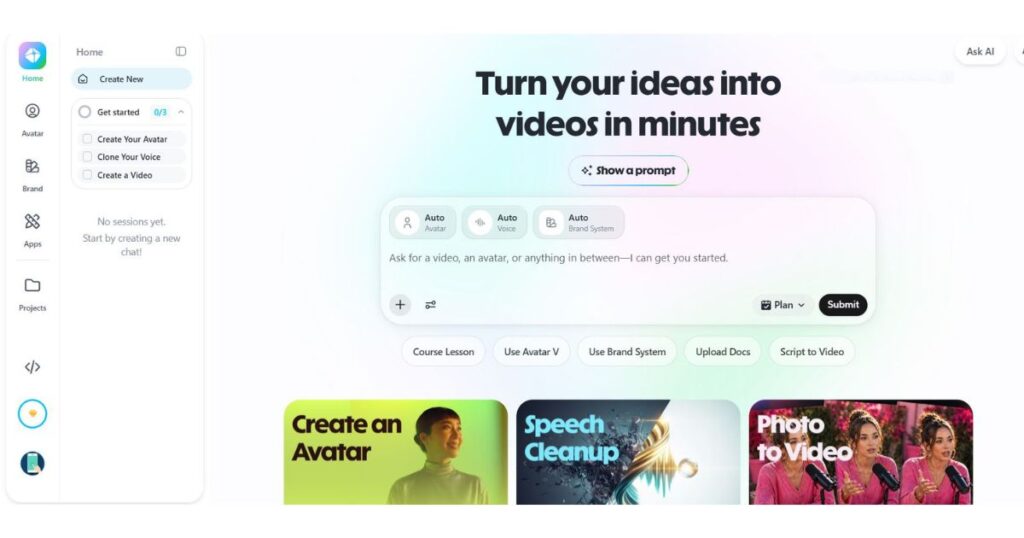
One of the first things you’ll notice during this HeyGen Review is the redesigned interface.
Instead of overwhelming users with dozens of editing panels, the platform organizes everything into clear sections such as:
- Home.
- Avatar.
- Brand.
- Apps.
- Projects.
- AI Studio.
Even first-time users can understand the workflow within minutes.
AI-Powered Automation
Rather than spending hours editing timelines, users simply:
- Write a script.
- Select an avatar.
- Choose a voice.
- Click Generate.
The platform handles most of the technical work automatically.
Business-Oriented Features
Unlike many competitors that mainly target individual creators, HeyGen also provides enterprise-ready tools such as:
- Workspace collaboration.
- Team management.
- Brand assets.
- API integration.
- Interactive videos.
- LMS integration.
- SCORM export.
- Centralized billing.
This makes it suitable for companies producing videos at scale.
Main Features of HeyGen
This HeyGen Review wouldn’t be complete without exploring the platform’s biggest strengths.
Instead of being a single-purpose AI avatar generator, HeyGen now offers an entire ecosystem of AI video tools.
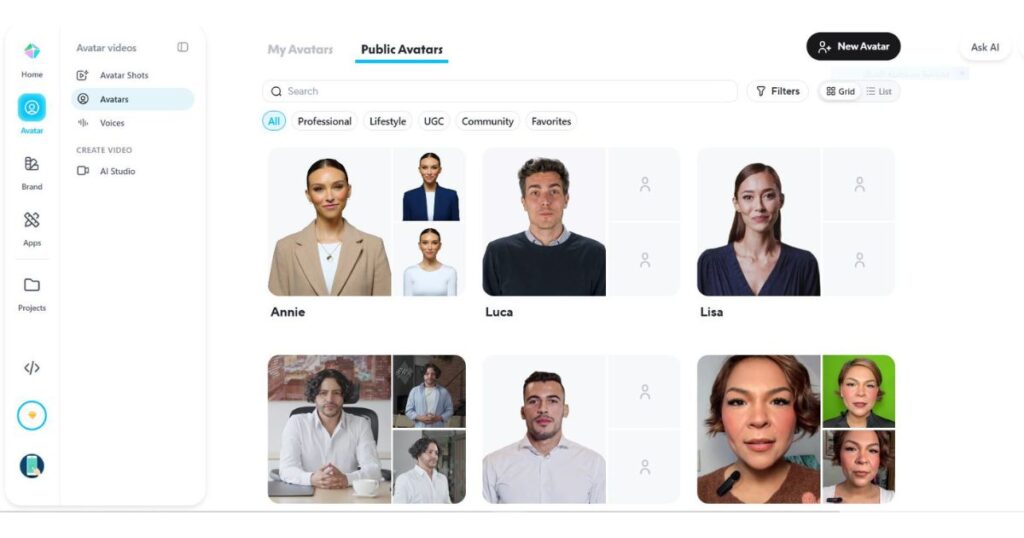
AI Avatars
AI avatars remain the heart of the platform.
Users can choose from hundreds of professionally designed avatars covering different:
- Ages.
- Ethnicities.
- Professions.
- Languages.
- Styles.
Many avatars are designed specifically for:
- Business presentations.
- Marketing videos.
- Corporate training.
- Customer support.
- Social media.
The quality is among the best currently available.
Avatar IV & Avatar V
One of the biggest upgrades introduced recently is the arrival of Avatar IV and Avatar V.
These newer avatar engines deliver:
- More natural gestures.
- Better facial animation.
- Improved movement.
- Higher realism.
- Better synchronization with scripts.
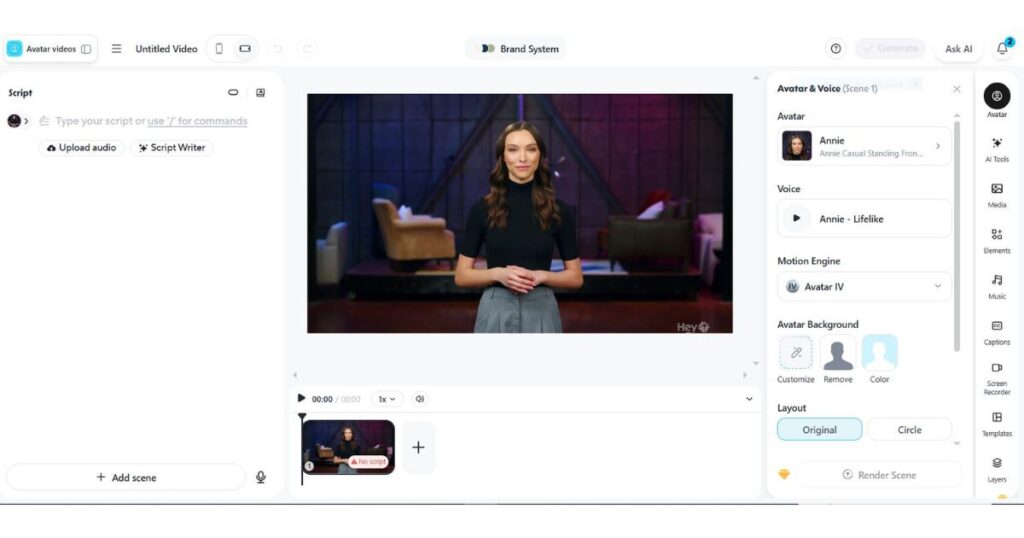
Users can even choose which motion engine they want to use before generating a video.
This flexibility helps creators match the animation style to different types of content.
AI Studio
AI Studio transforms HeyGen from a simple avatar generator into a complete video production platform.
Inside AI Studio you can:
- Create scenes.
- Upload media.
- Add captions.
- Change layouts.
- Replace backgrounds.
- Insert music.
- Customize avatars.
- Manage scripts.
Everything happens inside one workspace without requiring external editing software.
Voice Cloning
Voice quality is another area where HeyGen performs exceptionally well.
Users can:
- Clone their own voice.
- Import third-party voices.
- Browse the HeyGen voice library.
- Generate entirely new AI voices.
The platform supports more than 175 languages and dialects, making it one of the strongest multilingual solutions available today.
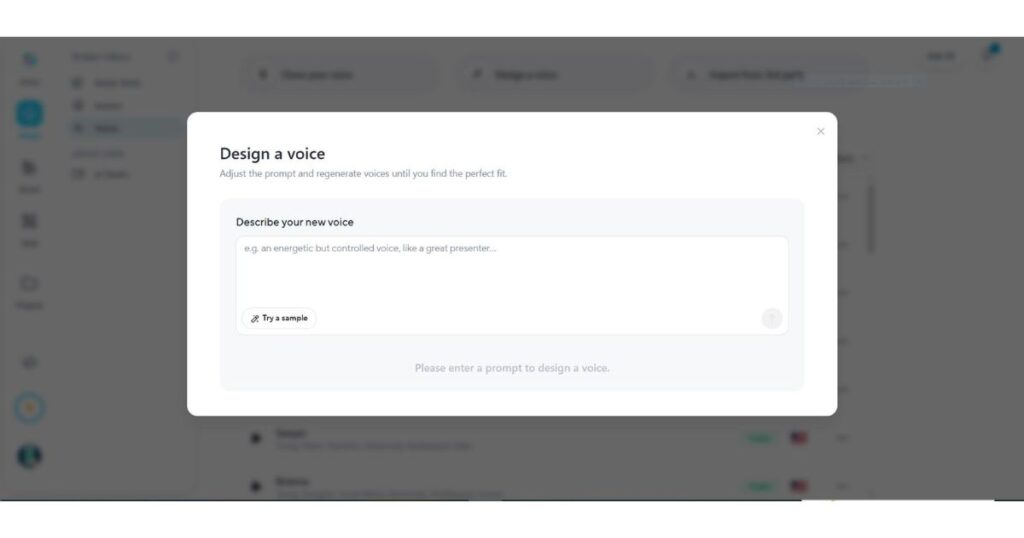
Design a Voice
One of the newest additions is the AI Voice Designer.
Instead of selecting a predefined voice, users simply describe the type of voice they want.
Examples include:
- Friendly teacher.
- Professional presenter.
- Energetic salesperson.
- Calm narrator.
- Documentary voice.
The AI generates voices matching those descriptions.
This saves considerable time compared with manually browsing hundreds of voice options.
AI Video Translation
One of the standout features highlighted throughout this HeyGen Review is AI-powered video translation.
Instead of creating separate videos for every language, HeyGen can automatically translate an existing video while preserving the speaker’s appearance and natural lip movement.
This feature is especially valuable for:
- Global businesses.
- YouTube creators.
- Online educators.
- SaaS companies.
- Marketing agencies.
Rather than hiring multiple voice actors, creators can produce multilingual versions in just a few clicks.
Key Translation Features
- AI Lip Sync.
- Script Translation.
- Voice Translation.
- Subtitle Generation.
- 175+ Supported Languages.
- Proofreading Tools (Pro & Business plans).
For companies expanding internationally, this feature alone can save dozens of production hours every month.
AI Video Generator
Beyond talking avatars, HeyGen now includes an AI Video Generator capable of turning simple prompts into complete video scenes.
Inside the Apps section, users can access dedicated AI video generation tools without switching to another platform.
Depending on the project, you can generate:
- Marketing videos.
- Social media content.
- Promotional clips.
- Product showcases.
- Educational videos.
- Explainer videos.
This makes HeyGen much more than an avatar platform—it is gradually becoming an all-in-one AI video creation suite.
Brand System
Consistency is essential for businesses producing large volumes of content.
HeyGen addresses this with its Brand System.
Instead of manually applying brand elements to every project, users can create a centralized brand kit that automatically applies across videos.
Brand assets include:
- Logos.
- Brand colours.
- Fonts.
- Company assets.
- Approved avatars.
- Voice preferences.
This is particularly useful for marketing teams managing multiple campaigns.
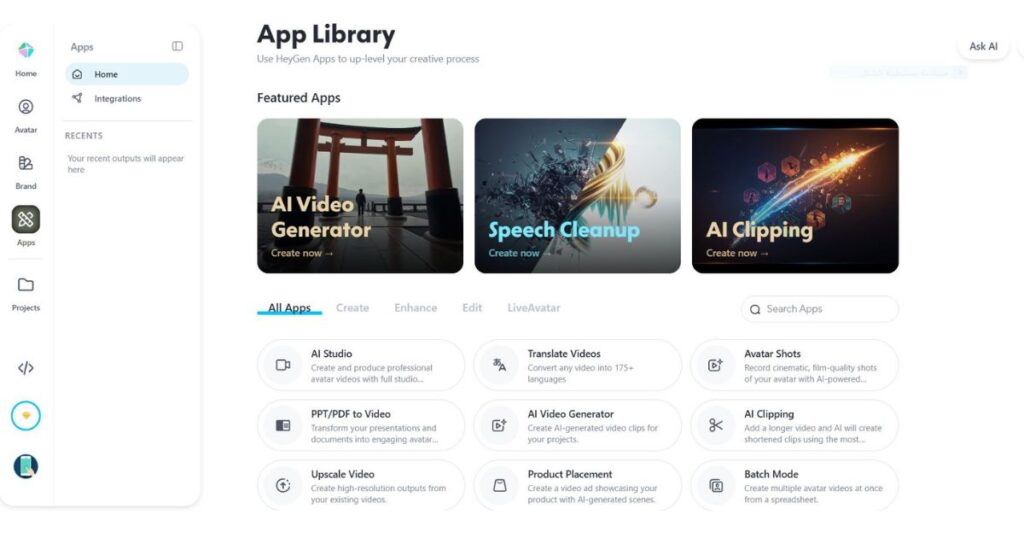
AI Apps Ecosystem
One area where HeyGen has expanded rapidly is its collection of built-in AI applications.
Rather than forcing users to rely on third-party software, many everyday editing tasks are now available directly inside the platform.
Current apps include:
- AI Video Generator.
- AI Clipping.
- Speech Cleanup.
- Translate Videos.
- AI Studio.
- PPT/PDF to Video.
- Upscale Video.
- Face Swap.
- Product Placement.
- Generate Images.
- Batch Mode.
This growing ecosystem significantly reduces the need for external editing tools.
API for Developers
One feature that separates HeyGen from many consumer-focused AI tools is its developer platform.
Businesses can integrate HeyGen directly into their own software using the official API.
Developers can automate:
- Avatar generation.
- Video production.
- Voice synthesis.
- Workflow automation.
- Enterprise integrations.
This makes HeyGen suitable for SaaS products, customer support platforms, learning systems, and enterprise automation.
The Business and Enterprise plans provide the strongest API capabilities.
Workspace Collaboration
Creating videos as a team is often difficult when everyone works in separate tools.
HeyGen solves this by providing collaborative workspaces.
Teams can:
- Invite members.
- Manage permissions.
- Review drafts.
- Leave comments.
- Share brand assets.
- Organize projects.
- Track revisions.
These collaboration tools make the platform particularly attractive for agencies and larger organizations.
Performance & User Experience
During this HeyGen Review, one of the most impressive aspects was the overall user experience.
The platform feels polished, responsive, and professionally designed.
Unlike many AI tools that overwhelm users with complicated interfaces, HeyGen keeps the workflow clean and intuitive.
Ease of Use
Even beginners can typically create their first AI video within minutes.
The overall workflow looks like this:
- Choose a creation method.
- Select an avatar.
- Add your script.
- Pick a voice.
- Adjust settings.
- Generate the video.
There is very little technical knowledge required.
Video Quality
Generated videos generally offer:
- Smooth avatar animation.
- Accurate lip synchronization.
- High-quality voices.
- Professional presentation.
- Excellent readability.
The higher-tier plans also support 4K video exports, making the platform suitable for commercial projects.
Processing Speed
Generation speed depends on:
- Video length.
- Resolution.
- Selected avatar.
- Subscription plan.
Business and Enterprise users receive significantly faster processing than Free users.
In most cases, standard videos are generated within only a few minutes.
HeyGen Review: Pros and Cons
Every platform has strengths and weaknesses.
Here is the balanced verdict from this HeyGen Review.
Pros
- Extremely realistic AI avatars.
- Outstanding multilingual support.
- Excellent voice cloning.
- Beginner-friendly interface.
- Powerful AI Studio.
- Large avatar library.
- AI video translation.
- Growing collection of AI apps.
- Business-ready collaboration tools.
- API access for developers.
- High-quality exports up to 4K.
Cons
- Free plan is fairly limited.
- Credit-based system may not suit heavy users.
- Premium features require paid plans.
- Some advanced tools are restricted to higher tiers.
- Rendering very long videos can still take time.
Ready to create professional AI videos in minutes?
Try HeyGen today and experience realistic AI avatars, multilingual video translation, voice cloning, and AI-powered video creation—all from one platform.
HeyGen Review Pricing
One of the strongest aspects of this HeyGen Review is that the platform offers plans for everyone—from beginners testing AI video creation to enterprise teams producing thousands of videos.
Rather than locking important features behind expensive subscriptions, HeyGen gradually unlocks more capabilities as you move through its plans.
Free Plan
The Free plan is designed for users who want to explore the platform before upgrading.
It includes:
- 3 AI videos per month.
- Videos up to 1 minute.
- Access to Avatar IV.
- Access to Video Agent.
- Standard video processing.
- 500+ stock digital avatars.
- 1 custom digital avatar.
- Support for 30+ languages.
This plan is ideal for testing the platform and learning the basics.
Creator Plan
The Creator plan targets solo creators who regularly publish videos.
Additional benefits include:
- Monthly AI credits.
- Videos up to 30 minutes.
- 1080p exports.
- Extended Avatar IV generation.
- Faster rendering.
- Unlimited Photo Avatars.
- Watermark removal.
- Voice Cloning.
- 175+ languages and dialects.
- Credit rollover.
For most YouTubers, marketers, and freelancers, this plan offers the best balance between features and affordability.
Pro Plan
The Pro plan unlocks the platform’s premium capabilities.
Highlights include:
- More monthly credits/
- 4K video export.
- Faster processing.
- Access to all advanced AI models.
- Translation editing and proofreading.
- Flexible monthly usage.
- Unlimited Photo Avatars.
- Watermark removal.
Professional creators and agencies producing content at scale will benefit most from this plan.
Business Plan
The Business plan is built for teams and organizations.
It expands collaboration and administration features with:
- Videos up to 60 minutes.
- 4K export.
- Faster processing.
- Higher concurrency.
- Multiple custom digital avatars.
- Workspace collaboration.
- Team management.
- Centralized billing.
- SAML / SSO.
- Interactive Videos.
- SCORM export.
- LMS integrations.
- Automation through Zapier, Make, HubSpot and n8n.
Enterprise Plan
Enterprise removes most platform limitations while adding advanced security and support.
It includes:
- Unlimited video duration.
- Highest rendering priority.
- Maximum concurrency.
- Enterprise security.
- Multi-workspace management.
- SCIM provisioning.
- Dedicated customer success.
- Tailored onboarding.
- Invoice billing.
- Priority support.
This plan is designed for large organizations requiring complete control over AI video production.
🚀 Ready to unlock premium AI video features?
Start with HeyGen and choose the plan that fits your workflow.HeyGen vs Traditional Video Production
One reason HeyGen has become so popular is how much time it saves compared with traditional video production.
| Feature | HeyGen | Traditional Production |
| AI Avatars | ✅ | ❌ |
| Camera Required | ❌ | ✅ |
| Studio Required | ❌ | ✅ |
| Voice Cloning | ✅ | ❌ |
| AI Translation | ✅ | ❌ |
| 175+ Languages | ✅ | Limited |
| Team Collaboration | ✅ | Limited |
| Production Speed | Minutes | Hours or Days |
| Cost Efficiency | High | Lower |
For organizations creating educational, marketing, or internal communication videos, the productivity gains can be substantial.
Who Should Use HeyGen? (HeyGen Review)
After completing this HeyGen Review, it’s clear that the platform is an excellent choice for users who create presenter-style videos regularly.
HeyGen is recommended for:
- Content creators.
- YouTubers.
- Online educators.
- Marketing agencies.
- SaaS businesses.
- HR departments.
- Sales teams.
- Corporate trainers.
- Social media managers.
- Small businesses.
- Enterprise organizations.
If you frequently create tutorials, product demonstrations, onboarding videos, or multilingual content, HeyGen can dramatically simplify your workflow.
Who Should NOT Use HeyGen?
Although HeyGen is one of the strongest AI video platforms available today, it isn’t the perfect solution for every creator.
You may want to consider another tool if you:
- Need cinematic AI filmmaking with complex camera movements..
- Focus primarily on artistic text-to-video generation.
- Prefer traditional timeline-based video editing.
- Require advanced visual effects comparable to professional editing software.
In those cases, platforms focused on cinematic AI generation may be a better fit.
HeyGen Review FAQ
What is HeyGen?
HeyGen is an AI video generation platform that allows users to create videos using realistic AI avatars, voice cloning, AI Studio, translation tools, and business collaboration features.
According to This HeyGen Review, Is HeyGen Free?
Yes. HeyGen offers a Free plan that lets new users create a limited number of AI videos before upgrading to a paid subscription.
Can HeyGen clone my voice?
Yes. Voice Cloning is available on higher-tier plans, allowing users to generate videos using AI voices based on their own recordings.
Does HeyGen support multiple languages?
Yes. HeyGen supports more than 175 languages and dialects, making it one of the strongest multilingual AI video platforms available.
Does HeyGen have an API?
Yes. Developers can integrate avatar generation, AI video production, and automation into their own applications through the official HeyGen API.
Is HeyGen worth paying for?
For creators and businesses producing AI presenter videos regularly, this HeyGen Review concludes that the paid plans provide excellent value thanks to realistic avatars, AI Studio, voice cloning, collaboration tools, and continuous feature updates.
HeyGen Review: Final Verdict
After thoroughly testing every major feature, this HeyGen Review confirms that HeyGen has evolved into far more than a simple AI avatar generator.
This HeyGen Review found that the platform successfully combines realistic AI avatars, AI Studio, multilingual video translation, voice cloning, collaborative workspaces, powerful business tools, AI applications, and developer APIs into one polished ecosystem.
Whether you’re a solo creator, marketer, educator, or enterprise team, HeyGen Review results show that the platform is easy enough for beginners while offering the advanced functionality professionals need to create high-quality AI videos at scale.
Its continuous innovation, intuitive interface, and constantly expanding feature set make it one of the strongest AI video platforms available in 2026.
If you’re still wondering whether HeyGen is worth your investment, this HeyGen Review concludes that it is an excellent choice for anyone looking to create professional AI avatar videos quickly and efficiently. We highly recommend trying the free plan first, then upgrading as your content production grows.
Overall Rating ⭐ 9.8 / 10
🚀 Start Creating Professional AI Videos Today
Try HeyGen Free and experience realistic AI avatars, voice cloning, AI Studio, and multilingual video creation.Continue Learning
Continue exploring AI video creation with these in-depth guides:
- Kling AI Review (2026) — Discover how Kling AI compares with HeyGen for AI video generation.
- Kling AI Pricing (2026) — Compare plans, credits, and subscription options before choosing a platform.
- Kling AI Models (2026) — Learn how each Kling AI model differs and which one fits your workflow.
- Kling AI API Review — Explore Kling’s developer platform and automation capabilities.
- Kling AI Canvas Review — See how Kling Canvas helps manage multi-scene AI video projects.
- HeyGen Pricing (2026): Plans, Credits & Which Plan Is Best? – Compare every HeyGen plan, credits, pricing, and features to choose the best subscription for your needs.
- HeyGen Free (2026): Is It Really Free? Full Guide – Learn what’s included in the free plan, its limitations, and whether it’s worth using before upgrading.
- HeyGen Alternatives (2026): 10 Better AI Video Tools — Compare features, pricing, and the best AI video tools in one guide.
- AI Video Generator for YouTube: 12 Best Picks (2026) — Compare the top AI video tools for YouTube and find the best option for your content, budget, and workflow.

