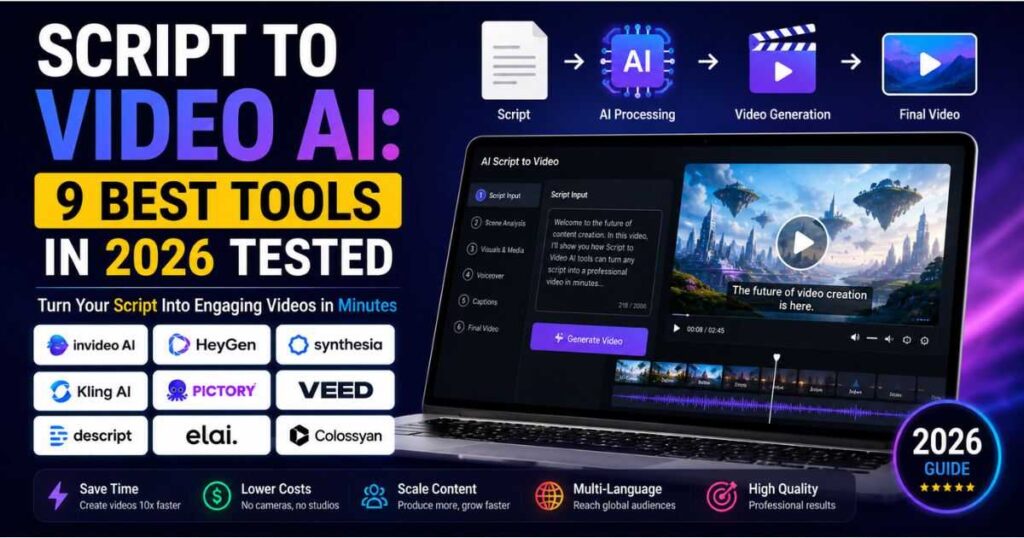
Script to Video AI: 9 Best Tools in 2026 Compared
Creating a professional video used to mean writing a script, recording a voiceover, finding footage, editing scenes, adding captions, and spending hours fixing small details. Script to Video AI is changing that workflow by turning a written script into a much more complete video production process.
Instead of starting with a blank editing timeline, you can give an AI video platform your script and let it help generate scenes, narration, visuals, avatars, captions, music, and other elements.
But not every Script to Video AI tool works in the same way. Some are designed for faceless YouTube videos and content repurposing, while others focus on AI presenters, corporate training, cinematic scenes, or social media content.
In this guide, we compare 9 of the best Script to Video AI tools in 2026, explain what each one does best, and help you choose the right platform for your workflow.
What Is Script to Video AI?
Script to Video AI is software that uses artificial intelligence to transform written video content into a finished or partially finished video.
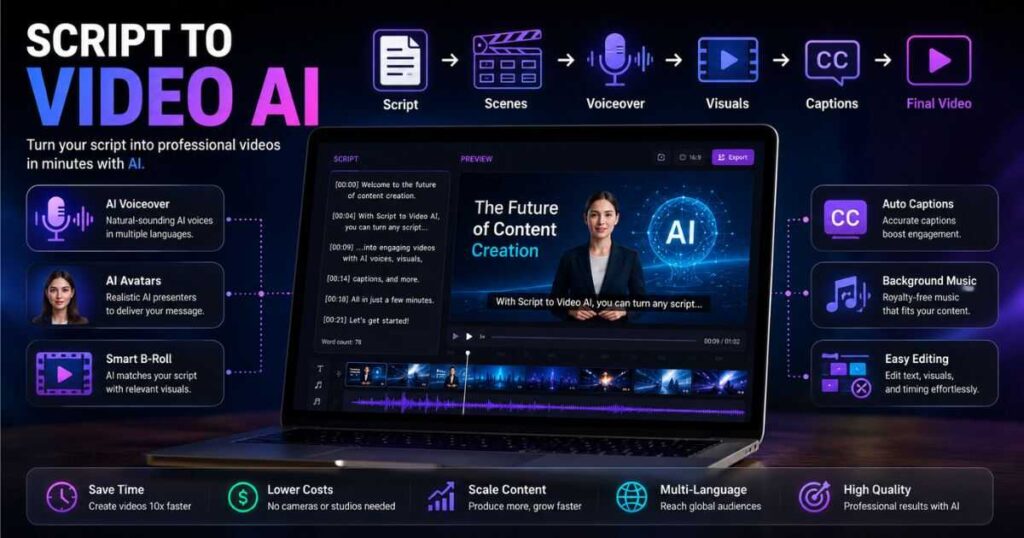
You provide a script, article, outline, or detailed instructions. Depending on the platform, the AI can then:
- Break the script into scenes
- Select or generate visual content
- Add AI narration
- Choose an AI avatar or presenter
- Generate captions
- Add background music
- Create transitions
- Format the video for different platforms
- Allow you to edit the generated result
The important distinction is that Script to Video AI is more than text-to-video generation.
A traditional text-to-video model may generate a short visual clip from a prompt. A script-to-video platform is usually trying to organize multiple elements into a complete piece of content.
For example, a YouTube tutorial script might become:
Hook → Introduction → Scene 1 → B-roll → Explanation → Scene 2 → Voiceover → Captions → CTA → Outro
That makes this technology particularly useful for creators who need to publish videos consistently.
How Does Script to Video AI Work?
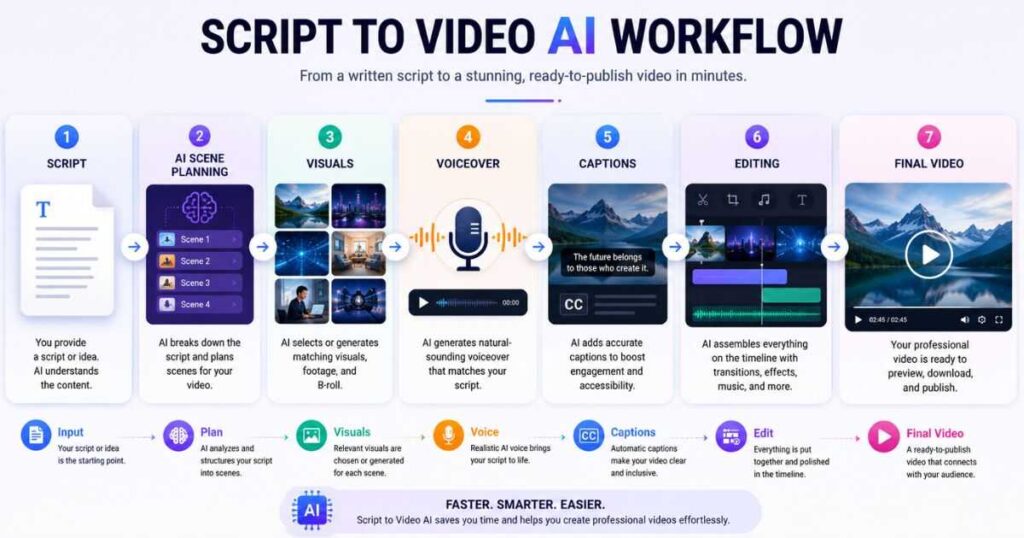
Most Script to Video AI platforms follow a similar workflow, although the level of automation varies.
1. Start With a Script
The first step is providing your written content.
You can write the script yourself or use an AI writing tool to create a first draft. Some platforms can also generate the script from a simple topic or prompt.
For example:
“Create a 5-minute YouTube video explaining how beginners can start a faceless YouTube channel.”
The AI can turn that idea into a structured script before moving into video production.
2. AI Analyzes the Script
The platform identifies different sections and determines what type of visual or presentation may fit each part.
A sentence describing a product might trigger a product image or B-roll.
A section explaining a concept might become an animated scene.
A presenter-led section may be assigned to an AI avatar.
3. Scenes Are Created
The script is divided into scenes or slides.
This is one of the biggest advantages of Script to Video AI because manually deciding where every scene begins can take a surprising amount of time.
4. Voiceover and Visuals Are Added
Depending on the tool, AI voices, avatars, stock footage, generated video clips, images, music, and captions can be added automatically.
5. You Review and Edit
This step is extremely important.
AI-generated videos are not always perfect. Visuals can occasionally be irrelevant, pacing can feel unnatural, and certain sentences may require different footage.
The best workflow is therefore not:
Script → AI → Publish
It is:
Script → AI generation → Human review → Editing → Publish
That small amount of human supervision can make a major difference in the final quality.
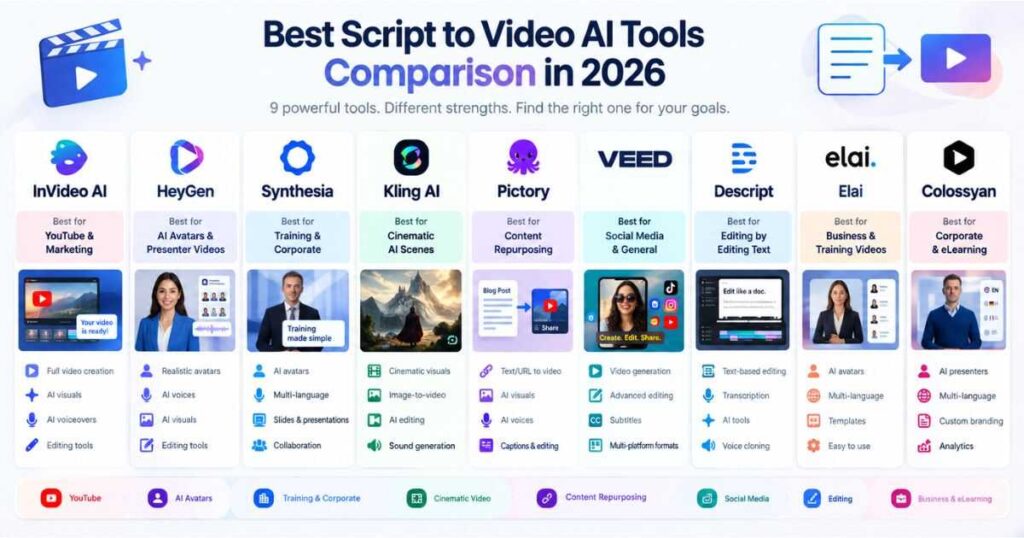
Best Script to Video AI Tools Compared
| Tool | Best For | Avatars | AI Visuals | Editing | Best Use Case |
| InVideo AI | Automated video creation | Yes | Yes | Yes | YouTube & marketing |
| HeyGen | Presenter videos | Excellent | Yes | Yes | Business & creator videos |
| Synthesia | Professional business videos | Excellent | Yes | Yes | Training & corporate |
| Kling AI | Cinematic AI scenes | Limited | Excellent | Limited | Creative B-roll |
| Pictory | Content repurposing | Yes | Yes | Yes | Articles & scripts |
| VEED | Social & general video | Yes | Yes | Excellent | Social media |
| Descript | Script-based editing | Yes | Yes | Excellent | YouTube & podcasts |
| Elai | Avatar-based content | Excellent | Yes | Yes | Training & education |
| Colossyan | Training & learning | Excellent | Yes | Yes | Corporate training |
The best choice depends heavily on what you expect the AI to do after receiving your script.
1. InVideo AI
If your goal is to turn a script or idea into a relatively complete video without building everything manually, InVideo AI is one of the strongest options to consider.
Its AI video generator can start with an idea and handle scripting, visuals, voiceovers, subtitles, music, and other production elements. Its current workflow is designed around creating videos from prompts while also allowing text-based editing afterward.
That makes InVideo particularly interesting for YouTube creators, marketers, and people running faceless channels.
Why InVideo AI stands out
- Automated script-to-video workflow
- AI-generated and stock visuals
- AI voiceovers
- Subtitles
- Text-based editing
- Multiple AI models and workflows
- Suitable for long-form content and social videos
One of its biggest advantages is workflow simplicity. Instead of jumping between separate script, voice, stock footage, and editing applications, much of the process can happen in one environment.
Best for: creators who want maximum automation.
Potential drawback: highly automated videos still need human editing if you want a distinctive, non-generic result.
Ready to turn your scripts into complete videos? Try InVideo AI and see how much of the production process you can automate.
2. HeyGen
HeyGen is one of the strongest choices when your script needs a realistic AI presenter.
Its dedicated script-to-video tool allows you to paste a script or upload a brief and generate a video with narration, captions, transition graphics, and matched stock footage. It can also use AI avatars to deliver the script.
This makes HeyGen particularly useful for:
- Explainer videos
- Educational content
- Product presentations
- Marketing videos
- Training
- Social media content
- Presenter-led YouTube videos
HeyGen also supports voice cloning and extensive multilingual video creation, making it useful when the same script needs to reach audiences in different markets.
The current free plan lets users test the platform with limited video generation, while paid plans add substantially more capacity and features.
Best for: realistic AI presenters and multilingual video content.
Potential drawback: if your goal is purely cinematic, avatar-based videos may not be the right format.
Want a realistic AI presenter to deliver your script without filming yourself? Try HeyGen for free and create your first AI presenter video.
For a deeper look at the platform, see our HeyGen AI Review.
3. Synthesia
Synthesia is another excellent Script to Video AI platform, particularly for businesses, educators, training teams, and professional communications.
The platform can create videos from scripts, prompts, URLs, and documents, then combine scenes, voiceover, AI avatars, and generated visuals. Synthesia currently supports 160+ languages and offers a large library of AI avatars and voices.
One of Synthesia’s biggest strengths is structured video production.
Instead of trying to imitate a cinematic film editor, it is designed around clear communication.
That makes it particularly useful for:
- Employee training
- Onboarding
- Sales enablement
- Product demonstrations
- Educational videos
- Internal communications
- Professional presentations
Synthesia’s current pricing includes a free Basic plan, while paid plans add features such as downloads, more video capacity, additional avatars, and other professional capabilities.
Best for: professional presenter-led videos.
Potential drawback: creators looking for highly cinematic storytelling may prefer a generative video model.
You can also read our detailed Synthesia Text to Video guide to see how the workflow works.
4. Kling AI
Kling AI is different from traditional script-to-video platforms.
Rather than being primarily designed to take a long script and automatically assemble a complete business presentation, Kling is particularly powerful for generating cinematic scenes from text and images.
Its current Kling 3.0 generation supports text-to-video, image-to-video, native audio, character consistency, multi-shot storytelling, and video generation of up to 15 seconds.
So why include Kling in a Script to Video AI list?
Because it can become an important part of a script-to-video production pipeline.
Imagine your script says:
“A futuristic city wakes up as thousands of autonomous vehicles begin moving through the streets.”
Instead of relying on generic stock footage, you can use Kling to generate a custom cinematic scene that matches the script.
This makes Kling especially useful for:
- Cinematic B-roll
- Storytelling
- Faceless YouTube videos
- AI short films
- Product visuals
- Creative advertisements
- Dramatic scenes
Best for: cinematic scenes and custom AI-generated footage.
Potential drawback: it is not the most convenient choice for automatically producing an entire 10-minute scripted video from start to finish.
Need cinematic AI footage for your script? Try Kling AI and turn written scene descriptions into high-quality video clips.
If you want to explore its newer capabilities, check our Kling AI Omni guide.
5. Pictory
Pictory is particularly useful when your script comes from existing written content.
It can turn scripts, articles, URLs, presentations, and other source material into videos while providing stock media, voiceovers, captions, and editing tools. Its current platform specifically includes a script-to-video workflow.
This makes Pictory a strong option for bloggers and content marketers.
For example, you could take a 2,000-word article, transform it into a video script, and then use Pictory to create a narrated video around the content.
Its workflow is especially attractive for content repurposing.
Best uses
- Blog-to-video
- YouTube content
- Educational videos
- Marketing content
- Social media
- Content repurposing
Pictory’s current plans include substantial video-minute allowances, stock media, AI voices, and AI credits, with higher tiers adding advanced features such as custom avatars and voice cloning.
Best for: turning existing written content into videos.
Potential drawback: creators wanting highly original cinematic footage may need another generative video tool alongside it.
Have articles, scripts, or written content sitting unused? Try Pictory and turn that content into publishable videos.
6. VEED
VEED combines Script to Video AI with a full online video editor.
Its current script-to-video workflow allows you to describe the video, customize its style, choose an avatar or AI voice, generate the video, and then continue editing it inside the editor.
That last part is important.
Some AI video generators produce an output and leave you with limited control. VEED gives you a broader editing environment where you can modify footage, music, captions, graphics, and other elements.
VEED is particularly useful for creators who produce:
- TikTok videos
- Instagram Reels
- YouTube videos
- Marketing videos
- Business content
- Educational content
It also supports AI-generated visuals and models such as Veo 3.1, PixVerse, and Hailuo within its broader AI video ecosystem.
Best for: creators who want AI generation plus traditional editing control.
Potential drawback: its broad feature set can feel more complicated than a highly automated one-click platform.
Want AI generation and a full editor in the same workspace? Try VEED and turn your script into a video you can fully customize.
7. Descript
Descript takes a different approach to Script to Video AI.
Instead of treating video editing as a complicated timeline-first process, Descript makes text and transcripts central to the workflow.
This is particularly useful if your video is built around spoken content.
You can edit the transcript, remove unwanted sections, clean up speech, create clips, and use AI tools to modify the production.
Descript’s current platform includes AI video editing, AI co-editing through Underlord, AI voices, voice cloning, captions, and generated media.
It is especially useful for:
- YouTube creators
- Podcasts
- Interviews
- Tutorials
- Commentary videos
- Educational content
Best for: creators who want to edit video almost like editing a document.
Potential drawback: it is not as focused on fully automated scene generation as platforms such as InVideo.
8. Elai
Elai is focused heavily on AI avatar video creation.
You can provide your script and use AI presenters to deliver the content without recording yourself.
That makes Elai a good option for:
- Online courses
- Training
- Educational videos
- Corporate communications
- Product explanations
- Presenter-led content
Its current platform includes AI avatars, voice and language options, custom avatars, voice cloning, and other presentation-focused features. The free plan includes limited video creation, while paid plans increase monthly video capacity.
Best for: educational and avatar-based videos.
Potential drawback: cinematic creators may find its presenter-oriented workflow less suitable than generative video platforms.
9. Colossyan
Colossyan is another strong Script to Video AI option for professional learning and training content.
The platform is built around AI video and course creation, with AI avatars, scripts, custom avatars, voice cloning, interactive videos, and multilingual capabilities.
Its current Starter plan provides access to its avatar library and limited video generation, while Professional plans add more video minutes, custom avatars, translations, SCORM exports, and other business-focused capabilities.
Colossyan is particularly attractive for:
- Employee training
- Compliance videos
- Learning and development
- Courses
- Corporate communication
- Interactive training
Best for: corporate learning and training.
Potential drawback: it is more specialized than general-purpose creator platforms.
Which Script to Video AI Tool Should You Choose?
There is no universal winner because these tools solve slightly different problems.
If you want maximum automation for YouTube and general content, InVideo AI is one of the strongest choices.
If you want a realistic person presenting your script, HeyGen is an excellent option.
If your priority is professional business and training content, Synthesia is particularly strong.
If you need cinematic AI-generated scenes, Kling AI is the better fit.
If you want to repurpose articles and existing written content, Pictory is worth considering.
If you want AI generation combined with a powerful online editor, VEED is a strong choice.
For transcript-based editing and YouTube or podcast workflows, Descript stands out.
For avatar-based education, Elai is worth testing.
For corporate learning and interactive training, Colossyan is one of the most specialized options.
Quick recommendation table
| Your Goal | Best Choice |
| Automated YouTube videos | InVideo AI |
| AI presenter videos | HeyGen |
| Corporate videos | Synthesia |
| Cinematic AI scenes | Kling AI |
| Blog/article to video | Pictory |
| Social media + editing | VEED |
| Transcript-based editing | Descript |
| AI avatar education | Elai |
| Corporate training | Colossyan |
How to Get Better Results From Script to Video AI
The quality of your final video depends heavily on the quality of your script.
A vague script produces vague visuals.
Instead of writing:
“Talk about AI video tools.”
Give the AI more context:
“Create a 6-minute YouTube video for beginners comparing AI video creation tools. Use a fast-paced but professional tone, explain the differences between avatar videos and cinematic AI-generated footage, include practical examples, and finish with a recommendation for beginners.”
You should also structure your script into clear sections.
Use short, visual sentences
Instead of:
“Artificial intelligence has fundamentally changed the way modern creators approach the process of video production.”
Try:
“AI is changing video production. Today, one creator can handle work that previously required an entire production team.”
The second version is easier to narrate and easier for an AI system to visualize.
Give visual instructions when necessary
For important scenes, describe what you want to see.
For example:
“Show a close-up of a creator working at a laptop while an AI video editor automatically builds scenes on the timeline.”
This gives the AI more information than simply saying:
“AI video editing.”
Always review the generated visuals
This is one of the most overlooked parts of using Script to Video AI.
The AI may understand your script correctly but still select a visually weak scene.
Watch the complete video before publishing and check:
- Does every scene match the narration?
- Are the visuals repetitive?
- Is the pacing too slow?
- Are captions accurate?
- Does the voice sound natural?
- Are important points visually emphasized?
- Does the opening hook hold attention?
- Is the ending strong?
AI should reduce production work, not eliminate quality control.
Script to Video AI for Faceless YouTube Channels
For faceless YouTube creators, Script to Video AI can be particularly powerful.
A traditional faceless video workflow might require:
- Research
- Scriptwriting
- Voice recording
- Finding stock footage
- Editing
- Captions
- Music
- Thumbnail creation
- Final quality control
A modern AI workflow can compress several of these steps.
For example:
Research → Script → InVideo AI → Kling AI B-roll → Voiceover → Captions → Human editing → YouTube
You don’t necessarily need one platform to perform every task.
A hybrid workflow can actually produce better results.
For example, use InVideo AI for the overall production, then use Kling AI to create unique cinematic scenes that replace generic stock footage.
For presenter-led videos, use HeyGen or Synthesia instead.
This approach gives you automation without sacrificing creative control.
For more information, see our guide on How to Make Faceless YouTube Videos With AI and our other faceless YouTube resources.
Is Script to Video AI Good Enough to Replace Video Editors?
Not completely.
At least not for every type of content.
Script to Video AI is excellent at accelerating repetitive production tasks. It can save creators from spending hours searching for footage, arranging basic scenes, recording voiceovers, or creating captions.
But human judgment is still valuable.
An experienced editor understands pacing, storytelling, visual hierarchy, emotional timing, sound design, and audience retention.
The best approach in 2026 is therefore to treat AI as a production assistant rather than a complete replacement for creative judgment.
Use AI to create the first version.
Then make the important creative decisions yourself.
What Makes the Best Script to Video AI Tool?
Before subscribing to any platform, consider these factors.
1. Script accuracy
Does the generated video actually follow your script?
2. Visual relevance
Are the selected or generated visuals genuinely related to what is being said?
3. Voice quality
Does the narration sound natural enough for your audience?
4. Editing control
Can you easily replace scenes and modify the generated video?
5. Generation quality
If the platform generates original footage, how realistic and consistent are the results?
6. Video length
Some platforms are better for short social clips, while others are designed for longer professional videos.
7. Languages
If you target international audiences, multilingual voiceovers and translation can be extremely valuable.
8. Pricing model
Don’t compare subscription prices alone.
Look at what you’re actually receiving for your money: video minutes, AI credits, avatars, voices, exports, resolution, and commercial-use options.
Pricing changes frequently, so check the provider’s current pricing page before subscribing.
Final Verdict: What Is the Best Script to Video AI in 2026?
The best Script to Video AI tool depends on what you want to produce.
InVideo AI is a strong all-around choice for creators who want to automate much of the video production process.
HeyGen is better when the script needs a realistic AI presenter.
Synthesia is particularly strong for professional business, training, and educational videos.
Kling AI is the standout choice when cinematic, custom-generated scenes are more important than automatic long-form assembly.
Pictory is excellent for turning written content into videos, while VEED provides a useful balance between AI generation and manual editing.
Descript is ideal for text-based editing and spoken-content workflows, while Elai and Colossyan are strong choices for avatar-led educational and training videos.
The biggest takeaway is that you don’t have to choose between AI automation and human creativity.
The most effective workflow is often to let Script to Video AI handle the repetitive production work while you focus on the story, visuals, pacing, and final quality.
If you’re building a faceless YouTube channel or producing content at scale, start with the platform that best matches your content format rather than simply choosing the tool with the longest feature list.
Ready to turn your scripts into videos?
Try InVideo AI if you want an automated all-in-one workflow.
Try HeyGen if you want realistic AI presenters.
Try Synthesia if you’re creating professional business or training videos.
Try Kling AI if your scripts need cinematic AI-generated scenes.