
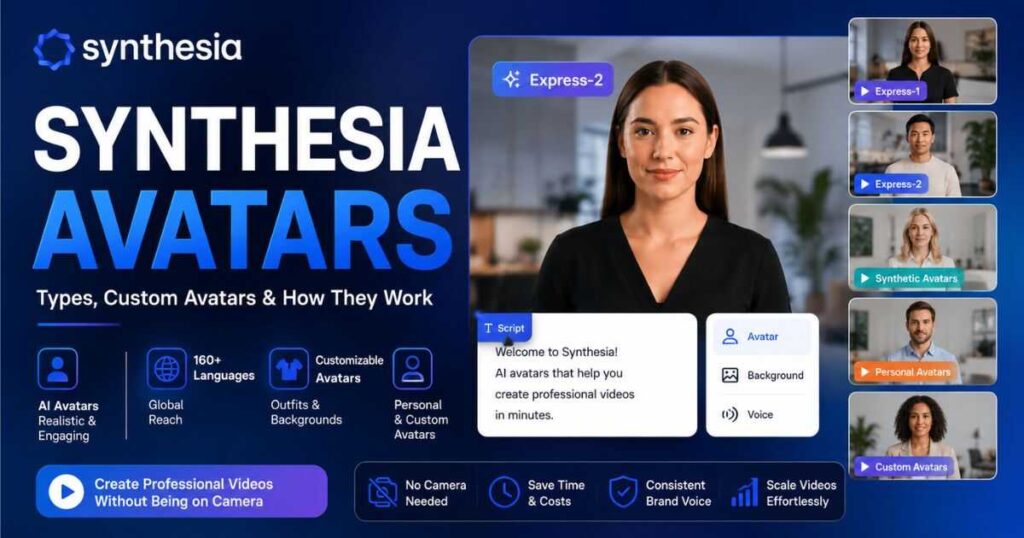
Synthesia Avatars: Types, Custom Avatars & How They Work
If you want to create professional videos without appearing on camera, Synthesia Avatars are one of the main reasons to consider Synthesia. Instead of filming yourself every time you need a presentation, tutorial, training video, or product explanation, you can choose an AI avatar and have it deliver your script.
But Synthesia Avatars are not all the same. The platform now includes different avatar technologies and customization options, ranging from ready-to-use stock avatars to personalized avatars based on your own appearance.
In this guide, you’ll learn what Synthesia Avatars are, how the different types compare, how Synthesia custom avatars work, what Express-1 and Express-2 mean, how personal avatars are created, and which option makes the most sense for your particular type of content.
What Are Synthesia Avatars?
Synthesia Avatars are AI-powered digital presenters that can deliver a written script as a video. Instead of recording a real person speaking to a camera, you select an avatar, enter your content, choose a voice and language, customize the scene, and generate the video.
The important thing to understand is that Synthesia does not treat every avatar as the same type of digital presenter.
Depending on the avatar you choose, you may get:
- A professionally filmed stock presenter
- A generative Express-2 avatar
- A fully synthetic AI-generated presenter
- A personal avatar based on your appearance
- A custom avatar created from video footage
- A customizable avatar with different outfits and environments
This makes Synthesia Avatars particularly useful for businesses that need to produce large amounts of consistent video content.
For example, a company could use one presenter for employee onboarding, another for sales training, and a personal avatar for executive communications.
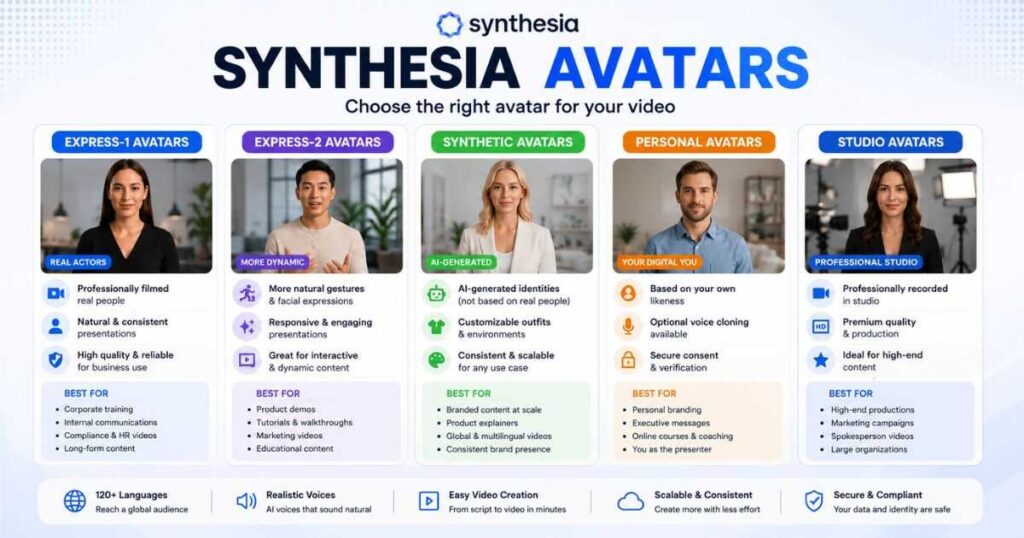
Synthesia Avatars: The Main Types Explained
The easiest way to understand Synthesia is to divide its avatar ecosystem into two broad categories: stock avatars and custom avatars.
Stock avatars are ready to use. You don’t need to record yourself or create anything before using them.
Custom avatars are personalized and can represent you, another authorized person, or a professional studio recording.
| Avatar type | Based on a real person? | Customizable | Best for |
| Express-1 | Yes | Limited | Training, corporate communication |
| Express-2 | Yes/generative | Yes | Dynamic presentations and tutorials |
| Synthetic Avatars | No | Yes | Scaled branded content |
| Personal Avatar | Yes | Yes | Personal branding |
| Studio Avatar | Yes | Professional setup | High-end corporate content |
| Legacy Avatars | Older technology | Limited | Existing projects |
The exact avatar library available to you depends on your Synthesia plan and the current avatar catalog.
Express-1 Avatars
Express-1 is designed around professionally filmed footage of real actors.
These avatars are particularly suitable when consistency and natural presentation are more important than highly dynamic movement.
They can work well for:
- Compliance training
- Leadership communication
- Corporate announcements
- Long-form educational content
- Automated video workflows
If your priority is a polished, professional presenter who feels appropriate for formal business communication, an Express-1 avatar can be a strong choice.
Express-2 Avatars
Express-2 is a newer generation of Synthesia Avatars designed for more dynamic presentations.
One of the biggest differences is body language.
Express-2 avatars can respond to the script with gestures and movement, which can make presentations feel less static.
This makes them especially interesting for:
- Product walkthroughs
- Training videos
- Tutorials
- Conversational presentations
- Marketing content
- Educational videos
For many new projects, Express-2 is the more interesting option because it gives the presenter more visual energy.
What Are Synthesia Synthetic Avatars?
Synthetic Avatars are different from avatars based on filmed actors.
They are generated identities rather than digital versions of a specific real person.
This distinction can be useful if you want a consistent presenter for your brand without using someone’s real likeness.
Synthetic avatars can also be customized with different environments and outfits, making them useful for branded content production.
For example, imagine you operate a software company and need 50 short tutorial videos.
Instead of hiring different presenters or recording yourself 50 times, you could maintain a consistent AI presenter and change the environment, clothing, script, and supporting visuals.
That consistency is one of the strongest advantages of this category of Synthesia Avatars.
Synthesia Custom Avatars: What Are They?
Synthesia custom avatars are personalized digital presenters created around the likeness of a real person.
They are useful when you don’t want a generic presenter.
For example, you might want:
- Your CEO to deliver company announcements
- Your instructor to deliver online lessons
- Your sales representative to explain products
- Your personal brand to have a consistent digital presenter
- A spokesperson to appear in multiple languages
Synthesia’s current custom-avatar system includes Personal Avatars and Studio Avatars, with different creation methods depending on the workflow and plan.
The major advantage is repeatability.
Once your avatar has been created, you don’t need to stand in front of a camera every time you need another video.
You can write a new script and reuse the digital presenter.
[Create Your Synthesia Avatar →]
Synthesia Personal Avatars
A Synthesia personal avatar is designed to represent you or another authorized person.
The current platform supports multiple ways of creating a personal avatar, including photo-based and video-based workflows.
The photo-based approach is particularly interesting because it can create a Personal Avatar from a single photo, followed by a consent process.
You can also optionally provide a voice sample for voice cloning.
This is a major development because creating a personalized AI presenter no longer necessarily requires the same traditional recording process for every workflow.
However, there is an important requirement: the person whose likeness is being used must provide the required consent.
You should never attempt to create an avatar of another person without authorization.
That matters not only from an ethical perspective but also because AI avatar technology involves someone’s face and potentially their voice.
How to Create a Synthesia Personal Avatar
The exact interface can change over time, but the general workflow is straightforward.
Step 1: Open the Avatars section
Start from your Synthesia workspace and open the avatar area.
Step 2: Choose the personal avatar option
Select the option for creating your own personal avatar.
Step 3: Select your creation method
Depending on your account and the current Synthesia options, you may be able to use a photo or video-based workflow.
Step 4: Provide your media
For a photo-based avatar, use a clear, well-lit image showing one person.
A high-quality source image can make a noticeable difference to the final result.
Step 5: Add your voice if available
If the workflow supports voice cloning, you may provide a voice sample.
If you don’t clone your voice, the avatar can use a supported Synthesia voice instead.
Step 6: Complete consent verification
Synthesia requires a consent process for personal avatars.
This is one of the most important parts of the workflow because a personalized avatar represents a real person’s identity.
Step 7: Generate the avatar
After submission and processing, your avatar becomes available for use in video projects.
Once it is ready, you can add it to a scene just like other Synthesia Avatars.
[Explore Synthesia Personal Avatars →]
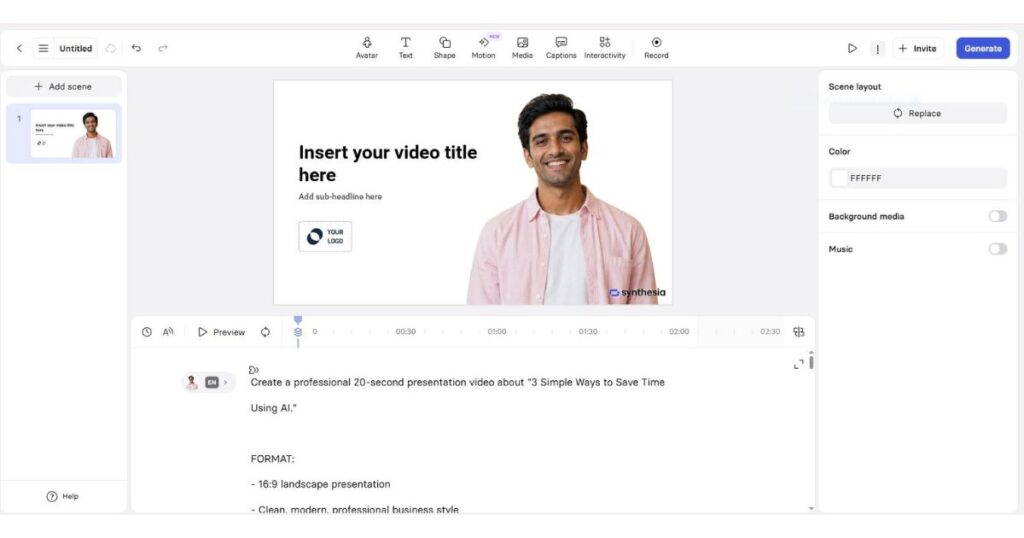
How Synthesia Avatars Work in a Video
Using an avatar is only one part of creating a Synthesia video.
A typical workflow looks like this:
Script → Avatar → Voice → Scene → Customization → Visuals → Generate
You start with the message you want the audience to hear.
Then you select the avatar that fits your content.
Next, you choose the voice and language, arrange the scene, add supporting media, and customize the avatar’s appearance where supported.
The final video is generated from these components.
This is why the quality of your script still matters.
An excellent avatar cannot fix a confusing script.
If the opening sentence is weak, the presentation will still feel weak even when the avatar looks realistic.
For business videos especially, the best results usually come from combining a suitable avatar with a concise script and a clear visual structure.
Can You Customize Synthesia Avatars?
Yes. Avatar customization is one of the areas where the platform has become more flexible.
Depending on the avatar type, you may be able to customize:
- Outfit
- Background
- Space/environment
- Pose
- Position
- Scene composition
- Supporting B-roll
This makes the difference between simply selecting an AI presenter and building a presenter that actually fits your brand.
For example, a financial company might use a professional office environment.
An online education company might use a classroom-style environment.
A technology brand might place the presenter inside a modern digital workspace.
The avatar becomes part of the visual identity rather than simply appearing as a person standing on a plain background.
Synthesia Custom Avatars vs Stock Avatars
The choice between a stock avatar and a custom avatar depends primarily on your goals.
| If you need… | Better option |
| Fast video creation | Stock Avatar |
| No recording | Stock Avatar |
| A professional generic presenter | Express-1 / Express-2 |
| More dynamic gestures | Express-2 |
| Your own likeness | Personal Avatar |
| Personal branding | Personal Avatar |
| Large-scale branded content | Synthetic Avatar |
| Executive communications | Personal or Studio Avatar |
| High-end production | Studio Avatar |
For most beginners, starting with stock Synthesia Avatars makes more sense.
You can test the platform without investing time in creating a personal avatar.
If you later decide that your own likeness would make your videos more effective, you can move toward a custom avatar workflow.
Are Synthesia Avatars Realistic?
Realism depends heavily on the avatar generation, the voice, the script, and the type of content.
Newer avatar technologies are designed to produce more natural movement and body language, but AI presenters are not identical to real humans.
You may still notice:
- Slightly unusual gestures
- Occasional gaze differences
- Lip-sync inconsistencies
- Robotic delivery in certain sentences
- Less natural emotional variation than a skilled human presenter
This doesn’t necessarily make the technology unusable.
For training, product explanations, internal communication, and educational content, the consistency and production speed can be more valuable than perfect human realism.
The right question isn’t:
“Does this look exactly like a real person?”
A better question is:
“Does this look credible enough for my audience and my type of video?”
For many professional use cases, the answer can be yes.
Synthesia Avatars for YouTube
If you’re creating a faceless YouTube channel, Synthesia Avatars can be useful, but they aren’t necessarily the best choice for every channel.
They work particularly well for channels focused on:
- Software tutorials
- Business education
- AI tools
- Corporate topics
- Online courses
- How-to videos
- Professional explainers
For entertainment-heavy channels, audiences may prefer a more cinematic approach with stock footage, AI-generated scenes, animation, or human narration.
If you’re building a professional faceless channel, however, an AI presenter can help create a recognizable host without appearing on camera yourself.
You can also combine the avatar with screen recordings, B-roll, graphics, and other visual elements.
For more ideas about using AI video tools for faceless channels, see our Faceless YouTube guides.
Synthesia Avatars for Business and Training
This is where Synthesia is particularly strong.
Businesses often need to create repetitive videos covering topics such as:
- Employee onboarding
- Compliance
- Product training
- Sales enablement
- Customer education
- Internal announcements
- Software tutorials
- HR communications
The traditional workflow requires a camera, presenter, recording setup, editing, retakes, and potentially localization.
An AI avatar can reduce many of these production steps.
For example, if a company updates an internal policy, the team can update the script and generate a revised video rather than organizing another filming session.
That scalability is one of the biggest practical reasons to use Synthesia Avatars.
Synthesia Avatars and Multilingual Video
Another important advantage is multilingual production.
Synthesia supports a large selection of languages and voices, allowing businesses to create localized versions of videos without recording every language separately.
This is especially useful for international organizations.
Imagine a product training video originally created in English.
Instead of producing completely separate recordings for Spanish, German, French, Japanese, and other markets, the same basic production can be adapted into multiple languages.
The result is a more scalable content workflow.
However, localization should not simply mean translating words.
You should also consider:
- Cultural context
- Pronunciation
- Tone
- Terminology
- Audience expectations
- Regional accents
The avatar is only one part of a successful localized video.
Synthesia Avatars: Free vs Paid Access
If you’re wondering whether you can test Synthesia Avatars without paying, Synthesia currently offers a free Basic plan.
The free plan is designed for exploring the platform and testing its core capabilities, while paid plans provide broader avatar access and additional production features.
For example, current plan information shows that the free Basic plan includes a limited selection of AI avatars, while Starter and Creator expand the avatar library and add more capabilities.
This means you don’t necessarily need to purchase a subscription before deciding whether Synthesia’s avatar technology works for you.
That’s useful because avatar quality is subjective.
What looks impressive to one viewer may feel unnatural to another.
The best approach is to create a sample video and judge the result yourself.
[Try Synthesia Free and Test the Avatars →]
How Many Synthesia Avatars Do You Get?
The number of available avatars depends on your plan.
Synthesia’s current pricing information lists a smaller avatar selection on the free plan, a larger selection on Starter, an even larger library on Creator, and the broadest avatar access on Enterprise.
The exact library can also change as Synthesia introduces new avatars and retires older generations.
That means you should avoid choosing a subscription purely because of a specific avatar count.
Instead, ask:
- Is the avatar style suitable for my audience?
- Does the avatar support the presentation style I need?
- Can I customize it?
- Does my plan include the avatar type I want?
- Will I need a personal or custom avatar later?
Those questions are much more useful than simply counting thumbnails.
Synthesia Avatars vs HeyGen Avatars
If you’re comparing AI video platforms, one of the most common comparisons is Synthesia Avatars vs HeyGen avatars.
Both platforms focus heavily on AI presenters, but their positioning can feel different.
Synthesia has historically been particularly strong in business communication, training, corporate learning, and enterprise video production.
HeyGen is also widely used for AI avatars, creator content, social media videos, and marketing workflows.
If your priority is corporate training and structured business communication, Synthesia deserves serious consideration.
If you’re more focused on creator-style content, social videos, and experimentation, you may want to compare both platforms before choosing.
You can also read our previous Synthesia AI Review for a broader look at the platform before making your decision.
Pros and Cons of Synthesia Avatars
Pros
Professional presentation
The avatars are designed specifically for professional video production rather than casual social-media filters.
Large selection
You can choose from different presenter styles, appearances, and technologies.
No camera required
You can create presenter-led videos without appearing on camera yourself.
Multilingual production
The platform supports a large range of languages and voices.
Customization
Supported avatars can be customized with different outfits and environments.
Scalable workflow
Once your workflow is established, creating additional videos can be significantly faster than traditional filming.
Cons
Not identical to human presenters
Even advanced avatars can occasionally display subtle AI characteristics.
Some features depend on your plan
Avatar availability and personal-avatar allowances vary by subscription.
Custom avatars require consent
You cannot simply create a digital copy of someone without authorization.
Some content still benefits from real humans
Highly emotional storytelling, entertainment, interviews, and personality-driven content may work better with real presenters.
Costs can increase with advanced production
If you need more minutes, more avatars, personal avatars, or enterprise functionality, you may need a paid plan.
Who Should Use Synthesia Avatars?
Synthesia Avatars are especially useful if you:
- Don’t want to appear on camera
- Create training videos
- Produce software tutorials
- Run an online course
- Manage corporate communications
- Need multilingual content
- Create product demonstrations
- Need consistent presenters
- Produce large volumes of videos
- Want to build a professional faceless channel
They may be less suitable if your content depends heavily on spontaneous human emotion, interviews, comedy, or highly personal storytelling.
Are Synthesia Avatars Worth Using?
For the right audience, yes.
The biggest advantage isn’t simply that an AI person can speak your script.
The real value comes from repeatable video production.
You can create a presenter once and use the same visual identity across multiple videos.
You can update scripts without organizing another filming session.
You can produce versions for different audiences.
And you can combine your avatar with screen recordings, B-roll, graphics, and other video elements.
That makes Synthesia Avatars particularly attractive for businesses, educators, software companies, and creators who prioritize production efficiency.
Before paying for a plan, however, test the platform yourself.
Create a short video with the avatar you actually intend to use.
Watch the result on both desktop and mobile.
Pay attention to:
- Lip synchronization
- Voice quality
- Gestures
- Eye movement
- Pronunciation
- Overall credibility
Your audience will ultimately determine whether the avatar feels convincing.
[Test Synthesia Avatars for Yourself →]
Frequently Asked Questions About Synthesia Avatars
Can I create my own Synthesia avatar?
Yes. Synthesia offers Personal Avatar workflows that allow eligible users to create an avatar based on their own likeness. Depending on the available workflow, this can involve a photo or video and a required consent process.
Are Synthesia Avatars free?
Synthesia has a free Basic plan with limited avatar access. Paid plans provide broader avatar libraries and additional features.
Can I customize Synthesia Avatars?
Yes. Supported avatars can be customized with options such as outfits and backgrounds. Customization availability depends on the avatar type.
What is a Synthesia Personal Avatar?
A Personal Avatar is a personalized digital presenter created from an authorized person’s likeness. It can be used repeatedly in Synthesia videos.
What are Express-2 Avatars?
Express-2 is a newer Synthesia avatar technology designed to provide more responsive body language and gestures based on the script.
Can Synthesia Avatars speak multiple languages?
Yes. Synthesia supports a large range of languages and voices, making its avatars useful for multilingual video production.
Can I use Synthesia Avatars for YouTube?
Yes. They can work well for professional faceless YouTube content, tutorials, educational videos, software explanations, and business-focused channels.
Can I create an avatar of another person?
Only with appropriate authorization and consent. You should never attempt to reproduce another person’s likeness without permission.
Are Synthesia Avatars realistic?
The latest avatar technologies can look and move naturally, but they are still AI-generated presenters. The level of realism varies by avatar type, script, voice, and generation.
Continue Learning
If you’re researching Synthesia before deciding whether it fits your workflow, don’t stop with avatars.
Continue with these related guides:
→ Synthesia AI Review
Our broader review covers the platform’s main features, usability, strengths, weaknesses, and who it is best suited for.
→ Synthesia Pricing
See the current Synthesia plans, costs, video limits, credits, and feature differences before choosing a subscription.
→ Is Synthesia Free?
Find out what you can actually do with Synthesia’s free plan and where the limitations begin.
[Explore Synthesia and Create Your First AI Video →]
A simple guide to creating videos from text with Synthesia.
Compare the top alternatives for AI avatars, faceless YouTube, cinematic video, training, and more.
Final Verdict
Synthesia Avatars have evolved beyond simple digital presenters. The platform now offers several avatar technologies designed for different production needs, from ready-to-use stock presenters and dynamic Express-2 avatars to synthetic presenters and personalized avatars based on your own likeness.
For beginners, stock Synthesia Avatars are the easiest place to start because they require no recording.
For more dynamic presentations, Express-2 can be a better choice.
For branded content, customizable synthetic avatars provide more flexibility.
And if your personal identity is part of your brand, a Synthesia Personal Avatar can turn your likeness into a reusable digital presenter.
The most important thing is to choose the avatar based on your audience and content—not simply on how impressive the technology looks.
If you create training, educational, business, software, or professional faceless content, Synthesia is worth testing.
Start with a short video, choose an avatar that fits your audience, and judge the final result for yourself.

