

Pictory Free Plan: 14-Day Trial & Watermark Limits
Looking for a way to create AI videos without paying for a subscription? The Pictory Free Plan is worth understanding before you invest your time in the platform. Pictory offers a 14-day free trial that lets you explore its AI video creation tools, test different workflows, and see whether the platform suits your needs.
However, there is an important difference between a free trial and a permanent free plan. Pictory’s trial comes with limited credits, restrictions on video projects, and a watermark on downloaded videos. Understanding these limits before you start can help you use your trial more effectively and avoid unexpected surprises.
In this guide, we explain what the Pictory Free Plan actually includes, how its credits work, whether you can download videos without a watermark, and what happens when the trial expires. We also explain when upgrading makes sense and how to decide whether a paid subscription is worth the cost.
Ready to test Pictory yourself? Start your Pictory free trial and explore its video creation tools before deciding whether to subscribe.
Is There a Pictory Free Plan in 2026?
The first thing to understand is that Pictory does not offer an unlimited, permanent free subscription to its full video creation platform. Instead, it provides a time-limited trial with access to selected tools and a limited allowance of AI credits.
The Pictory Free Plan is therefore best understood as a way to test the platform rather than a permanent solution for producing videos every month.
According to Pictory’s current official information, the free trial includes:
- 14 days of access: Enough time to explore the platform and test its main workflows.
- 300 AI credits: A limited allowance for AI-powered generation.
- No credit card required: You can start the trial without entering payment card details.
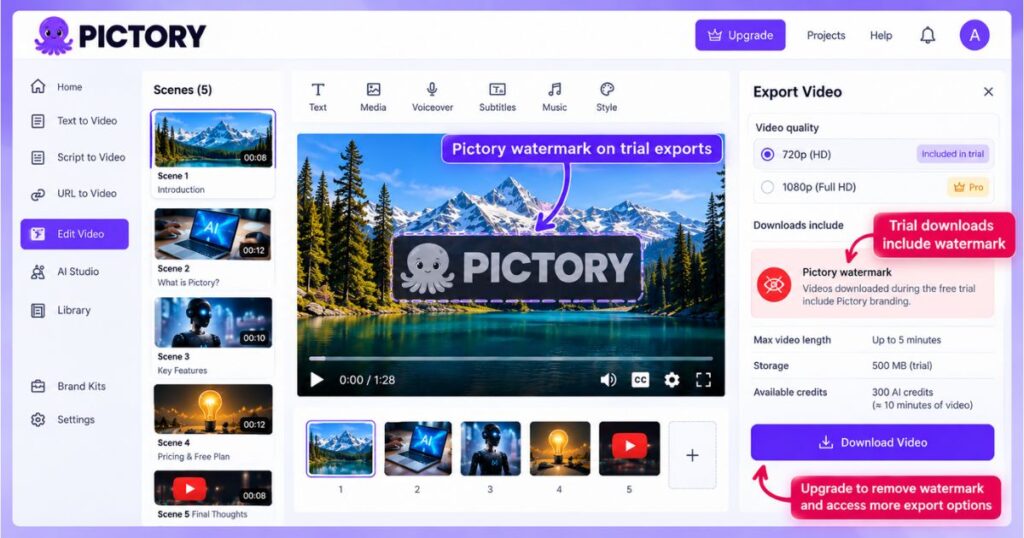
- Watermarked exports: Videos downloaded during the trial carry Pictory branding.
- Limited video projects: Pictory’s pricing comparison currently lists up to three videos during the trial.
- Limited storage and duration: The pricing comparison lists 500 MB of storage and a maximum video length of five minutes for the trial workflow.
Pictory also describes its 300-credit allowance as providing approximately 10 minutes of video generation. Actual output depends on the model and generation method, so this should not be treated as a guarantee that every user can create exactly 10 minutes of finished video.
You can review the details on the official Pictory pricing page before signing up.
The distinction matters because someone looking for a permanent free video maker may need a different tool, while someone who wants to test a professional workflow may find the trial useful.
Pictory Free Plan at a Glance
| Feature | Free trial details |
|---|---|
| Trial duration | 14 days |
| AI credits | 300 credits |
| Approximate AI video generation | Up to about 10 minutes, depending on usage |
| Credit card required | No |
| Number of video projects | Up to 3, according to the pricing comparison |
| Maximum video length | Up to 5 minutes in the listed trial workflow |
| Storage | 500 MB |
| Watermark | Included on trial downloads |
| Permanent free subscription | No, not for the full platform |
| Downloading after expiration | Requires a paid subscription |
These limits describe the current published offering and may change as Pictory updates its plans. In particular, AI generation credits and video project limits measure different things: having enough credits does not necessarily mean you can create unlimited projects.
Pictory Free Plan: What Can You Actually Do?
A free trial is most useful when you know which features you want to evaluate. Rather than clicking through every menu, begin with a project that resembles the videos you intend to publish.
Pictory supports several ways to start creating content. Depending on the workflow and tools available in your account, you can work from an idea, a script, a URL, a document, a PowerPoint presentation, or an audio recording.
Here is what you can test during the Pictory Free Plan trial.
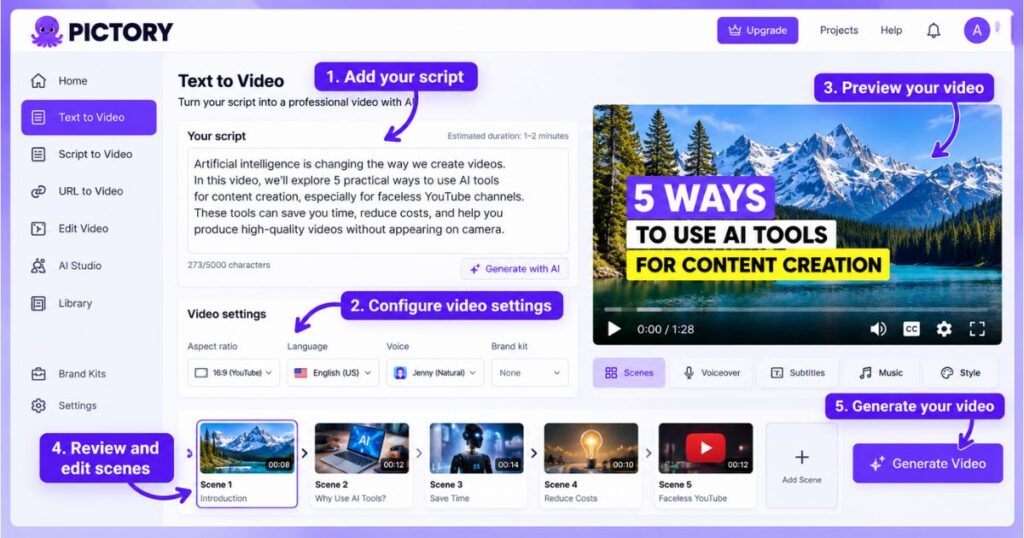
1. Turn Text and Scripts into Videos
One of Pictory’s main uses is converting written content into a visual video. You can start with a script, organize it into scenes, and review the visuals selected for different sections.
This is useful if you already write blog posts, educational scripts, product explainers, or YouTube narrations.
For example, you could prepare a short script explaining five ways to use AI tools for content creation. Pictory can help assemble an initial video from that material, which you can then review and refine.
The important part is to evaluate how well the generated scenes match your words. Automatic visual selection can save time, but you should expect to replace footage that does not communicate the intended message.
2. Experiment with AI Voiceovers and Captions
Narration and captions can make a substantial difference to the final video. During the trial, test the voice options available to your account and listen to the result before downloading anything.
Check pronunciation, pacing, pauses, and whether the voice sounds appropriate for your audience. Also review captions for spelling errors, especially when your script contains product names or technical terms.
If your goal is to create faceless YouTube videos, this is an important part of testing the Pictory Free Plan. You need to know whether the available narration and caption tools produce results that are good enough for your content style.
3. Review the Visual Editing Workflow
Look at how easily you can change scenes, replace stock footage, adjust text, and improve the structure of your video.
You should not judge the platform only by how quickly it creates the first draft. The time saved during initial generation matters, but the amount of editing required afterward is equally important.
If an automatically selected visual is irrelevant, check how easily you can replace it. If the script is too long, see whether you can shorten the scene or edit the text without rebuilding everything.
4. Explore AI Studio and Custom Visuals
Pictory’s AI Studio tools can help you work with custom AI-generated visuals where those features are available. Different image and video models can consume different amounts of credits.
This is important when testing the Pictory Free Plan because 300 credits do not provide the same amount of output for every model. You may generate many images with one model but only a few short clips with another.
Start with a small test. Generate one or two examples, examine their quality, and check the displayed credit estimate before using more of your trial allowance.
Want to test these tools on your own project? Try Pictory AI and use a short, original script so you can evaluate the results without wasting credits on a large experiment.
Pictory Free Plan: How Do AI Credits Work?
AI credits are one of the most important limitations to understand before you begin. Pictory’s free trial includes 300 credits, but those credits are not a fixed number of finished videos.
The amount of content you can generate depends on what you create and which model or feature you use. Generating an image, creating a video clip, and working with an avatar may have different credit costs.
For that reason, do not assume the trial will always produce the same number of minutes for every project.
How to Make 300 Credits Last Longer
| Action | Why it helps |
|---|---|
| Write your script before generating | Reduces unnecessary revisions caused by changing the topic or structure. |
| Preview the displayed credit cost | Helps you understand the cost before committing to generation. |
| Test one model at a time | Makes it easier to compare results without consuming the allowance too quickly. |
| Use relevant existing footage where suitable | Avoids generating custom visuals when stock footage can communicate the idea clearly. |
| Keep the first project short | Lets you evaluate the workflow before spending credits on a longer video. |
| Review each draft carefully | Helps you avoid repeating generation because of preventable mistakes. |
A practical way to test the Pictory Free Plan is to create one short video using a workflow you expect to use regularly. Record how many credits you spend, how much editing the result requires, and whether the output meets your standards.
You can then make a more informed decision about whether the paid plans offer enough additional capacity for your needs.
Pictory Free Plan: Does It Add a Watermark?
Yes. Pictory’s official Help Center confirms that videos downloaded during the free trial include Pictory branding or a watermark.
This is one of the most important limitations to understand if you plan to publish the results on YouTube, TikTok, Instagram, or a business website.
A watermark identifies the video as an output created under the trial. You may find it acceptable when testing a workflow privately, but it can look less professional in client work, branded marketing campaigns, or public-facing content.
The Pictory Free Plan can still be useful for evaluating the editing process and the quality of the generated result. Just do not assume that a trial export is ready for professional publication without checking the branding and other output restrictions.
Can You Remove the Pictory Watermark?
Pictory states that the watermark is removed from videos downloaded under a paid subscription. However, subscribing does not automatically remove branding from files you downloaded earlier during the trial.
According to the Help Center, you need to reopen the relevant project and download the video again after subscribing.
That means you should keep your project available if you intend to upgrade later. You can then produce a new, unwatermarked download under your paid plan, subject to the plan’s export terms.
Read the official instructions here: How to remove the Pictory watermark and branding.
Need videos without Pictory branding for your content? Explore the paid plans and check which option provides the export quality and features you need.
What Happens When the Pictory Free Plan Expires?
When the 14-day trial ends, your account does not simply become a permanent free subscription with the same download privileges.
Pictory’s Help Center explains that you can still access your account after the trial expires, but you cannot download videos unless you have a paid subscription.
This means you should distinguish between accessing your projects and exporting finished content. Being able to log in does not necessarily mean that you retain every trial feature or can continue downloading videos.
Before the trial ends, review your projects and decide whether you have learned enough to evaluate the platform.
If you need a video for a real campaign or a monetized channel, make sure you understand the current export rules and branding restrictions before relying on the trial for delivery.
Should You Wait Until the Last Day to Test Pictory?
No. Start testing early enough to compare the workflows that matter to you.
For example, you could use the first session to understand the interface, the second to create a short script-based video, and another session to test visual editing or AI Studio.
You do not need to use every feature. Focus on the ones that affect your regular production process.
The best outcome of the Pictory Free Plan trial is not producing as many test videos as possible. It is learning whether the platform can create the kind of content you need at a cost and quality you can accept.
Pictory Free Plan vs. Paid Plans: What Changes?
The main reason to move beyond the Pictory Free Plan is to obtain more consistent access to the platform’s export and production capabilities.
Paid plans include different allowances for video minutes, storage, brand kits, and AI credits. Higher tiers may also include additional tools or more capacity for teams and advanced workflows.
The following table summarizes the main subscription prices currently shown on Pictory’s pricing page. Prices are subject to change, and the annual figures represent monthly equivalents billed annually.
| Plan | Monthly billing | Annual-billing equivalent | Best for |
|---|---|---|---|
| Starter | $29/month | $25/month | Individual creators starting regular production |
| Professional | $59/month | $35/month | Creators who need more capacity and advanced features |
| Team | $199/month | $119/month | Teams that collaborate on video projects |
| Enterprise | Custom | Custom | Organizations with custom requirements |
These prices are not a guarantee that a specific plan is the right choice for you. Check the live Pictory pricing page for the latest plan allowances, billing terms, and available offers.
Which Paid Plan Should You Choose?
Starter is worth considering if you create videos individually and need a regular workflow without the watermark associated with trial exports.
Professional may make sense if you regularly produce content and need additional AI credits, storage, or advanced features such as custom avatars and voice cloning where included.
Team is designed for collaboration and higher shared production needs. It may be more suitable when several users work on content and need shared resources.
Enterprise is intended for organizations that require custom arrangements, rather than a standard individual subscription.
Do not upgrade simply because the trial has ended. Compare the amount of content you need to produce each month with the plan’s allowances, and make sure the included features justify the cost.
For a closer look at billing, allowances, and plan differences, read our Pictory Pricing Guide.
Ready to continue creating without trial download restrictions? Compare Pictory’s current plans and choose the one that fits your production workload.
Is the Pictory Free Plan Good for Faceless YouTube?
The Pictory Free Plan can be useful for testing a faceless YouTube workflow because it lets you experiment with scripts, visuals, narration, and scene editing without paying immediately.
However, a time-limited trial with a watermark is not a practical long-term production system for most creators who want to publish consistently.
Use the trial to check whether Pictory can help you create a repeatable workflow. Produce a short educational video or product explainer and examine the quality of the visuals, pacing, narration, and captions.
Think about your actual publishing schedule. If you plan to upload several videos every week, you will need to consider both the subscription price and the credits required for your preferred AI features.
Pictory can support faceless content production, but the quality of your videos still depends on your topic selection, script, editing, and final review.
For more tools to consider, explore our guide to the best AI tools for faceless YouTube channels.
If your goal is to build a regular video publishing workflow, the free trial is best treated as an evaluation period rather than a permanent solution.
Pictory Free Plan: Pros and Cons
Before signing up, weigh the advantages against the limitations.
| Pros | Cons |
|---|---|
| No credit card required to start the trial | The trial lasts only 14 days |
| Provides 300 AI credits to test generation | Credit consumption varies by model and feature |
| Lets you explore the platform before paying | Trial downloads include Pictory branding |
| Supports multiple ways to start a video | Trial projects and duration are limited |
| Helps you test editing, visuals, and narration | Downloads after expiration require a paid subscription |
| Makes it easier to judge the workflow before upgrading | It is not a permanent free subscription for the full platform |
The main benefit is the opportunity to test Pictory before committing money. The main drawback is that a short trial does not support unlimited production or unrestricted professional exports.
How to Get the Most Value from Your Pictory Trial
A little preparation can help you learn much more from the trial than by randomly testing tools.
Choose a real project. Use a topic you might actually publish, rather than a throwaway experiment. This gives you a realistic picture of the platform’s usefulness.
Prepare the script in advance. Editing the text before generation reduces unnecessary credit consumption and helps the first draft stay focused.
Test the full workflow. Do not stop after the initial preview. Review visuals, narration, captions, export options, and the watermark.
Track your generation costs. Note the credit estimates displayed before you create custom images or clips. This will help you determine how much capacity you may need in a paid plan.
Check the final output. Watch the video from beginning to end. Look for mismatched visuals, awkward pauses, spelling errors, or transitions that interrupt the message.
Compare the result with your alternatives. If you already use another AI video tool, create a similar short project in both platforms. Compare output quality, editing time, and the amount of correction required.
This structured approach turns the Pictory Free Plan into a practical evaluation instead of a rushed attempt to use every feature before the trial expires.
Want to test a complete project for yourself? Start your Pictory trial and evaluate the workflow using content you already understand.
Frequently Asked Questions
Is the Pictory Free Plan free forever?
No. Pictory’s full platform currently offers a 14-day free trial rather than a permanent, unrestricted free subscription. The trial includes a limited number of credits and other restrictions.
Does Pictory require a credit card for the free trial?
Pictory’s official website states that a credit card is not required to start the trial. Check the current signup page for the terms that apply when you register.
How many credits do I get?
The currently published free trial includes 300 AI credits. What those credits produce depends on the selected model and feature, so the exact amount of content varies.
Does Pictory add a watermark to free videos?
Yes. Videos downloaded during the free trial carry Pictory branding. After subscribing, you can download the project again to obtain a version without the trial watermark, according to Pictory’s Help Center.
Can I download videos after my trial expires?
Pictory states that you can still access your account, but downloading videos requires a paid subscription after the trial expires.
How many videos can I create during the trial?
Pictory’s current pricing comparison lists up to three trial video projects. The amount of AI generation available within those projects depends on your credit usage and workflow.
Is the Pictory Free Plan worth trying?
Yes, if you want to evaluate the platform’s workflow, visuals, narration, editing tools, and generation quality before subscribing. It is less suitable if you need unlimited ongoing production or unwatermarked exports without paying.
Where can I compare Pictory plans?
Visit the official Pictory pricing page for current subscription options and allowances. You can also read our Pictory Review for a deeper look at its features, benefits, and limitations.
Final Verdict: Is the Pictory Free Plan Worth It?
The Pictory Free Plan is useful for testing the platform before you invest in a subscription. Its 14-day trial, 300 AI credits, and access to video creation workflows give you an opportunity to evaluate whether Pictory fits your content needs.
However, the watermark, limited credits, project restrictions, and inability to download videos after the trial without a paid subscription mean it should not be treated as a permanent free video production solution.
The smartest approach is to prepare a real project, test the tools you need, track credit usage, and review the final output. If Pictory saves you enough time and delivers the quality you require, compare the paid plans with your expected production volume before upgrading.
Ready to see whether Pictory fits your workflow? Start your Pictory free trial here, test your first project, and make an informed decision before subscribing.
Continue Learning
Continue exploring these Videmint guides to understand Pictory and compare your options:
- Pictory Review: Is It Worth It? Features & Pricing — Learn about the platform’s features, advantages, limitations, and overall value.
- Pictory Pricing Guide — Compare subscription prices, allowances, and plan differences.
- Pictory AI Tutorial: Create Videos in Minutes — Follow a practical guide to creating and editing videos with Pictory.
- Best AI Tools for Faceless YouTube Channels — Explore tools that can support a faceless video production workflow.
- Pictory vs InVideo AI: Best for Faceless YouTube? — Compare features, pricing, and workflows to find the best AI video tool for your channel.
- Pictory Alternatives: 7 Best Tools in 2026 (Free & Paid) — Compare seven AI video tools, including InVideo AI, Kling AI, HeyGen, and Synthesia, to find the best free or paid alternative for your video creation needs.
Affiliate disclosure: Some links in this article are affiliate links. Videmint may earn a commission if you subscribe through them, at no additional cost to you.

