AI Storyboard Generator: Turn Ideas Into Stunning Videos
Creating an AI video is easy when you only need one short clip. The challenge begins when your project contains multiple scenes, characters, locations, camera angles, and visual details that need to work together.
That is where an AI Storyboard Generator becomes valuable. Instead of jumping directly from an idea to video generation, you can first turn your concept or script into a visual sequence, review the shots, and decide what each scene should look like before spending time and credits on video generation.
For YouTube creators, marketers, filmmakers, and anyone experimenting with AI video creation, this workflow can make production much more organized.
In this guide, you’ll learn what an AI Storyboard Generator does, how it works, how to create a storyboard from a script, how to maintain character consistency, how to use storyboards for multi-scene AI videos, and which tools are worth considering.
Want to turn your ideas into videos faster? Try InVideo and explore its AI-powered video creation workflow.
What Is an AI Storyboard Generator?
An AI Storyboard Generator is a tool that uses artificial intelligence to transform a script, prompt, shot list, or creative idea into a sequence of visual frames.
Traditional storyboarding usually requires a person to sketch or design each shot manually. An AI Storyboard Generator can speed up this process by helping create visual representations of the scenes automatically.
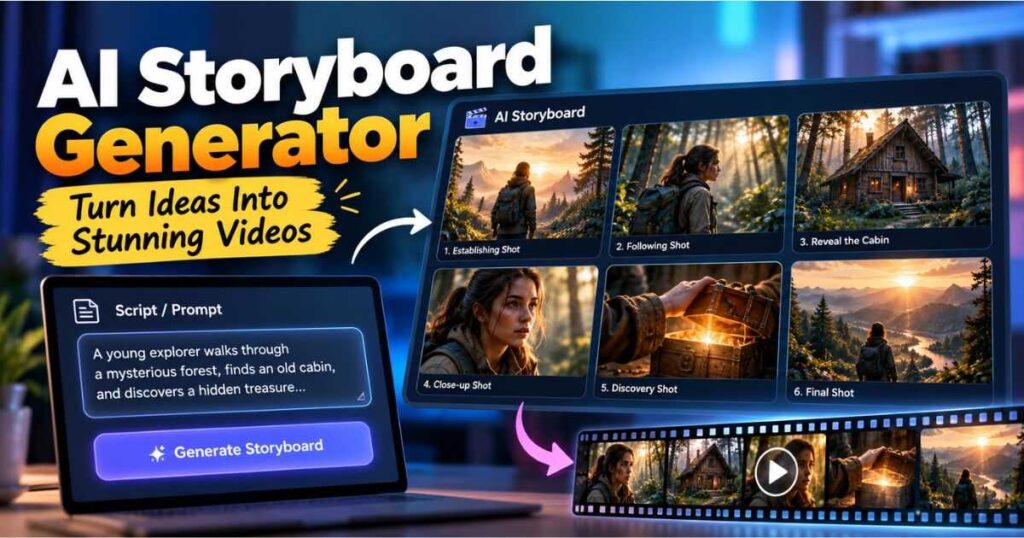
For example, imagine your script says:
A young explorer walks through an abandoned forest at sunset. She notices an old cabin and slowly approaches the door.
Instead of immediately generating a video, an AI Storyboard Generator can help you visualize the sequence as several shots:
| Shot | What the storyboard shows |
|---|---|
| 1 | Wide shot of the forest at sunset |
| 2 | Medium shot following the explorer |
| 3 | Close-up of her noticing the cabin |
| 4 | Wide shot revealing the cabin |
| 5 | Close-up of her hand reaching toward the door |
The storyboard therefore becomes a visual plan for the video.
This is particularly useful when you are creating a project with multiple scenes. Rather than generating clips randomly and trying to make them work together later, you can establish the visual direction first.
Why Storyboarding Matters for AI Video
AI video generators can produce impressive footage, but they can also produce unexpected results.
A character may look slightly different in another shot. A camera angle may not communicate the intended action. A scene may feel disconnected from the previous one.
A storyboard gives you a checkpoint before you commit to full video generation.
You can ask:
- Does the story flow logically?
- Does every shot have a purpose?
- Is the character positioned correctly?
- Are the locations consistent?
- Are the camera angles varied enough?
- Does the visual style work across the sequence?
If something is wrong, it is much easier to change the plan before generating the final footage.
Why Use an AI Storyboard Generator Before Making a Video?
The biggest advantage of an AI Storyboard Generator is not simply creating attractive images.
It is planning.
A good storyboard helps you decide what the viewer should see at every important moment.
For example, a product video might need:
- An establishing shot of the product.
- A close-up showing its design.
- A demonstration of how it works.
- A comparison with an alternative.
- A final shot showing the product in use.
Without a storyboard, you may generate five clips that look good individually but do not form a coherent sequence.
With an AI Storyboard Generator, you can think about the entire sequence before moving into video production.
Storyboarding Can Reduce Wasted Generations
AI video generation can require multiple attempts.
A scene may have the wrong camera movement, an unwanted object, an inconsistent character, or an action that does not match your instructions.
Generating a storyboard first allows you to identify some of these problems earlier.
Instead of generating ten complete clips and discovering that the story does not work, you can review ten visual frames first.
That makes the storyboard a kind of creative quality-control stage.
How an AI Storyboard Generator Works
Although every platform has its own interface, most AI Storyboard Generator workflows follow a similar process.
1. Start With an Idea or Script
First, provide the concept you want to visualize.
It could be:
- A complete script
- A short story
- A YouTube video concept
- A product advertisement
- A music video
- A short film
- A documentary sequence
- A social media video
You do not necessarily need a perfectly formatted screenplay.
A clear description of what happens is often enough to begin.
2. Define the Main Characters
Character consistency becomes increasingly important as the number of scenes increases.
Instead of writing:
A woman walks through a city.
You can provide a more useful reference:
A 28-year-old woman with shoulder-length dark brown hair, wearing a beige trench coat, black boots, and a dark green scarf.
This gives the AI Storyboard Generator more information to use when creating different shots.
3. Establish the Visual Style
Decide how you want the project to look.
You might specify:
- Cinematic realism
- Animation
- Documentary style
- 3D animation
- Vintage film
- Dark thriller
- Bright commercial
- Fantasy
- Futuristic science fiction
You can also describe the lighting, color palette, camera style, and atmosphere.
4. Generate the Storyboard
The AI Storyboard Generator interprets your instructions and creates the visual sequence.
Depending on the tool, you may receive individual frames or a larger storyboard containing multiple shots.
5. Review the Sequence
This step is easy to skip, but it is one of the most important.
Look at the storyboard as a complete sequence rather than judging each frame individually.
Ask whether the shots communicate the story clearly.
If the answer is no, make changes before moving to video generation.
How to Create a Storyboard With AI
You do not need a complicated production system to start using an AI Storyboard Generator.
A simple workflow is enough.
Step 1: Write the Basic Story
Start with the main events.
For example:
Scene 1: A detective arrives at an abandoned train station.
Scene 2: He discovers a mysterious suitcase.
Scene 3: The suitcase opens.
Scene 4: He discovers an old photograph.
Scene 5: He realizes someone is watching him.
This gives the AI a basic narrative structure.
Step 2: Break Scenes Into Shots
A scene and a shot are not necessarily the same thing.
One scene can contain several shots.
For example:
Scene: The detective enters the station
- Wide establishing shot
- Tracking shot following the detective
- Close-up of his face
- Insert shot showing his hand opening the door
This makes the storyboard much more useful when you eventually generate video.
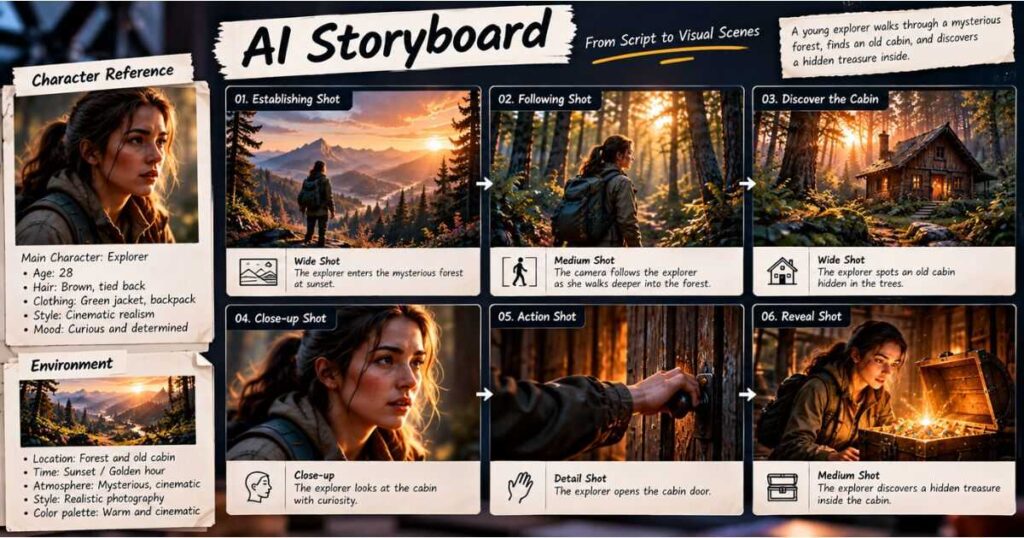
Step 3: Create Character References
Before generating dozens of scenes, define the important characters.
Include details such as:
| Character Element | Example |
|---|---|
| Age | 32 |
| Hair | Short black hair |
| Clothing | Dark brown jacket |
| Shoes | Black boots |
| Accessories | Silver watch |
| Style | Cinematic realism |
| Personality | Serious and cautious |
You can then use the same description throughout the project.
Step 4: Define the Environment
Locations should also have recognizable characteristics.
For example:
Abandoned 1940s train station, cracked concrete walls, rusted metal benches, broken windows, warm evening sunlight, dusty atmosphere.
This helps establish a visual identity for the location.
Step 5: Review Before Generating Video
Once your storyboard exists, do not immediately generate every shot.
First check:
- Character appearance
- Locations
- Camera angles
- Lighting
- Shot order
- Composition
- Story continuity
- Visual style
Fix obvious problems at this stage.
AI Storyboard Generator vs. Traditional Storyboarding
An AI Storyboard Generator does not necessarily replace traditional storyboarding.
Instead, it makes visual planning considerably faster.
| Feature | Traditional Storyboarding | AI Storyboard Generator |
|---|---|---|
| Creating initial frames | Manual | AI-assisted |
| Drawing skills | Often useful | Not required |
| Speed | Slower | Faster |
| Experimentation | Time-consuming | Easier |
| Character variations | Manual | AI-assisted |
| Shot variations | Manual | AI-assisted |
| Revisions | Can take time | Usually faster |
| Best suited for | Detailed productions | Fast AI-assisted workflows |
For a major film production, an experienced storyboard artist can provide creative decisions that automation cannot fully replace.
But for independent creators, YouTubers, marketers, and AI filmmakers, an AI Storyboard Generator can make the planning process significantly more accessible.
How to Keep AI Storyboards Consistent
One of the biggest problems with AI-generated video is consistency.
A character can look perfect in one shot and noticeably different in the next.
A good AI Storyboard Generator workflow should therefore focus on consistency from the beginning.
Use a Character Sheet
Create a reference for every important character.
For example:
Daniel is a 32-year-old detective with short black hair, light stubble, a dark brown jacket, black boots, and a silver watch. He has a serious expression and cautious personality.
Do not randomly change those details between scenes.
Keep the Visual Style Consistent
Decide on the visual style early.
For example:
Cinematic realistic photography, warm sunset lighting, muted orange and teal color palette, shallow depth of field, subtle film grain.
Then use that visual direction throughout the storyboard.
Keep Important Elements Stable
For a multi-scene project, identify the elements that should not change:
- Main characters
- Clothing
- Locations
- Visual style
- Important props
- General lighting
At the same time, you can vary the camera angles and composition to avoid making every shot look identical.
Best AI Storyboard Generator Tools
Different tools approach AI storyboarding differently, so the best option depends on what you want to accomplish.
| Tool | Best For | Main Advantage |
|---|---|---|
| InVideo | Complete AI video workflow | Storyboarding, generation, and editing |
| Kling AI | Cinematic AI video | Strong visual generation and multi-scene workflows |
| Runway | Advanced creative workflows | AI generation combined with creative tools |
Let’s look at the two options most relevant to creators making AI videos.
InVideo as an AI Storyboard Generator
For creators who want to connect planning with video production, InVideo is an interesting option.
Its AI workflow can help creators move from an idea or script toward a visual plan and then continue into video production.
This is useful because you do not want your storyboard to become a disconnected document that you have to recreate manually in another application.
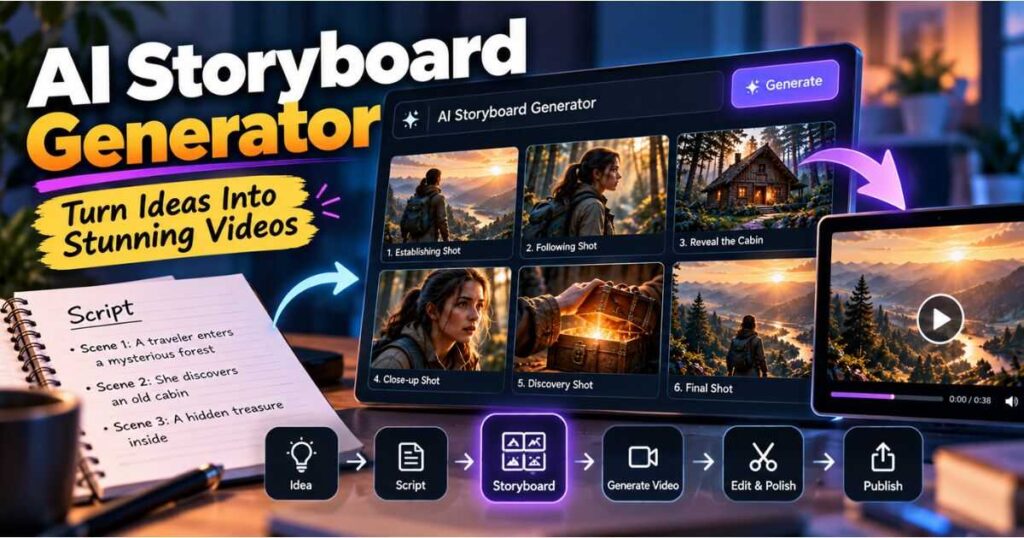
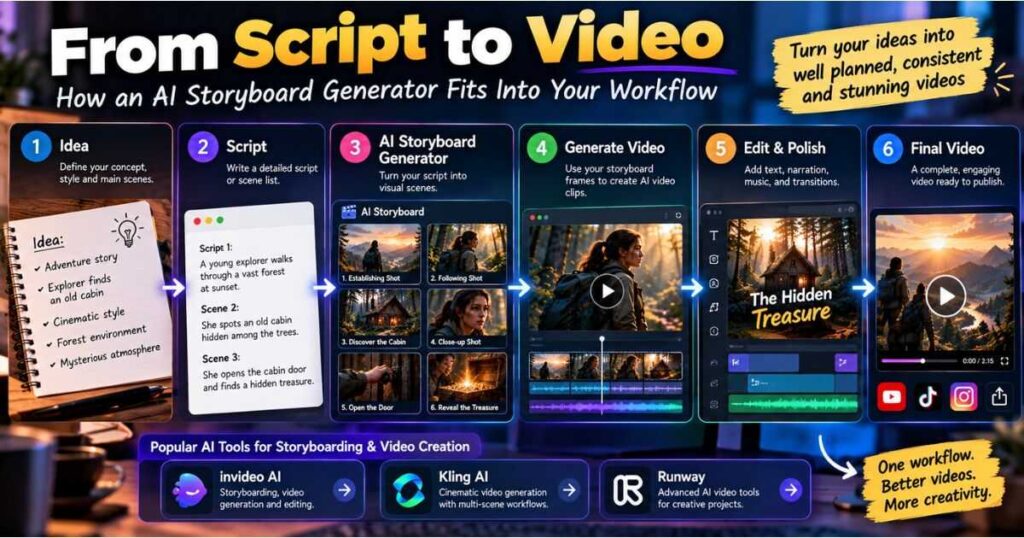
A practical workflow can look like this:
Idea → Script → Storyboard → Select Shots → Generate Video → Edit → Publish
The storyboard therefore becomes part of the production workflow rather than simply a collection of reference images.
Why InVideo Can Be Useful for Beginners
Beginners often struggle with deciding what should happen between the first idea and the final video.
An AI Storyboard Generator can provide a visual bridge between those two stages.
Instead of asking:
What should I generate next?
you have a sequence of planned shots to follow.
That can be particularly useful for YouTube videos, advertisements, tutorials, and story-driven content.
If you want to experiment with an integrated AI video workflow, try InVideo and build your first storyboard from a simple idea or script.
You can also read our InVideo AI Review for a deeper look at the platform and its features.
Kling AI for AI Storyboarding and Video Creation
Kling AI is particularly interesting for creators whose priority is cinematic AI video generation.
When working on a multi-scene project, the storyboard can serve as the visual blueprint for the footage you eventually generate.
You can plan:
- Character appearances
- Locations
- Camera angles
- Composition
- Actions
- Lighting
- Scene transitions
Then use those references when moving into video generation.
This is particularly useful for short films and cinematic projects where visual continuity matters more than simply creating isolated clips.
If your priority is cinematic AI video creation, try Kling AI and experiment with its generation tools for your next project.
For more information about Kling AI and its capabilities, see our Kling AI Review.
How to Use an AI Storyboard Generator for YouTube
An AI Storyboard Generator can be especially useful for YouTube creators because it allows you to plan the visuals before production.
Imagine you are creating a 10-minute faceless documentary.
Instead of generating random visuals while editing, you can create a visual plan for the entire video.
A Practical Workflow
1. Research the topic
Collect the information needed for your video.
2. Write the script
Divide the script into logical sections.
3. Create the visual plan
Decide what should appear on screen for each section.
4. Generate the storyboard
Use an AI Storyboard Generator to visualize your planned shots.
5. Select the strongest frames
Remove frames that do not communicate the story clearly.
6. Generate video
Use the selected visual references when appropriate.
7. Edit the final project
Add narration, music, sound effects, captions, transitions, and other elements.
This approach makes the production process more deliberate and can help prevent the final video from becoming a collection of unrelated AI clips.
If you are building a larger AI video workflow, our InVideo AI Review is a useful next resource.
Common AI Storyboarding Mistakes to Avoid
Even the best AI Storyboard Generator cannot compensate for a poorly planned story.
1. Trying to Generate the Entire Project With One Prompt
A long prompt describing an entire film can produce inconsistent results.
Break complicated projects into scenes and shots instead.
2. Ignoring Character References
If your main character appears in 15 scenes, define the character before generating the storyboard.
Otherwise, the character may gradually change.
3. Making Every Shot Identical
Consistency does not mean repetition.
Use different perspectives:
- Wide shots
- Medium shots
- Close-ups
- Over-the-shoulder shots
- Tracking shots
- Detail shots
The storyboard should provide visual variety while maintaining the same world.
4. Generating Video Too Early
Do not rush from the first idea directly into video generation.
Review the storyboard first.
It is much easier to change a storyboard frame than regenerate an entire video sequence.
5. Writing Vague Prompts
Compare:
A man walks into a room.
with:
Cinematic medium shot of a tired detective entering an abandoned hotel lobby at night, rain visible through the windows, warm tungsten lighting, slow camera push-in, realistic film photography, suspenseful atmosphere.
The second prompt gives the AI Storyboard Generator much more visual information.
If you want to improve your AI video prompting skills, you can also explore our Kling AI Review and related AI video content on Videmint.
AI Storyboard Generator vs. AI Video Generator
These two technologies are closely connected, but they solve different problems.
An AI Storyboard Generator answers:
What should each shot look like?
An AI video generator answers:
How should that shot move?
A strong workflow can use both.
| Production Stage | Main Purpose |
|---|---|
| Idea | Define the concept |
| Script | Define the story |
| Storyboard | Define the visuals |
| Image references | Establish appearance |
| Video generation | Add movement |
| Editing | Assemble the final project |
This distinction becomes increasingly important as your projects become longer and more complicated.
You do not need one AI tool to perform every task.
Instead, use the right tool for each stage.
When Should You Use an AI Storyboard Generator?
An AI Storyboard Generator is most useful when your project contains several scenes or visual elements that need to remain organized.
It can be useful for:
- AI short films
- YouTube documentaries
- Product advertisements
- Marketing videos
- Music videos
- Educational videos
- Story-driven Shorts
- Social media campaigns
- Cinematic AI projects
For a five-second experimental clip, a storyboard may be unnecessary.
For a 20-scene AI short film, however, planning can make a significant difference.
The more complicated the project becomes, the more useful visual planning becomes.
AI Storyboard Prompt Template
If you are unsure how to prompt an AI Storyboard Generator, start with this structure:
Project: Describe the video.
Character: Describe appearance and clothing.
Location: Describe the environment.
Visual style: Describe the artistic or cinematic style.
Lighting: Describe the time of day and lighting.
Shot: Specify the camera framing.
Camera: Describe the camera movement.
Action: Explain what happens.
Mood: Describe the emotion or atmosphere.
Example Prompt
Create a cinematic storyboard for a short mystery film. The main character is a 32-year-old detective with short black hair wearing a dark brown jacket. He enters an abandoned train station at sunset. Use realistic cinematic photography, warm orange lighting, subtle film grain, and a suspenseful atmosphere. Show a wide establishing shot, a medium tracking shot, a close-up of the detective’s face, and a final shot showing a mysterious suitcase on the platform. Maintain consistent character appearance, environment, lighting, and color grading across all frames.
This structure gives the AI Storyboard Generator enough information to create a much more useful visual plan.
Frequently Asked Questions
What is an AI Storyboard Generator?
An AI Storyboard Generator is an AI-powered tool that turns a script, idea, or prompt into a sequence of visual frames representing the planned shots of a video.
Can an AI Storyboard Generator create a storyboard from a script?
Yes. AI storyboard tools can use scripts and detailed descriptions as the basis for creating visual sequences. The quality of the result depends heavily on how clearly the script and visual instructions are written.
Can I use an AI Storyboard Generator for filmmaking?
Yes. AI storyboards can be useful for short films, advertisements, YouTube videos, music videos, product demonstrations, and other projects where visual planning matters.
Can an AI storyboard become a video?
An AI storyboard can serve as the visual foundation for video generation. You can use the planned shots and visual references to guide the generation of individual clips.
Should I create a storyboard before generating AI video?
For complex multi-scene projects, it is usually a good idea.
A storyboard allows you to plan the shot order, characters, locations, visual style, and composition before spending resources on video generation.
Is an AI Storyboard Generator useful for beginners?
Yes. In fact, beginners can benefit significantly because the storyboard provides a clear visual roadmap instead of requiring them to improvise every shot during production.
Which is better for AI video creation, InVideo or Kling AI?
It depends on your workflow.
InVideo is a strong option if you want to combine planning, AI video creation, and editing in a broader workflow.
Kling AI is particularly interesting for creators focused on cinematic AI-generated footage and more visually demanding projects.
Final Verdict: Is an AI Storyboard Generator Worth It?
An AI Storyboard Generator is much more than another AI image-generation tool.
Its real value is helping you plan the video before generating it.
You can establish characters, locations, camera angles, visual styles, and shot order before committing to full video generation. That can make the production process more organized and reduce the number of unnecessary generations.
For beginners, the biggest benefit may be having a clear roadmap:
Idea → Script → Storyboard → Generate → Edit → Publish
For experienced AI creators, the storyboard can become the visual foundation of a much larger production workflow.
If you want an integrated approach, try InVideo and experiment with turning your ideas into structured video projects.
If cinematic generation is your priority, try Kling AI and explore how it fits into your own multi-scene workflow.
And if you want to understand the broader AI video ecosystem, continue with our InVideo AI Review or Kling AI Review.
The key takeaway is simple: don’t wait until video generation to start thinking visually. Use an AI Storyboard Generator to plan the story, test the sequence, establish consistency, and give every generated shot a clear purpose.
Continue Learning
Want to explore more AI video creation tools and workflows? Check out these related guides on Videmint:
- InVideo AI Review — See how InVideo AI handles video creation, editing, and AI-powered workflows.
- Kling AI Review — Explore Kling AI’s capabilities for creating cinematic AI-generated videos.
- Runway AI Review — Learn more about Runway and its AI video generation tools.
- InVideo Alternatives — Compare InVideo with other AI video creation platforms.
- AI Video Prompt Examples: 50+ Prompts That Work — Practical, ready-to-use prompts for creating better AI videos.
- Runway AI Free: Is It Really Free? Here’s What You Get — Discover the free plan, 125 credits, key features, and its limitations.